
How to Complete the Tax Organizer
-
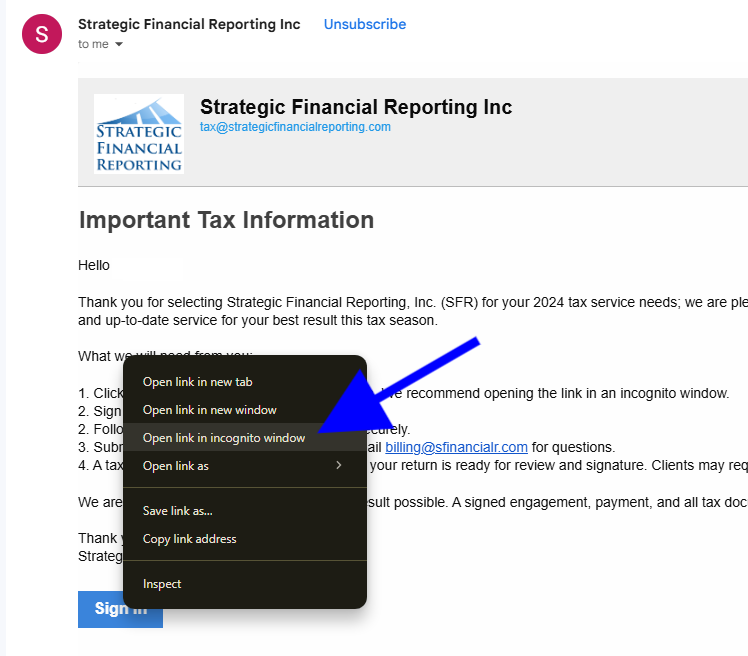
1Click the "Sign In" or "Accept" button for each invite
For the best results, we recommend clearing your browser history and cookies before accepting each invitation. This will allow you to toggle between your tax engagements.
If this does not work, please right-click the link and open it in an incognito window for each invitation. This will also allow you to toggle between your tax engagements.
-
2Sign into your Intuit account.
For the smoothest login experience, we recommend signing in with a phone number.
If you experience any login issues, call QuickBooks customer support for the best results. 1 (800) 446-8848.
If you receive this error code, "We can’t find anyone with [Your Email]"
Make sure you have the correct email entered first. :)
You may not have an email address connected to this account. Please take the time to create a login with this email address.
This is common for clients with new or changed email addresses.
-
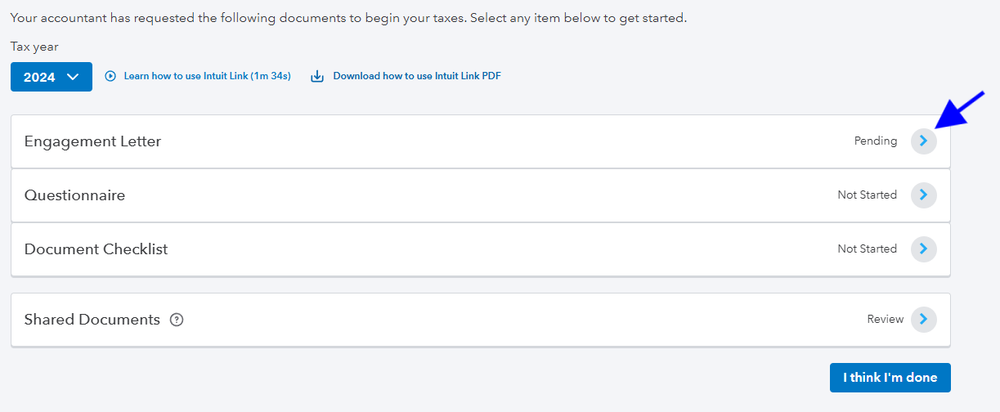
3Click on the action arrow next to "Engagement Letter."
-
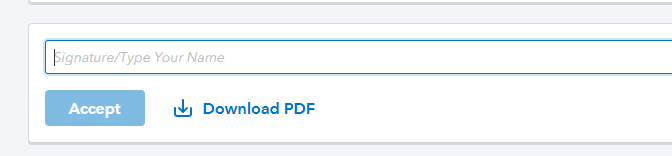
4After reviewing the letter, please sign in the space designated and click "Accept" to confirm receipt of this letter and your understanding of the scope, terms, and conditions of this engagement.
-
5Once signed, click on "Go to Questionaire"

-
6Answer each question accordingly
Click on "Does not apply" if the question does not apply to you.
Click on "Does not apply" if the information has not changed or SFR already has access to this information.
Click "Comments" to add a comment, and our team will reply if needed.
-
7Once complete, click on "Go to Documents"

-
8Be sure to upload all relevant tax documents
Click on "Does not apply" if the requested item does not apply to you.
Click on "Does not apply" if SFR has access to the requested item.
Click "Comments" to add a comment, and our team will reply if needed.
-
9Select "I think I'm done" when you have signed your engagement, answered the questions, and uploaded your tax documents

-
10Make sure to sign a tax engagement for all entities and personal tax returns to begin services 🎉