
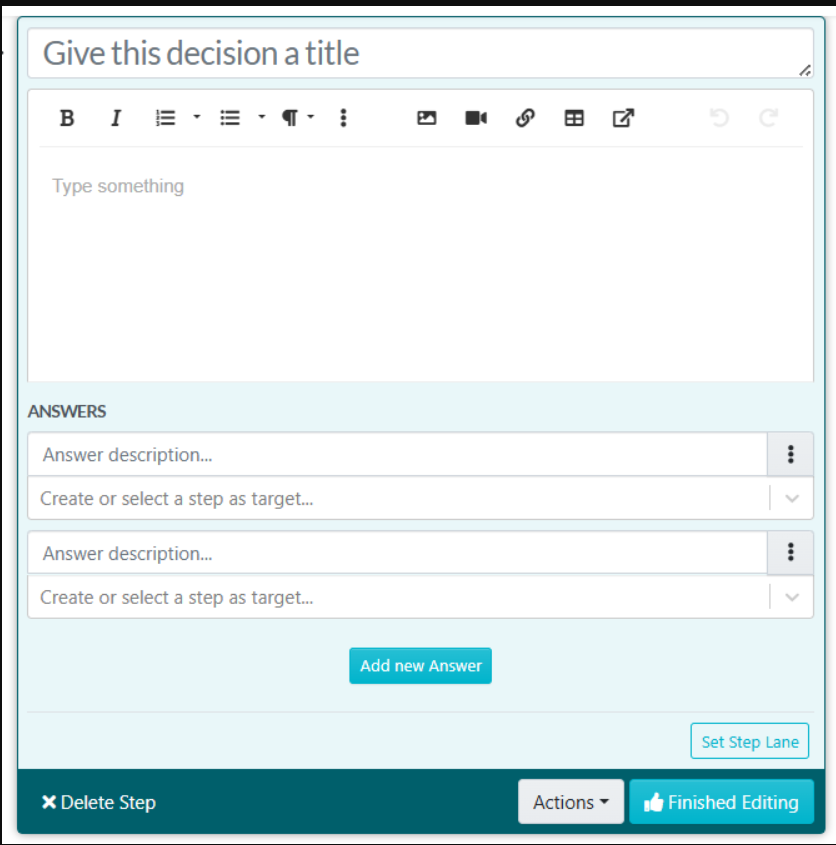
The instructions below will show you how to add conditional logic to a process. This is also known as branching, "yes-no", and so on. Essentially, when someone reaches the decision point in the process, they can choose from the options you created, and based on their choice, they will take a different path/branch. Please note You can also add multiple decisions to a process.
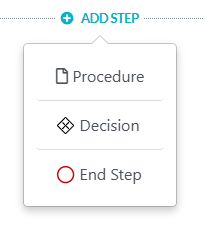
While adding steps to a process you will see "ADD A STEP" and you need to click on the Decision button to add it to the Process Step.
As soon as you are done with documenting all the steps of the procedure, click on “Approve”, which’s on the top right-hand corner of the page to approve the procedure and make it live.

Note: if you do not have the ability to approve the procedure, you will be able to request approval by clicking on the "Request Approval" button as shown below.

After finalizing the decision-making process, conduct a review with key stakeholders to gather feedback and ensure the logic aligns with business objectives. Make necessary adjustments based on the feedback received before making the process live.