
Report a Hazard or Maintenance Request

Description

This procedure outlines the necessary steps to report a hazard or submit a maintenance request within The Akidamy School of Early Learning. Ensuring the safety and functionality of our facilities is crucial to providing a secure and supportive environment for children. The following steps offer clear guidance on how to effectively communicate any issues that require attention.

If you notice any potential risks or maintenance issues, please follow the procedure below to ensure they are addressed promptly and appropriately.

Procedure Steps Overview

Follow the outlined steps to report a hazard or submit a maintenance request efficiently.
  1. 1

    Identify the Hazard or Maintenance Issue

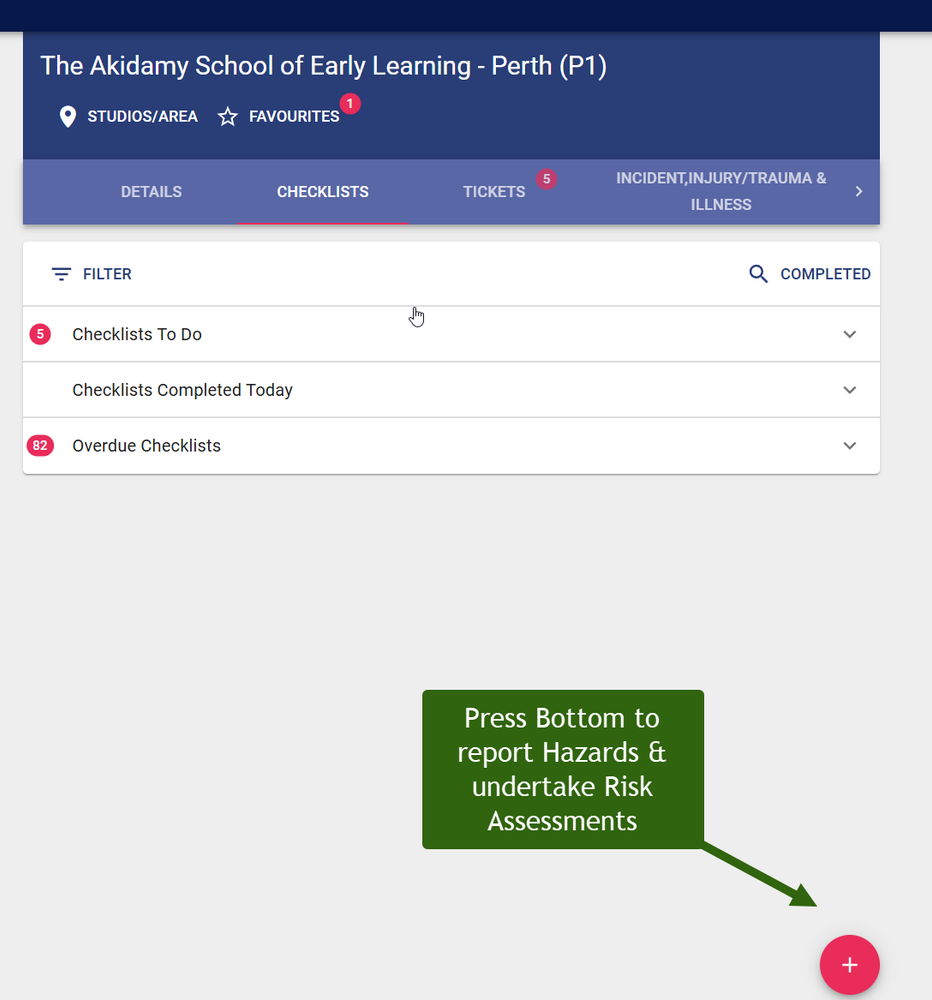
    Firstly, launch the 1Place Childcare App on your mobile device or computer. Navigate to the 'Report' section within the menu. In this section, you will find different forms for various types of reports. Choose the 'Hazard or Maintenance Request' form.

    Begin filling in the form starting with the nature of the issue ie, whether it is a hazard or maintenance request. Specific details about the problem should include its exact location, when it was first noticed, as well as the potential risks it could pose to any personnel or children.

    Take clear photographs of the hazard or maintenance issue, if possible. These images can provide valuable context and understanding of the severity of the situation. Attach these images as part of your report within the appropriate section of the form.

    Cross-check all the information provided to ensure its accuracy before submitting the form. After submission, the app will automatically notify the appropriate department.


    Watch video to see how to report hazards or maintenance requests
    sweetprocess.com/video/oopkcoMy.mp4
  2. 2

    Notify Immediate Supervisor

    Upon identifying a hazard or maintenance issue, you should report it immediately through the 1Place Childcare App. However, in cases where hazards pose an immediate threat to children, staff members or visitors, seek urgent intervention. Report the situation to your supervisor, responsible person, or nominated supervisor ASAP. If possible, secure the area and ensure the safety of children and other individuals by moving them away from the danger zone to prevent potential harm.
  3. 3

    Complete the Report Form

    In order to report a hazard or maintenance request, you must first open the 1Place Childcare App on your chosen device. Once in the app, navigate to the 'Report' section. This is where you'll find the form you need to complete. This form is specific to hazards or maintenance requests and allows you to detail the nature, location, and potential risks of the issue at hand.

    After you have filled out all the necessary sections of the form and attached any relevant images, verify the accuracy of the information provided before submission. Upon submission, the necessary department will be notified automatically. Remember that clear communication and accurate reporting are key in maintaining a safe environment within the Akidamy School of Early Learning.
  4. 4

    Submit the Form to Maintenance Department

    To submit a form to the Maintenance Department, use the 1Place Childcare App. In the app, you'll find a specific form for handling maintenance requests. Provide detailed information about the maintenance issue, any relevant images or any extra information that could help the Maintenance Department to resolve the issue quickly and efficiently. Cross-check all the details provided in the form for accuracy before submission. Upon submitting, the Maintenance Department will be notified about the request automatically via the app.
  5. 5

    Follow-up on the Report

    After making a request regarding hazards and maintenance issues, it is important to follow up with your supervisor to ensure the process is progressing as expected. Send a follow-up query after a reasonable timeframe has passed to confirm the status of your report.

    Additionally, an automated follow-up email is sent within the 1Place Childcare App once the maintenance tasks are completed. This provides a clear record of the issue's resolution. Ongoing communication is key to ensuring the utmost safety standards within The Akidamy School of Early Learning.