Last Updated on September 22, 2026 by Owen McGab Enaohwo
If you have a process in your head that you need to document, an AI SOP generator can give you a structured first draft quickly. Once you input a description of your task, it produces steps, instructions, roles, and other parts of a standard operating procedure (SOP).
The catch is that AI does not know the details you did not provide. When it hits a gap, it can fill it with information that sounds reasonable but does not match how your business works. Choosing a generator means weighing the draft it produces, the checks your team must make, and the cost of using it. Free plans and paid tools offer different starting points, but every procedure still needs a knowledgeable person to review it.
Key Takeaways
- An AI SOP generator can produce a usable first draft in about a minute, but it will invent specifics that you’ve not provided, including approval thresholds, tool names, and legal or regulatory language.
- An employee should review the generated draft before assigning or approving it to ensure it’s accurate and aligned with the business.
- Your AI-generated SOP needs regular maintenance to stay accurate when policies change or software gets updated.
- As you find an AI SOP generator for your organization, keep in mind that some of the tools in the market are free. However, others, like SweetProcess, require you to sign up for a trial period to try the tool before paying for a subscription.
Table of Contents
- What an AI SOP Generator Gets Wrong
- What Has to Happen to the Draft Before Anyone Follows It
- Are There Free AI SOP Generators?
- How Much Does an AI SOP Generator Cost?
- What Happens When a Generated SOP Goes Stale?
- Why Use an AI SOP Generator To Document Standard Operating Procedures
- How To Generate Instant SOPs With SweetProcess AI SOP Generator
- Why Choose the SweetProcess AI SOP Creation Tool
- How Consortium Private Wealth Uses SweetProcess To Document and Manage Its SOPs in One Place
- FAQs
What an AI SOP Generator Gets Wrong
An AI SOP generator doesn’t know your business, who does what, or your approval limits. It can produce a document that looks complete, even when the details are wrong or invented. The best option is to treat the output as a draft that needs review.
Here are three common ways an AI-generated SOP can go wrong.
It Invents Numbers and Specific Details
If you ask an SOP creation tool or a general-purpose chatbot like ChatGPT to write a procedure for handling and approving customer refunds, it will draft a general document with steps and an overview. It could also invent random numbers and statements like “Refunds over $500 require manager approval” when information is missing. While this may look reasonable, it could be the wrong number for your business.
You need an actual employee to check every number and detail to ensure it’s correct for your organization.
It Leaves Out Real Steps
If your onboarding process includes a step such as a security badge request that only your office manager knows about, an AI generator won’t include it if you didn’t type it. The generic draft misses out on real steps or invents new ones unless your employees explicitly include the details in the input.
Because of this, it’s important to compare the generated procedures with actual company processes and SOP examples. Have the employees performing the tasks check it to confirm every step is covered and prevent errors.
It Invents Regulatory and Legal Language
If you give your AI SOP generator a title such as “employee termination procedure,” it will produce legal provisions and information that may not apply to your organization or industry. This is because a generator is not knowledgeable about everything in your jurisdiction or recent changes.
You need a professional to review this content before any team members follow it to avoid legal and compliance issues.
AI can give you a starting point, but you still need a place to review and manage the final procedure. With SweetProcess, you can edit AI-generated SOPs and let your team update them as the process changes. Try it here!
What Has to Happen to the Draft Before Anyone Follows It
A generated SOP is a document. It becomes a standard operating procedure that your team can rely on only after four things happen. SOP software can help you handle each of them.
Ownership and Review
You need an employee on the team who does the job or manages the people who do it to own and review the document. This individual checks the draft to ensure it doesn’t include incorrect numbers or missing key steps. They can check for:
- If the sequence of steps matches what the team does
- Correct limits and thresholds
- Names of the tools and systems the company uses
- The roles and responsibilities assigned to employees
- Legal and compliance language used in the document
Approval
The first draft needs to be approved before it goes live. Skipping this step increases the chances of multiple documents for the same process within the organization, which can be confusing.
Assigning Procedure
An approved SOP sitting in a folder does not benefit the team. You need to assign it to the employees who do the work so that they can access and follow the current instructions. This is how you standardize operations.
Acknowledgment
You also need a record that employees saw and read the SOP. You can add sign-offs to make it easy to track who has received and acknowledged the procedure. These details are essential for audit trails.
Your AI-generated SOP is only useful when the right people can find it, follow it, and confirm they have seen the current version. SweetProcess supports every step, from creation to ensuring your team follows the correct procedure. Start your 14-day free trial today!
Are There Free AI SOP Generators?
Yes, free AI SOP generators exist. Some let you generate an SOP without paying or creating an account. The trade-off is that you get a draft, then you need a different system to review, approve, assign, and maintain the procedure.
As of September 9, 2026, QuillBot’s AI SOP Writer is free to use without signing up. You can enter a process idea or attach a document from your device, then use that information to generate an SOP. This free plan allows you to fix grammatical errors and paraphrase up to 125 words.
Another tool that offers free AI SOP generation is Optimo. It lets you type a description and generate an SOP without creating an account. Scribe also offers a free SOP generator. However, its workflow differs because it focuses on capturing a process as you perform it and turning those actions into a step-by-step guide.
While you get free access, these tools don’t offer version history, so if the process changes next month, you’ll have to generate a new document with no link to the old one. They also don’t assign the SOP or help you track who opened and read it.
On the other hand, SweetProcess lets you review and track the SOP on the same platform after SweetAI has generated a draft. However, SweetProcess is not a free tool. It runs on a 14-day free trial with no credit card required. After the trial period, you’ll need to pay for a plan to use the AI SOP creation tool.
A free generator gives you text. If you want to compare more SOP writing tools, read our comprehensive article here!
How Much Does an AI SOP Generator Cost?
It varies. AI SOP generators range from free tools to paid software with a trial or subscription.
For instance, tools like QuillBot offer a free plan. But users have to upgrade to a premium plan to access more capabilities.
With SweetProcess, you get transparent, uniform pricing to access SweetAI and other features that let you track sign-offs, reviews, and assign ownership. This AI SOP generator costs $99 per month for 10 users. Each additional user will be charged $5 per month. You can opt for the annual option at $990 annually, which charges $50 per year for every additional employee. If you have a team of five, SweetProcess costs $495 per year.
We don’t have separate Pro and Enterprise tiers. All users access the same feature set on each plan.
What Happens When a Generated SOP Goes Stale?
Your generated SOP is a snapshot of a process on the day you described it to the AI. When the software changes or the team adopts a new tool, this information doesn’t update automatically. The document will still describe an old procedure that no longer exists, which can affect the consistency of your operations and increase errors.
Regenerating an SOP from scratch every time something changes is also costly. You might lose the accurate older versions of your document that your team already relies on. You can prevent your SOP from going stale by:
- Keeping a version history: Your SOP tools should make it easy to view when the procedure changed and identify the current version without losing crucial data.
- Set a review date: Reviews are essential because industries and businesses change regularly. You can use them to spot any missing processes.
- Assigning an owner: The owner is responsible for checking whether the SOPs are still accurate.
Together, these tasks turn policy and procedure management into an ongoing practice instead of a one-time writing project. In addition, they provide an acknowledgment trail you can use during audits to show employees were notified when the version they rely on changed.
Your SOP should be updated when the process changes. SweetProcess gives you a central place to do all these instead of relying on an outdated AI-generated draft. Sign up today!
Why Use an AI SOP Generator To Document Standard Operating Procedures
Writing SOPs manually can be time-consuming, especially as your library of documented processes grows. An AI SOP generator gives you these benefits:
Saves Time and Cost
An AI-powered SOP generator significantly reduces the time and cost of hiring an expert to create manuals, enabling better resource management.
Jennifer Schneider, chief design officer at pLink Leadership, an executive coaching and leadership development company, had a similar experience. Training employees manually in Word documents was very slow, requiring her to guide them through each step. However, training became much faster using SweetProcess, as it allowed her to create SOPs automatically and assign them to team members for independent learning.
Improves Consistency and Accuracy
The overall performance of a team is more significant than that of any individual member. While one high-performing employee can make a positive impact, their contributions are limited in the larger context. SOPs bridge skill gaps among employees. By documenting the skills of top performers, these procedures serve as a valuable guide for others.
Creates a Documented Trail for Regulatory Reviews
An AI SOP generator paired with proper review and version control gives you a record of who wrote the current version, who approved it, and when it changed.
Tom Iacono, quality assurance and sensory coordinator at Stone & Wood, a brewing company, talked about the challenges he and his team faced using binders and Word documents for their SOPs, especially as the business grew. Updating the documents in line with the changing regulatory requirements in their industry was difficult. The struggle continued until they adopted SweetProcess, which helped them create and update SOPs automatically and maintain regulatory standards more effectively.
Supports frequent SOP updates
Updating SOPs manually can be as tedious as creating them from scratch, leaving businesses with outdated documents. An AI SOP generator performs the task instantly, encouraging companies to update their manuals and stay abreast of regulatory standards constantly.
Jennifer and Tom may be in different industries, but they shared a common interest in documenting their SOPs with automated tools for better operations, and they achieved their goal. SweetProcess’s flexibility makes it easy to implement in any industry while customizing features to unique business needs. This explains why organizations in different sectors can use it to streamline their operations successfully.
Want to test out SweetProcess for yourself? Sign up for a 14-day free trial without a credit card.
How To Generate Instant SOPs With SweetProcess AI SOP Generator
If you’re a business owner or manager, you likely have expert knowledge of performing the tasks in your operations. However, your team members may not share that level of expertise. As companies grow beyond the scope of a few workers, creating and managing SOPs for the increasing demands becomes more challenging.
Leveraging an AI SOP generator like SweetProcess can empower your team to be more efficient. Here’s how to use it:
Step 1: Generate the SOP with SweetAI
Documenting multiple SOPs manually from scratch can be exhausting and time-consuming even for experts. SweetAI can save you the trouble by automatically generating the document.
Provide a basic idea of the procedure, and it’ll generate step-by-step instructions for it from start to finish.
Not so knowledgeable about a procedure? No need to spend hours researching, as you can develop an expert-level procedure for it with SweetAI.
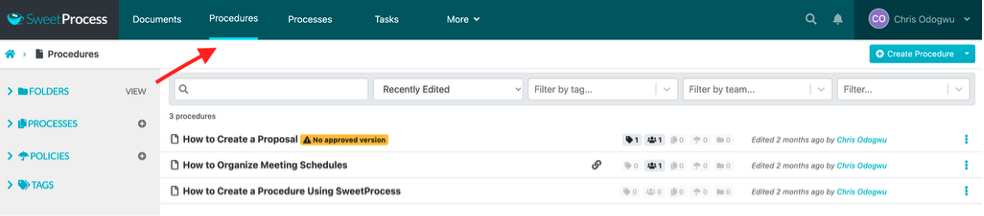
Click “Procedures” and “Create Procedure.”
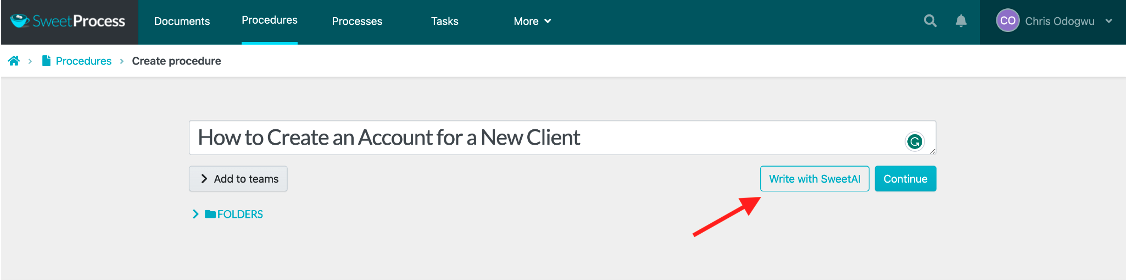
Enter the procedure title and click “Write with SweetAI.”
Step 2: Review and edit your SOPs (editing steps with SweetAI, comprehensive procedure description, etc.)
SweetAI does the heavy lifting of generating bespoke SOPs for you. However, you can edit the content to meet your specific needs by editing it manually or generating more content automatically.
Navigate to the procedure.
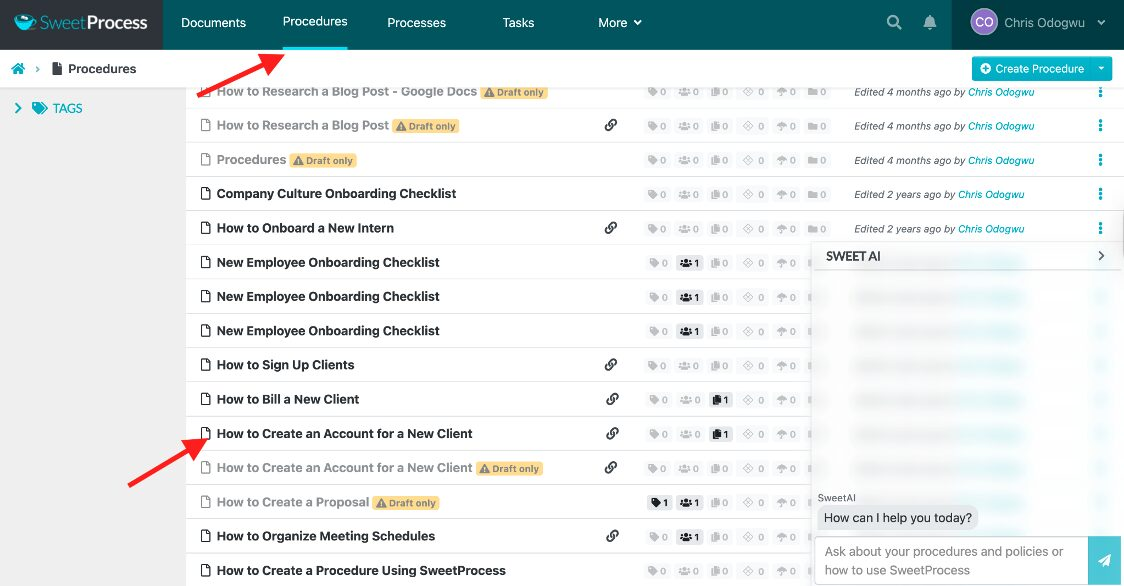
Click “Edit.”
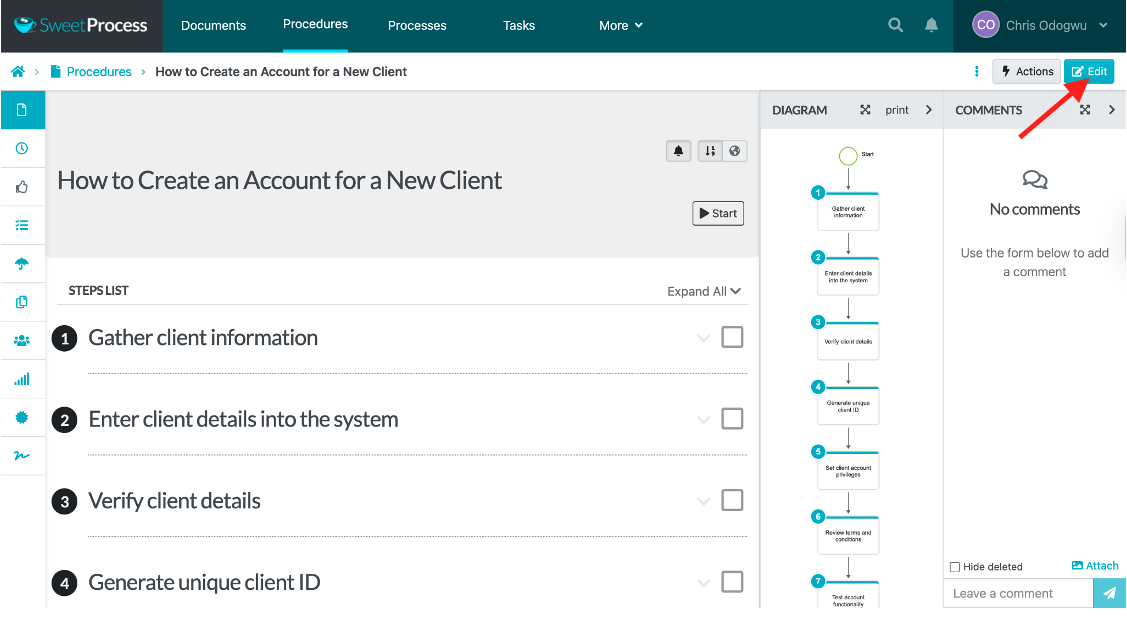
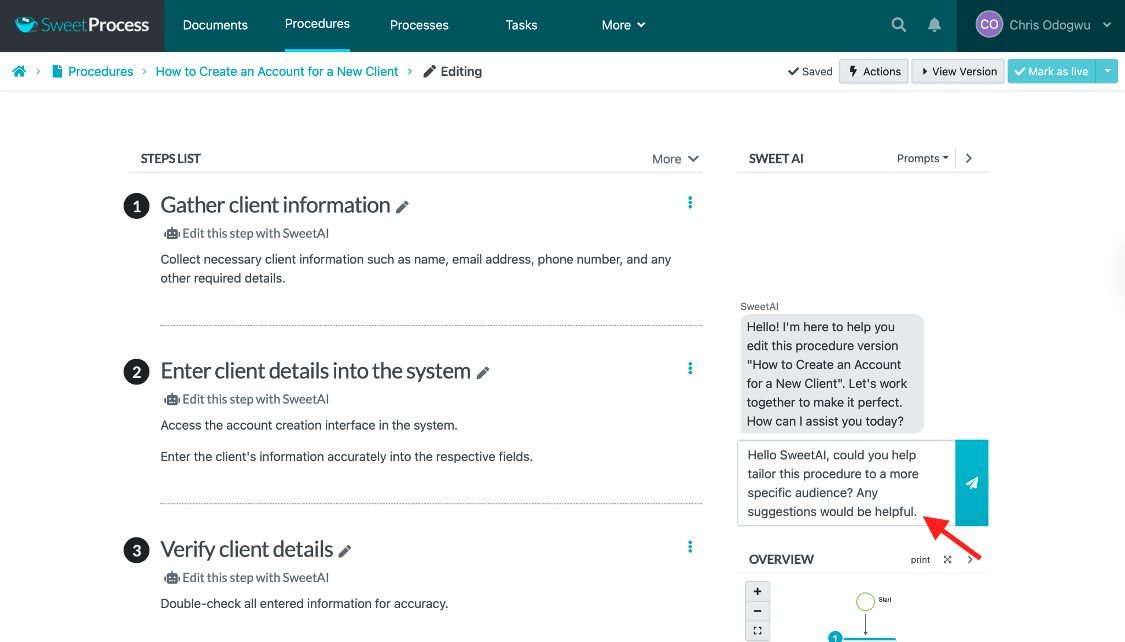
Rewrite the procedure by entering a prompt in SweetAI if you aren’t satisfied with it.
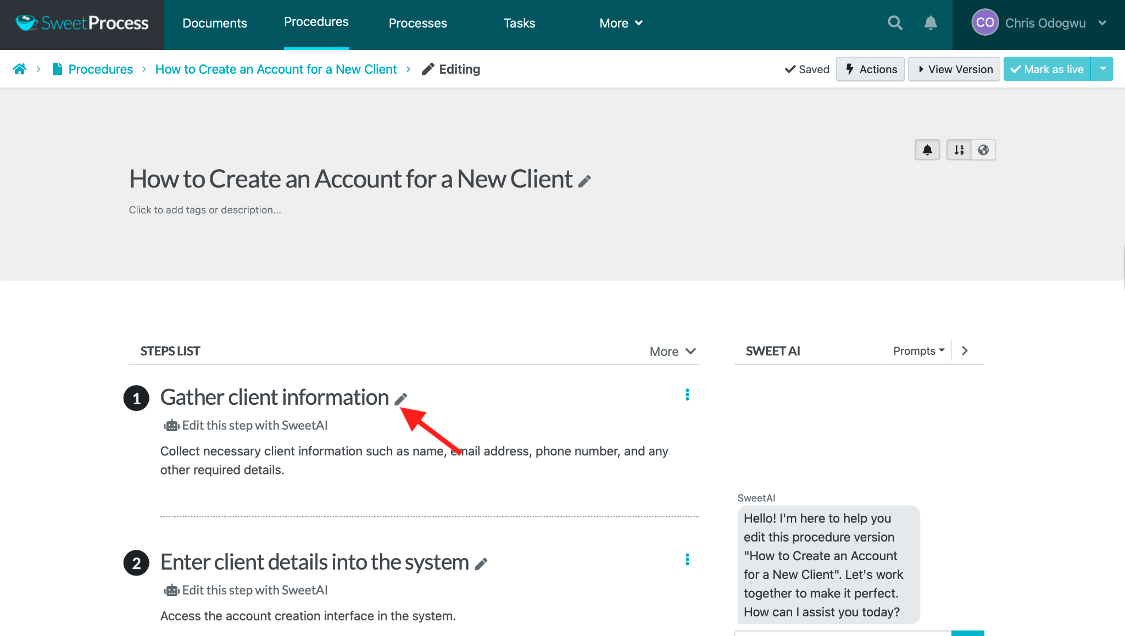
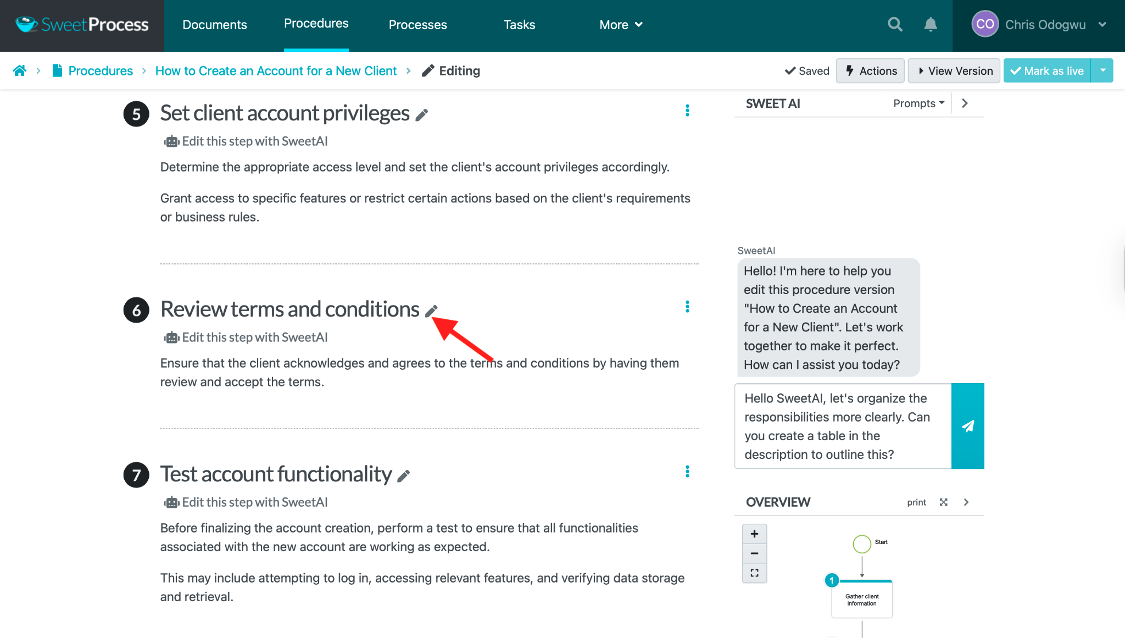
Click the pencil icon beside each title to edit it manually.
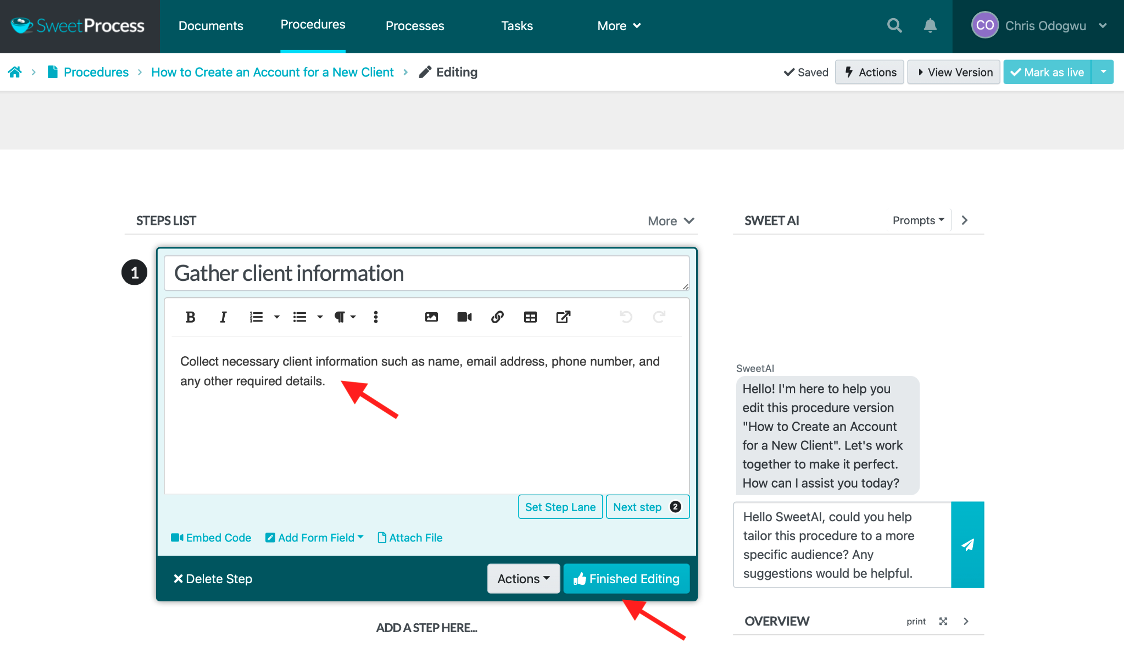
Enter your input directly in the box and click “Finished Editing” when you’re done.
Step 3: Customize your SOPs (move steps, convert to an ending, and a decision)
Flexibility is one of SweetAI’s unique selling propositions (USPs). You’re in control of the entire process, as you can customize your SOPs in desired formats. The customization includes rearranging steps, changing formatting styles, adding visual elements, etc.
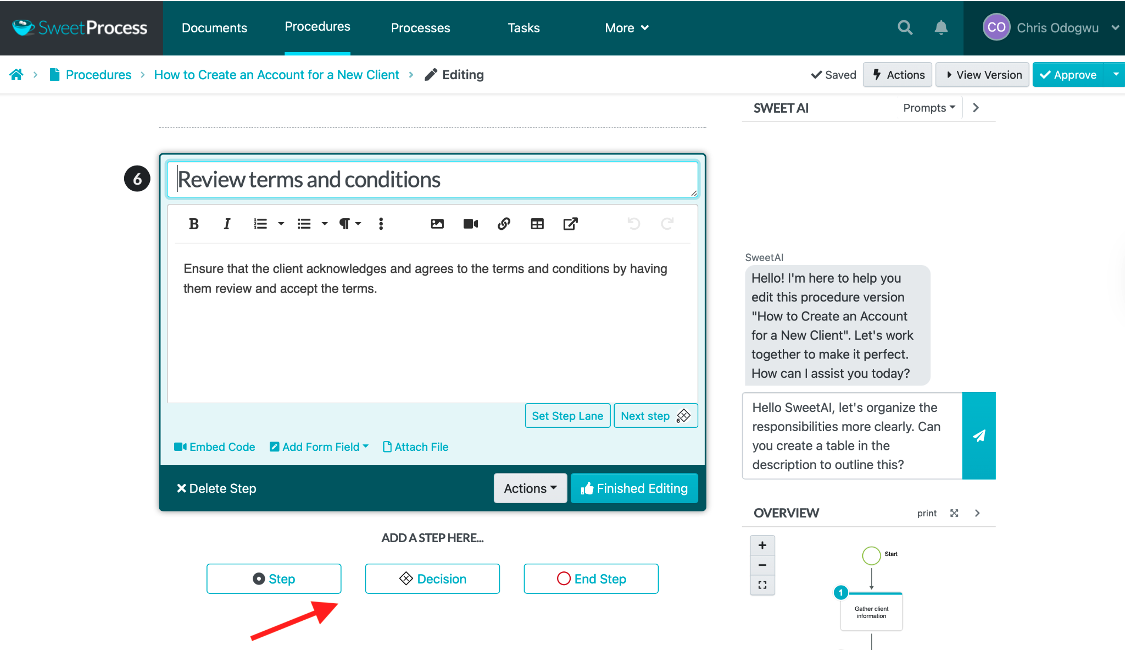
Click “Step,” “Decision,” or “End Step” to add additional layers to a procedure.
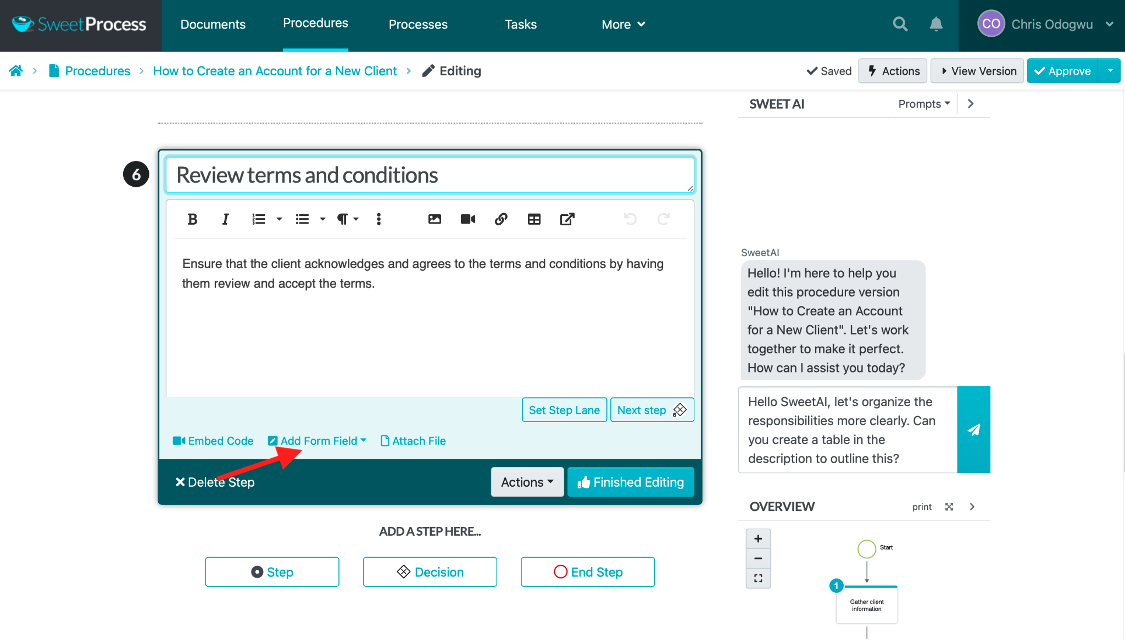
Click “Embed Code,” “Add Form Field,” or “Attach File” to make a procedure more interactive.
Step 4: Approve and share SOPs with your team members
Team members with the proper access can generate SOPs in SweetProcess. However, the documents are subject to approval by designated parties. This decentralizes SOP generation without sacrificing documentation quality. You can also share the materials with select team members or the entire team.
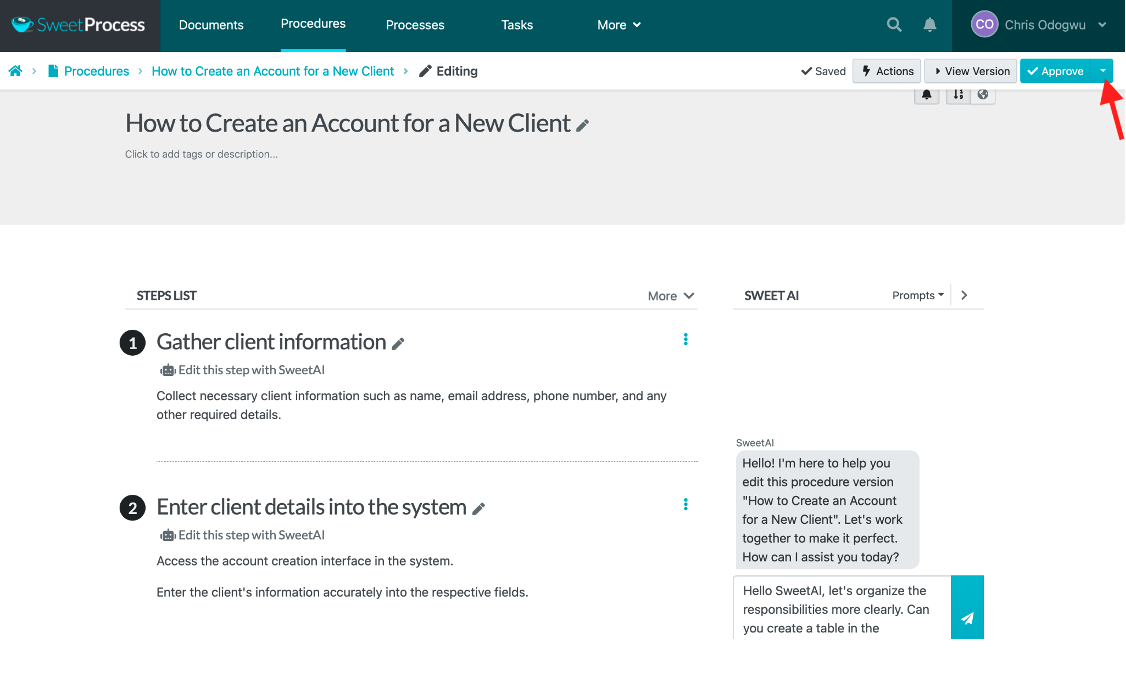
Navigate to the procedure and click “Approve” to publish.
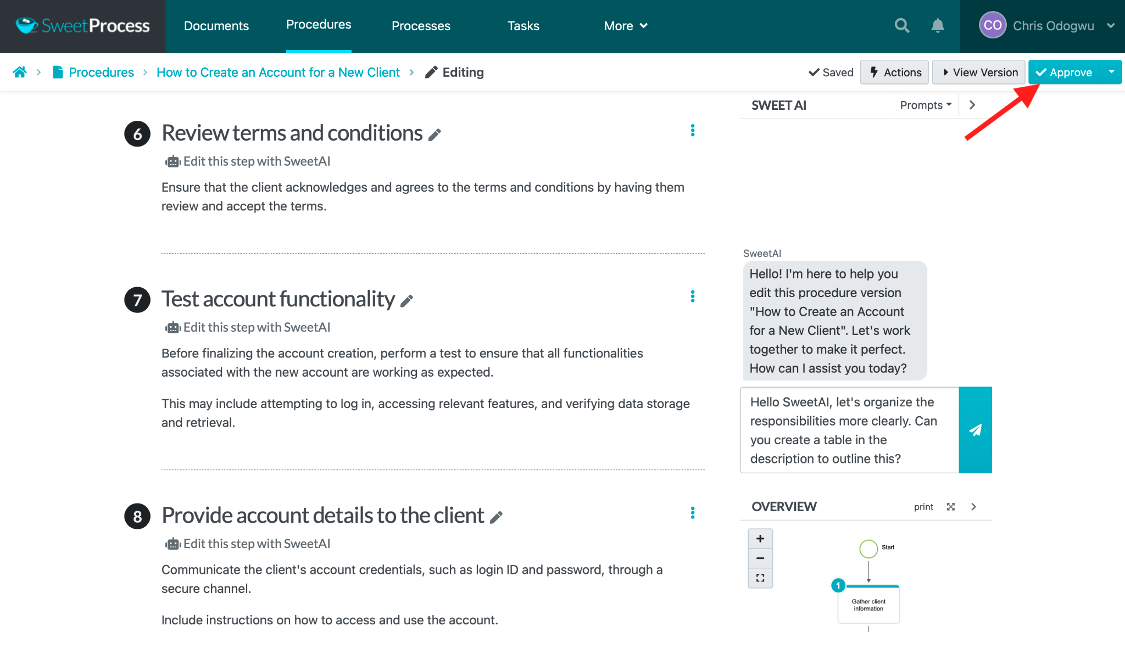
Click the tab next to “Approve” to view more approval options.
Step 5: Print and download the SOP and flowchart
SweetProcess helps you maximize your SOPs for various purposes by letting you export the documents you generate for external use. Having completed your detailed SOP, you can print or download it from the dashboard.
Click “Actions” to view the drop-down menu and then click “Export” to transfer the procedure out of SweetProcess.
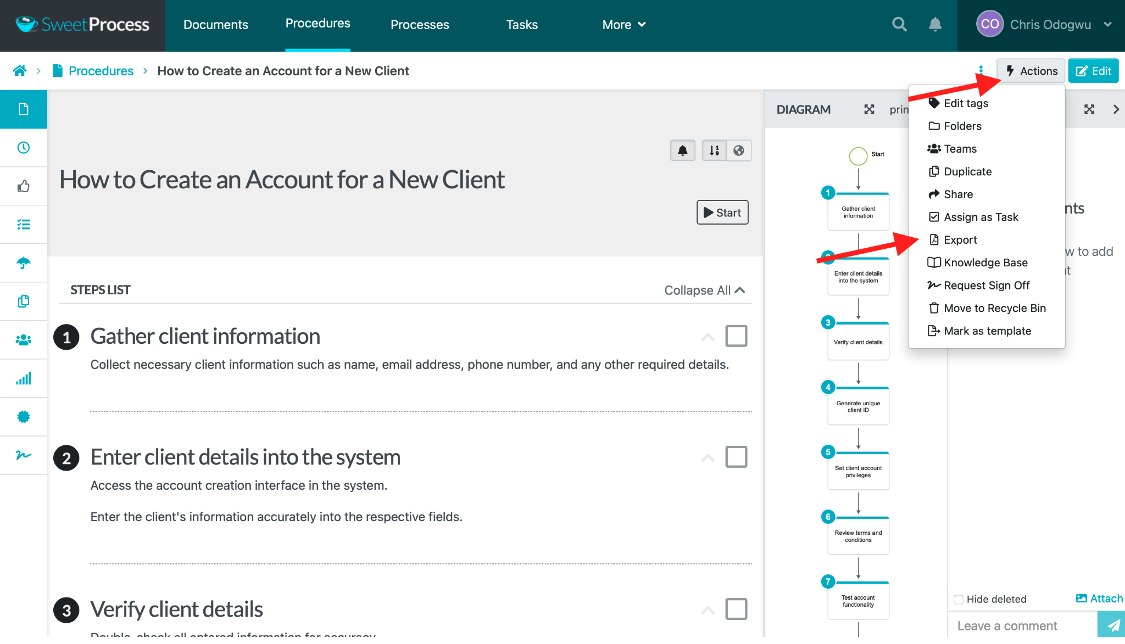
Select your preferred export formats and click “Export.”
As seen in the screenshots, anyone can use SweetProcess as it doesn’t require technical skills.
You can start generating SOPs with SweetAI immediately by signing up for a 14-day free trial!
Why Choose the SweetProcess AI SOP Creation Tool
After you generate the procedure, you’ll need to review and edit the content, organize related procedures, and add media to align with your business needs and goals. SweetProcess provides a platform to do all of this. Here’s why you should choose this tool.
Collaborate Seamlessly with Team Members
SweetProcess is built for multiple users, allowing them to make input to ongoing projects in real time. Depending on project needs, users can contribute simultaneously or take turns in sequence, with parties receiving notifications and prompts about work progress. Its real-time timestamps show team members’ contributions, capturing exactly what each person does.
Assign SOPs as Tasks to Employees
You can also assign the SOPs you create in SweetProcess to team members as tasks to improve performance. Since they are documented comprehensively, employees can execute them effectively without confusion. The tasks can also be assigned to either one person or multiple people based on the project’s needs.
Version Control
Some business processes and procedures aren’t set in stone; they require some degree of flexibility, allowing you to implement specific versions in different scenarios. SweetProcess’s version history lets you edit and update SOPs without losing previous copies. All versions are saved with details and timestamps of changes made. You can customize each version after you get your draft from the AI generator.
Format SOPs
The first SOP draft will always require updates. SweetProcess offers an easy-to-use editor. You can choose from a wide range of elements to make your procedures comprehensive and accessible.
Add and Edit Multimedia (images, videos, tables, forms, etc.)
Multimedia content is more accessible than text-only content. This is a significant obstacle in using text-only tools such as Word documents for writing SOPs. There’s room to seamlessly add multiple file types such as images, videos, and charts while developing your SOP in SweetProcess. This flexibility lets you craft SOPs in the way that works best for your team.
Link to Other Procedures, Processes, and Policies
Your new SOP should integrate well with existing company documentation. Synchronizing operational documents improves efficiency by keeping team members engaged in workflows without needing to consult external resources. SweetProcess connects related information, which saves time by making information easily accessible when you need to update or review the SOP.
Using SweetProcess is as easy as it looks. You can access all of its features, including SweetAI, to automatically generate SOPs for 14 days at zero cost.
How Consortium Private Wealth Uses SweetProcess To Document and Manage Its SOPs in One Place
Having run his business for almost three decades, founder and senior adviser at Consortium Private Wealth, Robert Goudie, attests to the immense impact of documenting SOPs. Before SweetProcess, the team used Word documents, which they described as “hard and boring to read.” Employees would abandon the files and perform tasks on their own, leading to operational problems.
Tribal knowledge was prevalent, leaving the business stranded when those people were indisposed. Training both new and existing employees took ages as they grappled with rigid, traditional learning methods. These challenges disappeared when Robert discovered and implemented SweetProcess.
Tribal knowledge quickly became a thing of the past as Robert encouraged his team members to document their expertise in using SweetAI. They found the documentation easy to follow, streamlining the complex process with SweetAI. The ease of use motivated the team to work hard towards achieving the collective goal of bulletproofing the business.
Team members were relieved to no longer have to deal with the pile of texts used as SOPs. They made the documents interactive by adding videos, images, charts, etc to their SOPs. The interactivity was a highlight for the team as it enhanced training and accessibility, allowing them to “throw in links, put screenshots, and videos” in their SOPs.
“I feel very comfortable knowing that what’s there are the steps that people need to know,” Robert says.
He is more confident than ever in his systems and his employees’ performance, knowing all the information they need to excel at their jobs is readily available in SweetProcess.
If your team members find your current SOPs boring and difficult to read, as Robert’s did. Improve things by using SweetProcess to create interactive documentation. Sign up for a 14-day free trial of SweetProcess and generate SOPs with SweetAI!
FAQs
Can I use AI to write an SOP?
Yes. An AI SOP generator, including SweetAI, will produce a structured first draft in about a minute based on a title and a short task description. It will also invent details; therefore, it’s important to have your team review the draft before anyone follows it.
What is the best free SOP creator?
Free SOP creators like Optimo and QuillBot allow you to generate documentation without an account. However, they don’t provide a platform to continuously maintain these procedures when you need to check the version history or the acknowledgment trail. SweetProcess provides these features, but it offers only a 14-day free trial.
What is the best app for writing SOPs?
It depends on your business needs. If you need to just draft a procedure document, free generators work. If you need to document more than a handful of procedures that must stay current, be approved, and be assigned to specific people, look for SOP software built around the full lifecycle.
What are SOPs in AI?
Standard operating procedures (SOPs) are documented steps for performing a task consistently. An AI SOP generator uses natural language processing to turn a short task description into a structured procedure document.
What does an AI SOP generator cost?
You can access free AI SOP generators that don’t require you to sign up. However, you might need to upgrade to a premium plan to get more features. With SweetProcess, it will cost you $99 per month or $990 annually for up to 10 users.