Last Updated on September 28, 2026 by Owen McGab Enaohwo
If you have ChatGPT open in another tab, you can use it to draft a standard operating procedure (SOP) in minutes. However, you need to be specific in your prompt. Inputting a vague prompt in your ChatGPT SOP generator will produce a procedure that contains made-up information with incorrect steps. You need to provide specific instructions to get a draft you can hand to your team with light editing.
A useful prompt gives ChatGPT the process details it needs and clear boundaries for what it must not invent. The six copy-and-paste prompts below give you that starting structure, while a worked example shows the gaps to check in the output. That review is what turns a plausible draft into instructions your team can safely follow.
Key Takeaways
- ChatGPT can write a usable first-draft SOP, but only if your prompt specifies the structure, the audience, process information, and the level of detail you need.
- The ChatGPT SOP generator can invent numbers, add steps that don’t exist, or leave out real steps that were never included in your input; therefore, you need to review the procedure before sharing it with the team.
- ChatGPT’s current features can help you work with files, projects, memory, and a canvas-style editing surface, but they do not make it the owner of your business process.
- ChatGPT has no memory of your company’s approval process, no way to confirm a draft was reviewed or who is accountable for keeping it current, and no way to track whether it was assigned to a team member. You need a tool like SweetProcess for these tasks. Sign up here!
Table of Contents
- ChatGPT SOP Prompts You Can Copy and Paste
- What ChatGPT Actually Returns
- How To Generate SOPs Automatically With ChatGPT
- What ChatGPT Can Do Now, and What It Still Cannot
- Should You Paste Your Processes Into ChatGPT?
- Why Use ChatGPT To Generate Standard Operating Procedures
- Can ChatGPT Really Handle SOPs?
- What Has To Happen After ChatGPT Is Done
- How To Generate SOPs Instantly With the SweetProcess SOP Generator
- How CloudTech24 Uses SweetProcess To Create and Manage Its SOPs in One Place
- FAQs About the ChatGPT SOP Generator
ChatGPT SOP Prompts You Can Copy and Paste
When writing SOPs with ChatGPT, the quality of the first draft depends on how clearly you define the job. Your prompts need to be specific. Here are six ChatGPT prompts you can use for different situations.
The First-Draft Prompt
You can use this prompt when you know your process but need ChatGPT to turn your notes into a structured first draft.
Write a standard operating procedure for “New Employee Onboarding” for a startup company with about 10 employees. Structure the output exactly like this:
- Purpose (one sentence)
- Scope (who this applies to)
- Prerequisites (tools, access, or approvals needed before starting)
- Numbered steps, each with a short action title and one to three sentences of detail
- What “done” looks like
What it tends to get wrong: ChatGPT will fill in reasonable-sounding steps between the ones you described. It’s good at following your actual sequence, but you still need to check whether ChatGPT has converted a general instruction into a specific step that your team does not actually perform.
The Role Prompt
This prompt is ideal when you want to draft the same procedure but tailor it to who is reading it, for instance, a new hire or hiring manager.
You are writing an onboarding SOP for a new hire, a Social Media Manager in the Marketing department with no prior experience in this role. Write the procedure at a level of detail appropriate for someone who has never done this task before. Define any internal terms or tools on first use. Do not assume familiarity with our systems. Use numbered steps for actions, bullets for lists, and short warnings for important exceptions.
What this tends to get wrong: ChatGPT tends to over-explain generic software concepts and under-explain the parts specific to your business, because it has plenty of training data on common tools and none on your internal systems. Compare the output with your company processes, trim the generic parts, and replace them with company-specific details.
The Transcript Prompt
If you have recorded an employee doing the work or have meeting notes, you can ask ChatGPT to turn them into a procedure instead of writing one from scratch.
Below is a transcript of the customer support manager handling a refund. Turn it into a numbered SOP. Use only the steps that appear in the transcript. Extract the process and separate it into actual actions, decisions, tools and systems mentioned, questions, and outputs.
Transcript: [paste transcript]
What it tends to get wrong: Raw transcripts can include assumptions and skipped actions that may not represent the actual task. ChatGPT can organize what was said, but it cannot know that an action happened off-camera unless the transcript records it. It’s essential to read the draft and compare it with the transcript to remove any duplicated or contradicted steps.
The Refinement Prompt
Once the draft SOP is generated, you can use this prompt when you want ChatGPT to find weaknesses without rewriting the process.
Review the SOP below as if you were a new employee trying to follow it with no outside help. List
- Every point where you would be confused
- Steps that include a number or requirement not supported by the source.
- Steps that appear to be invented or assumed.
- Decisions that do not explain what happens for each outcome.
- Information the person performing the procedure needs but is missing.
- Steps that contradict another step.
- Places where the wording could cause two people to perform the task differently.
What it tends to get wrong: ChatGPT will find the obvious gaps. However, it won’t question whether the overall sequence matches how the work is actually done in your business because it has no way to know that.
The Gap-Flagging Prompt
To improve ChatGPT output, you need to add instructions to your prompt that tell the model what to do when it doesn’t know a company-specific value.
As you write this onboarding SOP, if you need a company-specific detail you don’t have, such as a tool name, an approval level, or a timeframe, do not invent a value. Instead, write a bracketed placeholder like [insert system name] so I know exactly what to fill in.
[Add your process description]
What this tends to get wrong: It can still produce a polished sentence around a missing fact. Search the draft for unsupported specifics.
The Format-Lock Prompt
If you’re generating SOPs across multiple departments and need every one of them to follow the same structure, you can use this prompt to align all the documentation.
Use exactly this structure for every SOP you write for me in this conversation, with no deviation:
Title:
Purpose:
Scope:
Owner:
Prerequisites:
Procedure:
Step 1:
Step 2:
Step 3:
Rules:
- Keep the same headings in the same order.
- Do not add new headings.
- Do not remove a factual step because it seems repetitive.
- Keep numbers, names, deadlines, and system labels exactly as provided.
- If required information is missing, use [Insert information].
- Keep each step short and specific.
Confirm you understand the structure, then write the first SOP for: Customer Refund.
What this tends to get wrong: A format lock can make documents look consistent. However, the processes may still be inconsistent; therefore, you should check and edit the work to align it with your tasks.
If you want the broader editorial method behind turning any process into an SOP, see how to create an SOP using AI.
What ChatGPT Actually Returns
A prompt can change the output you get. However, you need to give ChatGPT specific knowledge about your business to get better output.
Here’s an example of a vague prompt and a detailed one if you need an SOP for processing a customer refund:
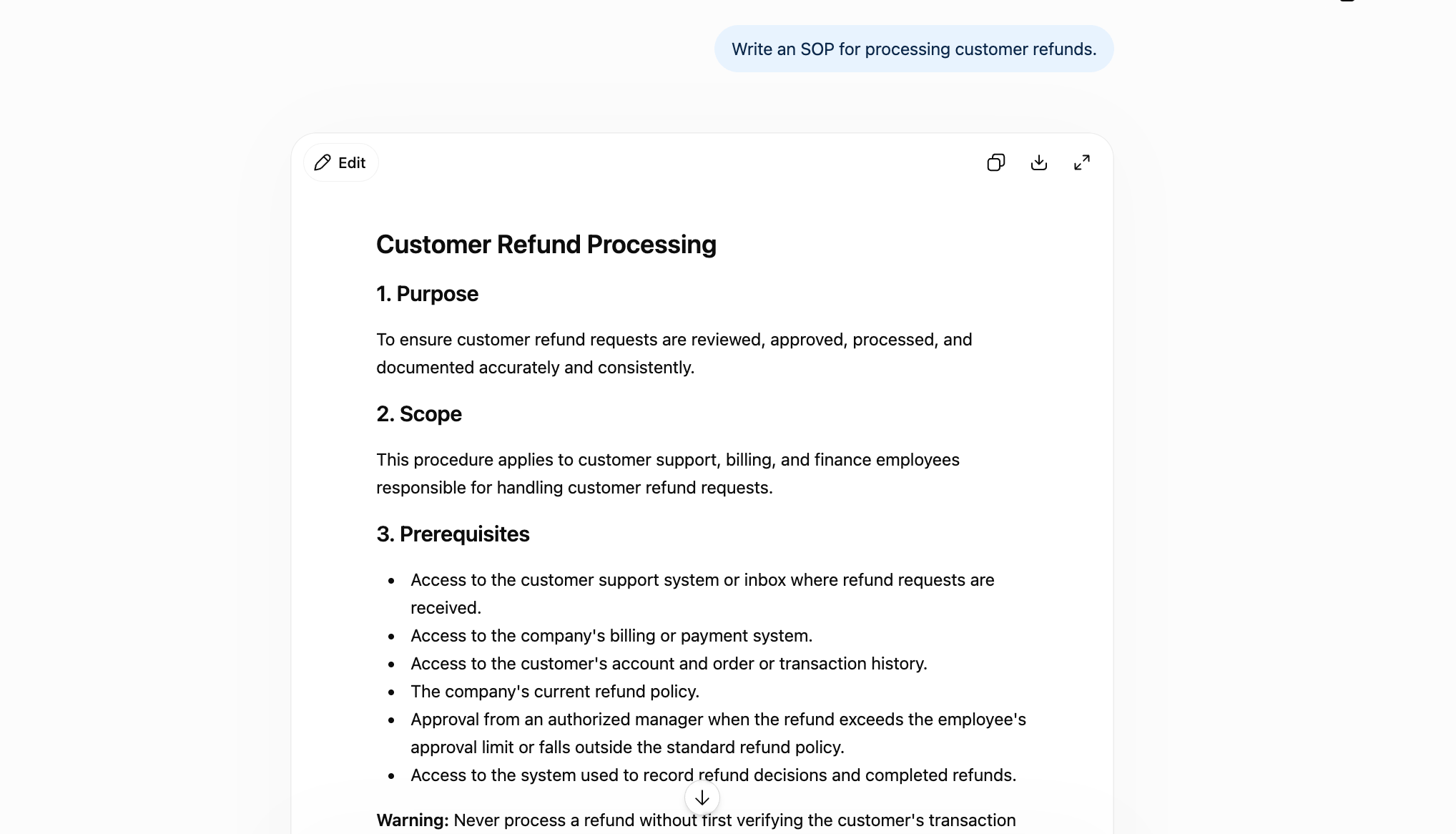
A vague prompt generated an SOP showing the purpose, scope, prerequisites, and steps to follow.
While it covers the key points, it doesn’t include
- The specific thresholds for your business. ChatGPT has no idea what your actual approval limit is.
- It doesn’t define specific numbers, such as the processing window for refunds.
- The output is missing details about the system your business uses to update customer records or manage billing.
Here’s a gap-flagging instruction
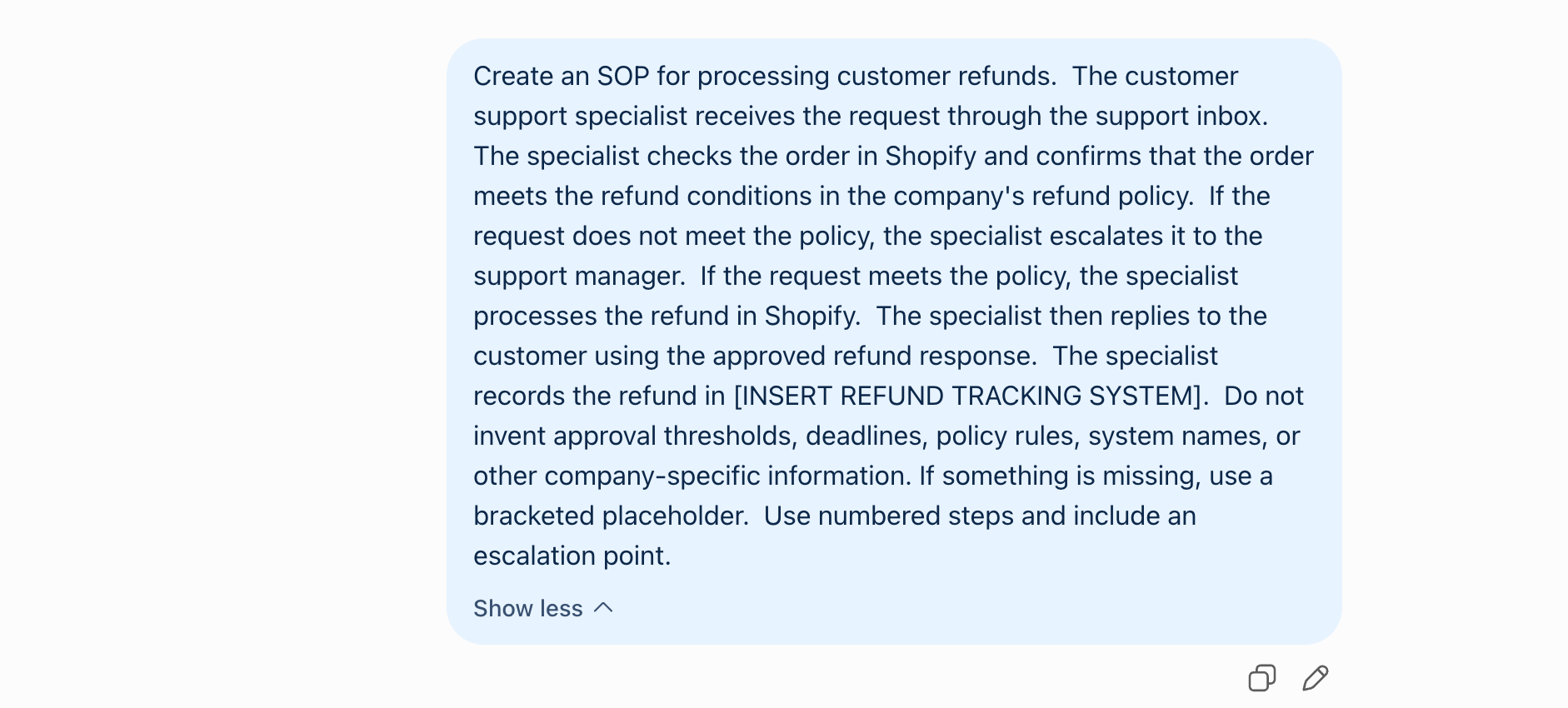
The output will be more detailed once you provide information about your organization.
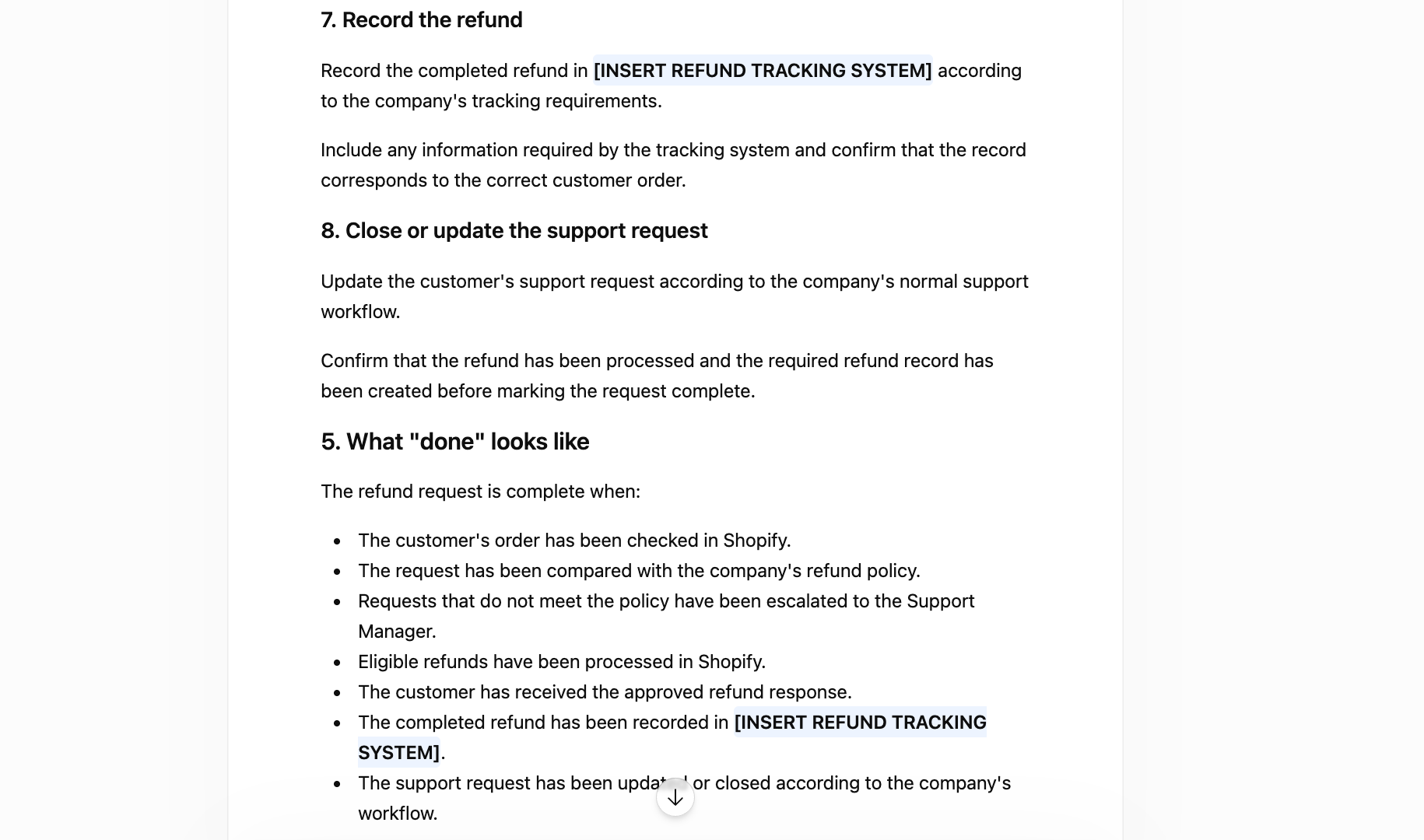
Image source: ChatGPT
From these two examples, it’s clear you need to give ChatGPT more information that you already have in the company, such as the fraud check process, a refund reason code, a finance notification, or a specific exception for partial refunds. These gaps are why you should compare your AI-generated SOP with the actual process.
If you want to see what a fully specified, human-reviewed SOP looks like, here are SOP examples you can compare against your own ChatGPT draft.
How To Generate SOPs Automatically With ChatGPT
Using ChatGPT to generate your standard operating procedures can save your team hours of manual documentation, especially when you need to structure your operations fast or work under tight deadlines. With the right prompt and a little fine-tuning, ChatGPT can provide a solid draft for your team to build on. Here’s how to do it step by step:
Define Your Process Clearly
Before opening ChatGPT, it’s essential to be clear about the task or workflow you want to document. Here are some questions to guide you:
- What’s the purpose of this SOP?
- Who will be using it?
- What are the exact steps involved from start to finish?
The answers to these questions will help you develop your purpose, main phases, key actions, decision points, and identify the tools or people involved. The more you understand the process, the more targeted and useful your ChatGPT output will be.
Open ChatGPT
Once you’ve mapped out your business process, open ChatGPT on your browser or app. With the free version, you can create SOP drafts but with some limitations. Once you upgrade to the paid plans ChatGPT Go, Plus, and Pro, you can generate more detailed responses and content formats. By using the most advanced model available, you can create SOPs that meet a higher standard and can be shared company-wide.
Enter a Prompt
This step determines the type of output you get. Your prompt should be detailed, specific, and structured to reflect the SOP you need. A vague prompt like “Write an SOP for onboarding” will give you a generic output.
Review and Customize the Output
While ChatGPT generates documents based on your input, it can make mistakes. Once you get the response, it’s essential to read through it and ensure that the flow of steps makes sense and aligns with how your team works. Watch for missing context, vague instructions, or any inaccuracies. You’ll likely need to reword certain parts, re-order steps, and insert internal terminology or tools your team uses.
Format and Save Your SOP
Once you’re satisfied with the content, it’s time to refine it. For instance, you can structure the SOP using a format your team is familiar with by adding headers for each step, using bullet points or numbered lists, and a consistent font and layout. Proper formatting helps team members follow instructions without confusion. Once formatted, save the SOP in your preferred system or streamline the process by creating and managing SOPs with a knowledge base generator, so they’re easy to find, reference, and update.
Share and Update as Needed
As the industry and company change, you’ll need to update SOPs to reflect those shifts. You can use the ChatGPT SOP generator to revise your documents instead of starting from scratch. Once this is done, you can share the finalized SOP with relevant teams and stakeholders and encourage feedback, especially if this is the first version of a new process. Ensure that everyone understands their responsibilities and can follow the steps easily.
You don’t have to repeat steps every time you create an SOP.
A tool like SweetProcess offers an AI-powered SOP generator, SweetAI, that lets you define your process once and instantly converts it into a structured, editable, and shareable SOP. Try SweetProcess today!
What ChatGPT Can Do Now, and What It Still Cannot
ChatGPT can do more than generate text for your company documentation. It offers these features to help you create SOPs:
- File uploads: You can upload your existing process document or transcript and ask ChatGPT to reorganize it instead of drafting a new one from scratch.
- Memory: ChatGPT can retain some of your company’s formatting preferences or terminology across sessions, so you don’t explain them every time.
- Projects: This feature helps you group all your SOP-related conversations and files together.
- Canvas-style editing: It lets you revise a long document instead of regenerating the whole thing from scratch every time you want to change details on your SOP.
- Images: If your team prefers visual SOPs, you can use ChatGPT to generate images.
However, ChatGPT still requires you to provide information about your business, since it doesn’t have visibility into the tools you use, the approval hierarchy, compliance obligations, or whether the process you described is the one your team actually follows day to day.
If you change processes in your company, you have to explicitly provide this information in your prompt. Because of this, it’s important to have an employee review every generated document to confirm its accuracy before the team uses it.
Additionally, the free plan is limited. After several sessions, you have to upgrade to use features such as uploads, voice chats, longer memory, and more image generation. As of September 11, 2026, the paid plans start at $5 per month. For more productivity, you can also pay for the Plus version at $20 per month or the Pro plan at $100 per month.
Should You Paste Your Processes Into ChatGPT?
Yes. You can paste your processes into ChatGPT; however, you need to consider the specific details you include in the prompt. If your process description contains sensitive information such as customer names, payment information, login credentials, financial thresholds, or anything covered by a supplier or client contract, you should edit the information out.
You also need to add specific details in your prompt to help ChatGPT describe your process much better. You can use placeholders for sensitive information and then add the real values during the editing phase or before you store them.
As you use the ChatGPT SOP generator, it’s important to check your own contractual, regulatory, and internal obligations before entering sensitive information.
Why Use ChatGPT To Generate Standard Operating Procedures
Your business relies on SOPs to create consistency across all departments. However, creating these procedures manually can be slow and resource-intensive. An SOP generator like ChatGPT helps you quickly draft, refine, and standardize processes, ensuring efficiency while saving valuable time and resources.
Here’s why ChatGPT can help you automate the SOP generation process:
Speed: Instantly Generate SOP Drafts in Seconds, Saving Hours of Manual Writing
Need an SOP by the end of the day? ChatGPT can deliver a full draft in less time than it takes to write an email. Instead of spending hours typing out each step or struggling with formatting, you can prompt the AI tool with a single request and get a usable first draft within seconds.
For example, if your marketing team needs a “Blog Publishing Process” SOP, ChatGPT can instantly outline steps from content creation to SEO review and final publishing. This speed allows managers and team leads to keep projects moving without delays caused by documentation bottlenecks.
Benjamin Richards, a growth expert, strongly encourages business owners to rethink how they approach SOP creation if they want to save time and scale effectively. He outlines a simple three-step system that includes the use of ChatGPT to eliminate hours of manual SOP writing.
His process? Record yourself doing a task, paste the transcript into ChatGPT, and prompt the AI to turn it into a step-by-step SOP.
According to Benjamin, this method will help you speed up documentation and ensure that the SOP captures how the process is actually done, something traditional documentation often misses.
Clarity: Produces Structured, Easy-to-Follow Instructions Based on Your Input
What’s the use of an SOP if your team members can’t follow it? ChatGPT excels at turning vague or complex processes into clear, step-by-step instructions. For instance, you can prompt it to “write an SOP for handling customer complaints in an e-commerce store,” and it will deliver instructions broken down into logical sections, including intake, investigation, resolution, and follow-up.
According to Financial Advisor Libby Greiwe, “If you’ve been drowning in processes and documentation, AI might just be the solution you need!”
She goes on to demonstrate how financial advisors can transform their Zoom transcripts into structured SOPs using ChatGPT. Therefore, if you have raw data from meetings with stakeholders, you can translate this into easy-to-follow steps within minutes. This structure is especially useful for teams scaling fast because it ensures everyone is aligned.
Scalability: Quickly Create Multiple SOPs Across Teams, Tasks, or Departments
Over time, your business will evolve, particularly as it expands. Do you have the right tools to support a scaling business? With the AI document generator, you can create different types of procedures, whether you need them for sales, IT, or customer support departments. You can prompt the tool and generate multiple drafts in a single afternoon.
For example, a startup expanding into new markets can create localized SOPs for hiring, onboarding, or logistics in just a few prompts. This rapid scalability helps ensure consistency across departments without waiting weeks for formal documentation processes.
Cost-Effective: Reduces the Need for Dedicated Technical Writers or Consultants
Unlike most business tools, which come at a cost, this free AI-powered tool can save you money. You won’t have to hire a technical writer or consultant, especially if you run a small or mid-sized team. ChatGPT generates high-quality drafts that can be edited in-house; therefore, you don’t need to incur costs associated with outsourcing documentation.
If you have a lean operations team using ChatGPT to generate ten SOPs in a day, it takes a few hours of review and polishing. It’s an efficient way to build a knowledge base without burning through your budget.
ChatGPT is a great starting point. However, if you’re looking to draft comprehensive SOPs, SweetProcess is built for you. SweetAI will turn your workflows into team-ready documentation in seconds. Start your 14-day free trial today!
Can ChatGPT Really Handle SOPs?
At first glance, ChatGPT seems like the ultimate productivity hack for creating SOPs. It’s fast, smart, and easy to use. But once you start using it for critical business documentation, you’ll start noticing some limitations. While it’s a helpful assistant for brainstorming or quickly drafting a rough outline, relying solely on ChatGPT for your SOPs can be risky. Here’s why:
Accuracy and Consistency Issues
ChatGPT doesn’t truly understand your business, your team’s workflows, or your company’s internal standards. It pulls from a pool of generalized information and can sometimes produce vague, incorrect, or even contradictory instructions. In an SOP, where every step matters, even a small misstep can lead to confusion, operational errors, or compliance issues.
Formatting Limitations
While it’s clear that ChatGPT can generate a decent draft within seconds, you’ll still need to manually clean it up and fix inconsistencies. It still won’t automatically add your company’s approval hierarchy, safety thresholds, or naming conventions unless you state them directly or they’re already saved in memory from an earlier conversation.
Collaboration Challenges
In most cases, you’ll be working on the SOPs with internal and external teams. ChatGPT is limited because it lacks built-in features for team collaboration, approvals, or real-time editing. You can’t assign steps to team members, track changes, or manage SOP versions directly in the platform. Once you get your draft, you have to copy and paste the content into another system for your colleagues to access.
This is where SweetAI, SweetProcess’s AI-powered SOP generator, comes in. SweetAI will help you write SOPs and build them with structure, clarity, and usability in mind. It understands how to break down workflows into actionable steps, apply consistent formatting, and instantly turn your inputs into team-ready documentation.
You can assign steps, collaborate with your team, or store your SOPs in one centralized system.
Don’t settle for half-finished SOPs! Start your free trial of SweetProcess today!
What Has To Happen After ChatGPT Is Done
Once ChatGPT has generated an SOP, you can’t store it or assign it to a team member directly from the platform. For your output to become usable, you need to implement SOP management software that allows you to :
- Assign a process owner: This is the team member who understands how the actual tasks are executed. With their experience, they can compare the ChatGPT-generated draft with the work and add missing steps, verify numbers, include exceptions, and correct company-specific terminology.
- Set approvals: You need a clear current version of your procedure. With the right SOP management tool, you can access the latest document and set approvals to ensure the team uses the correct document.
- Assign procedures as tasks: If you want to collaborate on a procedure, you need to assign your approved version to specific employees.
- Record acknowledgment: You need a record of the employees who have seen and read your procedures. The SOP management tool keeps track of these details for audits.
Want to test out SweetProcess for your business? Start your 14-day free trial here!
How To Generate SOPs Instantly With the SweetProcess SOP Generator
One of the key features of SweetProcess is SweetAI, which can help generate an SOP draft inside the same platform where you manage procedures.
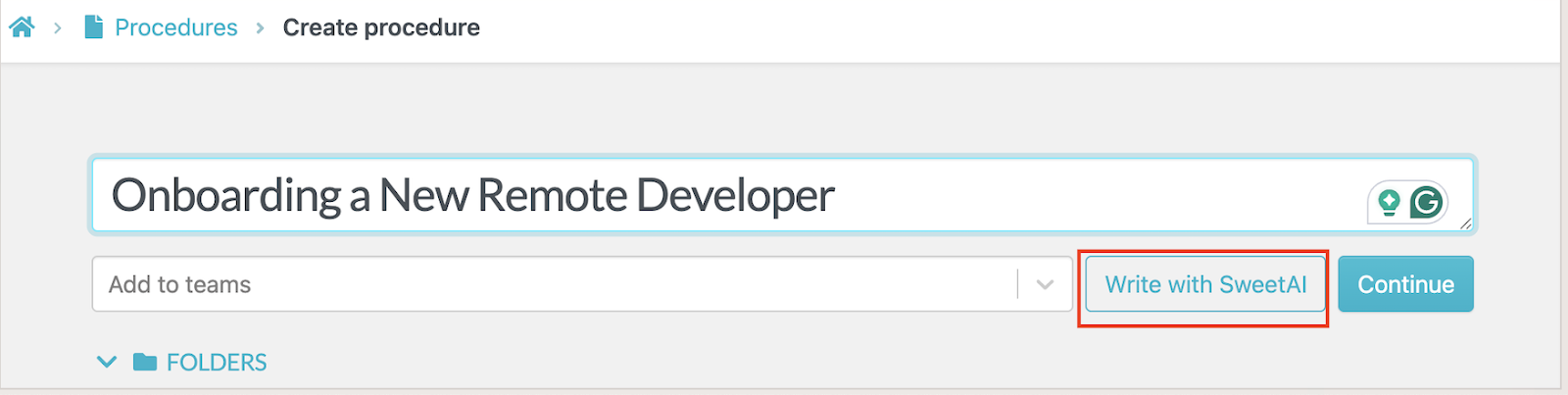
If you use SweetAI, remember that it doesn’t know your business or your obligations; therefore, you need to assign a team member to edit and review it.
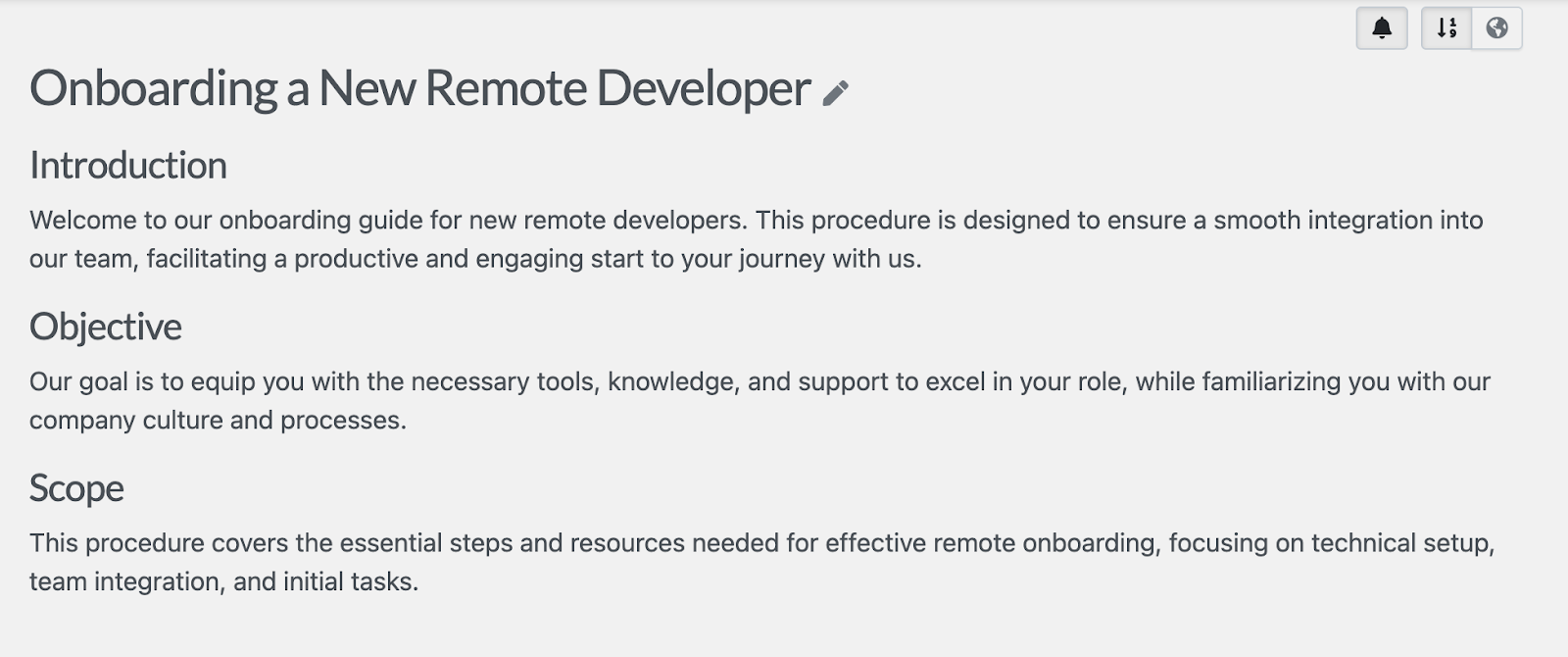
The key difference with the ChatGPT SOP generator is what happens after the initial draft. Instead of copying the generated text into another document system, you can continue editing the procedure, add supporting media, organize related documentation, and share the procedure with your team inside SweetProcess.
With SweetAI, you don’t have to waste time on manual SOP creation. This feature enables you to generate, customize, and deploy professional SOPs hassle-free. Try SweetProcess for free for the first 14 days!
How CloudTech24 Uses SweetProcess To Create and Manage Its SOPs in One Place
While it’s evident that ChatGPT can help kickstart SOP documentation for your organization, it falls short beyond that. SweetProcess fills those gaps by providing a tool purpose-built for creating, customizing, managing, and scaling SOPs across entire organizations.
CloudTech24 is one of the companies that has transitioned from scattered documentation to seamless operations, thanks to SweetProcess. This managed IT services provider was facing mounting inefficiencies as its team grew to about 25 employees. Despite using a technical documentation tool tied to their service desk, their SOPs were siloed, inaccessible to non-IT staff, and most of the company.
As a result, their onboarding system was inconsistent and time-consuming. Additionally, the leadership lacked visibility into task completion. Andrew Dale, the technical director, decided to implement SweetProcess, which brought in benefits such as:
- Consolidated Procedures: The company SOPs, from expense claims to HR workflows, are now stored in a centralized platform.
- Enhanced Visibility and Monitoring: SweetProcess’s reporting and task alerts integrate with tools like Microsoft Teams, which automatically notify managers when procedures are completed, enabling audit trails and quality checks.
- Faster Onboarding, Fewer Errors: New hires follow standardized onboarding checklists and flowcharts.
- Operational Consistency: Drafting SOPs using SweetAI instilled consistency across all teams, saving employees hours of manual writing and editing.
CloudTech24’s success story is just one example of how SweetProcess empowers growing teams to streamline operations. It offers instant AI-generated drafts, full customization, built-in collaboration, and reliable version control. If your team is ready to move beyond basic text generation and adopt a smarter and scalable solution, SweetProcess is built for the job.
Ready to experience it for yourself? Start your free trial of SweetProcess today. No credit card is required!
FAQs About the ChatGPT SOP Generator
Can ChatGPT Generate SOPs?
Yes. ChatGPT can generate a full first-draft SOP from a clear prompt that includes numbered steps, a stated purpose, and scope. The quality depends heavily on what you provide and how you instruct it to handle missing information. You should review the result against the real process before anyone follows it.
Can ChatGPT Create an SOP?
Yes. You can give ChatGPT notes, process information, a transcript, or an existing draft and ask it to organize the material into an SOP. It can structure the content into steps, decision points, responsibilities, and other sections. It cannot independently confirm that the resulting procedure matches the way your business actually works.
Can I Use AI To Write an SOP?
Yes. You can use different AI tools such as ChatGPT, Copilot, or a purpose-built tool like SweetAI. All of them draft faster than writing manually. However, you need to keep in mind that none of them know your business; therefore, you need a human review step before the SOP goes live.
What Is the Best Free SOP Creator?
If you specifically want to use ChatGPT, it offers a Free plan that lets you use the tool for writing and other everyday tasks at no subscription cost. If you need an SOP writing tool that also manages approved procedures, assigns them, and keeps them organized, SweetProcess offers a free SOP generator built into its 14-day free trial.
How Does ChatGPT’s Cost Compare to a Purpose-Built SOP Tool?
As of September 11, 2026, ChatGPT has a free plan with limited uploads, voice chats, and image generation. The paid plans start at $5 per month for the Go plan. You can also upgrade to Plus at $20 per month or Pro at $100 per month.
For a purpose-built SOP writing tool like SweetProcess, the price starts at $99 per month or $990 if you prefer to pay annually for up to 10 users. If you have a smaller team of five users, it will cost you $495 per year. With SweetProcess, you access all features no matter the payment plan.