Last Updated on October 13, 2026 by Owen McGab Enaohwo
Choosing a standard operating procedure (SOP) tool is easier when you know how much it will cost your business. You need to know which four or five products are worth a demo and what each one costs once your whole team is on it.
A useful shortlist starts with the work you need the software to handle, then accounts for everyone who will use it. These nine SOP tools cover different needs, from capturing steps to managing approvals. Their features, published pricing, and annual cost examples help you compare the options against your team size and documentation requirements.
Key Takeaways
- Standard operating procedure tools fall into distinct categories, from simple documentation software to screen-capture tools, workflow automation, and full SOP management platforms, and picking the wrong category costs you more.
- Vendor pricing varies by seat, creator, user role, or custom quote, so a monthly starting price doesn’t always show what a full team will pay over a year.
- The real cost of an SOP tool shows up once you multiply the sticker price by your team size, which is why this page works out the annual cost for teams of 10, 25, and 100.
- While some tools offer tiered pricing with premium plans that unlock more features, an SOP tool like SweetProcess offers flat-tier pricing for all users. Start your 14-day free trial here to test it out for your business.
Table of Contents
- SOP Tools Comparison at a Glance
- How We Chose These 9 SOP Tools
- 9 Standard Operating Procedure Tools for Team Documentation and Collaboration
- What These SOP Tools Actually Cost a Team of 10, 25, and 100
- Key Features To Consider Before Choosing a Standard Operating Procedure Tool
- Types of Standard Operating Procedure Tools
- Benefits of Standard Operating Procedure Tools
- SOPs in Regulated Work
- Which Standard Operating Procedure Tool Should You Choose for Your Business?
- FAQs
SOP Tools Comparison at a Glance
| Tool | Best For | Starting Price | What It Does Not Do |
| SweetProcess | Teams that want SOPs, policies, and processes managed in one system | $99/month for up to 10 users, or $495/year for up to 5 users | Does not include AI voiceover narration or automatic video translation |
| Scribe | Fast, individual screen-capture guides | Plan starts at $25 per seat per month annually | Does not manage policies, approvals, sign-off, or quizzes |
| Guidde | Teams that prefer video walkthroughs over text SOPs | $19 per creator per month, billed annually | Does not offer document version control or approval workflows |
| Whale | Teams that want AI-assisted writing plus training flows | Starts at $249 per month, billed annually for unlimited members | No native e-signature or audit-grade compliance record |
| Trainual | Turning SOPs into structured training and onboarding paths | Not published on website. Custom pricing | No screen-capture SOP creation |
| Process Street | Checklist-driven workflow runs with conditional logic | Not published on website. Custom pricing | Does not include screen-capture SOP creation |
| Document360 | Customer- and developer-facing knowledge bases | Not published on website. Custom pricing | No screen-capture SOP creation |
| Tango | Quick browser-based step guides | Starts at $15 per user per month billed annually (3+ seats) | No quizzes, task assignment, or approval sign-off |
| Tallyfy | Simple workflow automation with conditional rules | $100 per year for Light Seat plan | No screen-capture SOP creation |
Prices checked at each vendor’s own pricing page on September 8, 2026.
How We Chose These 9 SOP Tools
We selected the tools on this list based on these factors. We publish this guide at SweetProcess and recommend it for keeping procedures, policies, and employee training together, so your team can find and follow current instructions. The other tools solve specific documentation, workflow, knowledge management, capture, or training needs.
It Holds Procedures
A product had to do more than simply provide a blank document. We looked for tools that can hold procedures, capture processes, support workflow execution, organize knowledge, or help employees learn documented processes.
The Pricing Information
We also evaluated whether the tools publish a price on their vendor pages. For those that require you to request a quote, we’ve indicated that to help you shortlist the best options.
How It Fits Teams
Every product here is something a real operations team could realistically run day to day. We considered whether a tool works for different types of businesses, whether your team has 10 employees or 200 people.
9 Standard Operating Procedure Tools for Team Documentation and Collaboration
Before signing up for an SOP tool, you need to understand its features and pricing to determine whether it fits your organization. Here’s a closer look at each one.
SweetProcess
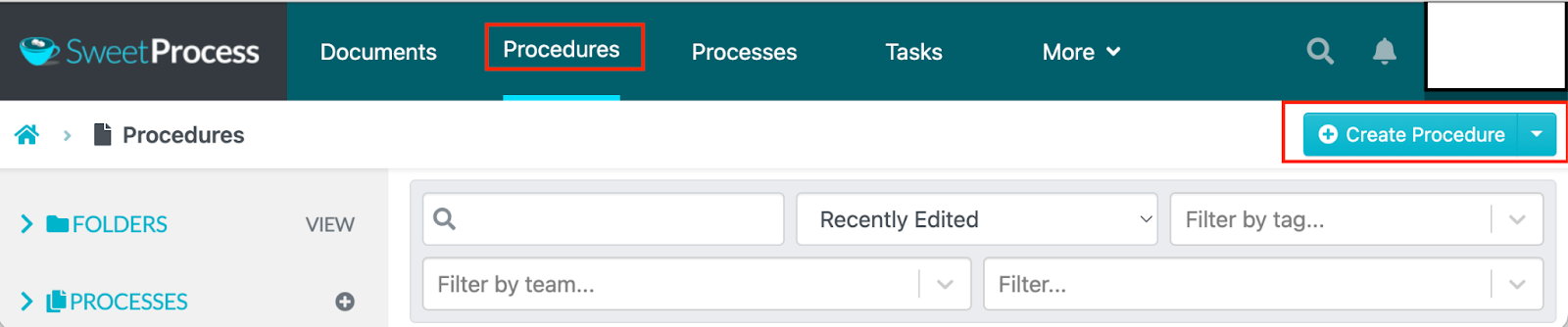
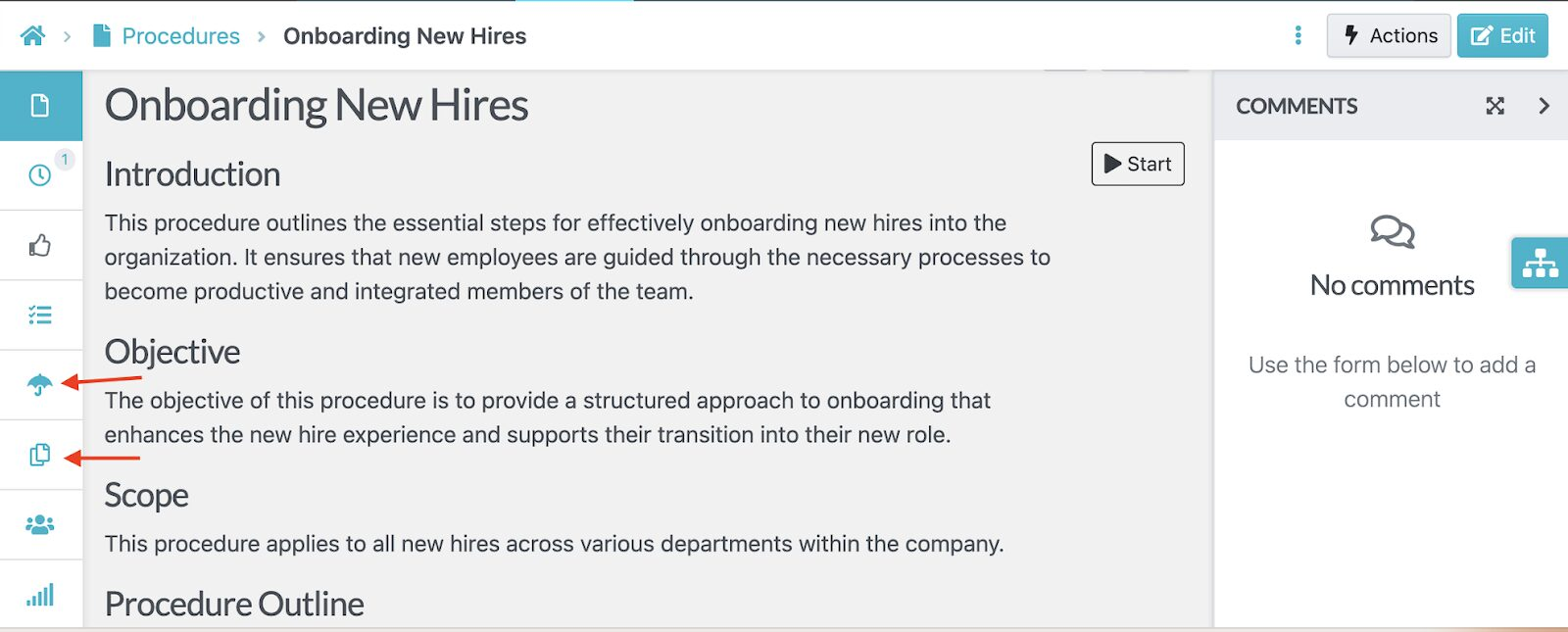
SweetProcess is a standard operating procedure software built for teams that want to create, manage, and enforce SOPs, policies, and processes in one system rather than juggling three separate tools. You can document a procedure manually, generate a first draft with SweetAI, or capture it directly from your screen, then route it through approval and keep a version history as it changes.
You can use it for multiple business tasks, from new employee onboarding to customer support, accounting, and product development.
Features of SweetProcess
Here are the core features that come with this SOP tool:
Document Your Company’s Standard Operating Procedures Manually and With AI
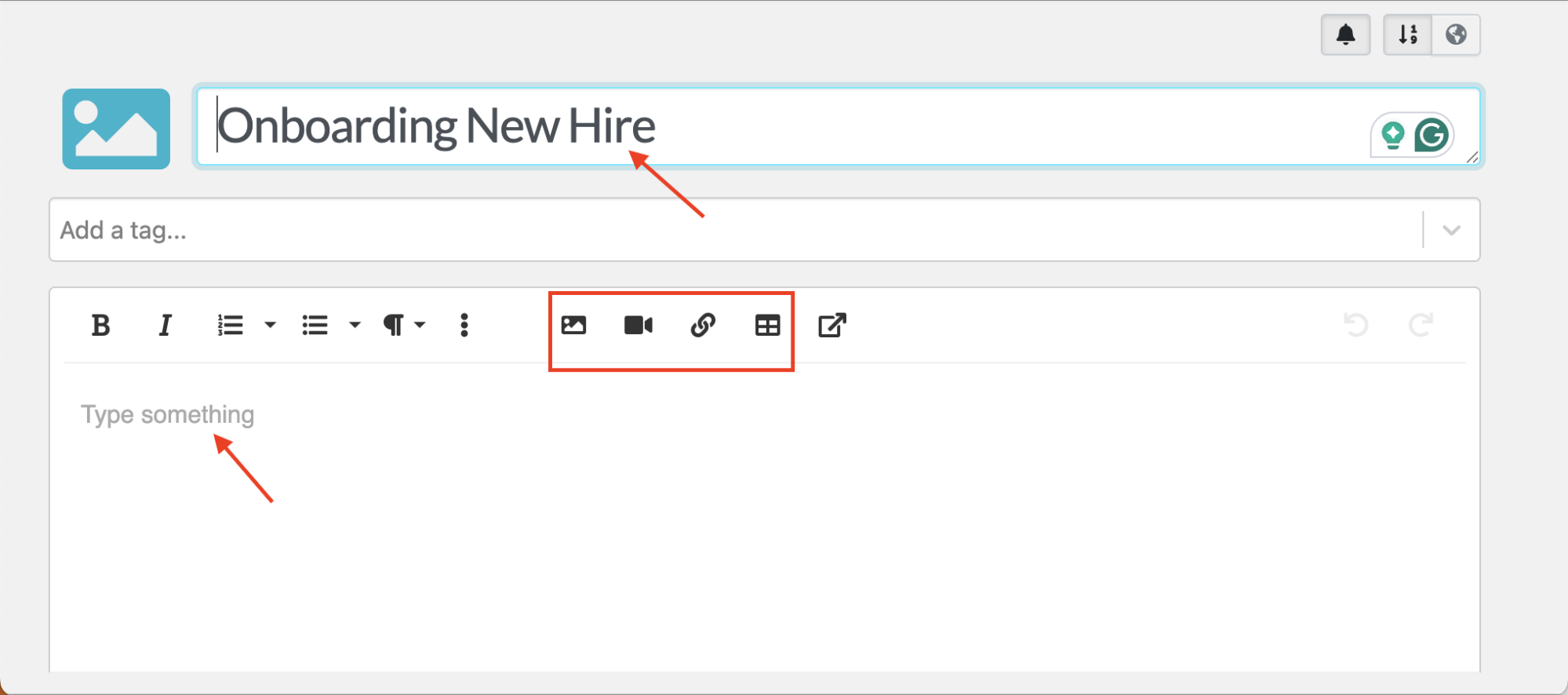
With SweetProcess, you can create your digital SOPs from scratch or with the AI generator, SweetAI.
If you want to do it manually, you’ll start with a blank template. From here, you can add text descriptions, embed images, attach files, or insert videos. These features ensure that you give your team an SOP format that’s easiest to follow.
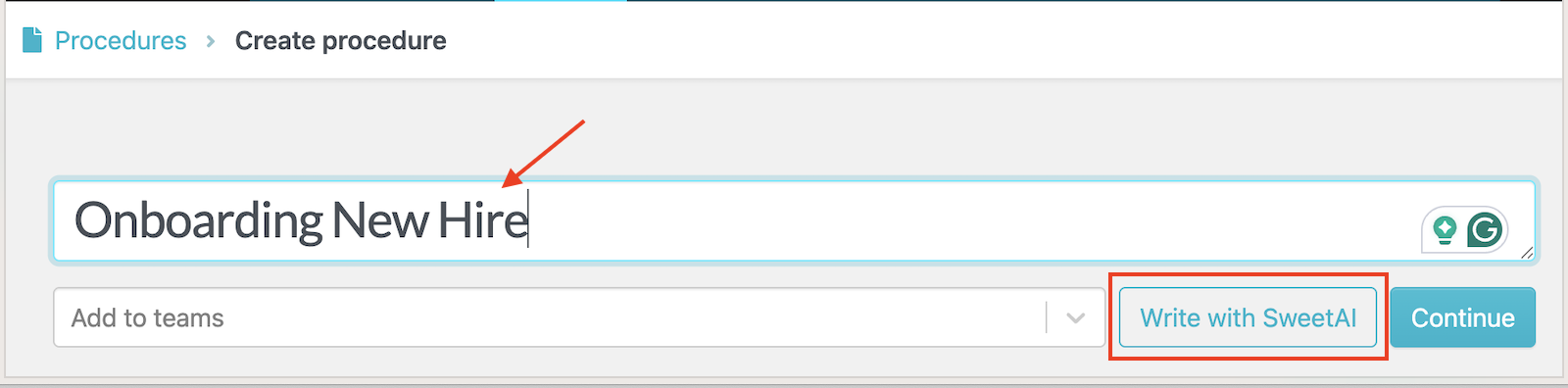
However, if you have busy schedules or need to convert tribal knowledge into documented workflows, you can use the SOP generator to create the text in minutes.
You just need to add a comprehensive SOP title, and SweetAI will create a document that you can edit.
Before sharing this SOP for approval and review, you can refine the language and make additions to make it more detailed and accurate.
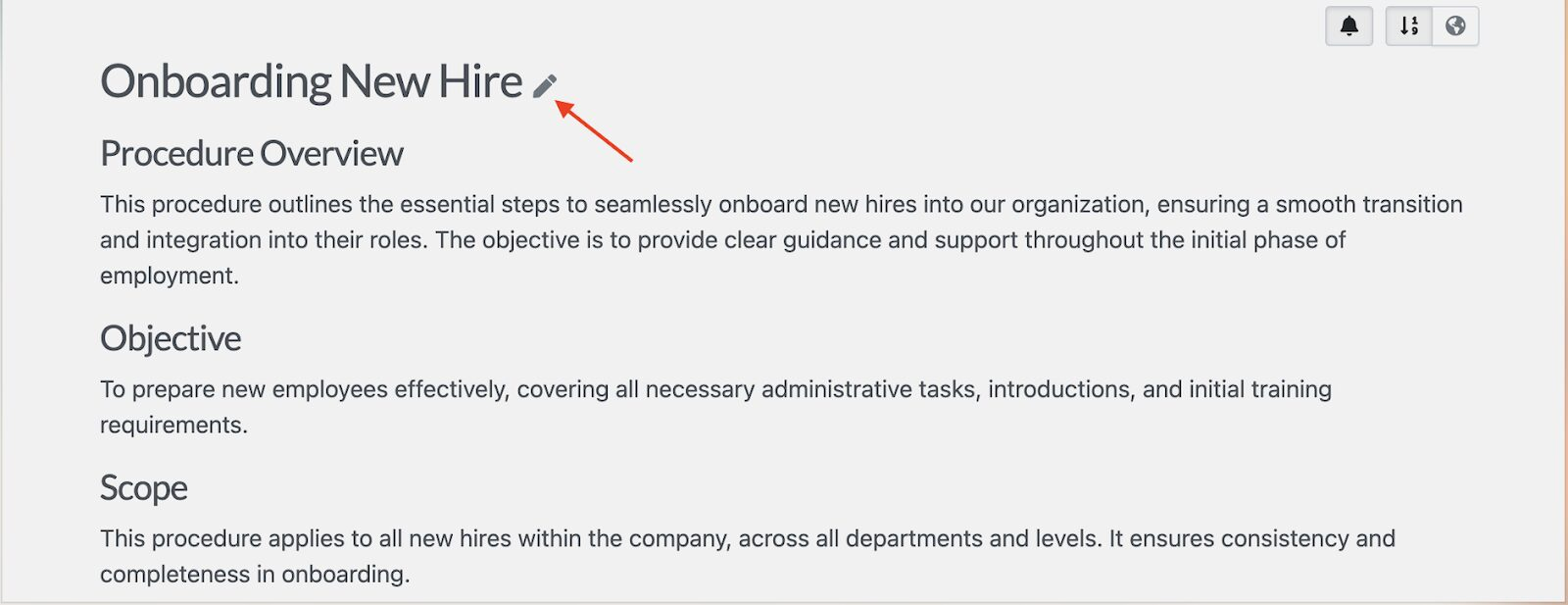
Does your team prefer checklists? The SOP builder also generates steps your team can follow to execute even complex tasks.
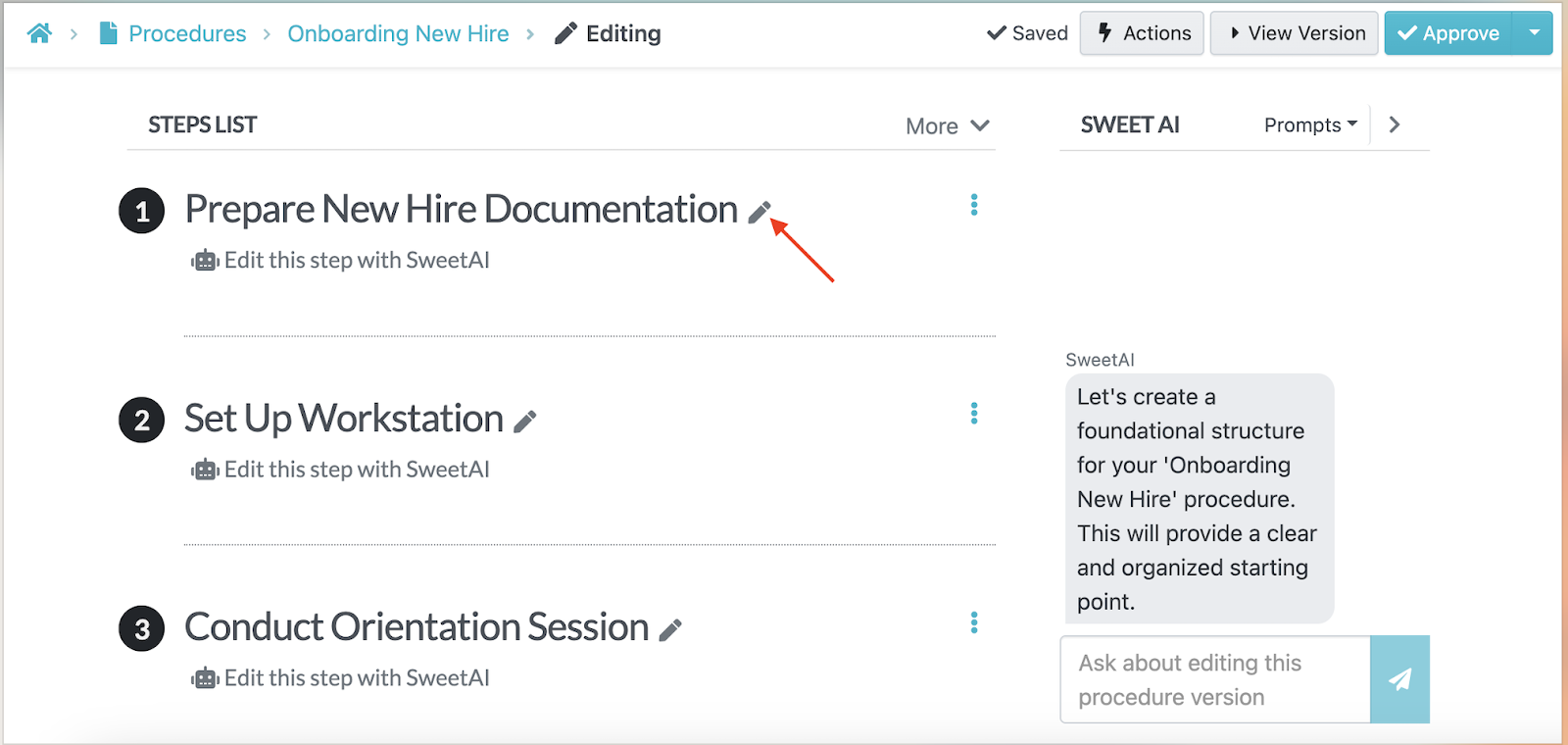
Collaborate With Team Members Based on Roles and Access
Collaboration is a must-have for company teams, but not everyone needs full editing rights to every procedure. SweetProcess’s role-based permissions let you control who can view, edit, approve, or manage specific SOPs.
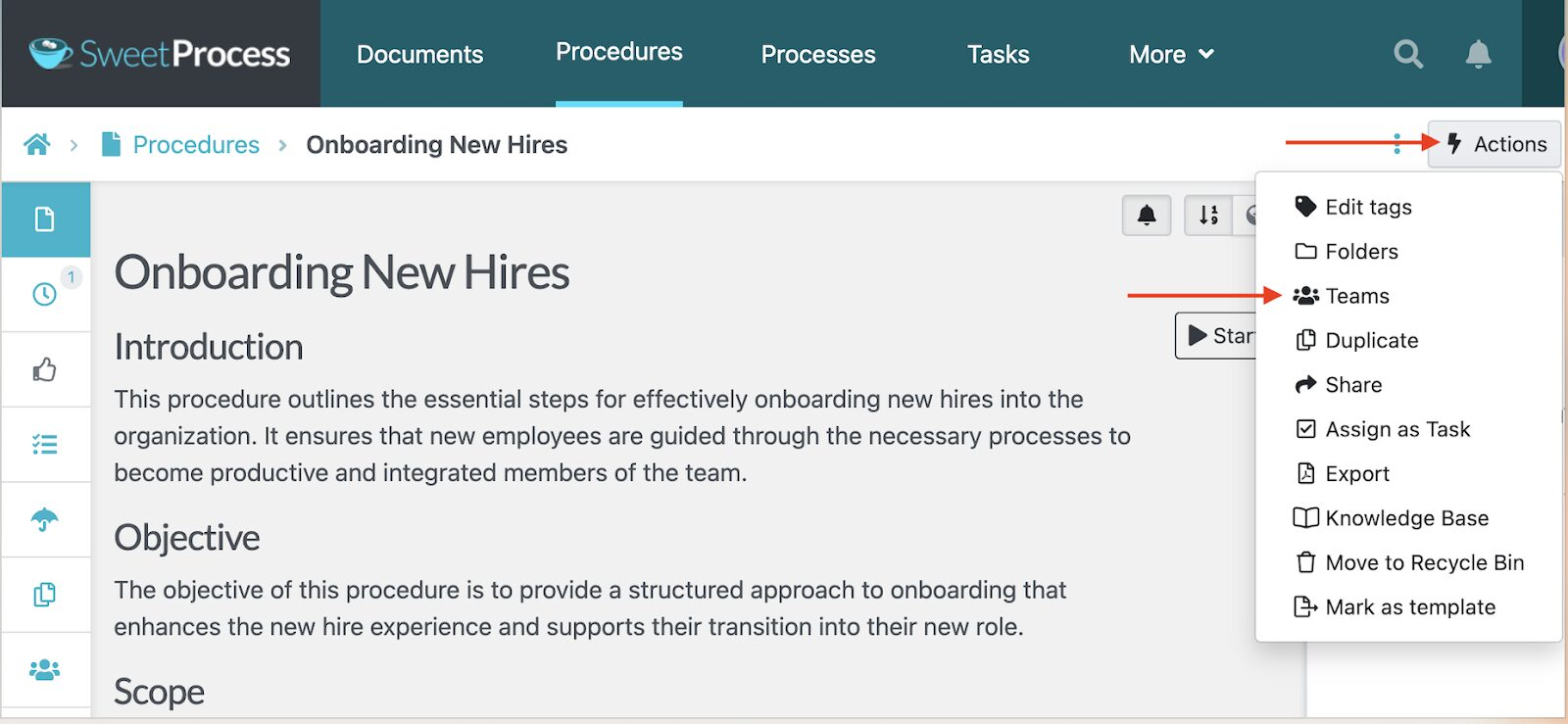
For example, HR can create a “Leave Request Process,” but only managers can approve changes, while employees can view and follow the steps. This structure prevents unauthorized edits and keeps sensitive processes secure.
You can also leave a comment on a specific SOP and tag the team member who should address it.
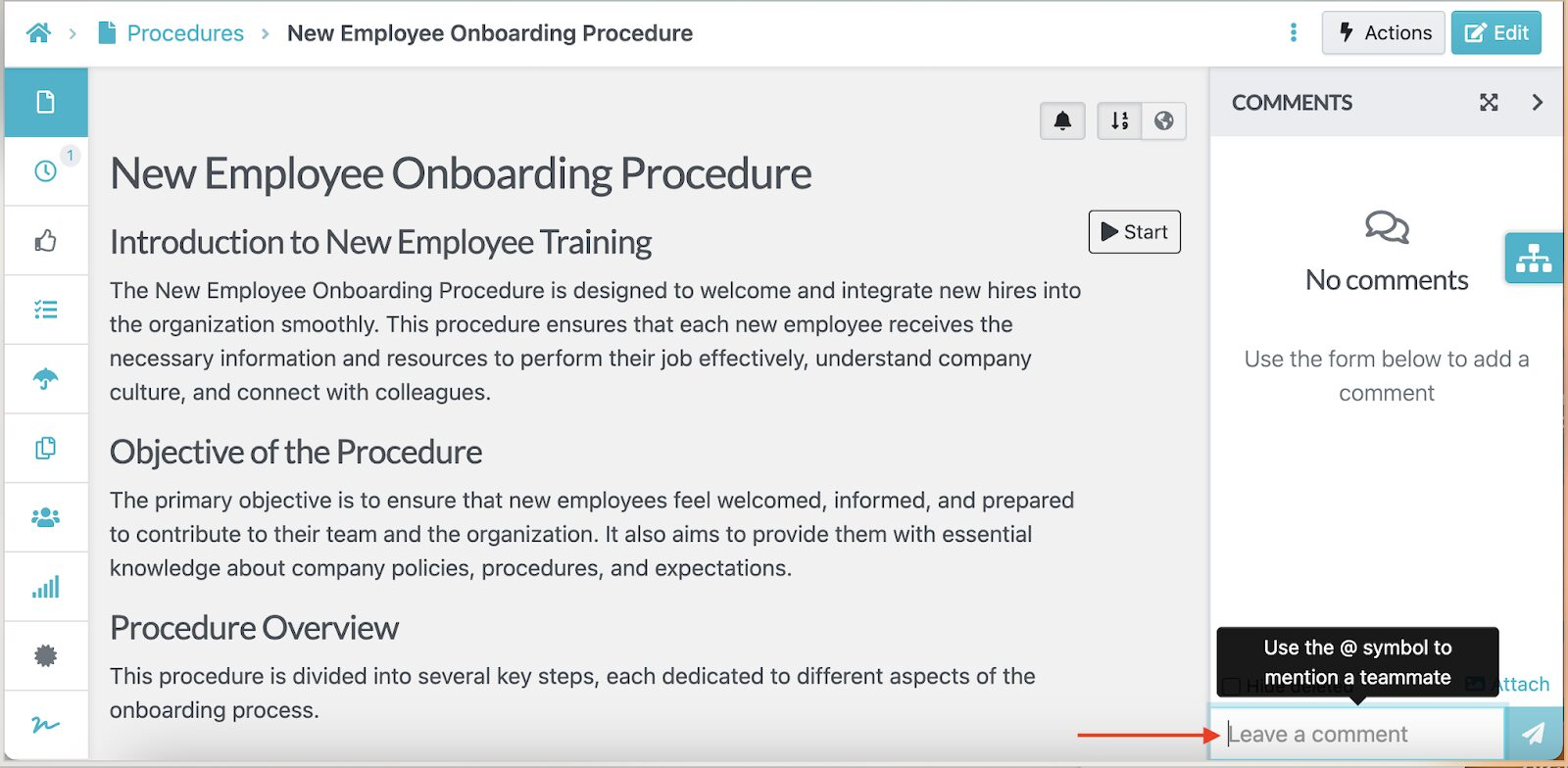
This feature is especially important for businesses with compliance requirements or multi-location operations. Your frontline staff can access the SOPs they need without accidentally modifying company-wide policies. Meanwhile, managers retain oversight and control over documentation standards.
Format, Review, and Track Changes on SOPs in Real Time
Every time someone updates an SOP in SweetProcess, the platform automatically tracks the change and logs who made it. The version history feature creates an audit trail that you can use for compliance.
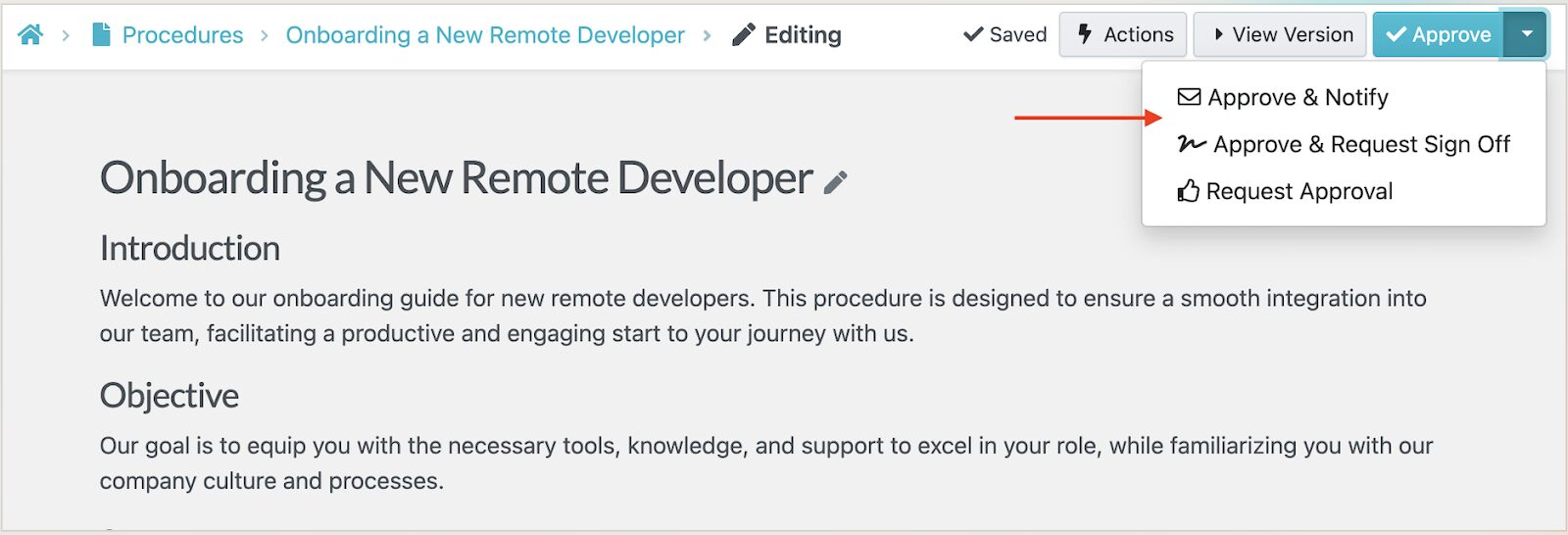
If you need a manager to review and approve an SOP, you can use the built-in SweetProcess features. Once the changes are approved, everyone with access can see the updated procedure immediately.
Capture On-Screen Activities and Use Them as SOPs
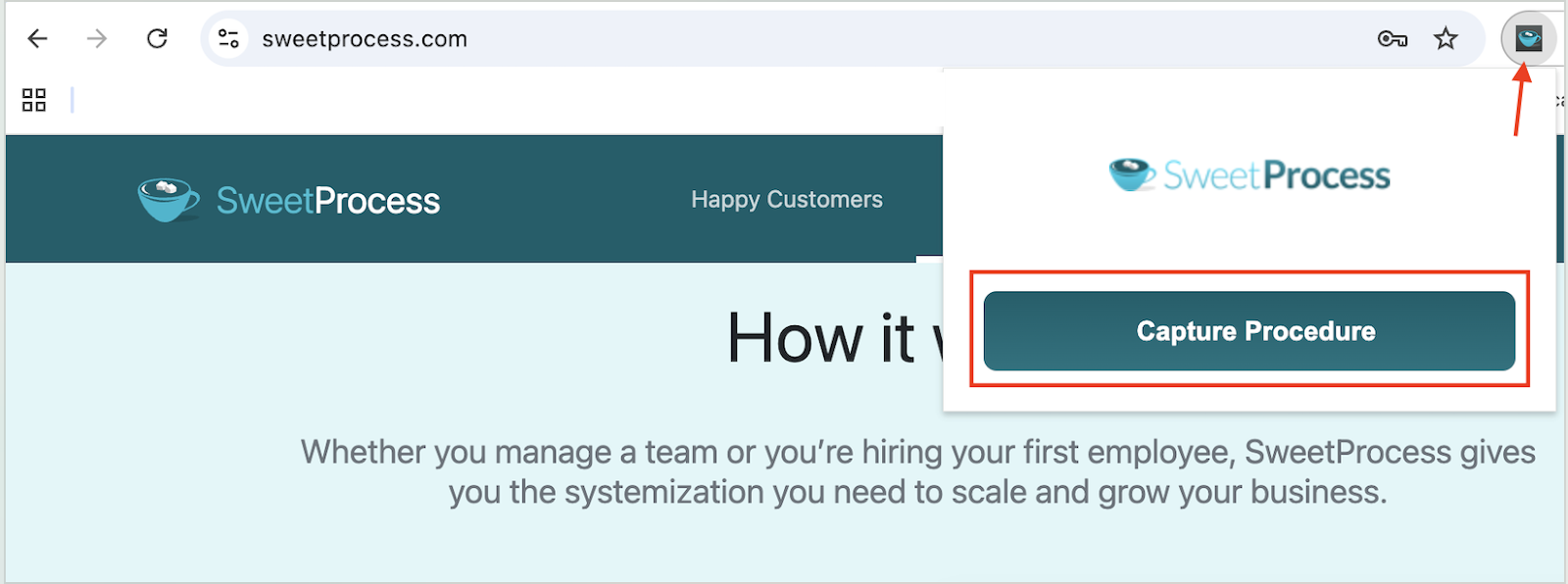
Instead of drafting your procedures in text, you can also capture screenshots and turn them into a visual SOP. The SweetProcess browser screen-recording feature captures all your clicks and keystrokes as you show how to complete a specific task.
You first have to install the Chrome extension to use this feature.
Once you’ve recorded everything you need, the screenshots are arranged into a step-by-step SOP guide that your team can follow.
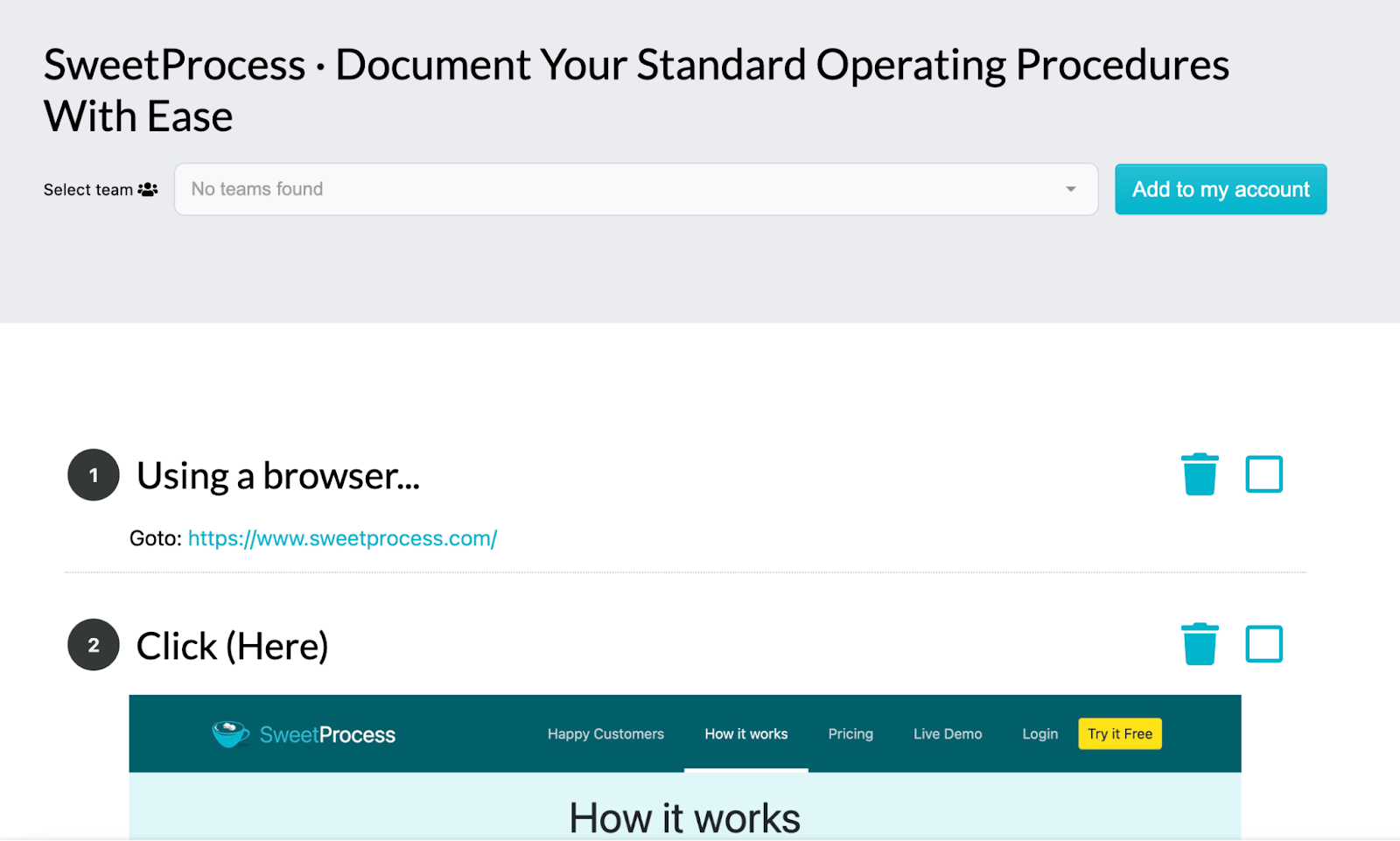
You can edit and remove any step you don’t require.
Manage SOPs, Policies, and Processes in One Place
Instead of juggling multiple separate tools, SweetProcess lets you store SOPs, policies, and processes together in one organized system.
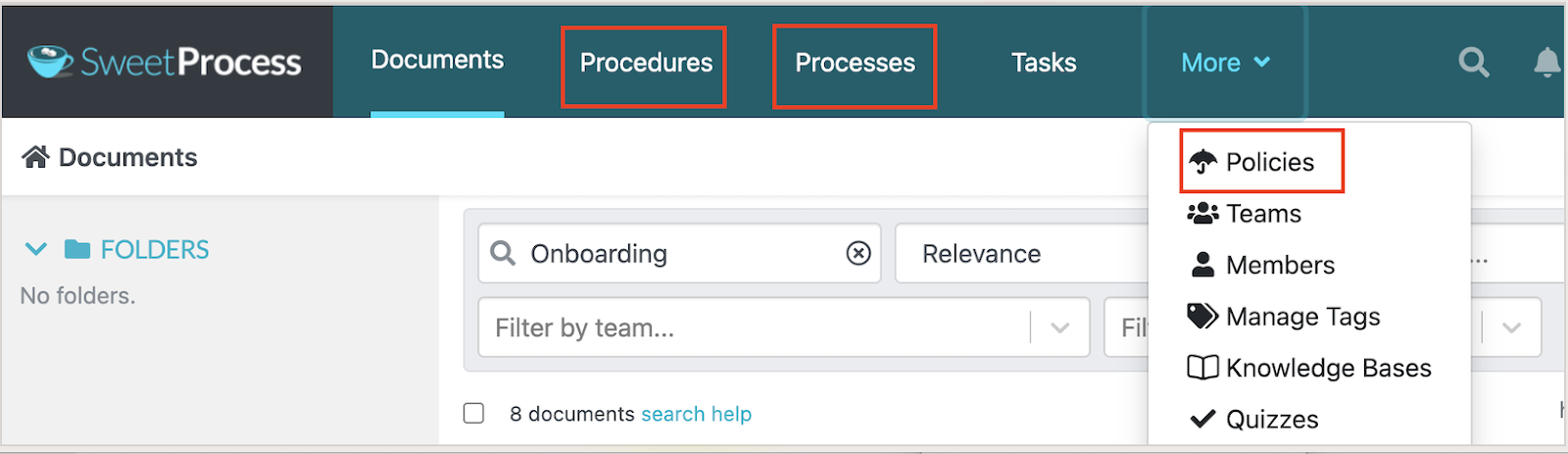
You can categorize them by team, such as HR, operations, or finance, as you draft them, making it easy to find a specific document from the dashboard.
In addition, SweetProcess enables you to create SOP workflows that link multiple documents, showing how different procedures connect to achieve larger operational goals.
SweetProcess Pricing
SweetProcess costs $99 per month or $990 per year for up to 10 users. This cost is billed by team size. If you choose the monthly payment plan, it costs $5 for each additional user, and $50 per new user on annual billing. For smaller teams, the Small Team plan costs $495 per year for up to five users, and is only available for annual billing. On this plan, each additional user costs $50 per year.
Annual billing saves about 16.7 percent compared to paying monthly. With SweetProcess, there are no Pro or Enterprise tiers. Every plan carries the same full feature set. It also includes a 30-day money-back guarantee and a free one-hour consultation call if you want help before deciding.
Scribe
Image source: Scribe
Overview of Scribe
Scribe is an SOP documentation tool that creates visual step-by-step guides by capturing your screen activity as you work. With this tool, you don’t need to write the procedures manually. It records your actions and generates a visual guide that your team can follow.
Once you have the guide, you can redact any sensitive information before sharing it with the respective stakeholders. It’s ideal for operations, IT, customer-facing, and HR teams. For a closer look at how it stacks up against a similar capture-first tool, see our Scribe vs. Tango article.
What Makes Scribe a Good Standard Operating Procedure Tool?
Here are the key features you get from Scribe:
- Auto-Generated Guides: When you’re done recording your screen, you have a complete visual guide that shows exactly what to click and what information to enter.
- Editable SOPs: You can edit the steps, add descriptions, blur sensitive information, or replace screenshots to ensure that your SOPs are accurate.
- Easy Sharing: Scribe lets you share guides via a link or embed them in your wiki or knowledge base. This makes SOP distribution simple across the entire team.
- Customization Options: You can add your brand colors to the visual SOP to match your existing business documents.
Scribe Pricing
Scribe offers a free Basic plan that gives you quick customization and the ability to share a link or embed. To access brand customization, a mobile app, and the ability to edit screenshots, you can pay for Pro Personal at $25 per seat per month billed annually, or $35 monthly. Pro Team plans start at $13 per seat per month billed annually, or $17 monthly, but they require a five-seat minimum. Enterprise pricing is custom.
Guidde
Image source: Guidde
Overview of Guidde
Just like Scribe, Guidde also uses screen capture to create visual SOPs. This tool is a generative AI platform that lets you create documentation with a few clicks. To use it, you’ll need to install the free SOP software extension on your browser and record a walk-through of the process you need.
Guidde automatically turns the recording into a step-by-step video guide complete with captions and AI-generated descriptions. It’s especially useful for teams that rely on visual training materials or need to document software workflows quickly.
What Makes Guidde a Good Standard Operating Procedure Tool?
Here are the key features that come with this SOP tool:
- AI-Powered Video Creation: Once you record your step-by-step video, Guidde uses AI to add descriptions. This makes your workflow easier to follow.
- Personalization: Choose from over 200 voices and languages to add to your SOP.
- Design and Editing Options: The tool has a low learning curve. You don’t need design skills to create a visual SOP.
- Embedding and Sharing: If the procedure was created by one team or a manager, they can embed or share the link with the rest of the organization for easier collaboration.
Guidde Pricing
Guidde offers a free plan that lets users create up to 25 how-to videos, share links, and record voiceovers. However, to get unlimited videos and features that allow you to blur information, you’ll need to pay for the Pro plan at $19 per creator per month or the Business plan at $39 per creator per month, both billed annually.
If you prefer to pay monthly, Pro goes for $29 per creator per month, and Business costs $59 per creator per month. You can also request a custom price for the Enterprise option.
Whale
Image source: Whale
Overview of Whale
Whale is an AI-powered SOP tool that helps teams capture processes and use them for training and onboarding. All the procedures are centralized on the Whale platform, making it easy for your employees to access and update company information.
With this tool, you can transform your procedures into training manuals. This makes it ideal for companies experiencing rapid growth or high turnover.
What Makes Whale a Good Standard Operating Procedure Tool?
Here are the core features of using Whale:
- Templates: You can use the Whale templates to draft your SOPs much faster.
- Export and Import Capabilities: Your team can import existing Word documents into Whale to have uniform SOPs. It’s also possible to export procedures for printing.
- Access Permissions: With Whale, you can control who can view and edit your documents to protect sensitive information.
- AI Assistant: To generate content for your SOPs, you can use the AI prompts to instantly create and refine a draft.
Whale Pricing
Whale has four pricing tiers. The Free plan supports one creator and 10 members and gives you access to core features such as the screen recorder and video to SOP converter. The Scale plan costs $249 per month, billed annually, includes three creators with unlimited members, and the Advance plan costs $499 per month, billed annually, and includes five creators with unlimited members.
For monthly payments, the Scale option costs $399 per month, and Advance goes for $799 per month. The Enterprise option is custom and is only billed annually.
Trainual
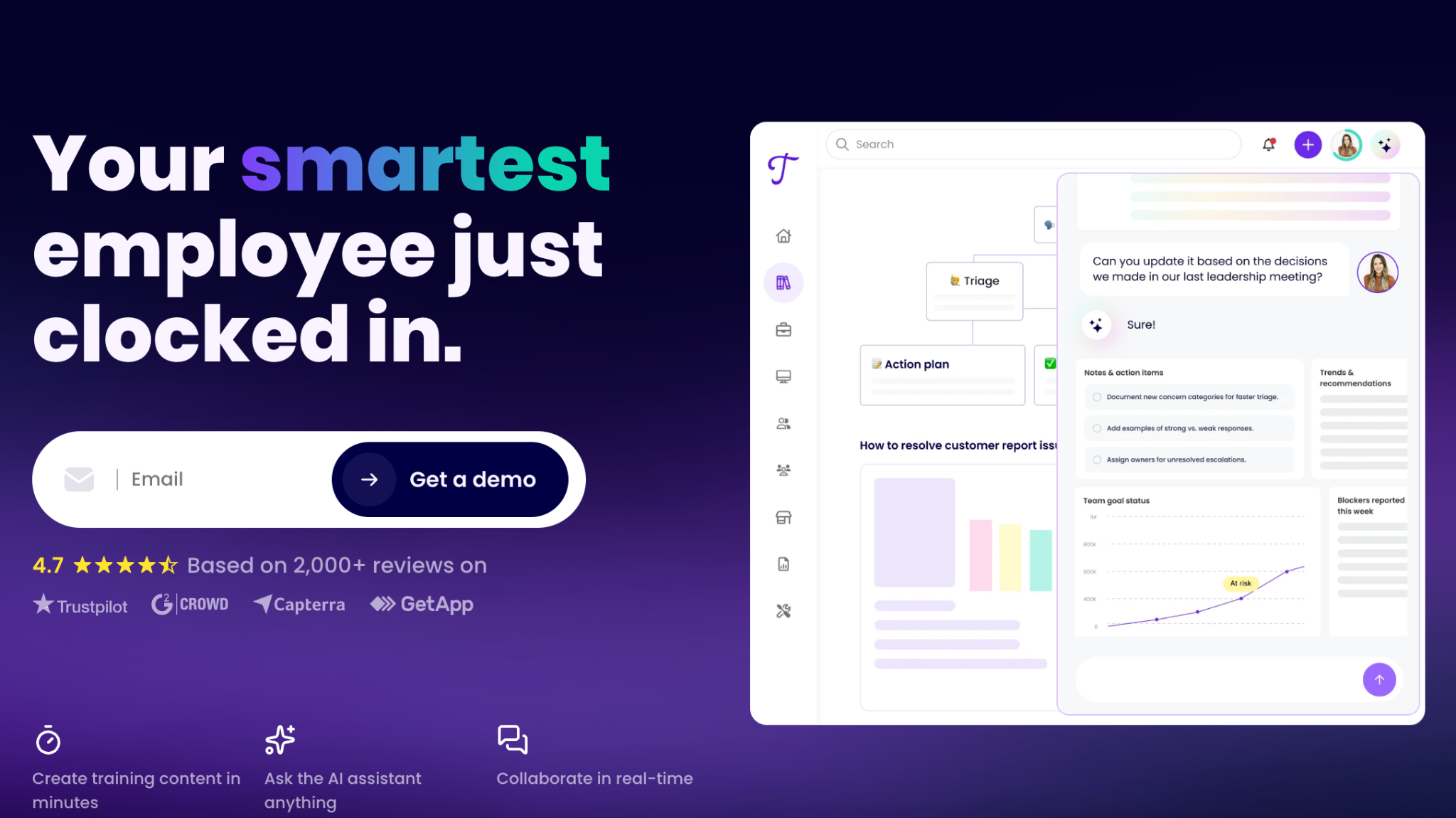
Image source: Trainual
Overview of Trainual
Trainual is an SOP tool that manages your documentation to boost your employee training and onboarding efforts. It’s built for small to mid-sized businesses that want to package their procedures, policies, and processes into structured training programs employees can complete at their own pace.
With this tool, you get quizzes, completion tracking, role-specific learning paths, and knowledge bases to fully equip your team.
What Makes Trainual a Good Standard Operating Procedure Tool?
Here are the key features of Trainual:
- Role-Based Training Assignments: Managers can assign SOPs to specific roles, making onboarding faster and more structured.
- Built-In Quizzes: Your employees can test their knowledge after completing SOPs, ensuring they understand processes.
- Multiple Integrations: Trainual integrates with popular tools like QuickBooks and Slack, so you don’t have to use multiple tools.
- Centralized Wikis: All the company information is easily accessible on the Trainual platform for easier collaboration.
Trainual Pricing
Trainual doesn’t list the specific costs for all tiers on its website. However, it has four pricing plans: Core, Pro, Premium, and Enterprise.
Process Street
Image source: Process Street
Overview of Process Street
Process Street is a checklist-driven workflow platform built around recurring processes that need conditional logic, meaning a step that only appears if a previous answer meets a certain condition. With this tool, you can standardize the way you run your company every time and automate your workflows.
Because of its features, Process Street works for tasks such as client and employee onboarding.
What Makes Process Street a Good Standard Operating Procedure Tool?
Here are the key features of Process Street:
- Conditional logic in workflows: Steps can branch based on how a previous step was answered.
- Workflow runs: Launch a new checklist for each time the process happens, with its own audit trail.
- Approval steps: Build sign-off points directly into a workflow’s logic.
- Integrations: Connect to common business tools for triggering workflows automatically.
Process Street Pricing
Process Street offers three tiers, Startup, Pro, and Enterprise. However, none of them display the actual cost; you’ll need to contact the sales team for a quote.
Document360
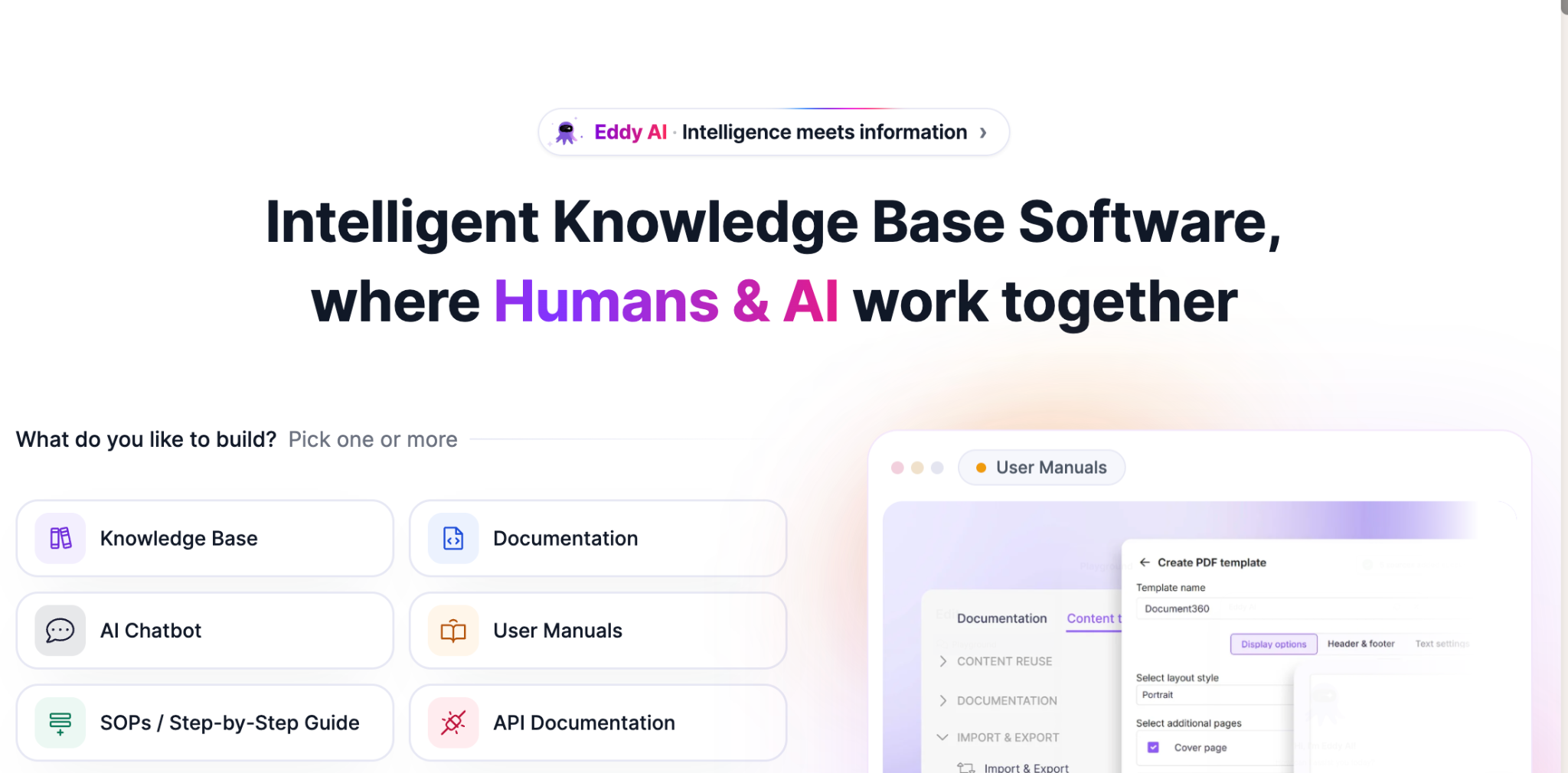
Image source: Document360
Overview of Document360
Document360 is a knowledge base platform built for customer-facing documentation. You can use it to create user manuals, guides, and API documentation for your technical teams. The platform’s AI capabilities make it easy to generate articles and search for specific SOPs.
It suits teams that need a polished, searchable knowledge base for customers or API users.
What Makes Document360 a Good Standard Operating Procedure Tool?
Here are the key features of Document360:
- Version control: Track every change to an article and revert if needed.
- AI-assisted writing (Eddy AI): Available as an add-on rather than bundled into the base price.
- Approval workflows: Route article changes through review before publishing, on higher tiers.
- Extensive Analytics: See which articles get used and where readers get stuck.
Document360 Pricing
Document360 doesn’t display any figures on its pricing page. The customized pricing is determined based on the number of workspaces you need, AI usage, accounts, language, and security needs.
Tango
Image source: Tango
Overview of Tango
Tango is an SOP tool that captures a workflow directly from your browser and turns it into an interactive, step-by-step guide. When you start recording with Tango, it captures screenshots and descriptions of your procedure.
This tool is built for teams that want a quick way to document browser-based tasks. New users can get started with the free plan before upgrading to access more features.
What Makes Tango a Good Standard Operating Procedure Tool?
Tango gives you these features:
- Browser-based capture: You can generate a guide automatically as you click through a workflow.
- Voice transcription: Speak while capturing, and Tango transcribes it into the guide.
- Shareable procedures: Once you finish recording, you can export the guide as a link or embed.
- Viewership insights: Tango allows you to see which employee has opened and completed a shared guide.
Tango Pricing
Tango’s Free plan covers up to five shared workflows and up to 10 members per workspace. The Pro Personal plan costs $22 per user per month billed annually for workspaces of one to two members, or $15 per user per month billed annually for workspaces of three or more members. Monthly billing runs $26 and $20, respectively. Enterprise pricing is custom and adds SSO and automatic PII redaction.
Tallyfy
Image source: Tallyfy
Overview of Tallyfy
Tallyfy is a workflow automation platform that transforms your repeatable job into a clear process. You can use this tool for tasks such as employee training and client onboarding. It suits teams with SOPs that involve approval chains or handoffs between people, like invoice approvals or new-hire IT provisioning checklists.
What Makes Tallyfy a Good Standard Operating Procedure Tool?
Here are the key features of Tallyfy:
- Conditional rules: Route a process differently depending on how a step was answered.
- Custom branding and smart views: Present workflows in a way that matches your brand.
- Unlimited guests: You can bring outside collaborators into a workflow without a paid seat.
- API access: Your team can build custom integrations for teams with development resources.
Tallyfy Pricing
Tallyfy has no permanent free plan, but it offers a 14-day trial. The Full Seat plan costs $300 per year when billed annually and $30 per month for the monthly option. The Light Seat option costs $100 per year or $10 per month when billed monthly.
Each of these tools brings something valuable to SOP documentation, but if you’re looking for a platform that offers flat-tier pricing with access to all features, SweetProcess is the go-to option. Start your free 14-day trial here!
What These SOP Tools Actually Cost a Team of 10, 25, and 100
Here’s the annual cost of each SOP tool, calculated for three team sizes. We’ve used the vendor’s own published annual costs.
| Tool | 10 users | 25 users | 100 users |
| SweetProcess | $990 | $1,740 | $5,490 |
| Scribe | 1,560 | $3,900 | $15,600 |
| Guidde | $2,280 | $5,700 | $22,800 |
| Whale(Scale Plan + 3 creators) | $2,988 | $2,988 | $2,988 |
| Trainual | Quoted on request | Quoted on request | Quoted on request |
| Process Street | Quoted on request | Quoted on request | Quoted on request |
| Document360 | Quoted on request | Quoted on request | Quoted on request |
| Tango (Pro Team) | $1,800 | $4,500 | $18,000 |
| Tallyfy (Full Seat) | $3,500 | $8,000 | $30,500 |
Whale’s real cost depends on how many individuals create content, since members are unlimited on paid plans and only creators are factored in. The Scale plan costs $249/month and includes three creators and unlimited members. The costs above assume your team has three creators and the remaining users are members. Additional creators cost $29/month each, so your cost increases if more than three people need to create or edit SOPs.
If a paid plan isn’t the right fit yet, read more in our article on free SOP software to see what’s available at no cost.
Key Features To Consider Before Choosing a Standard Operating Procedure Tool
Not all SOP tools are equal. Picking the wrong choice could leave you with expensive software that no one uses. Let’s examine the key features you should look out for before you sign up for a plan.
Document Creation and Editing
Have you ever started documenting a process only to realize that your tool makes everything feel clunky or tedious? A good SOP platform will prevent this. Creating and editing documents should be simple, even for non-writers. This means offering:
- Templates
- Drag-and-drop sections
- Simple formatting options
- Features to break procedures into clear steps
When the writing experience is smooth, your team is more likely to proactively document processes. Additionally, it should allow you to add images, videos, tables, and checklists to make your SOPs feel more interactive. Including screenshots and video walk-throughs as you write your procedure makes the information scannable.
Artificial Intelligence Assistance
AI assistance is quickly becoming one of the most valuable features in SOP tools. Instead of starting from a blank page, an SOP AI can draft your first version of the SOP based on a short prompt or outline. This removes the intimidation of writing and helps teams document processes faster.
For example, an operations manager can simply type “Create an SOP for Weekly Inventory Checks,” and the AI will generate a complete structure for them to refine. Beyond drafting, AI can also improve clarity, expand steps, shorten text, or turn long paragraphs into steps. This way, your team develops a comprehensive SOP document much faster.
Centralized SOP Library
You’ve accumulated multiple SOPs over the years. But can your team find a specific document in minutes? That’s why having a centralized SOP library is important. All your procedures should be stored and categorized by project or department, making it easy for employees to find.
Beyond storage, a centralized library also becomes a single source of truth for your entire organization. New hires know where to look, and managers know whether a process is up to date.
Founder and CEO Saul W. Marquez highlights a reality many growing businesses face: scaling without structure, which leads to inconsistency. He shares that sustainable growth becomes possible only when processes are clearly documented, standardized, and easily retrievable. Therefore, companies should create SOPs to boost their operations and revenue.
Version Control
Nothing is more frustrating than realizing you’ve been following an outdated SOP. An SOP tool with version control solves this problem by ensuring everyone always sees the most current version of any process. It tracks every change, including who made it, when it was made, and what was updated.
This transparency is especially essential for teams in compliance-heavy industries where auditors want documented proof of revisions. Beyond compliance, version control prevents confusion. Suppose your IT team updates the “Password Reset Procedure” with new security steps. In this case, the old version is archived automatically, and the updated one becomes the default.
Role Assignment and Approval Workflow
As the founder at The Lever, Justine Parsons points out, SOPs must have assigned responsibility and oversight. Even a brilliant SOP will fail if no one owns it, approves it, and ensures it’s followed. Role assignment and formal workflows ensure someone is accountable for every process, making the document actionable.
Your choice of SOP tool should have role assignment and approval workflows. These features allow you to control who can view, create, edit, and review documents. For instance, if you have a quality assurance team reviewing a “Safety Inspection Protocol,” each update moves through a clear approval chain, ensuring compliance.
This way, you avoid unauthorized changes that could disrupt critical processes and ensure everyone remains accountable for their tasks.
Collaboration and Task Assignment
One of the best practices for creating and managing SOPs is involving your team. They need to share feedback and assign responsibilities to each other. Select an SOP tool that allows your employees to tag team members and leave comments on documents. This feature keeps your documents accurate and helps you gather different perspectives.
Once the SOP is created, the managers and supervisors can assign tasks and track the completion rates. For instance, you can assign training tasks for new hires from your dashboard and view their progress in real time.
Integration With Training and Project Management Tools
If you already have project management tools and communication systems, you need an SOP tool that integrates seamlessly. This way, your employees don’t have to keep switching between systems to complete their tasks.
Integrations come in handy during employee training and onboarding. For instance, you can connect your SOP to an existing learning management system for additional training resources.
Now that you know what to look for, it’s clear that SweetProcess checks every box without overwhelming your team. Try it free for 14 days!
Types of Standard Operating Procedure Tools
While some SOP tools focus on simple documentation, others help teams create visual guides. Additionally, some excel at onboarding employees more efficiently. Here are the common types of SOP tools.
General Documentation Tools
These are the tools most businesses start with when documenting their procedures. Think Word documents or Google Docs. They let you write and store your SOPs. They might be useful for early-stage documentation before the team transitions into more structured systems.
As you scale, you’ll need a tool like SweetProcess, which offers these features and more.
SOP Management Tools
SOP management tools go beyond writing. They add templates, permissions, approval workflows, and version tracking, so your SOPs stay consistent across departments and locations. SweetProcess, Whale, and Tallyfy’s workflow layer fall into this category.
If you’re deciding between a management platform and a straight roundup of options, here’s a roundup of standard operating procedure software to consider.
Visual Capturing Tools
For some teams and industries, visual guides are ideal. For instance, in a manufacturing company, employees might follow a diagram, a flowchart, or screenshots with instructions on how to execute their tasks. SOP tools in this category allow you to capture clicks and actions to create a visual guide for the team. This reduces the time it takes to create a procedure.
With SweetProcess, you can embed visuals in your SOP and steps to clarify each step. You can also use the screen recording feature to create a visual procedure that your team should follow.
A good example of a company that used SweetProcess for this is Maxwell Counters. The General Manager, Austin Maxwell, was frustrated by the inconsistency in performance and documentation at his countertop fabrication business. SOPs existed, but they were scattered across paper binders and Word documents, making them hard to follow.
As a result, the business lacked operational consistency and risked quality issues. A Google search on SOP software led him to SweetProcess. Since this transition, the company now has:
- A single accessible knowledge base where every employee can find up-to-date procedures.
- Accessible documentation that reduces “Which version is this?” confusion.
- Enabled teams to perform more consistently day-to-day because they follow documented workflows.
- Improved onboarding and team alignment because new hires can access clear guides and checklists.
Process and Workflow Automation Tools
Some SOP tools excel at automating your workflow. They can assign tasks and initiate trigger actions for repeated tasks. Such systems ensure that your operations flow smoothly. For example, an automation tool might trigger a “New Hire Setup” workflow that alerts IT to create accounts and HR to send onboarding documents.
Process Street and Tallyfy sit here, automating tasks and triggering actions for repeated work.
Training and Onboarding Tools
Your SOPs are only useful if people actually learn them. With a training and onboarding tool, you can design training modules to show new hires how processes work. In addition, you can train existing employees on new policy changes and quiz them on what they know. Trainual and Whale both lean into turning documentation into structured training.
SweetProcess is also an excellent training tool. It provides a platform to develop a comprehensive knowledge base that employees can refer to. Additionally, you can create quizzes and assess your team’s knowledge on existing and new processes.
Manny Cosme, President and CEO of CFO Services Group, turned to SweetProcess when training new hires became challenging. He says, “When we were a smaller business, and there’s only a handful of us, it was so much easier for me to train someone and explain to them what to do, and then I’d be able to go back and double-check work. But as we grew, that became harder to do. I was looking forward to somewhere I could just put information so they could read it, train themselves, and then have checklists that they can use to do their own quality control work.”
He did a Google search and found SweetProcess to be the ideal tool to close the training gaps. Since the adoption, the company has now:
- Reduced new-employee training time. They can train someone in about two weeks.
- Created standardized, easy-to-follow training and operational processes that anyone can access.
- Implemented role-based access, giving each team the precise documentation they need.
- Centralized the company’s procedures into one web-based system, replacing scattered Word docs and manual checklists.
Ready to streamline your processes just like these companies? Start your 14-day free trial of SweetProcess today!
Benefits of Standard Operating Procedure Tools
Implementing an SOP tool gives you these benefits:
Centralized and Updated Library
A centralized library protects you from losing your tribal knowledge when seasoned employees leave. You’ll have all the documents stored in one dashboard for employees to access, even when updates are made by a different employee.
Faster Training and Onboarding
You can cut the time it takes to train and onboard employees by using an SOP tool with a centralized knowledge base, SOP manuals, training guides, and assessments. Employees can access these resources independently.
Compliance Tracking
One of the easiest ways to provide audit reports for a certain period is to keep a trail of documents. An SOP tool allows you to check your version history and approval workflows, so it’s easier to prove that your processes follow regulatory standards.
Limited Errors
Your team is more likely to have errors when the instructions are unclear or hard to find. With an SOP tool, you can create standardized protocols that guide your team to follow the same steps every time.
Give your team the clarity and the structure they need to perform at their best. Sign up for a free trial of SweetProcess and see the impact of organized SOPs.
SOPs in Regulated Work
If your business operates in a regulated environment, you need these capabilities in your SOP tool:
- Version history: You can identify previous versions and see who changed what and how a procedure changed.
- Approval gates: A revised procedure can go through a defined review process and sign-offs before it goes live.
- Acknowledgment records: You can record who signed off on a particular version and when.
- Retrievable records: You can produce the relevant documentation later when you need to understand what was approved or acknowledged.
However, not all the tools in this list do this. Scribe, Guide, and Tango are capture tools that keep a limited version history, but they don’t offer a built-in approval or sign-off mechanism. Document360, Whale, and Tallyfy support approval steps in their workflow logic on paid tiers.
SweetProcess covers all these areas. You can access version history, an approval workflow before a change goes live, and a record of who signed off on which version and when. However, it doesn’t make your organization compliant with any regulation or produce records that are automatically audit-grade or legally sufficient on their own.
If your work involves specific regulations, you’ll need an employee who understands those requirements to review what any tool produces.
A well-managed SOP is the starting point. See how a structured approval trail works in practice with a free 14-day trial of SweetProcess.
Which Standard Operating Procedure Tool Should You Choose for Your Business?
The right choice depends on what you’re actually trying to solve. If you need quick visual guides, Scribe, Guidde, or Tango cover that well. If your team needs onboarding and training built around your documentation, Trainual and Whale both do that. If your SOPs are really approval chains between people, Process Street and Tallyfy handle that well; however, you’ll need to request pricing.
SweetProcess is built for the team that needs document creation, whether manual, AI-assisted, or screen-recorded, alongside the management layer that covers ownership, reviews, approval sign-off, and a verifiable record of who signed off on what and when. It costs $990 a year for up to 10 users. All users get full access as soon as they sign up.
Your organization needs an SOP tool that actually works after the SOP is written. Start your 14-day free trial today. No credit card required.
FAQs
What is SOP software?
SOP software is a tool for writing, storing, and managing standard operating procedures so a team follows the same steps consistently. It typically adds version control, approval workflows, and a searchable library on top of plain document creation.
What is the best SOP software?
The best SOP software depends on whether you need document management, screen-capture guides, or built-in training. A team managing SOPs across departments needs a different tool than one that just needs quick browser-based guides.
What are the five parts of an SOP?
SOPs include a title and purpose, the scope of who it applies to, the step-by-step procedure itself, roles and responsibilities, and a revision or version history showing when it was last updated and by whom.
What are the five standard operating procedures?
There is no universal set of five SOPs that every business must use. Businesses typically maintain SOP categories across areas like onboarding, customer support, quality control, safety and compliance, and finance or accounting, with the specific procedures within each category varying by industry.
How much does SOP software cost?
Costs vary. SOP software can range from free plans to custom enterprise pricing. The cost depends on whether the vendor charges by user, creator, seat type, workspace, or another measure. For example, SweetProcess costs $990 per year for up to 10 users, while Tallyfy lists Full Seats at $300 per user per year. Some vendors, including Trainual, Process Street, and Document360, require you to request a quote.