Last Updated on October 24, 2026 by Owen McGab Enaohwo

Choosing work instruction software is easier once you decide what kind of work you need it to support. A factory employee following instructions at a workstation needs something different from an operations manager maintaining procedures for a distributed team. If you are looking for Dozuki alternatives for your field service or manufacturing team, you need to know the pricing, limits, and fit for each of the tools.
Some of these tools are built around frontline execution and connected workers. Others focus on documentation, knowledge management, workflows, or training. The comparison below distinguishes published prices from plans that require a quote, explains how the list was selected, and identifies where each product is a poor fit. Start with the work your team needs to complete, then compare the price of supporting that work.
Key Takeaways
- Dozuki’s pricing page shows a “Get Dozuki Pricing” request rather than a public subscription figure. Contact the vendor for a quote.
- Four alternatives in this comparison require a subscription quote: Trainual, Process Street, Poka, and Zavanta. Dokit publishes starting prices, although you should confirm its current offer and feature requirements.
- SweetProcess focuses on documentation and knowledge sharing. Dozuki and Poka focus on connected frontline work, while MaintainX centers on maintenance. Compare tools that support the job you are actually replacing.
- If you need documentation software with transparent, published pricing, SweetProcess lets you create, maintain, search, assign, and share procedures in one place. You can start with a 14-day free trial here.
Table of Contents
11 Dozuki Alternatives at a Glance
| Tool | Best For | Starting Price | Not Right For You If |
|---|---|---|---|
| SweetProcess | Documentation, SOPs, and knowledge bases with transparent pricing | $99/month for up to 10 users; Small Team $495/year for up to five | You need station-side execution with equipment or sensor data |
| Dokit | Visual manuals, instructions, and collaborative documentation | From €60/month for one author; confirm current offer | You need mobile-app or offline access included in the entry plan |
| Trainual | Company playbooks, onboarding, and role-based training | Subscription quote; $1,000 one-time implementation fee | You need manufacturing-station execution tied to equipment data |
| Process Street | Recurring checklists and workflow automation | Subscription quote | You need a dedicated system for manufacturing stations and equipment |
| ScreenSteps | Searchable knowledge bases and guided procedures | From $6,000/year for Operations Standard | Your annual budget is below the $6,000 starting price |
| Poka | Frontline manufacturing knowledge sharing | Subscription quote | You want a number without a sales call |
| MaintainX | Maintenance work orders | Free Basic plan | You need general company documentation without maintenance workflows |
| Procedureflow | Visual, flowchart-based procedures | $33 per seat per month, billed annually | You require a published month-to-month subscription |
| IT Glue | MSP and internal IT documentation | $29/user/month; five-user minimum; 36-month term; onboarding fee | You are documenting general business processes rather than an IT environment |
| Zavanta | Structured SOP authoring with built-in workflow | Subscription quote | You want to compare cost before a sales conversation |
| ProcessKit | Client onboarding and recurring project automation | Free tier; Solo $49/month, Agency $149/month, Reseller $399/month | You need a platform specifically designed for factory-floor work instructions |
Pricing information was reviewed on October 6, 2026. Figures are in US dollars unless shown in euros. Compare billing periods, minimum users, implementation charges, and included features before purchasing.
Dozuki: What to Check in a Demo
Dozuki combines digital work instructions with frontline learning, workflows, and collaboration. A useful demo should show whether those capabilities match the work your team does, rather than rely on a list of assumed shortcomings.
Use your own instructions, training records, and frontline reporting needs to test the fit.
Knowledge checks and training
Ask Dozuki to demonstrate how a learner completes a knowledge check, receives feedback, and how a manager sees the result.
Dozuki promotes training and digital work instructions. Compare its current knowledge checks, grading, and task guidance directly with your training requirements before drawing a feature-level conclusion.
Photo and video editing
Dozuki supports mixed-media work instructions. Bring representative photos and videos to the demo and ask an author to upload, arrange, annotate, and replace them. Check the tools your team needs for maintaining visual instructions.
Test the media workflow with the file types and edits your team uses. Dozuki describes mixed-media work instructions, but the editor experience should be checked firsthand.
Draft saving
Test draft saving in a Dozuki demo against your team’s editing workflow. Confirm how unsaved changes, automatic saving, version history, and recovery work for the editors and devices you will use.
Test what happens to an unfinished guide if the browser closes or the connection drops.
Authoring experience
Have a frontline expert build and revise a real instruction during the demo. Note whether the required steps, lists, and media are easy to add.
Finding current instructions
Companies use cloud-based documentation platforms because every team member can find the company information and processes in one place. This reduces time spent training new people and completing tasks because everyone can access business processes.
Ask employees to find a specific current instruction on desktop and mobile, without guidance from the person who wrote it.
Reporting
Ask for sample training, usage, and work history reports that match the measures you need to track.
Mobile experience
Making the software available on a mobile app is quite important. Team members and employees can access business processes and documentation on the go as long as they have the app installed on their smart devices.
Check which authoring, training, translation, and task features work in the mobile app for your roles and devices.
Rollout and onboarding
Ask what onboarding is included and have a new user complete a common task in the demo.
Support
Confirm support channels, coverage hours, and response expectations in your proposed plan.
If your priority is a searchable procedure library with version history and assignable tasks, compare SweetProcess with Dozuki using the same real workflow. SweetProcess offers a 14-day free trial.
Dozuki Pricing for Work Instruction Software
Dozuki’s pricing page did not display a public subscription price. It asks visitors to get pricing and provides a demo-booking route, so you need a vendor quote to compare the total with another product.
Prepare the scope before requesting a quote: the number of authors and frontline users, sites, languages, workflows, and integrations you need. Ask Dozuki which of those factors affect its proposal, rather than assuming a particular per-user rate or repeating a price from another comparison site.
Ask for the first-year and renewal totals in writing. Separate the subscription from migration, configuration, training, hardware, and any professional services. A headline annual figure can look comparable while covering a different number of users, a different support level, or fewer sites. Confirm whether readers, authors, administrators, and temporary workers are counted in the same way.
Use one scope sheet for every vendor on your shortlist. Record the required capabilities, the number of people using each role, and the period you want to compare. Then calculate both the initial rollout cost and the recurring annual cost. For products with a public price, use that figure as a starting point rather than assuming it covers every requirement. For quoted products, request the same scope so you can compare like with like.
If a listed number matters to you before you get on a call, there are tools that are transparent with the cost, and SweetProcess is one of them. Try it here!
How We Chose These 11 Dozuki Alternatives
We selected products that can hold, maintain, and share instructions, procedures, or the recurring work those instructions support. The criteria below describe the scope of the comparison; the list is not a scored ranking.
Document Management
A tool needs to keep instructions usable after the first capture. That means your team can revise content, organize it, and make the current version available to the people who need it. Screen recordings alone do not meet that purpose. Our broader comparison of standard operating procedure software covers the documentation category in more detail.
Ease of Use
The shortlist focuses on products a business can adopt as an operating tool. Some offer implementation support, and a complex rollout may still need specialist help. During evaluation, have the intended author and reader complete a real task so you can judge setup, navigation, and ongoing maintenance for your own team.
Pricing Transparency
We distinguish published subscription prices from plans that require a sales quote. A product is not excluded merely because it uses custom pricing, but an unverified estimate is not presented as a public rate. Check the billing period, seat or account basis, minimum commitment, and implementation costs together.
Products that only capture a one-off recording, or do not help a team maintain instructions or recurring work, fall outside this comparison. We also avoid treating a generic project board as a manufacturing execution system. A product can be useful in one category without replacing the full set of capabilities you currently use in Dozuki.
This comparison comes from SweetProcess, our first choice for keeping procedures current and assigning work from those instructions. We compared public vendor documentation, listed features, and pricing information, and distinguished published prices from plans that require a quote. We did not conduct a scored head-to-head test or establish firsthand demos for this article. You can sign up for a free trial to test SweetProcess with your own workflow.
11 Dozuki Alternatives That Actually Get the Work Done
The software you choose should meet your company’s actual needs. These 11 alternatives cover documentation, training, workflow management, and frontline execution. Each section keeps the same overview, features, pricing, benefits, and fit check so you can compare the parts that matter to you.
1. SweetProcess
SweetProcess helps businesses document procedures, tasks, and processes in one place. It can support work such as employee onboarding, customer support, financial planning, and product development. A shared procedure library gives your team a maintained reference for recurring work.
You can use SweetProcess to build a private or public knowledge base, document all the company information, manage tasks, and master processes. This platform is an ideal Dozuki alternative because it supports checklists.
SweetProcess can support teams of different sizes that need a shared procedure library. The Dozuki versus SweetProcess comparison is useful when you have narrowed your shortlist to those two products.
Features
- Single sign-on system
- Team management
- Collaboration in real-time
- Users can see version history
- Email and phone support
- Connect other apps through Zapier
- Draft documents with SweetAI; it does not know your business or obligations, so someone who does must review its output
- Assign and track tasks
- Document company’s step-by-step procedures
- Link policies to procedures and processes
- Combine multiple processes
- Create public or private knowledge base
- Embed videos and files
- Two-factor authentication
- Image editor
- Print documents for offline viewing
Pricing
SweetProcess costs $99 per month or $990 per year for up to 10 users. Each additional user costs $5 per month, or $50 per year on annual billing. The Small Team plan costs $495 per year for up to five users, with each additional user at $50 per year. The Small Team plan is billed annually. Billing is based on users added to the team.
For example, 20 users on SweetProcess’s standard monthly plan would cost $149 per month: $99 for the first 10 users and $50 for 10 additional users. On annual billing, the same team would cost $1,490 per year: $990 plus $500. Use the number of users on the team when budgeting, and compare that total with any per-seat or per-account alternative.
Annual billing on the standard plan saves $198 compared with 12 monthly payments, about 16.7 percent. All plans include the same full feature set. You can start a 14-day free trial without a credit card. SweetProcess also advertises a 30-day money-back guarantee with a free one-hour consultation; review the applicable terms when you subscribe.
Benefits of SweetProcess
- Users get a 14-day free trial period.
- The site is easy to navigate.
- SweetProcess offers customer support via phone and email.
- It has a fair and simple pricing structure.
- Users get email reminders on their project.
- You can create and organize procedures and processes in the browser.
- All the procedures and processes are cloud-based.
- It offers a free systemization checklist.
How to Find Documents on SweetProcess
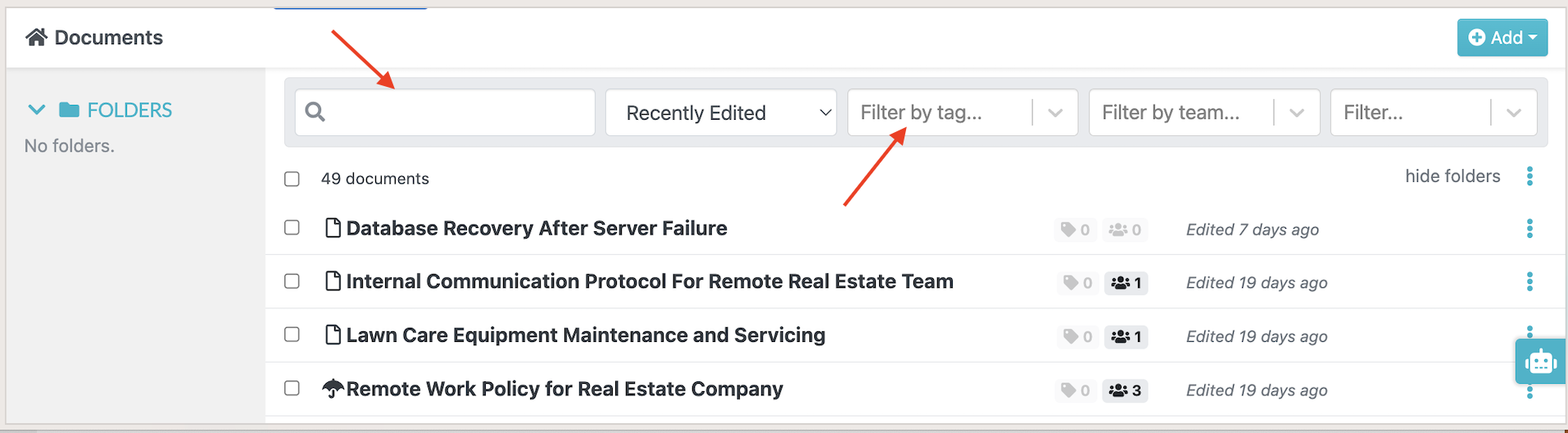
Once you log in to your SweetProcess account, select “Documents” on the main menu. From this page, you can view all your documents.
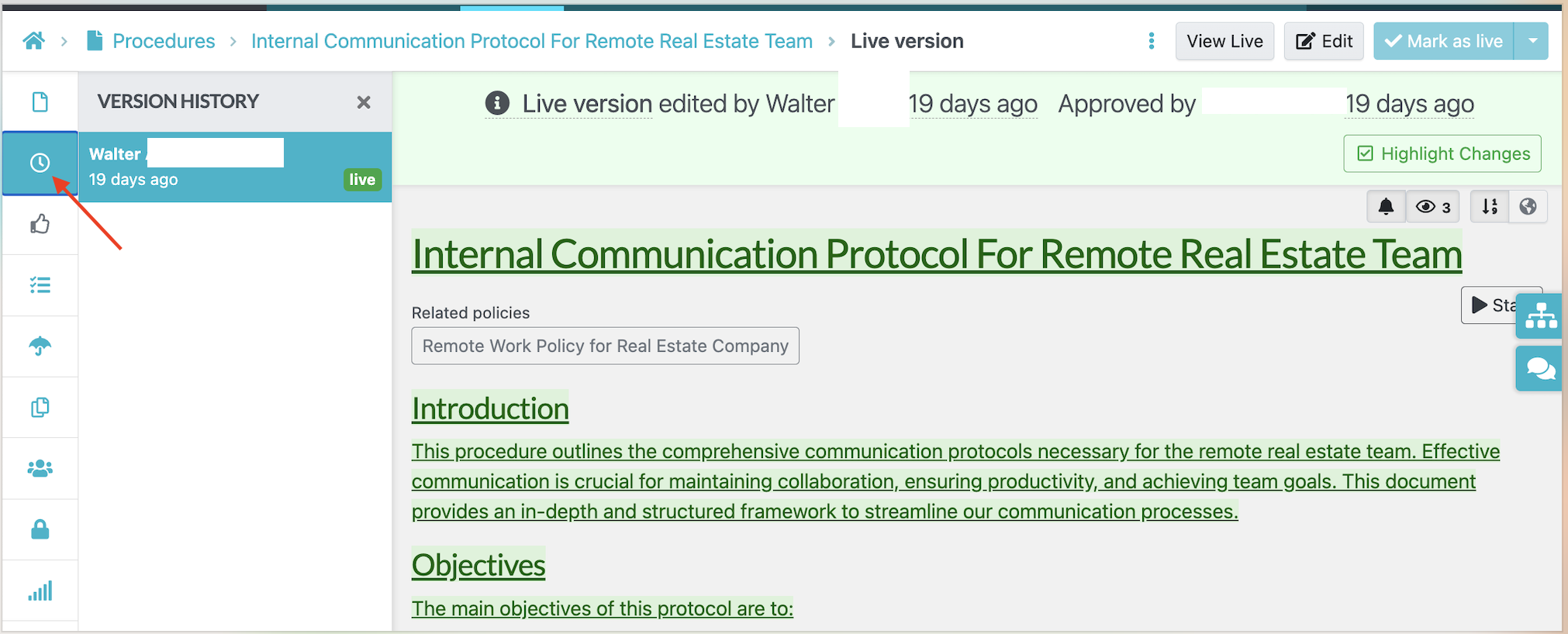
You can check the version history of your documents easily on SweetProcess. Select the specific procedure, process, or policy, and click on the clock icon. This will display your current version and past versions in the sidebar.
How to Create Procedures, Policies, or Processes With SweetProcess
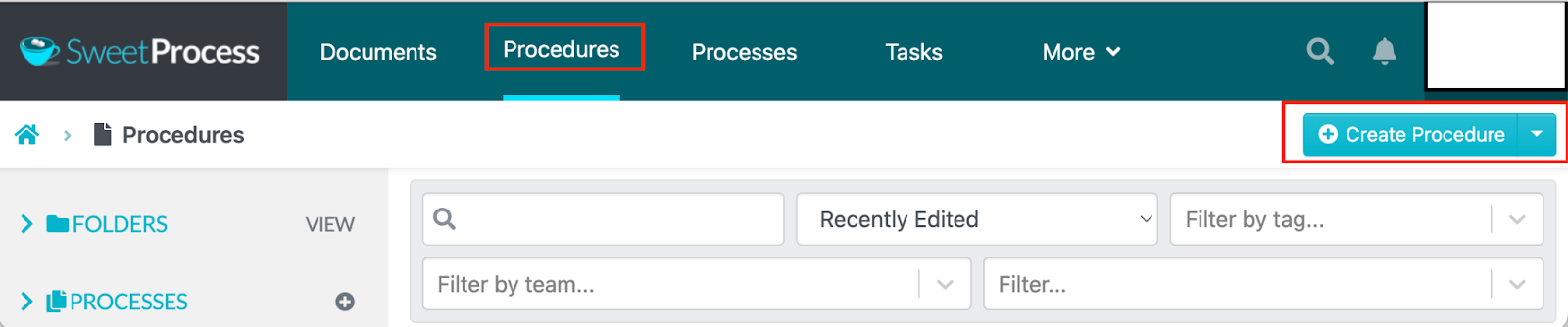
To create a procedure, log in to SweetProcess and select “Create Procedure.” Policies and processes have their own creation options; choose the document type that matches the information you need to record.
Enter the title of the procedure.
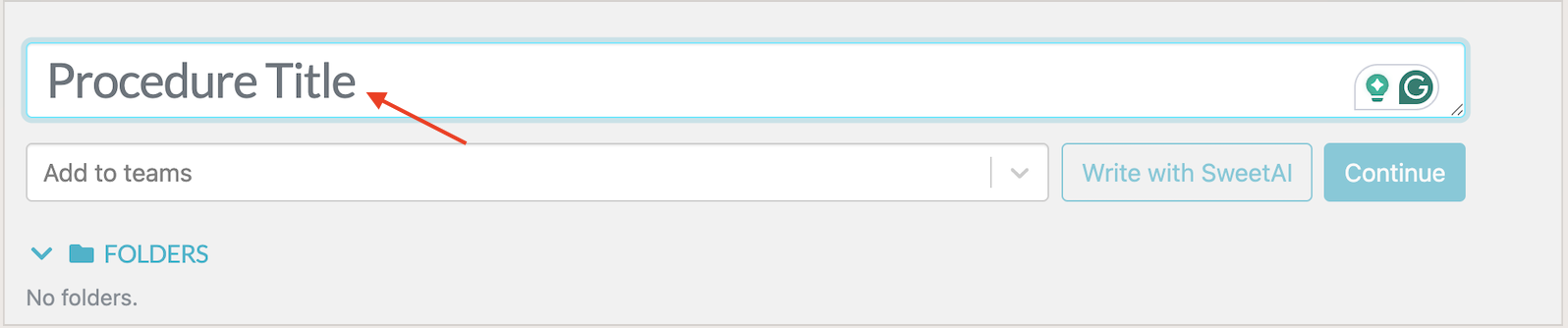
Add this procedure to a team or several teams and click “Continue”.
On the next tab, you can add a description to your procedure, process, or policy. In this section, you can add some tags, embed videos, add images, and add steps. Once you are done, you can click “Finished Editing.” You can repeat these steps to add other company procedures, policies, and processes.
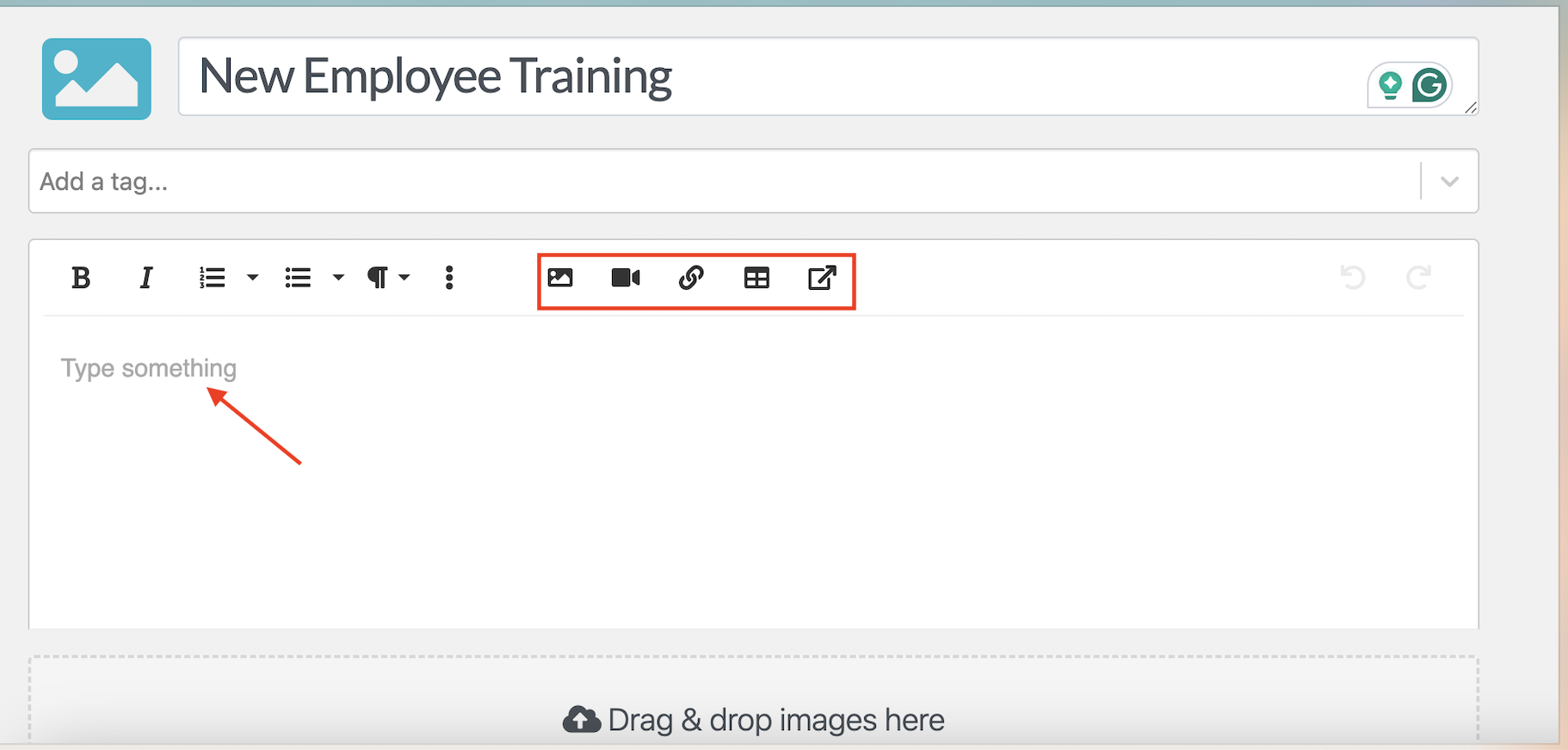
How to Assign, Monitor, and Track Tasks on SweetProcess
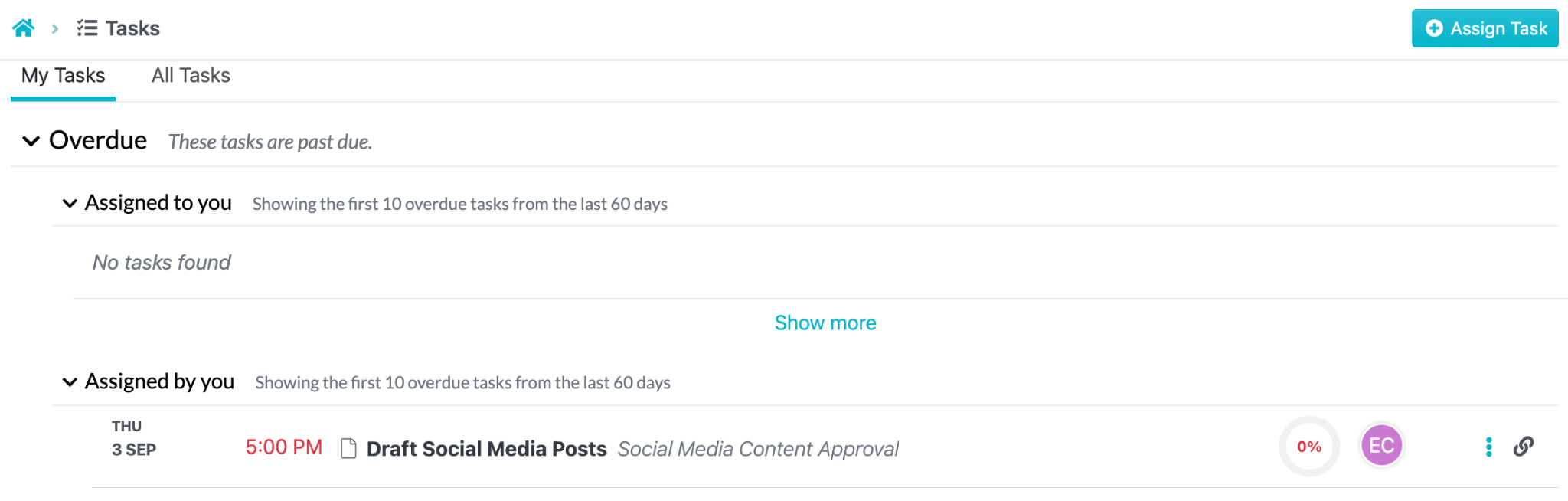
To assign tasks, select the “Tasks” tab on your account dashboard. Choose the “Assign Task” button.
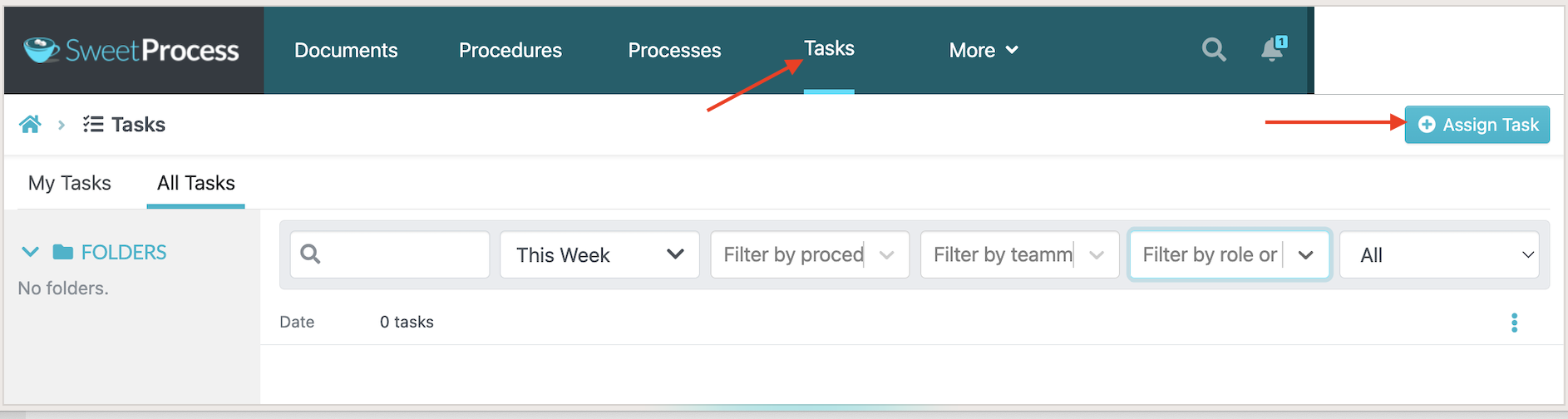
You can do this from the existing procedure or process.
Select a team member to assign tasks, add their name, the due date and time, and include the task name.
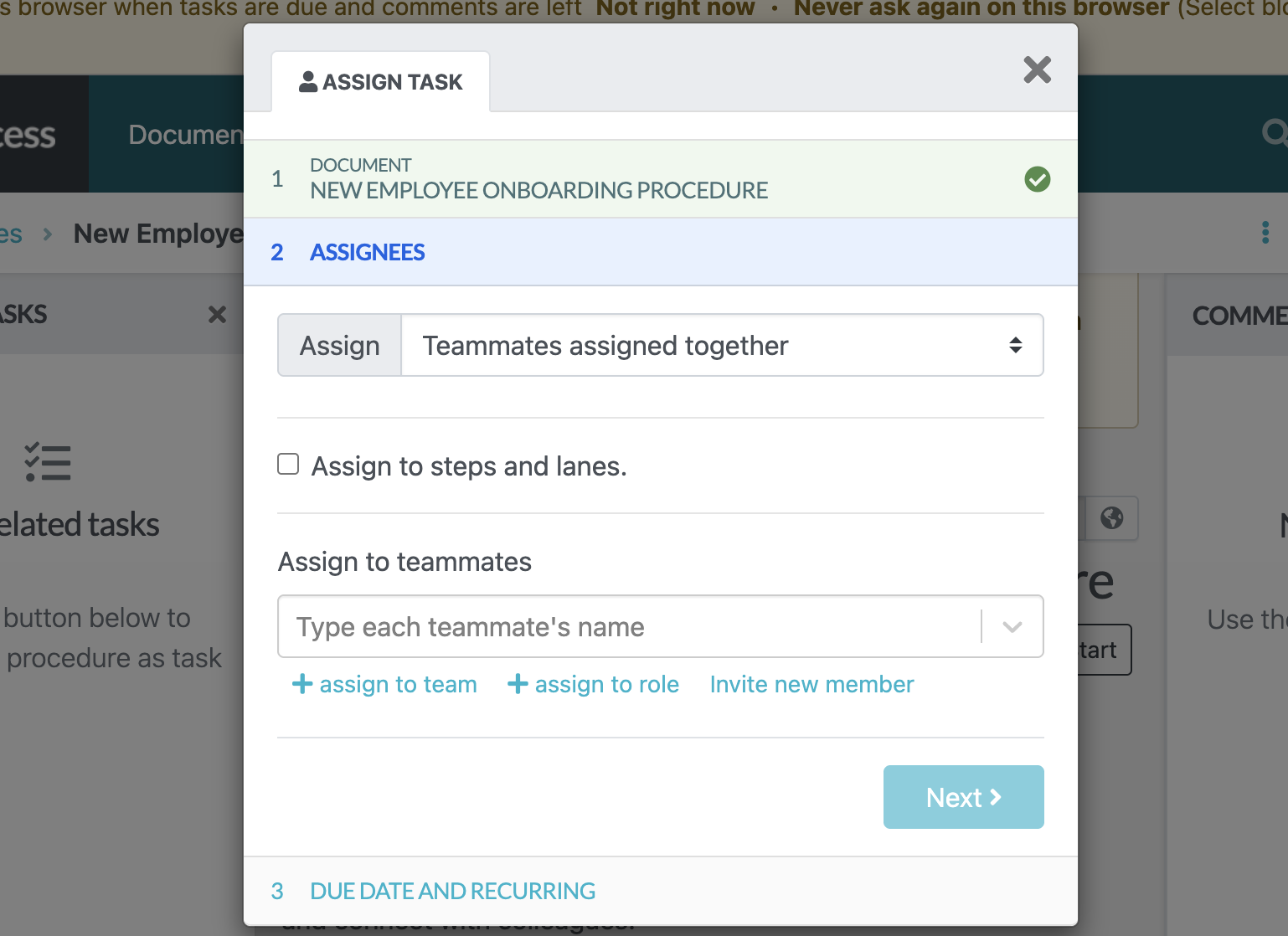
To track and monitor these tasks, check the “My Tasks” tab to see what is due soon and what is overdue.
How to Create a Knowledge Base Using SweetProcess
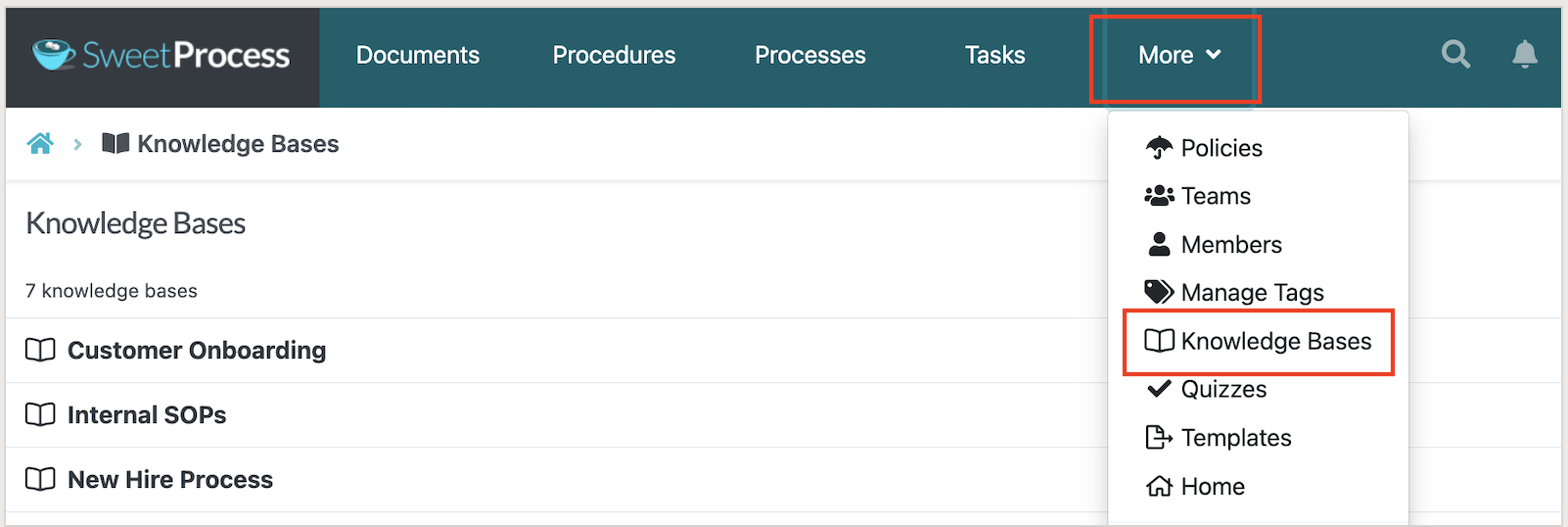
Creating a knowledge base for your customers and clients with SweetProcess is easy. Log in to your account and select “More” on the main menu, and click on “Knowledge Base.”
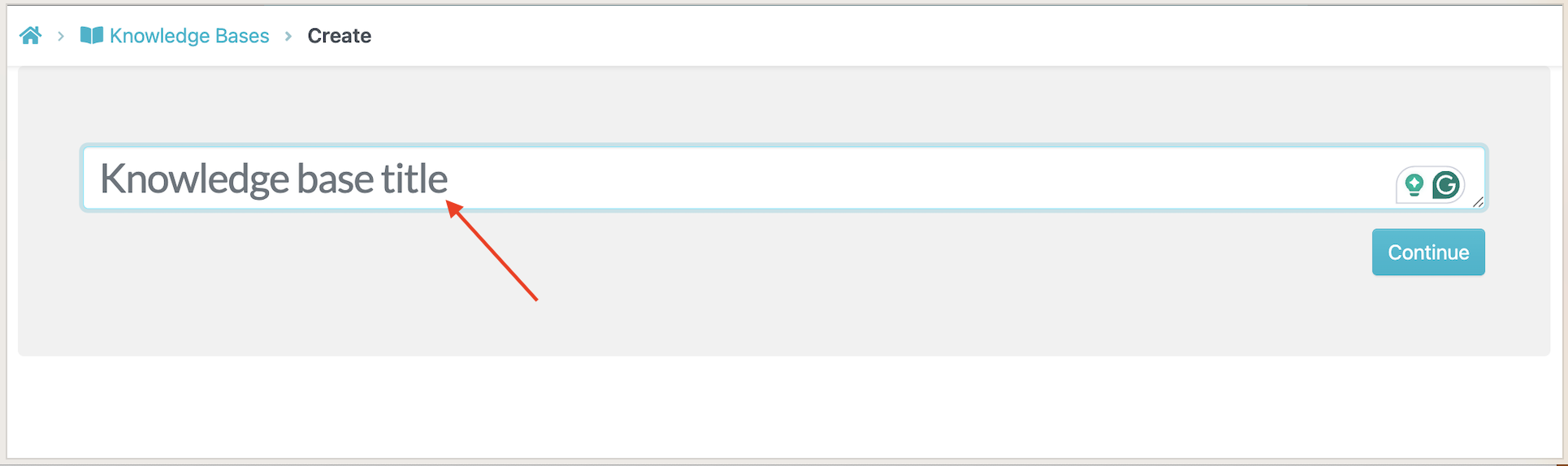
Select “Create Knowledge Base” and add a title.
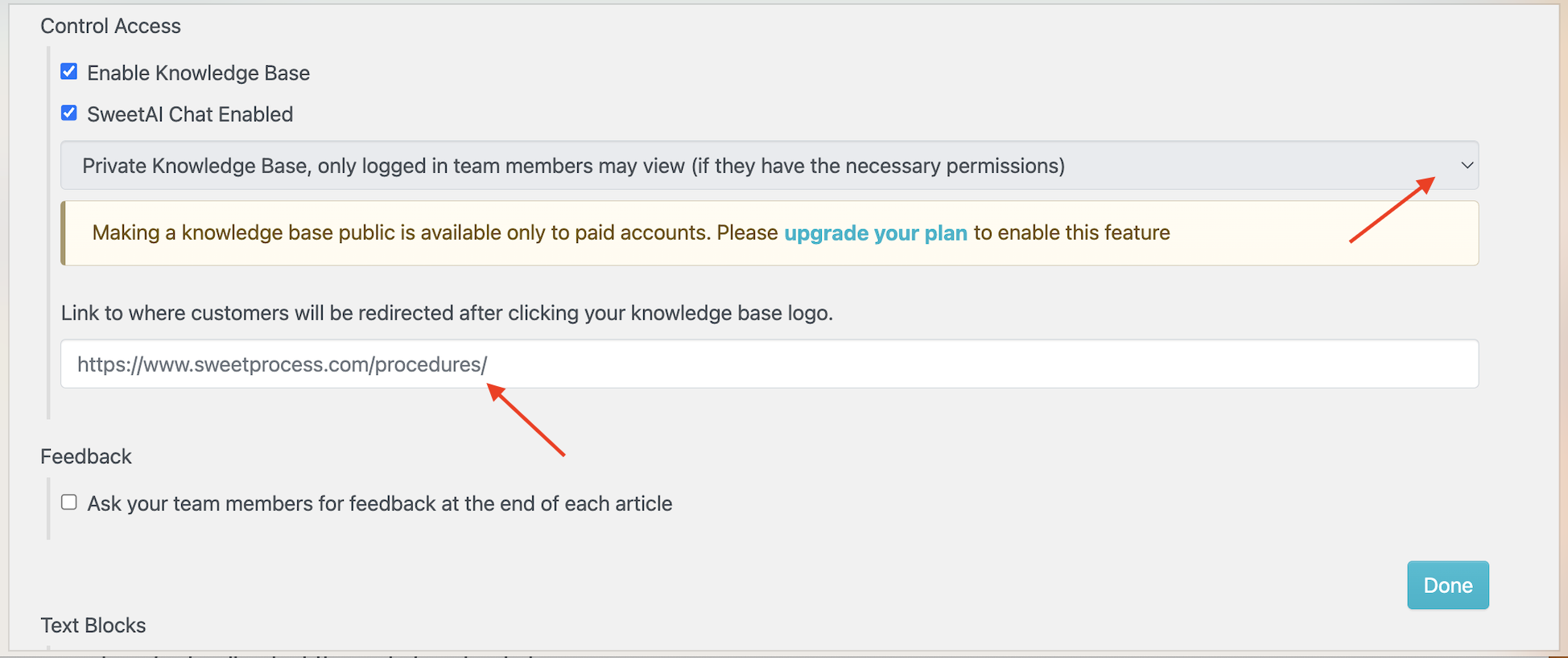
You can add the public URL that links to the knowledge base, add category names, and control access to the information.
How to Import a Procedure or Process Into SweetProcess
To import a procedure or process, select the “Procedures” tab and click on the down arrow button to the right of the “Create Procedure” button. Click “Upload document.”

When the dialogue box opens, add the procedure to specific teams and browse your computer to upload the document you need. Your file will be imported into SweetProcess.
Use one of your own procedures to test the authoring, search, and task workflow. Start your 14-day free trial of SweetProcess to see how it fits your team.
Not right for you if: You need a connected worker system for tablet-in-hand execution beside equipment, with station sign-off and machine or sensor data attached. SweetProcess is documentation-first; assess a dedicated frontline platform for that requirement.
2. Dokit
Dokit is an all-in-one collaborative platform that companies can use to create, organize, and share manuals, digital user guides, best practices, and instructions. This tool is ideal for manufacturing companies because it increases productivity and speeds up employee training through standardized work procedures.
Apart from industrial companies, this Dozuki alternative can also be used by companies in all sectors to share best practices. If you choose Dokit for your company, you can use both the Dokit app and the Dokit platform. Your customers and team members can benefit from the app because it includes visual, step-by-step instructions, is available on most devices, and is continuously updated.
Dokit separates its documentation platform from its mobile app. When you evaluate it, confirm which edition includes the collaboration, mobile access, and offline capabilities your team needs.
Features
- Visual editor
- Page templates
- Media gallery
- Multilingual
- Document importation
- Revisions tracking
- Notifications
- Comment section
- Version management
- Workflow validation
- User permissions
- Image annotation
- Drag and drop
Pricing
Dokit’s published pricing page lists Starter from €60 per month for one author and Enterprise from €300 per month for five authors. Tailor-made plans require a quote. The page lists mobile applications and offline access under custom features. Confirm the current price and required features with Dokit before purchasing.
Benefits
- API access is listed among Enterprise features; confirm the integrations you need
- Simple for team members and clients to understand
- Sends reminders about projects
- Site is visually appealing
- The mobile app is a plus
- Users can track revisions
Not right for you if: You need mobile-app or offline access included in the entry plan; Dokit lists those capabilities under its tailor-made offering.
3. Trainual
If you are looking for software to systematize your employment and onboarding, Trainual is one alternative to Dozuki. Trainual is a knowledge-transfer platform that puts together every company policy, process, and standard operating procedure for each role in one place.
Organizations that use this platform can save time on training and onboarding new employees because there is a standard playbook. This ensures that everyone gets trained consistently and content is updated so that every team member is aligned. Trainual is ideal for business owners, human resources professionals, and managers.
You can use a trackable employee handbook to test employees’ understanding of procedures and monitor who has reviewed company policies. Trainual’s current pricing page lists more than 500 customizable templates to help teams start building their content.
Features
- Integration with other apps
- Templates
- Customer support
- Trackable handbook
- Organizational charts
Pricing
Trainual’s pricing page lists Core, Pro, Premium, and Enterprise plans without public subscription figures. You need to request a demo or quote. The page states that a one-time implementation fee of $1,000 applies, so include that fee when comparing first-year costs.
Benefits
- Demo available to evaluate the product with the vendor
- Easy to use and navigate for employee training and onboarding
- Additional webinars and articles for users
- More than 500 customizable templates listed on its pricing page
- Integrations include HRIS, payroll, and Slack; confirm plan requirements
- Users can embed videos and images, making it visual
- The system is intuitive
Not right for you if: You need manufacturing-station execution tied to equipment data; Trainual’s primary focus is company knowledge and employee training.
4. Process Street
Process Street helps teams manage recurring workflows, checklists, and procedures. It combines process execution with document management, so evaluate both the workflow and document features against the way your business operates.
You can use this software in different departments, including marketing, sales, legal, human resources, and IT. It allows you to view all the ongoing process workflows at a glance, collaborate and communicate with your team securely, manage multiple organizations, and control the people who handle specific workflows and edit documents.
Process Street supports no-code workflows and checklists that teams can use to manage, automate, and share recurring business processes. Try a representative process in its demo or trial, including approvals and exceptions, to judge how much setup it needs.
Features
- Connect other apps through Zapier
- Single sign-on
- Data encryption
- Create and maintain procedure documents
- Multi-tiered permission
- Activity feed
- Documented team knowledge
- Conditional logic used to create dynamic workflows
- You can form groups
- Single-instance, sequential, and multi-stage approvals
- You can add visual and audio files
- Automated tasks with scheduled workflows
Pricing
Process Street’s pricing page lists Startup, Pro, and Enterprise plans with contact-sales pricing. It offers a 14-day Pro trial. Obtain a quote for the plan and usage your team needs before comparing the total with a published subscription.
Benefits
- They have a 14-day free trial.
- The software connects with multiple apps.
- Ability to reschedule recurring checklists.
- Create structured documents and repeatable workflows.
- Team members can receive notifications via the mobile app or email.
- The team has control permissions to limit access to information.
- You can assign guest permissions.
- You can use the comprehensive help articles or chat live with customer support for assistance.
Not right for you if: You need a dedicated connected worker system for manufacturing stations and equipment; test those requirements separately from general workflow and document management.
5. ScreenSteps
ScreenSteps is knowledge base software for creating searchable instructions and interactive guides. Teams can use it to help employees follow complex procedures, including call center work, without relying only on memorized training.
ScreenSteps helps teams turn complex procedures into guided instructions that employees can consult while working. For a call center evaluation, test a common call and an exception, then check how an agent finds the correct next step and how authors maintain that guidance.
Features
- Online searchable knowledge bases
- Courses
- Troubleshooting guidelines
- Permissions management
- Authoring management
- Content certification
- Content creation
- Zero memorization
Pricing
ScreenSteps’ pricing page lists Operations Standard starting at $6,000 per year and Operations AI starting at $9,000 per year. Enterprise uses custom pricing. The page offers a 15-day trial on request. These are annual starting prices, so confirm the scope included in your quote.
Benefits
- Free 15-day trial period
- Reduces time spent onboarding and training new employees
- Responsive customer support team
- Helpful training materials
- User friendly
- Integrates with different apps easily
Not right for you if: Your annual software budget is below the published $6,000 starting price for Operations Standard.
6. Poka
Poka is a connected worker platform focused on factory and frontline teams. It supports knowledge sharing, problem-solving, and employee learning. Poka identifies itself as an IFS company; the companies announced the acquisition agreement in June 2023.
With Poka, companies can overcome manufacturing challenges that arise from ineffective communication, outdated processes, and knowledge gaps. The software centralizes and manages all work instructions, digitizes all factory information, ensures product continuity, and enables problem-solving.
The user interface is also simplified for all users. If you have questions, visit the FAQ section for answers.
Features
- Cloud services
- Multiplatform software found on desktop and mobile apps
- SaaS security standard
- Caters to more than 14 languages
- Integrations with API
- Customized workflows and permissions
Pricing
Poka’s pricing page directs buyers to request pricing and does not show a public subscription amount. Ask for a proposal covering your sites, users, rollout, and required capabilities.
Benefits
- Employees are connected in real time.
- The software accelerates employee skill development.
- It has multilingual support.
- The interface is easy to use.
- Training materials are easy to access.
- It connects all the departments in the company.
- Companies can store and track training.
Not right for you if: You need a published subscription amount before starting a sales conversation.
7. MaintainX
MaintainX helps businesses simplify day-to-day maintenance tasks. With this software, companies can eliminate paperwork so that employees can spend more time accomplishing business tasks.
Unlike Dozuki, which is tailored mostly for the manufacturing industry, MaintainX can be used in various sectors. You can use this software whether you are in manufacturing, facility management, the food and beverage industry, hospitality, clubs and associations, education and schools, property management, and fleet maintenance.
MaintainX has web and mobile tools for maintenance work. Test the tasks your technicians, requesters, and managers need to complete on each device, including any offline requirements.
Features
- Create, assign, and manage work orders
- Approval of work requests
- Preventive maintenance
- Keep track of parts and inventory
- Checklists and inspections
- Reporting
- Communication and chat
Pricing
MaintainX’s pricing page lists a free Basic plan. Essential costs $20 per user per month billed annually or $25 billed monthly. Premium costs $65 per user per month billed annually or $75 billed monthly. Enterprise requires a quote. Requester accounts are free; confirm which team members need paid access.
Benefits
- It has a free option for small teams.
- Users can access the mobile version in the app.
- The software works in different industries.
- The free Basic plan provides a way to evaluate maintenance workflows.
- The reporting feature helps track the status
- Users can upload photos to communicate with the team.
- The program has filters, making it easy to find information.
Not right for you if: You mainly need a general company knowledge base and have little need for maintenance work orders, asset records, or preventive maintenance.
8. Procedureflow
Procedureflow is knowledge-based software that companies can use to turn employees into experts. This software makes it easy to create and share information and is simple to follow and maintain. Therefore, if your business has complicated processes and procedures, you can use this platform to simplify them.
Companies benefit from this software because team members get accurate information at the same time, whether they’re new hires or long-tenured employees. Your staff don’t need to memorize procedures and will make fewer mistakes because they can follow the flow.
Features
- Standard operating procedures
- Hyperlinked flowcharts
- Assign permissions and ownership
- Simple approval systems
- Notifications
- Quick reports
- Revision control
Pricing
Procedureflow’s pricing page lists Enterprise at $33 per seat per month, billed annually. Enterprise+ requires a quote. The page lists implementation services at a standard rate of $300 per hour; confirm the services and hours needed for your rollout.
Benefits
- It helps the team become experts much faster.
- The processes are more visual.
- Users can handle most of the functions.
- Team members get notifications.
- They have great training videos.
Not right for you if: You require a published month-to-month subscription; the displayed Enterprise rate is billed annually.
9. IT Glue
IT Glue is IT documentation software used by managed service providers and internal IT departments. It helps teams organize technical information, maintain knowledge bases, and connect related documentation in one place.
The IT Glue website has a user-friendly interface that’s easy to navigate. They provide pricing information, features, and a knowledge base section with detailed information on how the platform works.
Features
- MyGlue
- Document automation
- Runbooks
- Integration
- Mobile app
- GlueConnect
- Import and export
- Vault
- GlueFiles
- Checklists
- Premier onboarding
- Single sign-on
Pricing
IT Glue’s pricing page lists Basic at $29, Select at $38, and Enterprise at $44 per user per month. Those rates require at least five users and a 36-month term. Enterprise also lists one-to-four-user options at $49 to $102 per user per month. A one-time onboarding fee applies; the page does not publish its amount. Confirm the full contract cost and applicable currency in your quote.
Benefits
- Beneficial for IT professionals
- Integration with multiple apps
- Centralizes all information
- Searching feature makes it easy to find information
- The interface is easy to use
- The permissions give access to many users
Not right for you if: You document general business processes and don’t need an IT-focused documentation platform.
10. Zavanta by Comprose
Zavanta is policy and procedure software from Comprose, Inc. It helps teams create structured procedures and connect them with the policies employees need to follow. Confirm any integration with your existing business systems during evaluation.
Zavanta supports the lifecycle of policies and procedures, from authoring through review and distribution. Company experts can document their knowledge so employees have a shared reference for recurring work.
Features
- Content overlays
- Capture wizard
- Built-in image editor
- Updates
- Public sharing
- Feedback surveys
- Quizzes
- Dashboard analytics
- Workflow designer
Pricing
Comprose’s website offers a demo and contact route without a published Zavanta subscription amount on the reviewed pages. Ask the vendor for pricing and implementation details for your organization.
Benefits
- Ideal for creating company documents
- Helps with employee training and onboarding
- Confirm the integrations needed for your existing company systems
- You can provide feedback
- They provide training videos
Not right for you if: You need transparent public pricing that lets you calculate your subscription before contacting the vendor.
11. ProcessKit
ProcessKit is a software used by companies or agencies to onboard clients at scale. It brings the company’s standard operating procedures together with projects, so your team members can automate tasks, track recurring projects, and scale operations.
ProcessKit combines reusable process templates with project and task management. Its public materials also describe automation and training resources. Use a representative client workflow to assess how templates, task assignments, and recurring projects fit together.
Features
- Process builder
- Process templates
- Kanban lists
- Template emails
- Zapier integration
- Bulk editing
- Boards
- Activity history
- Mobile friendly
- Multiple accounts
Pricing
ProcessKit’s pricing page lists a Free tier with 30 active projects, three users, five guests, 300 Project Credits per month, and no AI Credits. Solo costs $49 per month and includes 25 active projects, three users, ten guests, and 1,000 monthly Project Credits and AI Credits. Agency costs $149 per month and includes 200 active projects, ten users, 50 guests, and 3,000 monthly Project Credits and AI Credits. Reseller costs $399 per month and includes unlimited active projects and guests, 50 users, 10,000 monthly Project Credits and AI Credits, white-label delivery, and sub-account management. The page advertises a 14-day free trial on paid plans. Compare the current terms on ProcessKit’s pricing page before subscribing.
Benefits
- Free tier with project and AI-task allowances
- Helps with onboarding clients
- Integration with other apps
- Mobile-friendly access for task and project work
- You can keep track of all clients
Not right for you if: You need factory-floor work instructions or a documentation-first knowledge base. ProcessKit is built around agency client onboarding and recurring project management.
SweetProcess offers transparent pricing for all users. There are no Pro or Enterprise plans; everyone gets access to all features as soon as they sign up. Start your 14-day free trial today!
Which Dozuki Job Are You Replacing With Work Instruction Software?
These Dozuki alternatives fall into two major categories: those designed for floor execution and those for documentation and knowledge sharing. So which job are you replacing?
Floor Execution
Dozuki sits in this group.
Floor execution platforms allow your team to receive instructions where the work happens, often on a tablet or another device at the station. The system may need to capture completion, sign-off, training, or information connected to the equipment or production environment.
Poka fits here if you are looking for connected worker platforms. MaintainX overlaps with this group when the work involves maintenance and operational tasks.
For a floor-execution shortlist, bring one complete job to the demonstration: the instruction, the worker assignment, the completion record, and an exception that a supervisor must resolve. Confirm what happens when a device loses its connection, a worker changes shifts, or an instruction is revised after training. These questions help expose differences that a feature list does not explain.
Documentation and Knowledge Management
If you need to maintain searchable procedures, policies, processes, and training material, start with SweetProcess and compare the relevant focus of Dokit, Trainual, Process Street, ScreenSteps, Procedureflow, IT Glue, Zavanta, and ProcessKit. SweetProcess belongs in this documentation-first group. These tools are not interchangeable: IT Glue focuses on IT environments, Trainual on employee knowledge and training, and ProcessKit on repeatable project work.
Although each has a different focus, these process documentation tools make it easy to centralize information scattered across Google Docs, Word files, notebooks, email, or individual employees.
For a documentation shortlist, test how quickly an employee can locate an approved instruction and tell whether it is current. Ask an author to revise it, route any required review, and notify the right readers. Then test permissions for a contractor or a different department. The best fit is the product that supports those recurring tasks with a level of administration your team can sustain.
What to check before moving from Dozuki
Plan the move around the records and workflows you need to keep. Inventory instructions, media, attachments, translations, owners, permissions, training records, and any links used at workstations. Confirm the export options in your current account and the import options in the proposed replacement. Do not assume an exported guide will carry its approval history, assignments, or training evidence into another system.
Choose a small pilot that includes both an ordinary instruction and a difficult one. Rebuild their structure in the new tool, check media quality, and have an employee follow the instructions without help from the author. Record any broken links, missing fields, extra manual steps, or changes to how work is approved. Assign an owner to resolve each issue before the wider rollout.
Keep a separate plan for existing records. A new procedure library and an archive of past training or execution are different needs. Determine what must remain accessible, who will own it, and how users will find it after the switch. Agree the cutover date, communicate which system is authoritative, and prevent parallel versions from becoming competing sources of instructions.
Optimize Your Business Processes With SweetProcess
SweetProcess helps businesses manage tasks, document procedures and processes, and build private or public knowledge bases. A maintained procedure library gives employees one place to find instructions and helps managers keep recurring work consistent.
In a published SweetProcess customer story, Sarah Brenner, director of quality assurance at Belvidere Community Unit School District 100, described the need to create, store, and distribute procedures so staff could find the information they needed.
While the company had some documented procedures, most were stored in Google Docs and Microsoft Word. These documents were disorganized, and most employees didn’t know they existed. Therefore, Sarah had to look for software to streamline the business documentation process, and this is how she discovered SweetProcess.
Since adopting SweetProcess, the company now has a centralized knowledge base, effective documentation for all team members, searchable information, and streamlined employee onboarding.
Another published customer story follows branch operations manager Sarah Beach and certified financial planner Elian Levatino at Benchmark Wealth Management. As the firm expanded, its leadership wanted shared procedures so employees could complete recurring work consistently.
The team documented all processes in a notebook, but it quickly became outdated. As a result, employees could not replicate consistent results. To solve their operational problems, the team found SweetProcess software, which changed the company.
Thanks to SweetProcess, the company now has an easier learning curve for new employees during onboarding and training. In addition, they have moved away from notebooks to an automated documentation platform, and employees are more independent.
You can read more SweetProcess customer success stories to compare how organizations handle documentation, training, and daily operations. Use those examples to define a small pilot for your own team, with a clear owner and a workflow you can test from start to finish.
You can also transform your business like these companies. Click here to sign up for a free trial of SweetProcess now!
FAQs
How much does Dozuki cost?
Dozuki’s pricing page did not show a public subscription amount. Request a quote for your users, sites, and required capabilities before comparing its cost with another product.
Is there a free alternative to Dozuki?
SweetProcess offers a 14-day trial, while MaintainX offers a free Basic plan and ProcessKit lists a free tier with usage allowances. Check the features, payment-card requirement, and usage limits before treating a free option as a replacement for Dozuki.
Who Are Dozuki’s Main Competitors?
SweetProcess is relevant when your main need is maintained procedures and company knowledge. Poka is a closer category match for connected frontline work, and MaintainX is relevant to maintenance workflows. Trainual, ScreenSteps, and Procedureflow serve different training and knowledge-sharing needs.
What does work instruction software usually cost?
Prices depend on the product and billing model. SweetProcess starts at $99 per month for up to 10 users on its standard plan; MaintainX has a free tier, and ScreenSteps Operations Standard starts at $6,000 per year. Dozuki, Trainual, Process Street, Poka, and Zavanta require subscription quotes.
Can a documentation tool replace Dozuki?
A documentation tool can replace a searchable procedure library. It should not be assumed to replace station-side execution, equipment data, production records, or frontline sign-off requirements. Test those workflows before moving away from a connected worker platform.