Last Updated on October 13, 2026 by Owen McGab Enaohwo
If you’re choosing standard operating procedure (SOP) software for your business, you first need to decide the use case. Some tools are strongest at capturing a process. Others are built around storing procedures and knowledge, while others add workflows, training, quizzes, maintenance operations, or employee accountability.
The best fit is the tool that supports how your team creates, follows, and updates procedures without charging you for capabilities you will not use. These nine options take different approaches to that job. Their features, published prices, and limitations help you narrow the list to the ones worth testing in your business.
Key Takeaways
- Each SOP tool in this list uses a different approach. Way We Do, Waybook, and Trainual put more emphasis on structured procedures, training, and employee knowledge; Process Street focuses on running workflows, while SweetProcess provides an all-in-one platform to create and manage procedures,
- SOP software like Scribe and Tango are built for capturing on-screen work, making them ideal for processes that happen in a browser or desktop app.
- We chose these nine based on how well they can hold and manage procedures, whether pricing is publicly available or clearly stated as quote-only, and whether they are realistic options for different team sizes.
- The right SOP software will help you create procedures, store them, train people on them, and manage them all in one platform. To compare SweetProcess with other options directly, start a 14-day trial here!
Table of Contents
- SOP Software Compared at a Glance
- How We Chose These Nine SOP Tools
- 9 Best SOP Software and Tools for Your Business Needs
- Key Features To Consider Before Choosing an SOP Software for Your Business
- Why Use SOP Software?
- Are SOPs Outdated?
- How To Choose the Best SOP Software for Your Business
- Which SOP Software Is the Best for Your Business?
- FAQs
SOP Software Compared at a Glance
| Tool | Best For | Starting Price | Not Right If |
| SweetProcess | Straightforward procedure, process, and policy documentation for teams | $99 a month or $990 a year for up to 10 users | You need built-in compliance tracking on active tasks or workflow automation that runs a process for you |
| Scribe | Fast, automatic capture of a screen-based task | Free plan; paid plans start at $13 per seat for Pro Team or $25 per seat per month for Pro Personal. Both billed annually | You need one tool to also hold and organize your procedures long-term |
| Way We Do | Compliance-based policy documentation with sign-offs | $99 a month for the Entry plan, 10 members | You need to add users one at a time instead of in blocks of 10, or you have a small team |
| Waybook | SOPs, knowledge management, onboarding, and team learning in one platform | $99 per month when billed annually or $119 a month for the Core plan | You need a narrowly focused SOP tool rather than a broader knowledge and onboarding platform |
| Whale | Screen capture workflows and AI-assisted documentation | Free plan; paid Scale plan starts at $249 a month billed yearly for Scale for three creators | Most of your team will be creating documentation rather than reading it |
| ProcedureFlow | High-volume complex workflows for larger operational environments | Starts at $33 per seat monthly, Enterprise plan, billed annually | You need a low-cost plan for a small team |
| Process Street | Recurring workflow checklists | Not published. Every tier requires a sales call. | You need to know the exact cost before you talk to a salesperson |
| Trainual | Structured training for onboarding-heavy teams | Not published, plus a stated | You want to avoid a setup cost layered on top of a subscription you cannot see the price of yet |
| MaintainX | SOPs tied to maintenance and inspections | Free plan; paid plan starts at $20 per user monthly, billed annually for the Essential option | Your core need is procedure writing, not work orders or operations-management capabilities. |
All prices checked on September 17, 2026
How We Chose These Nine SOP Tools
We looked at nine SOP tools that take different approaches to documenting and managing how work gets done. We used the same criteria across the list so you can compare them.
They Need to Hold Procedures
We looked for software that can do more than capture a single workflow. Each tool needed to give you a way to store, organize, or manage procedures so they remain useful after you create them.
If you use a screen capture tool for your business, it can be useful if you need to show an employee how to complete a task in an application. However, these features do not automatically make it a complete SOP management system.
Pricing
We checked each vendor’s pricing page to determine the actual cost your business will need to pay for the SOP tool. We also noted platforms that don’t list prices on their website to help you make the best decision.
They Need to Work for Growing Teams
We focused on tools that can make sense for teams of 10 to 200 people. These tools work for individuals as well as teams that need a tool to create, store, share, maintain, and use their procedures.
SweetProcess publishes this comparison and is our top pick for teams that need clear procedures, current policies, and assigned tasks in one place. Try SweetProcess free for 14 days and decide for yourself whether it’s the right fit.
9 Best SOP Software and Tools for Your Business Needs
Here are the nine best SOP tools, what they do well, what they cost today, and who should look elsewhere.
SweetProcess
Overview of SweetProcess
SweetProcess is a standard operating procedure software that offers numerous customizable templates for documenting procedures in both text and multimedia formats, along with an AI feature that automatically creates procedures. It also provides a centralized knowledge base for storing these procedures, making them accessible to authorized team members remotely as they are stored in the cloud.
Features of SweetProcess
Document Your Company’s Standard Operating Procedures Manually and Automatically
SweetProcess supports effective SOP documentation, based on the idea that employee performance depends on the procedures they follow. Instead of designing SOPs from scratch, SweetProcess simplifies the process by providing templates you can fill out. Manually creating applicable procedures requires expertise and time.
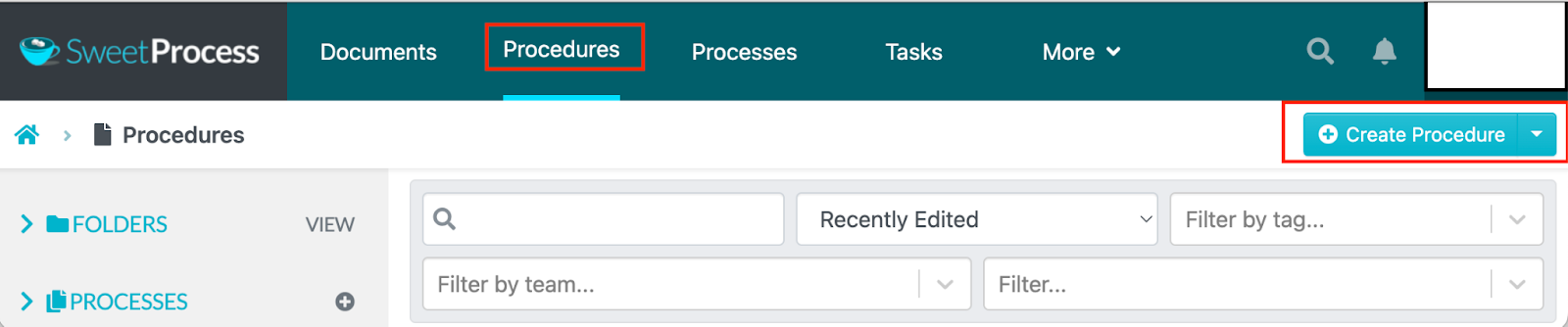
You can expedite the process by generating your procedures automatically with SweetAI. Here’s how to create SOPs manually with SweetProcess:
Click “Procedures” and “Create Procedure.”
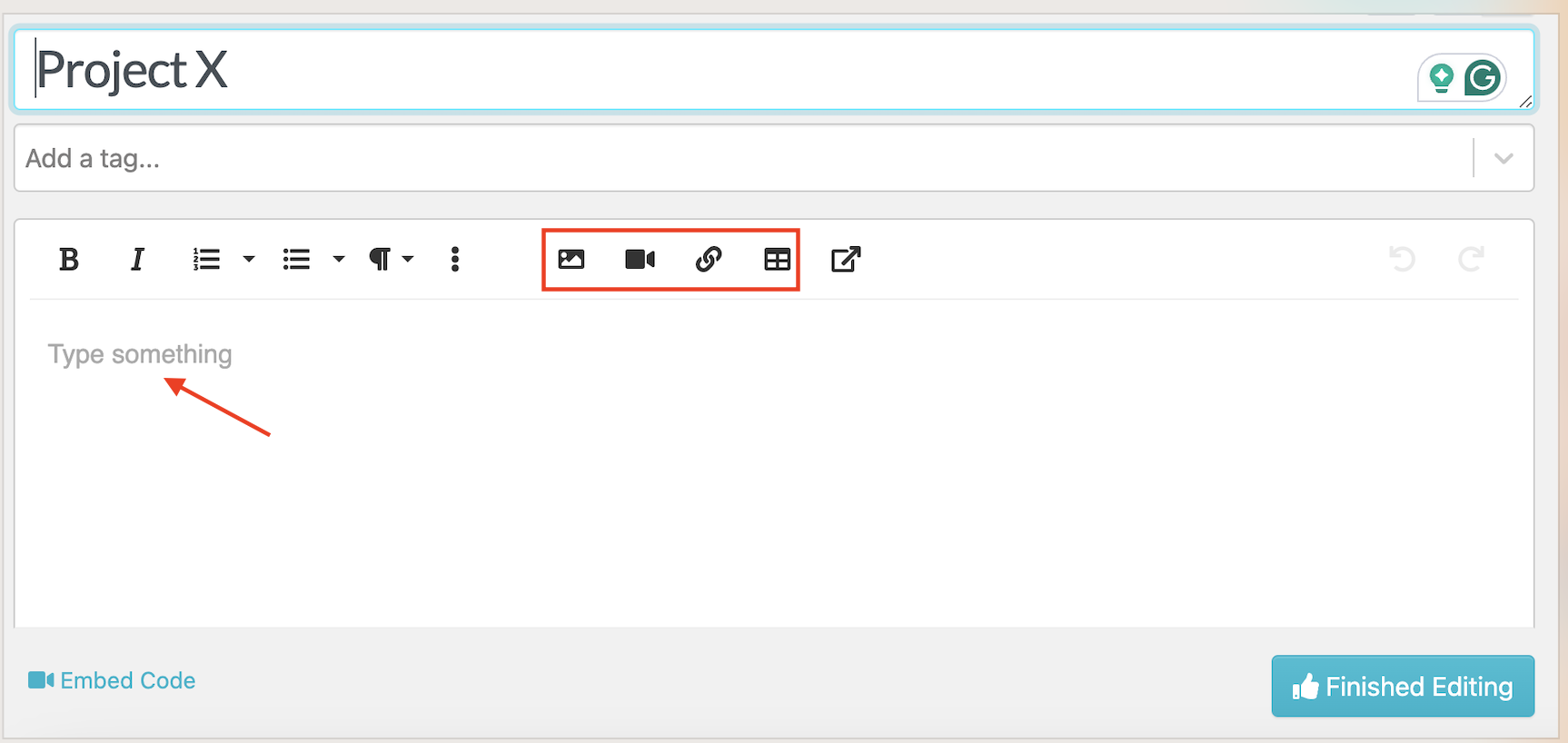
Enter the procedure details and click “Finished Editing.”
Here’s how to create detailed SOPs automatically with SweetProcess:
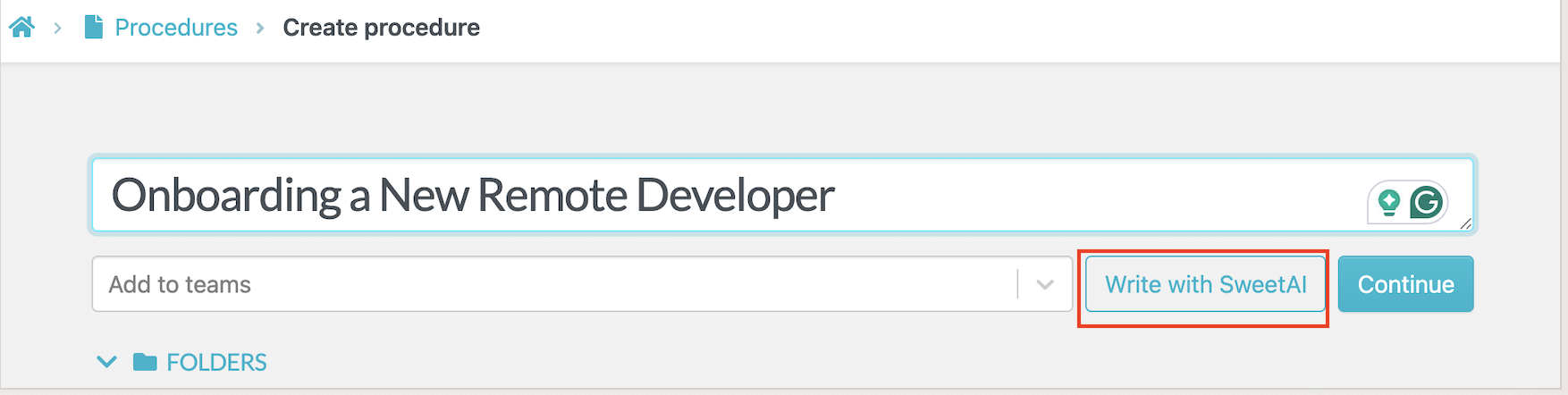
After you select “Create Procedure” and add a title, click “Write with SweetAI.”
Collaborate With Team Members on Your Company’s SOPs
SweetProcess offers various options for team collaboration, including task assignment. Authorized team members can create a task, assign it to others, or simply share it with them for information purposes. All parties involved in a task can contribute simultaneously, view real-time performance, and receive notifications about progress.
Here’s how to assign tasks to team members:
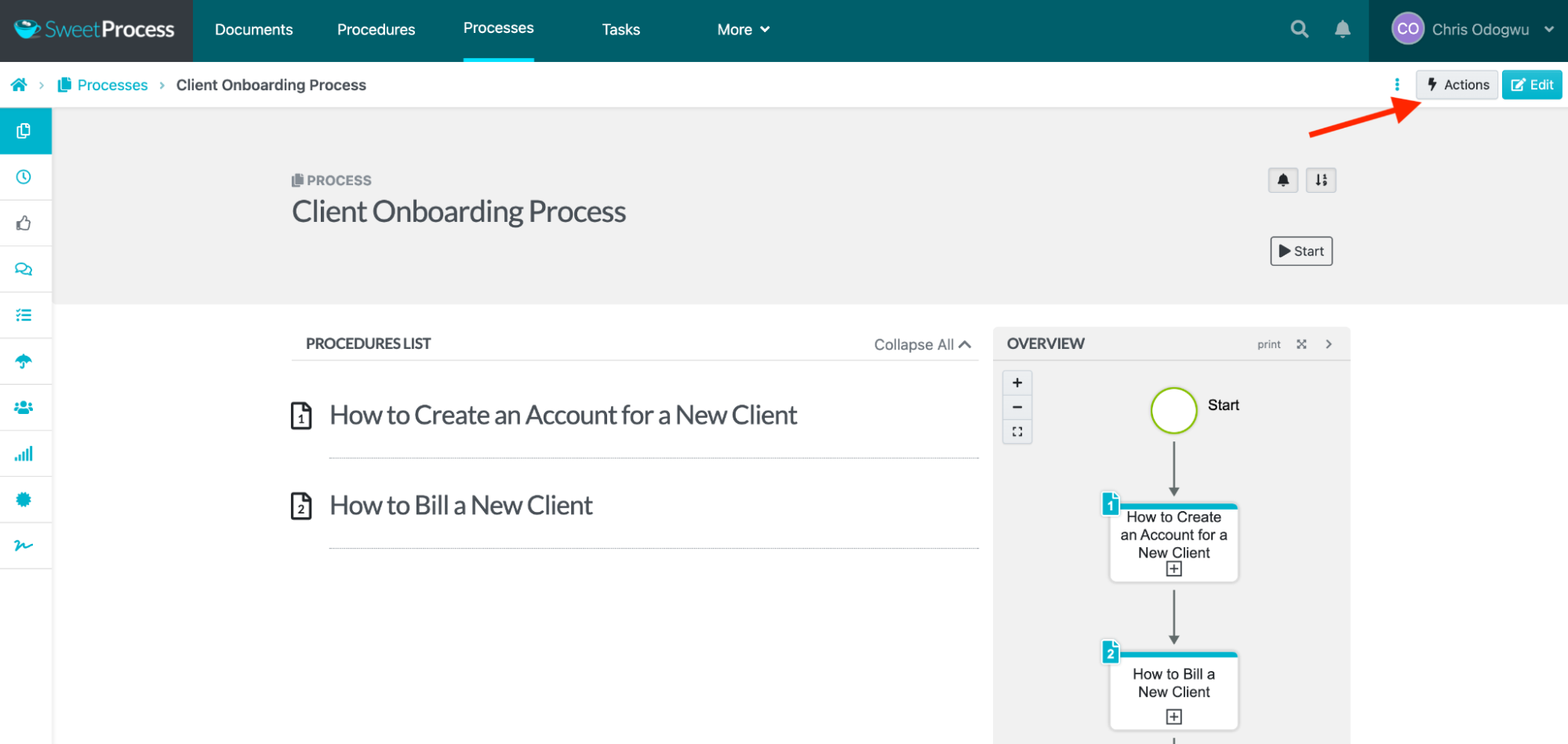
Navigate to the document and click “Actions.”
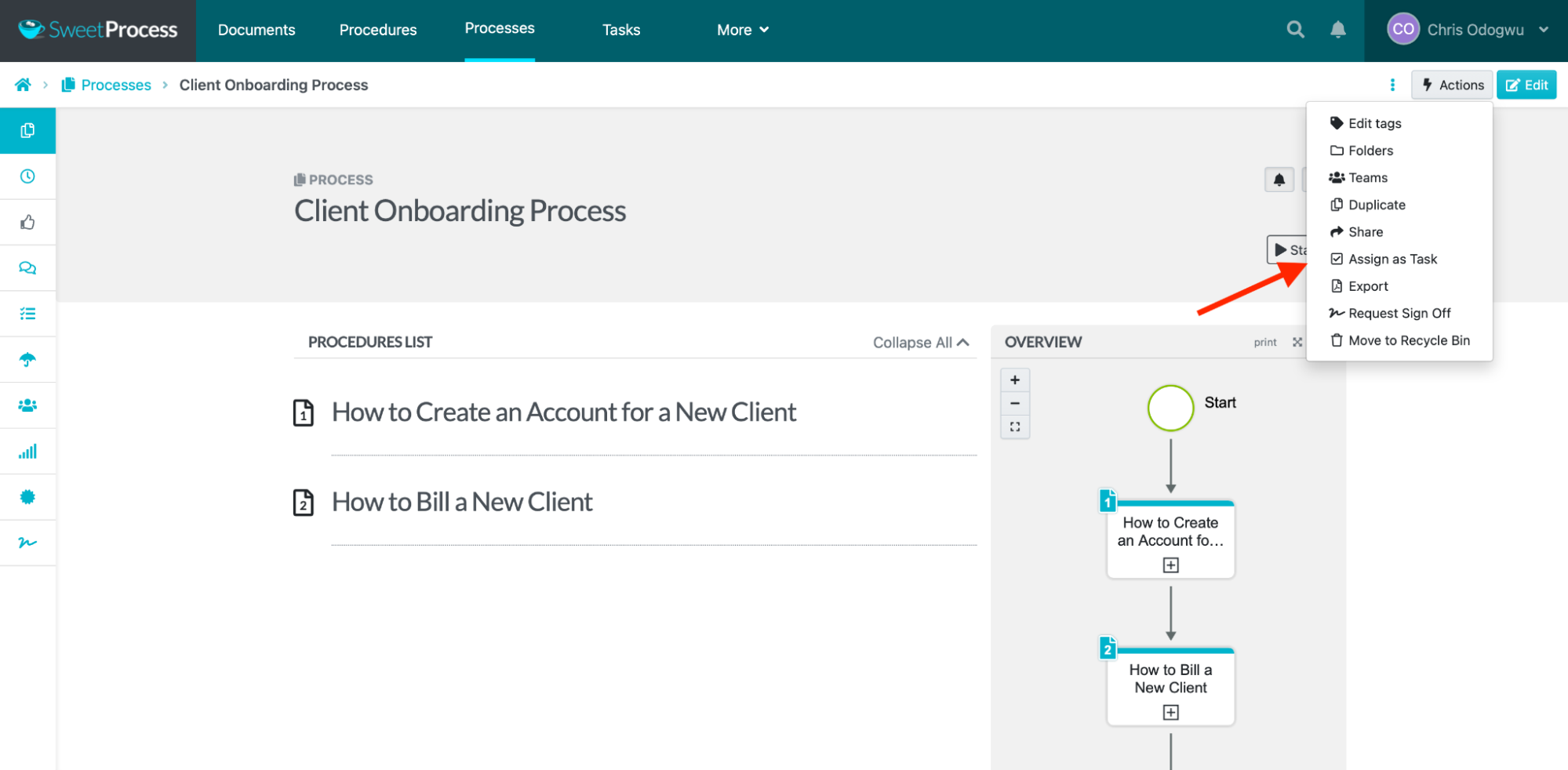
Choose your desired action from the drop-down menu. To assign as a task, click “Assign as Task.”
Click “Assign.”
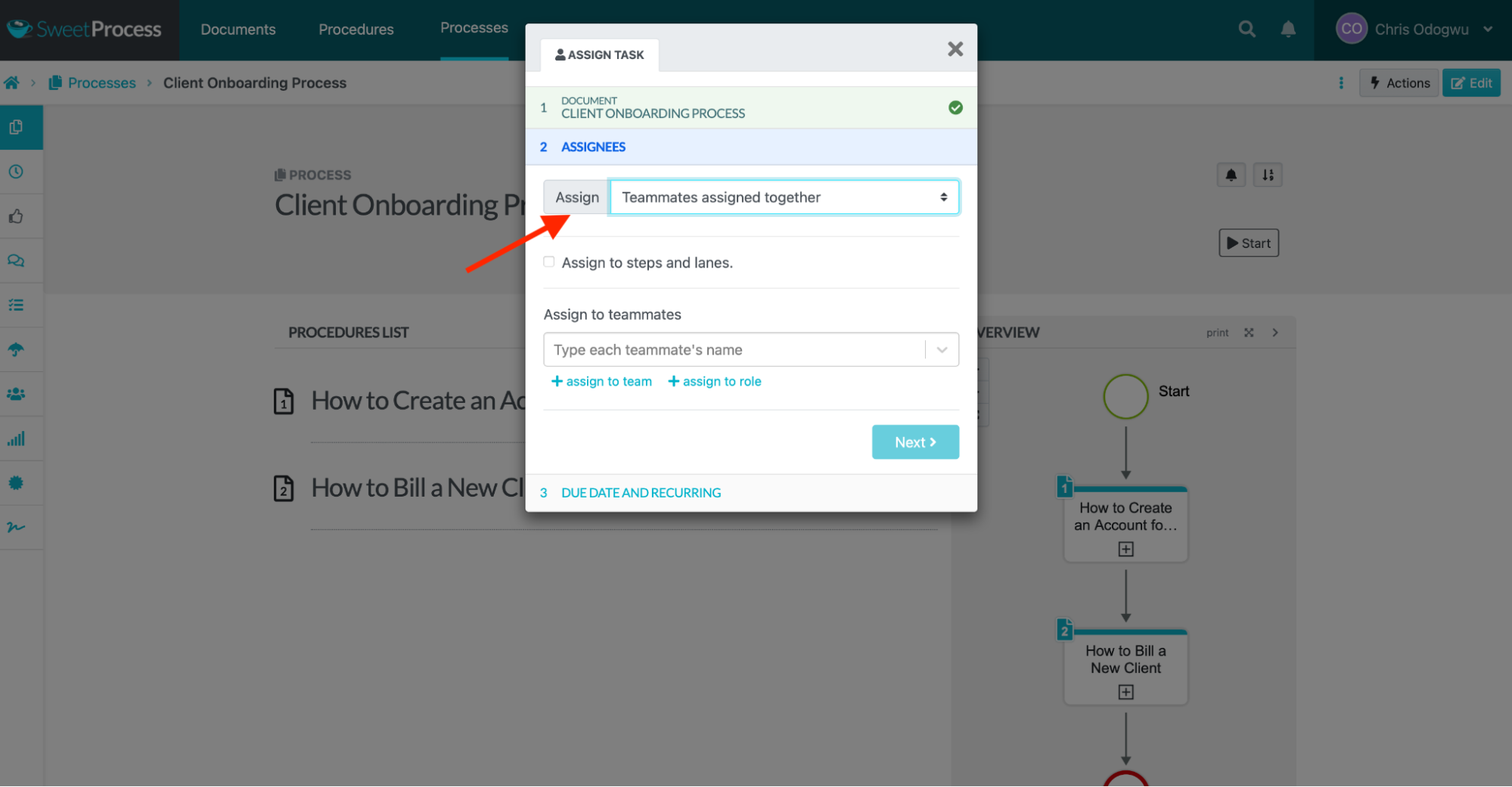
Click “Teammates assigned their own task” for individual tasks and click “Teammates assigned together” for group tasks.
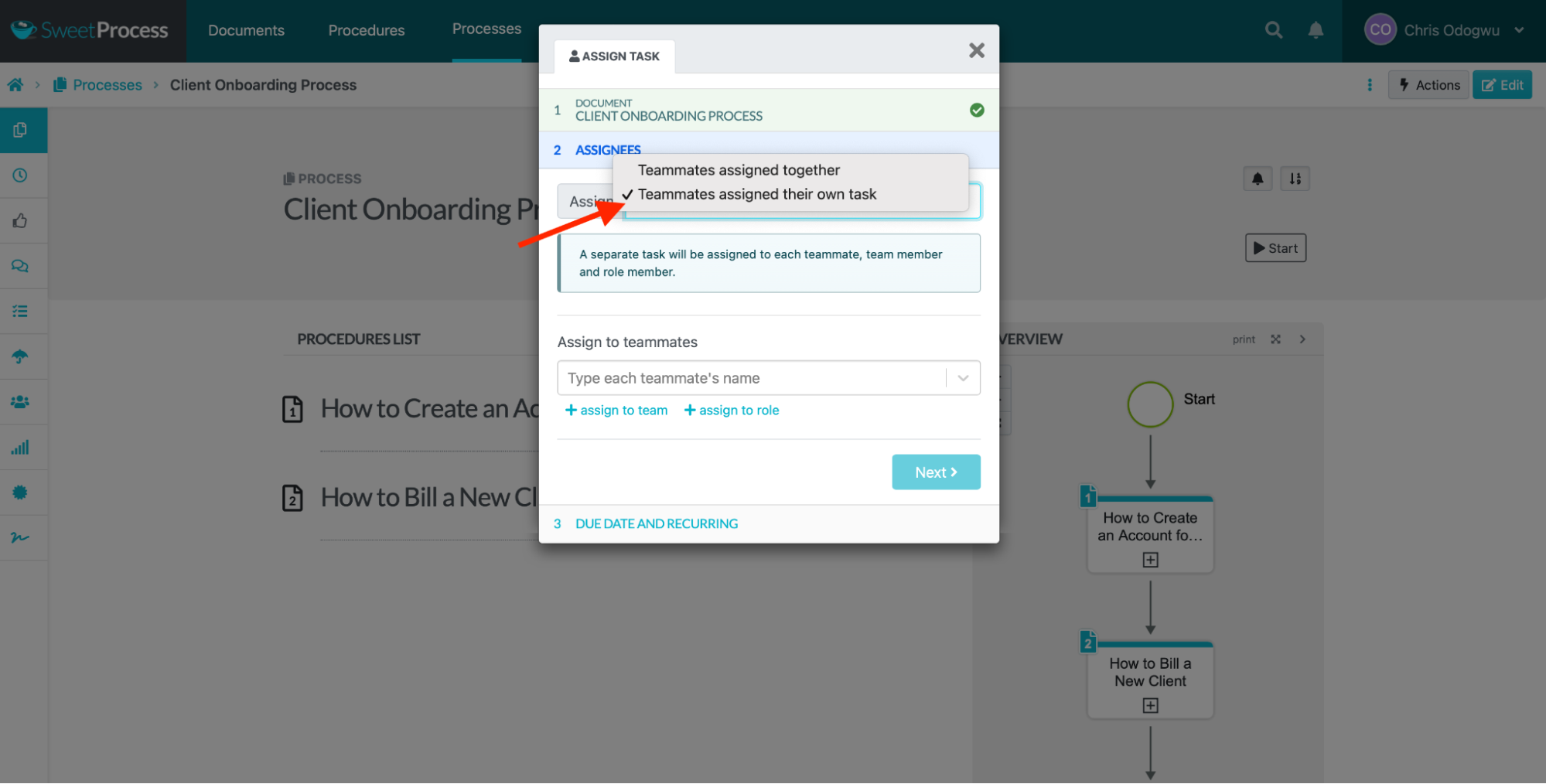
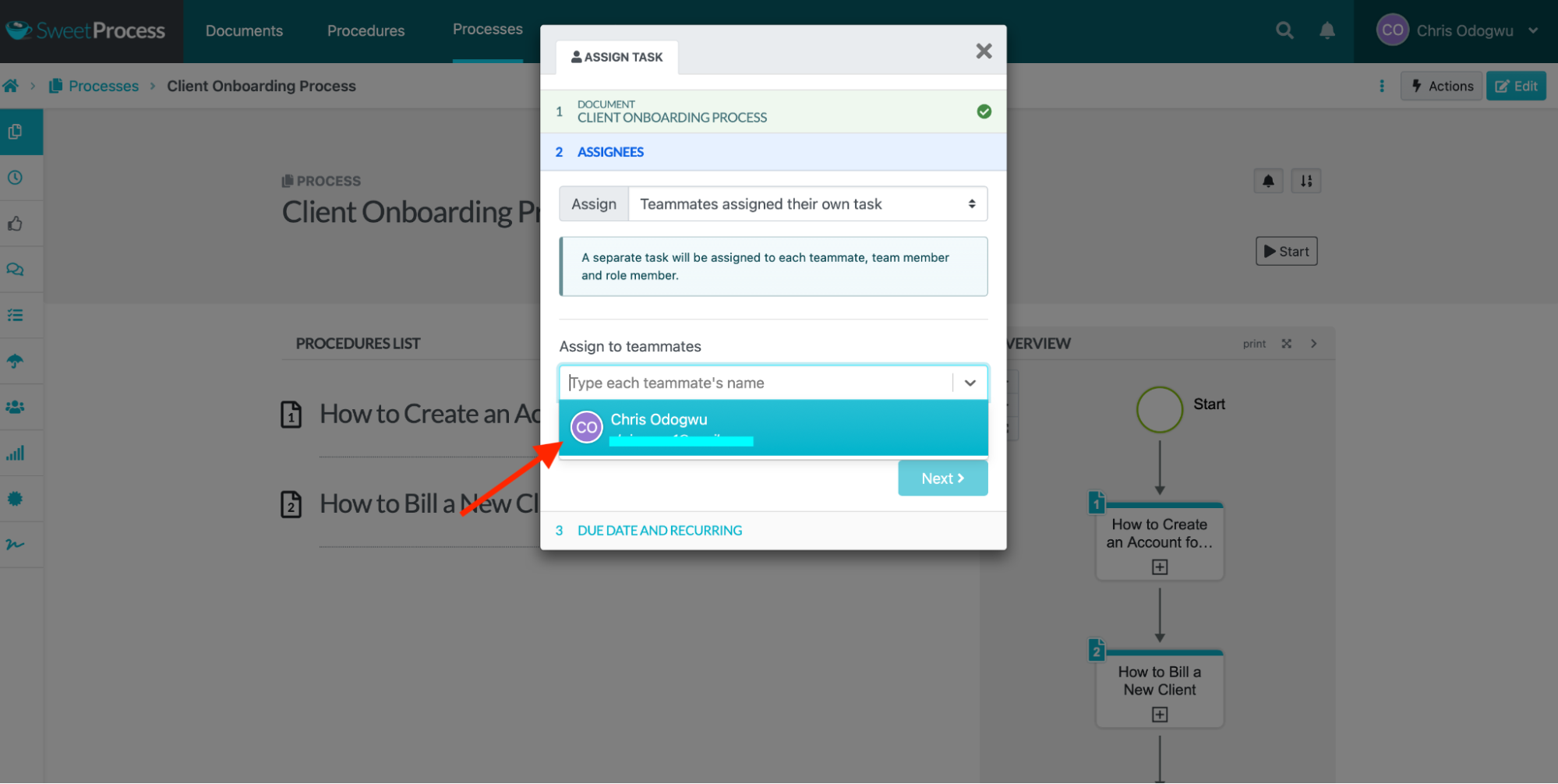
Select the teammate.
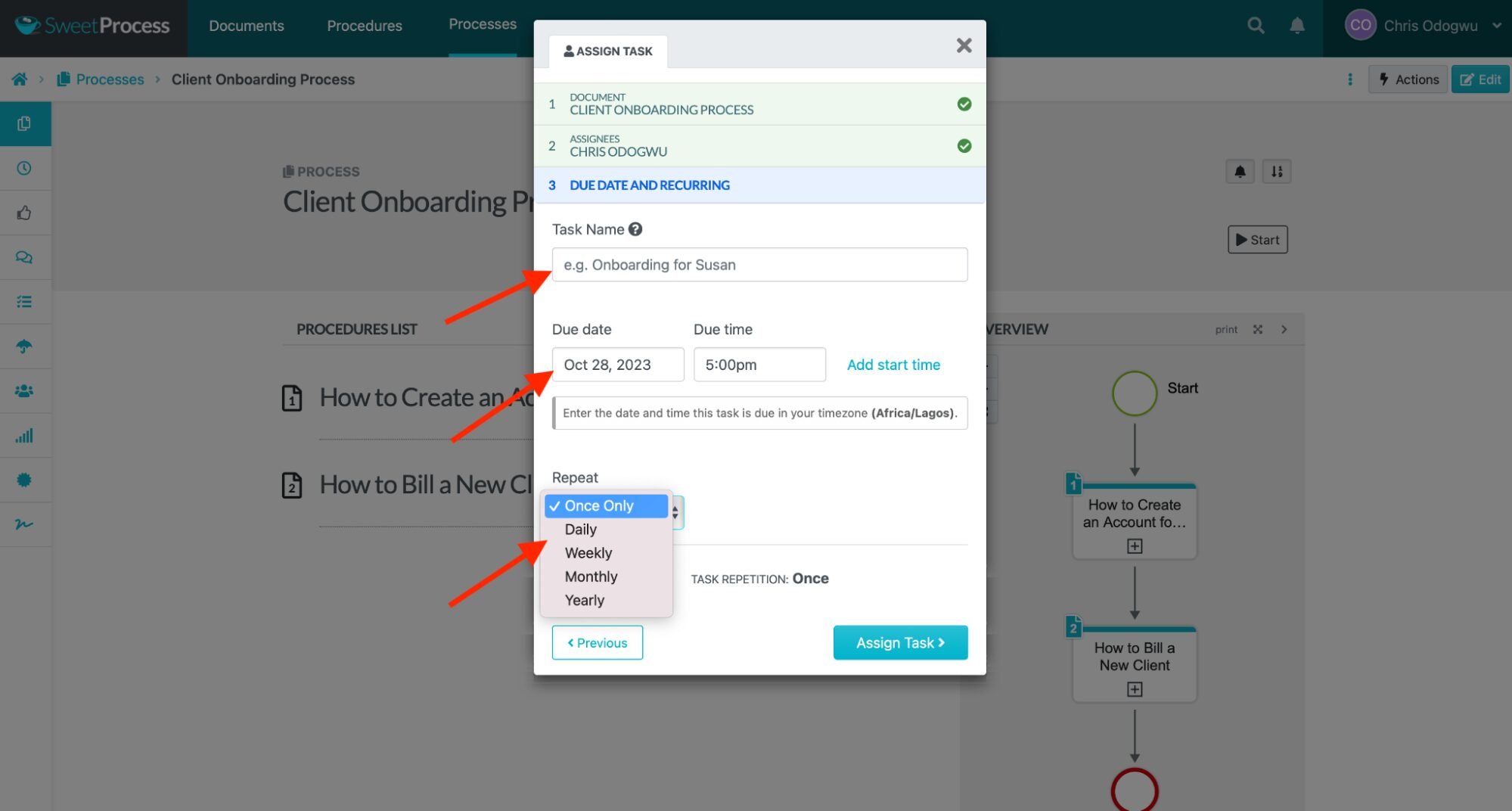
Enter the task name, due date, time, and frequency, and click “Assign Task.”
Manage Document Versioning and Track Changes on SOPs
SweetProcess allows you to use different versions of a document for different purposes. As you update your procedures to meet increasing operational demands, the older version is saved, allowing you to refer to it or keep it for your records. The system records all your changes, including timestamps that indicate when each change was made. This helps differentiate the various versions. You can quickly retrieve each document by entering its title in the search bar without spending much time searching.
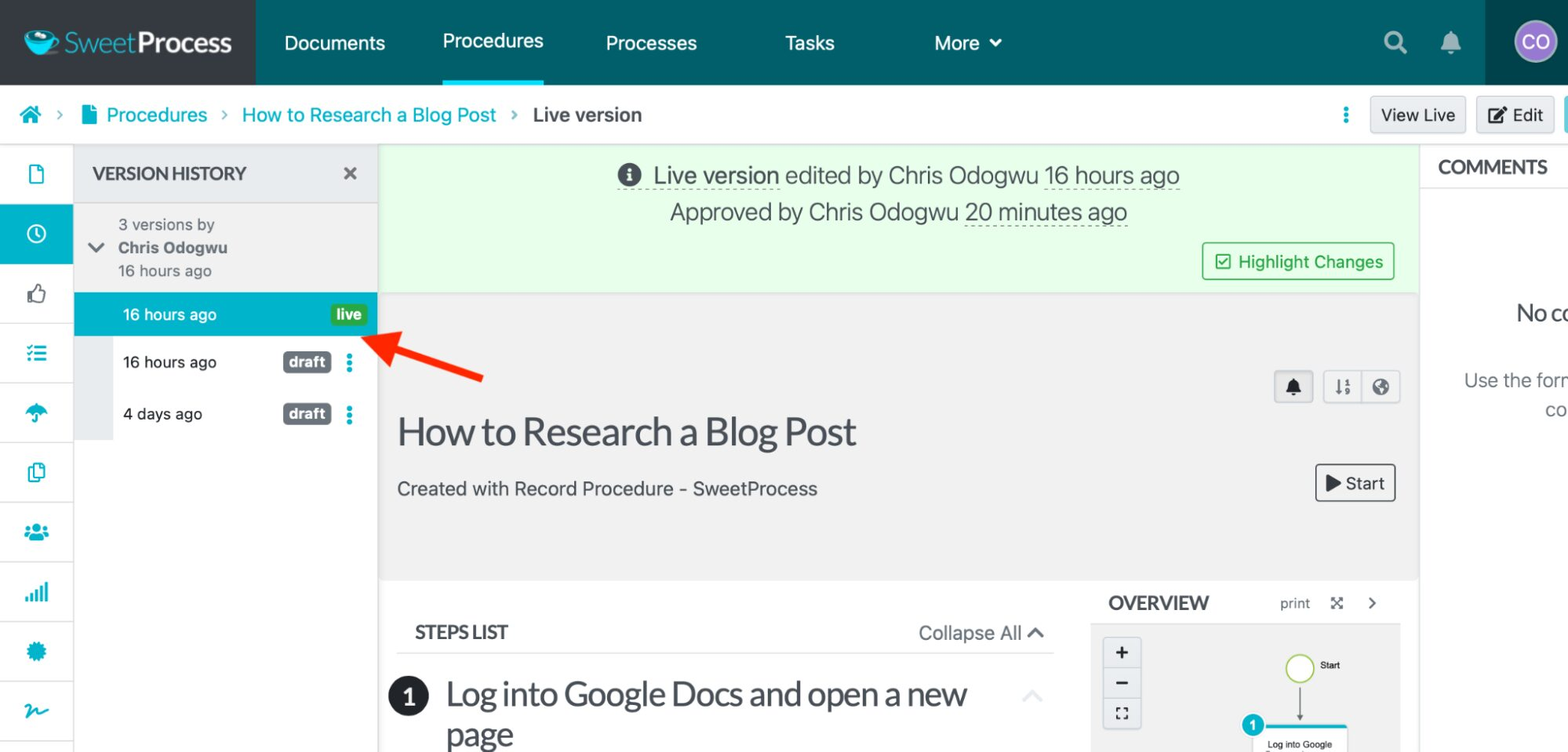
Here’s how to view version history and track changes on SOPs:
Open the document and click the clock icon.
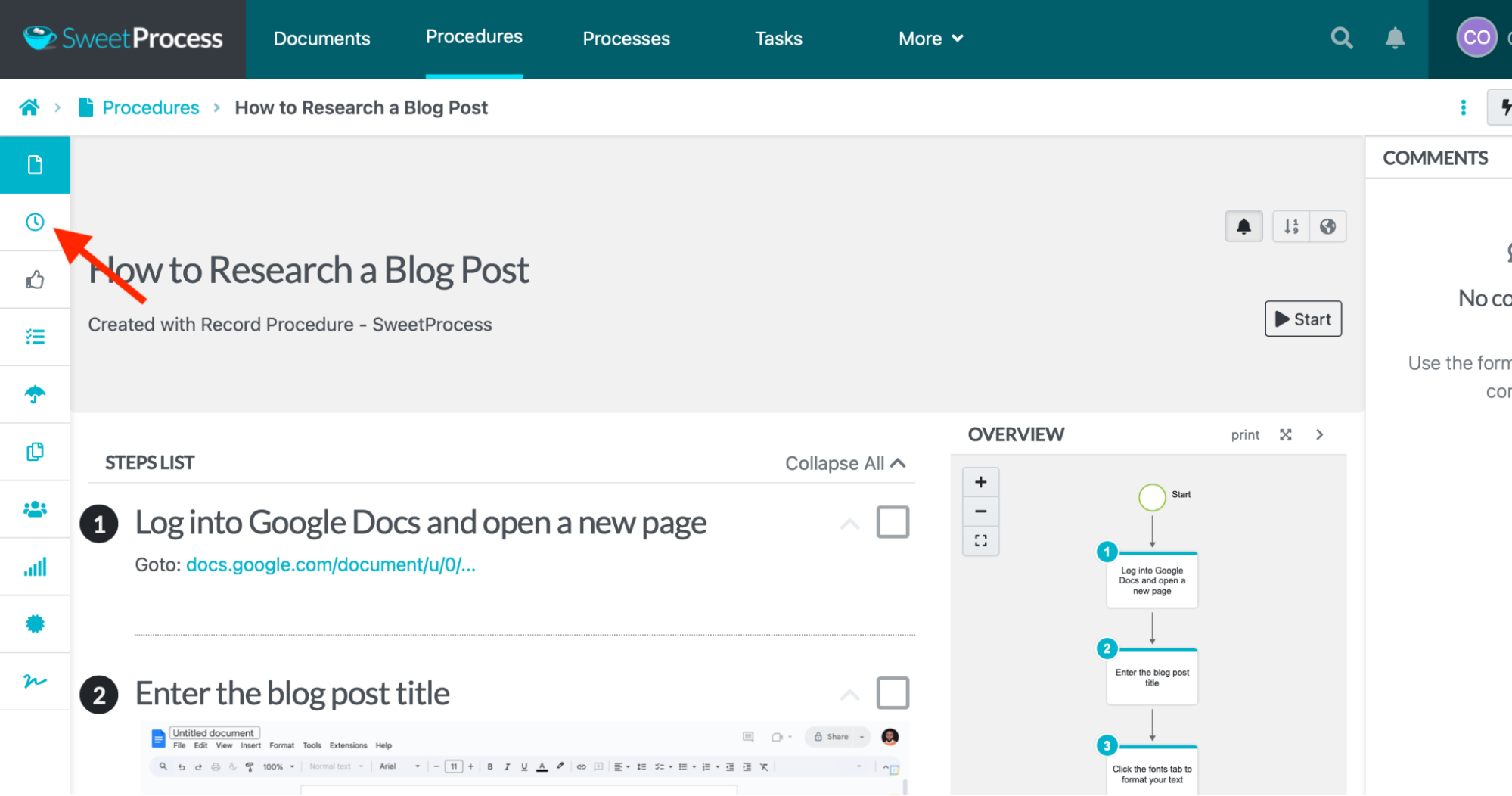
All created versions will be displayed. Review and click the version you want to use.
Distribute and Set Access Permissions on Your SOPs
SweetProcess prioritizes security to protect your data. Even when you and your team are using the system, it offers additional security measures that allow you to grant access permissions to specific documents to select individuals based on your discretion. This security feature is useful when handling specialized or sensitive information intended for individuals in specific roles or departments.
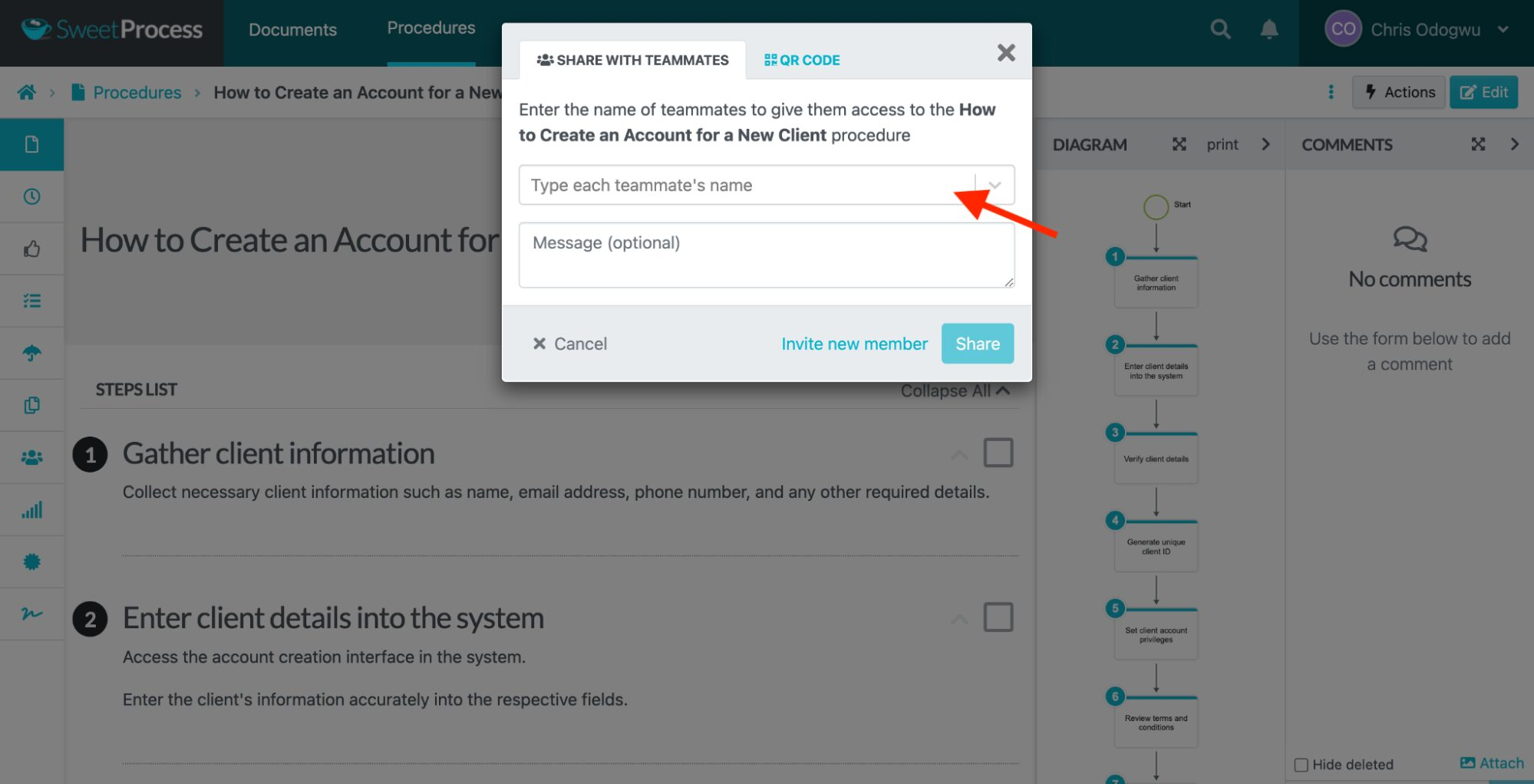
Here’s how to set access permissions for team members:
Click “Procedures” and click the document title.
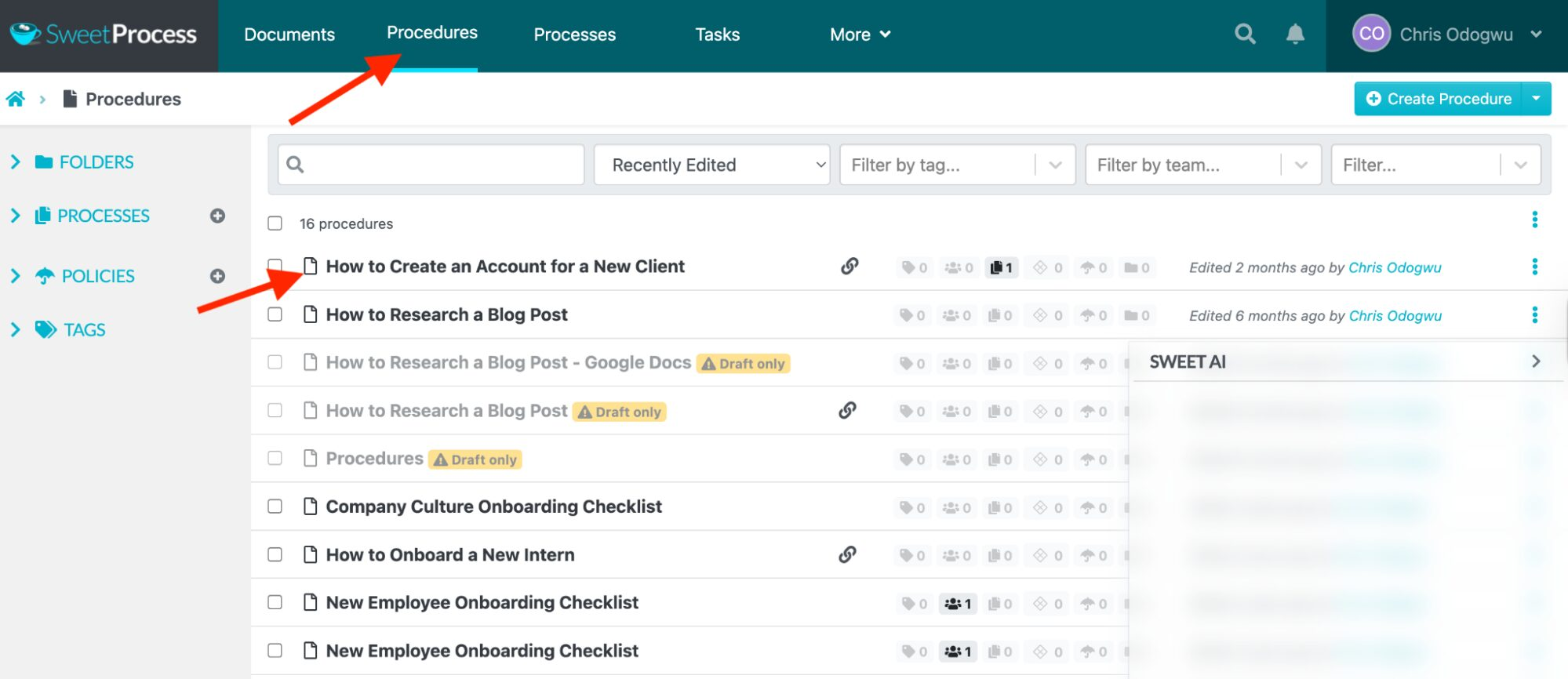
Click “Actions.”
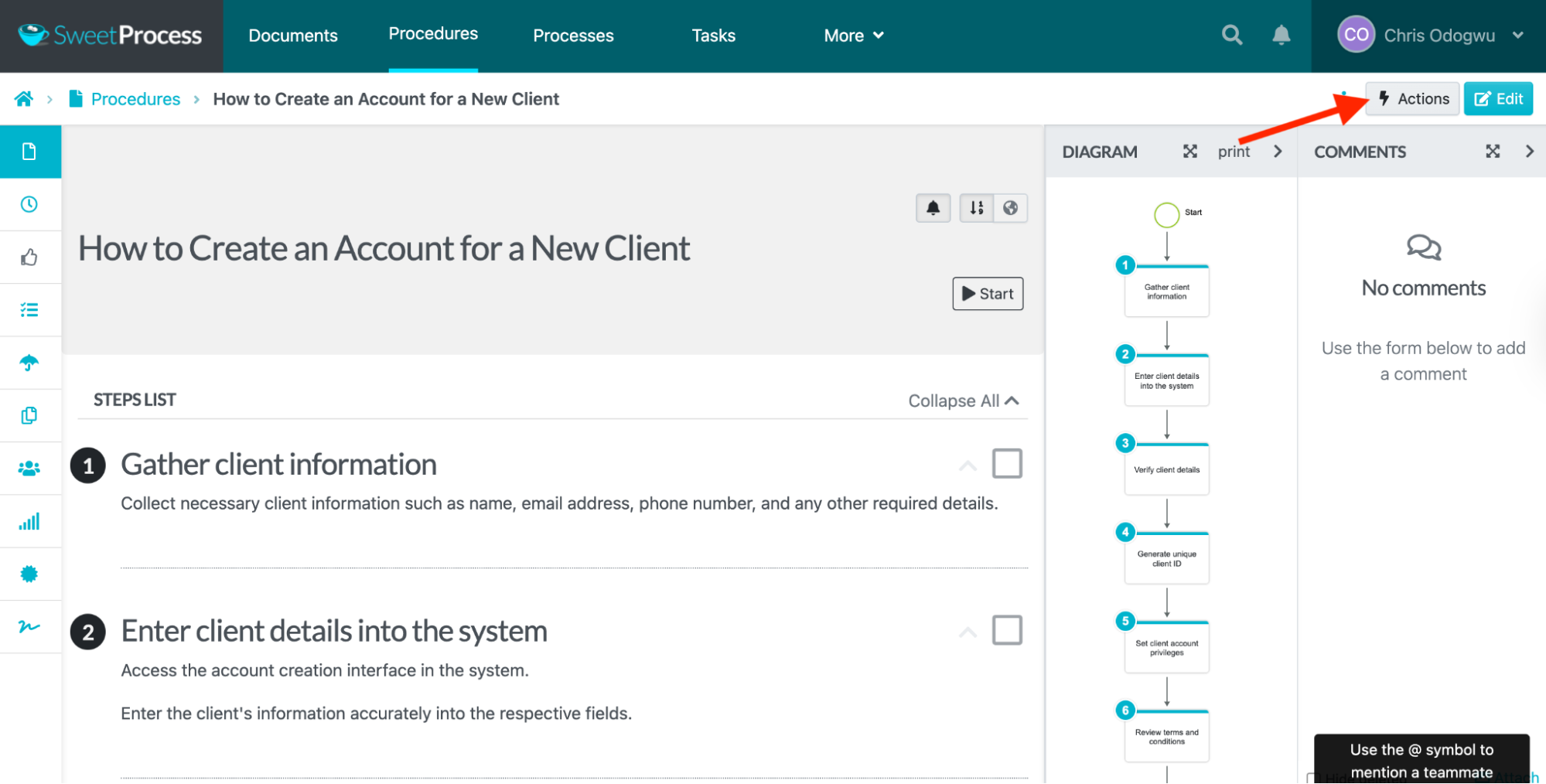
Click “Share.”
Start typing the team member’s name in the search bar, and their name will come up if they’re on your team.
Manage SOPs in a Single Knowledge Base
SweetProcess also lets you organize them in a centralized internal or external knowledge base. This serves as the primary resource for all information related to task execution and policy understanding within your organization.
An internal knowledge base is designed for your team, while an external knowledge base is intended for external parties, such as customers.
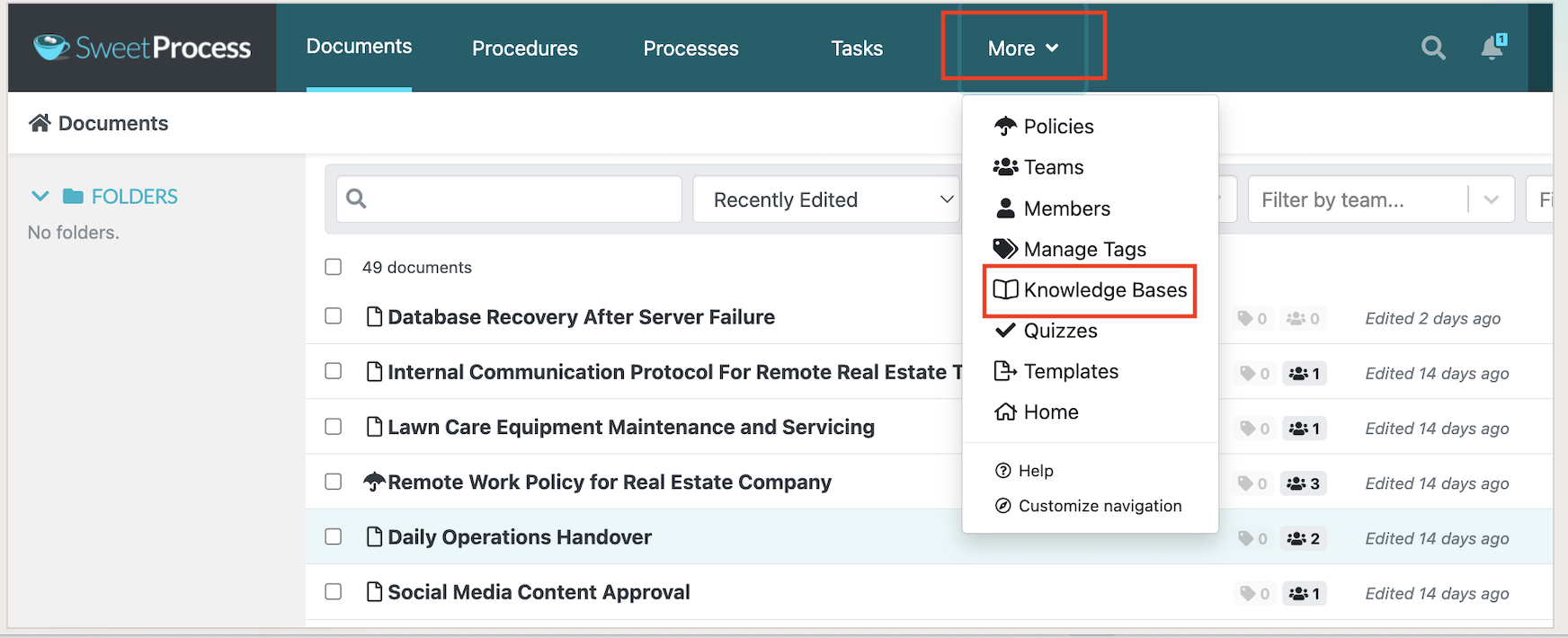
Here’s how to create an internal knowledge base:
Click “More” and “Knowledge Bases.”
Enter the title of the knowledge base and click “Continue.”

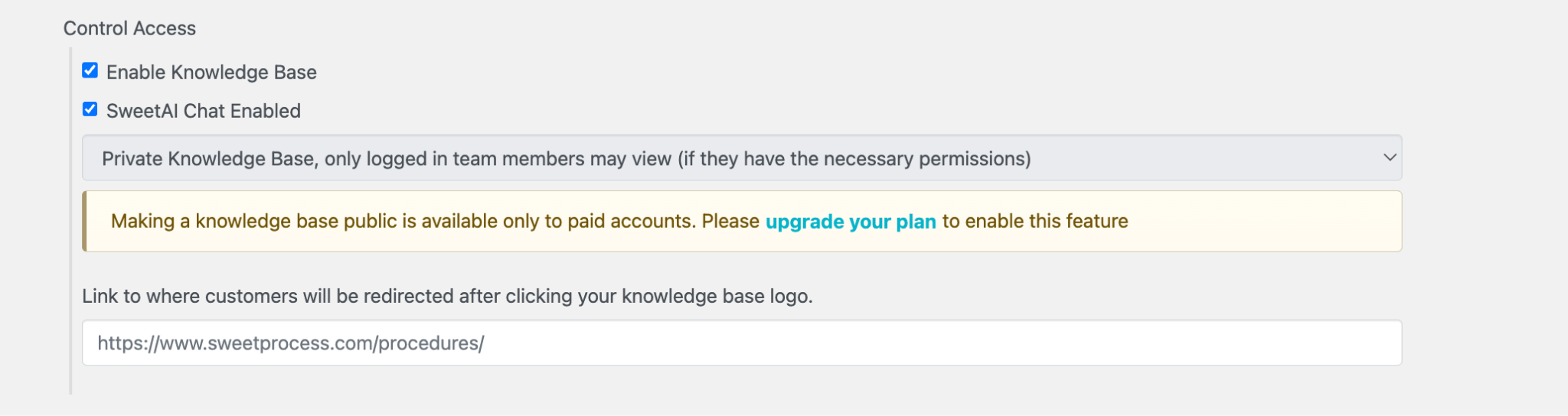
Click the column below “Control Access” and select “Private Knowledge Base, only logged-in team members may view (if they have the necessary permissions).”
You can enter the page URL to redirect users when clicking the knowledge base title.
SweetProcess Pricing
SweetProcess uses one flat plan rather than tiers, so every user gets every feature. If you have 10 users, you can choose the monthly plan at $99 or the annual option for $990. If you have a small team of five users, SweetProcess costs $495 per year, billed annually. You’ll be charged $50 per year for every additional user after that.
In addition to the 14-day free trial, you also have access to a 30-day money-back guarantee in case you want to switch tools.
Not right for you if: You need built-in compliance tracking on active tasks or your main requirement is automatically capturing every click you make inside software. SweetProcess is built to create, hold, and manage procedures clearly.
Scribe

Image source: Scribe
Overview of Scribe
Scribe improves process documentation by offering on-screen recording features and providing SOP templates to streamline procedures.
What Are the Standout SOP Features of Scribe?
- Screen recording: Record your screen as you perform tasks, demonstrating each step in action from start to finish. You can use the video as a standalone SOP or embed it alongside other SOP elements.
- Image capturing and annotation: Take screenshots of images as you perform tasks and add annotations to highlight key points.
- AI content creation: Automatically create structured SOPs and related documents with AI using expert knowledge. This saves time, especially when producing multiple documents.
- Employee training and onboarding: Use the numerous documentation templates to create and update training materials. Onboard new hires quickly by sharing onboarding SOPs in the system with them.
- Comprehensive documentation: Reduce teammates’ questions about how to perform tasks by using various documentation tools to clarify SOPs. This includes embedding images, videos, and charts where needed.
Scribe Pricing
Scribe offers a free Basic plan that comes with limited features. The paid plans include:
- Pro Personal is $35 per seat per month, or $25 per seat if billed annually.
- Pro Team is $17 per seat per month, or $13 per seat when billed annually, with a five-seat minimum.
- Enterprise pricing is available on request.
Not right for you if: Scribe is built to capture a process fast; therefore, it may not be ideal if you need one central SOP system to hold and manage physical procedures, policies, and processes that cannot be captured from a computer screen.
For a closer look at how Scribe stacks up against another capture-first tool, see our Scribe vs. Tango comparison.
Way We Do
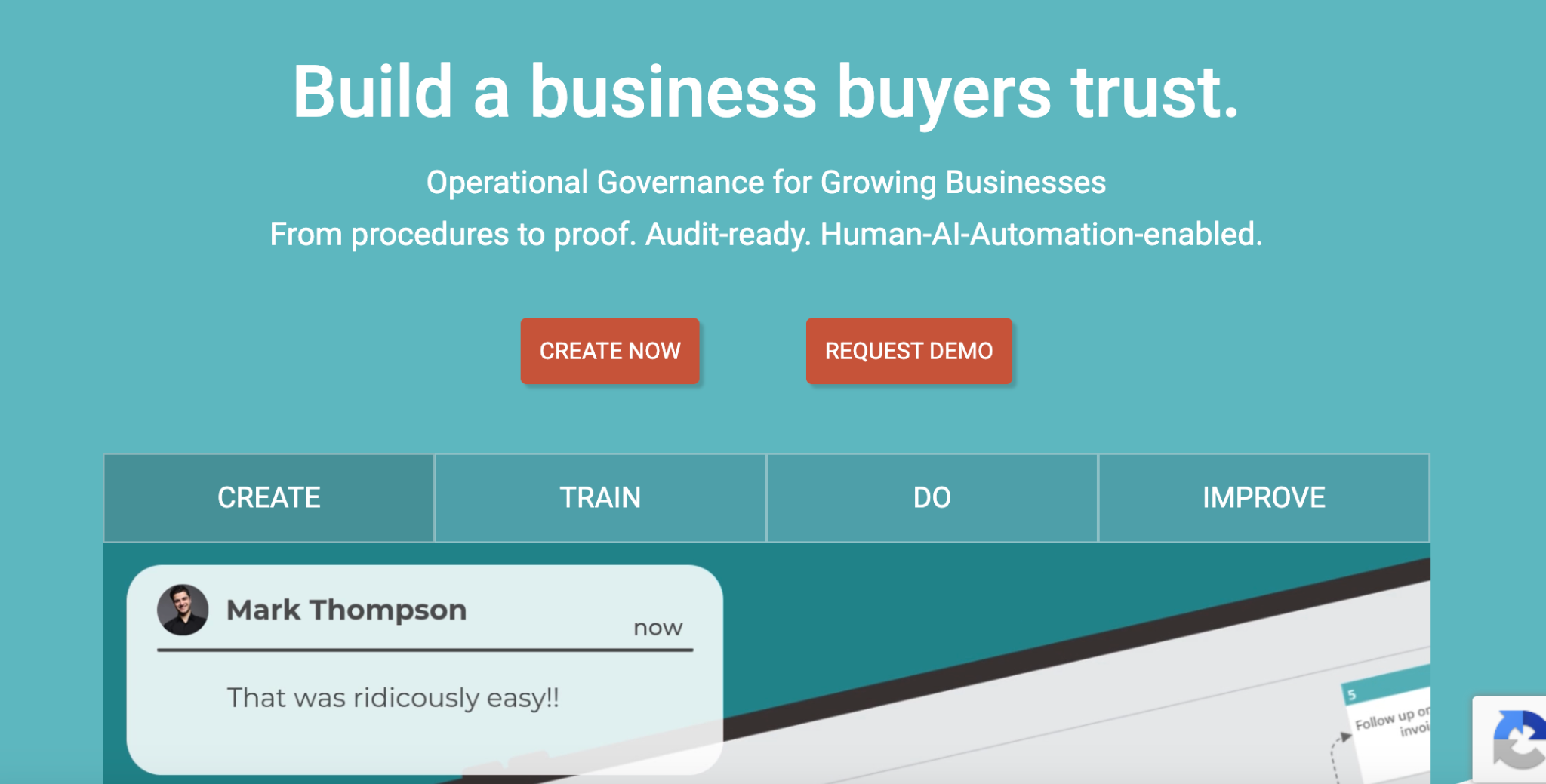
Image source: Way We Do
Overview of Way We Do
Way We Do enables the accurate documentation of policies and procedures, helping businesses meet compliance requirements, follow best practices, deliver high-quality services, and empower teams to work more efficiently.
What Are the Standout SOP Features of Way We Do?
- Multimedia documentation: Bring your documentation to life with a mix of visual elements, such as videos and charts. Adding multiple elements boosts usability as teammates are more likely to use them.
- Compliance tracking: Maintain regulatory compliance by monitoring performance activities in the system. It records activities with timestamps, providing evidence of high-quality work.
- Flexibility to update procedures: Meet emerging business needs by easily updating outdated sections of your SOPs. Focusing on improvement areas saves more time than recreating the entire document.
- Knowledge testing: Gauge how well your employees understand business procedures with quizzes. This is useful for both new and existing employees as it keeps them up to date.
- AI content writer: Save time by using the AI content creator to create SOPs instead of doing it manually. It generates a complete procedure in just a few minutes, with expert knowledge.
Way We Do Pricing
- Waybook’s entry plan costs $99 per month for up to 10 team members
- You have to add additional members in blocks of 10.
- Enterprise pricing is quote-only, with a 50-member minimum.
Not right for you if: You need to add users one at a time. A business hiring its eleventh employee pays for an entire new block of 10 seats, which can be costly for teams growing gradually.
Waybook
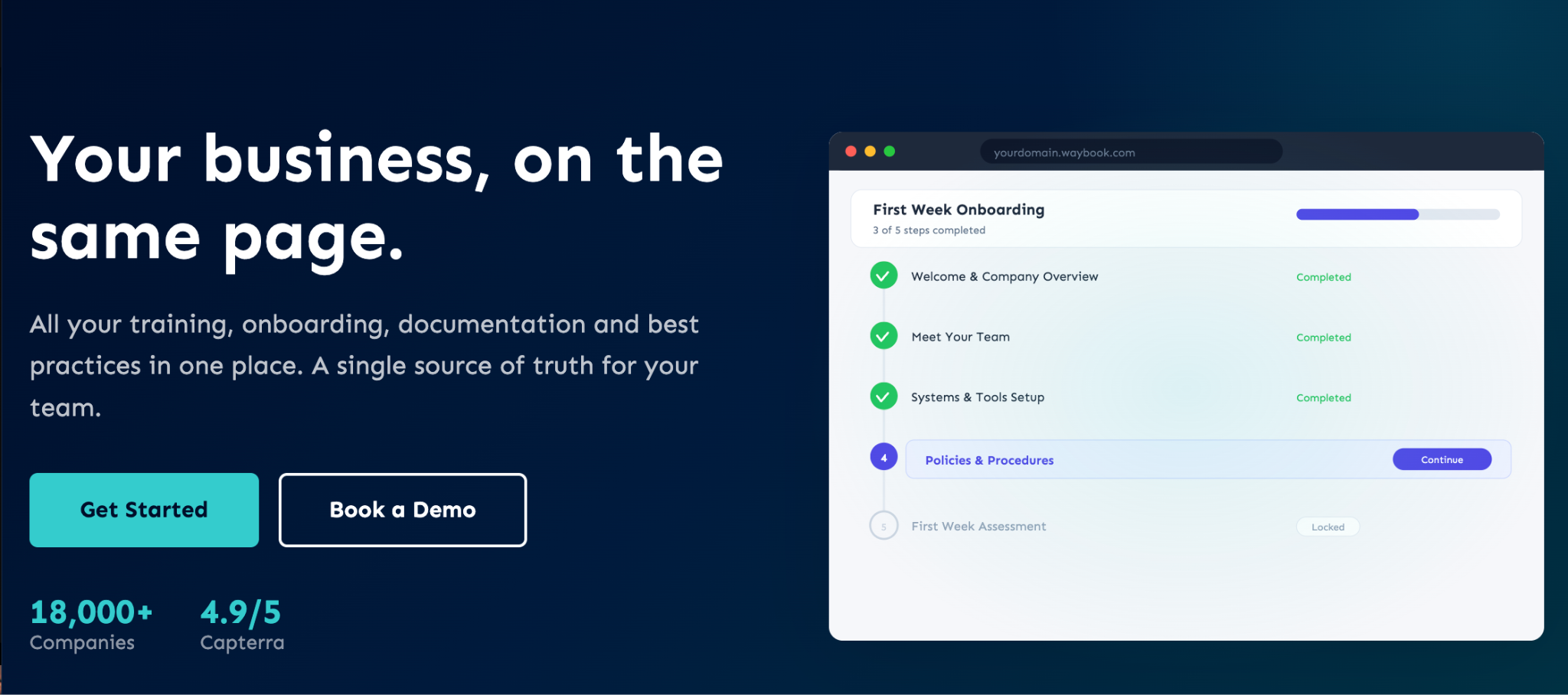
Image source: Waybook
Overview of Waybook
Waybook simplifies complex instructions for task completion by structuring them into efficient procedures, facilitating training and onboarding new staff, enabling employees to perform key tasks, and ensuring adherence to regulatory policies.
What Are the Standout SOP Features of Waybook?
- Video embeds: Create engaging SOPs with videos that offer team members alternative learning options. You can use these videos as standalone SOPs or combine them with others.
- Full image support: Add pictures between text in your SOPs for easier reading. You can also use this feature to capture complex ideas visually and help employees better understand how to perform tasks.
- AI document writer: Put the AI document writer to work with the right prompts, and it’ll instantly generate top-tier procedures, policies, and related documents, saving time.
- Team collaboration: Manage collaborative tasks by granting access to authorized team members, assigning tasks, and tracking their input. Facilitate smooth handoffs by notifying teammates about task progress.
- Advanced searchability: Retrieve specific SOPs using the keyword-enabled search function, saving time when managing numerous documents in your system.
Waybook Pricing
Waybook plans are as follows:
- Core plan costs $99 a month if billed annually or $119 on the monthly option for up to 20 team members.
- Pro costs $198 per month billed annually or $238 on a monthly plan
- Enterprise pricing is quote-only.
Not right for you if: You want a narrowly focused SOP system without the broader knowledge management and onboarding capabilities.
Whale
Image source: Whale
Overview of Whale
Whale combines audiovisual elements to document procedures in a centralized system, ensuring operational consistency, maintaining quality assurance, and adhering to regulatory policies.
What Are the Standout SOP Features of Whale?
- Video screen recorder: Record your screen as you perform a task step by step. You can also include your voice if you want to explain the task as you go.
- Step recorder: Automatically capture each step of a task with screenshots while you work on the screen, and add annotations.
- AI writing assistant: Save time by instantly creating SOPs with the AI writing assistant.
- Video to SOP transcription: Automatically generate SOPs from videos. If you upload a specific video, the system will transcribe it into a detailed step-by-step process.
- Process templates: Speed up SOP creation with multiple templates designed specifically for that purpose. This saves the time that you would have spent creating them yourself.
Whale Pricing
Whale’s price depends on the features you need and the number of creators who will build and edit the content. Whale offers:
- A free plan that covers 10 members and one creator.
- Scale plan that costs $249 a month billed yearly, including three creators
- Advance plan costs $499 a month billed yearly and includes five creators
- The Enterprise option is customized
If you need an SOP tool but don’t have a software budget yet, compare these free SOP software options to see which fits your business.
Not right for you if: You need a pricing model based primarily on total team members rather than the number of people who create documentation. The price goes up as your number of creators increases.
Procedureflow
Image source: Procedureflow
Overview of Procedureflow
Procedureflow focuses on visualizing procedures within an organization, helping teams follow clear instructions with visual aids, and creating a more robust knowledge base with helpful information.
What Are the Standout SOP Features of Procedureflow?
- Centralized knowledge base: Build your knowledge base in a single, centralized system. It’s designed to help you quickly retrieve the information you need.
- Text-to-visual conversion: Transform text documents into visuals such as charts. This comes in handy when managing complex procedures.
- Process automation: Automate repetitive processes such as data entry and calculations that AI tools can perform. Automating these tasks reduces errors and gives teammates time to focus on more engaging activities.
- Performance tracking: Gather insights on performance levels across your business. Use this information to make informed decisions toward improving operations.
- Document versioning: Manage multiple versions of a procedure for various use cases. Track changes at any point, with identifiers to distinguish between documents.
Procedureflow Pricing
Procedureflow offers two pricing options:
- Enterprise costs $33 per seat monthly, billed annually.
- Enterprise+ pricing is available on request for larger deployments.
Not right for you if: You need a low-cost plan for a smaller team. The SOP tool is better suited to complex work and enterprises.
Process Street
Image source: Process Street
Overview of Process Street
Process Street builds a framework for streamlining compliance requirements and operational procedures into comprehensive and actionable documents, enabling employees to perform tasks that meet required standards.
What Are the Standout SOP Features of Process Street?
- Risk management: Monitor your performance with real-time tracking to flag any anomalies. It operates in accordance with the outlined compliance requirements and alerts you to potential threats.
- Centralized knowledge base: Maintain workflow consistency by creating SOPs that are accessible in a single location. It supports all document formats, including Word, PDF, and Excel.
- Performance insights: Gain real-time insights into your workflow’s state. This visibility reveals existing gaps and provides insights on how to close them.
- Compliance automation: Leverage compliance automation to reduce human error by utilizing the precision of AI to ensure that your operations are effective and audit-ready.
- AI content creator: Save time by quickly creating SOPs with AI. Your SOPs will be detailed, with information only professionals in the field can provide.
Process Street Pricing
Process Street offers three pricing tiers. However, to get the actual costs for the Startup, Pro, and Enterprise plans, you have to contact the sales team.
Not right for you if: You need to know the exact cost of the SOP tool before you talk to a salesperson.
Trainual
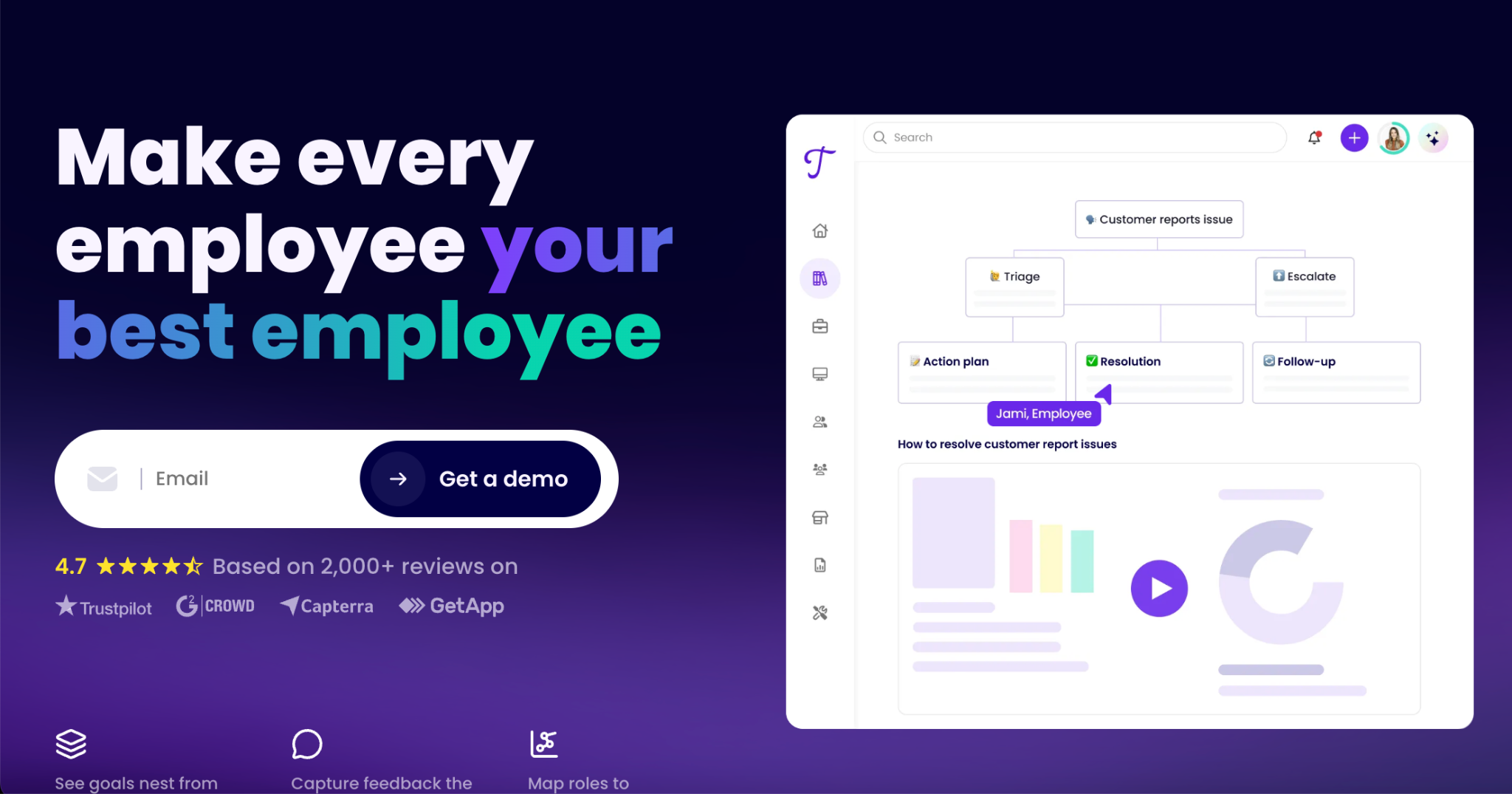
Image source: Trainual
Overview of Trainual
Trainual simplifies employee training by streamlining procedure documentation with clearly outlined steps and defining team roles with specific expectations, all in a single, accessible platform.
What Are the Standout SOP Features of Trainual?
- Video embeds: Add video instructions to your SOPs to appeal to a broader audience. These videos help simplify complex ideas that are too lengthy and boring in written form.
- Advanced searchability: Make it easier for team members to find the documents they need with advanced search.
- Employee training: Create custom training tailored to team members’ roles, locations, and knowledge levels. You can also streamline training to meet individual requirements by developing a clear SOP for training.
- Knowledge testing with quizzes: Test employees’ knowledge of new and existing tasks with quizzes. Insights into their performance help to set realistic expectations.
- Software integration: Connect multiple software tools to your system to maximize your workflow. Having everything in one place saves time switching between tools.
Trainual Pricing
Trainual offers three pricing tiers: Core, Pro, Premium, and Enterprise. However, the website doesn’t list pricing; you have to contact the team.
Not right for you if: You want to compare transparent subscription prices online and start without first going through a sales process.
MaintainX
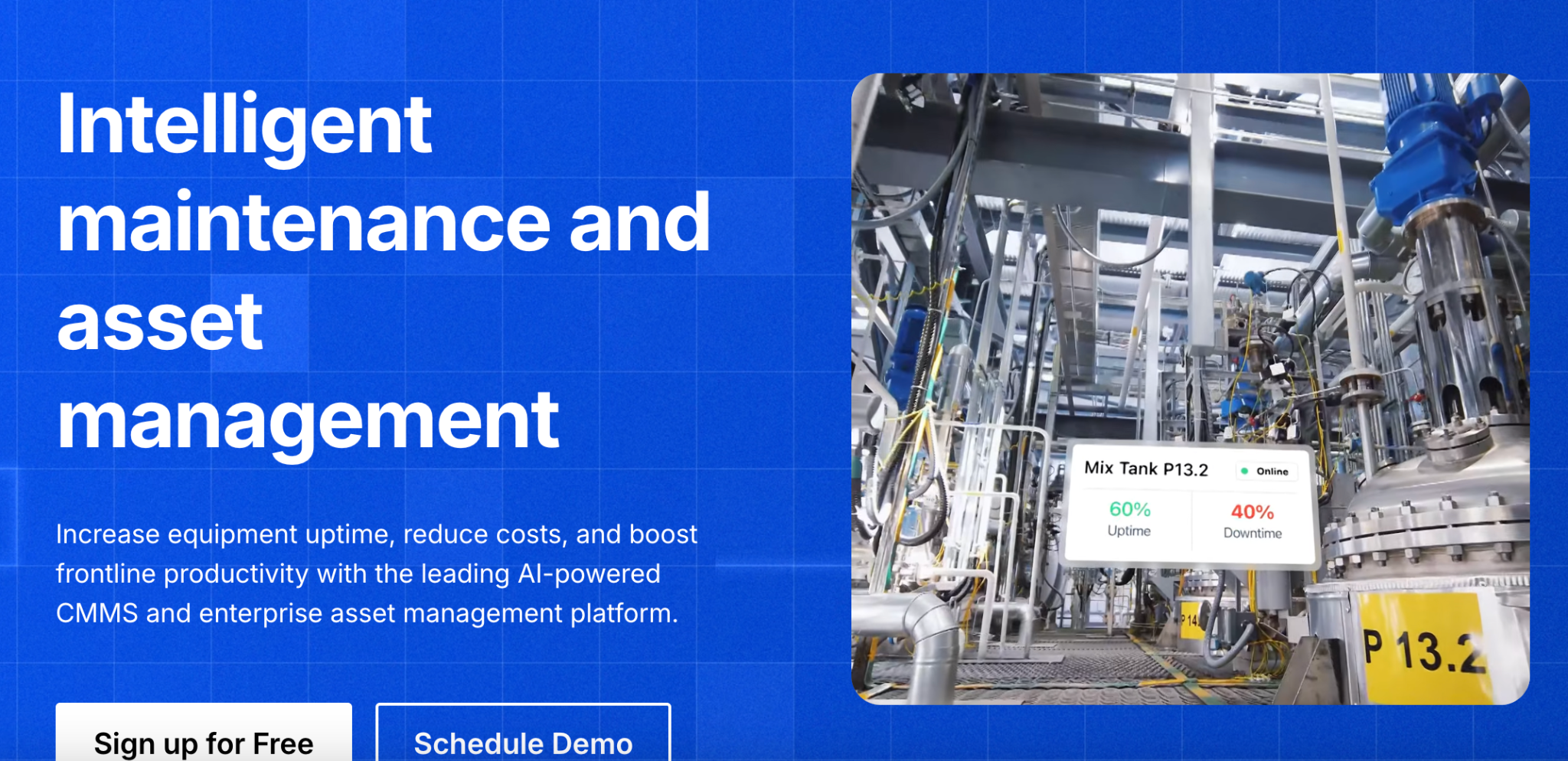
Image source: MaintainX
Overview of MaintainX
MaintainX reduces workflow redundancies by automating repetitive tasks and optimizing daily activities that typically consume time and resources.
What Are the Standout SOP Features of MaintainX?
- Expert implementation support: Get expert guidance to implement the software. This shortens the learning curve, helping you get the most out of the tool quickly.
- Data reporting and management: Gain full visibility of your operation by monitoring data in real time. These performance insights support decision-making and accountability.
- Tools integration: Enhance your operations by integrating multiple tools into a single platform to improve your workflow across all areas.
- Asset management: Manage your assets by streamlining maintenance routines and tracking operational downtime. These insights help reduce costs.
- Process automation: Free up time for tasks that require brainpower by automating mechanical ones. This automation allows parts of your operations to run on autopilot.
MaintainX Pricing
MaintainX offers three pricing options:
- Free Basic plan
- Essential costs $20 per user per month, billed annually, or $25 billed monthly.
- Premium is $65 if billed annually, or $75 when billed monthly.
- Enterprise pricing is available on request.
Not right for you if: Your SOPs are not built around maintenance operations or tracking work orders.
The good old practice of trying something out before acquiring it is still viable today. Among these SOP software options, SweetProcess is the only one offering a completely free two-week trial with access to all its features. This demonstrates its confidence in its ability to deliver. Sign up for the 14-day free trial now and see if it’s suitable for your business.
Key Features To Consider Before Choosing an SOP Software for Your Business
It’s important to make an informed buying decision by outlining your needs and prioritizing software that can meet them. Here are some key features to consider.
Templates and Easy Document Creation
One of the core needs for SOP software is to create comprehensive SOP documents with ease. Many businesses struggle with achieving this because the tools they use don’t offer much help. The right system saves time by providing multiple templates for different types of procedures. Instead of making a design from scratch, you can simply customize the available templates to meet your specific needs.
Dr. Jeremy Weisz, co-founder at Rise25, emphasized that using the right tool for documenting SOPs makes a big difference. Implementing SweetProcess after using Microsoft Word and Google Docs made him wish he had switched to it sooner because his SOPs became easier to create and understand due to the available templates. He could break them into step-by-step instructions, allowing someone unfamiliar with a task to complete it successfully by following the outlined steps.
Multimedia and Formatting Support
One of the best practices for creating effective SOPs is to make them multimedia. Long texts can be boring and may not capture procedures in action. Good software supports multimedia documentation, letting you add text, videos, images, charts, and other media. These elements are designed to seamlessly integrate into the content editor, allowing you to format your documents with ease using clicks and uploads.
Document Collaboration, Version Control, and Audit Trail
Using software that enables team members to create, share, update, and access documents simultaneously fosters collaboration. It also allows for creating multiple versions of a procedure for different use cases and provides real-time tracking of engagements, maintaining records of operational data for audit trails.
Chris Dunning, founder and CEO at TechQuarters, didn’t realize how much document versioning could improve his business operations until he implemented SweetProcess. He and his team struggled to handle multiple documents for the same procedure. This caused confusion because they lost track of updates. Versioning became easier to manage with SweetProcess, as it allowed users to track changes and identify different versions of documents.
Permission and Security
The rise of digital technology creates more opportunities for cyberattacks. With this vulnerability in mind, it’s crucial to prioritize the security of the software you plan to use. Choose one that allows you to grant permission access only to authorized teams, preventing unauthorized entries, and that also offers advanced security measures such as multi-factor authentication to enhance data protection.
Integration With Project Management Tools
Considering how your SOP management software integrates with other project management tools ensures you maximize your workflow for high efficiency and productivity. The goal is to connect to multiple tools and manage them all in a single system without switching between platforms. This creates a seamless workflow and saves you time.
SweetProcess allows you to integrate over 1,000 other software applications through an application programming interface (API) without advanced coding. You don’t have to forfeit other tools that cater to specific needs within your business.
Try it out right away by signing up for a 14-day free trial without a credit card.
Why Use SOP Software?
Here are some specific ways your business benefits from SOP software.
Centralized Documentation
A solid SOP system creates a single source of truth that all team members, regardless of their individual skills, can refer to when performing tasks, ensuring uniformity across the organization.
When faced with an operational issue, the first point of call for many organizations is to resolve it and continue moving forward. However, they find themselves back at square one when a similar issue arises. Jamie Ramsden, business intelligence officer at Turkstra Lumber, experienced this in his organization. But upon implementing SweetProcess, he and his team were able to address operational problems at their root causes by documenting and storing procedures for each task in a centralized knowledge base. If an operational error occurs, they create an SOP to address it. Employees can access the document in the knowledge base and avoid repeating the mistake.
Team Consistency and Error Reduction
When employees use procedures that are reviewed and stored in a centralized knowledge base, the chance of inconsistency and errors is minimized. This access to SOPs means they are relying on tested and trusted information.
Faster Onboarding and Training
An effective SOP tool speeds up onboarding and training because you can share materials with the team, allowing them to dive in and even learn on their own.
Onboarding at Interview Valet was a lengthy and tedious process. It took new hires at least six months to fully understand the business operations and start making significant contributions. The lengthy wait cost the organization too many resources. According to the chief evangelist officer and founder, Tom Schwab, the onboarding time was drastically reduced to just a few weeks after they implemented SweetProcess. It allowed them to easily share documented procedures for tasks with new employees, showing them exactly what they needed to do.
Audit Trail
SweetProcess lets you keep a record of who wrote a procedure, who approved it, and when it was last updated. You can show this to an auditor or a regulator to show that your team is meeting specific obligations.
Sign up for a 14-day free trial to see how it can benefit your business. No credit card required.
Are SOPs Outdated?
If you have a static document nobody opens, buried in a shared drive with no owner and no update history, your SOP is outdated.
However, a useful SOP is different. It should be current, findable, understandable, and connected to the work employees actually perform. It should also have someone responsible for keeping it accurate. For instance, a procedure for processing refunds may need to change when your refund policy or e-commerce platform changes.
SOP software can help your business by providing a central location, search, version history, and assignments to keep procedures connected to the people who use them.
While the tools on this list help keep your SOPs updated, you still need to decide which processes to document, who owns each procedure, and when to review them.
If your bigger problem is documenting business processes rather than choosing an SOP platform, see our process documentation software comparison.
How To Choose the Best SOP Software for Your Business
Organizations typically allocate the majority of their IT budget to software. Using incompatible software can lead to a waste of resources and overextension.
Here’s how to choose the right ones for you:
Step 1: Consider Your Team Size and Industry Needs
Some SOP tools are better suited for particular types of companies. For instance, financial sector businesses benefit more from applications that manage numbers and present calculations through charts and figures. In contrast, media and communications companies often rely on capturing detailed processes via text and audiovisual content.
An organization’s size influences collaboration needs. Since larger companies have more employees, they need a tool that offers segmented infrastructure for clear messaging and allows multiple users at an affordable rate. The best software for smaller organizations facilitates fast-paced communication and close interaction.
Step 2: Access, Pricing, and Budget
Developing excellent procedures is pointless if they aren’t accessible, as users won’t be able to utilize them effectively.
Budgeting matters a great deal. A business must be able to afford the software without incurring high costs. If it exceeds the budget and isn’t sustainable in the long term, it’s not suitable. A more affordable and appropriate alternative should suffice.
Step 3: Sign Up for a Free Trial
What better way to determine if the software suits your business than to try it out? Focus on free SOP software tools or those that offer free trials and use them fully during the trial period. You will be able to assess how they can enhance your operations. This is important because some software companies overpromise. If you pay for their product without testing it first, you might discover that the features they promised don’t exist.
SweetProcess provides a 14-day free trial without requiring a credit card. During that time, you can use all its features to see whether they meet your needs and expectations. If you’re not satisfied by the end of the trial, you’re not obligated to continue since you never entered your credit card information. Sign up for the trial and see if it meets your business needs.
Step 4: Import Existing SOPs and Create New Ones
If you have external documents you’d like to add to your workflow, you should be able to import them into the system. This saves time and maintains work continuity. Likewise, you should be able to export documents for external use outside of the software. Your workflow could be limited if you can’t import and export files.
Step 5: Evaluate Use Cases and Learning Curve
No matter how effective an application claims to be, it raises concerns if it has a steep learning curve. Anyone with basic computer skills should be able to use it. It’s also essential to examine the software’s use cases. Ensure that similar businesses have successfully used it to streamline their operations.
Regardless of your industry, you can tailor SweetProcess to suit your daily operations. Try it today by signing up for a 14-day free trial without a credit card.
Which SOP Software Is the Best for Your Business?
The best SOP software for your business depends on your team’s size, budget, and what you need it to do beyond storing documents. SweetProcess is built for teams that want a straightforward, flat-priced place to document procedures, processes, and policies, with SweetAI available to help draft a first draft that your team can review and own.
The only way to know if it’s right for you is to try it against your own procedures. Sign up for a 14-day free trial. No credit card required.
FAQs
What is the best software to write SOPs?
It depends on what you need beyond writing. SweetProcess suits teams that need comprehensive procedure documentation with version control, acknowledgments, and a knowledge base. Scribe suits fast screen capture. Trainual and Whale suit teams that need structured training built around the SOPs, not just the documents themselves.
Can ChatGPT generate SOPs?
Yes, ChatGPT can generate SOPs with a well-written prompt. However, it will not know your specific tools, policies, or exceptions unless you provide them, and someone still has to verify the result. An AI SOP generator like SweetAI goes a step further by helping you manage your procedures.
Are SOPs outdated?
SOPs are not inherently outdated. A static procedure that nobody updates or uses is outdated. However, a current, findable procedure with a clear owner can still be useful for repeatable work, onboarding, training, and operational consistency.
Is there any free software that can create SOPs?
Several tools on this page, including Scribe, Whale, and MaintainX, offer a free tier with limited features. Software like SweetProcess and Process Street offers a 14-day trial to test the tool.
What does SOP software cost?
SOP software ranges from free plans to paid subscriptions that charge per user or by team size. Some vendors publish their prices, while Process Street and Trainual require prospective customers to contact sales. Before comparing headline prices, check included users, minimum seats, creator limits, annual billing, and implementation fees.