Last Updated on April 20, 2026 by Owen McGab Enaohwo
What good is an employee handbook if most of your team has never read it? Here’s what that looks like in practice: you spend two full days of valuable time writing a 40-page handbook. Six months later, a new labor law requires three policy updates. You save it as “Handbook_Final_v3” and email it out. Four employees never bother to open it, while the rest are still working off a printed copy from onboarding.
During the annual company audit, you realize that you need to create a centralized handbook, since all you have is a folder full of files with nearly identical names and no way to prove acknowledgment. That’s the role an employee handbook is supposed to fill.
An employee handbook is your business’s formal guide, covering everything from workplace conduct and leave policies to compliance requirements and company culture.
Creating it manually makes it difficult to make updates and collaborate on tasks. You need an AI employee handbook builder to create a living, trackable system within minutes. Here’s a guide to automate the process.
Table of Contents
Why Use an Employee Handbook Builder?
Why Choose SweetAI As Your Employee Handbook Creator?
How Thimbleberry Financial Uses SweetProcess To Build and Manage Its Employee Handbooks
Employee Handbook Builder FAQs
Why Use an Employee Handbook Builder?
Building an employee handbook manually might seem manageable when you have a handful of employees. But the moment your team expands, it starts becoming overwhelming. Your policies get buried in static PDF and Word documents that never reach the right people. Here are the key reasons why you should switch to an employee handbook builder:
Saves Time and Cost
Think about what it actually takes to build a compliant employee handbook from scratch. Someone on your team has to research relevant policies, write every section, format the document, get it reviewed, incorporate feedback, and then distribute it across the organization. That process alone can eat up anywhere from 20 to 40 hours of work. For small businesses, this effort takes up time that would otherwise be spent on revenue-generating activities or strategic planning.
With an employee handbook generator, you eliminate this inefficiency. AI-powered tools can generate structured policy drafts in minutes and automatically organize them into clean sections. Instead of hiring consultants or legal writers to draft from scratch, you start with smart customizable templates and customize them for your company. Over time, you lower your administrative costs and get a professional custom employee handbook built in a fraction of the time.
Reduces Legal Risk
Imagine facing a workplace dispute and being asked: “Can you prove this employee acknowledged your disciplinary policy?” If your only evidence is a mass email from last year, you may be exposed to costly legal liability. If you have missing acknowledgment records and inconsistent versions, you increase the risk of legal vulnerabilities.
Legal risk in the workplace arises from being unable to prove that policies were communicated and understood. An employee handbook builder protects you by tracking who has read each section, logging acknowledgments with timestamps, and maintaining a clear version history so you always know what was in effect and when. When a dispute arises, you can provide an audit trail.
Employment lawyer Sarah Goodman writes, “A well-maintained handbook is no longer optional.” As organizations adapt to remote and hybrid models, introduce AI tools, and keep up with ongoing changes in labor and data privacy laws, outdated policies leave too much room for confusion and disputes. A handbook that’s easy to update and redistribute helps ensure employees are always aligned with current expectations, while giving employers protection when policies need to be enforced.
Ensures Consistency Across Departments
If your sales team is operating under a PTO policy that was updated one month ago, your operations team might still be following the old one because their manager never received the memo. That kind of disconnect creates room for inconsistencies and confusion.
When this mix-up happens, you weaken accountability since there’s no clear understanding of your policies.
With an employee handbook builder, you can centralize all your policies on a single platform that every department can access. You can add all the policies and procedures to this platform and create a single source of truth. When updates are made, they apply to everyone; all team members can view and acknowledge them from multiple locations. Consistency strengthens company culture and ensures every team operates under the same expectations.
John Liston, the director and advisor at Liston Newton Advisory, used the employment handbook builder, SweetProcess, to ensure consistency. Initially, the company relied on Microsoft Word documents for documentation, but the approach fell short. As Liston puts it, “We still found that people weren’t necessarily following the procedures on how to write a procedure and were using different formats. Dragging in images and videos also tended to break the documents.”
The switch to SweetProcess made it easy to create policies. They use the tool to:
- Centralize policies so that employees can refer to them at any time.
- Speed up the onboarding process for new hires by giving them access to the platform from day one.
- Assign tasks and KPIs that employees need to meet.
- Track all the procedures and admin work without using multiple tools.
Simplifies Onboarding
Consider what your current onboarding process actually looks like for a new hire. When they show up on day one, do they get handed a stack of documents or multiple links to shared drives? Without a structure, new employees won’t have a reference point for policies, making it easier to make mistakes.
An employee handbook builder transforms the onboarding process into a structured, trackable experience. On their first day, new hires get access to a clean, compliant handbook that’s easy to navigate and available on any device. With this tool, managers can assign specific sections as required reading and collect digital acknowledgments before the employee ever starts working.
It can be integrated into the new employee orientation plan to build trust from day one. Additionally, managers can confirm completion without sending reminders.
Eases Policy Updates
Policies are not static. The labor laws change, and the workplace model shifts. In addition, your company might restructure its benefits system or get new industry regulations. In a manual system, you’ll need to find the original documents, manually edit them, get approvals, notify the team, and collect confirmations. For a single update, this can take up to a week of back-and-forth emails.
Your business needs an employee handbook builder to make updates in minutes. Once you make a change, the documents are automatically updated, and you can share them from the same platform and get acknowledgments. The built-in version control keeps track of what changed and when, transforming your policy into a living document that evolves alongside your company.
Getting Started With the SweetProcess Employee Handbook Builder: Creating Policies Instantly Using AI
To create a comprehensive employee handbook, you don’t have to start with a blank document. With SweetProcess, you can generate structured workplace policies in minutes using SweetAI. This employee handbook software allows you to draft, refine, customize, distribute, and approve documents from a single dashboard.
Here’s exactly how to do it, step by step.
Step 1: Generate Workplace Policies With SweetAI
Before you can share or enforce an employee handbook, you need to draft your policies. Writing policies from scratch requires time and a working knowledge of what needs to be included and how policies should be worded.
That’s where SweetAI speeds things up.
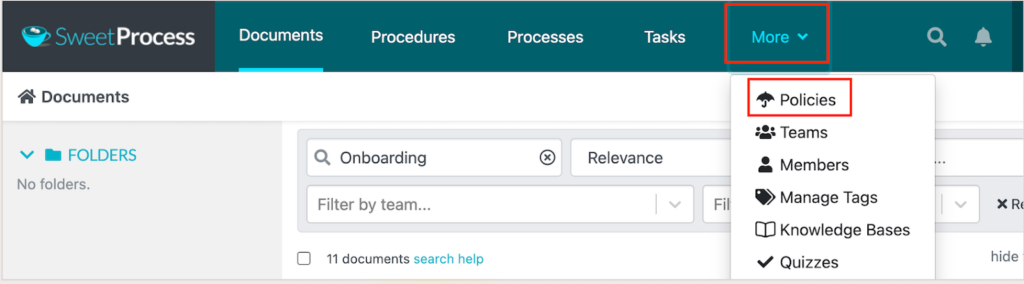
Once you’re inside your SweetProcess account, navigate to the Policies section and start the process.
Your policy needs a working title, such as “Remote Work Policy,” “Code of Conduct,” “Leave Policy,” or “Data Protection Policy.” A title makes it easy to track.

SweetAI creates a structured draft with clear sections and headings.
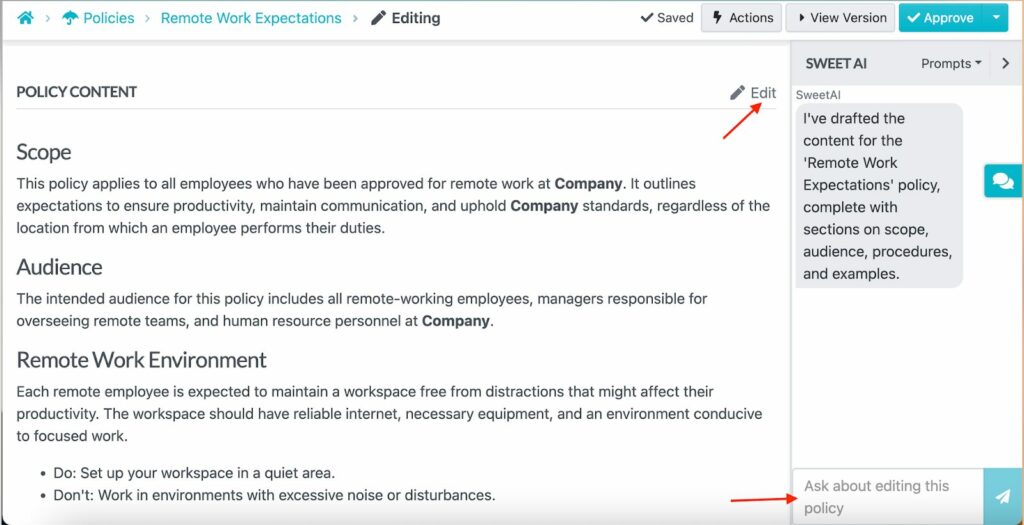
You can use the policy immediately as it is or refine it to suit your company.
Step 2: Review and Edit Your Policies
Generating a policy with SweetAI takes a few minutes. However, you still need to take a second look to customize it. Your company’s remote work policy may have different rules from the AI template.
SweetProcess makes this easy with two built-in options. First, you can prompt SweetAI to edit and review the generated policy by asking it to identify gaps or expand specific sections.
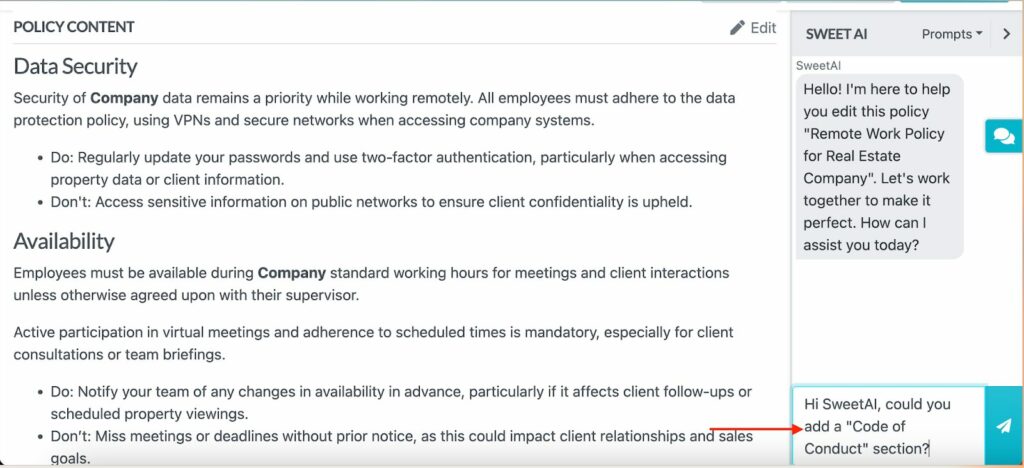
You can also edit the policy directly using SweetProcess’s free editor. Select the “Edit” button and update specific clauses, adjust the tone, add company-specific details, or rework any section that doesn’t quite fit.
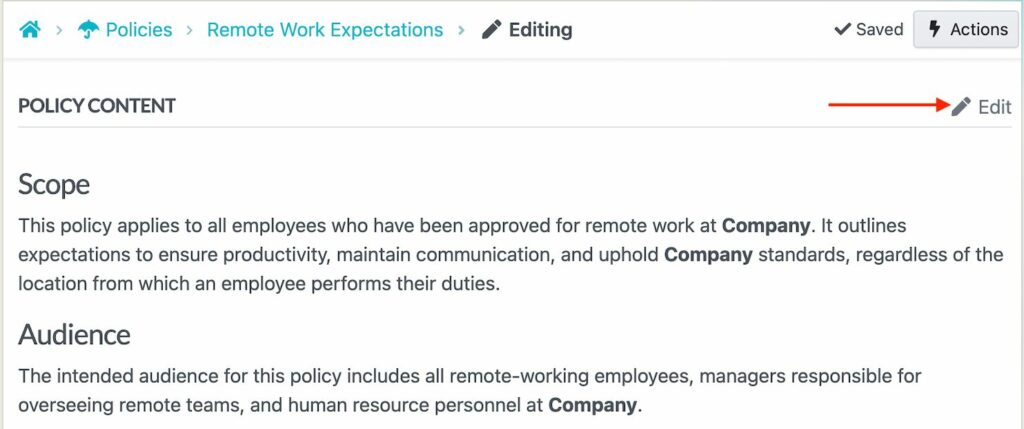
Every change is tracked automatically, so you always have a record of what was modified and when.
Step 3: Customize Your Policies
An effective employee handbook should reflect your company’s culture, your structure, and operational procedures. Once SweetAI generates the draft, you should customize it to transform it into an actual guide.
SweetProcess allows you to tell SweetAI about your company by adding details such as your industry, size, values, and any specific requirements so it can tailor the language and scope of your policies accordingly.
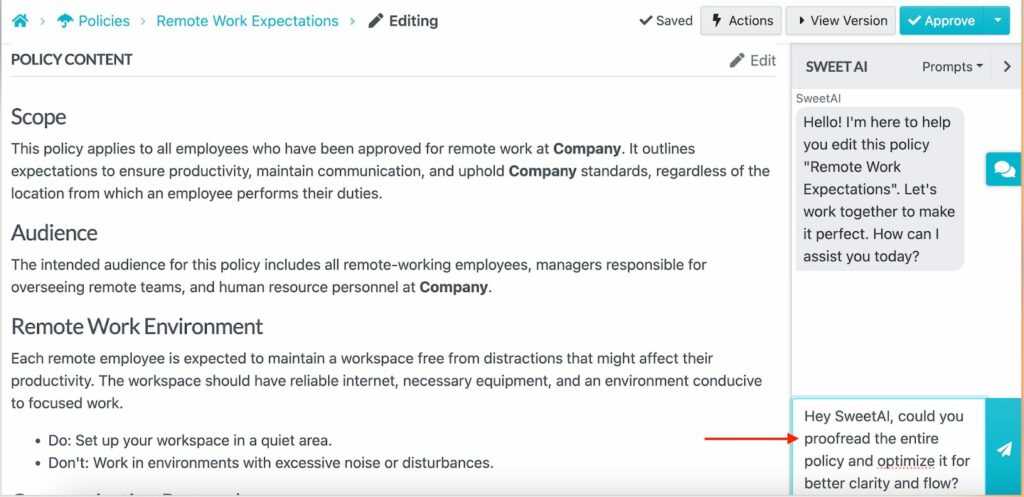
The AI generator will refine the policy to reflect this.
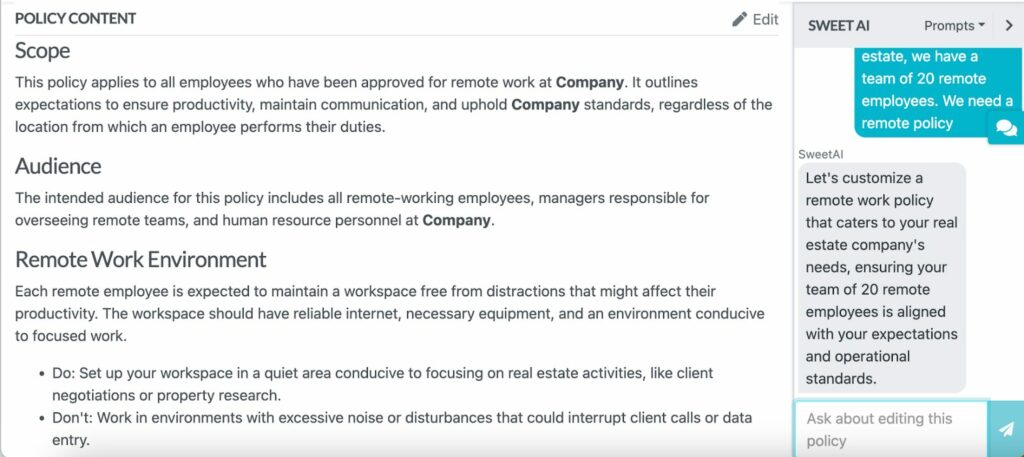
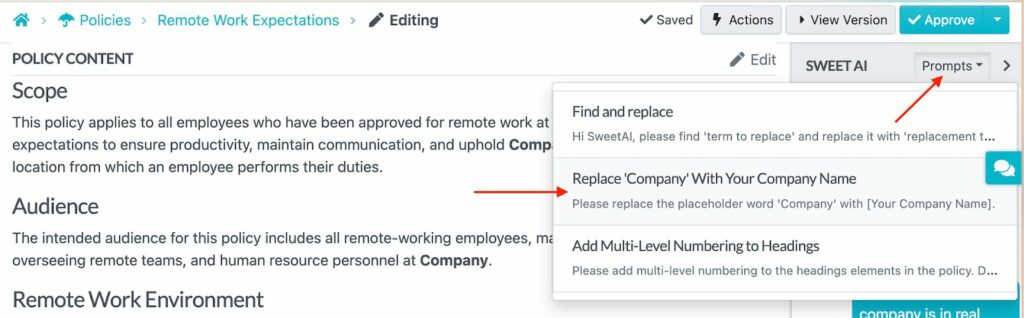
You can use the prompts to replace “Company” with your actual business name.
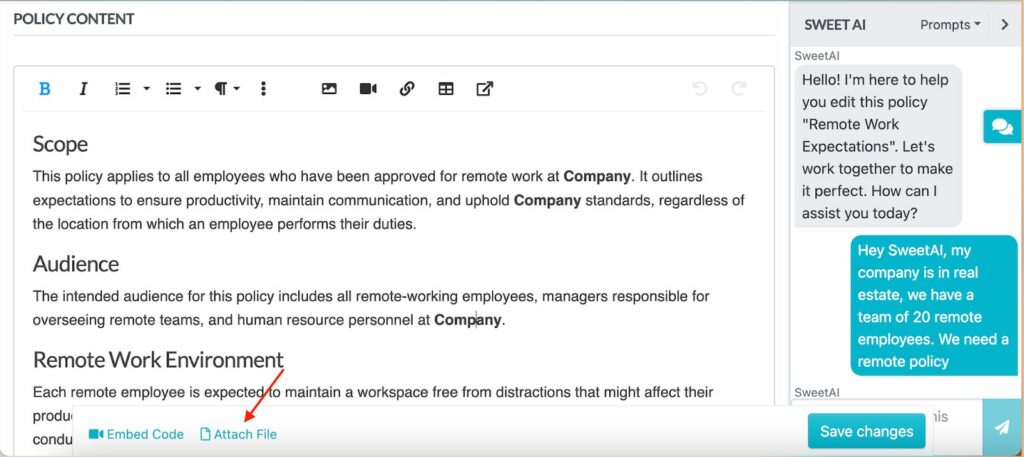
Additionally, you can upload relevant company documents or existing policy drafts directly into SweetProcess, and SweetAI will use that context to refine and align the generated content. As you edit, there’s an option to “Attach File.”
SweetProcess stands out from other employee handbook generation tools by allowing business owners to link related procedures to the policy.
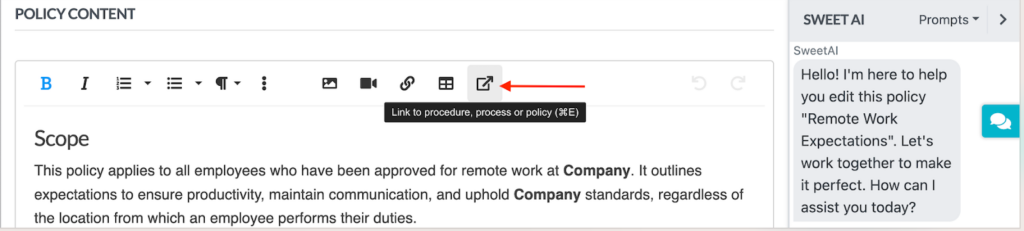
This way, your remote work policy can link directly to the procedure for submitting a remote work request, and your disciplinary policy can reference your performance review procedure. Your handbook stops being a static document and becomes a fully connected operational system.
Step 4: Approve and Share the Employee Handbook With Your Team Members
Writing an employee handbook is only half the job. You need to ensure that all employees have read, understood, and acknowledged it. SweetProcess handles the entire approval and distribution process from within the platform.
Once your policies are finalized, you can send them through an internal approval workflow before they go live, ensuring the right stakeholders have signed off before anything reaches your team.
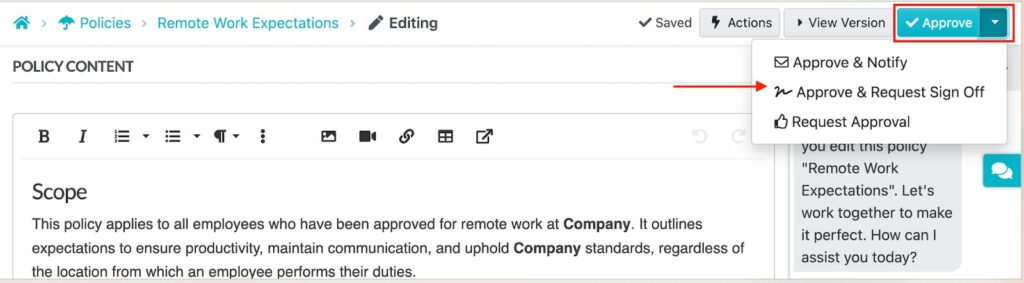
After approval, you can share the handbook directly with your employees through SweetProcess, where they can access it from any device at any time.
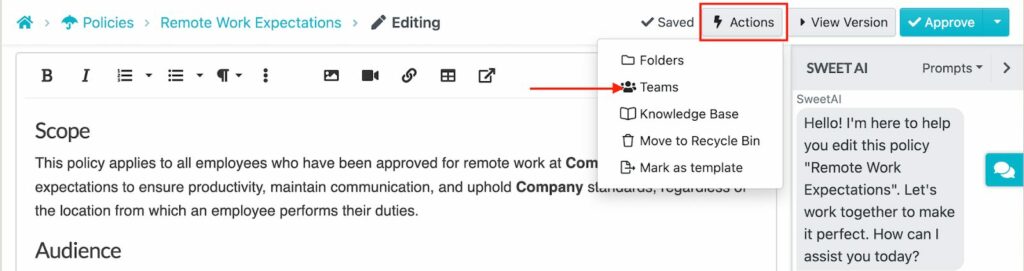
SweetProcess tracks who has reviewed each policy and maintains version history, giving you a clear audit trail. This eliminates the need for email follow-ups and scattered signature tracking.
Step 5: Download and Print Physical Employee Handbooks
In some work situations, such as in-person employee onboarding or a warehouse environment, you might need a physical copy of the employee handbook. SweetProcess makes it easy to export your completed handbook into a printable format.
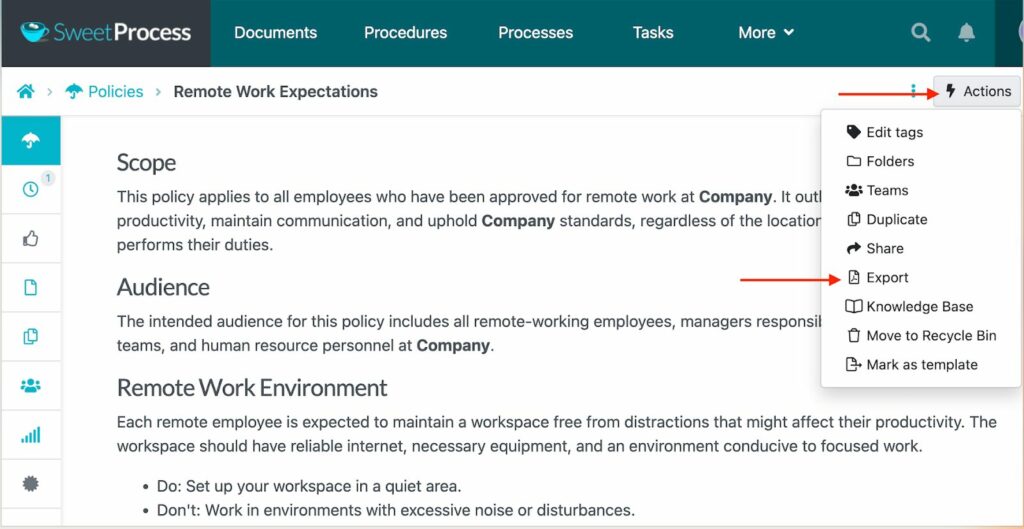
You can download the document as a PDF, Word document, or HTML file, and provide hard copies when necessary, without losing the advantage of maintaining a digital version in the system.
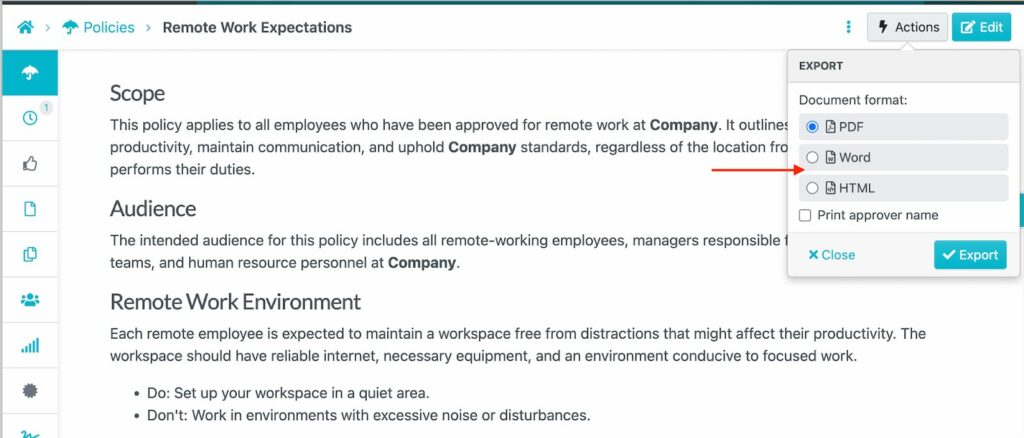
The exported version maintains the professional structure of your digital employee handbook with clear headings and organized sections.
Why Choose SweetAI As Your Employee Handbook Creator?
When choosing an employee handbook builder, you need a system that helps you stay organized. SweetAI goes beyond drafting content, helping you structure and update your entire handbook from a single centralized platform.
Here’s what makes SweetAI a powerful employee handbook creator for small businesses, founders, and growing teams.
Generate Core Handbook Sections With SweetAI
A strong employee handbook is a collection of distinct policies covering everything from how employees behave at work to how they request time off. With SweetAI, you can generate every core section of your handbook, including the code of conduct, compensation, leave policies, remote work expectations, and disciplinary procedures.
Instead of drafting each of these sections manually, you can prompt SweetAI to add the information for you.
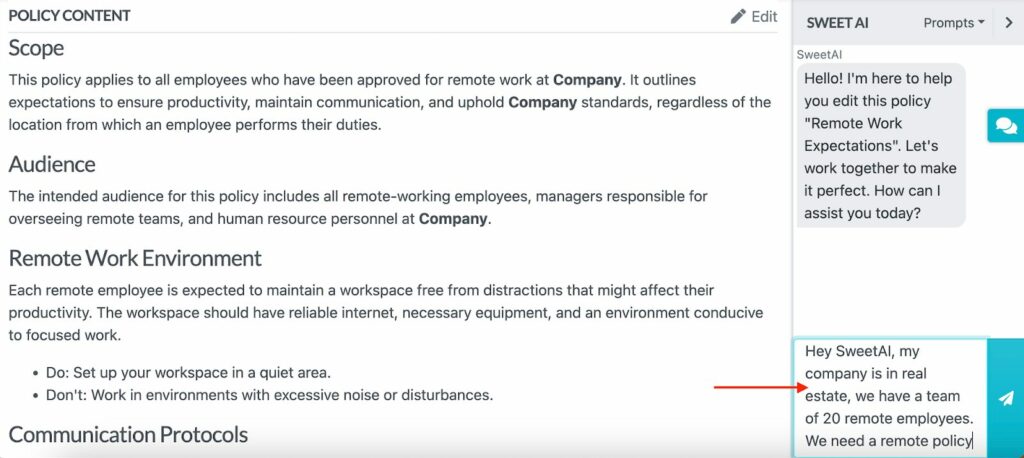
SweetAI generates the section within minutes with a clear heading and formatting. You can edit and refine these details to align with your brand.
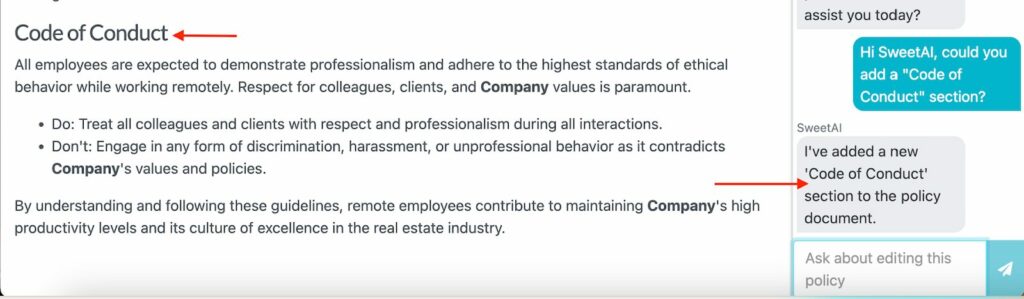
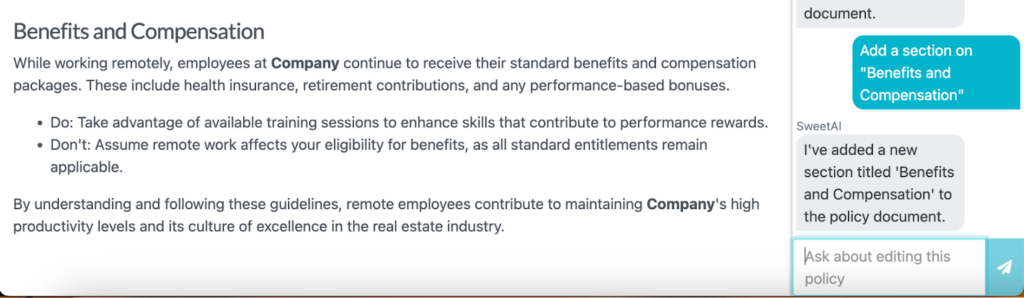
You can also add more details, such as benefits that employees are eligible for, using the SweetAI prompt.
Once you have all the core sections, you can share the complete handbook for approval and then send it to the respective team members. SweetAI gives you a consistent structure while saving you hours of writing time.
Auto-Link to SOPs and Policies Within the Handbook
Your employee handbook should be connected to your existing SOPs and procedures. For instance, if you have a remote work policy, your team needs to know the exact steps for submitting a remote work request. In a static handbook, they will have to search through folders or email HR to get this information.
However, with SweetProcess, you can auto-link SOPs and procedures directly within your handbook. This way, your onboarding section can connect to the training manual to streamline operations.
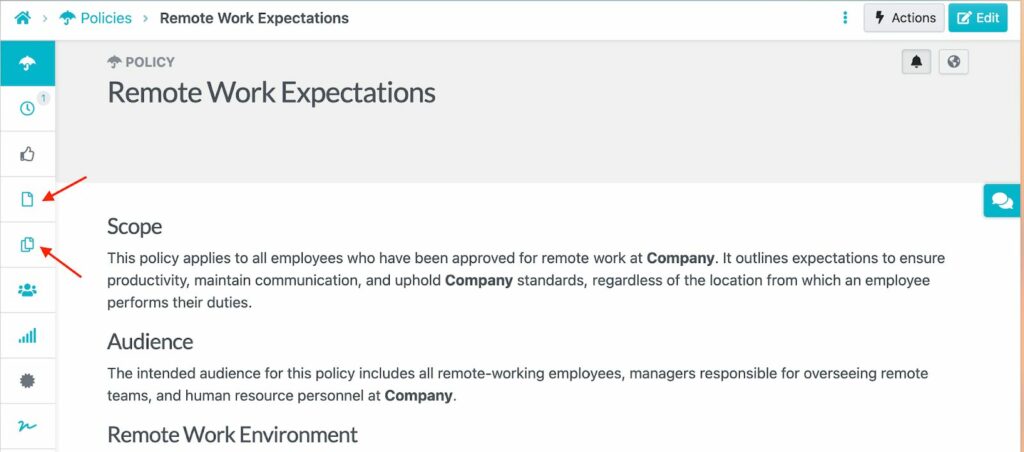
With such a comprehensive handbook, you can reduce recurrent questions since your team has a reference point.
Update and Collaborate With HR and the Leadership Team
Keeping an employee handbook accurate is rarely a one-person job. Your HR manager might own the benefits section, while your leadership team will likely want to review and approve the final version before it goes out. When that collaboration happens over email or Word documents, it’s easy to lose some company information in the back-and-forth.
SweetProcess brings everyone into the same workspace. Team members can leave comments, suggest edits, and flag sections for review directly within the platform.
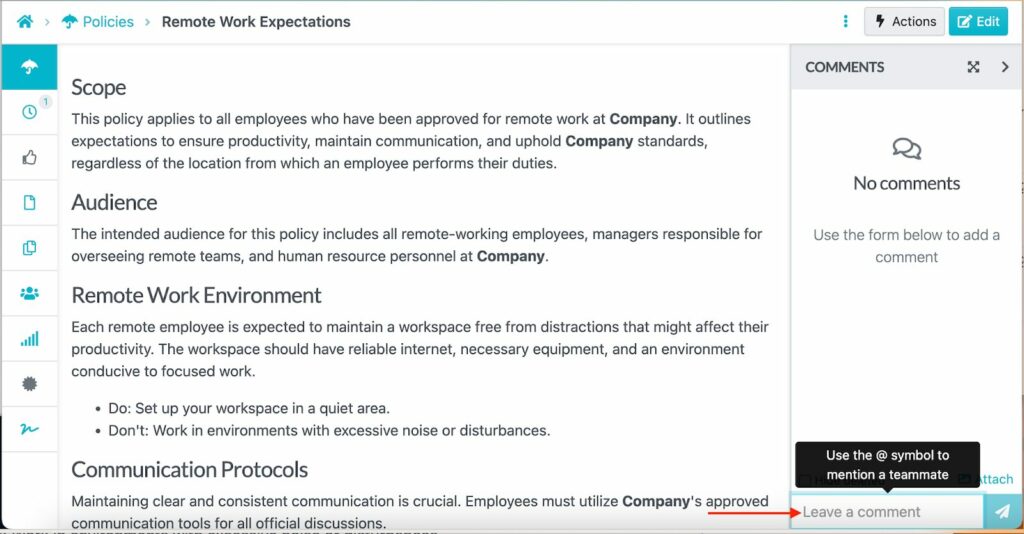
With these features, the HR team can update their sections independently without affecting the rest of the handbook, and leadership can approve changes. When changes are made, the update is saved and readily available to everyone. This way, every team lead can access the same handbook version.
Manage Multiple Handbooks Across Teams or Locations
A 10-person team operating out of a single office has very different handbook needs from a 150-person business with remote employees spread across multiple states or countries. Labor laws and workplace expectations vary by role and location. In this case, you’ll need an employee handbook builder that can handle multiple documents within the same account.
SweetAI lets you create and manage these handbooks much faster and tailor them to specific locations and teams. For instance, when you open the “Policies” tab, you can access a safety handbook for your construction team that covers protocols and shift policies, and another for the remote marketing team that covers digital communication and flexible work guidelines.
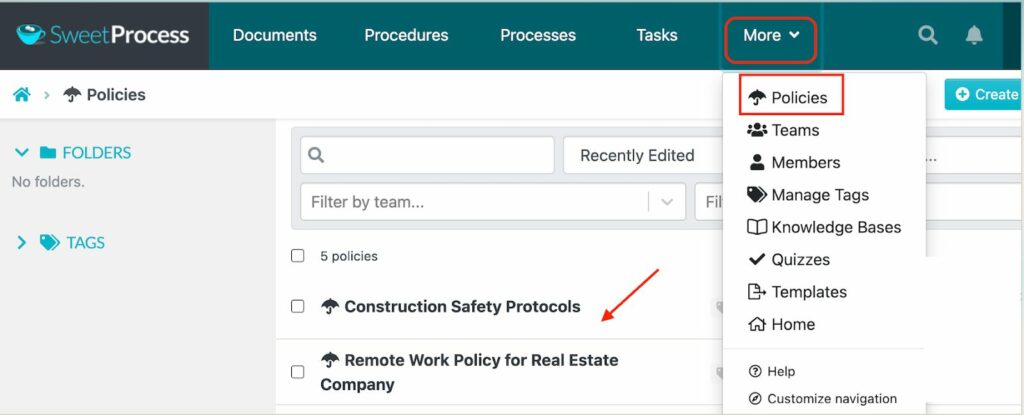
While each handbook is managed independently, they are managed within the same centralized platform, making it easy to maintain consistency. This capability is essential for businesses expanding into new markets or operating across regions; you don’t have to adopt an additional policy management tool.
Format and Personalize Handbook Content
A cluttered or poorly formatted handbook feels unprofessional and difficult to read. However, if you implement clear formatting, it improves comprehension and reflects positively on your company culture.
With SweetProcess, you can personalize the handbook content by adjusting text color to highlight critical policies or differentiate sections at a glance. Just highlight the sentences or paragraphs you need to emphasize and pick a color.
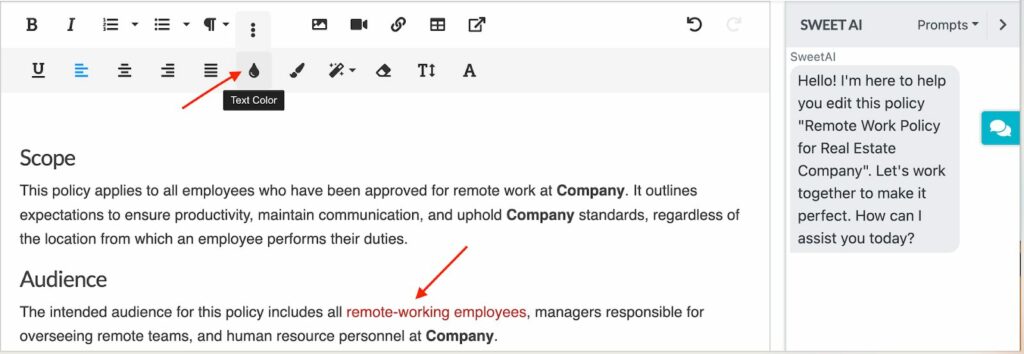
Additionally, you can apply paragraph styling to create a clear visual hierarchy, including headers, subheadings, and body text, so employees can scan and find exactly what they’re looking for.
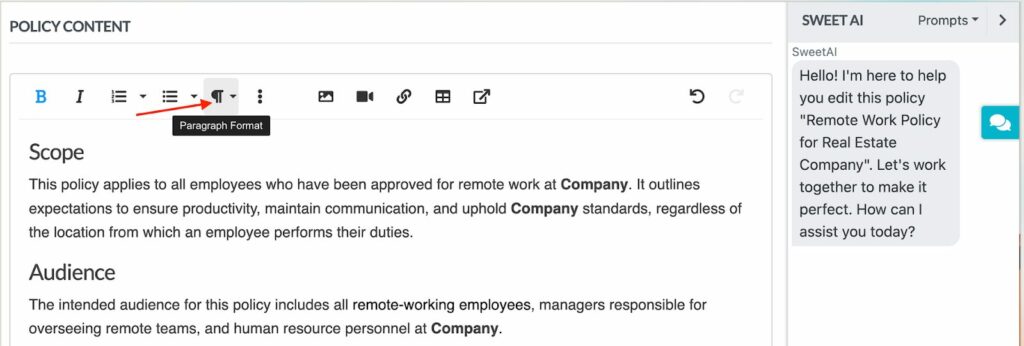
You can put key clauses in bold and add visual breaks between sections on each workplace policy so it reads like a professional document.
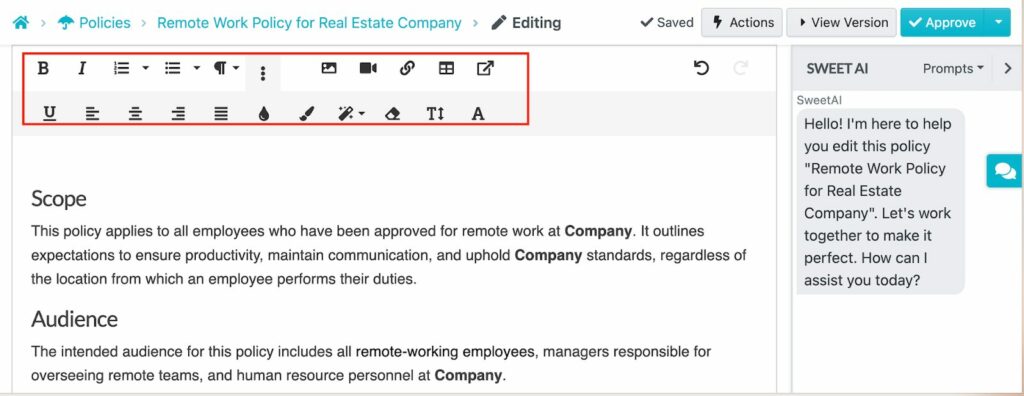
With these features, you can create a polished handbook that reflects your company’s brand.
Review Frequently and Access Handbook Versions
As you draft your policies, keep in mind that they change over time. Your industry will get new regulations, and your company will evolve. All these details need to be included in the employee handbook to avoid issues during audits and legal disputes.
SweetProcess makes it easy to review your handbooks. Every version is automatically saved within the platform; therefore, you can see which employee made the changes and when.
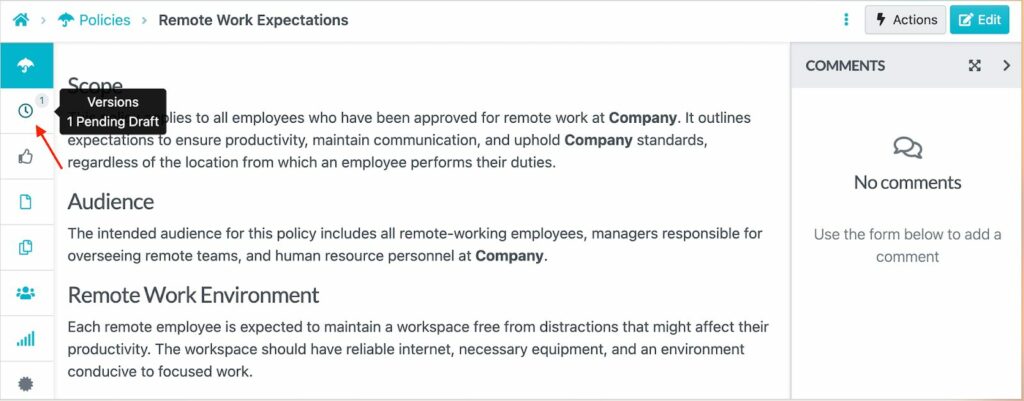
Version control allows you to review previous versions and track edits. You can revert to an older policy document if necessary. With these features, you achieve transparency into your company’s operations and keep your team accountable.
SweetAI creates and refines employee handbooks in minutes. To use this SweetProcess handbook creator, sign up here for an account!
How Thimbleberry Financial Uses SweetProcess To Build and Manage Its Employee Handbooks
Growing companies eventually outgrow scattered Word documents and outdated PDFs. As teams expand and onboarding becomes more frequent, employee handbooks must be centralized and easy to update. To achieve this, you need a system that simplifies the process. SweetProcess gives you exactly that: an AI-powered handbook builder that enables you to build, manage, track, and continuously improve your employee handbook in one place.
Thimbleberry Financial, a financial planning and wealth management firm is a great example. Amy Walls, the company’s president and financial advisor, had taken documentation seriously from day one, creating detailed business processes in Microsoft Word. But despite her best efforts, the documentation wasn’t working. Team members found the Word documents hard to follow, so they abandoned them entirely and did things their own way.
Employees were juggling multiple responsibilities with no reliable reference point. Switching to SweetProcess transformed how Thimbleberry Financial operated. They were able to:
- Build a structured onboarding process for new employees.
- Create a standardized training procedure in which every new hire is assigned specific learning tasks, complete with written steps.
- Link connected processes so employees could navigate multilayered tasks without asking for help at every step.
- Empower team members to identify and fix documentation gaps themselves, without waiting for Amy to intervene.
Thimbleberry Financial’s experience captures exactly why SweetProcess stands out as an employee handbook builder. It’s a complete system for creating, managing, updating, and scaling your policies as your business grows. You can generate core handbook sections with SweetAI, link policies with SOPs, track acknowledgments, and manage multiple handbooks in a living document.
Employee Handbook Builder FAQs
What Is an Employee Handbook Builder?
An employee handbook builder is a tool that helps businesses draft, manage, organize, and distribute their handbooks without having to create them from scratch. Instead of starting with a blank document and manually writing every policy, a handbook builder provides AI-powered generation, pre-built templates, formatting tools, centralized storage, and structured frameworks that make it easy to share and track different versions.
How Does the Employee Handbook Builder Work?
An employee handbook builder guides you through generating and organizing workplace policies into a structured document. With tools like SweetAI, you can instantly generate core sections of your handbook, review, edit, and customize them to match your company. The platform keeps everything centralized, allowing collaboration with multiple teams or leadership. Employees can also access the handbook and formally acknowledge each policy.
Can ChatGPT Build Employee Handbooks?
ChatGPT can help draft individual policy sections or provide content ideas. However, to develop a living employee handbook, you need a tool that can manage version control, track employee acknowledgments, link handbook policies to procedures, or store your handbook in a centralized, collaborative system. SweetProcess provides more control and long-term scalability.
What Is the Best Software To Create Employee Handbooks?
The best software for creating employee handbooks is SweetProcess. Unlike generic document generators, SweetProcess combines AI-powered policy generation with a full suite of management features. You get version control, employee acknowledgment tracking, collaboration tools, multi-team handbook management, and direct integration with your SOPs and procedures. This way, your handbook is connected to how your business operates.