Last Updated on November 16, 2026 by Owen McGab Enaohwo
TL;DR: Need a Scribe alternative? Choose a tool based on what your team needs to do after capture. SweetProcess fits teams that need captured steps turned into procedures with approvals, review dates, and assigned tasks. Tango and Dubble suit screenshot guides, while Guidde works if you want narrated video. Process Street, Way We Do, Waybook, Dozuki, Whale, and Manifestly cover recurring checklists, training, and frontline work.
Start your free 14-day trial of SweetProcess.
No credit card needed. Cancel anytime.
Scribe turns actions on your screen into step-by-step guides. That can be useful when you need to show a colleague how to complete a browser-based task or create instructions without writing every step from scratch. While this screenshot guide may be enough for a simple task, the important step is what you do with it after capturing the instructions.
Your team may need to add decisions made outside the software, review changes, or assign the documented procedure as a task. Compare these 10 Scribe alternatives by their output, workflow, total team cost, and plan limits.
Key Takeaways
- If you are looking for Scribe alternatives, you can consider tools such as SweetProcess, Tango, Dubble, Guidde, Process Street, Way We Do, Waybook, Dozuki, Whale, and Manifestly.
- Each of these tools produces different outputs, including a screenshot guide, narrated videos, procedures with approvals, and completed-task records. Pick the one your business needs.
- Of all Scribe alternatives, Tango, Dubble, and Guidde focus on capture and video. SweetProcess, Way We Do, Waybook, and Whale focus on maintained procedures and training. Process Street and Manifestly focus on recurring work, while Dozuki focuses on frontline instructions.
- Some tools combine different outputs. SweetProcess allows you to capture procedures with the Chrome extension and edit them on the same platform to make it comprehensive. Sign up for a 14-day free trial here to test it out.
Table of Contents
How to Choose a Scribe Alternative
Scribe Alternatives at a Glance
Scribe Alternatives Pricing: What Your Team Will Pay
Example: How SweetProcess Captures Guides
How Thimbleberry Financial: Organized Onboarding With Documented Procedures
Try One Procedure Before You Switch
What Is Scribe?
Scribe is a workflow documentation platform that allows its users to record movement and clicks on screen and then converts these movements and clicks into step-by-step guides complete with screenshots and text that team leads can edit and share.
Scribe offers browser capture through an extension and desktop capture on paid plans. You can edit and share the resulting guides with employees or customers. Check whether you also need training records, document approvals, or recurring task assignments.
How to Choose a Scribe Alternative
Scribe supports browser capture and link and embed sharing on the Basic plan. On paid plans, you can access features such as desktop capture, branding, screenshot redaction, and exports. If you already use Scribe, you might be looking for another tool that may be a better fit if you need to maintain instructions, train employees, or manage repeatable tasks.
Here’s how to sort the alternatives based on what you need after the capture is done.
- A guide to share: Tango and Dubble capture screenshots and turn them into how-to guides. Pick these when the guide is the finished product.
- Video documentation: If spoken or narrated explanations are more useful than a sequence of screenshots, Guidde is built around this output.
- Managed procedures: SweetProcess, Way We Do, Waybook, and Whale manage written procedures, playbooks, or training. Dozuki does the same for frontline and manufacturing work. Pick these Scribe competitors if instructions change, and someone must approve, review, or assign them.
- Recurring work: Choose a workflow or checklist tool like Process Street and Manifestly if the important part is completing work in a defined order, assigning responsibilities, handling conditional steps, or keeping task records.
- Training or managing operations: If your documentation sits inside a wider program for employee learning or operational execution, Way We Do, Waybook, Dozuki, and Whale address different versions of that need.
Scribe Alternatives at a Glance
Tool | Main Output | Best Fit | Free Plan or Trial | Pricing and limits |
|---|---|---|---|---|
Editable procedures with approvals, reviews, and tasks | Maintained SOPs and assigned work | 14-day trial | $99 per month or $990 per year for up to 10 users; Small team plan at $495 per year for five users. Extra-user fees apply | |
Tango | Screenshot guides and in-app guidance | Showing people how to use software | Free plan with browser capture | Pro Team: $15 per user per month billed annually, or $20 monthly; minimum three users. All members of a Pro workspace need paid seats. |
Dubble | Browser guides with PDF export | Creating guides with private sharing and redaction | Free plan | Pro is $18 per month billed annually and includes three creators |
Guidde | Narrated video guides | Video how-tos for tasks | Free plan | Pro plan starts at $19 per creator, per month, billed annually. Desktop app and text-to-voice available on Business plan |
Process Street | Recurring workflows | Workflows with approvals, conditional logic, and assigned roles | 14-day trial on Pro plan | Startup, Pro, and Enterprise plans, but they all require custom quotes |
Way We Do | Written SOPs and checklists | Connecting written instructions to checklists and jobs | Request free trial | Entry plan starts at $99 per month for 10 team members; additions are in groups of 10 |
Waybook | Company playbook and learning paths | Organizing knowledge, training, tests, and progress | 7-day trial | Core plan starts at $119 per month for 20 members or $99 per month if billed annually |
Dozuki | Work instructions | Frontline and manufacturing work | Contact team | Request quote |
Whale | Capture, SOP hub, and training | Assigned training | Free plan for one creator, 10 members | Scale: $249 per month billed annually, including three creators; additional creators cost $29 per month at the annual rate. |
Manifestly | Recurring checklists | Repeating and tracking operational checklists | 14-day trial | Business plan starts at $10 per user per month or $100 per user per year |
Competitor features and pricing checked October 16, 2026. Confirm plan limits and quoted terms before purchasing.
Top Scribe Alternatives
Here are the Scribe alternatives, their key features, billing, and use cases in detail.
SweetProcess
SweetProcess combines browser capture with procedure editing, approvals, periodic reviews, and assigned work. We publish this comparison and recommend SweetProcess when your captured guide needs to become a maintained operating procedure. Add the decisions, checks, and exceptions that the recording does not capture before sharing it.
SweetProcess organizes documented work into policies, procedures, processes, and knowledge bases to help your team complete their tasks from the same platform.
Here are the key features of SweetProcess:
- Procedure documentation: You can easily create procedures to give your team directions on how to do anything.
- Process documentation: You can link multiple procedures together to create comprehensive workflows, especially if the process is long and complicated. SweetProcess provides all the functionality you need. You can document simple and complex processes alike.
- Process map: To help with creating processes, SweetProcess has a process map feature that allows team members to visualize the flow of processes with flowchart diagrams that are easy to follow.
- Policy documentation: Record the rules employees need to follow and link relevant policies from procedures or processes. Assign a sign-off when you need an acknowledgment of the document.
- Knowledge base functionality: Knowledge is important for your business, both for your customers and your employees. With SweetProcess, you can create forward-facing knowledge bases for your customers, or you can create an internal knowledge base that could provide your team answers to common questions.
- Task management: Assign procedures and processes to team members, set due dates, and review recorded task progress. This connects the written instructions with the work employees are expected to complete.
Let’s take a closer look at how to use these features to create and manage SOPs and team training.
Create Processes Using SweetProcess
Say you’re the hiring manager at your company.
How would you use SweetProcess to document the process of hiring candidates?
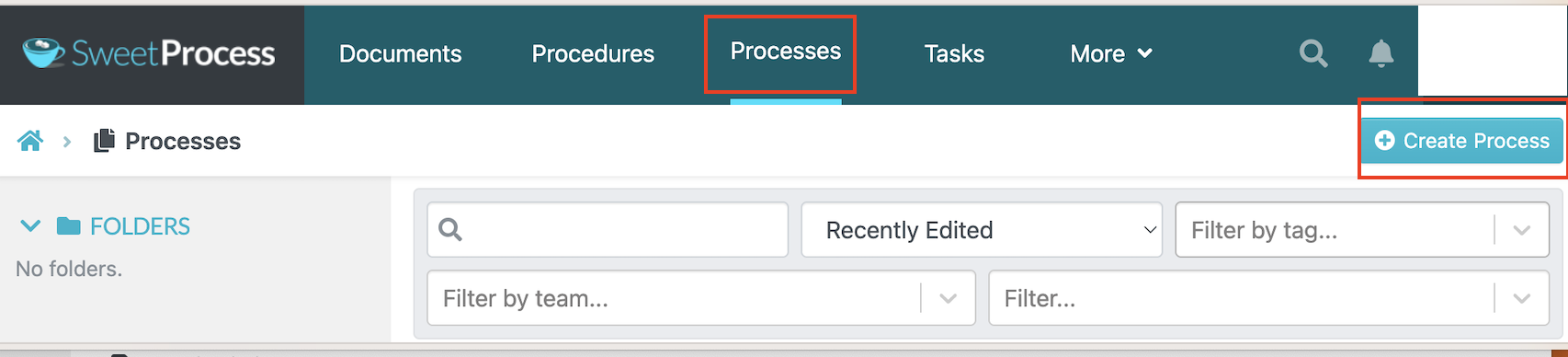
Log in to your account. On the dashboard, navigate to the “Processes” tab on the main menu.
Give the process a descriptive title, such as “Candidate Screening,” so colleagues can distinguish it from other hiring workflows.
After naming your process, proceed to outline the steps in the process by clicking the “Add Step” button.
Choose the type of step you want to add. Use a procedure when that step needs its own set of detailed instructions.
To continue, click the “Procedure” button.
Continue adding the remaining steps in the order the work should happen.
When you’re done adding all the steps, approve the process so it goes live.
Depending on your role, you can either approve it yourself or request permission for approval and notify the rest of your team.
Creating Procedures
Click on the “Procedures” header on the dashboard.

We’ll use “Check for minimum requirements” in this example.
Click on “Edit” in the upper right corner to add steps to the procedure.
In the open dialog box, title the step and write a description if more explanation is needed. Click “Finished Editing” when you’re satisfied with your input.
Repeat for each remaining step, including any checks or escalation instructions.
Review the finished instructions and approve the procedure, or request approval from the responsible reviewer.
Create a Knowledge Base Using SweetProcess
These are the steps you’ll use to create a simple knowledge base for your customers.
Log in to your dashboard and click on “More” in the header. Select “Knowledge Bases.”
Just like before, title your knowledge base to get started.
You can then decide whether the knowledge base will be private, giving access to only a few stakeholders, or make it public for everyone with a link.
Create categories and subcategories within the knowledge base, then add the appropriate procedures or policies as articles.

Check the published view and access settings before sharing the knowledge base. Confirm that readers can find the intended articles and cannot access private material.
SweetProcess Pricing
SweetProcess costs $99 per month or $990 per year for up to 10 users. Each additional user costs $5 per month or $50 per year. The annual-only Small Team plan costs $495 per year for up to five users, plus $50 per year for each additional user. Once you subscribe to a plan, you get access to all features.
Tango
Tango captures a workflow as a screenshot guide. It’s an ideal alternative if the main job is showing someone how to complete a task inside software. Tango’s strength is speed. You capture once, and the guide is ready to share.
While the Tango Chrome extension captures web-based applications, you can upgrade to Pro to get the desktop app that documents information on your laptop or PC.
Tango Features
- In-app guidance: Helps users follow workflows while working inside software, reducing the need to switch between a guide and the application.
- Screenshot editing and redaction: Edit captured screenshots and blur sensitive information, which is available on paid plans.
- Sharing and exporting: Share guides with teammates and export them for use outside Tango.
Tango pricing
Tango’s Free plan includes five shared workflows and up to 10 workspace users. Pro adds desktop capture, screenshot blurring, branded exports, and 14-day version history. Pro Team costs $15 per user per month billed annually, or $20 monthly, with a minimum of three users. Every member of a Pro workspace needs a paid seat. Pro Personal costs $22 per month billed annually, or $30 monthly.
You can also upgrade to the Enterprise plan if you want to access more advanced capabilities such as automatic redaction and year-long version history.
Choose something else if: You need a procedure your team approves, reviews, and signs off on.
See how Scribe and Tango stack up against each other.
Dubble
Dubble is designed for creating browser-based how-to guides. It’s a good Scribe alternative if you want to capture steps, edit screenshots, share the finished instructions privately, or export a guide as a PDF. Since redaction and private viewing features are available on the free plan, you can test a real client-facing guide before you pay anything.
Dubble Features
- Automatic guide creation: Dubble captures actions as you work in your browser and turns them into step-by-step guides with screenshots and written instructions.
- Image editing and redaction: You can edit screenshots to make instructions clearer and hide sensitive information before sharing guides with others.
- Guide sharing: Share guides with teammates and give viewers access to instructions without requiring everyone to create content.
- PDF export: You can export guides as PDFs for offline reference.
Dubble Pricing
Dubble’s Free plan includes unlimited guides, private viewers, redaction, and PDF downloads. Pro costs $18 per month billed annually, including three creators, plus $6 per additional creator per month at the annual rate. Enterprise requires a quote. The pricing page labels integrations and advanced integrations as “coming soon,” so confirm availability before relying on them.
Choose something else if: You want a tool to assign work, schedule reviews, or record that someone finished a task.
Guidde
Guidde records your workflow and turns it into video documentation. Instead of relying only on a series of screenshots, you can create a narrated walkthrough that explains a process as the viewer watches it. Video can be useful when a task benefits from spoken explanation and visual context.
Guidde Features
- AI-powered video creation: Guidde turns screen recordings and workflows into step-by-step video guides with automatically generated descriptions and visuals.
- Voiceovers: The Business plan includes text-to-voice features for adding AI-generated narration. Check the voice and language options you need before selecting a plan.
- Branding: You can customize videos with brand elements, layouts, and visual styles to maintain consistency across training materials.
- Embedding: You can share video guides through links or embed them in knowledge bases and other platforms, making instructions easy for employees and customers to access.
Guidde Pricing
Guidde’s free plan includes up to 25 how-to videos. Upgrading to Pro costs $19 per creator per month if billed annually and $29 per month if billed monthly. The Business plan costs $39 per creator per month, annually, and $59 if billed monthly. It gives you access to web and desktop workflows and text-to-voice features. You can also contact the team for a quote for the Enterprise plan.
Choose something else if: You prefer written procedures rather than narrated videos.
Process Street
Process Street is a robust workplace management tool to manage routine procedures. You can use it to create, automate, update, and manage your team’s processes. You can also add rich media, including images, attachments, and videos, to procedures and tasks to make them comprehensive.
Process Street uses conditional logic to vary a workflow according to the information entered. Test both the routine path and an exception, including who must approve the result.
Process Street Features
- Workflow automation: Process Street turns repeatable business processes into structured workflows to help teams complete work consistently.
- Task assignments and approvals: You can assign tasks to specific team members, set due dates, and include approval steps to clarify responsibilities and track progress.
- Integrations: Process Street connects workflows with other business tools and monitors workflow activity
Process Street Pricing
Process Street offers three plans. But you have to request a quote to subscribe to either the Startup, Pro, or Enterprise plans. The Pro option comes with a free 14-day trial.
Choose something else if: You want a public price before you talk to anyone.
Way We Do
Way We Do is SOP software that helps businesses and large enterprises create, update, and manage SOPs online and in real time. The platform helps turn static policies, procedures, and checklists into an interactive and automated workflow assistant.
It is a cloud-based platform, so team members can access tasks, checklists, and procedures conveniently, and most importantly, remotely. The platform provides a progress status on all tasks, showing tasks team members have completed and others they haven’t. This way, team members can hold each other accountable.
Way We Do Features
- Activated Checklists: Turn documented instructions into checklists employees can run. Use completion records to follow progress on testing, evaluations, audits, and other repeatable work.
- Organization charts: Organization charts make it easy to design and illustrate your company structure by basing it on roles instead of people. With this structural understanding, businesses can plan for expansion, and team members can easily see their responsibilities.
- Procedure authoring: Create and maintain instructions using the editor and available templates. Review template content against the way your team actually works.
Way We Do Pricing
Way We Do’s Entry plan starts at $99 per month for 10 team members. Additional members are purchased in groups of 10. The plan includes unlimited procedures and processes and standard support. You can request a free trial.
Enterprise starts at 50 team members and requires a custom quote. Confirm the support, rollout, and account features included in that quote.
Choose something else if: You want automatic screen capture. If you want captured steps, pair it with a capture tool.
Waybook
Waybook is a cloud-based knowledge management tool for documenting training, onboarding, and reference material in one place. It is another excellent alternative to Scribe.
You can access all your guides, processes, and procedures from Waybook. Like a mini Wiki, you can search for information to help with tasks. It is also a good learning management system (LMS). You can add learning, development, and onboarding programs for your staff on the platform.
Waybook supports connections through Zapier and lets you embed content such as videos and PDFs. Treat app integrations and embedded content as separate capabilities when checking how information will move between systems.
Waybook Features
- Connections and embeds: Use supported integrations to connect systems and embeds to display reference material within your playbook. Test the specific data flow or file format you need.
- Quick search: Waybook provides knowledge base functionality. You can quickly get what you need, whenever you need it.
- Native browser capture: Waybook Shots captures browser actions as screenshots for step-by-step instructions. Review and edit the captured steps before using them in training. Waybook also supports screen recording.
Waybook Pricing
Waybook costs $99 per month for 20 users, billed annually. If you opt to pay monthly, you’ll pay $119 per month. If you upgrade to the Pro plan, it will cost you $198 per month, billed annually or $238 for the monthly option. The Enterprise plan is customized based on your business needs.
Choose something else if: You only need a shareable screenshot guide and do not need a broader playbook, learning paths, or progress tracking.
Dozuki
Dozuki focuses on work instructions and frontline training for manufacturing and industrial organizations. Evaluate it when the instructions need to support work performed on the production floor.
In the manufacturing industry, monitoring equipment and procedures without being on the ground to manage every step of the process can be challenging. It is even harder to update existing operating procedures and train employees on new best practices.
Dozuki gives instruction owners a place to maintain standardized procedures and manage changes. Test how employees find the correct instruction at the workstation and how reviewers approve updates.
Instructions can include visual material that shows the work in context. Use the pilot to check readability, access, and revision control on the devices employees will actually use.
Dozuki Features
- Visual work instructions: Create step-by-step instructions with supporting images and video. Check whether employees can locate the approved procedure for the relevant task and equipment.
- Quality management: You can manage and improve your quality with Dozuki thanks to the easy update and approval process of SOPs. Experts can control and approve every step of every process in the work instructions and improve them.
- Workforce training: Connect maintained instructions with frontline training. Written and visual guidance supports practical instruction; it does not replace supervision, equipment authorization, or a competency assessment.
Dozuki Pricing
Dozuki requires a custom quote. Confirm the included users, implementation, training, and support before comparing its total cost.
Choose something else if: You prefer to see upfront prices before speaking to anyone and your team needs more than a specialist tool.
Whale
Whale is a cloud-based knowledge-sharing tool that makes it easier to train and onboard employees while implementing processes and procedures.
Authors can maintain centralized procedures and training content. Approval flows are listed on Whale’s Enterprise plan, so confirm that tier if formal approval is required.
If you are having a hard time creating workflows and processes, there are templates on the platform that you can use as inspiration to start. You can edit other details as you go.
Whale Features
- Create SOPs: You can create SOPs, playbooks, guides, etc., on the Whale platform. The “create” feature on the platform is robust, allowing you to break processes into bite-sized data. You can also embed links, videos, pictures, etc., to make your guides easier to understand.
- Training manuals: With this feature, you can transform SOPs, guides, and other resources into comprehensive manuals for training and streamlining the intake process for onboarding employees. You can easily add assignments, create structured learning flows, and track completion to ensure a smooth and efficient training experience.
- Video to SOP: You can upload videos to Whale, and the AI assistant will structure the steps into a comprehensive written SOP.
Whale Pricing
Whale’s Free plan covers one creator and up to 10 members. Scale costs $249 per month billed annually, including three creators, with additional creators at $29 per month at the annual rate. Advance costs $499 per month billed annually, including five creators, with additional creators at $39 per month at the annual rate. Enterprise requires a quote and includes approval flows. Confirm member limits and the total creator count for your team.
Choose something else if: The creator-based pricing and plan limits do not suit the number of people who need to author and maintain your documentation.
Manifestly
Manifestly is an integrated checklist software solution for teams and businesses. Its main objective is to help teams with recurring tasks focus on carrying out their assignments rather than recreating checklists from days or weeks before.
On the platform, team members rely on a streamlined Slack integration to help with easy communication. The checklist tool in the app is connected to the communication tool so that managers and team leaders can monitor team activities without sending emails.
Use Zapier to connect Manifestly with additional applications, or assess the API when you need a custom connection. Test the trigger, action, permissions, and error handling for the workflow you intend to run.
Manifestly Features
- Checklist scheduling: You can schedule daily, weekly, or quarterly checklist runs to ensure that recurring tasks are completed when due. This feature sends notifications for checklist status, like when a checklist is running or completed.
- Integrations: Manifestly supports Slack and Microsoft Teams integrations, connections through Zapier, and an API. Confirm whether a specific connection is native, requires Zapier, or needs custom development.
- Open API: If you have a particular software built for your business only, you can integrate it with Manifestly. Manifestly has an open API to build your own integrations and connect them directly with your own application or website.
Manifestly Pricing
Manifestly offers a Business and Enterprise plan. The Business plan costs $10 per user per month, or $100 per user per year. The Enterprise option starts at $2,000 per year for 10 users and is annual-only. You can test out the tool with the free 14-day trial.
Choose something else if: You need a tool to capture screens or produce guides.
Looking for a way to turn captured guides into documented, repeatable processes? SweetProcess helps you create, organize, and maintain procedures, policies, and processes in one place. Sign up for a free trial today!
Scribe Alternatives Pricing: What Your Team Will Pay
For Scribe alternatives that offer a free plan, it comes with some limits. What will it cost you after you upgrade to a premium plan? Here’s a breakdown:
Scenario | Cost | What To Know |
|---|---|---|
SweetProcess, 10 users | $99 per month or $990 per year | All users on the team count. Annual billing saves $198, or about 16.7 percent. |
SweetProcess, 20 users | $149 per month or $1,490 per year | The base covers 10 users, plus 10 additional users. |
SweetProcess, five users | $495 per year | The Small Team option is annual-only. |
Tango, 10 Pro users | $200 per month, or $1,800 per year at the annual rate | This estimate assumes all 10 need Pro if they share a Pro workspace. |
Dubble, three creators | $216 per year at the published annual rate | The $18 monthly equivalent includes three creators. |
Waybook Core, 20 members | $119 per month or $1,188 per year | Additional members and Pro features change the total. |
Manifestly Business, 10 users | $100 per month or $1,000 per year | This is recurring-checklist software, not capture or video software. |
These examples use the billing terms described for each software. As you calculate the costs, consider the different terms used by each vendor. Some platforms bill for creators who build the content differently than members who read and complete the work.
Example: How SweetProcess Captures Guides
With SweetProcess, you can capture your procedures using the Chrome extension and then add an off-screen step, request approvals, or share it with the team.
This illustrative example uses a “New Client Welcome Checklist.” Capture only sample data and remove private URLs, names, and unrelated files from screenshots before sharing the procedure.
Step 1: Capture the Browser
Click on the extension icon on the top navigation bar and then “Capture Procedure” to start the process.
As you click through the steps, SweetProcess takes screenshots. Once you are done recording, click “Stop.”
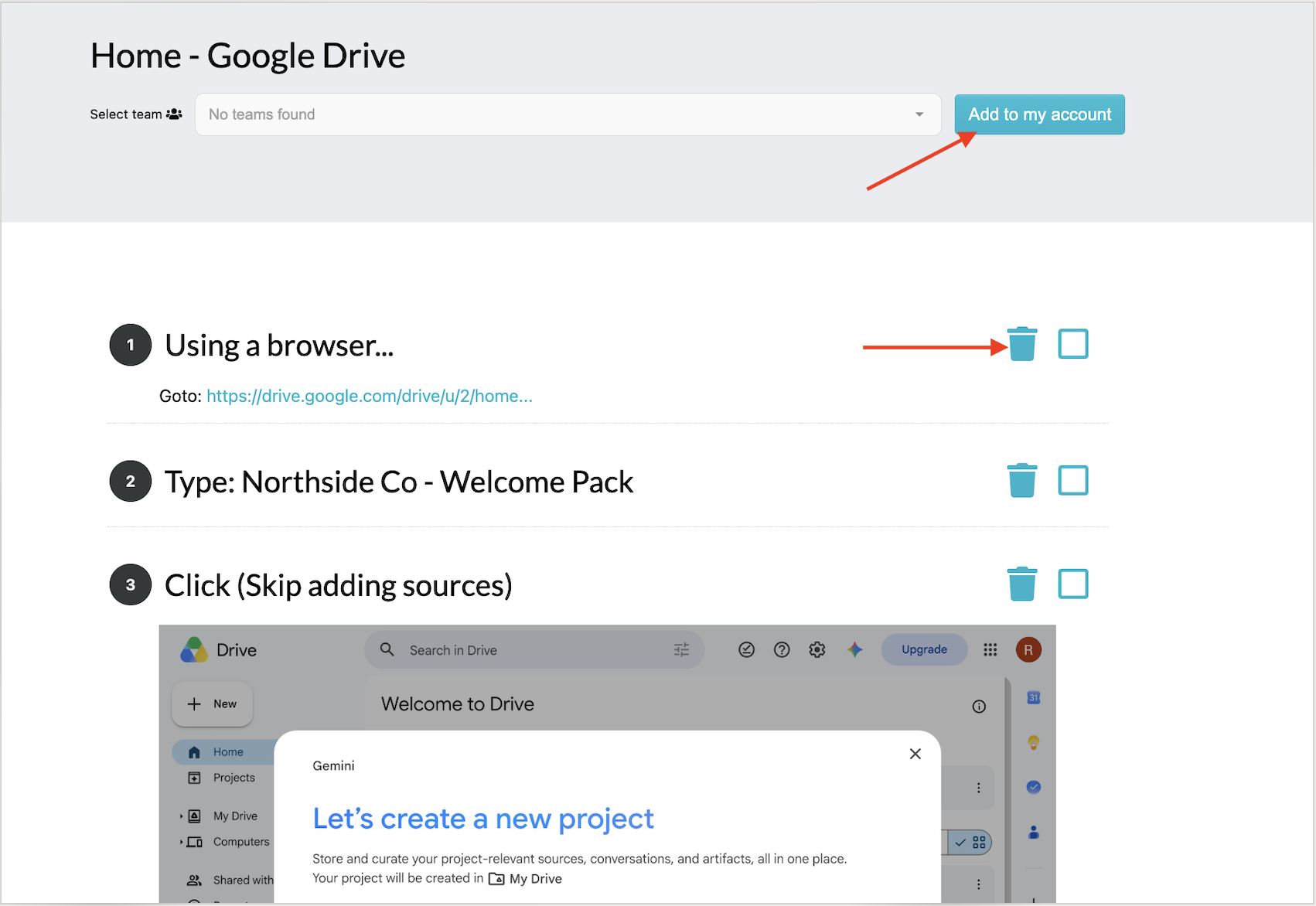
You can then add the generated screenshots to your SweetProcess account, which makes it easier to centralize all your procedures. If you’re not happy with any of the screenshots, you can delete them from here.
Step 2: Add an Off-Screen Step
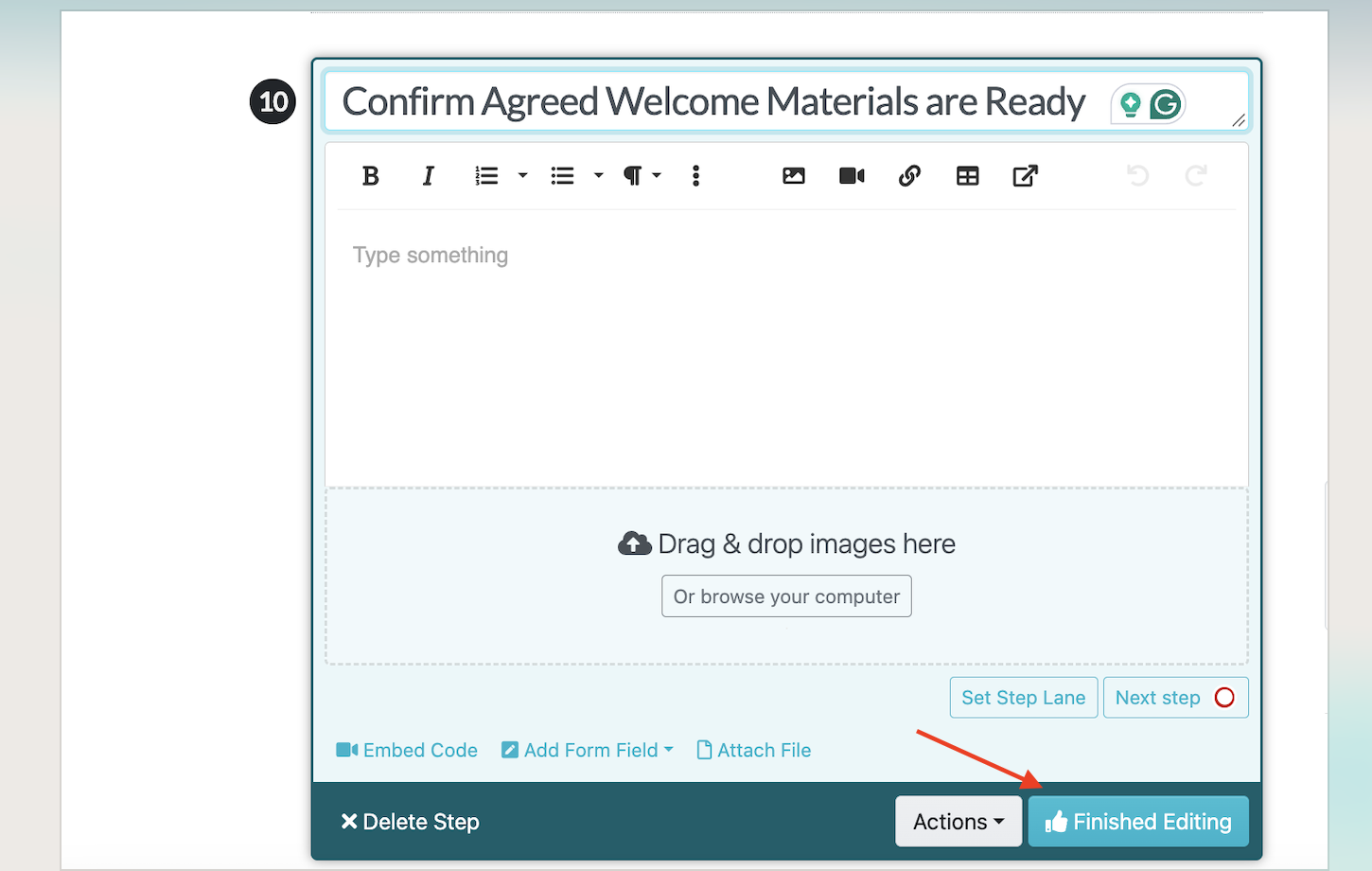
For instance, in this procedure, the screen capture cannot decide whether the agreed welcome materials are complete or whether another team needs to be involved.

Add those instructions to the procedure. Once you’re done editing, click “Finished Editing.”
Step 3: Request Approval of the Draft
Before the procedure becomes the live instruction, the author can request approval of the draft. The reviewer should check the captured steps, the off-screen instruction, and the conditions for handling exceptions.
Once it is approved, it becomes the live version your team sees.
Step 4: Revise an Instruction
If the welcome materials change in another file or system, the procedure owner must review and update the relevant SweetProcess instructions. An external file change does not automatically rewrite the SOP. Submit the revision for approval, then inspect version history to see what changed and who contributed.
Step 5: Review and Sign Off
A review reminder prompts someone to confirm the procedure is current. You can add a review date and assign it to a team member or department.
If the business requires an employee to acknowledge the revised procedure, use the relevant read-and-understand sign-off record.
A capture tool may be sufficient when the finished guide is all you need. Evaluate SweetProcess when you also need to maintain instructions, assign work, and review changes. Try SweetProcess free for 14 days.
How Thimbleberry Financial Organized Onboarding With Documented Procedures
Thimbleberry Financial used SweetProcess to make its documentation easy to reach and its onboarding easy to follow. Amy Walls, president and financial advisor at Thimbleberry Financial, describes new employees beginning with SweetProcess procedures. The team also uses training material and linked work alongside those procedures.
Amy Walls says, “Our new employees say they have never gone through a more organized onboarding.”
Thimbleberry already had processes documented in Word. The problem was that some instructions were incomplete or difficult to access. SweetProcess gave the team a more organized place to maintain procedures and use them during onboarding.
The practical lesson is to maintain the procedures, make them accessible, and use them in a defined onboarding sequence.
If you want the same starting point, start your free trial of SweetProcess here!
Try One Procedure Before You Switch
Tango and Dubble suit shareable screenshot guides, while Guidde focuses on video documentation. For maintained instructions and operational follow-through, compare SweetProcess with Waybook, Way We Do, Whale, and Process Street. Check which plan includes the reviews, approvals, and assignments you require.
With SweetProcess, pick one real procedure, capture the browser steps, add the off-screen decisions, and submit it for approval. Then revise one instruction, inspect its version history, and confirm how the team will learn about the change. Evaluate both the original guide and the work required to keep it current.
Start your free 14-day SweetProcess trial today. No credit card needed.
FAQs
What is the best Scribe alternative?
There is no universal winner. SweetProcess is worth considering when you need maintained SOPs, review and approval workflows, and assigned work. Tango and Dubble are relevant for screenshot-based guides, while Guidde focuses on narrated video. Process Street and Manifestly address recurring workflows and checklists. Start with the output you need and compare the current plan limits.
Does Microsoft have something similar to Scribe?
Microsoft provides screen-capture tools, including Snipping Tool, and has deprecated Steps Recorder. Capturing a screen creates reference material. A managed SOP system adds capabilities such as document reviews, assigned procedures, and completion records. Choose according to the work you need to support.
Is there a free version of Scribe?
Yes. Scribe Basic offers browser-based guide capture and link or embed sharing. Desktop capture and paid editing and export features require a higher plan.
Is Tango better than Scribe?
It depends on your required output, team seats, and guidance features. Tango is worth considering for screenshot-based guides and in-app guidance. Scribe also supports browser capture, and its paid plans include additional capabilities such as desktop capture, branding, redaction, and exports. If you only need a shareable guide, the gap between the two may be small.
Is Scribe worth the money?
Scribe can be worth paying for when screen-based documentation is the main job. Check whether you need browser or desktop capture, which editing and export features are included, and how many people require paid seats. Compare the full cost with the work the tool will support.
Which free Scribe alternative supports private sharing and export?
Dubble’s published Free plan includes private viewers, PDF download, and redaction. Other tools have different free-plan limits, so it’s important to check the specific features and restrictions before subscribing.
Do I need to replace Scribe to manage SOPs?
Not always. A capture tool can complement a managed procedure library. The important question is whether the benefits justify maintaining the instructions in two places. Consider who updates each version, how employees find the current instructions, whether work needs to be assigned, and how changes are reviewed. If you can keep the material consistent without unnecessary duplication, using complementary tools may work.
What should I try first?
To test the tools, choose one real recurring procedure, capture or draft the steps, add the decisions that happen outside the software, and share or assign the procedure to the people who need it. You can also inspect how an updated version is reviewed to decide if the tool aligns with your business needs.