Last Updated on November 16, 2026 by Owen McGab Enaohwo
TL;DR: Choose an SOP creator based on the material you already have and what your team needs to do with the finished procedure. Browser capture records on-screen steps, while AI-assisted writing and templates help structure a first draft. You can also import an existing procedure and improve it. Whatever method you choose, verify the instructions with someone who knows the work, publish the approved version, and assign the task when needed. SweetProcess offers a 14-day free trial, not a permanent free plan.
Create and review your first procedure with a free 14-day SweetProcess trial. No credit card needed. Cancel anytime.
A standard operating procedure (SOP) creator helps you turn a repeatable task into written instructions your team can follow. You might start with captured browser steps when the work happens on screen, or an AI-assisted draft when you have clear source notes, or a template when you want a ready structure, or an existing document you can improve. SweetProcess brings these starting points together with editing, review, and task assignment.
A useful first draft is only the starting point. The real test is whether a colleague can complete the task without guessing which information, decision, or approval comes next.
Key Takeaways
- An SOP creator turns a repeatable task into instructions your employees can follow, and your starting material decides which route fits.
- You need to choose a creation method that fits your needs. Use browser capture for repeatable on-screen work, AI-assisted writing or templates for a structured first draft, and document import when useful instructions already exist.
- Review every procedure before publishing it. Check the steps, required information, exceptions, and expected results with a team member who understands the task.
- Keep creation, approval, and task completion separate. SweetProcess brings these stages into one workspace, so your team can maintain the instructions and track assigned work.
Table of Contents
Quick Comparison: Which SOP Creator Fits Your Starting Point?
Choosing Your SOP Creation Method
Gather the Facts Before You Create an SOP
Example: Creating a Weekly Client Status Report SOP in SweetProcess
Keep SOPs Current and Track Their Use
Why Choose SweetProcess as Your SOP Creation Tool
What Benchmark Wealth Management Teaches About Reviewing SOPs
Create One Procedure Your Team Can Use
What an SOP Creator Does
An SOP creator is a tool that helps you document a repeatable business task as a standard operating procedure. Depending on the product, it may record browser activity, generate a draft from information you provide, organize instructions around a template, or help you edit existing documentation.
A useful SOP explains what triggers a task, who performs it, what information they need, which steps to follow, how to handle exceptions, and what defines a finished task. Record those details before they become knowledge that only one experienced employee holds.
When creating an SOP, you get:
- A draft: The initial instructions, whether captured from a workflow, written with AI assistance, or adapted from a template.
- An approved procedure: The reviewed instructions ready for your team to use.
- An assigned task: A piece of work given to an individual, with relevant details such as a due date.
These outputs serve different purposes. A generated draft can contain missing details, while an approved procedure does not mean the work described in it has been completed.
Check which outputs each tool supports. A guide generator may help you write instructions without managing approval or tracking the work. SweetProcess supports creating procedures, approving drafts, and assigning trackable tasks.
Publisher disclosure: SweetProcess publishes this guide. We recommend it when you need to maintain procedures, review drafts, and assign trackable tasks in one workspace, rather than only generate a first draft.
Quick Comparison: Which SOP Creator Fits Your Starting Point?
|
Creator |
Best starting material and useful output |
Free access |
Selection question |
|---|---|---|---|
|
Browser steps, source notes, templates, or existing procedures. Produces a maintained procedure you can assign as a task. |
14-day trial. Paid plans include all features. |
Do you want to create the instructions and manage the recurring work in the same system? |
|
|
Scribe |
A digital workflow you can perform. Produces an editable, shareable step-by-step guide. |
Basic plan offers free access to browser-based guides. |
Is your main need to show someone a screen sequence, and which editing or export capabilities do you need? |
|
Tango |
A browser workflow. Produces captured guides, with additional guidance and analytics depending on the plan. |
Free plan includes five shared workflows and up to 10 users. |
Do people need guidance alongside the software they use, and does your selected plan include the required capabilities? |
|
Waybook |
A written description of a process. Produces an AI-assisted draft with a route into a team playbook. |
Free public AI SOP generator; the separate paid workspace offers a seven-day trial. |
Are assignment, training, and knowledge checks part of the same project? |
|
Creately |
A process best understood visually. Produces a collaborative map with supporting procedure details. |
Free plan available with limits on features and usage. |
Do you need to see roles, decisions, and connections on a canvas before finalizing the instructions? |
Choosing Your SOP Creation Method
Competitor details checked November 5, 2026.
Start with the material you already have. A demonstrated workflow, source notes, a reusable structure, and an existing document call for different creation methods. If you are still comparing tools, compare SOP writing software against the output your team needs.
Here’s how to use SweetProcess for each of these methods.
Capturing Browser Steps
For work performed in Chrome, the SweetProcess Chrome extension can capture selected browser actions as steps and screenshots. This is browser capture, not a claim that it records every desktop application.
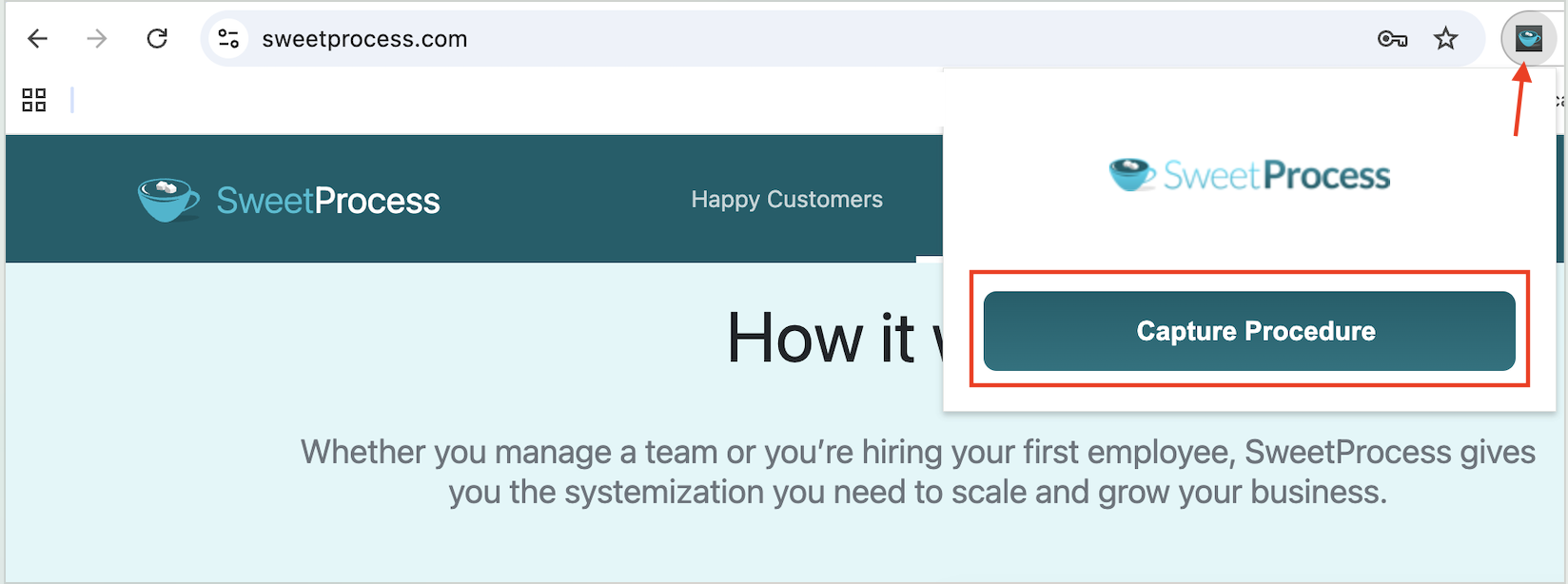
You can then add your capture to your account.
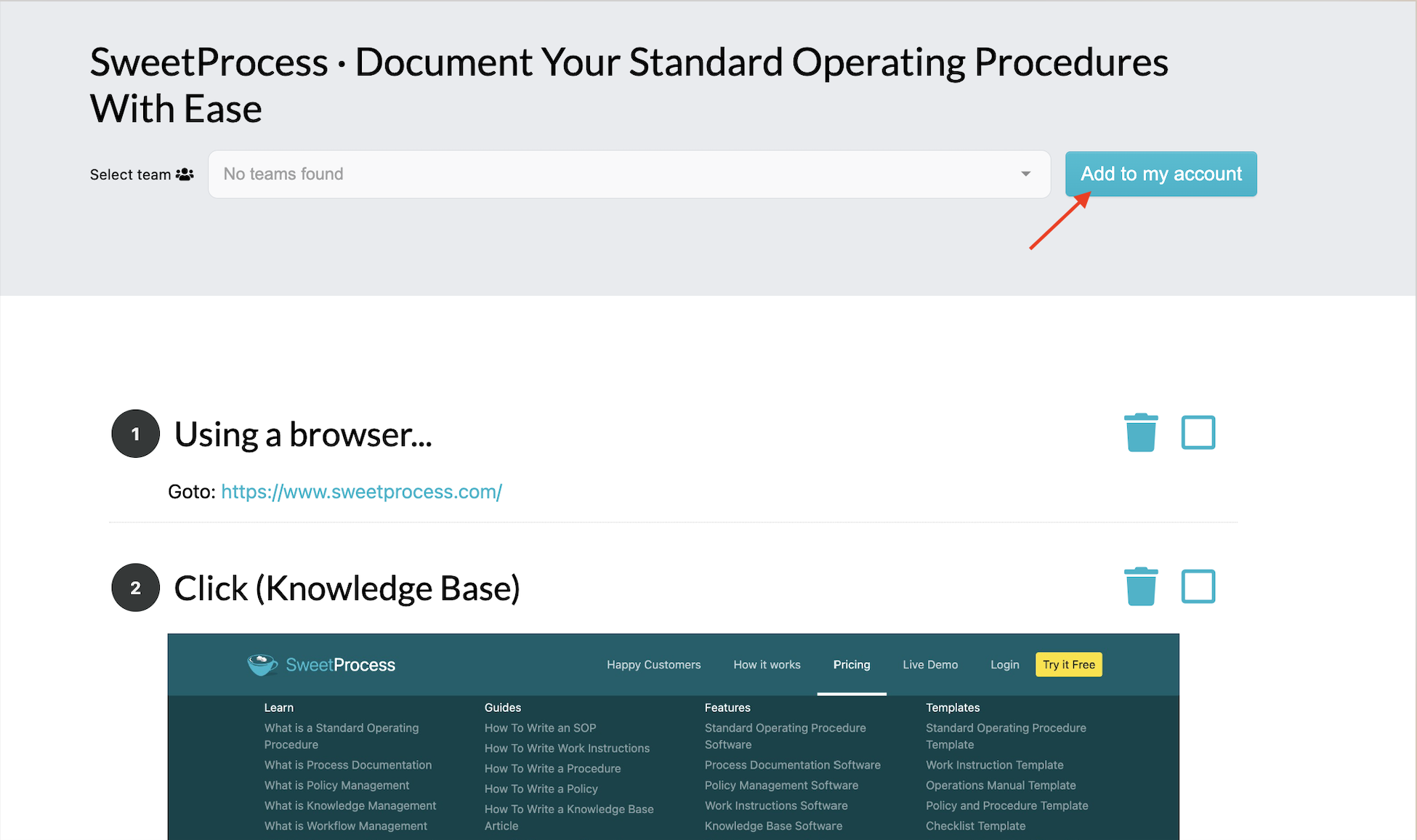
These screenshots act as procedure steps that you can review, edit, and share with your team to use.
Capture is useful for recording the sequence of actions. If you have more information to add or steps that happen offline, you can add them directly on SweetProcess.
AI-Assisted Draft or Template
SweetProcess offers multiple templates that can help you maintain a consistent structure on all procedures.
You can also use SweetAI to generate your first draft of a procedure. Navigate to the “Procedures” tab, add a title, assign it to a team, and choose “Write With SweetAI.”
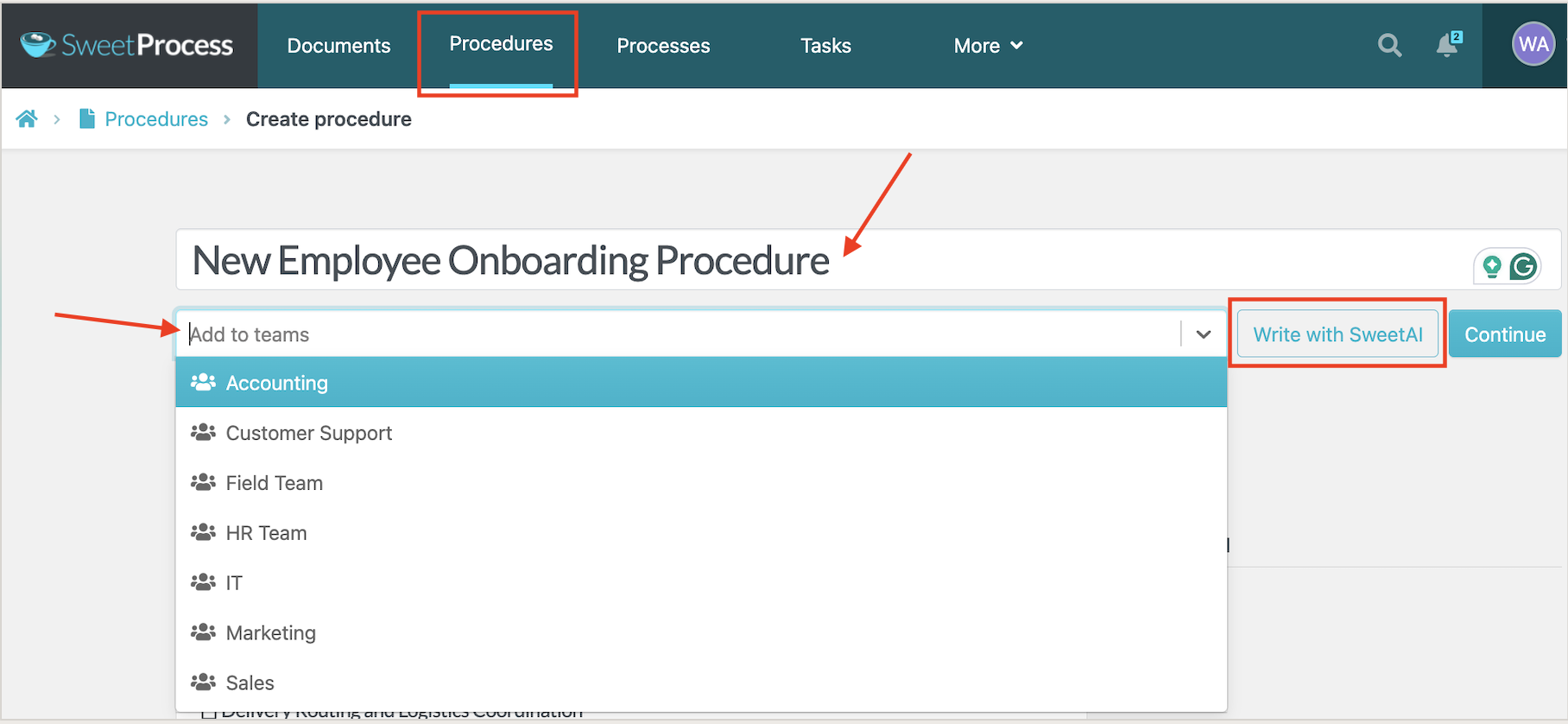
Treat the generated text as a draft. Have someone who does the work check the steps and add your actual tools, required inputs, decisions, exceptions, and completion criteria.
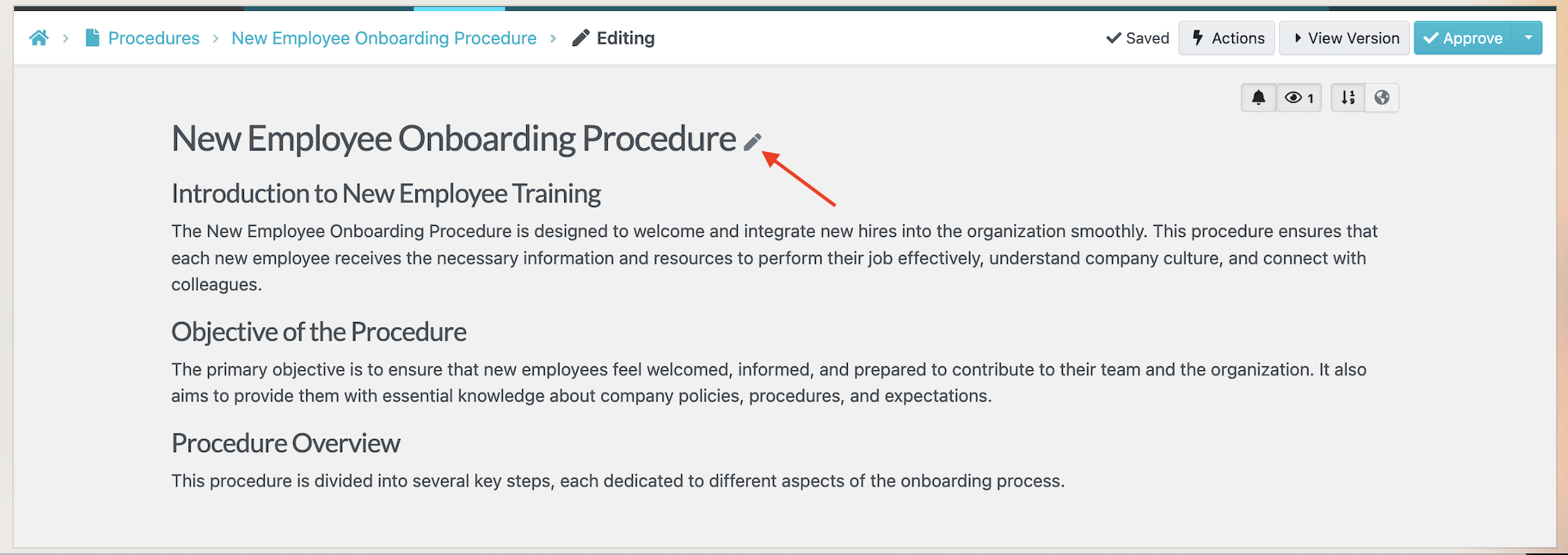
You can add instructions to refine the draft with SweetAI. Review the resulting changes before approving the procedure; generation speed is not a substitute for accuracy.
Importing an SOP
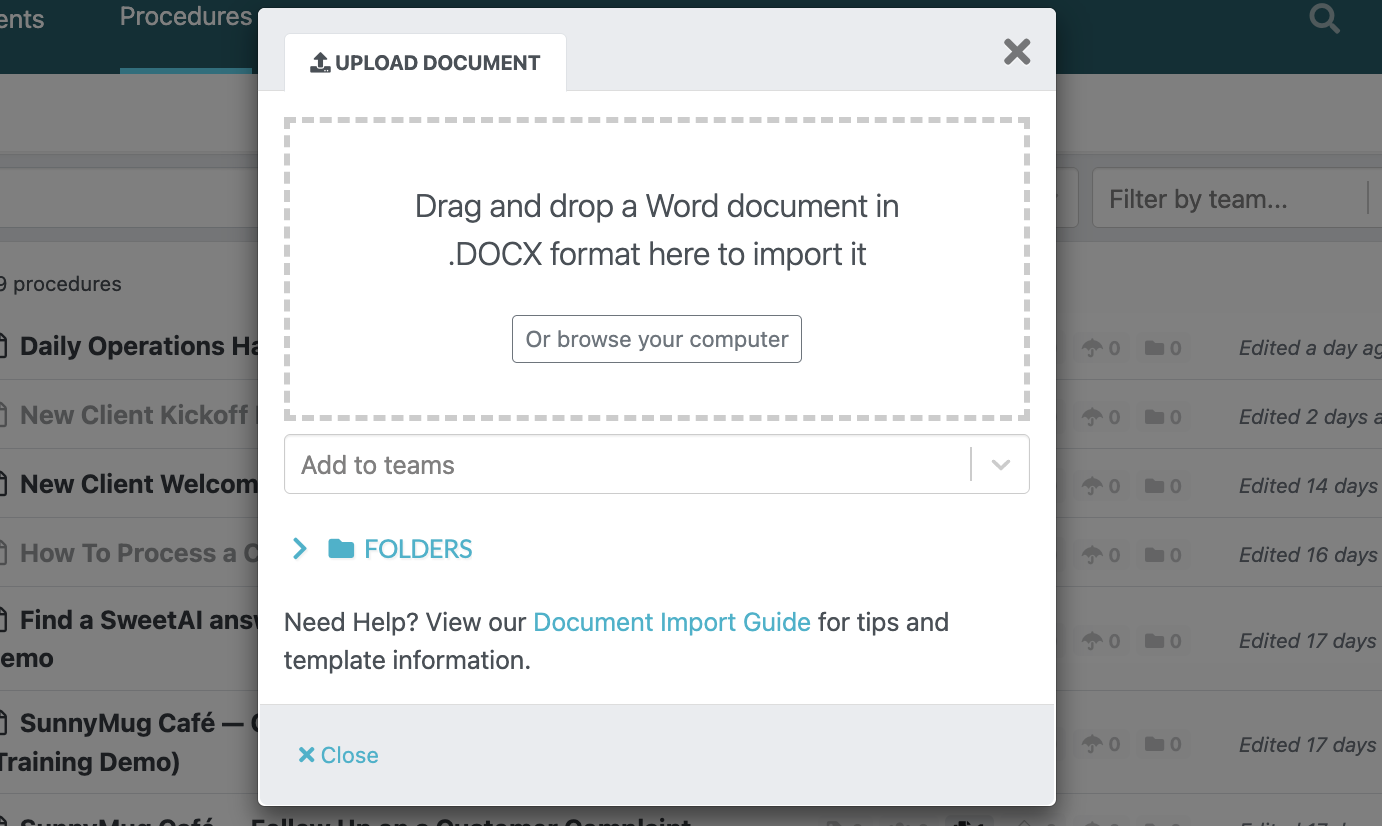
If you already have a useful SOP saved in Word, you may not need to rewrite it. Importing it into an SOP management system gives you a starting point for review and maintenance.
SweetProcess lets you upload an existing procedure, and built-in heading styles in your file help it detect the structure.

You can import it easily into SweetProcess and start editing it.
You’ll see a notification that your upload is complete. Click “Create Document.”
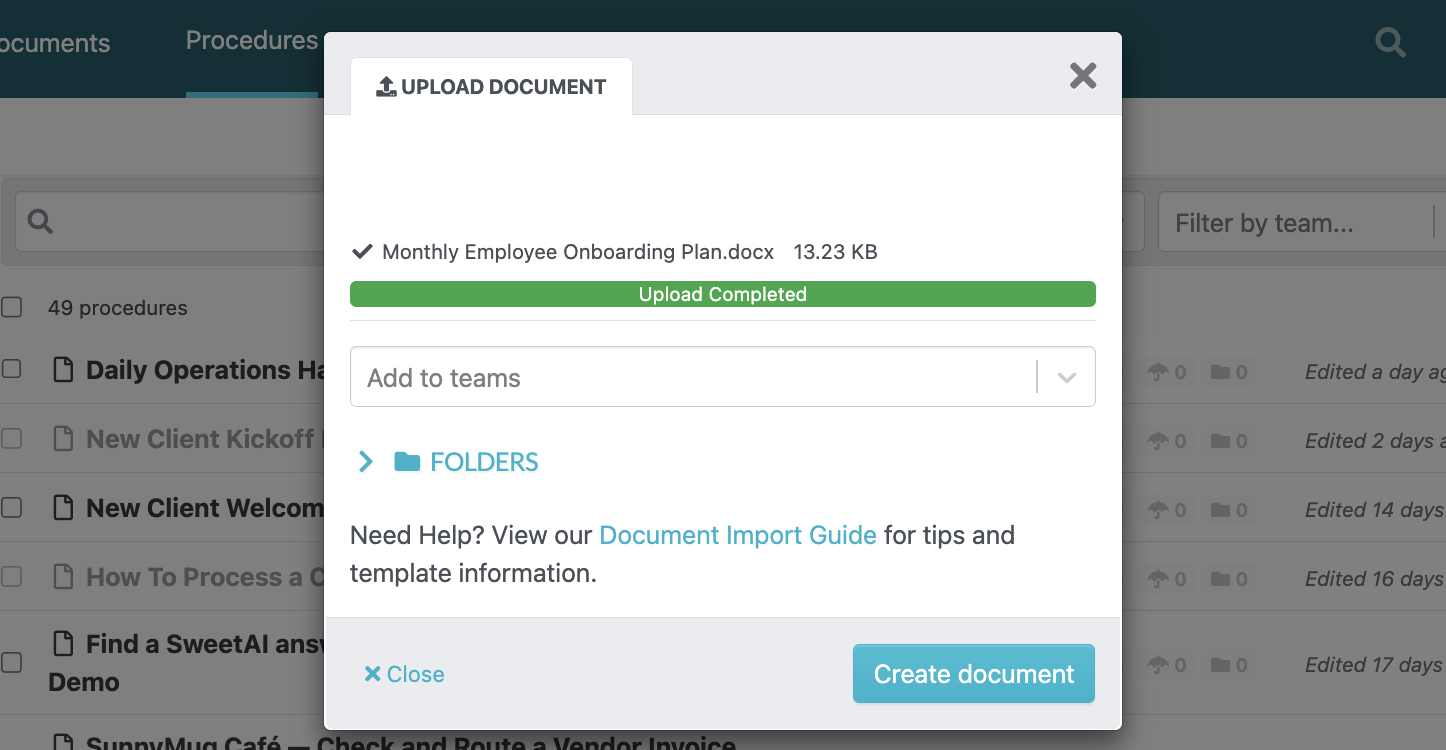
Before importing, check the document import guide for the supported format and preparation steps. After importing, review the result before publishing because formatting can change between systems.
Check the order of the steps, formatting, links, and any embedded material that matters to the task.
Gather the Facts Before You Create an SOP
Before capturing steps or generating a draft, establish what the procedure needs to explain. A clear source description makes the first draft more useful and gives the reviewer something concrete to check.
Here are the key things to prepare:
- Trigger: What starts the task, and when?
- Owner: Who is accountable for the task and for keeping the procedure current?
- Audience: Who will follow the instructions, and how often do they do this work?
- Tools: Which systems, files, and accounts does the task use?
- Steps: What does the employee actually do, in order?
- Exceptions: What goes wrong, and whom does the person ask when it does?
- Completion evidence: What shows the work is finished?
Example: Creating a Weekly Client Status Report SOP in SweetProcess
Consider this illustrative weekly client status report, not a completed product test or a customer result. An account coordinator prepares it from the approved project tracker, and an account manager reviews unresolved blockers.
The report covers completed work, next actions, blockers, and their owners. Your team must supply the reporting day, recipient, approved delivery channel, and storage location. A capture or generated draft cannot establish those decisions for you.
Step 1: Define the Task
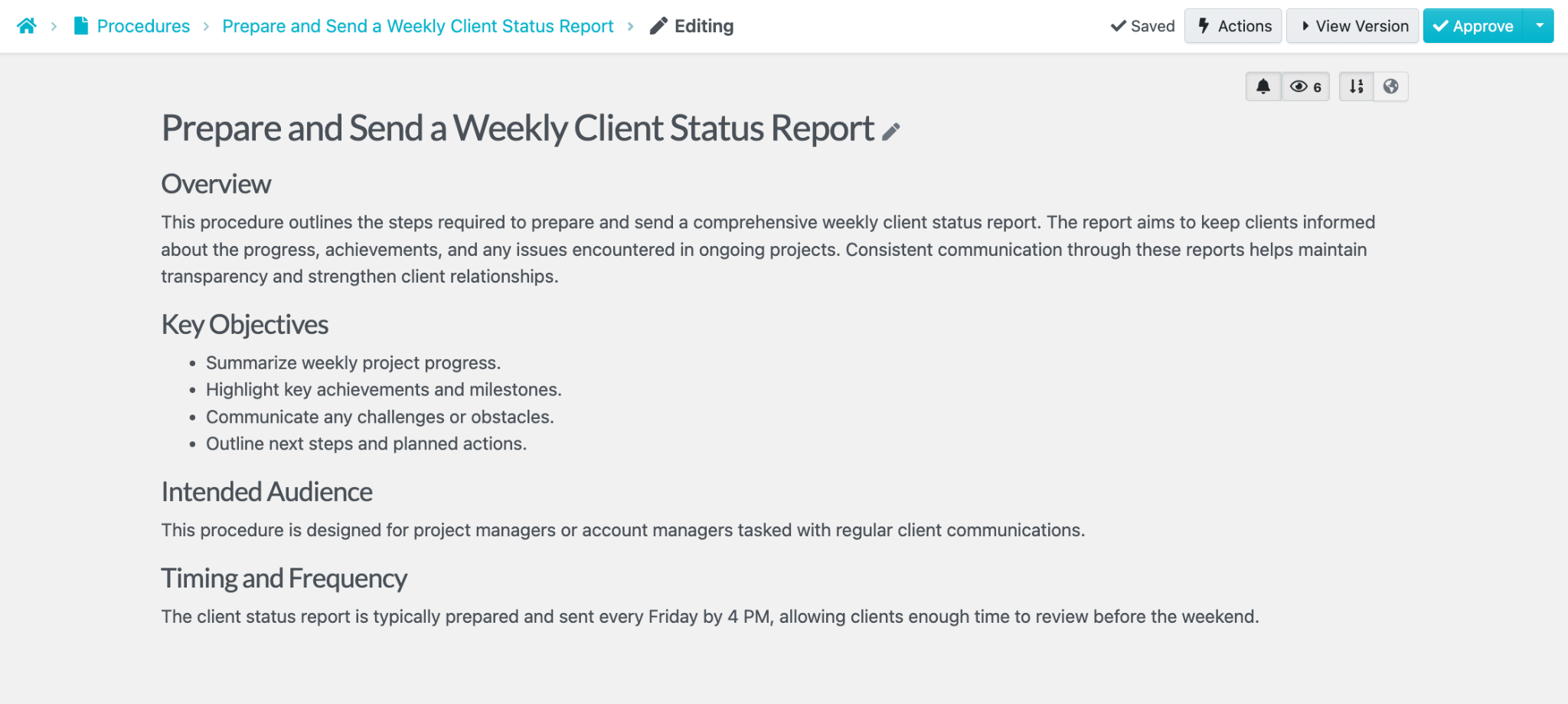
Give the procedure a clear title, for example, “Prepare and Send a Weekly Client Status Report.”
Start when the reporting period closes. Finish only after the account manager has reviewed the report, the coordinator has sent it through the approved channel, and a copy is stored in the agreed location. Name both people and the approved project tracker in the procedure.
Step 2: Choose the Starting Route
If the coordinator regularly uses a browser-based project tracker, browser capture may help document the navigation and data-gathering steps.
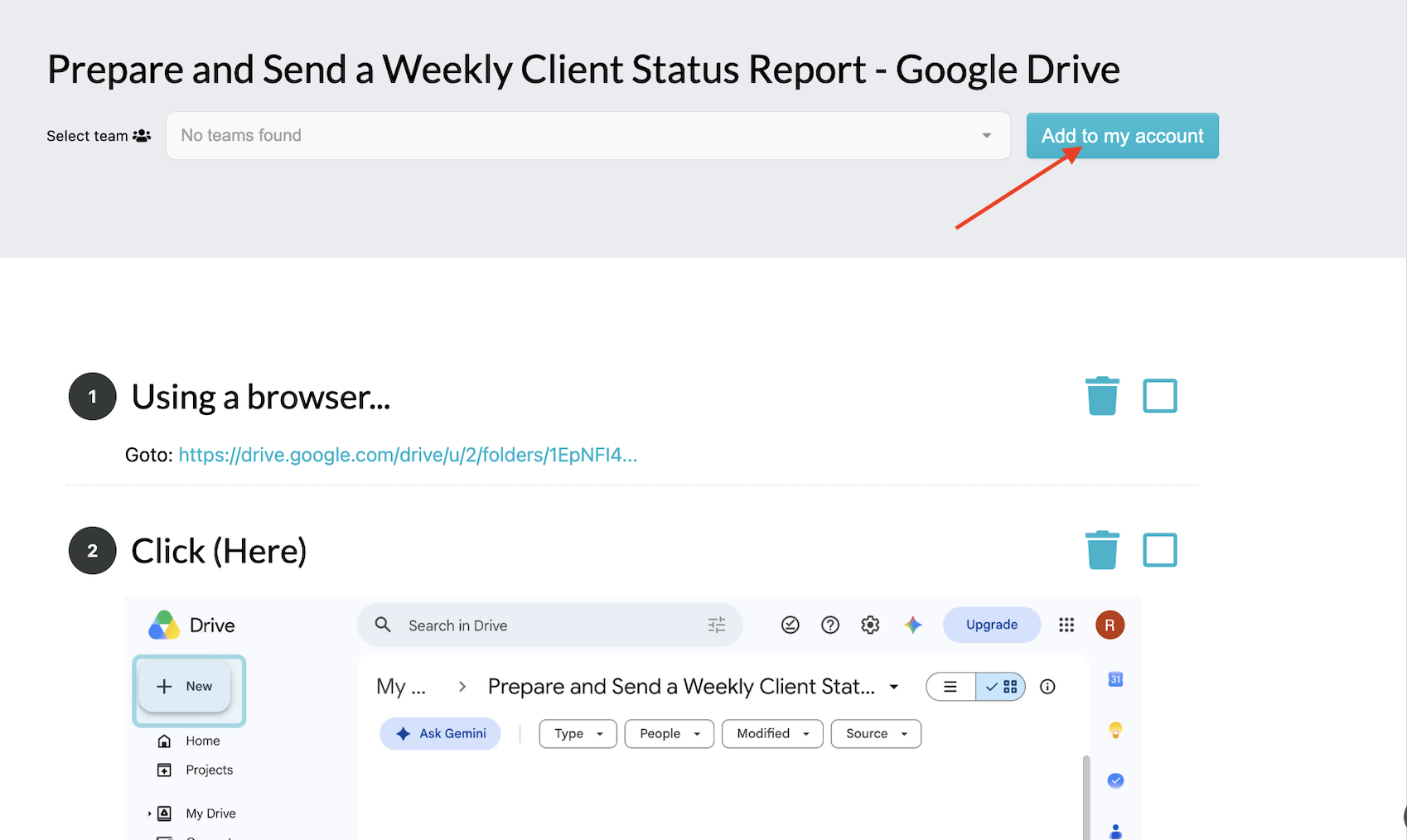
Choose one route that fits the information available. You do not need to use every method to create a single SOP.
Alternatively, you can use SweetAI to help turn the title into an editable draft.
Step 3: Add Steps
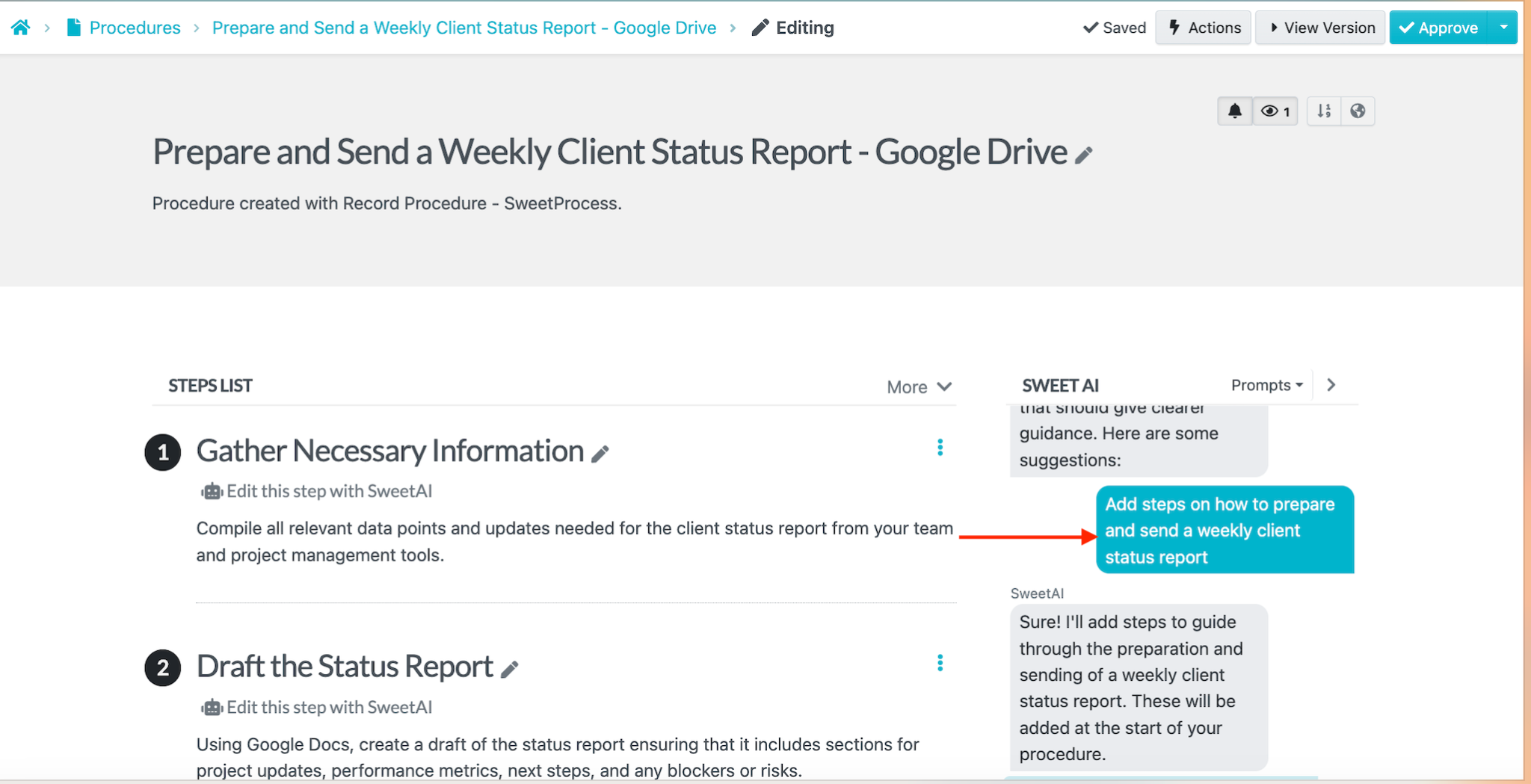
Add the checks that a screen capture cannot explain: confirm that each status belongs to the current reporting period, give every unresolved blocker an owner, and separate completed work from planned work. If a critical detail is missing, get clarification before sending the report.
For each step, state the action and expected result. For example: “Review unresolved blockers with the account manager. Record the owner and next action for each blocker before preparing the client version.” Remove private internal notes that the client should not receive.
Step 4: Test the Instructions
Ask a colleague to follow the draft with sample or approved non-sensitive inputs. Can they find the correct tracker, identify the reporting period, handle a blocker without an owner, and tell when the report is ready to send? Revise the instructions wherever they have to guess. This is a suggested acceptance check, not a claim that this example has passed a hands-on test.
Step 5: Review and Publish the Procedure
Send the checked draft to someone with approval authority. In SweetProcess, a team manager can approve drafts within the team, and a super manager can approve drafts account-wide. A regular member who is not a team manager needs approval before their changes become the live version.
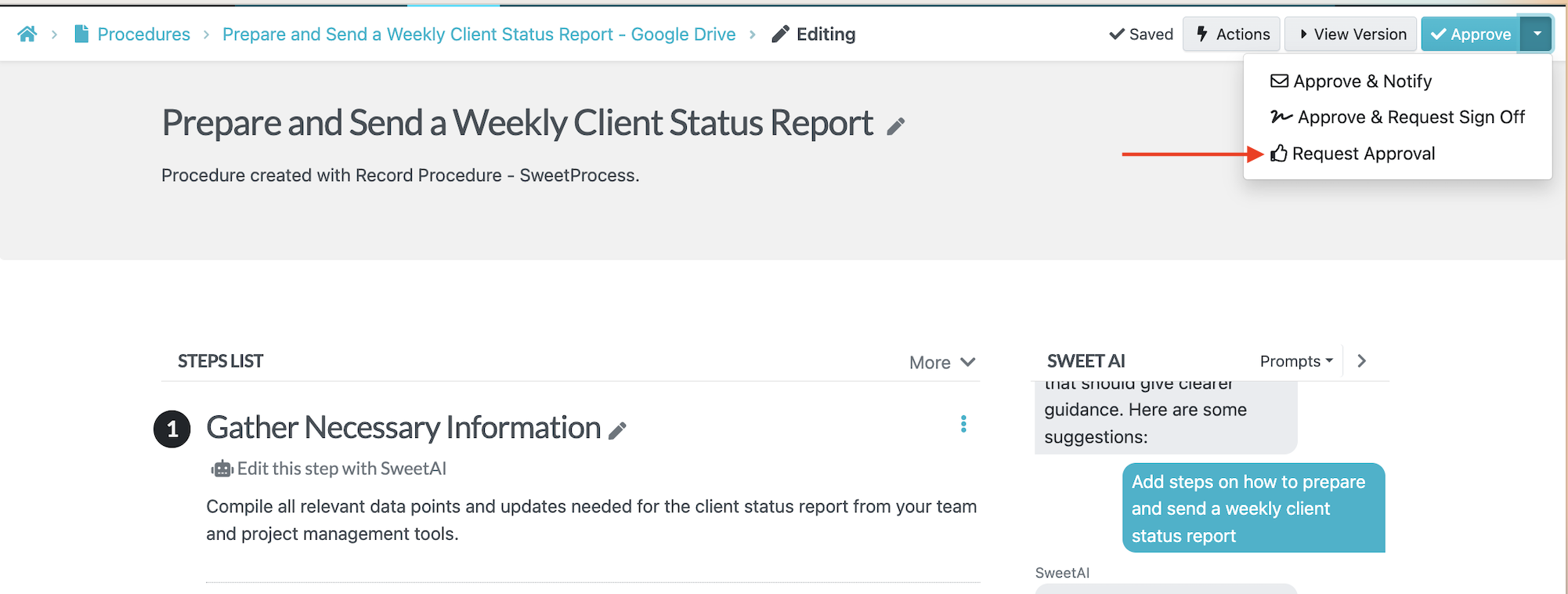
You can review the relevant approval permissions before setting up your team’s process.
Approval means the procedure has been reviewed by someone with the appropriate authority.
After approval, confirm that the published version contains the agreed steps, exceptions, and reporting requirements.
Step 6: Assign the First Task
In SweetProcess, you can assign a procedure as a task to the appropriate team member. They’ll receive an automatic notification to stay informed.
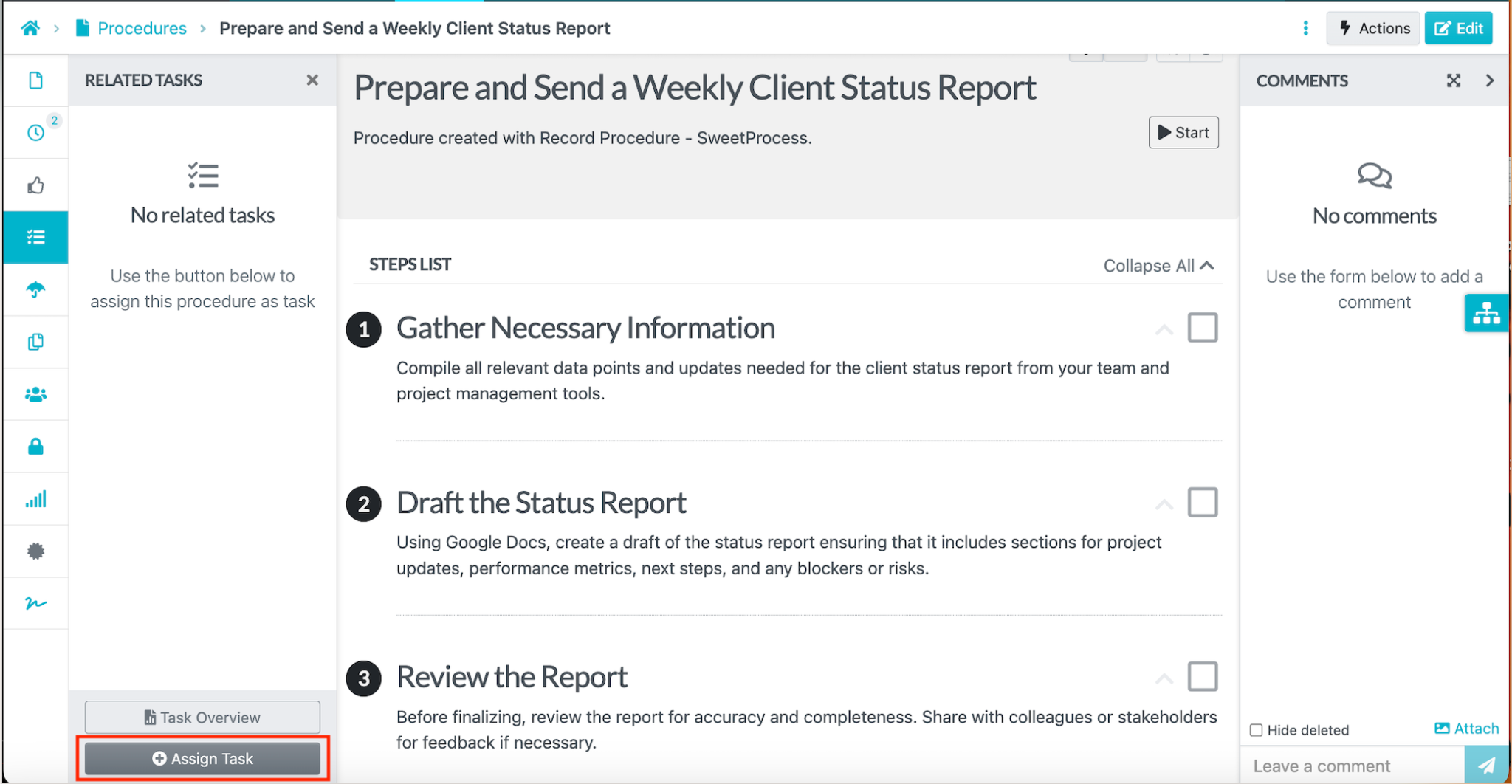
When assigning the procedure as a task, select the person responsible and set the relevant due date. Keep task settings separate from editing the reusable instructions, and check any recurrence settings before relying on them.
From the “Tasks” tab, you can view the progress and distinguish work that’s pending and what has been marked complete.
Check Whether the SOP Is Ready
- The trigger, owner, inputs, and finish point are clear.
- Each step states an action and its expected result.
- Exceptions say what to check and whom to ask.
- A colleague can find the right version and follow it with the approved inputs.
- Screenshots and examples contain no passwords, private client information, or other sensitive details.
- Approval, read-and-understood acknowledgment, and task completion remain separate records.
Keep SOPs Current and Track Their Use
Creating the SOP is only one stage. Give the document an owner and a review date, revise it when the work changes, and request read-and-understood acknowledgment when appropriate. Acknowledgment records a response; it does not prove that the work was performed correctly.
SweetProcess supports procedure approval, reviews, and acknowledgments.
Review Changes on Your SOPs
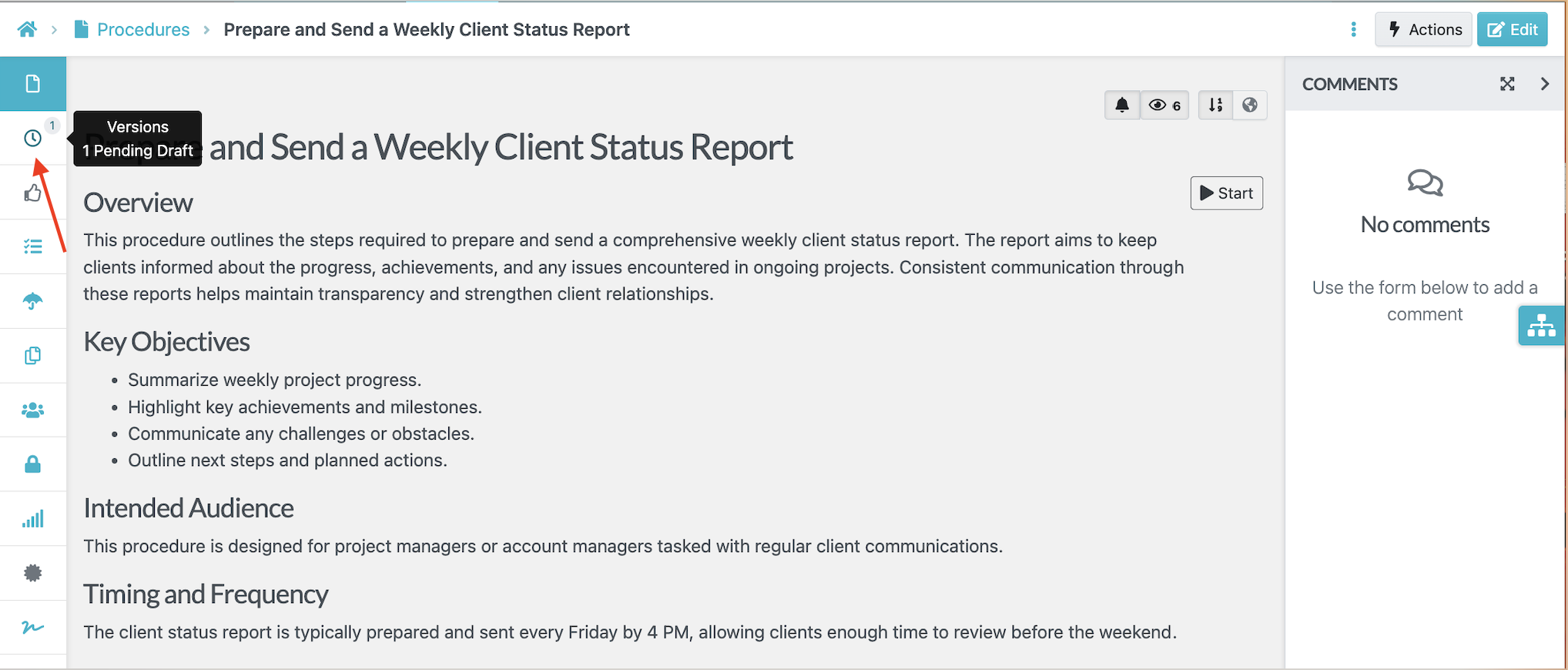
When the reporting process changes, you can update the relevant steps on SweetProcess. You can view the older versions and revert if necessary. The version history feature makes it easy to view who changed the procedure.
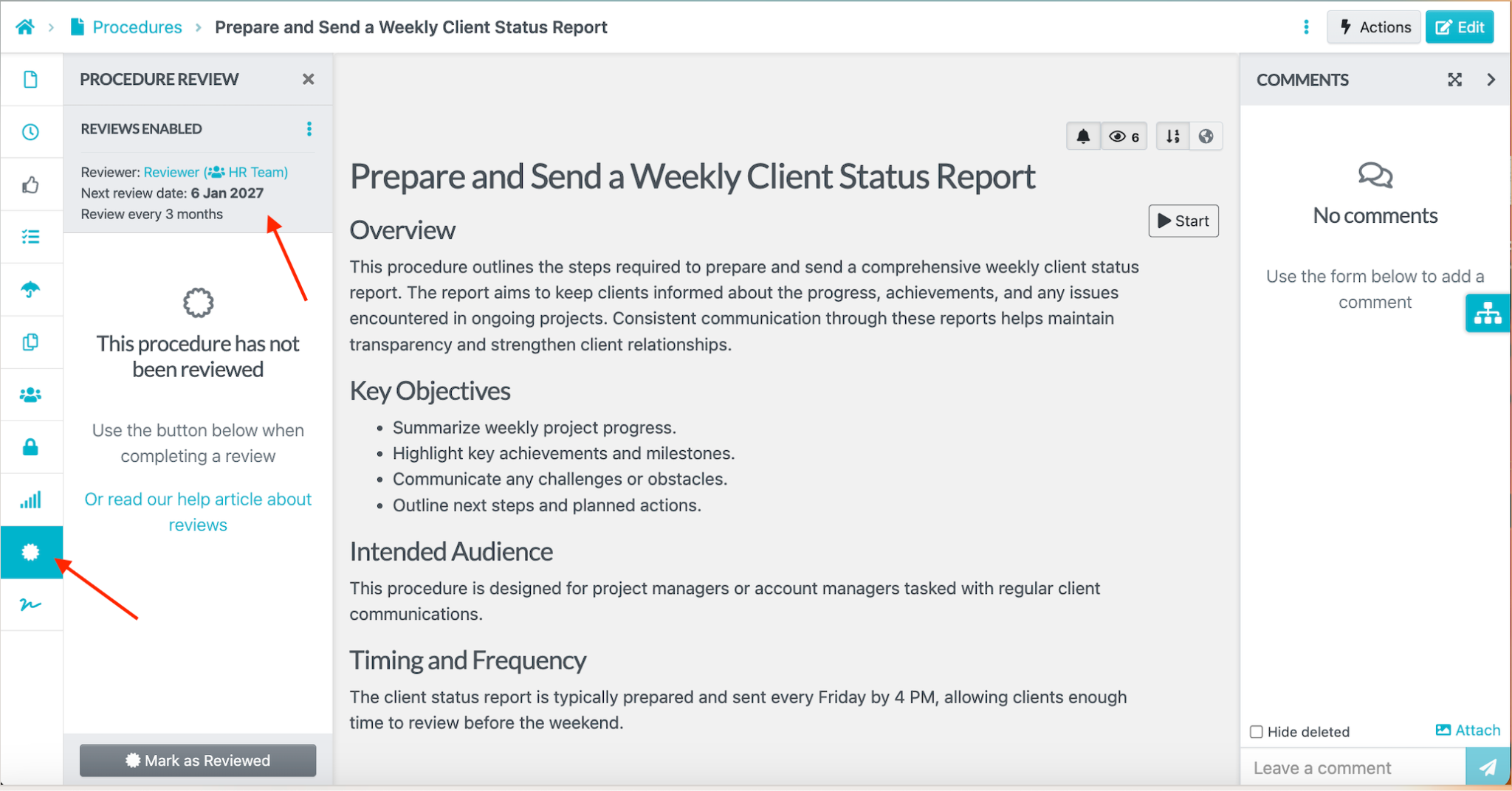
You can add a review date so that the document owner can use it to ensure it’s updated accordingly.
Request Sign-Offs
If you have a new procedure, you can send a sign-off request to your employees. They will receive a notification to remind them to read the SOP.
However, a read-and-understood record does not prove that an employee has completed the work correctly.
Why Choose SweetProcess as Your SOP Creation Tool
SweetProcess is useful when you need the procedure to remain usable after its first draft. Editing, version history, approval, acknowledgment, and task assignment serve different parts of that job.
The following features help you maintain the instructions and connect them to everyday work. Choose the ones your team will actually use rather than treating every feature as a requirement.
Format SOPs
SweetProcess has an editor for structuring procedure text and adding supporting media and links.
To do this, identify the procedure in question from the list of procedures created. Click the three dots beside it, then click “Edit” from the drop-down menu.
Use the editor to organize paragraphs and add the media or links that explain the task. Keep formatting consistent so an employee can distinguish an instruction, an exception, and an expected result.
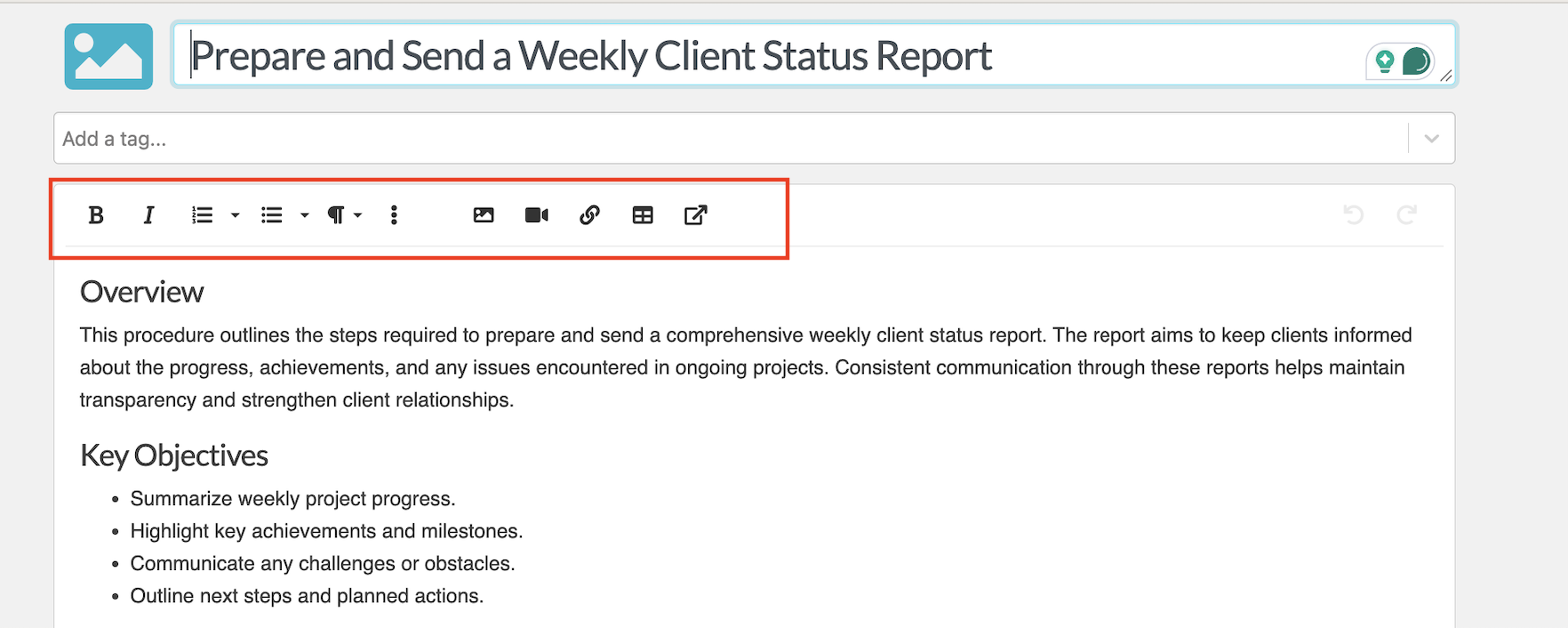
Save the changes and follow the approval process for your role. Then check the live version rather than assuming that saving a draft published it.
Manage All Procedures, Processes, and Policies in One Place
Keep related procedures, processes, and policies in a shared workspace rather than sending employees between competing document copies. SweetProcess provides search and filters to help people find the relevant document.
Searching for any SOP created can be done without hassle through the filter or search options on the dashboard.
Give documents descriptive names and check team access. Central storage is useful only when the person doing the work can find and open the right instructions.
Start From Reusable SOP Templates
A template supplies structure, not a finished account of how your business works. SweetProcess lets team members use existing templates; super managers create and manage them. Replace generic instructions with your actual roles, tools, decisions, and exceptions before approval.
Automated Flowchart Created With SOPs
SweetProcess can generate a flowchart from a procedure. Use it to review the sequence alongside the written steps, particularly when a decision changes what happens next.
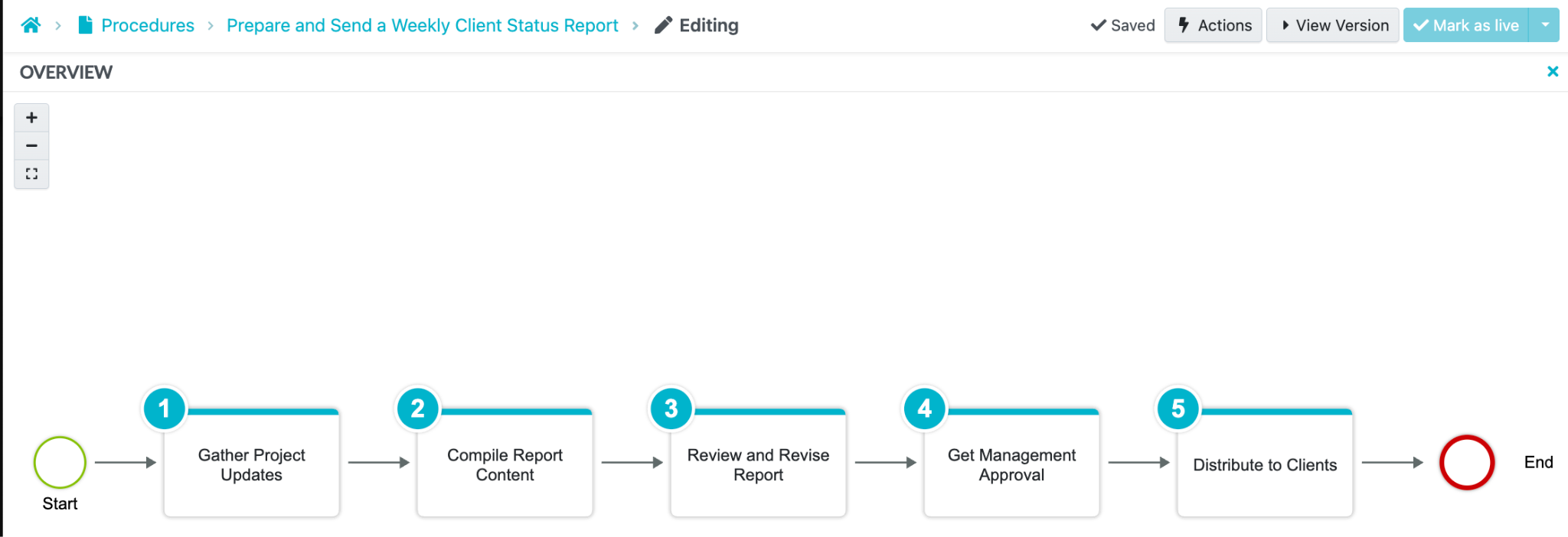
These flowcharts help to:
- Clarify complex workflows for easier understanding
- Highlight dependencies between steps
- Review the sequence for redundant steps or bottlenecks that your team identifies
Review Procedures With Your Team
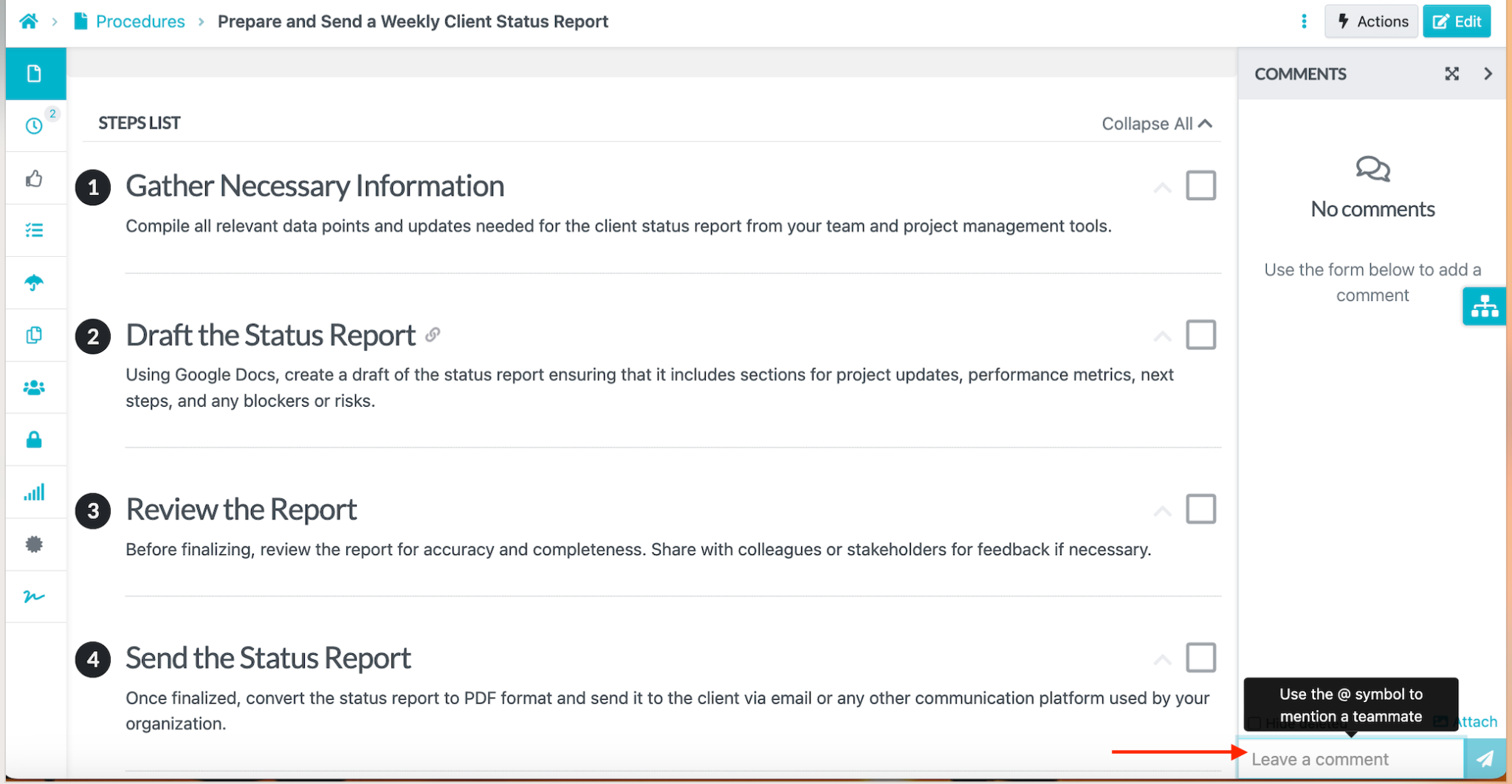
Invite the people who perform the task to review the instructions and flag missing details. Comments can support that discussion, while approval determines which draft becomes live. Do not confuse these features with a claim of simultaneous document co-editing.
SweetProcess makes this possible with the following features:
Team members can leave comments and discuss an SOP to ensure clarity and accuracy.
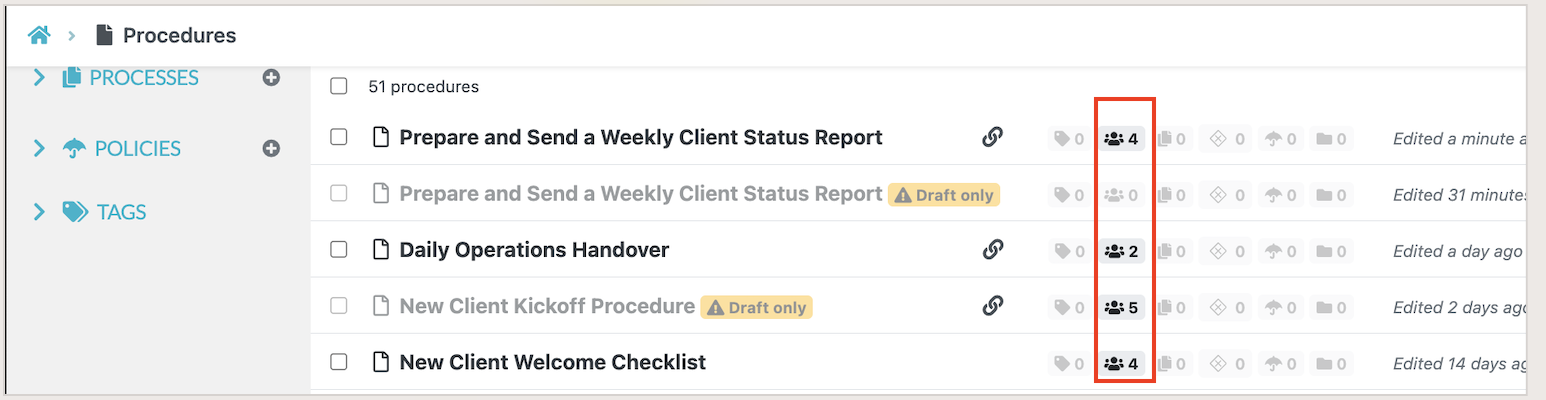
Set team permissions deliberately. Access can overlap across teams, and some administrative roles have account-wide access; making someone read-only in one team does not remove permissions granted elsewhere.
SweetProcess combines AI-assisted drafting with the review and maintenance work that follows. Start with one recurring task so you can judge that complete workflow for yourself.
Use the 14-day free trial to create a procedure, review it with a colleague, and assign a task. No credit card is required.
Where an SOP Creator Helps
An SOP creator helps most when the same task recurs and unclear instructions create avoidable questions. Choose a task with a defined owner and a checkable outcome.
These examples show what the procedure needs to explain, not results that software alone guarantees:
Employee Onboarding and Training
Document what must happen before a new employee starts, what access they need, who provides it, and how each onboarding task is checked.
A useful onboarding SOP names the owner of each handoff and distinguishes instructions from the employee’s actual completion record. Test it with someone who does not already know every step.
Customer Onboarding Workflows
For customer onboarding, record the approved setup information, handoff owners, and next step after each milestone. Include what to do when an input or approval is missing.
SweetProcess helps you map out the procedure and create a corresponding workflow that can be shared with team members.
Review the workflow when the product, handoff, or customer requirements change.
IT and Security Protocols
IT procedures can explain access requests, troubleshooting, and escalation. Have an appropriately qualified owner verify technical instructions and security requirements before anyone relies on them.
Keep passwords, tokens, and other sensitive details out of screenshots and examples. Review permissions rather than assuming that documenting a process makes it secure.
For an access-request SOP, identify who authorizes the request, who fulfills it, and what evidence records the change.
Specify the escalation path when approval is missing or the request falls outside the employee’s authority.
Documentation supports a repeatable process; it does not by itself prevent security incidents or demonstrate compliance.
Finance and Expense Reporting
An expense-reporting SOP can identify required receipts, review roles, approval limits, and the record kept after reimbursement.
Have the appropriate finance owner validate the requirements. Clear documentation can support checks, but it does not guarantee accurate financial records or legal compliance.
SOP Creator Pricing
Free access can mean a public generator, a limited free plan, or a time-limited trial. Check which option covers drafting, maintaining documents, assigning work, and the number of people who need access.
SweetProcess offers a 14-day free trial. The trial gives you an opportunity to create a real procedure, review it, and assign a task before deciding whether to subscribe. Use the trial to evaluate the creation, review, and task-assignment workflow before subscribing.
SweetProcess costs $99 per month or $990 per year for up to 10 account users. Each additional user costs $5 per month or $50 per year. The annual-only Small Team plan costs $495 per year for up to five users, plus $50 per year for each additional user. All paid plans include all features; billing is based on account users, not just users active that month.
What Benchmark Wealth Management Teaches About Reviewing SOPs
Benchmark Wealth Management’s experience illustrates why writing is not the final step. The firm described moving from outdated process notebooks to documented procedures that people could review and use.
Elian Levatino explained the need to execute written instructions and check them. Sarah Beach’s review structure included a writer, a separate checker, and a final review.
The lesson is practical: a tidy document can still omit information that an employee needs. Have another person work through it before treating it as ready.
For the weekly report example, that means checking whether a colleague can select the correct period, resolve missing information, and identify the reviewer without asking the author.
Do not treat this customer story as a forecast for your own onboarding speed, efficiency, or client results. Use its review practice as a model to evaluate against your own work.
Keep the final approved procedure distinct from acknowledgment and task completion. Each answers a different question: is this the accepted instruction, has someone acknowledged it, and has the assigned work been done?
Try that review process with one procedure during SweetProcess’s 14-day free trial.
Create One Procedure Your Team Can Use
The best way to evaluate an SOP creator is to start with a real recurring task. Choose the material you already have, create a draft, add the decisions and exceptions that matter, and ask a colleague to check if the instructions are accurate. You can then assign the approved procedure as a task to assess whether the tool supports the work your team actually needs to do.
Evaluate how SweetProcess supports your procedure before committing to a paid plan. Sign up for a 14-day free trial of SweetProcess here. No credit card required!
FAQs
What is an SOP creator?
An SOP creator is a tool designed to help businesses and organizations document, organize, and manage their standard operating procedures (SOPs). It can turn a recurring task into a standard operating procedure. You can either capture browser steps, draft instructions with AI assistance, start from a template, or improve an existing document to create a finished procedure.
Is an SOP maker the same as an SOP creator?
In a business context, “SOP maker” and “SOP creator” generally refer to tools that help teams create standard operating procedures. The useful difference is the method and the output, such as captured steps, an AI draft, a template, or an imported document.
How do I create an SOP?
Start by defining the task, its owner, its trigger, and what counts as finished. Gather the actual steps and required information, then choose a suitable starting method. Add exceptions, review the draft with someone who knows the work, revise unclear instructions, obtain the appropriate approval, and then publish the procedure.
What is the best program to create SOPs?
The best program depends on what you need to produce. SweetProcess is our first choice when you want to create and maintain procedures, review them, and assign the resulting work in one place. Scribe or Tango may suit teams that primarily need captured screen guides, while Creately supports visually mapping processes. Compare the actual output and ongoing use before picking a tool.
Can ChatGPT create SOPs?
ChatGPT can help draft instructions from the information you provide. Use ChatGPT SOP prompts as a starting point, then validate the steps, remove sensitive details, and manage approval and updates. A generated answer is not an approved procedure.
Can I use an SOP creator for free?
Yes, but check what “free” includes. Waybook has a public AI SOP generator, while Scribe and Tango offer limited free plans. SweetProcess offers a 14-day trial, not a permanent free plan. Use the trial to assess creation, review, and task assignment together before subscribing.
Can I create an SOP from an existing document or a screen recording?
SweetProcess supports importing an existing procedure, and its Chrome extension captures selected browser activity as steps and screenshots. That is not the same as converting any existing screen-recording video into an SOP. Check the supported input, then review the instructions, images, and exceptions before approval.
What should happen after the SOP is created?
Have a team member who’s familiar with the work review the instructions, then obtain approval from a person with the appropriate permissions. If the team requires read-and-understood acknowledgment, you can configure this, send the requests, and then assign the procedure as a task when someone needs to perform the work.