Last Updated on November 23, 2026 by Owen McGab Enaohwo
Start your free 14-day trial of SweetProcess.
No credit card needed. Cancel anytime.
A hospital policy has been reviewed and approved, but different departments are still working from different versions.
One department may have a printed copy, another may have an older PDF saved on a shared drive, and a third may be waiting for someone to email the latest revision.
Without a reliable way to manage policy changes and distribution, keeping documents organized becomes difficult.
Hospital policy management software gives you a central place to maintain approved documents, coordinate committee reviews, control access, distribute updates, and retrieve historical records.
Here are eight hospital policy management tools that you can use to streamline the governance and implementation of your policies.
Key Takeaways
- SweetProcess, PowerDMS, MedTrainer, Ntracts Policy Manager, OSP, VComply, DocTract, and Cloda are policy management software that centralize documentation. However, each of them approaches the process differently.
- Document storage, policy approval, version-specific acknowledgment, and demonstrated staff competence are four different jobs. Acknowledgment shows that a person confirmed a policy. It does not prove comprehension or compliance.
- Of these software options, only SweetProcess and VComply publish their pricing publicly. For the rest of the tools, you have to request a quote to determine if they fit within your budget.
- Healthcare-specific capabilities vary. Some tools combine policy management with training, accreditation, regulatory content, or broader governance functions.
- You can evaluate whether SweetProcess is a good fit for your hospital by organizing a policy and its supporting procedure. Start a 14-day free trial of SweetProcess to test its workflow capabilities.
Table of Contents
Hospital Policy Management Software Compared
Software | Strongest documented fit | Policy lifecycle capabilities | Pricing | Question to resolve |
|---|---|---|---|---|
Managing policies alongside procedures and processes | Document creation, sharing, history, review, approvals, and access management | $99 per month for up to 10 users, $495 per year for up to five users | How will you record acknowledgment and schedule reviews? | |
PowerDMS | Healthcare policy and document management | Version control, review and approval, acknowledgment, and audit records | Custom quote | Which policy, training, and standards modules are included? |
MedTrainer | Policy work alongside compliance training | Policy creation, storage, signature collection, tracking | Select, Premier, or Signature pricing plans. Custom quote | Which content, AI, and implementation services are included? |
Ntracts Policy Manager | Healthcare policy approval and document governance | Approval workflows, version control, audit trails, attestations, and reporting | Custom quote | What’s included in the pricing package? |
OSP | Custom healthcare software development | Project-built repositories, workflows, notifications, and reporting | Custom quote | Who owns maintenance, integrations, hosting, and future development? |
VComply PolicyOps | Policy lifecycle management within broader GRC operations | Reviews, approvals, targeted distribution, acknowledgments, and obligation links | PRO GRC Suite modules start at a $1,000 monthly equivalent, billed annually with a 12-month minimum. Confirm exact PolicyOps pricing. | What modules, implementation services, and contract terms are required? |
DocTract | Healthcare policy governance and standards-related workflows | Approvals, attestation tracking, compliance binders | Custom quote | Which features and support are included? |
Cloda | Healthcare quality and governance policy-library access | Policy and procedure access, management, and staff acknowledgment | Custom quote | Is the product suitable for your US hospital’s requirements and geography? |
Competitor details and pricing checked November 20, 2026.
SweetProcess publishes this comparison and is our editorial pick for teams that want policies connected to step-by-step procedures in one maintained library.
Where specialized healthcare content or accreditation workflows matter more, another option may fit better, and we say so.
How We Evaluated Hospital Policy Management Software
We compared these options using publicly available vendor product pages, documentation, and pricing information. Here’s the criteria we used to select these hospital policy management software options:
The Work They Do
We included tools that support policy creation, controlled access, review, distribution, or acknowledgment, and identified the custom-development option separately.
We assessed each option against hospital policy work, including:
- Organizing approved documents
- Routing reviews
- Managing versions
- Distributing updates to relevant staff
- Recording acknowledgments
- Retrieving records
EHRs, patient-management suites, and hotel/hospitality tools are outside this shortlist.
Pricing Transparency
We also considered pricing transparency, implementation requirements, and whether healthcare-specific content or additional modules were involved.
We indicated which tools listed their pricing plans publicly and mentioned if the software didn’t include the cost on the website.
8 Hospital Policy Management Software Options
Healthcare compliance can sometimes be complex. Between Joint Commission standards, Centers for Medicare & Medicaid Services (CMS) requirements, state regulations,
and Occupational Safety and Health Administration (OSHA) guidelines, hospitals need systems that can keep up to ensure nothing falls through the cracks.
Here are eight policy management solutions built to handle these challenges:
SweetProcess
SweetProcess is a comprehensive policy management platform used by hospitals to create, organize, and distribute policies. Tools like SweetProcess manage policies and centralize your procedures and processes in a single system.
While other tools focus narrowly on document storage or compliance checklists, SweetProcess connects your entire operational framework.
Policies link to procedures that explain how to implement them, which in turn link to step-by-step guides that show staff exactly what to do.
Authorized staff can access a policy from a device with internet access. Check your organization’s access and security requirements before making internal policies available outside the workplace.
Features of SweetProcess
Here are the features that make SweetProcess the tool you cannot afford to miss for managing your hospital policies.
Document Hospital Policies Manually and Automatically
Creating hospital policies from scratch takes specialized knowledge and time. You need to understand healthcare regulations, write clearly so staff at all education levels can follow, and format everything consistently.
Many hospitals end up with policies that read like legal documents. What do you expect when committee members copy directly from regulatory manuals without considering their audience?
SweetProcess tackles this problem in two ways. For manual creation, the platform gives you a clean editing interface where you can write your policies from scratch.
You can also use our policy and procedure templates or import your existing templates in Word or PDF format.
The SweetProcess AI makes it much easier by automatically generating your policies and customizing them to your industry and company needs.
Here’s how to create policies manually with SweetProcess:
Log in to your SweetProcess account.
Go to “More” on your main dashboard, then select “Policies.”
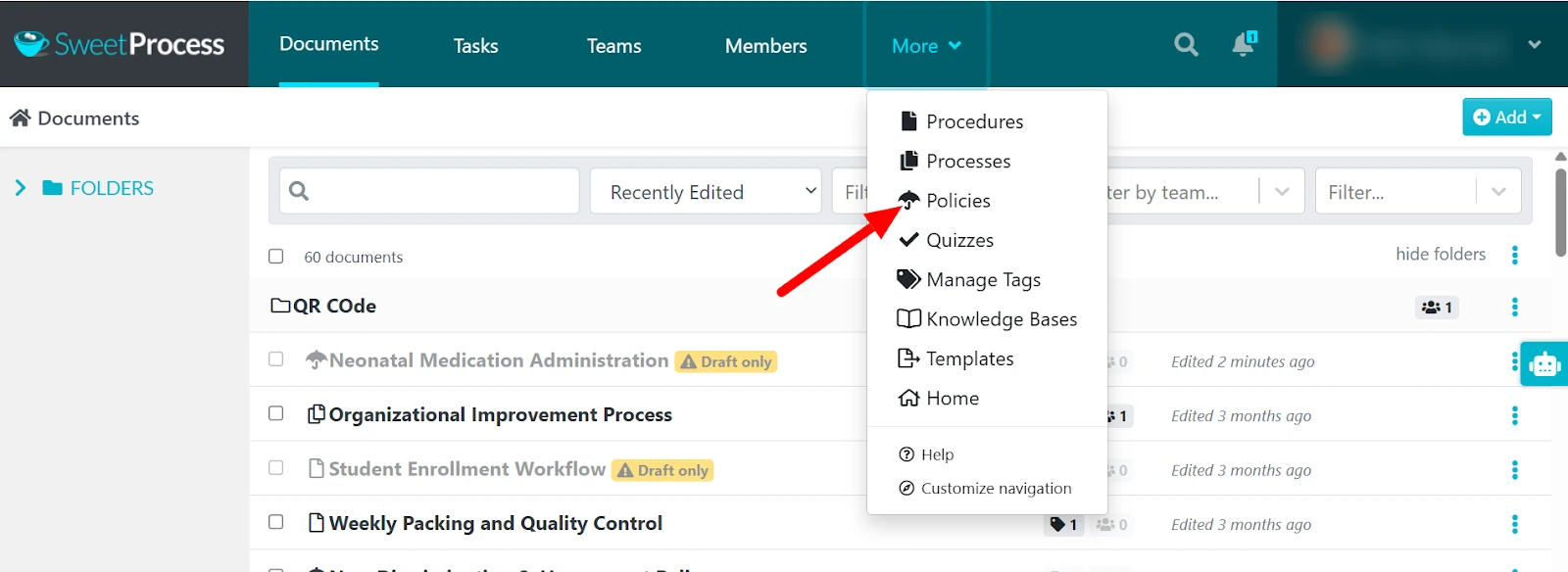
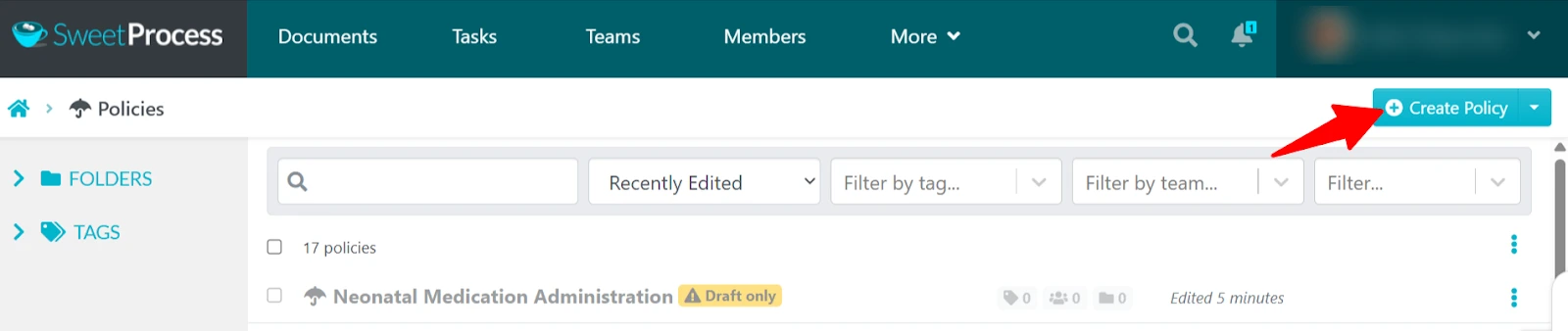
Select “Create Policy.”
Enter the policy title and click “Continue.”
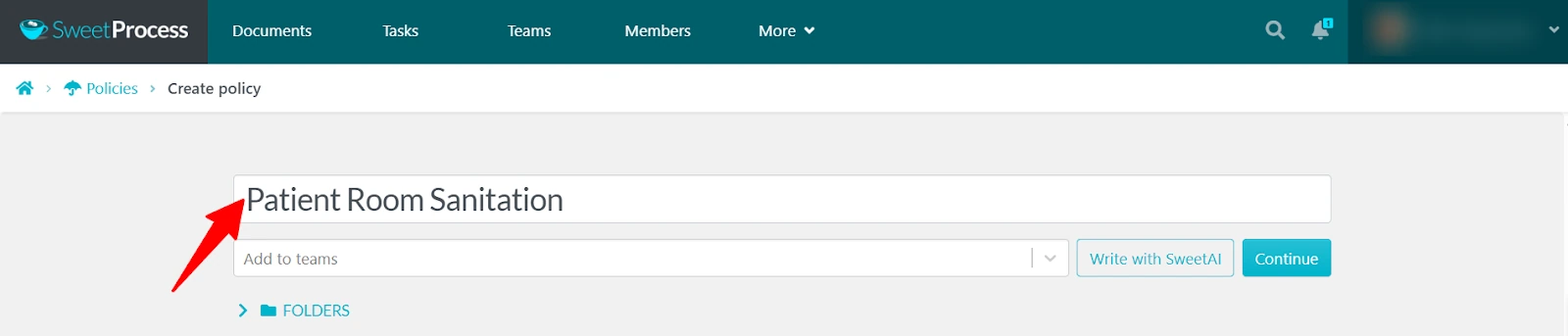
Click the pencil icon beside the title or the one below it to edit.
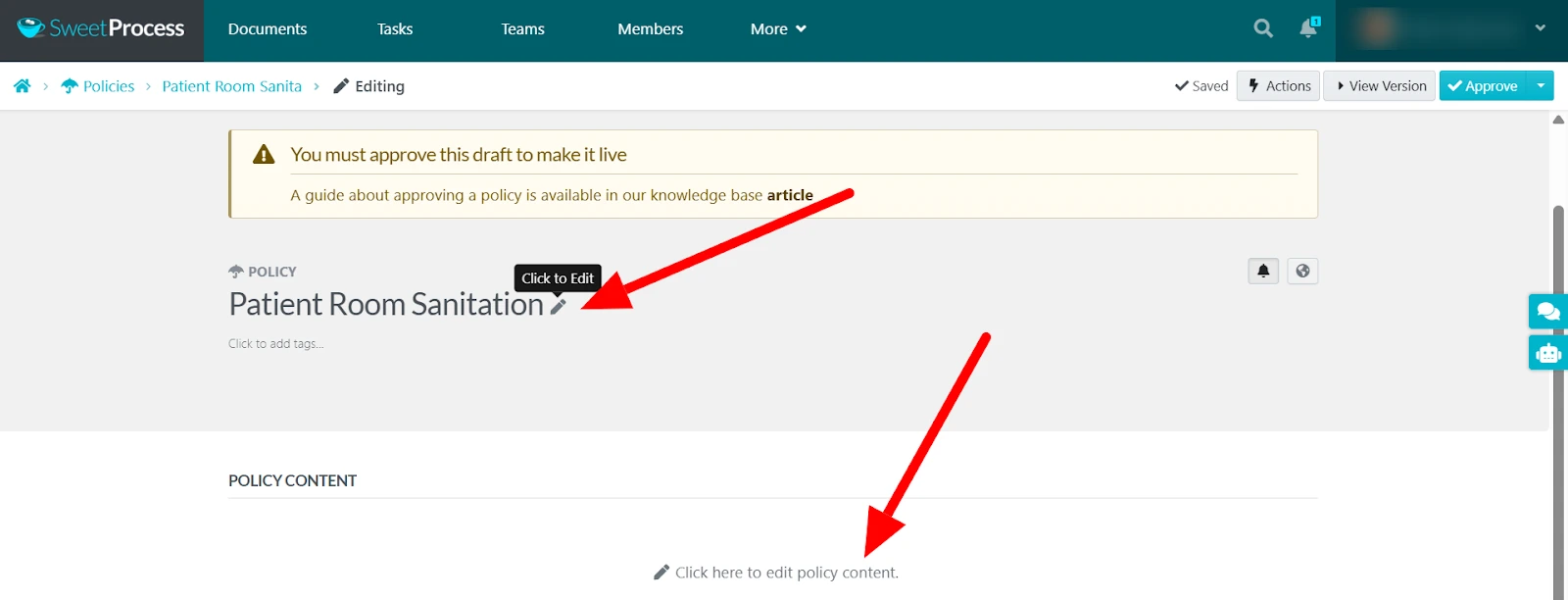
Enter all policy details, including the purpose, scope, definitions, and policy statement. Add images, videos, or attachments where necessary to enrich the policy.
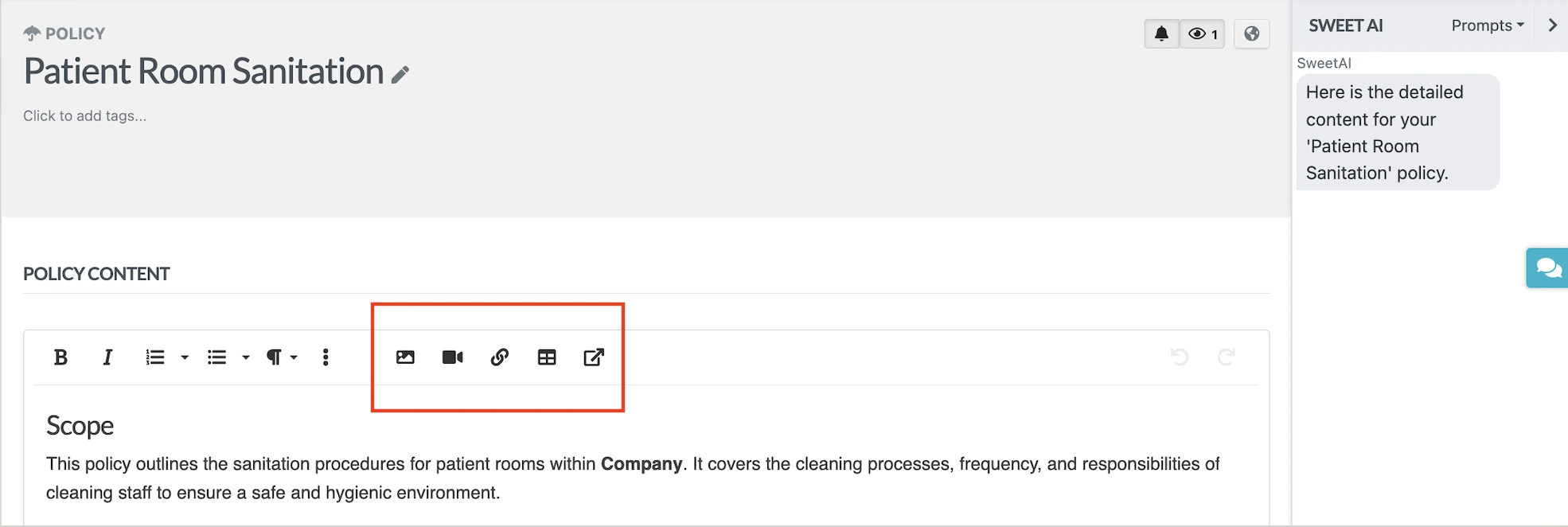
If your hospital needs to create or update many policies, SweetAI can help produce initial drafts. Your team can edit the content for the hospital’s needs and have qualified clinical, compliance, and legal reviewers check it before approval.
Here’s how to write policies with SweetAI:
Follow the same process as above. After you add a policy title, select “Write with SweetAI.”
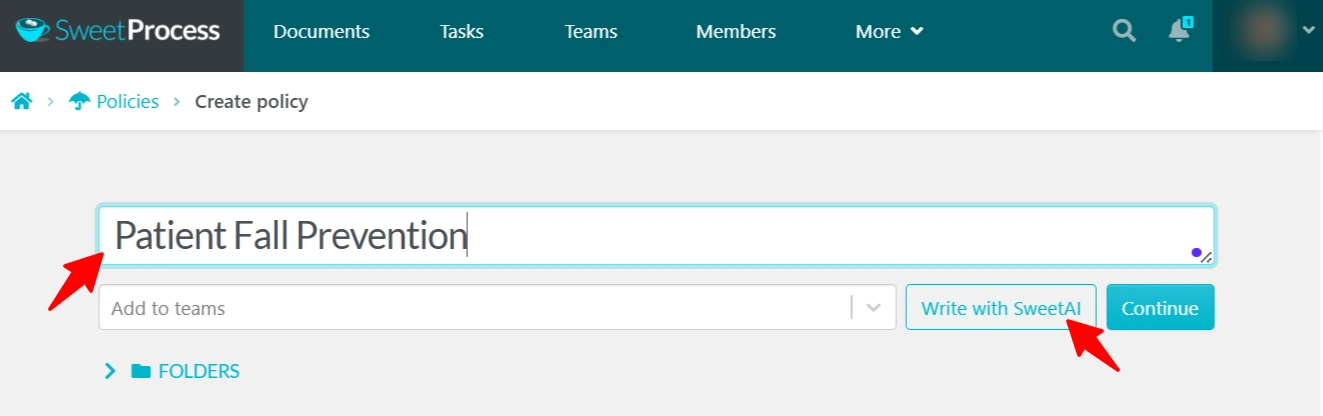
SweetAI generates an initial policy draft that your team can review and edit. Check that it addresses the relevant requirements and safety considerations before approving it.
You can now review and customize the generated policy to align with your hospital’s protocols, equipment, and patient population. You can edit manually or prompt SweetAI to edit your policy document.
Collaborate With Hospital Staff on Hospital Policies
Writing effective hospital policies requires input from multiple stakeholders.
Your infection control nurse, legal team, floor nurses, compliance officer, and quality improvement team will need to collaborate to develop comprehensive hospital policies.
Getting this many people to write policies without policy management software is counterproductive, as it will require endless email chains, unproductive meetings, and Word documents circulated until no one knows which version has the latest edits.
You don’t have to deal with this frustration because SweetProcess enables collaboration, allowing everyone to contribute without chaos.
Here’s how to assign team members to collaborate on your hospital policies:
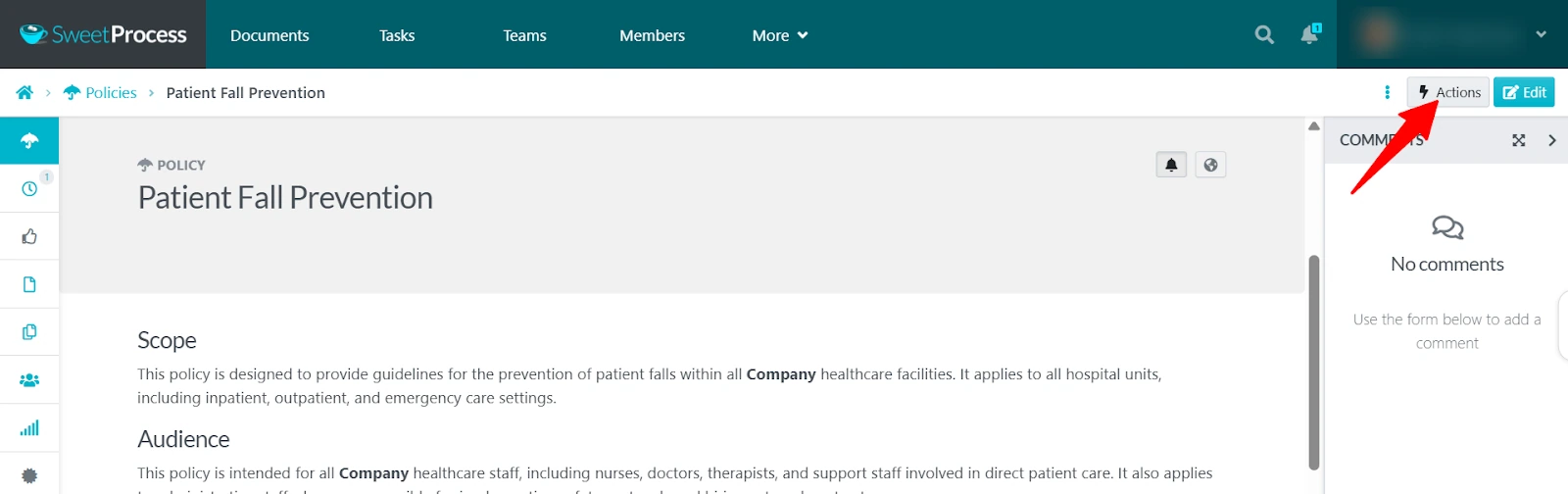
Navigate to the policy document and click “Actions.”
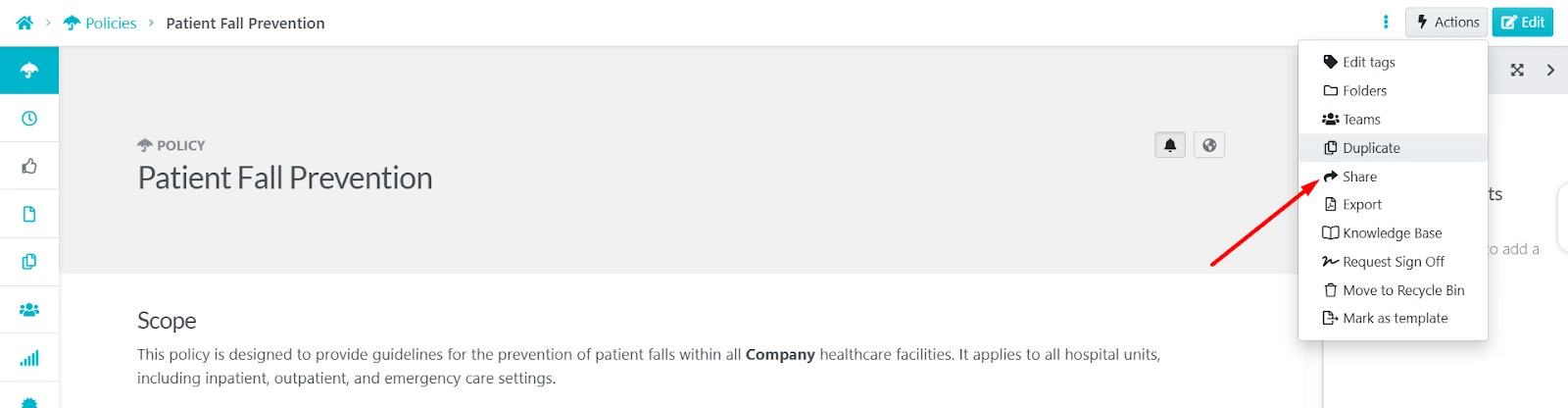
Choose “Share” from the menu.
Add the appropriate team members, such as your clinical director, compliance officer, legal counsel, and department managers, to work on the policy document.
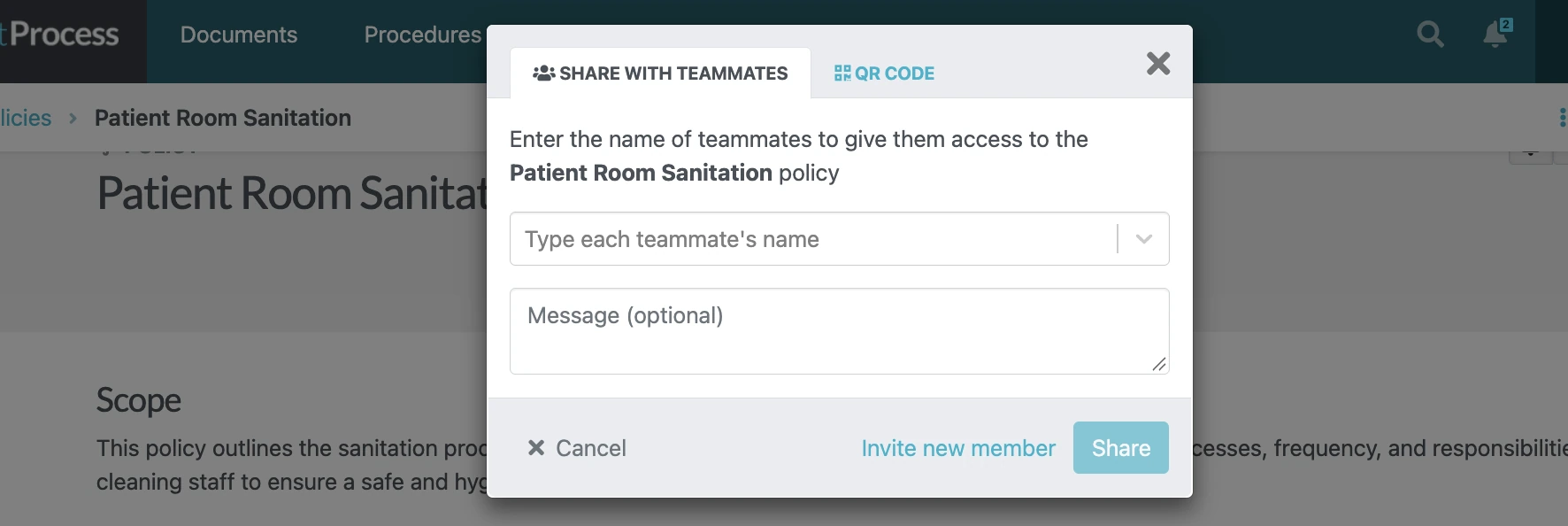
You can share with team members who are available on SweetProcess or invite them to join SweetProcess. Team members will be notified of the invitation to collaborate on the policy document.
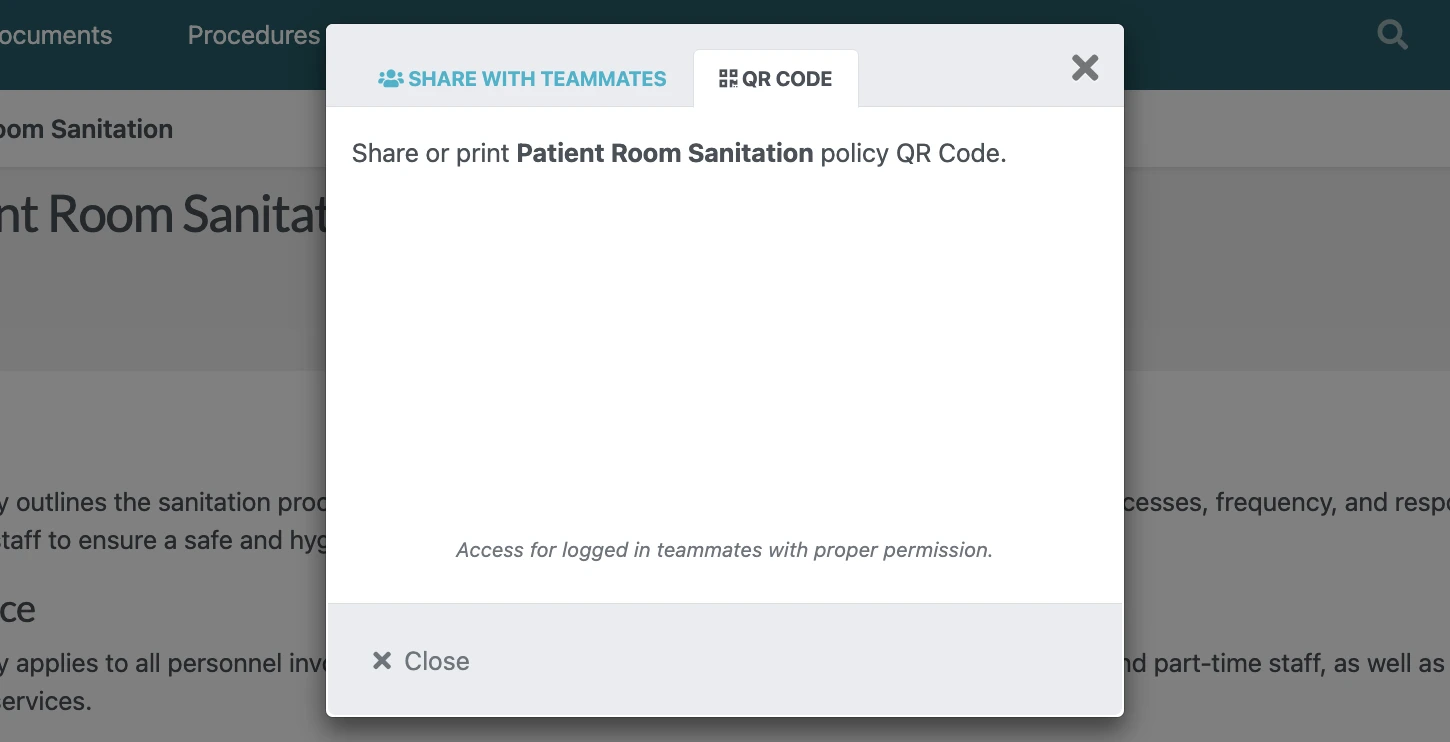
You can also share QR codes with team members who should access the policy.
Review and Track Versions on Hospital Policies
Every time you update a policy, two problems arise. First, how do you prevent staff from using the old version? Second, how do you prove to surveyors that you updated policies, notified staff, and are complying with the new policy?
SweetProcess solves both problems with comprehensive version control.
Every time someone edits a policy, the system saves the previous version with a complete record of what changed, who changed it, and when. You never lose work, and you can always revert if an update causes issues.
Here’s how to track changes on your policies:
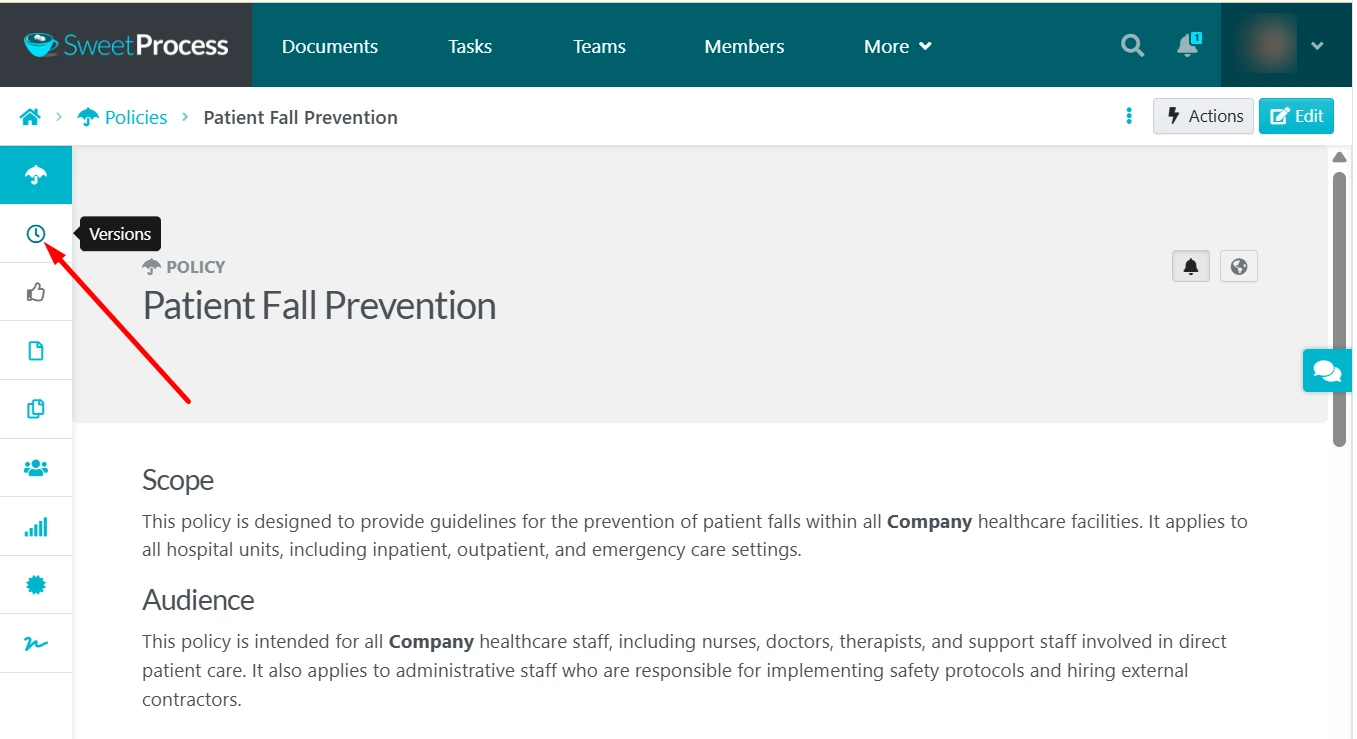
Open any policy document and click the clock icon.
View the complete version history with timestamps and author names.
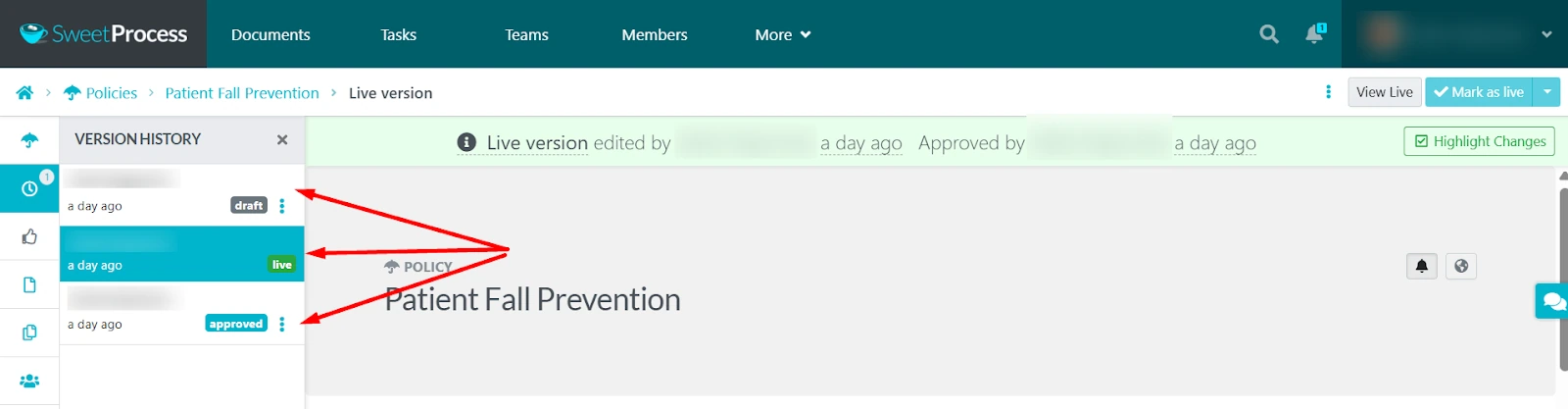
You can also review the tracked highlights to see the changes made to the document.
The SweetProcess policy system prevents scenarios in which someone finds an old policy version on a shared drive and follows outdated procedures.
Manage, Distribute, and Set Access Permissions on Your Policies
Not every staff member needs access to every policy. For instance, housekeeping staff does not need to read surgical protocols;
administrative assistants should not see personnel policies for departments they do not work in; and nurses need essential clinical guidelines, not strategic planning documents.
This specialized access control serves two purposes: it protects sensitive information by ensuring it can be accessed only by the right stakeholders, and it prevents staff from being overwhelmed by policies irrelevant to their roles.
SweetProcess lets you control exactly who sees what:
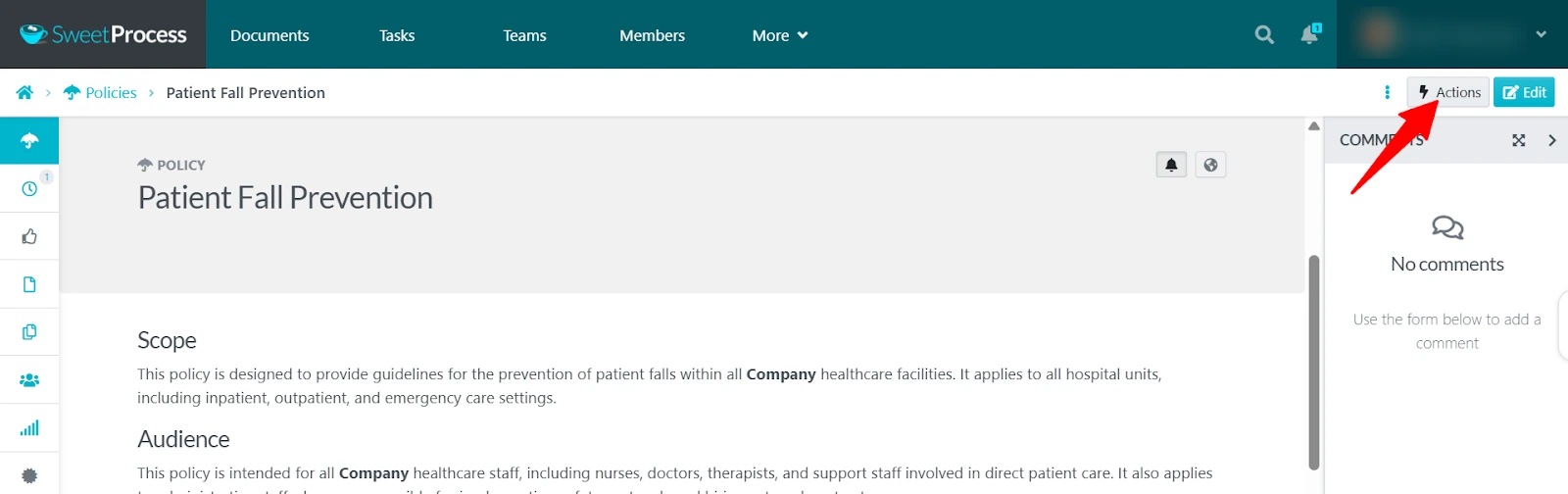
On your policy document, click “Actions.”
You can choose to share it with specific employees or add the policy to a team that needs to read it.
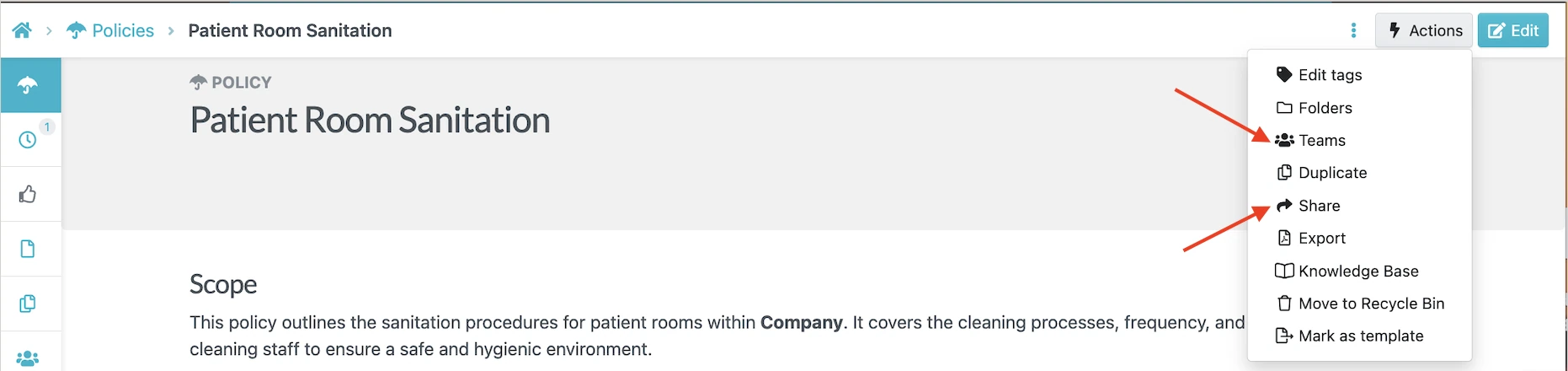
Enter the names of people who need access.
Manage Policies, Procedures, and Processes in One Place
Hospitals need the whole operational picture connected.
For example, your HIPAA privacy policy explains what staff should do; the procedure document outlines how to handle everyday privacy situations; and the process maps out the exact steps for responding to a privacy breach from start to finish.
SweetProcess houses all your organization’s procedures, processes, and policies, and you can document them in one or multiple searchable knowledge bases.
Here’s how to organize your hospital knowledge base:
Click “More” and select “Knowledge Bases.”
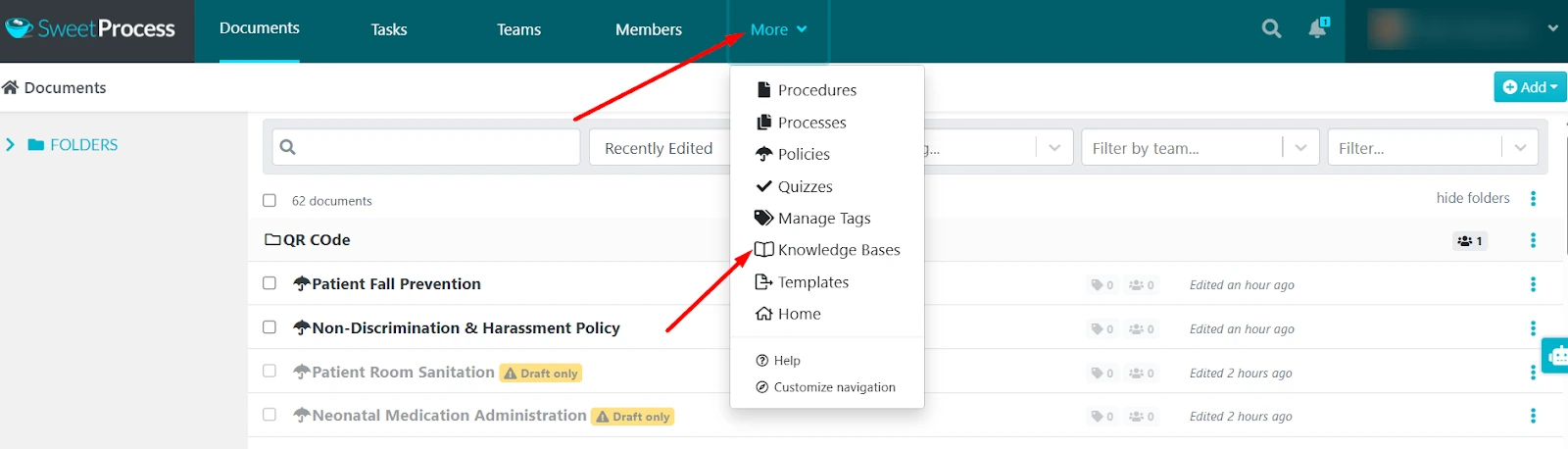
Click “Create Knowledge Base.”

Give it a name and click “Continue.”

Set access control to “Private Knowledge Base, only logged-in team members may view.”
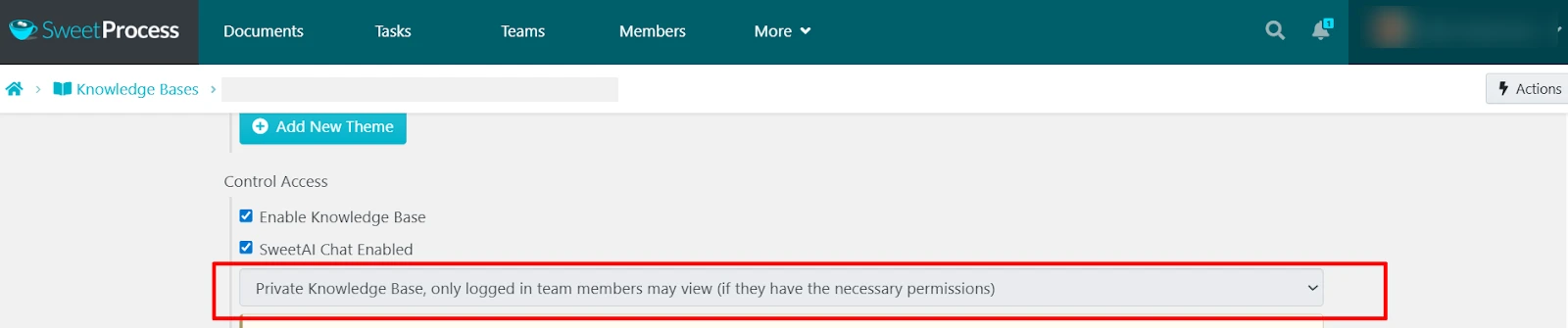
You can also create a public knowledge base that’s accessible to your patients and the general public.
The centralized approach in SweetProcess transforms how staff interact with policies.
Record Staff Acknowledgments
When a hospital publishes a revised policy, it may require designated employees to acknowledge that they have received the updated document.
For example, after an administrative policy is updated, a department manager can coordinate its distribution and follow up with the employees who need to acknowledge the change.
You can approve the policy and request sign-offs from your team.
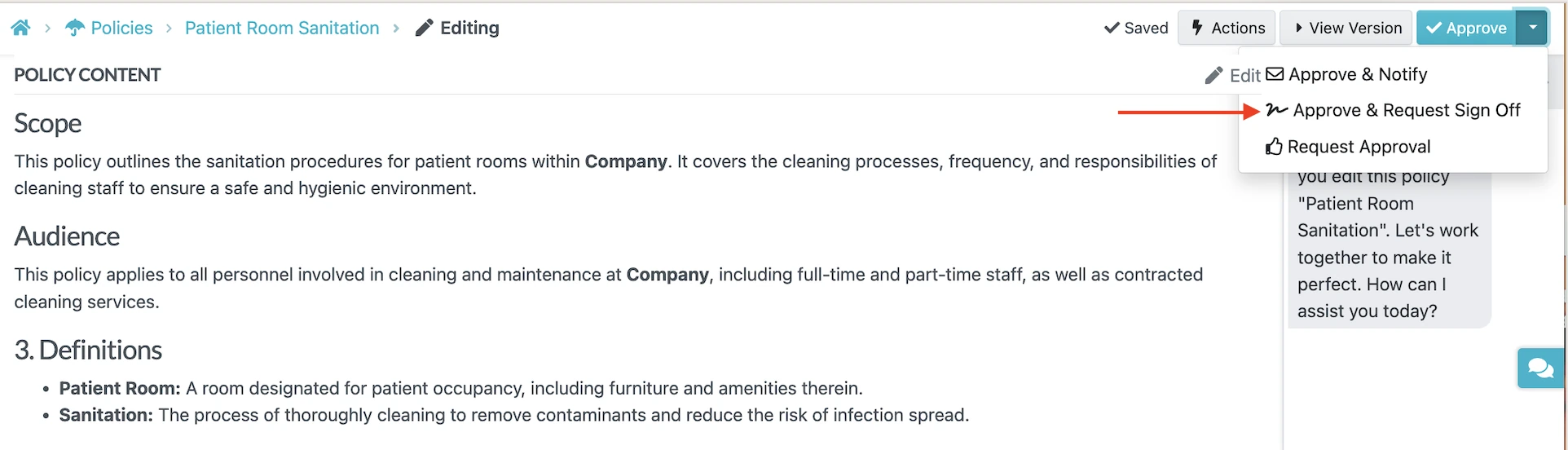
An acknowledgment record is useful evidence that a person completed a specified confirmation step. It does not demonstrate that the employee understood the policy, can perform the required task, or complied with the policy in practice.
If your hospital needs competency assessments, formal training records, or specialized accreditation evidence, establish whether SweetProcess provides the required functionality or whether you need a separate system.
SweetProcess Pricing
SweetProcess charges by account user. The monthly billing starts at $99 per month for up to 10 users, then $5 per month per additional user.
With annual billing, it costs $990 per year for 10 users and $50 per year for every additional user. There’s also a Small Team plan that’s annual-only at $495 per year for up to five users, and $50 per year for each extra user.
Every plan includes all features. You can use the 14-day trial to test out whether SweetProcess is a good fit for your hospital. You also get a 30-day money-back guarantee in case you need to switch tools.
Best for: Hospitals and departments that want to maintain policies, procedures, and processes in one organized platform and get transparent pricing from the start.
Consider before buying: SweetProcess is a general policy and procedure management platform, not a specialized clinical policy library, EHR, or accreditation solution.
Confirm that its permissions, approval records, integrations, security arrangements, and evidence exports meet your hospital’s requirements.
PowerDMS
Image source: PowerDMS
PowerDMS has a healthcare offering for policy and document management. PowerPolicy supports version control, reviews, approvals, and acknowledgment.
With PowerStandards, teams can map documents to accreditation requirements and see when mapped standards change.
Features of PowerDMS
- Standards mapping: PowerStandards can link policy documents to related accreditation requirements, so teams can find those links during review or survey preparation.
- Automated workflows: You can design policy writing processes that route policies to the right people in the correct sequence, from initial draft through final sign-off.
- Simplified search: If you have multiple policies, you can find them easily on the platform, reducing delays, especially during critical moments.
- Reminders: With the automated email reminders, your team can update the policies at the right time, ensuring your team is always using updated guidance.
- Version control: You can easily track the current policy version and automatically archive the old ones, which ensures that staff are aligned at all times.
PowerDMS Pricing
PowerDMS uses custom pricing, so no pricing plans are displayed on its website. You can only request a demo to get started.
Best for: Hospitals evaluating a healthcare-focused document management platform with policy approvals, version control, acknowledgment, and standards-related capabilities.
Consider before buying: Obtain a written breakdown of the included modules. Verify that the healthcare configuration supports your hospital’s governance requirements.
MedTrainer
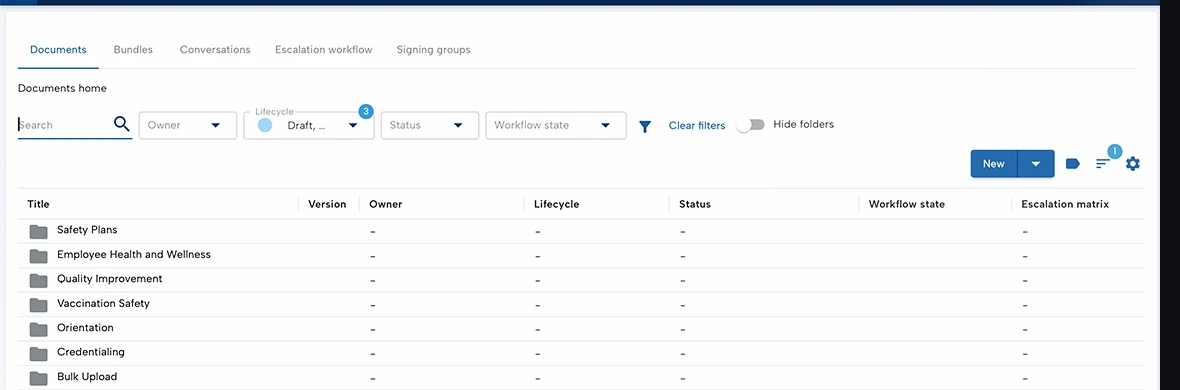
Image source: MedTrainer
MedTrainer is an all-in-one compliance solution for healthcare organizations. The platform integrates policy management, incident reporting, employee health tracking, and mandatory training into a single system.
It suits healthcare organizations that want document and policy work alongside compliance training and other modules.
Features of MedTrainer
- Compliance training: It has a wide healthcare compliance and training offering. It combines incident reports, credentialing, policies, and training.
- Policy creation and document storage: You have access to a centralized document management system to organize your policies.
- Signature collection: This feature can help you request and record employee confirmation when policies are distributed or updated.
- Tracking: Administrators can oversee policy-related activities and see who has signed the current policies.
- AI automation: With the AI-enhanced workflows, you can work smarter.
MedTrainer Pricing
MedTrainer offers three pricing plans: Select, Premier, and Signature. However, they don’t list the actual costs; you’ll need to request a quote. The pricing is then customized based on the features and modules required, user count, and industry.
Best for: Healthcare organizations evaluating policy documentation alongside compliance training and other healthcare-related modules.
Consider before buying: Do not assume that all AI tools or implementation services are included in the entry package. Ask for a detailed breakdown for each plan before committing.
Ntracts Policy Manager
Image source: Ntracts
Ntracts Policy Manager, formerly MCN Policy Manager, covers drafting, approvals, distribution, acknowledgment, and archiving for healthcare organizations.
Features of Ntracts Policy Manager
- Automated policy workflows: With this tool, you can automatically manage your policies within your team, providing more time to focus on important work.
- Version control: You can maintain a distinction between current documents and previous revisions. This is relevant when a hospital needs to retrieve an older policy for historical reference.
- Document audit trail: Ntracts allows you to track your policy documents and changes made, which is important information during audits.
- Dashboards: You can view every policy and your team’s progress from the centralized dashboard that holds all documentation.
Ntracts Policy Manager Pricing
Ntracts does not have transparent pricing displayed on its website. You can contact their sales team to learn more about their pricing plans.
Best for: Hospitals that want a healthcare-focused policy management platform with approval workflows, version control, attestations, and reporting.
Consider before buying: Confirm which capabilities you get during the demo.
OSP
Image source: OSP
OSP takes a different approach by offering custom healthcare policy management software development for hospitals rather than a one-size-fits-all product.
You can use it to build policy repositories, workflows, notifications, and reporting to your specifications.
It suits a hospital with requirements an existing product cannot meet and the capacity to manage a software project. This makes OSP most suitable for large health systems with complex needs.
Features of OSP
- Custom development: OSP can help you build policy management systems specifically for your hospital’s workflows, governance structure, and compliance requirements.
- EHR integration: OSP can integrate policy management directly with electronic health record systems. This allows clinical policies to link to relevant documentation within the EHR, making guidance available right where clinicians work.
- Automated training modules: The system can link policies to customized training content that reflects your hospital’s specific equipment, protocols, and procedures.
- Compliance monitoring: OSP builds dashboards that track policy adherence through automated alerts and reporting. You can monitor compliance in real time rather than discovering problems during retrospective audits.
OSP Pricing
OSP scopes and quotes custom projects. Ask it to separate development, integration, implementation, support, and ongoing maintenance costs.
Best for: Hospitals with specialized requirements that need a purpose-built policy management application.
Consider before buying: With custom development, you need to compare the full project cost and ongoing ownership responsibilities with the cost of configuring an existing platform.
VComply
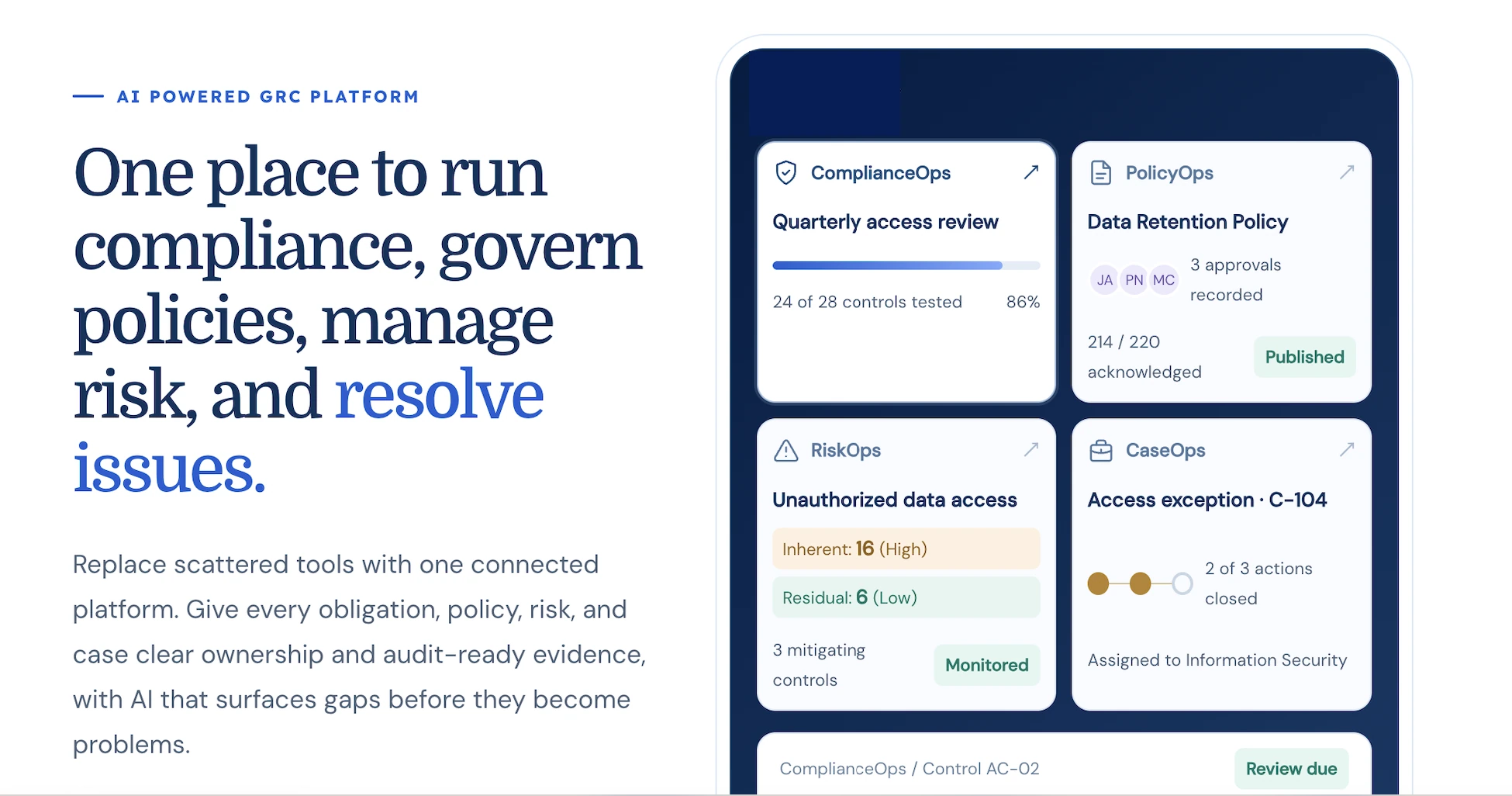
Image source: VComply
VComply provides an enterprise policy management platform that serves multiple industries. The system uses automation and AI-powered features designed to reduce the administrative burden of maintaining compliance.
VComply serves multiple industries. Consider PolicyOps if you want policy approvals, acknowledgment, and reporting within a broader governance program. Ask which health-sector templates, if any, apply to your organization.
Features of VComply
- AI drafting assistance: PolicyOps can help draft or rewrite policy text and answer questions from approved content. Policy owners retain review and approval.
- Broader GRC functionality: PolicyOps sits within VComply’s broader governance, risk, and compliance offering. This feature is ideal if you want to evaluate policy management alongside other workflows.
- Audit logs: You can track current policy versions to ensure that your team is aligned. You can also use this documentation during audits.
- Review reminders: Policy owners can set review dates and receive reminders through automated workflows.
- Standards mapping: Check which requirements and control records your chosen modules can link to policies.
VComply Pricing
VComply’s PRO GRC Suite modules start at a $1,000 monthly equivalent ($12,000 per year at that rate), invoiced annually with a 12-month minimum.
The published starting offer includes one admin seat and unlimited users; request a quote for your exact PolicyOps modules and admin access.
Best for: Hospitals evaluating policy lifecycle management as part of a broader governance and compliance program.
Consider before buying: The actual costs tailored to your hospital and team size.
DocTract
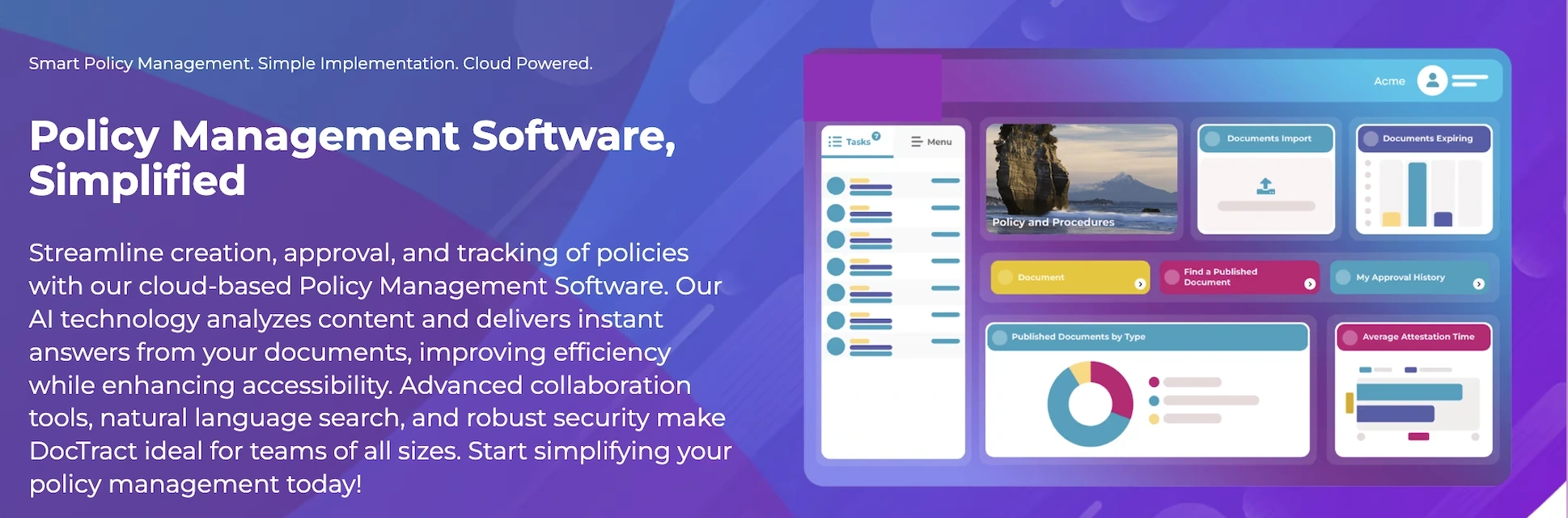
Image source: DocTract
DocTract offers policy management with review and approval workflows, version history, and AI assistance for drafting and search.
Features of DocTract
- AI drafting assistance: Teams can guide initial drafts with shared or custom prompts. Qualified reviewers should verify regulatory references and policy requirements before approval.
- Intelligent compliance monitoring: DocTract’s innovative compliance feature notifies you when reviews are due, helping you keep your policies up to date.
- Version control and audit trails: Every policy change gets recorded with timestamps, author information, and change summaries.
- Policy search and retrieval: DocTract supports policy search, helping users locate relevant documents within the policy management environment.
DocTract Pricing
Pricing is customized based on organization size and features required. Contact their sales team for quotes and to schedule a demo.
Best for: Hospitals looking for policy management with healthcare-oriented search, approval workflows, attestations, standards crosswalking, and compliance-binder functionality.
Consider before buying: Confirm which capabilities are included in the proposed package and how the system’s records can be retrieved and exported.
Documented vendor features should be assessed in a demonstration rather than treated as independently tested outcomes.
Cloda
Image source: Cloda
Cloda brings AI to healthcare policy management, focusing on reducing the time compliance teams spend on creating, updating, and distributing policies.
The platform emphasizes automation and intelligent workflows designed to help small compliance teams work more efficiently.
Features of Cloda
- Policy questions: Ask Cloda can answer questions from approved policies in users’ languages.
- Policy distribution and acknowledgment: Cloda’s Library lets teams distribute policies, track acknowledgments, and review activity.
- Policy and procedure library: The Library is a resource for managing and accessing policies and procedures. This centralized library can provide employees with an organized location for finding approved organizational documents.
- Staff acknowledgment: With this feature, employees can acknowledge relevant documents.
Cloda Pricing
There is no pricing information available on Cloda’s website. You can request a demo to talk to their team.
Best for: Healthcare organizations investigating policy-library access and management as part of quality and governance activities.
Consider before buying: Confirm whether the tool is suitable for US-based hospitals, applicable regulatory coverage, and the pricing.
Try SweetProcess with one hospital policy and test how you manage its approval, access, and acknowledgment.
How to Choose Hospital Policy Management Software
When choosing a hospital policy management system, you need to consider how policies move from draft to approval, who receives them, how revisions are recorded, and how your administrators retrieve evidence when required. Here are steps to follow:
Map Your Hospital’s Policy Approval Process
Identify who owns, reviews, and approves different categories of policies.
For instance, an administrative policy might require review by a department manager and an executive, while a clinical policy may need review by qualified clinical professionals and a designated committee.
Your software should accommodate the approval responsibilities your hospital has established.
Check Department-Specific Distribution
A policy may apply to the entire hospital or only to selected departments. For example, a procurement policy may concern department managers and purchasing employees, while an administrative facilities policy may apply to maintenance personnel.
The system should help you distribute documents to the intended audience. Check whether you can:
- Organize employees by department or role
- Assign access to specific policy libraries
- Distribute a policy to selected employee groups
Evaluate Temporary and Agency Staff Access
Hospitals may work with temporary employees, agency staff, contractors, and other personnel who need access to selected organizational policies.
Their access requirements may differ from those of permanent employees.
During your software evaluation, establish how these users will receive access, whether their access can be limited by department or role, and what happens when their assignment ends.
Examine Acknowledgement and Version Control
You need a tool that allows you to receive acknowledgements from your team. During your evaluation, you need to understand precisely what the system records.
Additionally, your hospital may need to retrieve previous policy versions or records associated with a particular review. Confirm whether you can retrieve an older policy version and export the associated records.
Understand the Total Cost of Ownership
The subscription price is only one part of your software budget. Depending on the product, you may also need to account for:
- Additional user licenses
- Healthcare-specific modules
- Training and onboarding
- Template subscriptions
- Integration work
- Technical support
- Contract renewal and price changes
During your call with the sales team or demo, ask all the vendors to provide a total cost breakdown and compare this on every platform to determine which tool fits your budget.
How SweetProcess Supports Hospital Policy Management
SweetProcess combines approval, access, and document controls in one place. Two customer examples show how non-hospital teams organized complex documentation.
Centralized Repository for Policies and Procedures
Think about how your hospital currently stores policies, on a shared drive, in department-specific locations that only insiders know about, in email attachments, and in printed binders that may or may not reflect current versions.
This scattered approach creates serious problems. Staff waste time hunting for policies. People follow outdated versions because they can’t find current ones.
New employees struggle to locate items. Compliance officers panic before surveys because they’re not sure they can see everything quickly.
SweetProcess gives teams a maintained location for current policies, procedures, and processes. You still need to retire outdated printed copies and files stored elsewhere.
The Texas Department of Family and Protective Services used SweetProcess to consolidate scattered instructions.
Its published case study describes an agency handling more than 40,000 annual records requests, not a volume increase attributable to the software.
For a hospital, centralization helps authorized staff find the approved version. You still need to manage access and remove superseded copies from local folders or binders.
Easy Documentation and Approval Workflow
Creating a new hospital policy typically requires input from multiple people, from clinical experts to compliance officers, legal counsel, medical staff leadership, and the administrative team.
Coordinating all these stakeholders via email quickly becomes chaotic. SweetProcess structures the approval process clearly. Once the contributors document all policy items, policy approval depends on the person authorized to approve them.
JJC Law used documented procedures in SweetProcess to give its legal team a consistent way to handle routine work.
For hospitals, this organized approach is essential during rapid policy updates in response to new regulations or internal incidents.
Instead of scrambling to coordinate reviews, you activate your established workflow and track progress from your dashboard.
Pilot and Migration Plan
A pilot allows you to evaluate the software using a limited, realistic administrative workflow before making a wider purchasing decision. Here are the key things to do during this pilot:
- Pick one departmental administrative policy: Choose a policy that has a clear owner and a manageable approval process.
- Send it to qualified reviewers: Create a draft document and assign the appropriate reviewers.
- Distribute it to a defined group of staff: After approval, distribute the document to the intended departments and check whether they can access the policies.
- Collect acknowledgments: Check if your team can read and sign off on the policies.
- Revise the policy and issue a new version: Move the revised version through the appropriate review and approval process, then examine how the platform maintains the previous version.
- Evaluate export options: Test whether you can retrieve and export the records you need and if the exported records are usable.
Which Policy Management Software Is Best for Your Hospital?
The right choice depends on your hospital’s governance structure and the records you need to maintain.
If you need healthcare-specific policy content, standards-related workflows, or integrated compliance training, evaluate options such as PowerDMS, MedTrainer, Ntracts Policy Manager, and DocTract.
If your requirements call for a purpose-built application, OSP offers a custom-development route. VComply may suit organizations looking to connect policy management with broader GRC activities.
If your priority is maintaining policies alongside the procedures and processes employees use to carry out their responsibilities, SweetProcess is worth considering.
You can organize documents in one library, maintain their history, coordinate reviews and approvals, and control access to relevant information. Its transparent pricing also makes it easier to estimate the subscription cost before committing.
Start your 14-day free SweetProcess trial. No credit card is required.
FAQs
What does hospital policy management software do?
It organizes the controlled policy document and the follow-up around it, from drafting, review and approval, distribution to the right staff, acknowledgment, scheduled review, and retrieval of earlier versions. It supports your process and your records to ensure your team has a reference point.
How is hospital policy management software different from an EHR or hospital-management suite?
An electronic health record (EHR) holds patient records and supports clinical care, while a hospital-management suite typically covers operations such as scheduling or billing. Policy software manages the hospital’s own governing documents, such as policies, procedures, and their approval history. Some products may connect to other systems; therefore, you should confirm before migrating.
Which capabilities help with committee reviews and version control?
Look for configurable approval routing, a record of each reviewer’s decision, version history with dates and authors, and a clear way to publish only the approved version. Also check how a revision is flagged for reviewers and how an earlier version is retrieved. Test all of it with a real committee path to identify any hiccups.
Does acknowledgment prove understanding?
No. Acknowledgment shows that an employee has confirmed that they received or read a policy. It does not prove comprehension or compliance. If you need evidence of understanding, add training, a quiz, or an assessment, and decide what evidence counts for each policy.
How do subscription and custom-development costs differ?
A subscription has defined plans and a recurring fee, though modules and implementation may cost extra. Custom development includes costs for design, build, hosting, support, and upkeep. Define your requirements and ownership before comparing the two, and compare several years of cost rather than the first invoice.
Can existing Word and PDF policies and metadata be migrated?
It depends on the tool. Some accept Word imports, and some vendors offer migration help. During migration, check how owners, dates, attachments, and version history carry over. Ensure that you test with a small batch, and keep your originals until you confirm the imported copies are correct.
What must a hospital check before storing sensitive data?
Your hospital should conduct a security and legal assessment of the actual software deployment before storing sensitive information. Review the vendor’s security documentation, hosting arrangements, access controls, authentication, data flows, retention policies, incident response arrangements, and contractual commitments. For a pilot, you can use dummy records.
How should AI-generated policy text be reviewed?
While AI can help prepare an initial policy draft or improve the clarity of existing documentation, it cannot independently establish that the content reflects your hospital’s clinical rules, regulatory obligations, or approved operating procedures. Every AI-generated draft should be reviewed by a qualified policy owner to check factual accuracy, terminology, responsibilities, approval requirements, and consistency with the hospital’s current policies.