Last Updated on November 27, 2026 by Owen McGab Enaohwo

When your Friday client handoff is late, do you need people to find the instructions or do you need to know who owns this week’s handoff? Both systemHUB and SweetProcess can organize your standard operating procedures (SOPs). The difference is what happens after someone opens them.
Here’s how the two platforms compare on approvals, training, recurring work, and what you’ll pay for 10 or 20 users. You can use the same client handoff to test either tool before you move your SOP library.
Key Takeaways
- Compare training records with task records. An acknowledgment tells you who agreed to follow the SOP. A recurring task record tells you who marked a specific run complete.
- Count everyone who needs a login, not just the people writing procedures. For more than 20 users, check systemHUB’s Accelerator volume tiers before requesting a Champion quote.
- Test one editable import before migrating. Check what happens to images, links, attachments, permissions, and approvals rather than assuming they all move with the text.
systemHUB vs SweetProcess at a Glance
| What you need | SweetProcess | systemHUB |
|---|---|---|
| Document and approve SOPs | Separate procedures, processes, and policies. Review versions and approve drafts. | Organize systems and policies in a library. Collaborate and track approvals. |
| Train people | Share approved procedures with teams and use assigned tasks for practice. | Assign systems by role, use learning tracks, and record acknowledgments. |
| Run recurring work | Assign a procedure or process once or on a schedule. Set due dates and review completion records. | Keep instructions and training in the library. If your team needs a record for every scheduled run, plan for how your work tracker will handle it. |
| Share and export | Create public or private knowledge bases. Export documents to Word or PDF. | Share systems with team members or through external links. Export manuals as PDF, XML, or Markdown. |
| Starting price | Standard: $99/month or $990/year for up to 10 users. Small Team: $495/year for up to five. | Starter: $95/month or $995/year for up to 10 users. Accelerator: $195/month or $1,995/year for up to 20, with volume tiers for larger teams. |
systemHUB features and pricing checked November 28, 2026.
SweetProcess publishes this comparison. It’s our pick when you need to assign work from an approved procedure and see who marked each scheduled run complete without checking a separate tracker.
Documenting Procedures, Processes, and Policies
SweetProcess
SweetProcess keeps procedures, processes, and policies as separate document types. A procedure gives someone step-by-step instructions. A process puts related procedures in order. A policy sets the rules those procedures should follow.
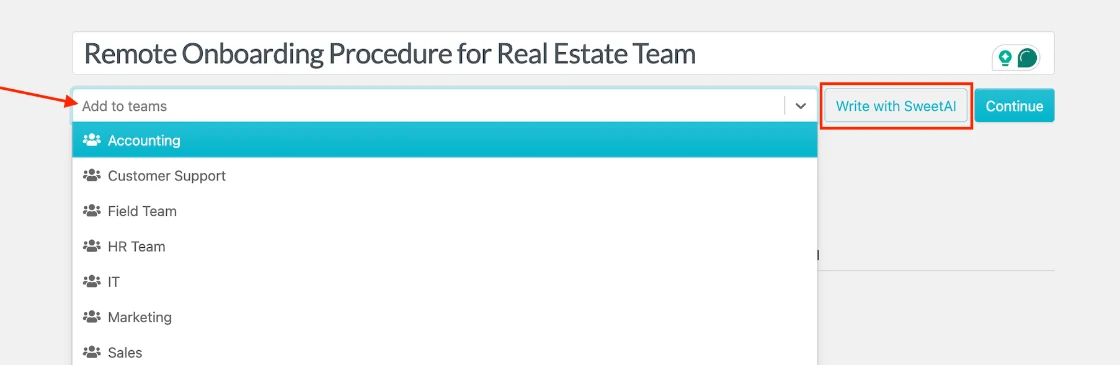
To start a procedure, open Procedures and select Create Procedure. Add a title and choose the teams that need it. Write the steps yourself or use SweetAI to draft them, then review the instructions before sharing.
Authorized managers can approve a procedure, process, or policy draft so it becomes the live version. If you don’t have approval rights, request a review. Version history lets you see earlier drafts and versions. If you already have an SOP in Word or Google Docs, use a .docx file to bring the content into SweetProcess.
systemHUB
systemHUB organizes instructions in a systems library, with separate areas for policies and training. You can group documents by function, such as sales or operations, and give people access by role. Teams can also use workflow mapping and share links with people outside the account.
Starter provides the core library, approval tracking, and basic process templates. Accelerator adds more than 100 process templates, more than 50 policy templates, SYSTEMology Foundations Training, and AI tools.

Accelerator also includes AI Gateway for compatible clients such as Claude or ChatGPT. A connection follows the permissions of the person who connects it. A Reader connection is read-only once systemHUB support enables AI access for that role; it isn’t enabled for Readers by default.
If your main goal is a searchable library and structured training, see how other systemHUB alternatives handle those needs.
Recurring Work and Training
SweetProcess: Schedule and track each run
Assign an approved procedure or process as a one-time or recurring task. Pick the assignee, set the due date, and choose how often it repeats. In the Tasks dashboard, you can see overdue or completed assignments. The task record can include who marked a step complete and when.
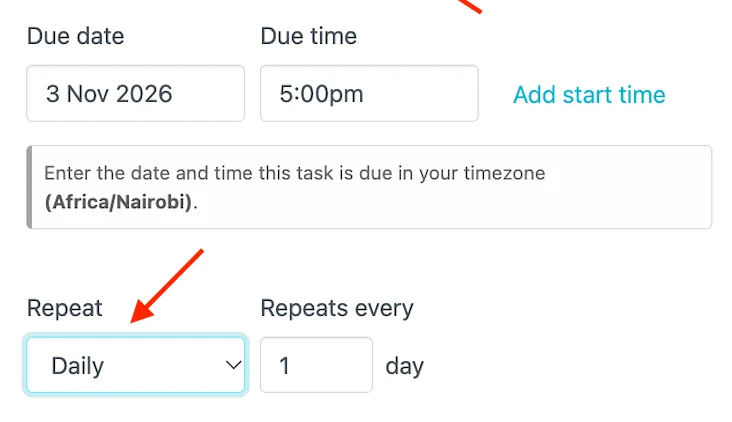
A completion record shows what someone marked complete in SweetProcess. If you need to confirm that they sent a client email or uploaded a file, include a step for the relevant link or attachment and have the reviewer check it.
systemHUB: Assign systems and track acknowledgment
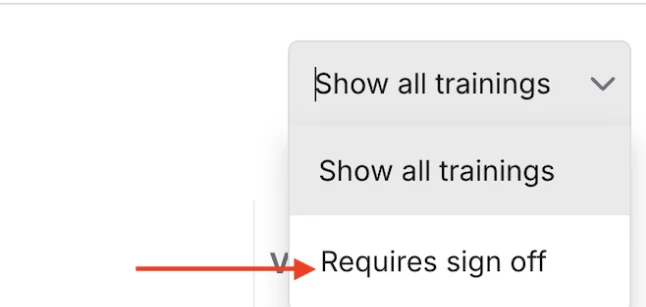
Use role-based assignments to put the relevant systems in front of each employee. Agreement logs record who has read and agreed to follow a system; learning tracks help organize onboarding. If your team already runs work in a separate task tracker, link back to the system from the recurring assignment there.
Workflow Example: A Weekly Client Handoff
Suppose your consulting team hands off client work every Friday. Use one real handoff to compare how the two products would support it. Write down what the handoff lead needs to do:
- Review open client requests.
- Update project notes and confirm deadlines.
- Identify next week’s priorities and their owners.
- Send the summary to the account manager and attach or link to it in the work record.
In SweetProcess: Have a manager approve the procedure. Assign it to the handoff lead, set the Friday deadline, and schedule it to repeat weekly. At the end of the pilot, check whether the lead could find the steps and whether the manager can see who marked the run complete and retrieve the summary.
In systemHUB: Document the steps as a system and assign it to the handoff role. Check whether the lead can find and acknowledge the instructions. If your team records the handoff in a task tracker, link to the SOP from the Friday assignment and check whether the manager can see each week’s status in that tracker.
systemHUB vs SweetProcess: Pricing
At 10 account users, systemHUB Starter costs $4 less per month, while SweetProcess Standard costs $5 less per year. At 20 users, SweetProcess Standard costs less on both billing schedules. The plans are not identical: Accelerator includes SYSTEMology training, expanded templates, and AI tools.
| Account users and billing | SweetProcess Standard | systemHUB |
|---|---|---|
| 10 users, monthly | $99/month | $95/month (Starter) |
| 10 users, annual | $990/year | $995/year (Starter) |
| 20 users, monthly | $149/month | $195/month (Accelerator) |
| 20 users, annual | $1,490/year | $1,995/year (Accelerator) |
Smaller and Larger Teams
SweetProcess: The annual-only Small Team plan is $495/year for up to five users, plus $50/year per additional user. Standard includes up to 10 users, then costs $5/month or $50/year per additional user, depending on your billing schedule. Every paid plan includes the same features. See SweetProcess billing for details.
systemHUB: Starter includes up to 10 users. Accelerator includes 20 at the base price and offers volume tiers up to 250 users. You don’t need Champion just because you have more than 20 users. Champion is quote-based and adds hands-on help, including a 90-day implementation sprint and weekly coaching. Check whether you need that support before requesting a quote.
Include the cost of any separate task tracker, plus the work to migrate content and rebuild access. If you only need an SOP library, those costs may matter more than a difference in subscription price.
How to Migrate SOPs Between systemHUB and SweetProcess
Start with one procedure that includes steps, images, links, and a named owner. Don’t move the whole library until someone who didn’t write the SOP can use the migrated version without asking where to find things.
- Export and test an editable copy. systemHUB’s Print Manuals supports PDF, XML, and Markdown. SweetProcess can import a formatted
.docxas a procedure or policy and export documents to Word or PDF. For either move, test a conversion or rebuild the content in the destination; don’t assume a full-fidelity transfer. - Check the instructions and attachments. Open each link and file. Check that screenshots remain legible and still match the steps. Compare the new copy with the approved original.
- Rebuild permissions and approvals. Confirm who can see, edit, and approve the procedure. Decide where to keep old versions and approval records if they don’t transfer.
- Run the work once. Ask the owner to find the SOP, follow the steps, and hand off the result. If the work repeats, also test the schedule and verify where the completion record appears.
How Businesses Use SweetProcess to Document SOPs
These SweetProcess customer stories describe how three organizations moved away from scattered or hard-to-maintain documentation:
- pLink Leadership used separate, updateable procedures instead of asking a remote team to search through an 85-page Word document.
- Belvidere Community Unit School District 100 moved procedures out of employees’ individual Google Docs into a central knowledge base and made selected information accessible to families.
- Rise25 organized its podcast production procedures so staff had a place to look up how to do the work rather than relying on the co-founder for each answer.
Which Should You Choose: systemHUB or SweetProcess?
Choose systemHUB if your priority is building a systems library around SYSTEMology, training people by role, and recording their acknowledgments. It fits a team that already has a place to schedule and track recurring work.
Choose SweetProcess if you want approved instructions and recurring assignments in one place. Managers can assign the work directly from a procedure or process and check the status of each run without asking the assignee for an update.
Not sure what to document first? Use the existing SweetProcess Systemization Checklist to pick which tasks to document, or see the SOP examples for help writing the steps. Then run it with a teammate in a free 14-day SweetProcess trial. Check whether the teammate could complete the work from the instructions and whether you could find their completion record.
FAQs
Can both tools assign SOPs to employees?
Yes, but the assignments serve different purposes. SweetProcess assigns a procedure or process as a task with a due date and a completion record. systemHUB can assign systems to members by role and record acknowledgments and training progress.
Does systemHUB require Champion for more than 20 users?
No. Accelerator offers volume pricing for up to 250 users. Champion is the quote-based package for teams that want live implementation and coaching.
Can I schedule recurring tasks from an SOP?
In SweetProcess, yes. Choose the procedure or process, set an assignee and due date, and select a repeat schedule. If you store the SOP in systemHUB and already use a separate work tracker, put the recurring assignment in that tracker and link to the system.
Do systemHUB and SweetProcess offer free trials?
Both offer a 14-day trial with no credit card required. Use the trial to check whether an employee can find and follow the instructions and whether the manager sees the record they need.
What does SYSTEMology add to systemHUB?
SYSTEMology provides a framework for identifying, documenting, and organizing business systems. Accelerator includes the Foundations Training, the book and audiobook, and a masterclass library. Champion adds hands-on implementation and weekly coaching.