Last Updated on April 21, 2026 by Owen McGab Enaohwo
Standard operating procedures (SOPs) are step-by-step instructions that document how your business operates, from onboarding new employees to processing payroll and handling customer support tickets. You already know SOPs are critical for consistency and scalability. The problem? Writing them manually is painfully slow. It drains management time, delays execution, and often results in outdated documents sitting in Google Drive folders that no one checks. For growing businesses, that’s not just inefficient, it is also expensive.
That’s why smart founders and operations managers are turning to AI. Instead of spending weeks drafting procedures from scratch, an AI SOP writer like SweetAI generates structured ones in minutes. More importantly, those SOPs don’t just exist as text; they’re instantly organized and shareable inside a real management system.
Generate your first AI-powered SOP with SweetAI using the 14-day free trial now.
Table of Contents
How To Generate Instant SOPs With SweetProcess AI SOP Writer
Why Is SweetAI Perfect for SOP Writing?
How CloudTech24 Uses SweetProcess To Write and Manage Its SOPs in One Place
How To Generate Instant SOPs With SweetProcess AI SOP Writer
Creating an SOP manually can take hours (or days), but with SweetAI, you can generate a structured, ready-to-use procedure in minutes and manage it inside a real system.
Here’s exactly how it works:
Step 1: Sign Up for a Free Account
If you’re new to SweetProcess, start by creating a free account. SweetProcess offers a 14-day free trial, giving you full access to SweetAI and all SOP management features.
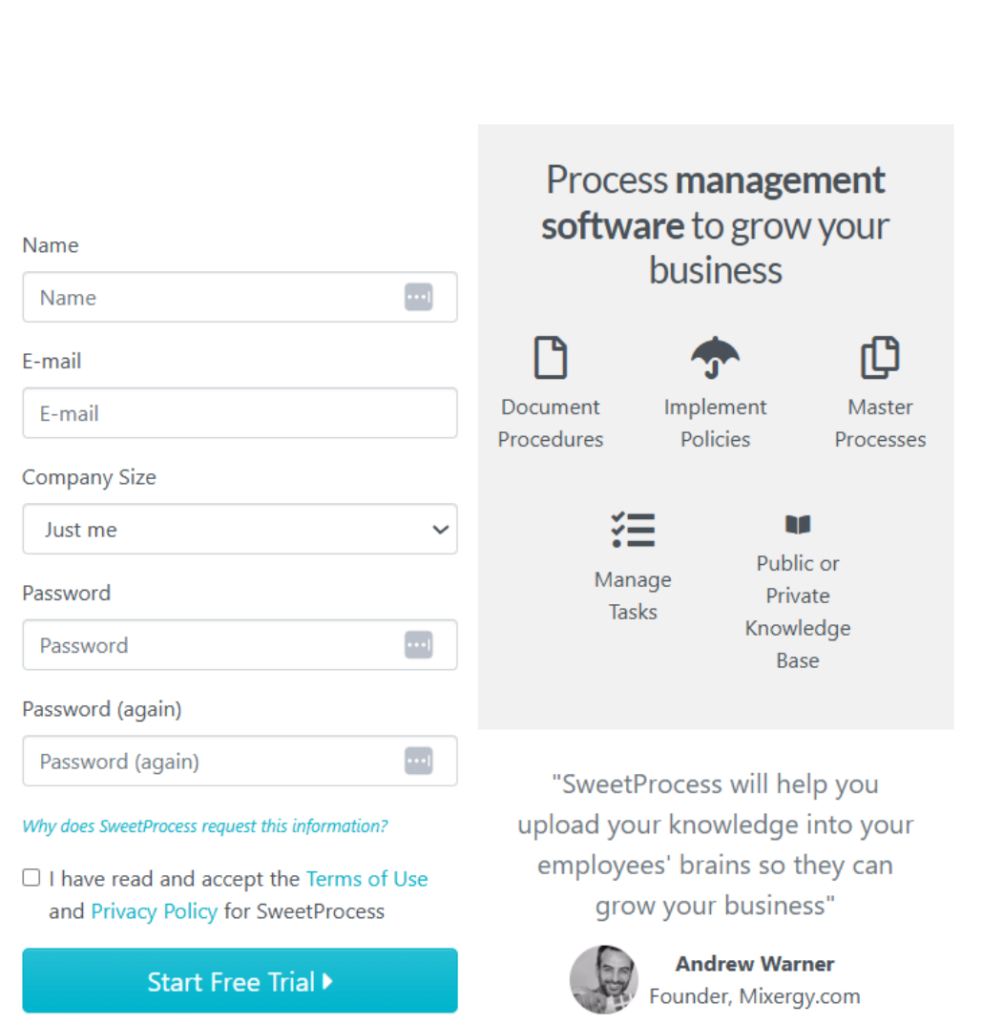
Once inside, you’ll land on the main dashboard. From here, you can create SOPs, policies, and processes with everything organized into folders and categories.
You’re now ready to generate your first AI-powered SOP.
Step 2: Automatically Write SOP With SweetAI
From the top menu, on the dashboard, click “Procedures,” then click the blue “Create Procedure” button on the right.
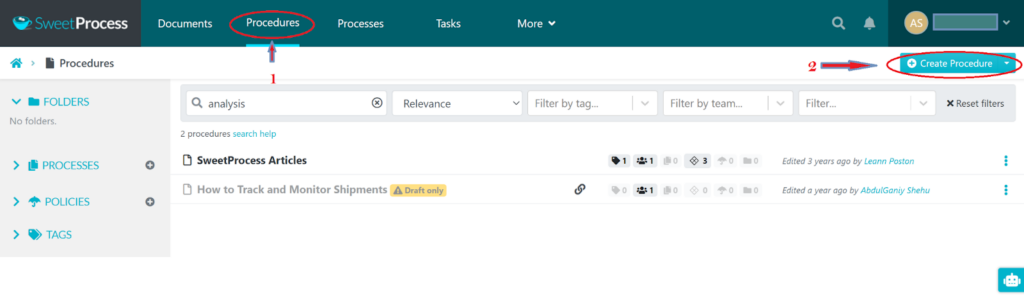
This opens up a draft page for you to start creating your procedure.
On the draft page, enter a clear, descriptive title.
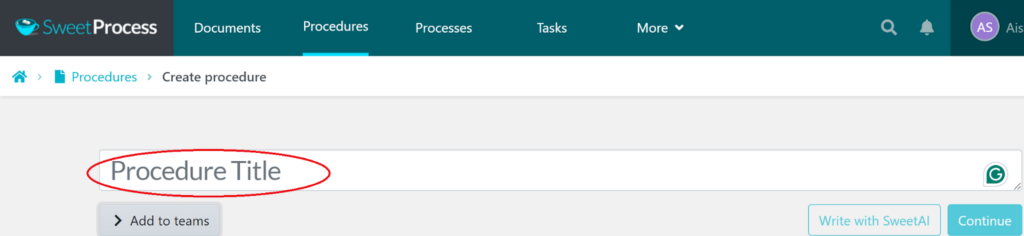
The quality of your output depends heavily on this line. A vague title like “Inventory” produces generic content. A specific title, such as “Monthly Warehouse Inventory Reconciliation Process,” yields structured, relevant steps.
If you’re unsure what to call your procedure, click the “Suggest” button. SweetAI will generate possible titles based on your input.
Still on the same page, choose the team members who need to use the procedure, using the checkbox to indicate your selection. This step ensures that the procedure is automatically shared with them.
With the title set, click “Write with SweetAI.”
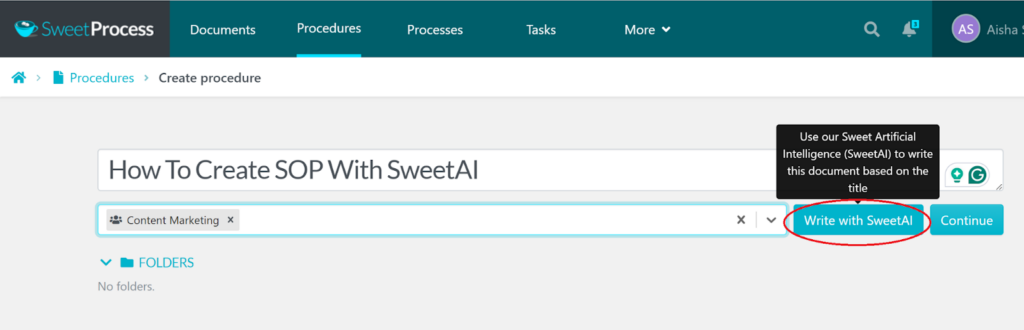
Within seconds, SweetAI generates a complete, step-by-step procedure.
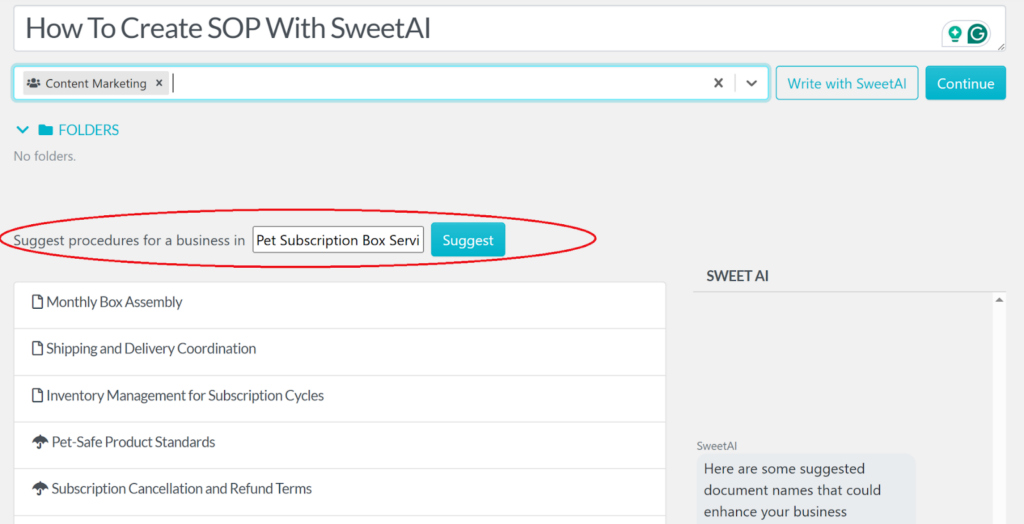
The content is logically structured, broken into clear steps, and formatted for usability.
SweetProcess also lets you upload existing procedures if you already have them.
Step 3: Review and Edit Your SOPs
Inside the editor, you can click the SweetAI button again to refine individual sections. You might expand steps, simplify language, add compliance details, or tailor it to your team.
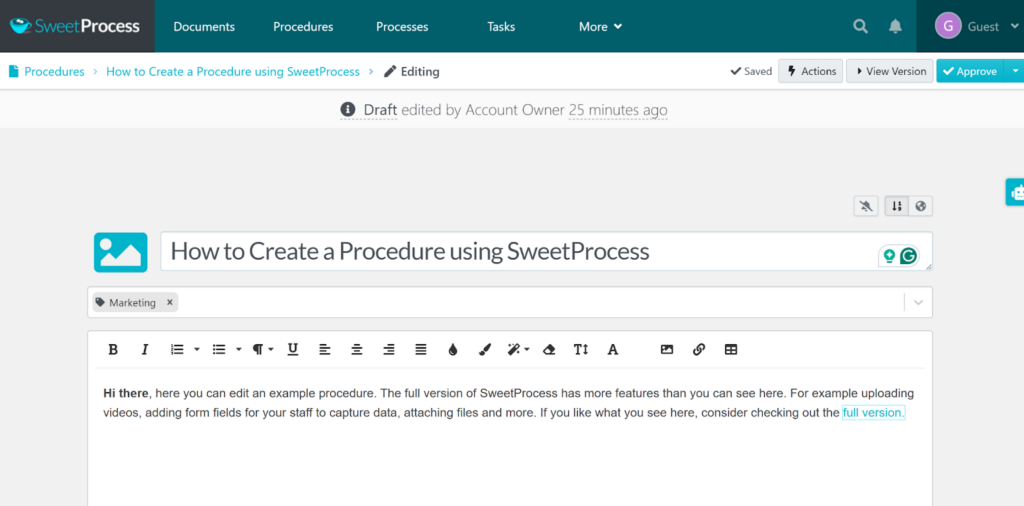
For example, you can instruct SweetAI to: “Break step 3 into smaller tasks,” “Add a quality control check,” or “Rewrite this for nontechnical staff.” You can also edit the AI SOP manually using the built-in visual editor. The versatility of SweetProcess’s SOP-writing AI tool makes editing a breeze.
Step 4: Customize Your SOPs
You can reorganize steps by dragging them into a better sequence. You can convert a step into a decision point, turn it into an ending, or expand it into sub-steps.

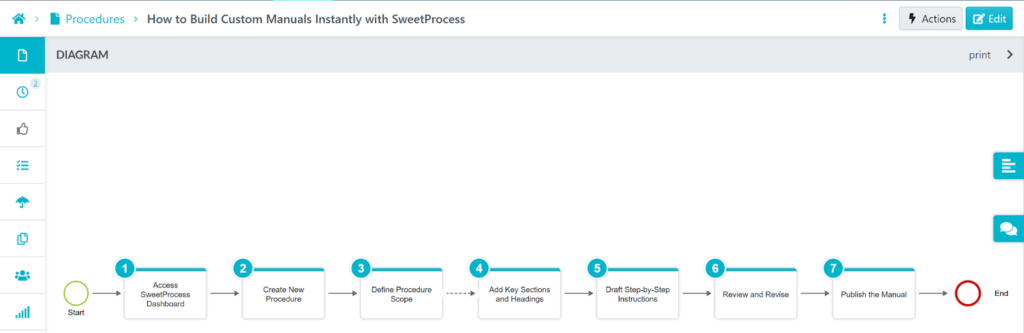
Each procedure automatically generates a visual flowchart, giving your team a clear process map.
That flowchart can also be exported or printed separately.
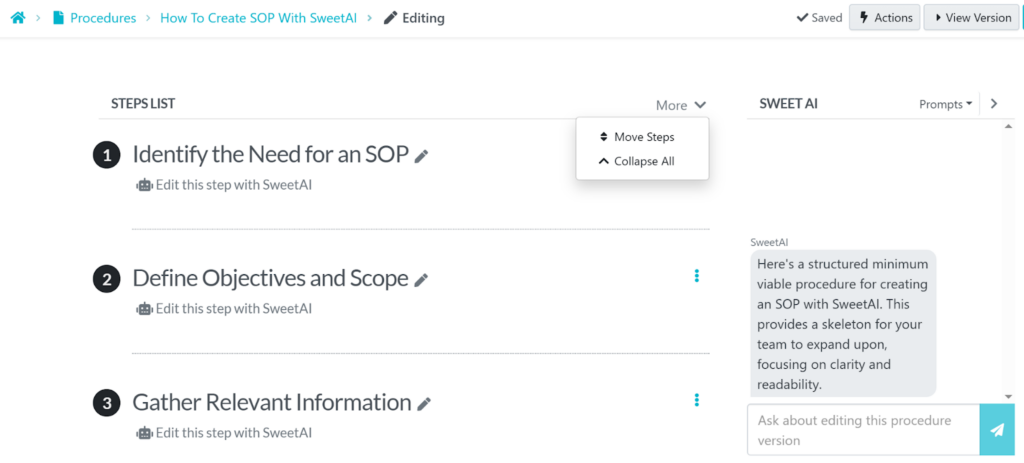
You’re not just documenting instructions but building a structured operational workflow that will give your team clarity at every step, and that’s the difference.
Step 5: Approve and Share SOPs With Your Team Members
Once your procedure has been finalized, you can publish the procedure by clicking the “Approve” button.
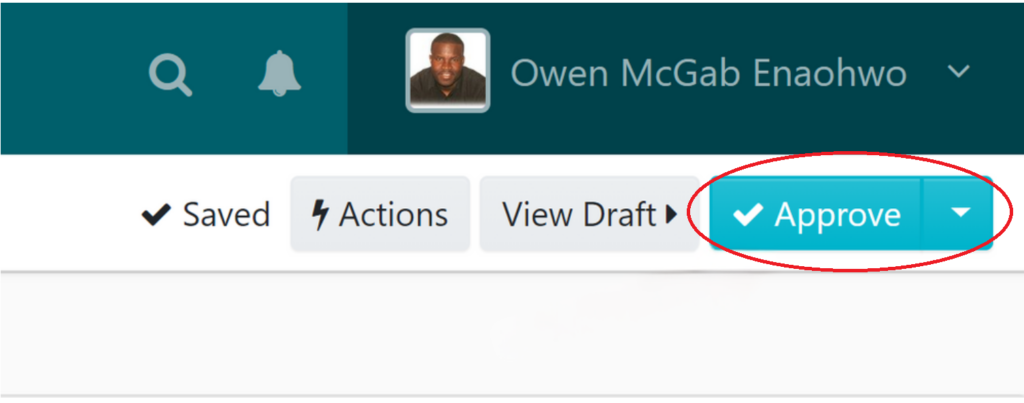
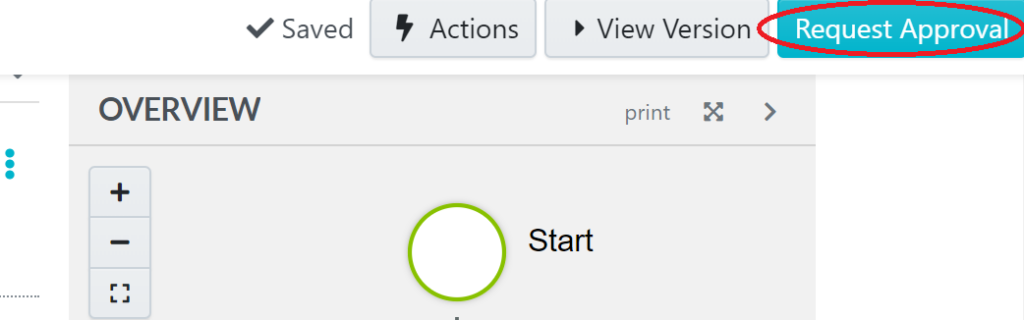
If approvals are required, use “Request Approval.” The system ensures the right people review it before it becomes active.
Note that if you’re not the account owner, you’ll see a “Request Approval” button instead of the “Approve” button to proceed with the procedure going live.
After approving, you can then make it live by clicking the “Mark as live” button.
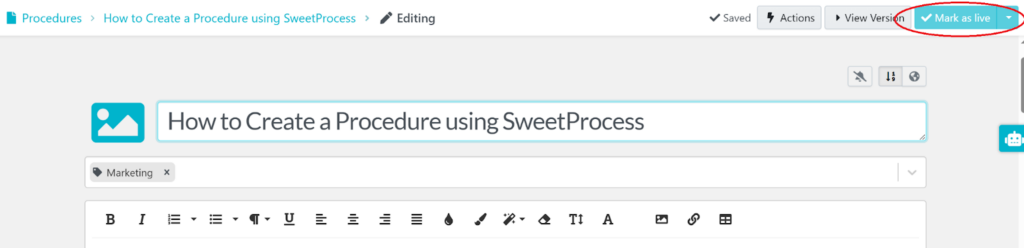
This action ensures proper oversight while still allowing delegation. The approval structure is something that standalone AI tools simply don’t offer.
You can assign access to specific team members or departments, ensuring the right people see the right procedures.
SweetProcess also maintains version history, ensuring that every update is tracked and nothing gets lost. This turns your SOP from a static document into a living operational system.
Step 6: Assign SOPs As Tasks to Team Members
With SweetProcess, you can convert your procedure directly into an assignable task.
From the dashboard, go to the “Tasks” tab and click “Assign Task” to open the dialogue box. Select the procedure, choose the team member, set the due date, and assign it.
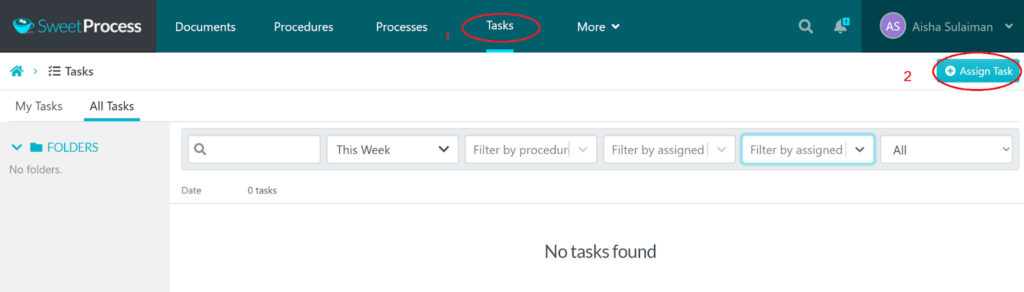
Here’s how:
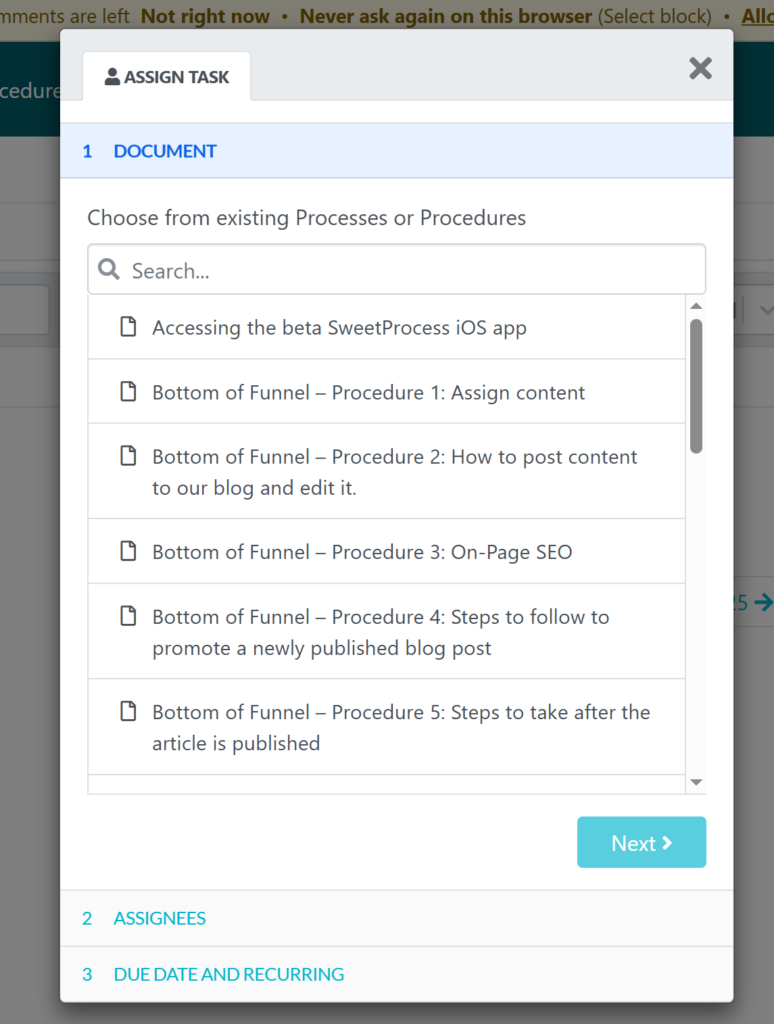
From the dialogue box, choose the specific procedure you’d like to turn into a task and click “Next.”
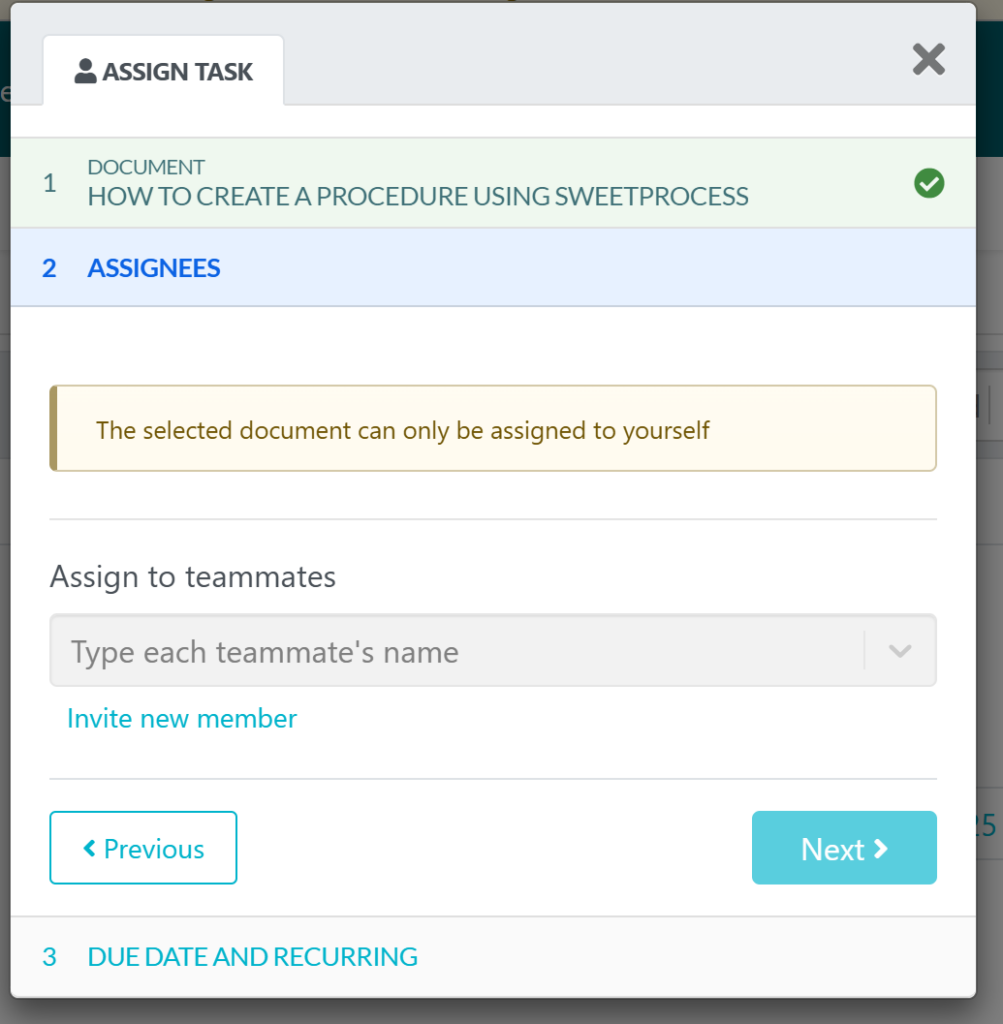
Select the team member responsible for completing it and click “Next” again. If the task applies to multiple people, you can assign it to the entire team rather than just one individual.
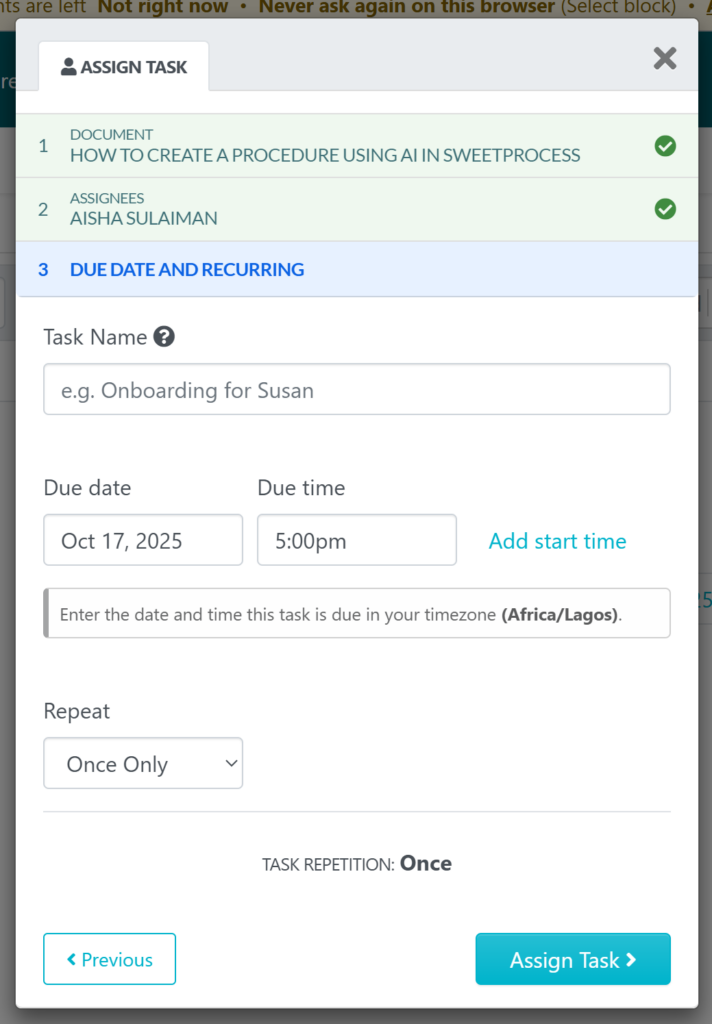
In the final step, enter a clear task name, set the due date and time, and click “Assign Task” to activate it.
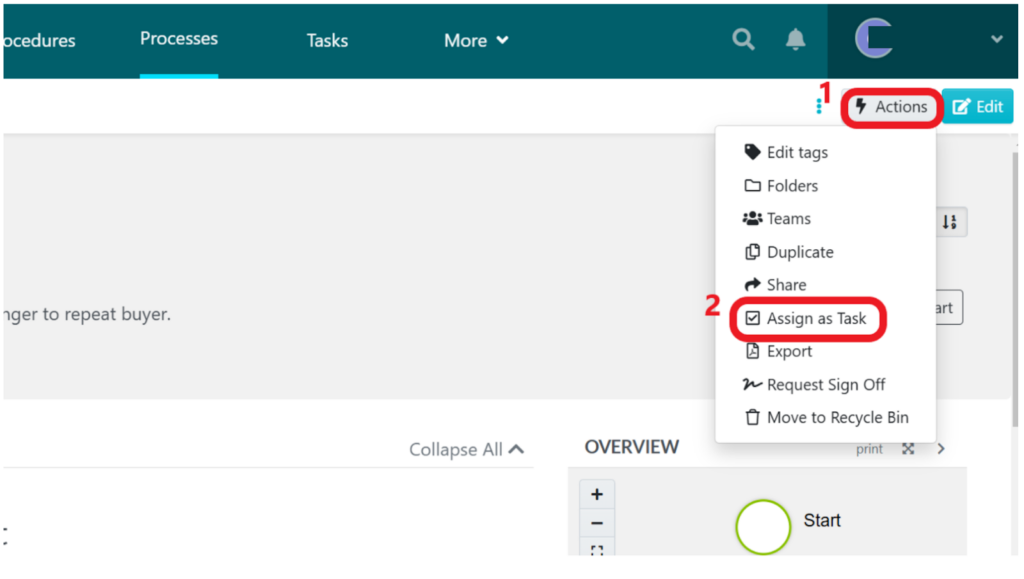
Alternatively, you can assign a task directly from within an open procedure. Simply open the procedure, click the “Actions” button on the right-hand side, and choose “Assign as Task” from the dropdown menu.
From there, select the appropriate team member and confirm the assignment.
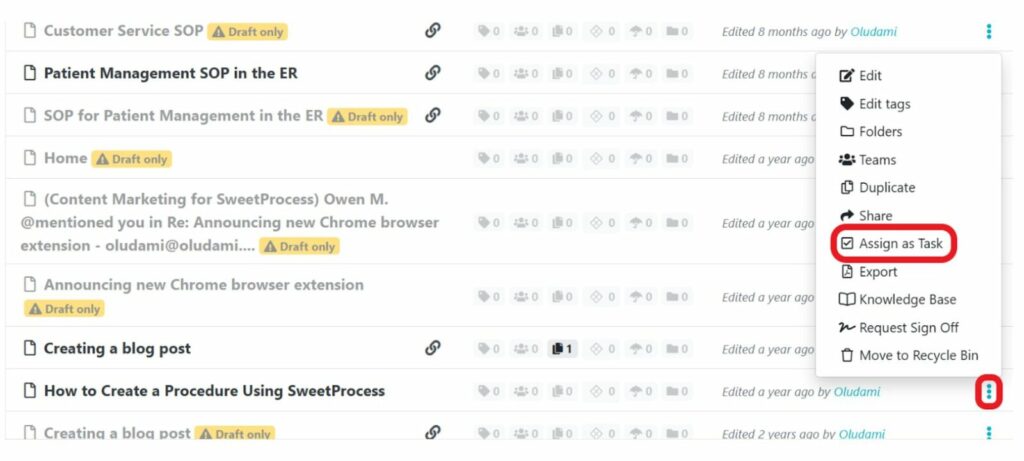
There’s also a quick way to assign tasks from the procedures list. Navigate to your list of procedures, click the three-dot menu next to the one you want to assign, and select “Assign as Task.” Then choose the team member and complete the setup.
You can monitor progress from a single dashboard, receive overdue notifications, and confirm completion automatically.
Why Use an AI SOP Writer?

You already know SOPs matter. What most businesses underestimate is the operational cost of writing and maintaining them manually.
An AI SOP writer doesn’t just help you document faster. It changes how your organization captures, executes, and protects operational knowledge.
Here are the key advantages of using an AI SOP generator:
Saves Time and Cost
Writing SOPs manually is deceptively expensive. Managers block hours to document processes. Teams rewrite the same instructions repeatedly, updates get delayed, and documentation becomes a quarterly project instead of a continuous system.
That hidden inefficiency compounds over time. With an AI SOP writer like SweetAI, procedures that used to take hours can be drafted in minutes. Instead of starting from a blank page, you begin with a structured, editable first draft, saving time.
Improves Consistency and Accuracy

When SOPs are written manually, variation creeps in. One manager documents a process one way, while another explains it differently. Over time, those small differences create confusion and mistakes.
An AI SOP writer introduces structure from the start. SweetAI generates clear, logical steps using a consistent format every time. When those procedures live inside SweetProcess, updates are centralized and standardized across teams. The result is fewer errors, clearer execution, and a more reliable operation.
Sarah Beach of Benchmark Wealth Management explained that before implementing structured documentation, employees did things differently from one another, leading to operational friction. After centralizing procedures, consistency across the team improved dramatically.
An AI SOP generator gives you speed, while a management system gives you control. Together, they eliminate procedural chaos.
Start creating standardized and structured SOPs today using the 14-day free trial to test things out.
Enhances Compliance With Industry Regulations
In regulated industries, documentation is not optional. The finance, healthcare, IT, and government sectors require clear procedures, audit trails, and version histories.
Manual documents stored in folders or shared drives make audits stressful and risky. There’s no clear approval record, structured revision history, or enforcement.
An AI SOP writer built into a workflow system ensures:
- Procedures are structured.
- Approvals are recorded.
- Updates are tracked.
- Access is controlled.
Texas DFPS, for example, used SweetProcess to manage over 40,000 annual public service requests while maintaining strict compliance workflows. Centralized SOP documentation made their operations both agile and auditable.
Compliance becomes easier when documentation is structured by design.
Supports Frequent SOP Reviews

The biggest flaw in manual SOP documentation is having to start from scratch once it becomes outdated.
Processes change, tools evolve, and regulations shift, but the SOP sitting in a Google Doc stays frozen in time.
An AI-powered SOP system encourages continuous improvement. With SweetProcess, you can update procedures instantly, track revisions, request approvals, and republish updates, all inside one platform.
Version history ensures you know exactly what changed and when, transforming SOPs from static documents into living operational assets.
Aids Process and Workflow Management
Most AI tools can generate text, but very few can turn that text into actionable workflows.
The AI SOP writer inside SweetProcess doesn’t just produce paragraphs. It creates structured procedures that can:
- Be converted into tasks.
- Assigned to team members.
- Tracked for completion.
- Turned into recurring workflows.
This closes the gap between documentation and execution. Instead of saying, “Here’s how we do it,” you say, “Here’s the process,” and it’s already assigned and ready to go.
Maintains Institutional Knowledge

One resignation can expose a major vulnerability in your organization. When processes live only in an employee’s head, you risk losing critical operational knowledge overnight. Many founders realize this too late.
You can also face repeated onboarding struggles because procedures weren’t documented, forcing experienced employees to manually retrain new hires each time.
An AI SOP writer makes it easy to capture knowledge the moment it’s created. When that documentation lives inside a centralized system, it becomes part of your organization’s permanent operating structure. This means you’re no longer dependent on memory and can better protect your business from knowledge loss.
Why Is SweetAI Perfect for SOP Writing?
Most AI SOP writers stop at generating text, but SweetAI goes further. It doesn’t just help you write procedures; it helps you manage, assign, track, refine, and scale them across your organization.
Here’s what makes it different.
Collaborate Seamlessly With Team Members
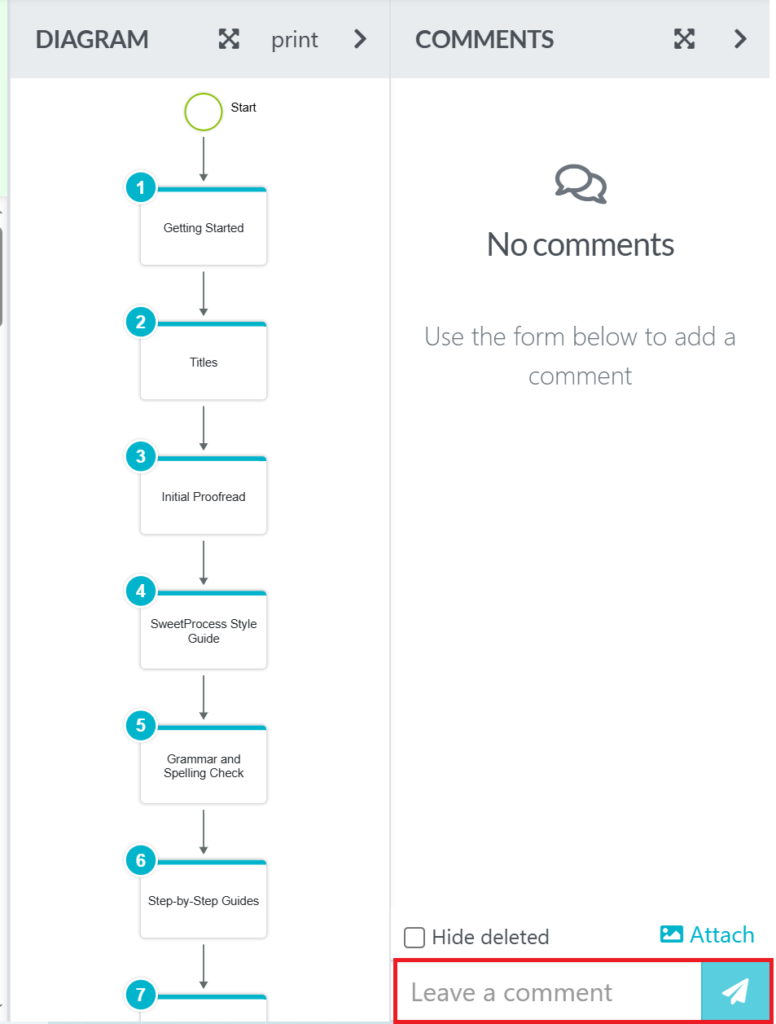
SOPs should never live in isolation. Inside SweetProcess, collaboration is built directly into the editor. When you open any procedure, you can:
- Invite team members to review the SOP.
- Leave comments directly on specific steps for clarity.
- Request approval from managers or admins.
- Control access permissions for sensitive procedures.
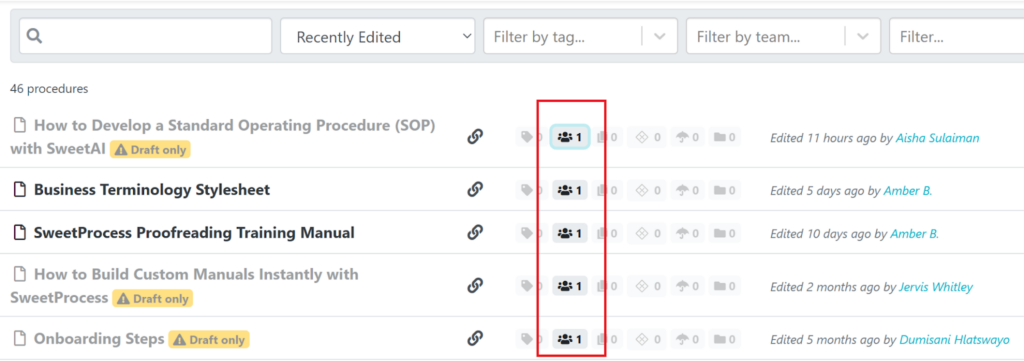
Every edit is tracked in real time. Team members can contribute without breaking structure. Leadership can maintain oversight without micromanaging.
Instead of emailing documents back and forth, your entire team works from one centralized source.
Assign SOPs As Tasks to Employees
An SOP that is not followed is just documentation. SweetProcess allows you to convert any procedure into an actionable task.
From the procedure page, click “Actions” then click “Assign as Task.”
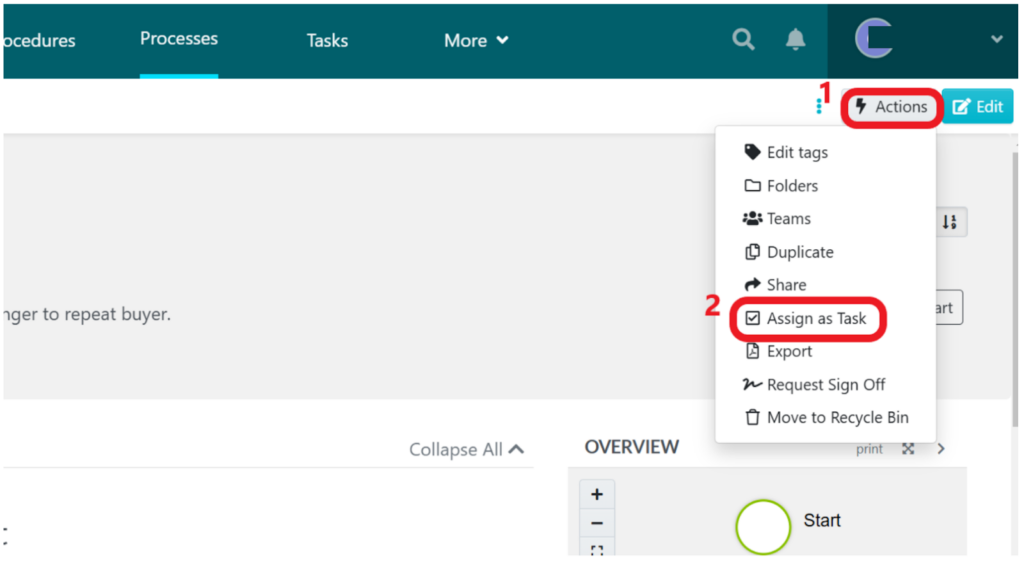
You can then:
- Select specific team members or entire teams.
- Set deadlines and due times.
- Make tasks recurring (daily, weekly, monthly, yearly).
- Track completion from a central dashboard.
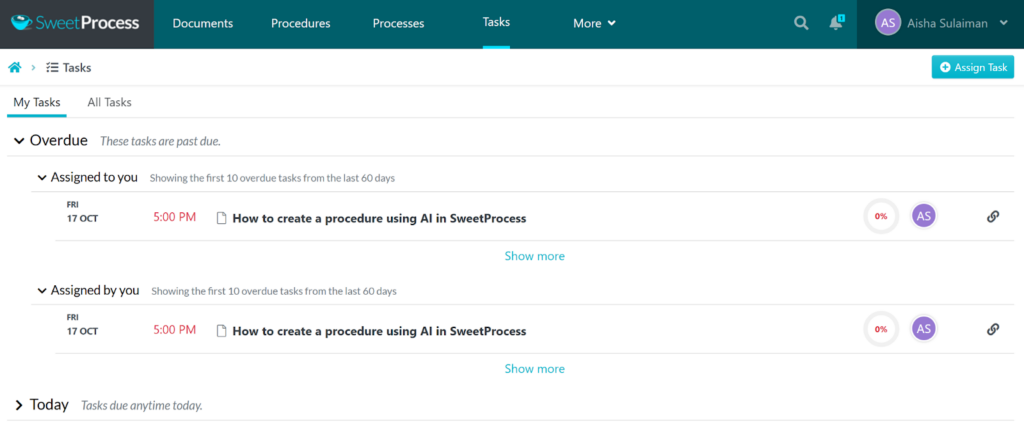
This bridges the gap between documentation and execution.
Instead of telling your team what to do, you assign it directly inside the system.
View Document Versions
Processes evolve, and that’s why version control matters. Every time an SOP is edited, SweetProcess records the change automatically. You can:
- View previous versions of the document.
- See who made specific changes and when.
- Restore earlier versions if needed.
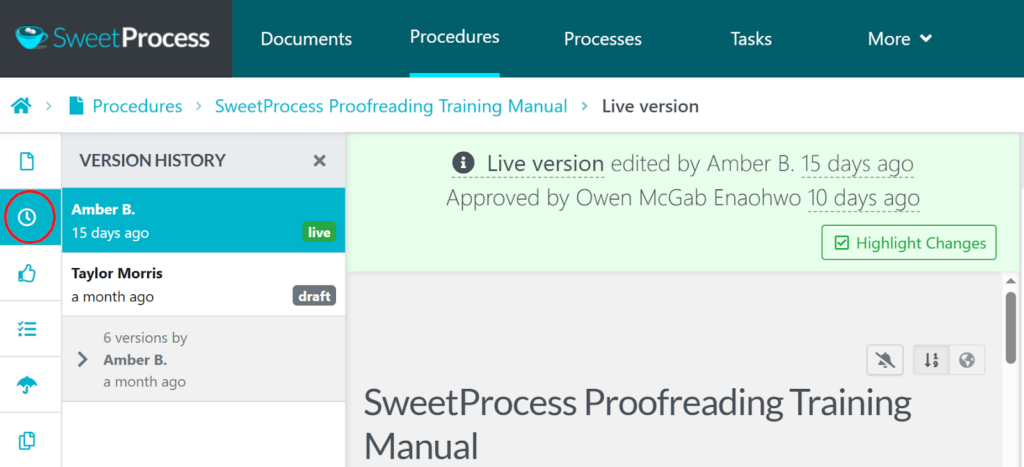
This is critical for compliance, audits, and operational transparency. Manual documents in Google Docs don’t give you structured version governance tied to approvals, but SweetProcess does.
Ensures Consistency Across Teams
As companies grow, inconsistencies begin to creep in. One department documents processes differently from another. Formatting varies, and terminology changes.
SweetAI standardizes structure automatically because every SOP is created inside the same system. This gives you:
- Consistent formatting.
- Uniform step structure.
- Clear workflow logic.
- Centralized document organization with folders and tags.
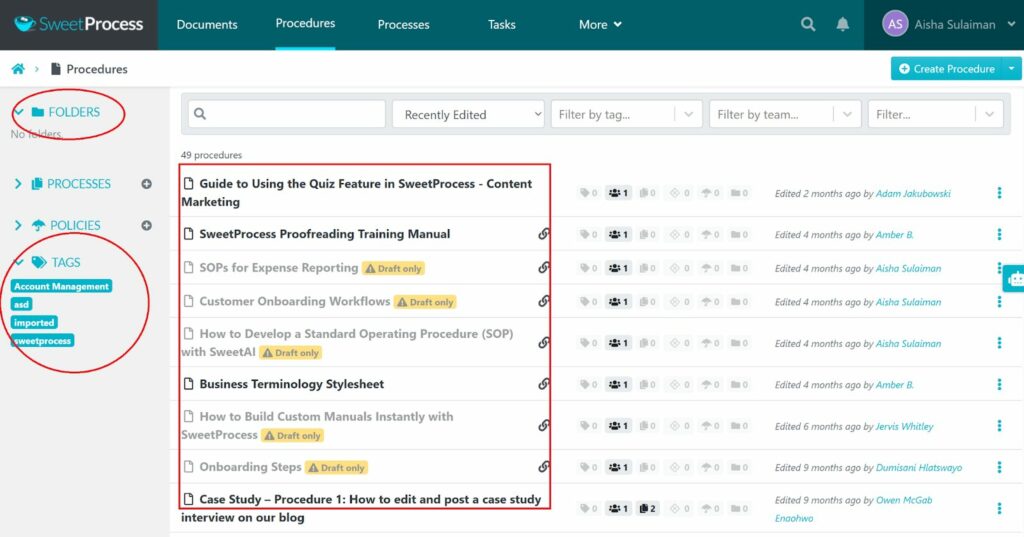
This ensures that whether someone is in HR, IT, Finance, or Operations, procedures follow the same predictable structure.
That consistency reduces training time and operational confusion.
Import Existing SOPs for Easy Management
If you already have SOPs in Word, Google Docs, or PDFs, you don’t have to start from scratch.
Inside SweetProcess, you can upload existing SOP documents directly and convert them into structured procedures.
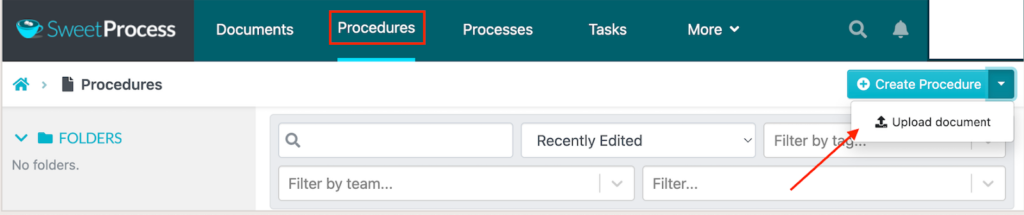
This allows you to migrate from scattered documentation to a unified operational system.
You keep your existing knowledge, but now it becomes manageable, assignable, and version-controlled.
Link to Other Procedures, Processes, and Policies
This is where SweetAI becomes truly powerful. Your SOPs don’t exist in isolation. They connect to other workflows.
Inside the editor, you have the option to:
- Link one procedure to another.
- Attach related policies.
- Connect SOPs to broader processes.
- Create structured workflow chains.
From the list of procedures, select the one you want to link with other resources and click on the “Related Procedures” button.
This brings up a search bar where you can search for it, and click on the checklist box beside the document in question to connect it.
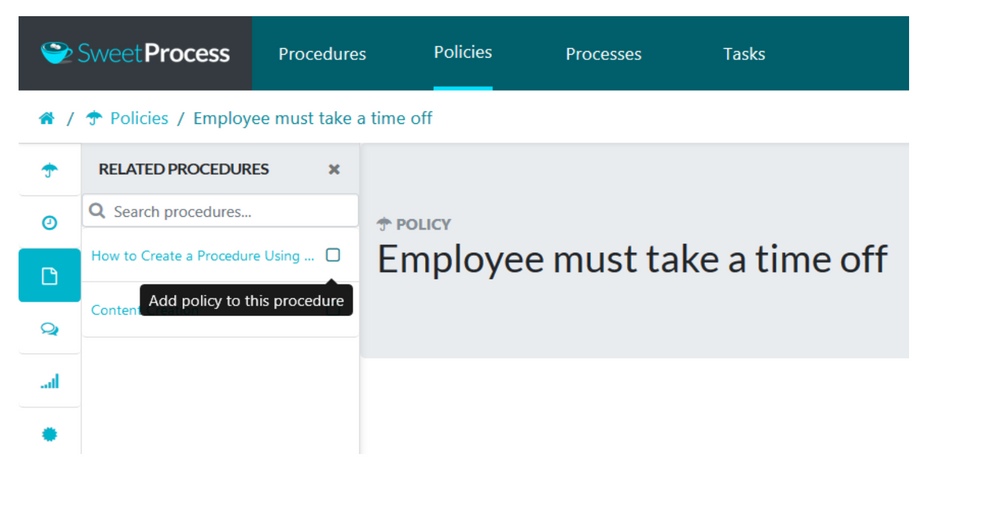
For example, a “Customer Refund Procedure” can link directly to:
- Escalation Policy.
- Accounting Reconciliation Process.
- Customer Communication Template.
This creates an interconnected operational framework instead of disconnected documents.
That’s something generic AI writing tools simply cannot replicate.
How CloudTech24 Uses SweetProcess To Write and Manage Its SOPs in One Place

Before adopting SweetProcess, CloudTech24, a global IT services provider, struggled with documenting and standardizing internal procedures as they scaled.
Processes were known by experienced team members but weren’t consistently written down, making onboarding slower and execution uneven across teams.
They needed a system that would allow them to document procedures clearly, keep them updated, and ensure every team member followed the same structured steps.
SweetProcess gave them that foundation. Instead of scattered files and repeated explanations, their SOPs now live in one centralized platform where they can generate procedures, refine them collaboratively, control approvals, and assign tasks directly to team members.
According to Andrew Dale, technical director at CloudTech24, SweetProcess “works really well” for their needs, helping them standardize operations without unnecessary complexity. With documented, version-controlled SOPs in place, their team operates with greater clarity, consistency, and accountability.
If your SOPs still live in Word docs, shared drives, or in someone’s head, you’re exposed to the same risks CloudTech24 once faced. SweetAI helps you generate structured SOPs in minutes and manage them inside a system built for collaboration, approvals, and execution.
FAQs About AI SOP Writer
What Is an AI SOP Writer?
An AI SOP writer is a software tool that automatically creates standard operating procedures (SOPs) based on a process title or short description. It generates structured, step-by-step instructions that businesses can edit, approve, and share. Advanced AI SOP writers like SweetAI also allow teams to manage, assign, and track SOPs inside a centralized system.
How Does the AI SOP Writer Work?
An AI SOP writer works by analyzing the title or description of a process and generating a structured procedure with clear, logical steps. In SweetProcess, you enter a detailed title, click “Write with SweetAI,” and the system produces a draft instantly. You can then edit, customize, approve, and assign the SOP directly within the platform.
Can AI write perfect SOPs?
AI can generate accurate and well-structured SOP drafts, but human review is still necessary. AI speeds up the writing process and ensures consistency, while managers refine the details to match company policies and compliance requirements. Tools like SweetAI make it easy to edit, track revisions, and approve final versions before publishing.
Is the AI SOP Writer Suitable for All Industries and Business Types?
Yes. AI SOP writers can be used by start-ups, small businesses, enterprises, and regulated industries. They help document processes such as onboarding, IT procedures, finance workflows, and compliance protocols. When combined with a management system like SweetProcess, AI-generated SOPs become structured, assignable, and easy to maintain.