Last Updated on February 27, 2026 by Owen McGab Enaohwo
The infection control committee just updated the hand hygiene policy for the third time this quarter. Now comes the real test. You must ensure that over 500 staff adopt these changes before next month’s commission inspection.
You fire off an email blast, but half your staff never opens it. You print copies for every nursing station, only to see them disappear in days. You upload the policy to the shared drive, but it gets mixed up among other files named “Final,” “Final_FINAL,” and “Final_USE_THIS_ONE.”
Unfortunately, a night-shift nurse is following the old protocol because that’s what she found. When the compliance officer asks for your audit trail, all you have are scattered emails and hope.
If this sounds familiar, you are not alone. Most hospitals are drowning in policy chaos, frustrated by inadequate document management. Every outdated policy, missed acknowledgment, or lost document puts your accreditation and patients at risk.
Hospital policy management software changes this story. It gives your team instant access to the latest policies from any device. Each staff member receives a notification of a new policy, and their acknowledgments are tracked in real time. When supervisors ask for proof, you deliver audit trails in seconds without wasting time.
SweetProcess provides hospitals with a centralized platform for creating, managing, and distributing policies with automated workflows, version control, and complete audit trails. Sign up for a 14-day free trial with no credit card required.
Table of Contents
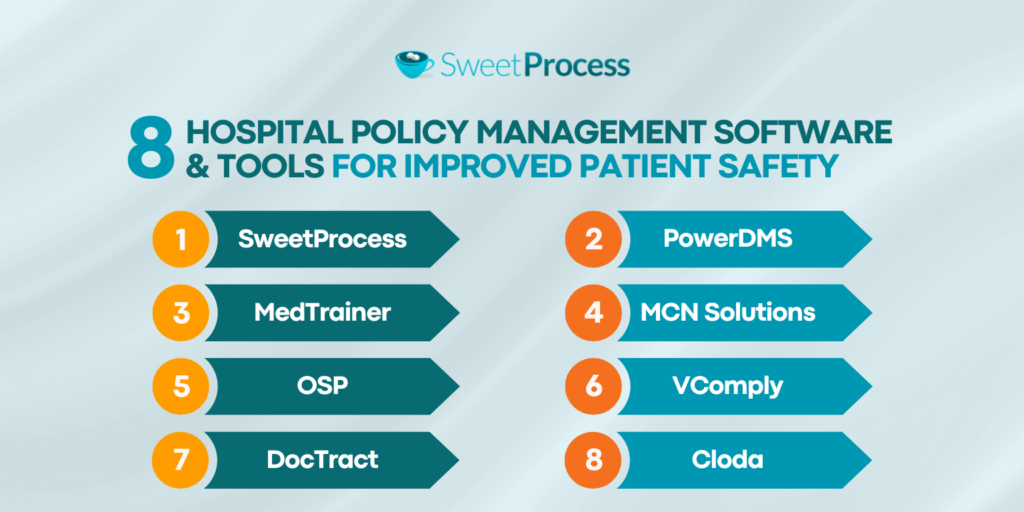
8 Hospital Policy Management Software & Tools for Improved Patient Safety
How SweetProcess Supports Hospital Policy Management
Key Features To Consider Before Choosing a Policy Management Software for Hospitals
Why Policy Management Is Important in Hospitals
Which Policy Software Is Best for Your Hospital?
8 Hospital Policy Management Software & Tools for Improved Patient Safety
Healthcare compliance can sometimes be complex. Between Joint Commission standards, Centers for Medicare & Medicaid Services (CMS) requirements, state regulations, and Occupational Safety and Health Administration (OSHA) guidelines, hospitals need systems that can keep up to ensure nothing falls through the cracks.
Here are eight policy management solutions built to handle these challenges:
1. SweetProcess
SweetProcess is a comprehensive policy management platform used by hospitals to create, organize, and distribute policies. Tools like SweetProcess not only handle policies but also ensure your procedures and processes are centralized in a single system.
While other tools focus narrowly on document storage or compliance checklists, SweetProcess connects your entire operational framework. Policies link to procedures that explain how to implement them, which in turn link to step-by-step guides that show staff exactly what to do.
It has a cloud storage capability, which means your nursing supervisor, for example, can access fall prevention protocols from her phone in the hallway, your compliance officer can update HIPAA policies from home, and your night-shift staff can review medication administration guidelines from the nurses’ station computer. Everyone can see, use, and collaborate on the latest document version, and that’s what makes the difference.
Features of SweetProcess
Here are the features that make SweetProcess the tool you cannot afford to miss for managing your hospital policies.
Document Hospital Policies Manually and Automatically
Creating hospital policies from scratch takes specialized knowledge and time. You need to understand healthcare regulations, write clearly so staff at all education levels can follow, and format everything consistently. Many hospitals end up with policies that read like legal documents. What do you expect when committee members copy directly from regulatory manuals without considering their audience?
SweetProcess tackles this problem in two ways. For manual creation, the platform gives you a clean editing interface where you can write your policies from scratch. You can also use our policy and procedure templates or import your existing templates in Word or PDF format.
The SweetProcess AI makes it much easier by automatically generating your policies and customizing them to your industry and company needs.
Here’s how to create policies manually with SweetProcess:
Log in to your SweetProcess account.
Go to “More” on your main dashboard, then select “Policies.”
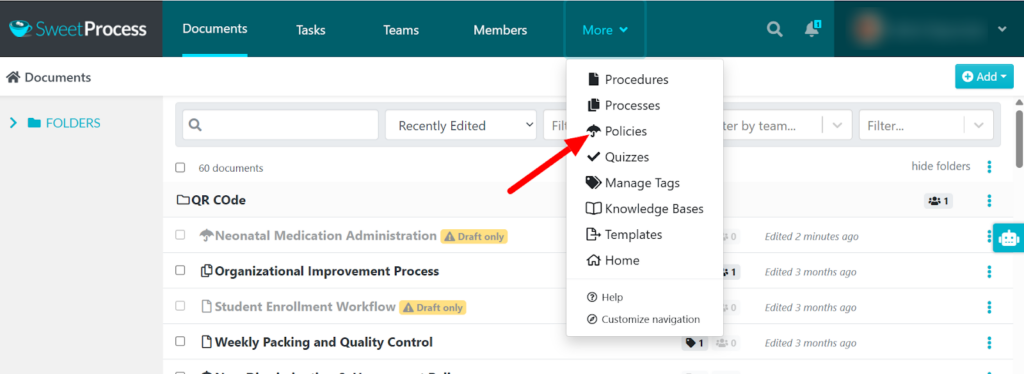
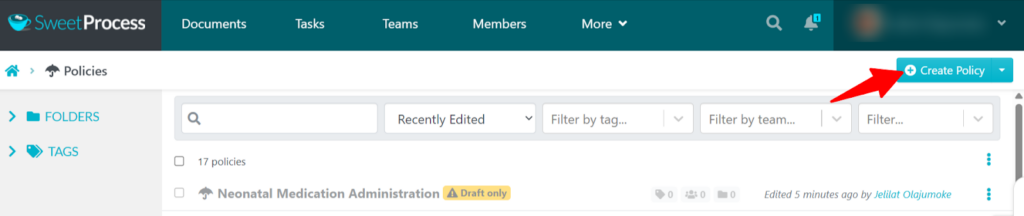
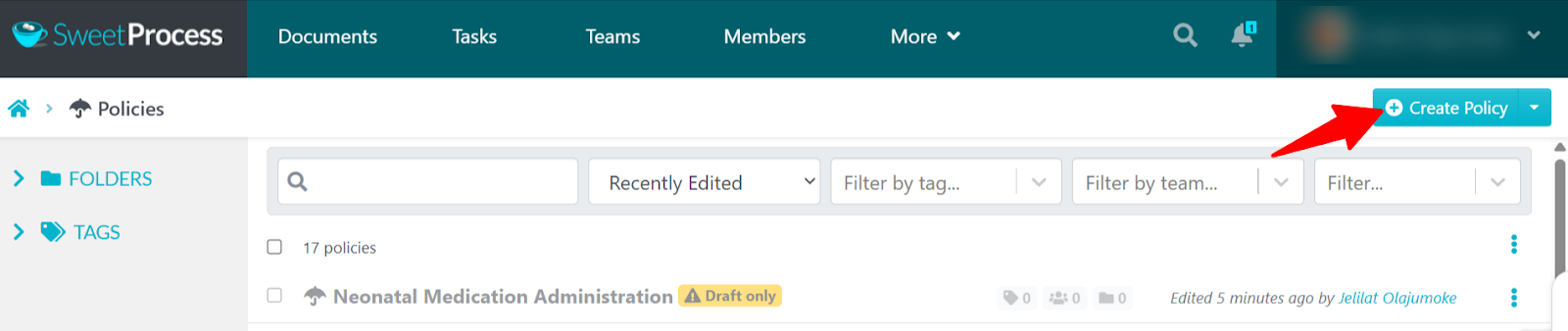
Select “Create Policy.”
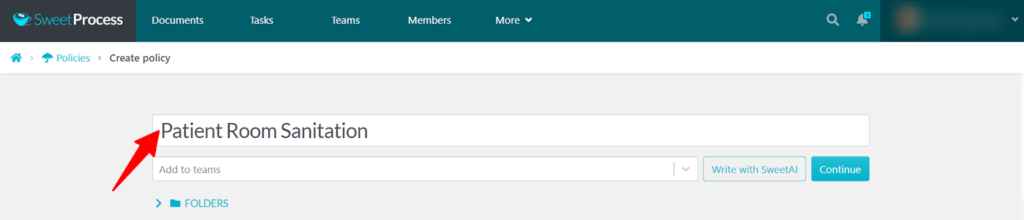
Enter the policy title and click “Continue.”
Click the pencil icon beside the title or the one below it to edit.
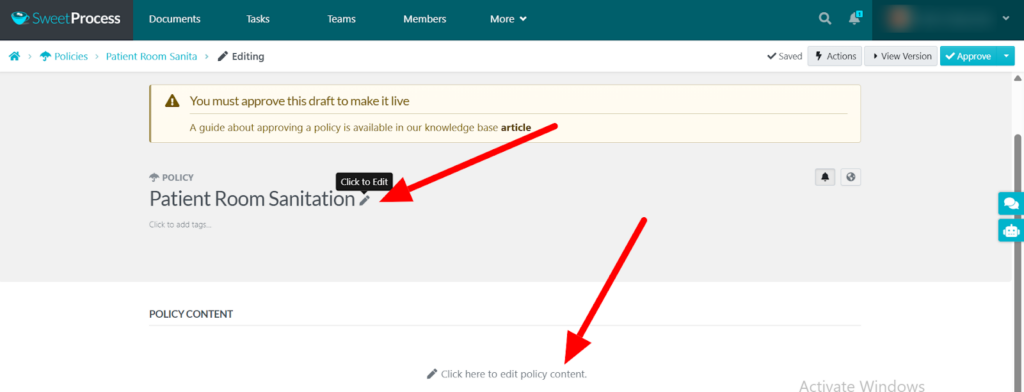
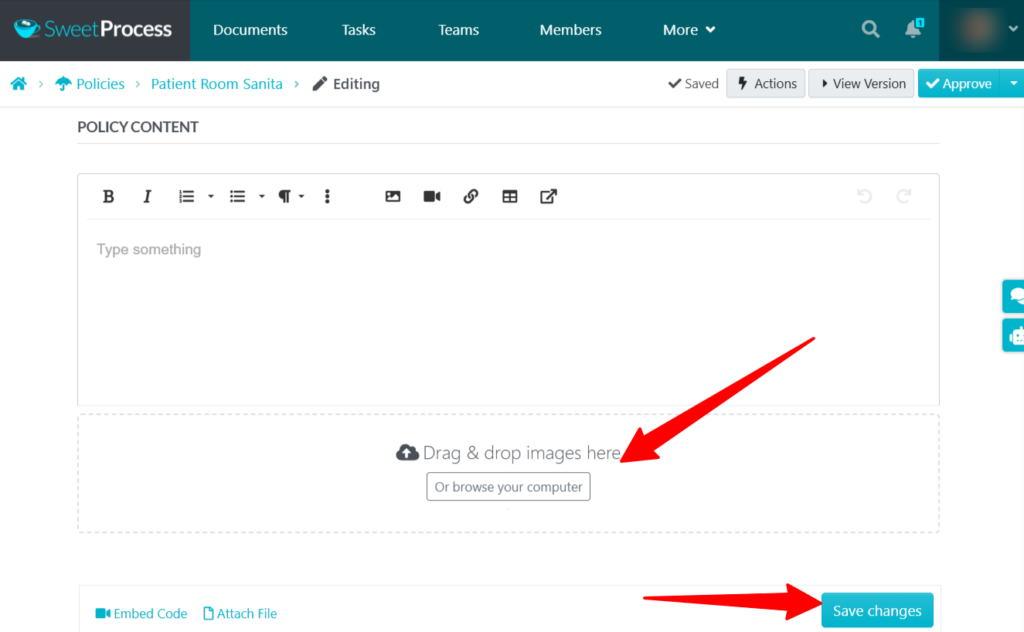
Enter all policy details, including the purpose, scope, definitions, and policy statement. Add images, videos, or attachments where necessary to enrich the policy.
Click “Save changes.”
If your hospital needs to create or update many policies fast, SweetAI is your best tool. It is not a generic document generator but a customized AI tool for policy and procedure development that understands healthcare compliance. You can also update your information in our system so every policy is tailored to your hospital’s needs.
Here’s how to write policies with SweetAI:
Go to “More,” then “Policies.”
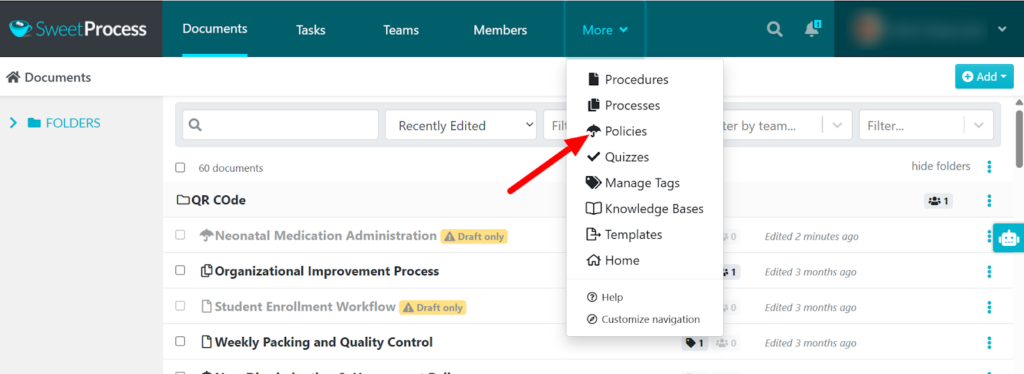
Select “Create Policy.”
Give your policy a title, then click “Write with SweetAI.”
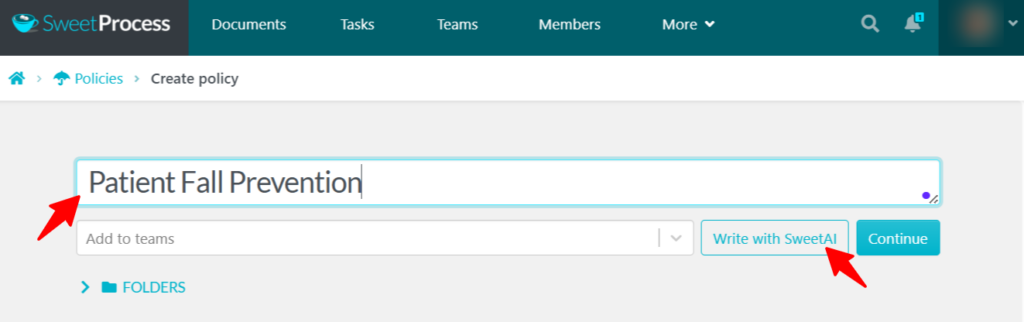
SweetAI will generate the policy in less than a minute. You’ll receive comprehensive content covering compliance requirements and safety considerations.
You can now review and customize the generated policy to align with your hospital’s protocols, equipment, and patient population. You can edit manually or prompt SweetAI to edit your policy document.
Collaborate With Hospital Staff on Hospital Policies
Writing effective hospital policies requires input from multiple stakeholders. Your infection control nurse, legal team, floor nurses, compliance officer, and quality improvement team will need to collaborate to develop comprehensive hospital policies.
Getting this many people to write policies without policy management software is counterproductive, as it will require endless email chains, unproductive meetings, and Word documents circulated until no one knows which version has the latest edits.
You don’t have to deal with this frustration because SweetProcess enables collaboration, allowing everyone to contribute without chaos.
Here’s how to assign team members to collaborate on your hospital policies:
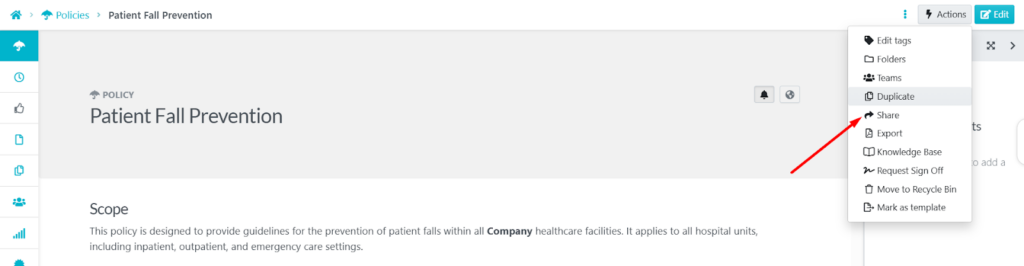
Navigate to the policy document and click “Actions.”
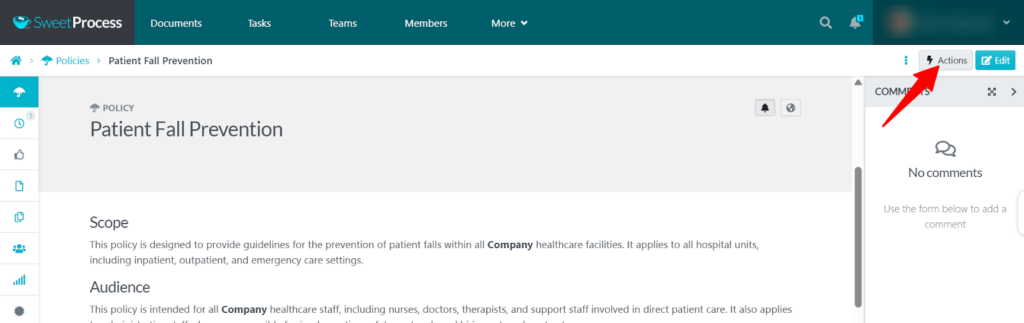
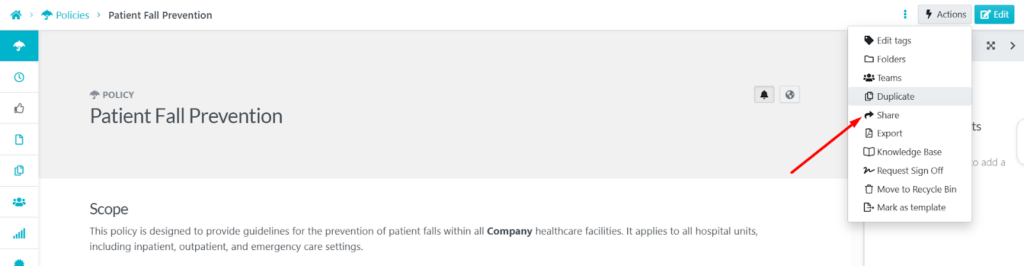
Choose “Share” from the menu.
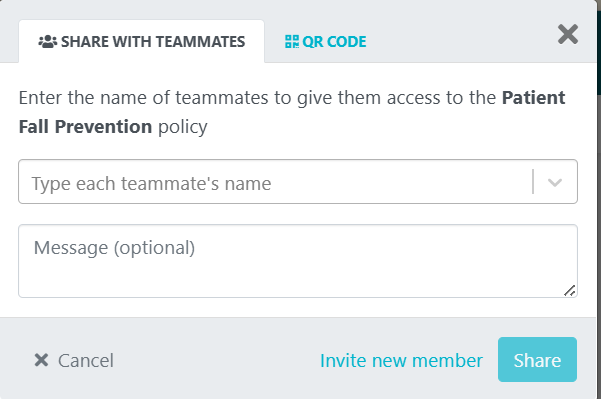
Add the appropriate team members, like your clinical director, compliance officer, legal counsel, and department managers, to work on the policy document.
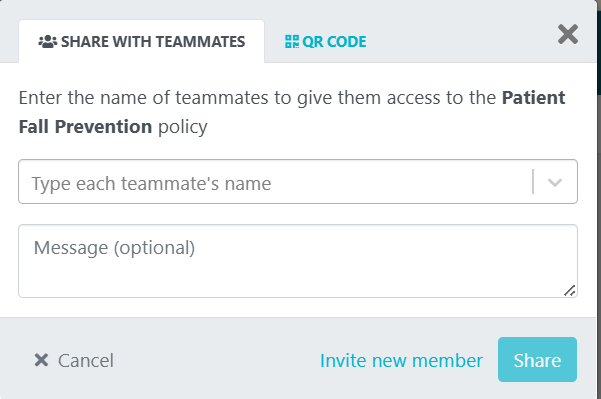
You can share with team members who are available on SweetProcess or invite them to join SweetProcess. Team members will be notified of the invitation to collaborate on the policy document.
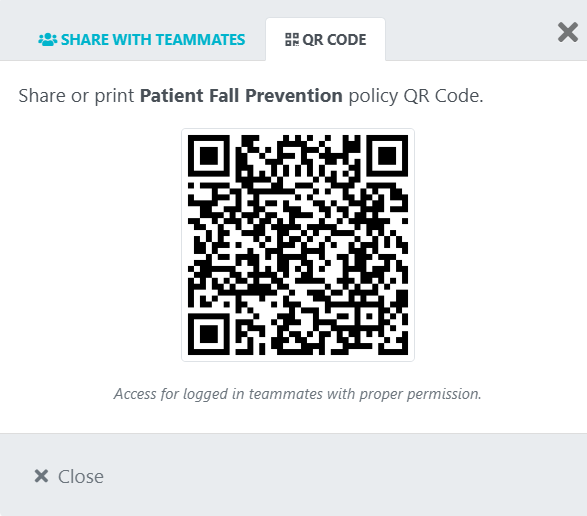
You can also share QR codes with team members who should access the policy.
Format, Review, and Track Changes on Hospital Policies
Every time you update a policy, two problems arise. First, how do you prevent staff from using the old version? Second, how do you prove to surveyors that you updated policies, notified staff, and are complying with the new policy?
SweetProcess solves both problems with comprehensive version control.
Every time someone edits a policy, the system saves the previous version with a complete record of what changed, who changed it, and when. You never lose work, and you can always revert if an update causes issues.
Here’s how to track changes on your policies:
Open any policy document and click the clock icon.
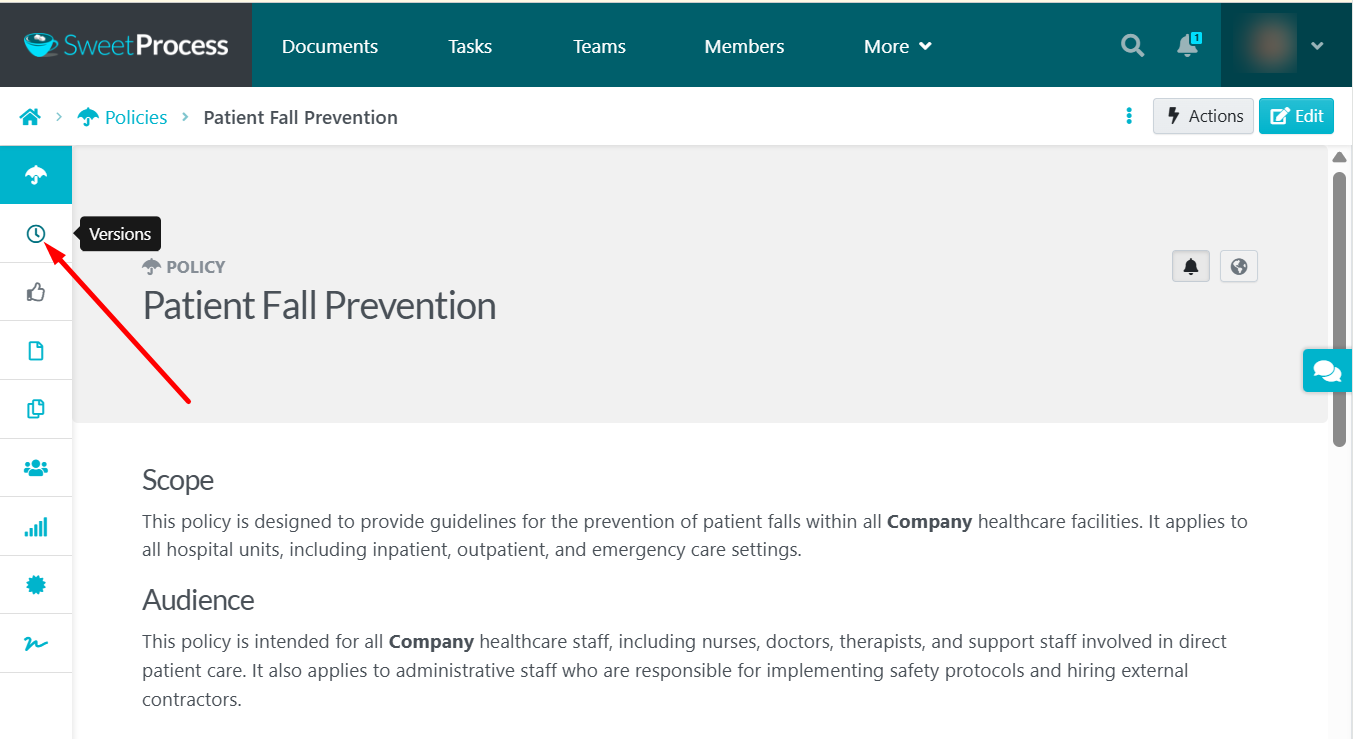
View the complete version history with timestamps and author names.
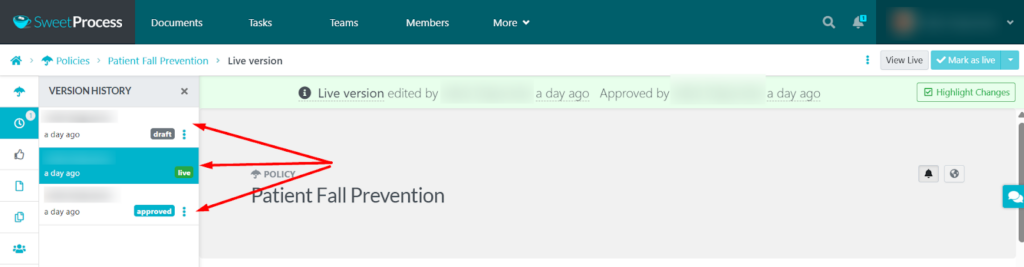
You can also review the tracked highlights to see the changes made to the document.
The SweetProcess policy system will prevent scenarios in which someone finds an old policy version on a shared drive and follows outdated procedures. SweetProcess only displays current versions to staff, while administrators can access the complete history for documentation.
Manage, Distribute, and Set Access Permissions on Your Policies
Not every staff member needs access to every policy. For instance, housekeeping staff do not need to read surgical protocols; administrative assistants should not see personnel policies for departments they do not work in; and nurses need essential clinical guidelines, not strategic planning documents.
This specialized access control serves two purposes: it protects sensitive information by ensuring it can be accessed only by the right stakeholders, and it prevents staff from being overwhelmed by policies irrelevant to their roles.
SweetProcess lets you control exactly who sees what:
On your policy document, click “Actions.”
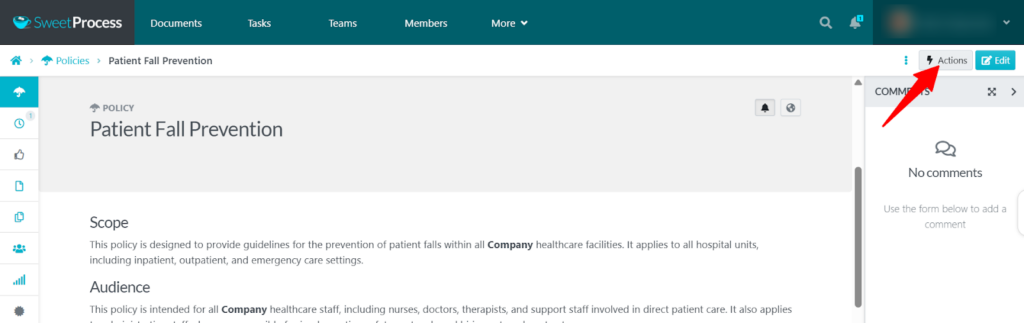
Select “Share.”
Enter names or email addresses for people who need access.
For temporary staff or new hires, you can quickly grant access to essential policies and revoke it when they leave. No one keeps access unless you want them to.
Manage Policies, Procedures, and Processes in One Place
Here’s where SweetProcess differs from other policy management systems. Hospitals don’t just need policies stored somewhere accessible. They need the whole operational picture connected.
For example, your HIPAA privacy policy explains what staff should do; the procedure document outlines how to handle everyday privacy situations; and the process maps out the exact steps for responding to a privacy breach from start to finish.
SweetProcess houses all your organization’s procedures, processes, and policies, and you can document them in one or multiple searchable knowledge bases.
Here’s how to organize your hospital knowledge base:
Click “More” and select “Knowledge Bases.”
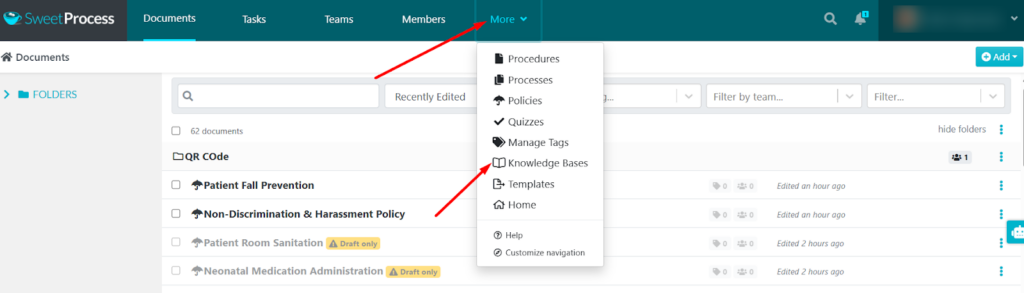
Click “Create Knowledge Base.”

Give it a name and click “Continue.”

Set access control to “Private Knowledge Base, only logged-in team members may view.”
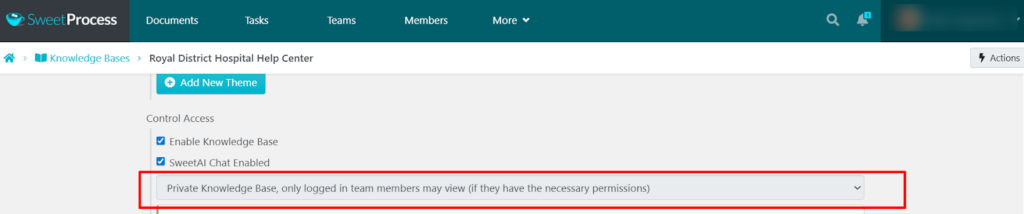
You can also create a public knowledge base that’s accessible to your patients and the general public.
Add sections for departments, compliance areas, or clinical specialties.

Add your policies, procedures, and processes to the appropriate sections.

The centralized approach in SweetProcess transforms how staff interact with policies.
Stop letting policy chaos put your hospital and patients at risk. Start your free SweetProcess trial today and bring order to your clinical operation—no credit card required.
SweetProcess Pricing and Support
SweetProcess keeps pricing straightforward with no hidden fees or surprise charges.
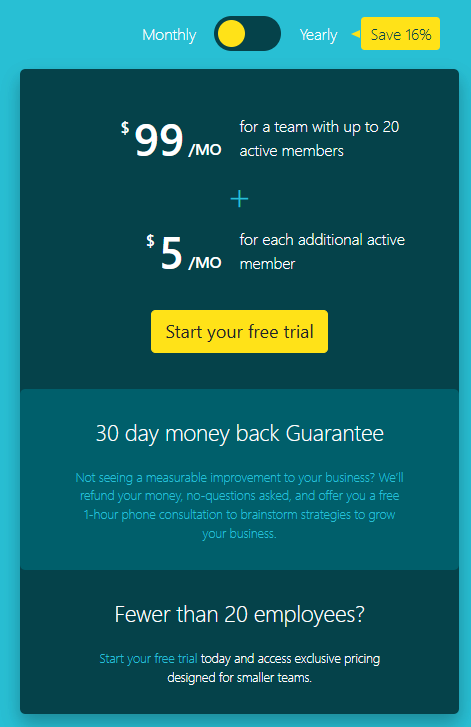
The 14-day free trial gives you full access to all SweetProcess features without any upfront payment. You can set up your entire system, import existing policies, invite your team, and see how everything works in your real environment before spending a dollar.
Monthly pricing starts at $99 per month for up to 20 active team members. Each additional member costs $5 per month. Annual subscriptions save you 16% compared to monthly billing.
Larger hospital systems with specific requirements can request custom pricing that fits their needs.
2. PowerDMS
Source: PowerDMS
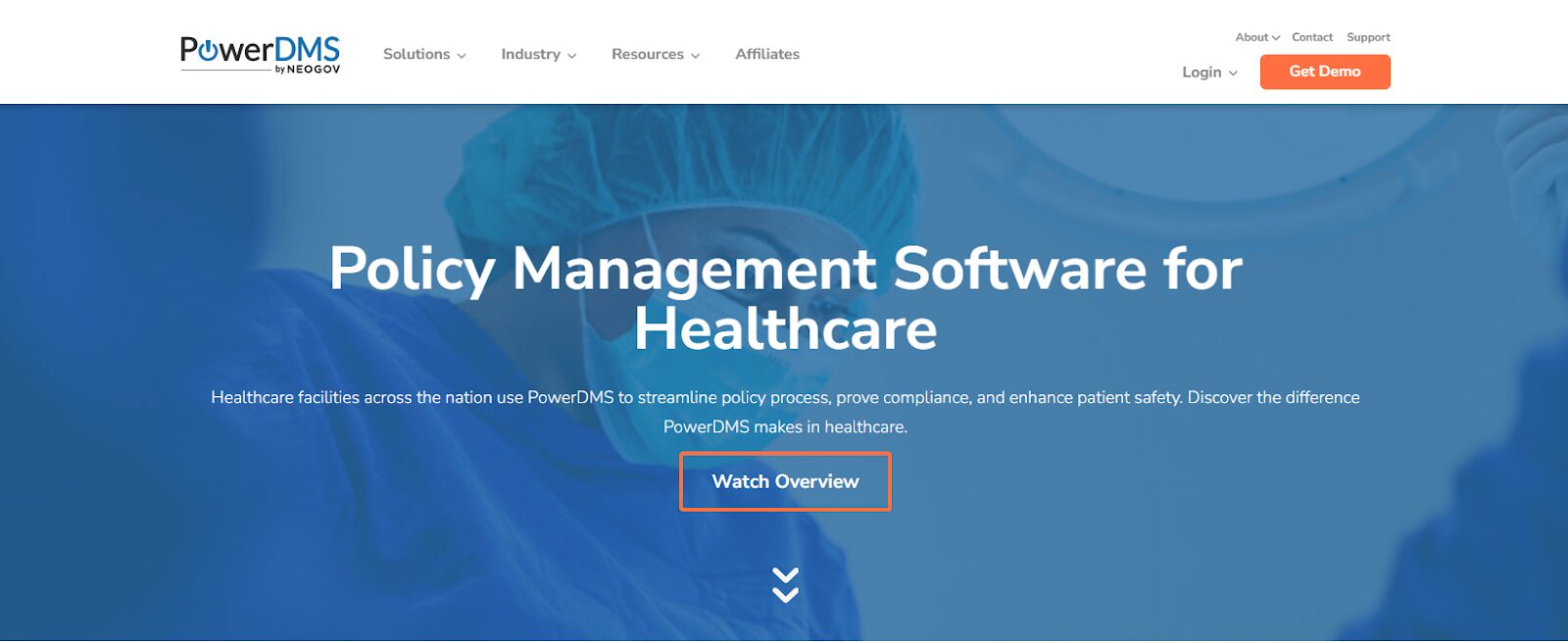
PowerDMS is a policy management tool that helps hospitals track professional licenses, certifications, and continuing education while ensuring policy compliance.
The system ensures regulatory compliance tracking by linking policies directly to specific requirements from accrediting bodies and government agencies. This makes it easier to demonstrate compliance during surveys.
Features of PowerDMS
Compliance Tracking: With PowerDMs, you can map policies to regulatory requirements, so when surveyors request policies for specific standards, you can retrieve them instantly by regulation number.
Electronic Signatures: Staff can acknowledge policies with legally binding e-signatures that satisfy documentation requirements for accreditation and audits.
Automated Workflows: You can design policy writing processes that route policies to the right people in the correct sequence, from initial draft through final sign off.
Training Integration: When you update a policy, you can require staff to complete related training before they acknowledge it. This ensures understanding, not just checkbox clicking.
PowerDMS Pricing
PowerDMS uses custom pricing, so no pricing plans are displayed on its website. You can only request a demo to get started.
3. MedTrainer
Source: MedTrainer
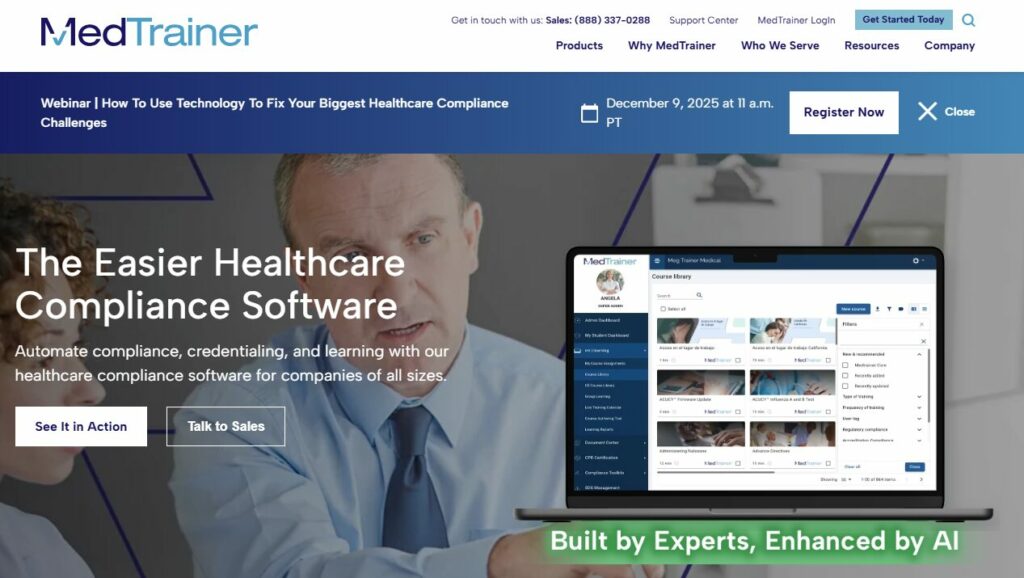
MedTrainer is an all-in-one compliance solution for healthcare organizations. It is particularly popular with long-term care facilities and smaller hospitals. The platform integrates policy management, incident reporting, employee health tracking, and mandatory training into a single system.
Features of MedTrainer
Healthcare-Specific Templates: The platform includes policy templates covering common compliance areas, including HIPAA, OSHA bloodborne pathogens, infection control, and emergency preparedness. These templates follow current regulatory requirements and clinical best practices.
Drag-and-Drop Organization: The drag-and-drop interface lets you organize policies by department, regulation type, or any other grouping that makes sense for your staff.
Mobile Access: MedTrainer allows mobile access for healthcare workers who need information at the point of care. Staff can access policies from phones or tablets during their shifts.
Automatic Notifications: The MedTrainer system sends alerts when policies change or approach their scheduled review date.
MedTrainer Pricing
MedTrainer does not display its pricing information on its website. Contact their sales team for specific quotes.
4. MCN Solutions
Source: MCN Solutions
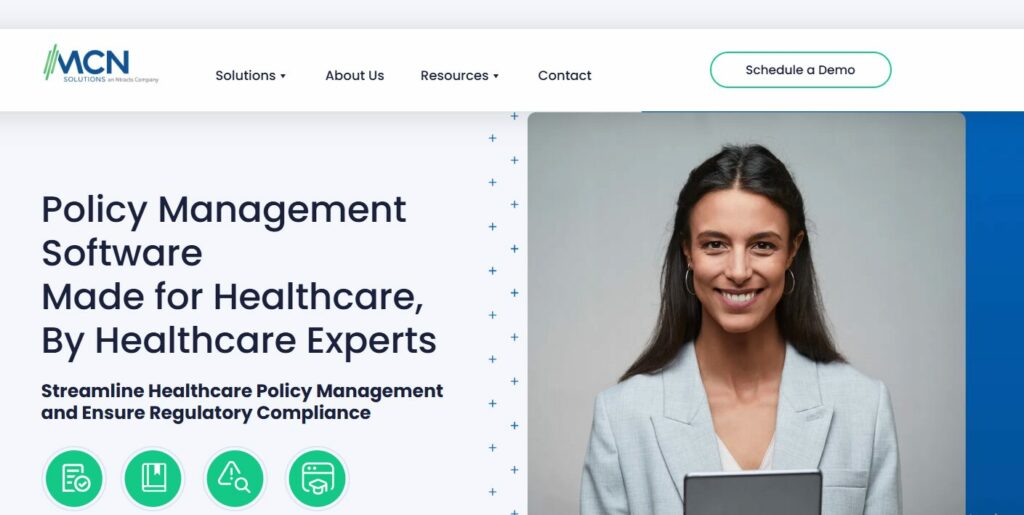
MCN Solutions is a policy management software that focuses exclusively on healthcare and hospital compliance requirements. Their policy manager platform includes features designed explicitly for multi-facility health systems that need to standardize policies across locations while allowing some facility-specific customization.
Features of MCN Solutions
Multi-Site Management: Health systems can create master policies that apply across all hospital facilities while allowing individual hospitals to add location-specific sections or procedures. This balances standardization with practical flexibility.
Regulatory Updates: MCN monitors federal and state healthcare regulations, accreditation standards, and clinical guidelines. When changes affect your policies, you receive alerts with details on what changed and how it may impact your current policies.
Clinical Content Integration: MCN partners with evidence-based content providers to offer policy templates that reflect current clinical guidelines and best practices. This is particularly valuable for clinical policies where staying current with medical research is essential.
MCN Solutions Pricing
MCN does not have transparent pricing displayed on its website. You can contact their sales team to learn more about their price plans.
5. OSP

Source: OSP
OSP Labs takes a different approach by offering custom healthcare policy management software development for hospitals rather than a one-size-fits-all product. They build tailored solutions for hospitals with unique requirements that off-the-shelf systems can’t accommodate.
This makes OSP most suitable for large health systems with complex needs. They may also offer specific integration requirements based on the existing hospital infrastructure tools.
Features of OSP
Custom Development: OSP can help you build policy management systems specifically for your hospital’s workflows, governance structure, and compliance requirements.
EHR Integration: OSP can integrate policy management directly with electronic health record systems. This allows clinical policies to link to relevant documentation within the EHR, making guidance available right where clinicians work.
Automated Training Modules: The system can link policies to customized training content that reflects your hospital’s specific equipment, protocols, and procedures.
Compliance Monitoring: OSP builds dashboards that track policy adherence through automated alerts and reporting. You can monitor compliance in real time rather than discovering problems during retrospective audits.
OSP Pricing
OSP’s custom tool development pricing varies widely based on project scope, complexity, and ongoing support requirements. It requires significant upfront investment plus ongoing maintenance costs. Contact OSP to evaluate your needs and get detailed quotes.
6. VComply
Source: VComply
Overview of VComply
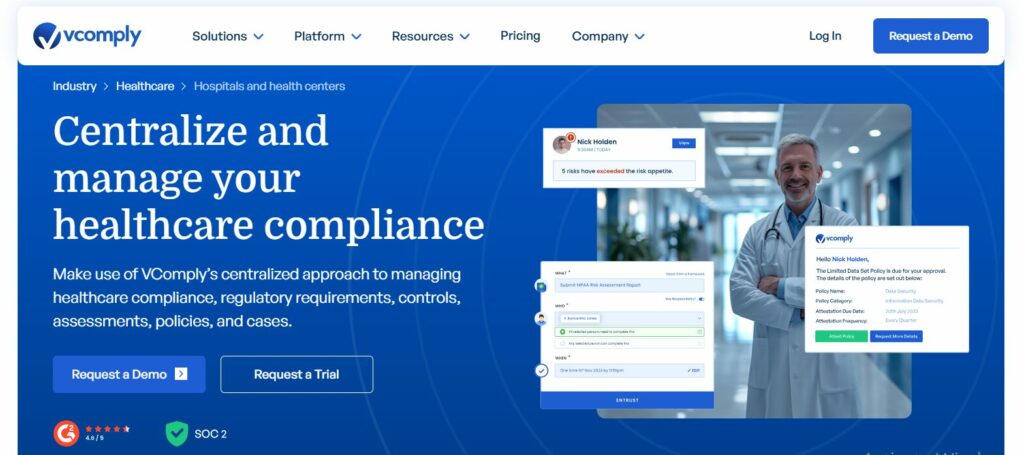
VComply provides an enterprise policy management platform that serves multiple industries. The system uses automation and AI-powered features designed to reduce the administrative burden of maintaining compliance.
While not built exclusively for healthcare, VComply offers healthcare-specific templates and configurations that adapt the policy platform to hospital needs.
Features of VComply
AI-Powered Policy Creation: The platform uses AI to draft policies from your titles or keywords, incorporating required sections and compliance language.
Automated Review Cycles: VComply schedules policy reviews based on regulatory requirements, organizational preferences, or the scheduled review period. The system automatically notifies policy owners when reviews are due.
Compliance Mapping: Policies link directly to specific regulatory requirements, making it easy to demonstrate coverage during audits.
VComply Pricing
Contact VComply for custom pricing based on your organization’s size and required features. Free demos are available for qualified prospects.
7. DocTract
Source: Doctract
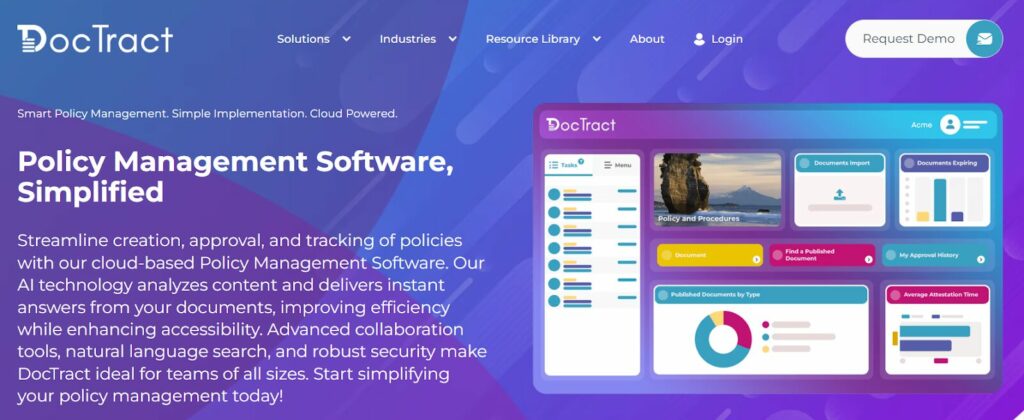
DocTract positions itself as an AI-powered policy management platform that transforms how organizations create and maintain policies. The system uses artificial intelligence throughout the policy lifecycle, from initial drafting through compliance monitoring and update alerts.
Features of DocTract
AI Policy Drafting: DocTract’s AI generates complete policy documents that align with regulatory requirements and organizational context. The system understands healthcare compliance requirements and produces policies that address relevant standards.
Intelligent Compliance Monitoring: DocTract’s innovative compliance feature notifies you when reviews are due, helping you keep your policies up to date.
Stakeholder Collaboration: DocTract facilitates multi-department input through workflow tools that route policies to reviewers in different departments
Version Control and Audit Trails: Every policy change gets recorded with timestamps, author information, and change summaries.
Industry-Specific Templates: DocTract offers templates tailored to hospital compliance requirements, including HIPAA privacy and security, Joint Commission standards, and CMS conditions of participation.
DocTract Pricing
Pricing is customized based on organization size and features required. Contact their sales team for quotes and to schedule a demo.
8. Cloda
Source: Cloda
Cloda brings artificial intelligence to healthcare policy management, focusing on reducing the time compliance teams spend on creating, updating, and distributing policies. The platform emphasizes automation and intelligent workflows designed to help small compliance teams work more efficiently.
Like several competitors, Cloda positions AI as the major solution to policy management bottlenecks that plague many hospitals.
Features of Cloda
AI Content Generation: Cloda’s AI automatically generates policy content based on regulatory requirements, clinical best practices, and your organization’s specific context.
Smart Notifications: Rather than blasting every policy update to every staff member, Cloda sends targeted alerts to relevant stakeholders based on their roles, departments, and responsibilities.
Collaborative Editing: Multiple users can work on policies simultaneously with real-time updates visible to everyone. This prevents confusion that can arise when people email documents back and forth.
Compliance Tracking: The system monitors staff acknowledgments and generates audit reports. You can see at a glance which staff members have acknowledged new or updated policies and follow up with those who haven’t.
Cloda Pricing
There is no pricing information available on Cloda’s website. You can request a demo to talk to their team.
How SweetProcess Supports Hospital Policy Management
Beyond the core features we covered earlier, SweetProcess offers several capabilities that make it particularly effective for hospital policy management. Let’s look at how real organizations use these features to solve common compliance challenges.
Centralized Repository for Policies and Procedures
Think about how your hospital currently stores policies. Like the shared drive, department-specific locations that only insiders know about, email attachments, and printed materials stuck in binders, which may or may not reflect current versions.
This scattered approach creates serious problems. Staff waste time hunting for policies. People follow outdated versions because they can’t find current ones. New employees struggle to locate items. Compliance officers panic before surveys because they’re not sure they can see everything quickly.
SweetProcess eliminates this chaos by creating a single authoritative repository for all your hospital’s policies, procedures, and processes.
The Texas Department of Family and Protective Services faced similar challenges in managing procedures across multiple offices. After implementing SweetProcess, they consolidated all processes into a single centralized system. This organization enabled its team to process over 40,000 requests annually with consistent quality across all locations.
For hospitals, centralization means your ICU nursing supervisor, environmental services director, infection control nurse, and temporary staff all have access to the same up-to-date information. No one works from outdated versions because there’s only one current version the team can access.
Tracking Employee Acknowledgment and Activities
Traditional tracking methods fail in predictable ways. Email tracking may show who opened a message, not who read and understood the attached policy; acknowledgement tracking sheets may be lost; and training records live in separate systems from policies. When surveyors ask for proof, you’ll be scrambling through multiple sources trying to piece together the story.
SweetProcess tracks every interaction automatically. When staff members open policies, the system records it. When they acknowledge understanding, that is captured as well. Everything happens in the background without creating extra work for anyone.
Automated Notifications
Policies need regular review to stay current with regulations, clinical guidelines, and internal quality improvement initiatives. But manually tracking review schedules fails when compliance teams juggle hundreds of policies and dozens of other priorities.
If you schedule a policy review for six months from now, you may forget to complete it. SweetProcess prevents this by sending automated reminders when policies approach their review dates. Policy owners receive sufficient advance notice to complete reviews without rushing. If reviews are not completed on schedule, escalation reminders are sent to managers or compliance officers.
Mobile Access
Hospital staff hardly work at desks. The assumption that people will return to computers to look things up is a traditional policy management style. In reality, they make their best guess and keep moving because stopping to find a computer wastes precious time, especially when a life is at stake.
SweetProcess works on any device with internet access. Smartphones, tablets, computers, and hospital workstations on wheels all display policies perfectly. Staff can look up information immediately on the SweetPocess SOP App when needed without leaving patient care areas.
Easy Documentation and Approval Workflow
Creating a new hospital policy typically requires input from multiple people, from clinical experts to compliance officers, legal counsel, medical staff leadership, and the administrative team. Coordinating all these stakeholders via email quickly becomes chaotic. SweetProcess structures the approval process clearly. Once the contributors document all policy items, policy approval depends on the person authorized to approve them.
When JJC Law faced organizational issues stemming from inconsistent operations, SweetProcess helped them implement structured procedures and approval workflows. They build a superior work culture where everyone knows their responsibilities and can collaborate effectively without confusion.
For hospitals, this organized approach is essential during rapid policy updates in response to new regulations or internal incidents. Instead of scrambling to coordinate reviews, you activate your established workflow and track progress from your dashboard.
Key Features To Consider Before Choosing a Policy Management Software for Hospitals
Your choice of policy management software affects your entire organization, so it’s worth taking the time to evaluate the options carefully. Here are the essential features that separate effective solutions from systems that create more problems than they solve.
1. Centralized Policy Repository
The most fundamental requirement is a single, secure location for all your hospital’s policies. Staff should be able to find what they need in seconds, not minutes.
Look for systems with intuitive organization and a fit for your facility and healthcare needs. Ensure you pick a tool that can organize policies by different criteria. In addition to organizing policies by folders and providing an intuitive search feature, SweetProcess lets you access policies directly via QR codes so hospital staff don’t need to search through a pile of files to find the exact policy they need.
2. Easy Policy Creation, Approval, and Review
Creating policies shouldn’t require technical expertise or hours of formatting work. The policy software should make it easy and fast to develop professional-looking policies that meet regulatory standards.
Using templates or importing existing healthcare policy documents gives you a strong starting point.
There should also be an approval workflow that aligns with your hospital’s operating model. Since policy reviews must be conducted regularly to maintain compliance, the software should include a feature that reminds policy owners of upcoming review dates, tracks completion, and escalates overdue reviews to the appropriate managers.
3. Real-Time Updates and Automated Reminders
Hospital policies must stay current with evolving regulations, clinical guidelines, and internal quality improvement initiatives. The software should make updates easy and ensure that relevant staff are notified of changes immediately.
4. Policy Sharing and Tracking
Policies only work if staff can access them, and you provide proof. The software should make sharing simple, whether you’re granting access to entire departments, specific roles, or individual staff members.
Comprehensive tracking shows who has accessed each policy, when they viewed it, and whether they’ve acknowledged understanding it. This documentation becomes critical during surveys and investigations.
5. Version Control and Audit Trail
Joint Commission surveyors regularly request prior policy versions and documentation of changes over time. Your software must maintain a complete version history with timestamps, author information, and summaries of what changed.
6. Intuitive Interface
The best policy software fails if staff won’t use it. Look for systems with clean, intuitive interfaces that require minimal or no training, so even your less techy staff can navigate easily.
7. Secured Cloud-Based Storage
Healthcare data security is non-negotiable. Your policy management software must meet HIPAA security standards, including data encryption, secure access controls, regular security audits, and compliance with healthcare privacy requirements.
Experience secure, intuitive policy management built for your hospital. Start your SweetProcess trial today, absolutely free!
Why Policy Management Is Important in Hospitals
Effective policy management isn’t just about checking boxes for accreditation. It’s fundamental to delivering safe, high-quality patient care and maintaining efficient operations. Here are additional reasons why it matters.
Ensures Compliance
Hospitals operate under intense regulatory scrutiny from multiple agencies. Your policies must keep pace with regulatory changes, which is nearly impossible with manual tracking.
Improves Efficiency
Staff productivity drops dramatically when people can’t find the information they need to do their jobs. Time spent hunting for policies, asking questions that those policies address, and correcting errors will result in significant resource waste.
When staff can quickly find current policies and procedures, they spend less time searching and more time on patient care or other value-added activities. Clear, accessible policies reduce questions, minimize errors, and help new hires get up to speed faster.
Increases Accountability
Clear policies set expectations for staff behavior and clinical practices. When everyone understands what’s expected and how to meet those expectations, accountability becomes straightforward.
Policy management software documents exactly who has accessed policies, who has acknowledged them, and when these activities occurred. This creates a culture of responsibility where staff know they’re expected to stay current with policies relevant to their roles.
Forensic Analytical Consulting Services realized accountability benefits after implementing SweetProcess to document their business processes. Before this, they kept their policies and procedures in PDF files that were not easily accessible. By making expectations clear and tracking adherence, they built a more efficient workforce where everyone understood their responsibilities.
For hospitals, clear accountability supports quality improvement initiatives. When you identify areas for improvement, you can update policies and procedures, ensure staff are trained on changes, and track compliance going forward.
Strengthens Culture
Hospitals with strong policy management systems demonstrate their commitment to quality and safety. Staff feel supported when they can easily access the information they need to do their jobs correctly and safely. Clear policies also protect staff from ambiguity. When faced with challenging situations, they know where to find guidance. This reduces stress and empowers staff to make confident, appropriate decisions.
Patients will also feel safe knowing that all personnel are operating according to standard protocols.
Reduces Risk
Many patient safety incidents and medical errors result from staff failing to follow policies. Often, this happens not because people deliberately ignored policies, but because they couldn’t find them, didn’t know they existed, or were following outdated information on a shared drive.
Effective policy management mitigates these risks by ensuring staff have immediate access to current policies. The system can even push notifications about policies relevant to specific clinical situations, providing just-in-time support at the point of care.
Supports Audit Readiness
Accreditation surveys and regulatory inspections create tremendous stress for hospital staff. Much of this anxiety stems from uncertainty about whether the documentation will satisfy the surveyor’s requests.
A robust policy management system maintains the records you need for any inspection: current policies, approval documentation, staff acknowledgments, version histories, and comprehensive audit trails. When surveyors ask for infection control policies from two years ago, you can produce them immediately, along with proof that staff received training on those policies.
This continuous state of audit readiness reduces the last-minute scrambling that typically happens before surveys.
Build a culture of compliance and quality. Try SweetProcess free for 14 days and experience the difference organized policy management makes.
Which Policy Management Software Is Best for Your Hospital?
Choosing the right policy management software depends on your hospital’s specific needs, size, budget, existing systems, and compliance requirements. There’s no single best option for every organization, but there are clear factors that can guide your decision.
SweetProcess is well-suited for hospitals seeking a comprehensive yet approachable solution that doesn’t require extensive IT support or lengthy implementation timelines. Its combination of manual and AI-powered policy creation, robust collaboration features, and mobile accessibility makes it suitable for hospitals of all sizes.
The centralized documentation and knowledge base are especially valuable for organizations that need to manage policies, procedures, and processes in a single, unified system rather than juggling multiple tools.
Don’t let another day go by with scattered policies, frustrated staff, and audit anxiety. Sign up for your free SweetProcess trial and discover how the right policy management software transforms hospital operations.