Last Updated on September 23, 2026 by Owen McGab Enaohwo
When an incident happens in your business, you need someone on the team who knows which checks to run and when to escalate an issue. A runbook outlines step-by-step procedures and a sequence of actions and decisions your employees should take when handling day-to-day tasks.
The challenge is making those instructions easy to find and reliable enough to use under pressure. Some runbook tools help people follow and record a procedure; others execute technical steps automatically. That distinction is the starting point for comparing these nine options, their costs, and how they fit alongside the SOPs your team already uses.
Key Takeaways
- A runbook is a step-by-step document for a specific, recurring situation, such as an outage or a failed process, not a general reference for how a task is normally done.
- A runbook and an SOP are different documents that solve different problems
- Some tools, such as Rundeck, PagerDuty, Azure Automation, Octopus Deploy, and StackStorm, execute a runbook’s steps automatically, while others, such as SweetProcess, Cutover, and Splunk, document and organize the procedure a human follows.
- Your runbook needs to be reviewed regularly to ensure that it’s current, with a record of which team members acknowledged it.
- SweetProcess documents runbooks, records who followed them and when, and connects them to related SOPs and policies. You can start your 14-day free trial today.
Table of Contents
- What Is a Runbook?
- Runbook vs. SOP
- Runbook Software Compared
- Documenting a Runbook vs Running One
- How To Create a Runbook: An Example
- 9 Best Runbook Software and Tools
- How SweetProcess Simplifies Runbook Management
- Why Your Company Needs Runbook Software
- How Teams Keep Runbooks Current
- Which Runbook Software Should You Choose?
- FAQs
What Is a Runbook?
A runbook is a step-by-step document that your team uses when a specific, recognizable situation happens. These routine procedures outline what your employee needs to check, in what order, what to do when something goes wrong, and who to call if the first fix does not work.
A complete runbook contains:
- The trigger: The specific event that requires your team to open the runbook, such as “payment processor returns a timeout on more than five percent of transactions.”
- The steps in order: What to check or do first, second, and third, written specifically enough that someone unfamiliar with the situation can follow them.
- Who owns it: The person or role responsible for keeping the runbook accurate.
- What to do when a step fails: The decision point; if the first fix does not work, what happens next.
- Escalation: The role or the person who should take over when the person following the runbook cannot resolve the issue.
- A review date: When the team should check that the instructions still match the real process.
Runbooks are not limited to IT departments. For example, a marketing agency with a runbook for client offboarding can use it to freeze new work requests, export the client’s files to a shared archive folder, revoke their access to shared tools within 24 hours, send the final invoice, and notify the account lead to schedule an exit call.
The trigger for this runbook could be a signed termination notice.
Runbook vs. SOP
| Runbook | SOP | |
| What it answers | What to do when a specific thing happens | How a routine task is done, every time |
| When to open it | When responding to a specific incident, under pressure | As a standing reference, during normal operations |
| Who writes it | The person responsible for the operation or process affected, IT operations or support | The process owner, or team lead |
| Typical content | Trigger, response steps, decision points, escalation, expected result | Purpose, scope, responsibilities, prerequisites, steps, exceptions |
The main difference between a runbook and an SOP is their use case. A runbook gives a defined response to a particular situation, while the SOP describes how a task should be performed as a standing practice.
For instance, your SOP can be “How to onboard a new employee,” and the runbook can go a step further to describe, “What to do when a new employee cannot access required systems on their first day,” which can be accessed within five minutes.
Some tools can hold both SOPs and a runbook, making it easy to centralize all documentation.
If your team needs a platform to hold both procedures and runbooks in the same system, sign up for a 14-day free trial of SweetProcess to get started.
Runbook Software Compared
The biggest difference between runbook tools is what happens after you document the procedure. Some tools are designed primarily to hold the instructions a person follows. Others are built to execute scripts or deployments. Here’s a breakdown:
| Tool | What It Actually Does | Best For | Starting Price | What It Does Not Do |
| SweetProcess | Documents, manages, assigns runbooks and SOPs, tracks sign-offs and version history | Teams that need a written, trackable runbook | $99 per month for up to 10 users | Does not execute automated remediation or run scripts |
| Rundeck | Executes automated jobs and orchestration tasks across infrastructure | DevOps teams automating routine IT tasks | Free open source; to upgrade, contact team | Does not document the reasoning or ownership behind a procedure |
| PagerDuty | Incident alerting, on-call scheduling, and automated response workflows | Teams needing fast, automated incident response | Free for up to 5 users; Professional plan starts at $21 per user per month, billed annually | Doesn’t serve as a general process or SOP repository |
| Redwood | Job scheduling and workload automation with a low-code interface | Large organizations standardizing enterprise automation | Request custom quote | Does not focus on documenting runbooks for people to follow manually |
| Cutover | Orchestrates and documents complex workflows like disaster recovery | Enterprise IT teams running large-scale events | Custom quote, not published | Not a simple documentation-first SOP repository |
| Microsoft Azure Automation | Cloud-based runbook execution and configuration management | Organizations already using Microsoft Azure | 500 job-run minutes and 744 watcher hours included monthly. Usage-based | Doesn’t offer a non-technical interface for writing procedures |
| StackStorm | Event-driven automation connecting systems and triggering actions | Technical teams comfortable with Python and self-hosting | Free open source; enterprise pricing not published | Requires technical expertise |
| Splunk | Analytics-driven monitoring with automation capabilities | Teams already using Splunk for data and log analysis | Request custom quote | Pricing and capabilities depend on the wider Splunk deployment |
| Octopus Deploy | Automates software deployments and operational runbooks | DevOps teams managing deployment workflows | Free tier available; Professional plan starts at $4,330 per year for 20 projects | Not for documentation of general business procedures outside deployment |
Pricing as of September 15, 2026.
If you are also evaluating documentation software outside the runbook category, you can compare these against standard operating procedure tools.
Documenting a Runbook vs Running One
Runbook tools are not built the same. Some tools help your team document the procedure a person should follow, while others execute the procedure automatically.
Tools that Execute Runbooks
Rundeck, PagerDuty, StackStorm, Azure Automation, and Octopus Deploy can execute or orchestrate technical workflows. For example, your technical team might create an automated workflow that checks whether a service is responding, restarts a process, gathers diagnostic information, and records the result.
The software shows the operator what to do and carries out some or all of the defined actions.
Tools That Document and Organize Runbooks
A tool like SweetProcess helps you document and organize the procedure in a way your team can follow. You can draft it, create the steps, assign responsibility, request approval, collect sign-offs, track versions, and give the team access to the current document. However, it doesn’t independently execute automated remediation, run scripts, or respond to an alert on its own.
SweetProcess can also connect with other systems through its API and 1,000+ integrations via Zapier, making it easier to connect all your tasks in one system.
Cutover and Splunk can sit between these categories depending on how you use them. They can support operational workflows while also providing information and visibility around those workflows.
This distinction is important when choosing software. If you need an automation engine that can execute technical actions, an automation platform may be the better answer. If the problem is that your team relies on scattered documents, undocumented knowledge, or instructions that nobody reviews, documentation software solves this.
Before you automate responses, you need to agree on the sequence of steps your team must follow. This way, you have a better flow of operations within the business.
Want to learn more about process documentation software that can help you organize your runbooks? Read more here!
How To Create a Runbook: An Example
A useful runbook documents a recurring business situation that has a clear trigger, a defined response, and an escalation path. Here’s an example of a runbook for a client offboarding at a marketing agency:
Trigger: A client submits a signed termination notice, or the account lead confirms the relationship is ending.
Steps to follow:
- The account lead freezes all new work requests for the client within one business day.
- The operations manager exports the client’s project files, assets, and communication history to a shared archive folder.
- IT revokes the client’s access to any shared tools, logins, or portals within 24 hours of the freeze.
- Finance sends the final invoice, including any outstanding balance, within three business days.
- The account lead schedules a brief exit call to close out the relationship and note any lessons for future offboardings.
Decision point: If IT cannot revoke access within the 24-hour window because of a technical block, IT escalates directly to the operations manager rather than waiting for the next status check.
Escalation: Operations manager, then the founder if the issue is a client dispute rather than a technical one.
Review date: This runbook should be reviewed every six months or immediately after any offboarding where a step did not go as written.
To turn this from a document into something your team actually opens, you need to make it accessible. Employees should find it within a minute. It also needs to stay current to avoid errors.
Once you have a runbook ready, add it to your SOP since it’s part of your offboarding procedure. This way, your team can find all the documentation in one place.
To create the runbook faster, you can use SOP writing software that helps you turn an outline like the one above into a document your team will actually trust.
9 Best Runbook Software and Tools
Now that you understand the importance of runbook software, let’s dive into the nine top choices that can transform the way your team manages IT operations. Each of these tools offers unique features tailored to different needs.
SweetProcess
Overview
SweetProcess is a powerful tool that allows you to create, manage, and automate your company’s runbooks and standard operating procedures (SOPs). It’s designed to simplify the workflow, making it easier for teams to follow tasks and protocols. Whether you need to document a simple procedure or automate a complex IT process, SweetProcess has the features to make your life easier.
Pricing
SweetProcess costs $99 per month for 10 users, with each additional user at $5 per month. For annual payments, it costs your team $990 per year, plus $50 per year for each additional user, saving you about 16.7%. However, if your team has five users, SweetProcess offers an annual plan for $495, with each additional user at $50 per year.
Before paying for a plan, you can use the 14-day free trial to see whether the tool fits your team. These plans also come with a 30-day money-back guarantee.
What Makes SweetProcess the Perfect Runbook Software?
- Manual and Automated Compliance-focused Documentation: SweetProcess ensures that your processes stay compliant by automating updates and checks, reducing the manual work required.
- Guided Workflows and Role Assignment: It helps you define clear workflows and assign specific roles to team members, ensuring everyone knows exactly what they’re responsible for.
- Real-Time Collaboration and Automated Triggers: SweetProcess enables seamless real-time collaboration among teams, with automated triggers that notify users when action is required.
- API Integration: Easily integrate SweetProcess with your other business tools via Zapier and other systems so your runbooks work in sync with your entire workflow.
Building Powerful Runbooks With SweetProcess in Minutes
Runbooks are the backbone of IT and DevSecOps. They provide the step-by-step playbook your team needs to resolve incidents, perform maintenance, and keep systems running smoothly. But creating runbooks from scratch could take hours.
With SweetProcess, you can generate structured, automation-ready runbooks in minutes using SweetAI, then refine, share, and track them across your entire team.
Here’s exactly how it works:
Step 1: Generate a Runbook With SweetAI
Start by logging in to your SweetProcess dashboard. On the home page, to the right, select “Add,” then choose the “New Document” option.

Select the “Procedure” option and input your procedure title, for example, “Database Recovery After Server Failure.”
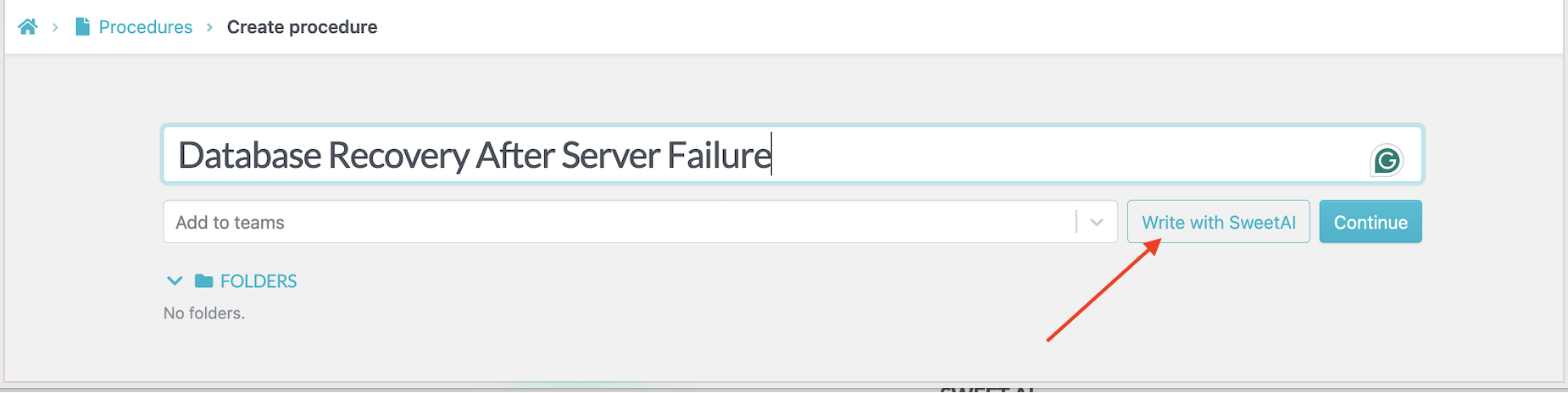
After entering your title, you can use SweetAI to instantly generate a complete draft of your runbook, structured with logical steps and sections.
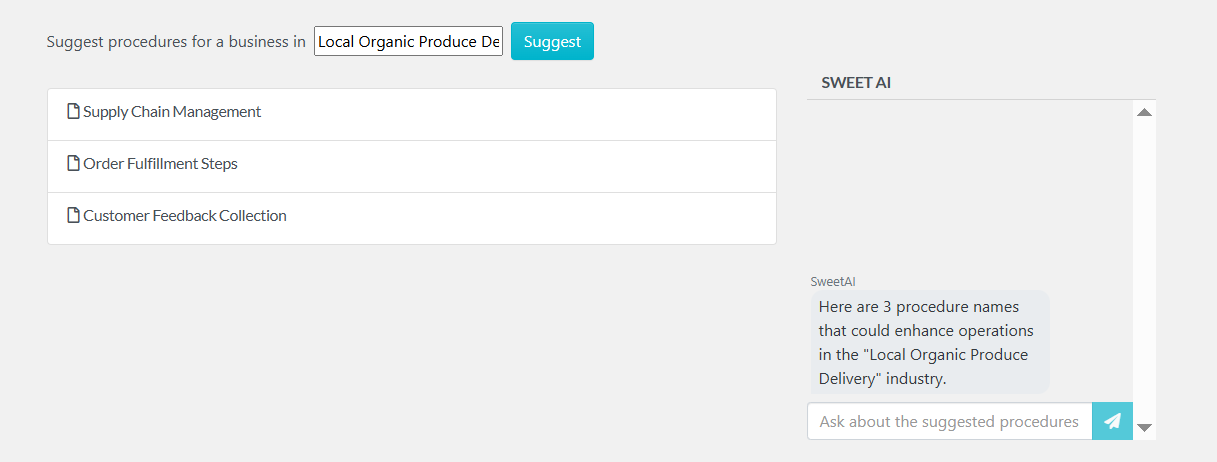
Pro tip: If you’re not sure what to call your runbook, use the AI title generator to instantly suggest names based on the type of process you’re documenting.
Step 2: Review and Edit Your Runbook
SweetAI gives you a great starting point, but your runbook needs to reflect your exact processes. Use the built-in editor to:
- Personalize instructions to match your IT environment and tools.
- Expand steps with technical details, command-line examples, or screenshots.
- Use AI assistance to rephrase instructions for clarity.
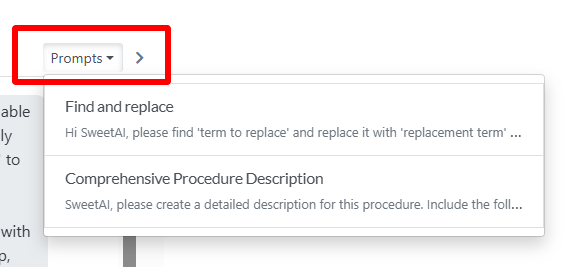
- Quickly edit or restructure with the prompt feature.
This ensures your runbook is not just a checklist, but a trusted guide for real incidents.
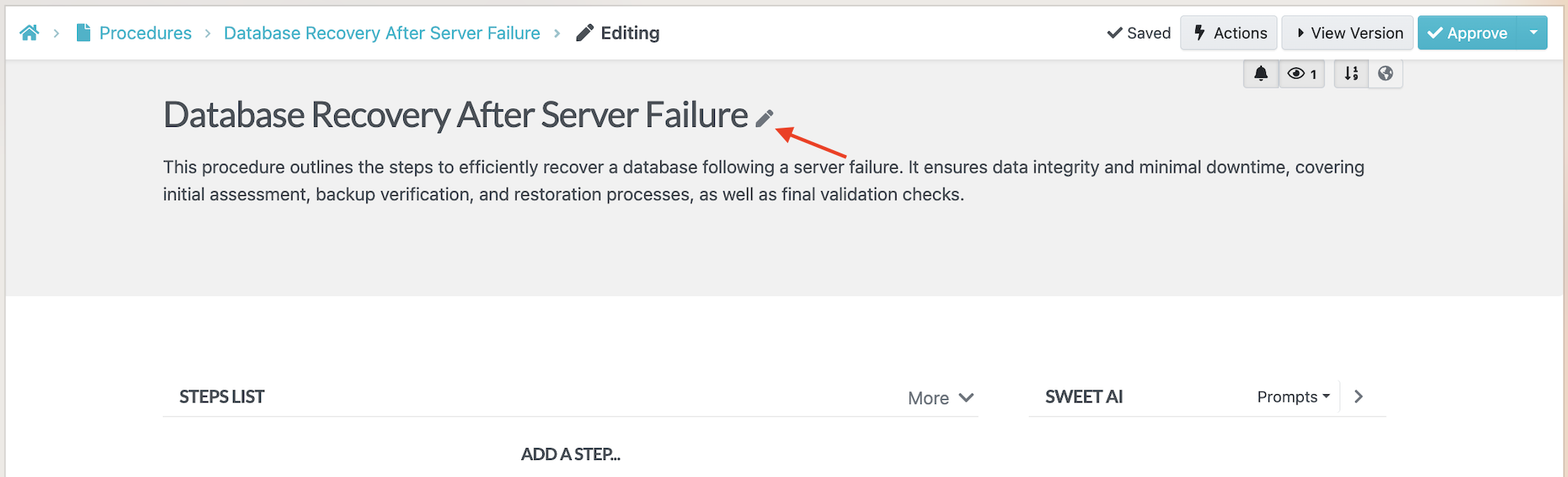
- Expand steps with detailed descriptions or examples. You can also use SweetAI assistance to rewrite or rephrase sections for better clarity.
You can also use the prompt feature for quick and easy edits.
Step 3: Customize Your Manual
Runbooks often involve multiple possible outcomes. SweetProcess lets you:
- Drag and drop steps to reorder them logically.
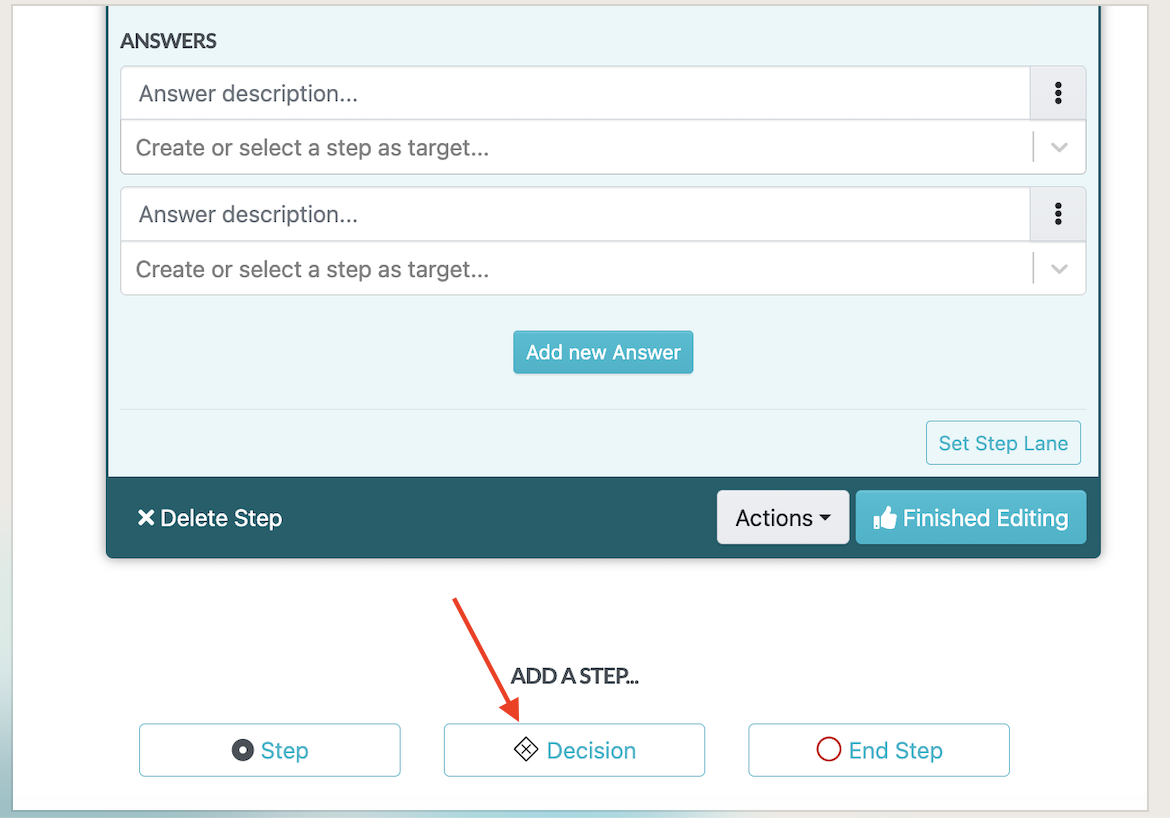
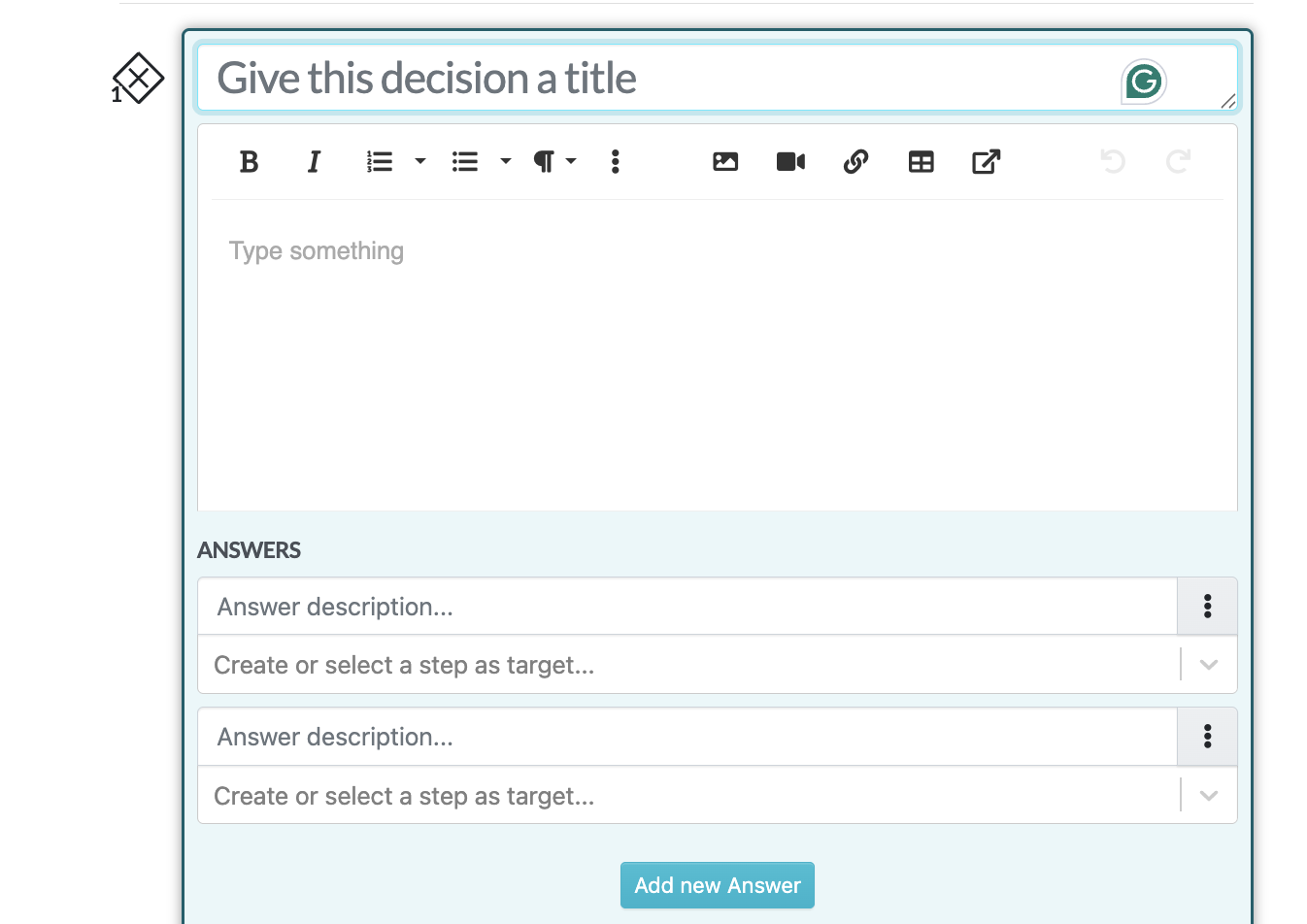
- Convert a step into a Decision (e.g., “If server is unresponsive, reboot; if not, escalate to network admin”).
Convert steps into an Ending when the workflow is complete.
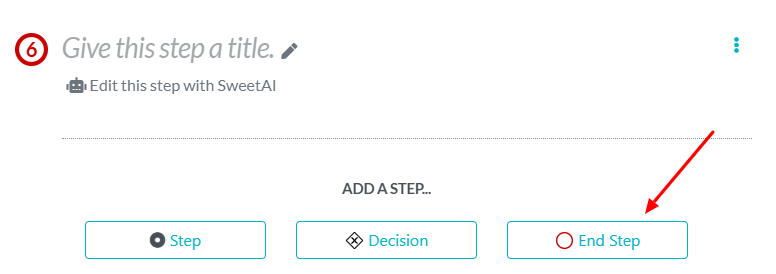
This flexibility allows your runbook to mimic real-world troubleshooting, not just linear processes.
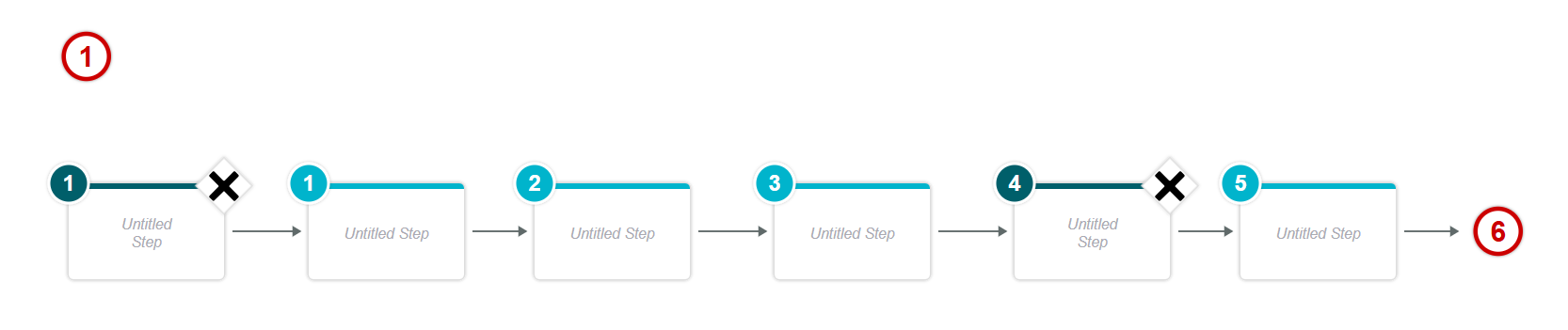
Step 4: Print and Download the Manual Flowchart
Complex IT workflows can be hard to follow. With a single click, SweetProcess enables you:
- Print it for training sessions.
- Download it as a PDF for compliance or audits.
- Use it in incident response drills for quick role assignments.
This makes your runbook far more accessible for both technical and non-technical stakeholders.
Step 5: Approve and Share the Manual With Your Team Members
Once finalized, assign the runbook to team members directly inside SweetProcess. You can:
Request managerial approvals before it goes live.
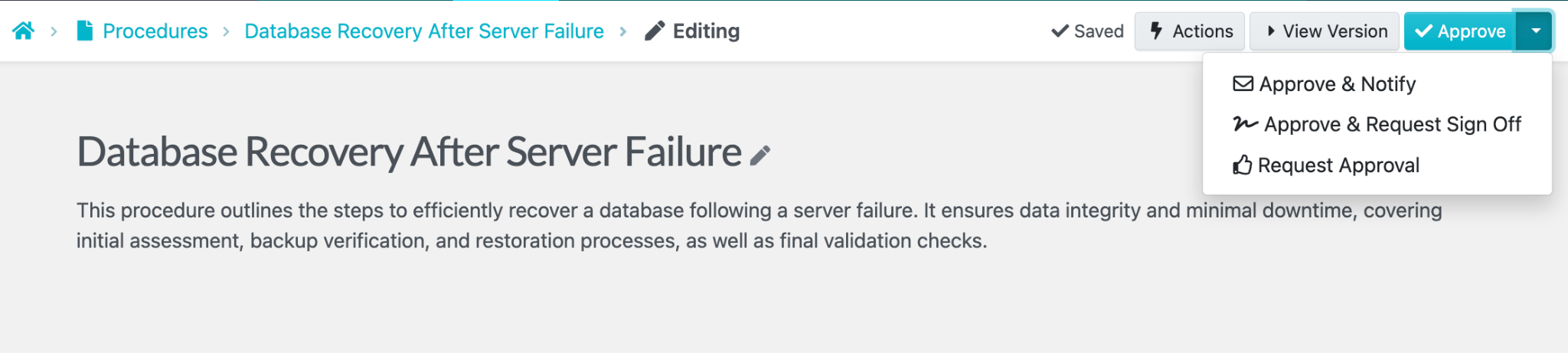
Everyone always sees the latest version, ensuring no confusion during critical incidents.
You can even set up sign-offs to ensure team members have read and understood a procedure. To do this, go to the Actions button on the procedure you want to request sign-off on, then select “Request Sign Off.”
Version Control for Runbook Updates
Runbooks evolve as systems change. SweetProcess automatically tracks every edit:
- View version history.
- See who made changes.
- Roll back to earlier drafts if needed.
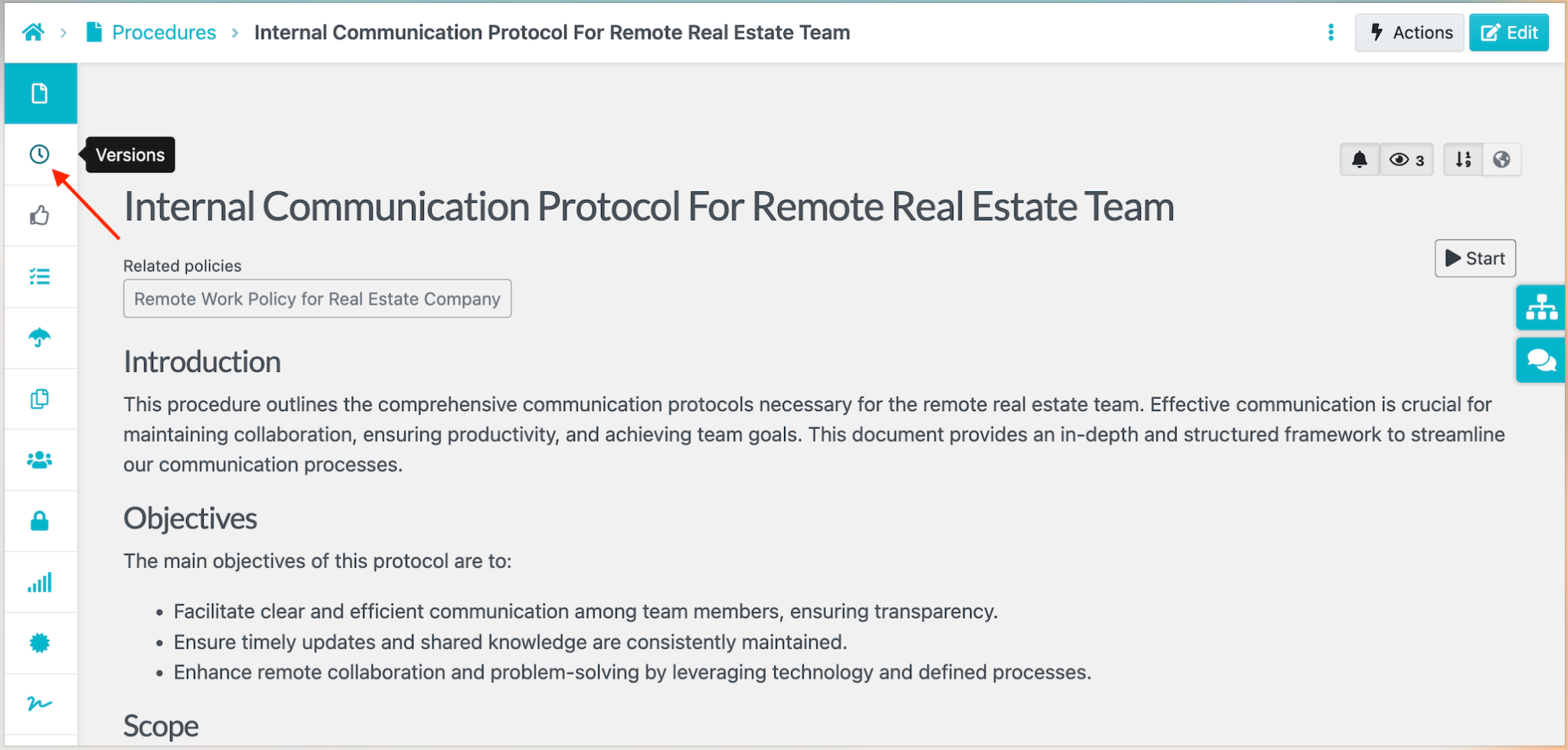
All you have to do is open the runbook document you want to view.
Once the runbook page loads, click the icon below to open the version history sidebar, then select the draft of the runbook you want to approve. This lets you track updates, compare past versions, and ensure your team is always following the most accurate instructions.
Format Your Manuals for Clarity and Readability
A runbook is only as effective as it is easy to follow. With SweetProcess, you can format your runbooks using simple but powerful tools:
- Add headers and subheadings to clearly organize complex workflows.
- Use bold, italics, or bullet points to highlight critical steps or warnings.
- Apply proper spacing to make step-by-step actions easy to scan under pressure.
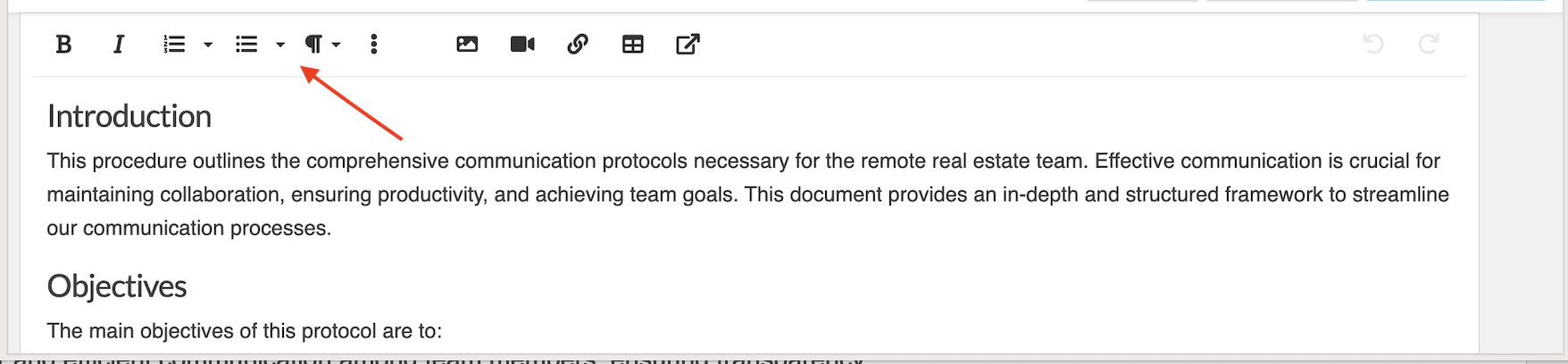
Add and Edit Multimedia Inside Your Runbooks
Not every IT issue can be explained with text alone. SweetProcess lets you enrich your runbooks with multimedia:
- Add screenshots of dashboards, server logs, or error messages.
- Embed videos to demonstrate step-by-step incident responses.
- Insert tables for IP addresses, scripts, error codes, or escalation contacts.
This ensures that even under time-sensitive conditions, your team has visual guidance alongside written instructions.
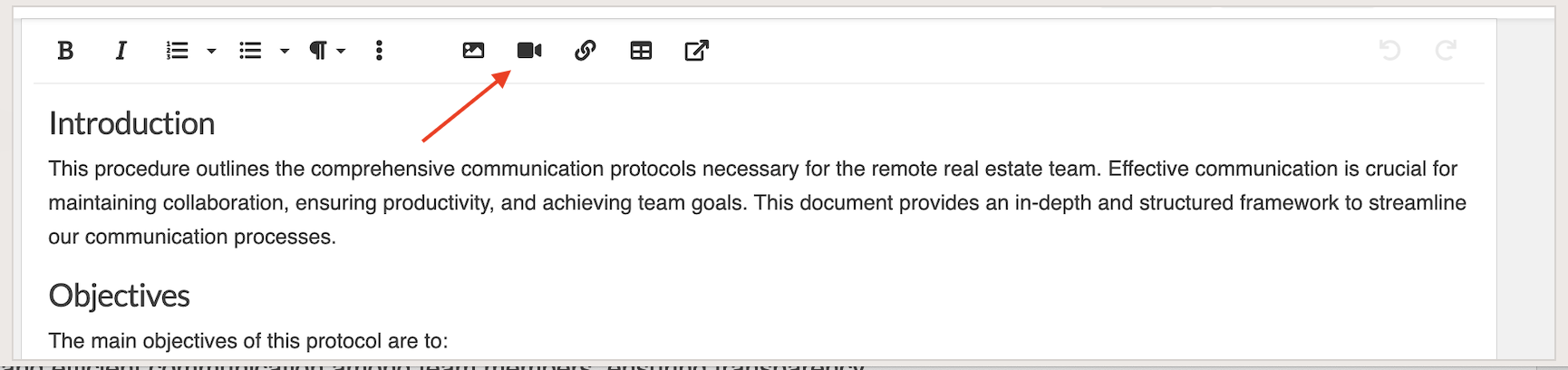
Link Runbooks to Related Processes, Policies, or Training Materials
IT operations rarely happen in isolation. SweetProcess helps you keep everything connected by linking runbooks to:
- Related incident response procedures
- Compliance policies or regulatory documents
- Training materials for new team members

This way, team members can quickly access everything they need without losing context, keeping knowledge centralized and scalable as your documentation grows.
Want to see how SweetProcess can simplify your runbook management and reduce downtime during incidents? Start your 14-day free trial today, here!
Rundeck
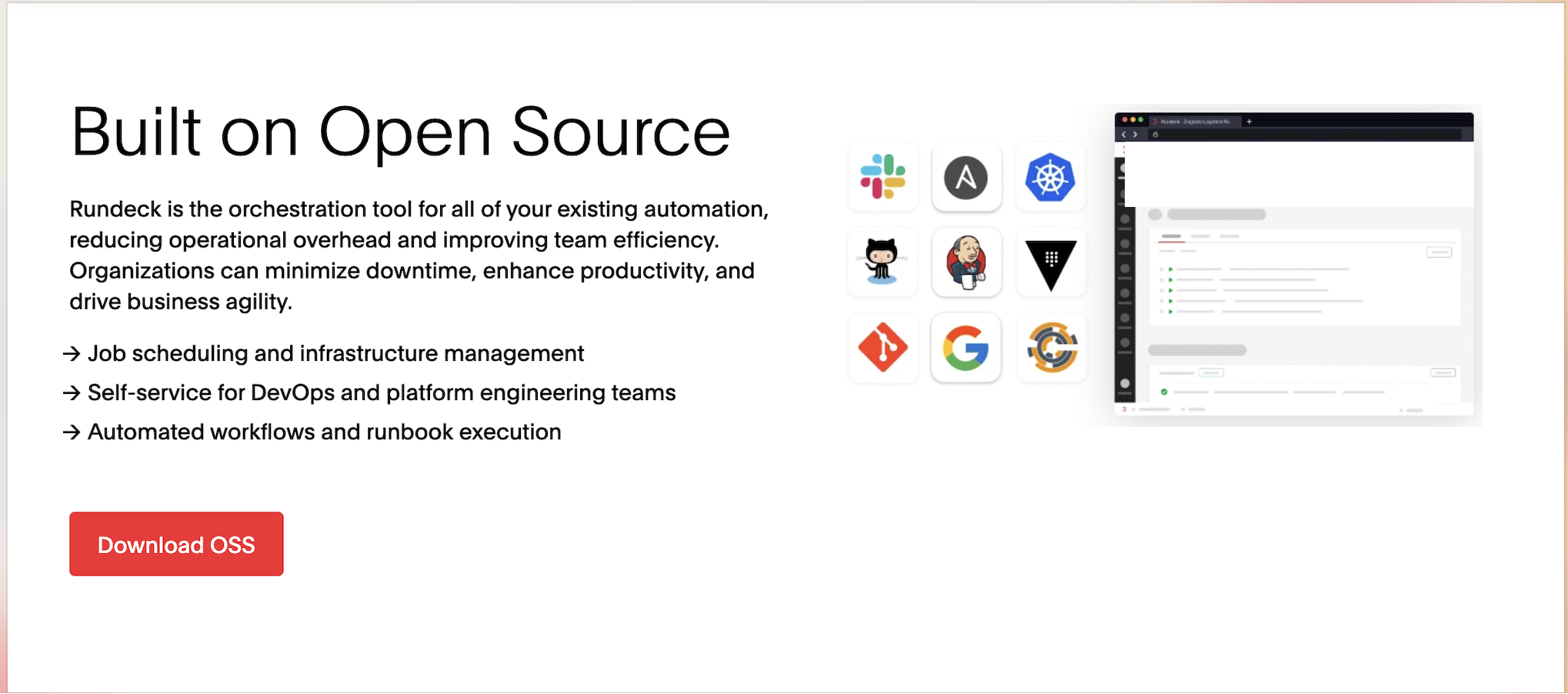
Image source: Rundeck
Features
Rundeck is an open-source automation service that enables self-service operations, job scheduling, and orchestration across various systems. It’s especially beneficial for DevSecOps teams looking to automate routine tasks and improve efficiency.
Pricing
As of September 15, 2026, Rundeck offers a free open-source community version, allowing you to automate workflows and execute tasks without any cost. For teams that require advanced features and enterprise-level support, you have to request a custom quote from the team. The price varies significantly depending on your organization’s specific needs and scale.
What Makes Rundeck the Perfect Runbook Software?
- Job Scheduling and Infrastructure Management: Rundeck allows teams to automate jobs and manage infrastructure efficiently, making it an excellent choice for DevOps teams. However, configuring complex workflows can be challenging for beginners.
- Self-Service for DevOps and Platform Engineering Teams: Rundeck empowers teams to execute tasks independently, which reduces bottlenecks.
- Automated Workflows and Runbook Execution: This enables teams to automate jobs and manage infrastructure efficiently, making it an excellent choice for DevOps teams.
Redwood
Image source: Redwood
Features
Redwood is an automation platform offering job scheduling, workload automation, and real-time monitoring. It’s great for teams looking for a scalable and comprehensive solution.
Pricing
As of September 15, 2026, Redwood’s pricing is custom-based, depending on the scale and needs of the organization. You will need to contact the company directly to obtain a price or quote.
What Makes Redwood the Perfect Runbook Software?
- Feature-Rich Platform With Built-in Observability: Provides extensive monitoring tools for better visibility, which helps teams proactively address issues. However, the feature-rich nature might require a learning curve for new users.
- Low-Code, Drag-and-Drop User Interface: This makes automation accessible to teams without extensive coding expertise, although more complex tasks may still require technical knowledge.
Cutover

Image source: Cutover
Features
Cutover specializes in orchestrating and automating complex workflows, especially in IT disaster recovery and cloud migrations. It offers a strong combination of process automation and real-time collaboration.
Pricing
Cutover offers a flexible pricing structure based on team size, usage, and required features. As of September 15, 2026, to get a customized quote, you’ll need to consider factors such as the number of users, whether you need built-in automations or third-party integrations, and the advanced functionalities you require.
What Makes Cutover the Perfect Runbook Software?
- AI-Powered Runbooks: Uses artificial intelligence to enhance automation processes.
- Real-Time Visibility and Control: Provides live dashboards, but this might feel overwhelming for smaller teams or those with simpler processes.
Microsoft Azure Automation

Image source: Microsoft Azure Automation
Features
Azure Automation provides cloud-based services for runbook execution, configuration management, and update management. It’s particularly useful for organizations already using the Azure platform.
Pricing
Azure Automation pricing has two main components as of September 15, 2026:
- Initial 30-Day Credit: New accounts get a one-time $200 credit to use on most Azure services during their first month. This can cover your initial automation costs.
- Ongoing Monthly Free Allowance: After the first month, your subscription provides a permanent, free monthly allowance of 500 runbook minutes and 744 watch hours.
Beyond these free units, usage is billed at a low, pay-as-you-go rate.
What Makes Microsoft Azure the Perfect Runbook Software?
- Scalable Cloud-Based Automation: Scales seamlessly to accommodate growing business needs, especially for teams heavily invested in Microsoft services. However, it might be less appealing for businesses that prefer non-Microsoft cloud solutions.
- Integration With Azure Services: The integration with Azure’s ecosystem makes it a no-brainer for existing Azure users, but it may be less useful for teams using other cloud services.
PagerDuty
Image source: PagerDuty
Features
PagerDuty is an incident management platform that integrates runbook automation for efficient IT operations. It includes features like alerting, on-call scheduling, and automation for faster response times.
Pricing
PagerDuty offers a free plan for up to five users. Paid plans start at $21 per user per month for the Professional tier, and the Business tier starts at $41 per user per month, both billed annually. For the Enterprise plan and advanced features such as AIOps, live call routing, and automation, you have to request custom pricing as of September 15, 2026.
What Makes PagerDuty the Perfect Runbook Software?
- Integrated Incident Management: PagerDuty combines runbook automation with incident management, streamlining the response to critical events. While great for high-pressure environments, a solution that combines these features might indeed be more than necessary for smaller teams with fewer critical incidents, potentially adding complexity and cost without significant benefit.
- Extensive Integrations: Offers over 700 integrations, though setting up complex integrations may take some time and technical expertise.
StackStorm
Image source: StackStorm
Features
StackStorm is an event-driven automation platform that connects various systems and triggers automated actions in real time.
Pricing
The core platform is free and open source. StackStorm does not publish enterprise pricing on its website as of September 15, 2026. The enterprise options are available by contacting the vendor.
What Makes StackStorm the Perfect Runbook Software?
- Event-Driven Automation: StackStorm responds to events in real time, enabling immediate action. While it offers flexibility, StackStorm can be challenging to set up and manage, especially for smaller teams. It is a “high-code” solution that requires a strong understanding of Python and its multi-microservice architecture.
- Extensive Integration Support: The tool integrates with a broad range of services, which makes it a flexible option for diverse environments. However, some configuration may be required for optimal performance.
Octopus Deploy

Image source: Octopus Deploy
Features
Octopus Deploy focuses on automating software deployments and operational runbooks, making it a strong choice for DevOps teams. It centralizes deployment workflows, environment management, and routine operations, helping teams ship code faster and improve reliability.
Pricing
As of September 15, 2026, there is a free plan. Octopus Cloud Professional plan starts at $4,330 per year for 20 projects, and Enterprise at $24,600 per year for 100 projects. If you choose Octopus Server, the self-hosted product line, you can use the Free plan, Professional at $2,080 per year, or Enterprise at $15,600 per year. Annual billing is the only option across both lines.
What Makes Octopus Deploy a Good Runbook Software?
- Deployment & Operations Automation: Octopus is built to handle complex deployment workflows and recurring operational tasks like database maintenance, certificate renewal, failover procedures, and incident response.
- Role-Based Access Control (RBAC): Fine-grained permissions ensure secure management of deployments and runbooks, letting teams safely self-service common tasks without compromising security.
- Environment-Aware Execution: Easily promotes deployments across dev, test, and production environments with approvals and compliance checks.
Splunk

Image source: Splunk
Features
Splunk provides analytics-driven IT operations with real-time monitoring, machine data analysis, and automation.
Pricing
As of September 15, 2026, Splunk’s pricing is based on the features you need. You’ll need to request a custom quote.
What Makes Splunk a Good Runbook Software?
- Advanced Data Analytics: Provides powerful insights for operational intelligence, although its complexity may be overwhelming for smaller teams.
- Real-Time Monitoring: Offers continuous monitoring to catch issues before they escalate, but this may require extensive setup to get the most out of it.
Selecting the right runbook software is crucial for automating IT operations and improving team efficiency. Whether you’re looking for simple task automation or advanced event-driven systems, the tools listed above can help you streamline your operations. However, it’s essential to evaluate your team’s specific needs to ensure you’re choosing the best fit.
Ready to streamline your operations? Start your 14-day free trial with SweetProcess today!
How SweetProcess Simplifies Runbook Management
Managing incident response and recurring operations can be chaotic when your team is juggling multiple tasks and unexpected problems at once. Here is how SweetProcess helps you build, maintain, and share runbooks your team will actually use.
Document the Incident Resolution Guide for Expected and Unexpected Scenarios
When an incident occurs, whether planned or unplanned, your team needs to act quickly and follow a set of proven steps to fix the issue. SweetProcess allows you to document these procedures in a clear, easy-to-follow format. Whether it’s a server crash, a security breach, or a simple system update, you can ensure that everyone on your team knows exactly what to do.
For example, CloudTech24, an IT service provider, used SweetProcess to document its incident response process. Before SweetProcess, the team was dealing with chaos, having to figure out procedures on the fly. After integrating SweetProcess, their response time improved, and their teams were able to handle incidents smoothly, without confusion.
Automate Workflows
Repetitive tasks can eat up valuable time and lead to human error. SweetProcess lets you automate workflows, so your team doesn’t have to repeat the same actions over and over. By automating key processes like backup management, routine maintenance, or system updates, SweetProcess ensures that tasks are completed correctly and on time, every time.
Take Next7 IT, for example. By automating their runbook tasks in SweetProcess, they drastically reduced manual work, freeing up their team to focus on more strategic, high-value tasks. The result? Faster operations, reduced errors, and a more productive team overall.
Integrate the SweetProcess API With Other IT Tools
SweetProcess doesn’t work in isolation; it integrates seamlessly with other IT tools you already use. When you integrate with the SweetProcess API, you can connect your runbooks to various platforms like ticketing systems, monitoring tools, and cloud services. This ensures that information flows effortlessly across your entire tech stack, improving automation and reducing manual updates.
Collaborate With Team Members on Your Guides and Tasks
Runbook management isn’t just about creating procedures; it’s also about teamwork. SweetProcess makes collaboration easy, enabling your team to work together on guides, tasks, and incident resolutions in real time. You can share feedback, assign tasks, and update procedures as a team, ensuring everyone stays on the same page.
Want to see how SweetProcess can transform your team’s runbook management? Sign up for a free trial today and discover how our platform can simplify your operations, improve incident response, and boost team efficiency. No credit card required!
Why Your Company Needs Runbook Software
It’s no longer just about having a set of instructions; it’s about transforming those instructions into automated workflows that save money, reduce mistakes, and keep operations running smoothly.
Let’s look at why runbook software is such a powerful tool for your company:
Equip Your Team for Unexpected Incidents
When something bad happens, like a server going down or security problems, runbook software provides clear steps, saving them time from figuring things out. This gets things back to normal faster.
Faster Incident Resolution Time
Your team doesn’t need to guess or search around for what to do. They can follow the steps and fix problems faster, reducing downtime.
Ensures Consistency Across Processes
A runbook makes sure everyone does things the same way every time. That consistency helps if you must follow safety rules or standards. It also keeps track of who did what, which could come in handy during audits.
Aids Automation of Repetitive IT Tasks
Some IT tasks happen over and over. Runbook software can automate these, so people don’t have to do them manually each time, reducing errors and freeing team members up for more important work.
Improves Customer Satisfaction
Customers don’t like waiting when things break. Faster fixes, fewer mistakes, and more reliable systems mean happier customers. Good runbooks mean less downtime, which helps maintain trust.
Enhances Collaboration
Runbook software ensures everyone knows the process, who does what, and when. That means fewer mix-ups, smoother hand-offs, and better teamwork.
Want your team to react well to incidents, stay consistent, and make customers happier? Sign up for a free trial of SweetProcess today and see how runbook automation can transform the way your company handles operations.
How Teams Keep Runbooks Current
Here’s how to keep your runbook updated at all times:
- Assign an owner: Every runbook should have someone responsible for keeping it accurate. The role of this team member is to make sure the document still reflects your company’s processes.
- Set a review date: To keep the runbook updated, set a recurring review cycle. This action ensures that you add new changes and remove what’s no longer relevant.
- Review the runbook after incidents: After an incident, identify whether your current runbook has issues. Evaluate whether the escalation path worked and if the runbook covered all the important information needed during the incident.
- Add approval steps: Before a new version goes live, assign it to a team leader or subject matter expert to confirm that all the information is accurate. Policy management software makes it easy to request approvals on your runbook.
- Record acknowledgments: If your runbook is designed for multiple employees or departments, you need a sign-off record to view who has read the current version. These records become important during audits to show compliance.
SweetProcess handles all these core tasks for you on a single platform. Try it here!
Which Runbook Software Should You Choose?
If your team needs runbooks with a clear owner and a record of who read it, SweetProcess, Cutover, or Splunk’s documentation layer are the right category for your business. However, if what you need is a step executed automatically the moment a condition is met, consider Rundeck, PagerDuty, Azure Automation, Octopus Deploy, or StackStorm, and expect a steeper technical setup.
Why SweetProcess: It documents runbooks and SOPs in one place, tracks who approved and who acknowledged each version, and connects to related processes and policies, without pretending to execute automation it does not perform.
Sign up for a free trial to see how it fits your team. No credit card required.
FAQs
How much does Rundeck cost?
As of September 15, 2026, Rundeck’s open-source version is free. If you want to get Rundeck’s Enterprise plan, you can request a quote from the team.
What is a runbook example?
A failed payment run is a good example. The runbook can start with the trigger that identifies the payment failure, provide steps based on the failure reason, explain when to retry the payment, identify when to escalate, and tell the owner how to record the outcome.
How do I create a runbook?
Start by identifying the situation that triggers the runbook. Then document the steps in order, including decision points, failure paths, escalation instructions, the expected result, the owner, and a review date. Finally, test the instructions against the real process before publishing them, then give the approved version a central home where the team can access and update it.
What is a runbook vs an SOP?
An SOP describes how a routine task is done every time. A runbook is what you open when something specific has happened and gives the employee a defined response. Both can live in the same documentation system. If your team already has good SOPs, those procedures can provide much of the information needed to create useful runbooks.
What does runbook software cost overall?
It ranges widely. SweetProcess starts at $99 per month for documentation. Execution-focused tools range from free open-source options, while PagerDuty paid plans start at $21 per user per month, billed annually. For most runbook tools, you need a customized quote based on your business needs.