Last Updated on September 28, 2026 by Owen McGab Enaohwo
A missed inspection or an undocumented procedure has real consequences. It affects your safety record and your day-to-day operations, and it hurts most when your team is still working from paper and memory. Keeping inspection reports and safety records in one place helps prevent incidents and gives everyone the same version of how the work is done.
SafetyCulture, now called Mitti and originally known as iAuditor, is one of the best-known platforms in this space. It provides an operations platform for inspections, training, compliance, and quality management. It is not the right fit for every business or every use case.
The right replacement depends on the job you need it to do. Field inspections, safety reporting, and company-wide procedure management call for different capabilities. These 15 alternatives are grouped around those needs so you can compare the options against your actual work and choose a tool your team can use consistently.
Before you compare a single tool, it helps to see what you are actually solving for. Start your free 14-day trial of SweetProcess and test it against your operations.
Key Takeaways
- SafetyCulture, formerly iAuditor, rebranded to Mitti on August 11, 2026, expanding from safety and inspections into a wider operations platform.
- These tools are not interchangeable, and the SERP treats them as if they are. Match the tool to the job: field inspections, safety audits and reporting, procedure documentation, or compliance record keeping.
- SweetProcess and SafetyCulture both publish a full price list on their own websites. Several tools on this list publish partial pricing, and several publish none. Every price below was checked on the vendor’s own site and is stamped with the date.
- SweetProcess is built for both small and enterprise teams, and it is where to look first when the problem is documentation rather than inspection. Process Street and ProcessMaker suit small teams that need workflow automation. Scribe and Whale suit mid-sized teams. Zavanta, Kissflow, PolicyTech, and MetaCompliance are aimed at large enterprises. Sign up for SweetProcess here.
Table of Contents
- What is SafetyCulture?
- iAuditor Alternatives: What Changed and What to Look For
- SafetyCulture Competitors and Alternatives at a Glance
- Which SafetyCulture Alternative Fits Your Job
- The Best SafetyCulture Alternatives
- Best SafetyCulture Alternatives for Small Businesses
- Best SafetyCulture Alternatives for Medium-Sized Companies
- Best SafetyCulture Alternatives for Enterprises
- The Benefits of Documenting Safety Processes
- Digitizing Safety Management Processes
- How SweetProcess Can Help
- Conclusion
- FAQs
What is SafetyCulture?
SafetyCulture, now called Mitti, is an operations platform that helps businesses manage workplace safety and other operational tasks. The company launched in 2004, giving organizations basic safety documents on a phone. It went by the name iAuditor until November 2022, when it rebranded to SafetyCulture.
On August 11, 2026, SafetyCulture rebranded again as Mitti, moving its positioning beyond safety and inspections into a broader operations platform. Teams run shifts and sites with the tool, conducting inspections and collecting information in the field that head office can act on.
As a mobile-first tool, SafetyCulture lets frontline teams capture what they see in real time. A worker can take a photo in the field, upload it, and use the AI assistant to turn it into a checklist the rest of the team can open. During inspections, the captured information becomes a report with clear steps and to-do lists.
SafetyCulture is also strong at task management. The prebuilt dashboards give managers a view of task progress across locations. Creating and assigning tasks is quick, and your team can see due dates, chat, and work in the same place.
The centralized dashboards suit distributed teams because they pull data from across the company’s workflows. You can look at training and onboarding data next to inspection reports, spot an issue, and assign it to the right person without switching tools.
That said, user reviews suggest that documenting policies and procedures with SafetyCulture is not straightforward. Reviewers say advanced features take a long time to configure. Others report that the inspection templates are not always intuitive and carry a learning curve. Advanced reporting is limited without a paid plan.
The complaints cluster in two places: how much there is to configure, and cost. Here are the pros and cons.
Pros
- Mobile-compatible platform
- Offline mode
- Wide third-party app integration options
Cons
- Steep learning curve
- Feature complexity
- Ongoing updates that require retraining
- Complex dashboard customization
SafetyCulture solves a different problem from the one you may actually have. If yours is documenting how the work gets done, SweetProcess is built for exactly that. Start your free 14-day trial today.
iAuditor Alternatives: What Changed and What to Look For
If you are searching for iAuditor alternatives or iAuditor competitors, you are searching for a product that has changed its name twice. iAuditor launched in 2004 as a mobile inspection app. It became SafetyCulture in November 2022, and SafetyCulture became Mitti on August 11, 2026. Same company, same core inspection product, three names.
That history matters, because the software you remember as iAuditor was a focused checklist and inspection app. What you get today is a broad operations platform with training, task management, dashboards, and an insurance arm attached. If you liked iAuditor because it was simple, the thing you are looking for is not the current version of it. It is a smaller, more focused tool.
People searching for iAuditor alternatives usually want one of four things:
- A mobile inspection app that works offline, tags photos with location, and produces a report at the end. Lumiform, Fulcrum, and TrueContext are the closest matches.
- A lower per-seat price or tailored solution for field teams filling in forms.
- A way to write down the procedure itself, not just the result of the inspection. That is a different category of product, and SweetProcess is where to start.
- A single record of who read and approved which version of a policy. PolicyTech, DynamicPolicy, and MetaCompliance are built around that.
Be honest about which of those four you are solving. The rest of this page is organized that way.
SafetyCulture Competitors and Alternatives at a Glance
| Tool | Best For | Primary Job | Pricing (as of September 5, 2026) | Where It Beats SweetProcess |
| SweetProcess | Documenting procedures, policies, and processes | Documentation | $99/month for up to 10 users; $495/year for up to 5 users | All-in-one platform. Flat pricing with no feature tiers |
| Zavanta | Enterprises digitizing operational knowledge | Documentation | Custom quote. Request for demo | Structured content overlay designer for complex documents |
| Kissflow | No-code workflow and app design | Workflow automation | Schedule consultation for pricing | No-code app building beyond process documentation |
| ComplianceBridge | IT-heavy compliance teams | Compliance record-keeping | Custom quote, contact vendor | Centralized policy distribution at enterprise scale |
| Process Street | Teams needing multi-approval workflows | Workflow automation | Custom quote required | Multiple approval chains and scheduled recurring workflows |
| ProcessMaker | Technical teams building custom workflow logic | Workflow automation | Now part of Decisions; quote only | Deep conditional logic for complex approval routing |
| PolicyTech | Large enterprises needing policy governance | Compliance record-keeping | Custom quote, contact vendor | Microsoft 365 integration and NAVEX ecosystem access |
| TrueContext (ProntoForms) | Field teams pulling data from ERP or CRM systems | Field data collection | $400/mo (Digital); custom above. | Native ERP and CRM integrations for mobile form data |
| MetaCompliance | Cybersecurity and compliance training at scale | Compliance training | Custom quote, contact vendor | Phishing simulation and cybersecurity training modules |
| DynamicPolicy | Multi-language policy distribution | Compliance record-keeping | Custom quote, contact vendor | Built-in multi-language policy support |
Which SafetyCulture Alternative Fits Your Job
These tools are not interchangeable. Some are built for field inspections, some for procedure documentation, and some for safety audits or compliance record-keeping. Buying the wrong one costs you months.
Here is what each group does best.
Field Inspections
If your team goes to a site and checks it against a standard, you need a tool built for that motion: photo capture, offline mode, GPS tagging, and a mobile-first interface. Lumiform, Fulcrum, and TrueContext (previously ProntoForms) are the strongest alternatives here. All three are built around mobile inspection and field data.
Safety Audits and Compliance Reporting
If the job is producing reports from structured checklists and routing them for approval, look at TrueContext and Process Street. Both give you approvals, reporting, and workflow management that goes past documentation.
Procedure Documentation
Some tools are built for companies that want their SOPs, policies, training material, and processes in one place. SweetProcess is where to start if you want procedures written down for new hires and for review. It turns your steps into process maps and tasks that everyone can open.
Compliance Record Keeping
If you work in a regulated industry, you need to distribute policies and record who has signed off on them. At scale, you also need strict version control, which is what PolicyTech, DynamicPolicy, and MetaCompliance are built for. They are also heavier and more expensive than a small or mid-sized team usually needs.
You do not need to guess whether SweetProcess fits your team. Sign up, write up a process you already run, and see the result in minutes. Try it free for 14 days.
The Best SafetyCulture Alternatives
Now that you know which tools suit which job, here is each one in detail, with what it does well and where it gets in your way.
SweetProcess
SweetProcess is a platform for writing, storing, and maintaining procedures, processes, and policies. It is built for creating, collaborating on, and refining the way your business works.
The standard operating procedure builder is visual. SweetProcess automatically generates a process map from your steps, so everyone on the team can see the order of work.
You can also run your team from inside SweetProcess, emailing and assigning tasks to individual team members through the web or mobile app. SweetProcess records who signed off on which version of a document and when.
The real advantage is the low learning curve. Say you hold a round table and review your safety needs. Your compliance manager reports that, according to the Bureau of Labor Statistics, material moving and transport occupations have the highest number of workplace fatalities.
The team proposes assessing safety performance and improving safety habits among your logistics fleet workers.
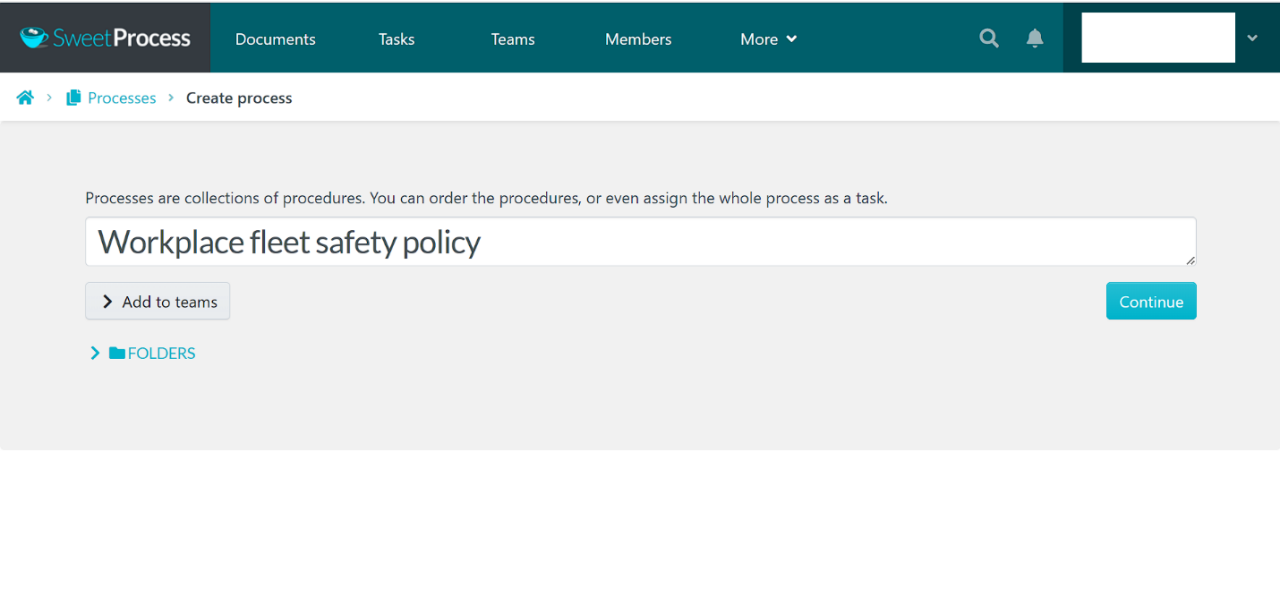
Your team picks SweetProcess and sets out to write a workplace fleet safety policy. Here is how to have that policy ready in minutes.
- Go to the SweetProcess website and click the Try it Free tab at the top.
- Enter your email address to start a 14-day trial with no credit card.
- Verify your email address and log in to your SweetProcess account.
- Select the departments you want to share your policies with on the “Add teams” page.
- Use the “Suggest policies and procedures” for a business tab to generate a template automatically. You can also upload existing Word documents to centralize your procedures.
- The AI content generator drafts your process or policy in about 60 seconds and gives you a process map of the draft.
- Add your images and link the policy to related processes.
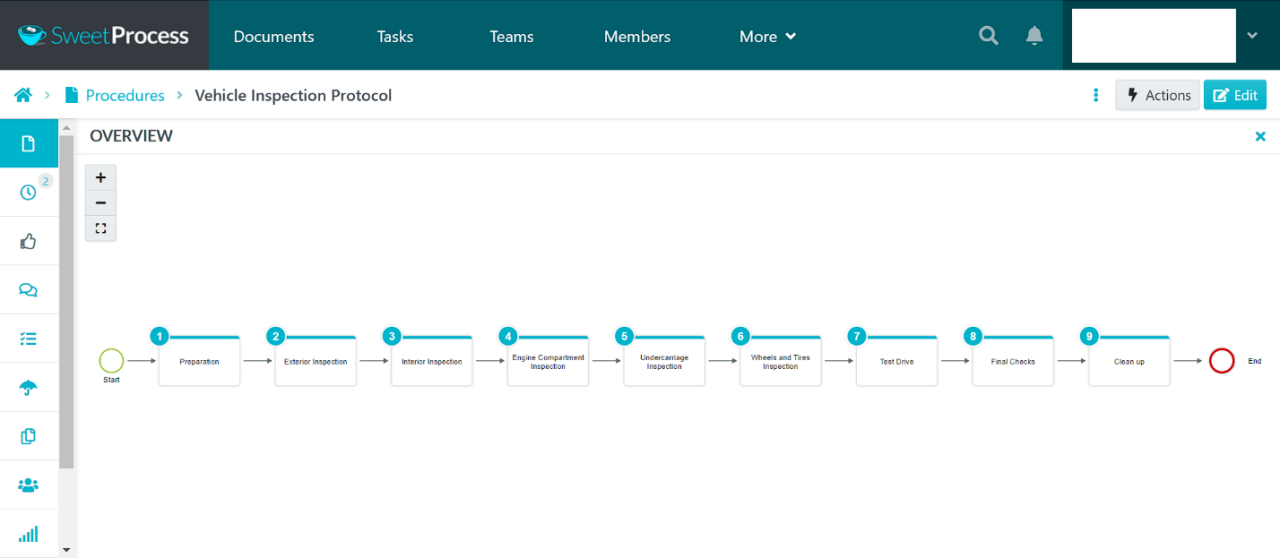
- Share it with your team for revision and review. Then approve it, publish it, and share it with the rest of the fleet team.
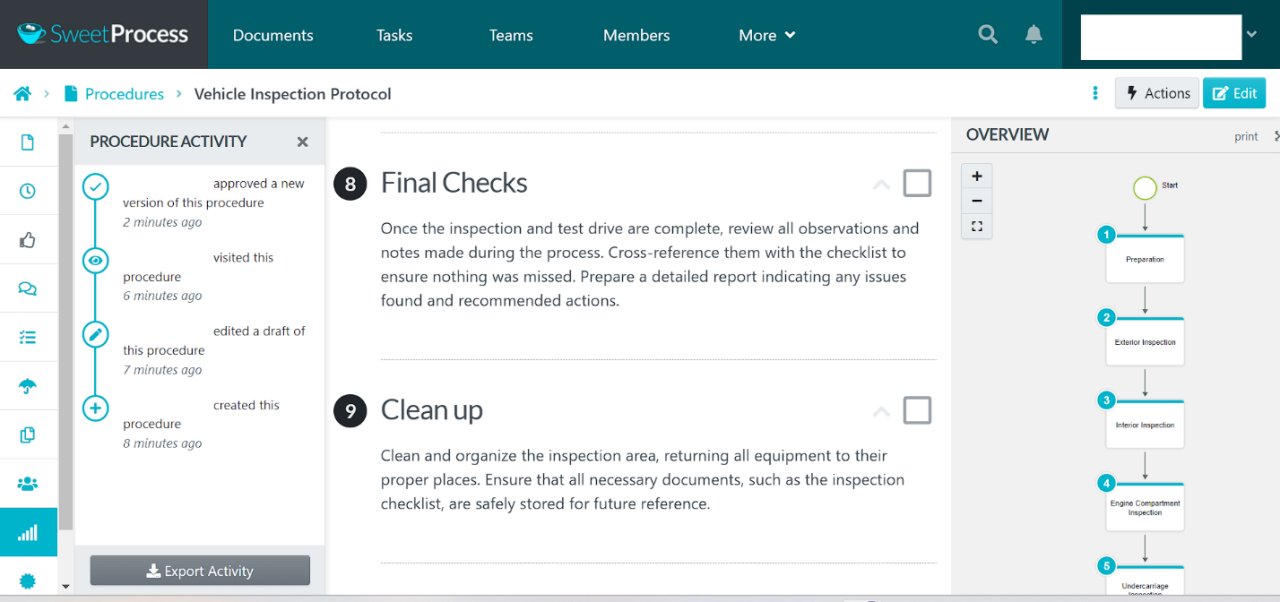
- You can also start a policy from scratch on the SweetProcess dashboard. Click the “Processes” tab.
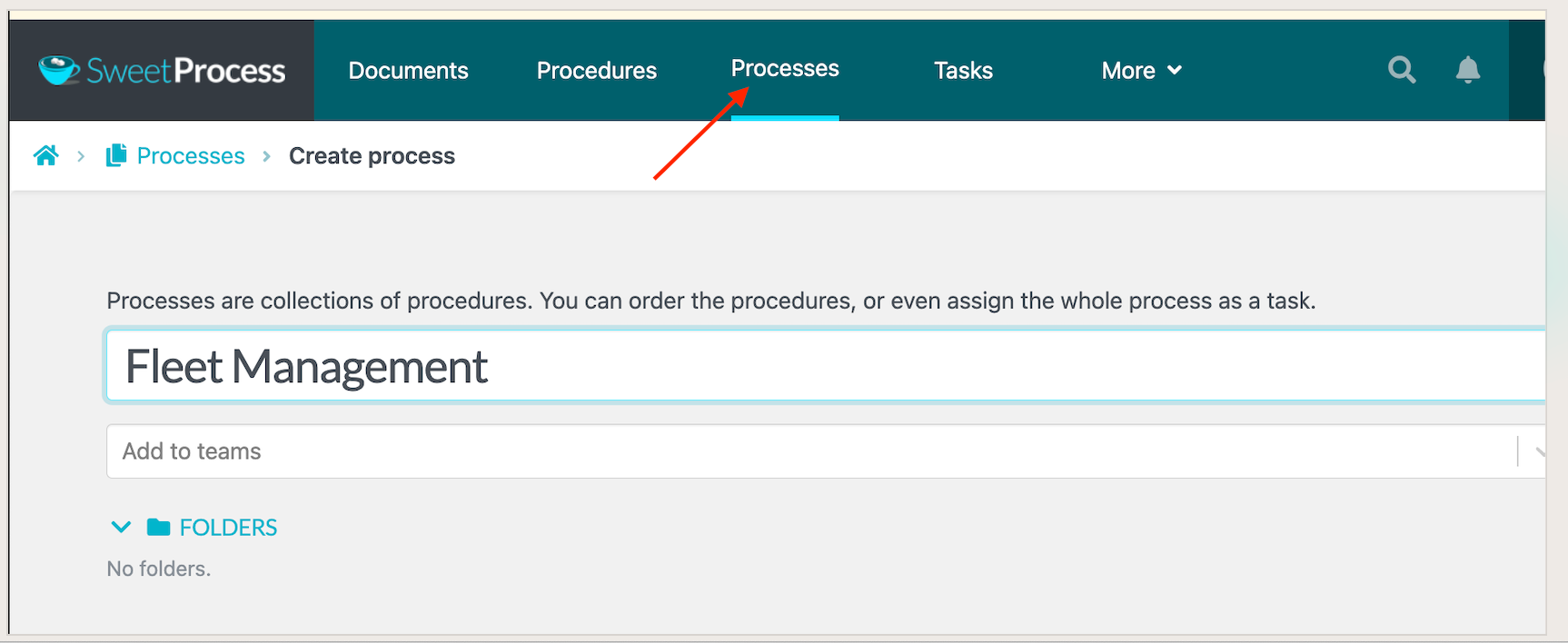
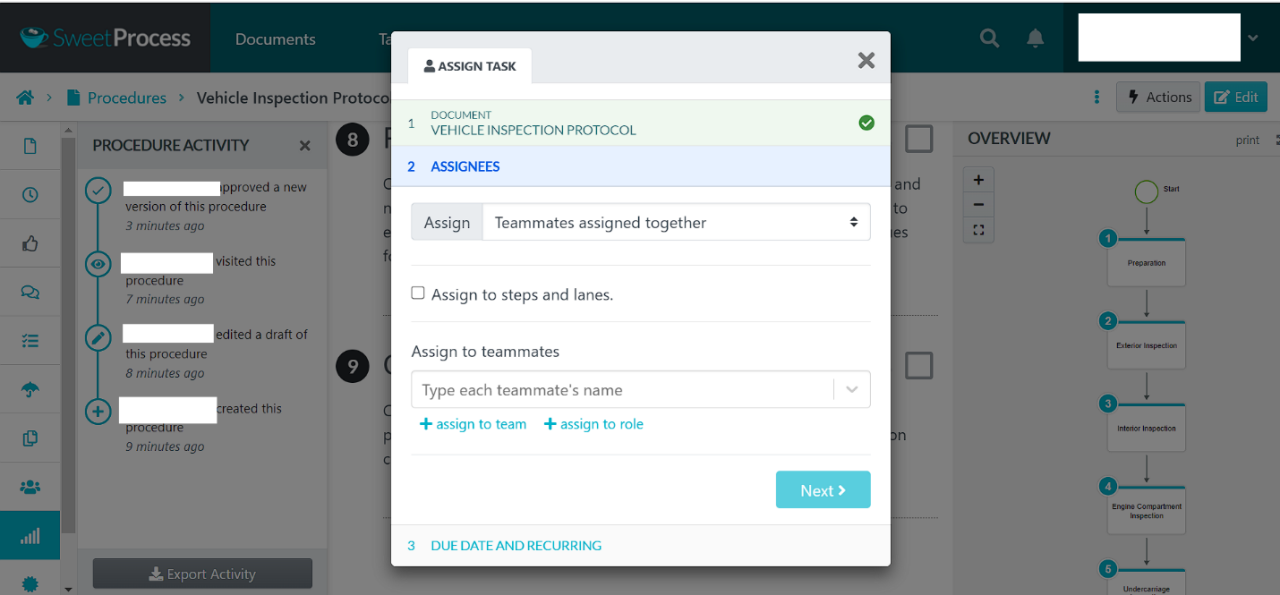
- Add the process title and click Continue. Click Write with SweetAI, edit what it gives you, then click Approve. Use the Procedure Activity and Review tabs to see what changed and who reviewed it. Then assign it to your team.
- Use the Actions tab to export your policy as a PDF, or add it to a knowledge base.
- Create a fleet safety knowledge base by choosing the Knowledge Base option under the “More” tab.
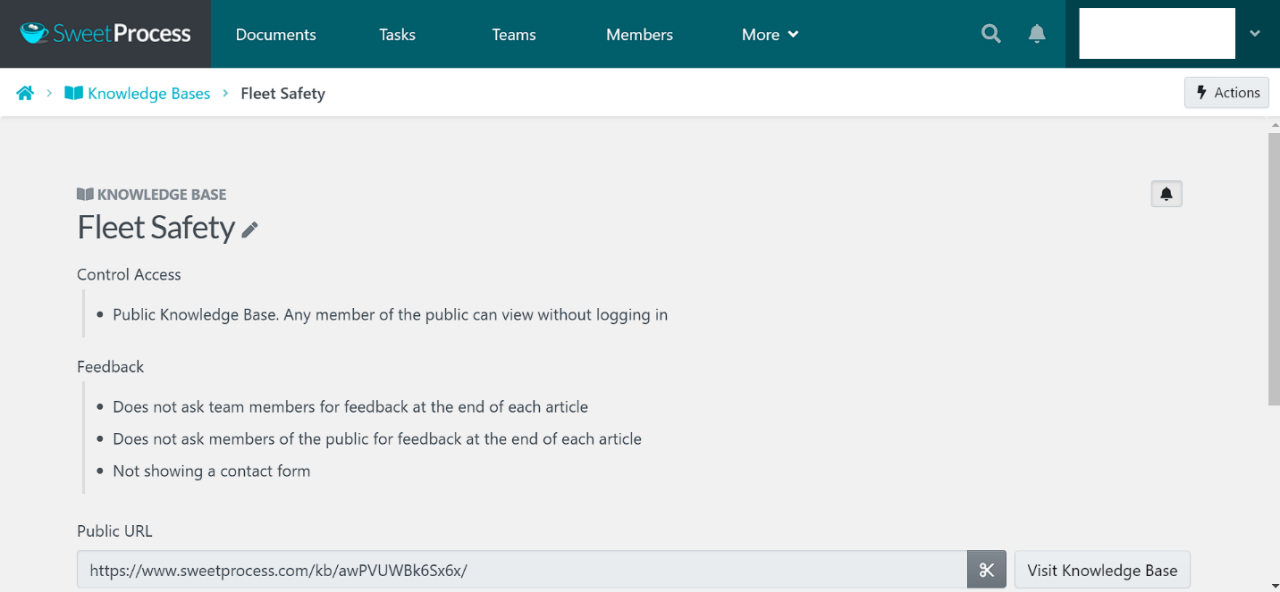
A knowledge base is how you stop depending on tribal knowledge. It means your employees can find safety information when the safety manager is out, which is what Stephanie Chavez of Zen Media found.
Stephanie, CMO of Zen Media, turned to SweetProcess when her operational structure depended too heavily on what individual people happened to know. Zen Media’s knowledge bases now support onboarding and quality control by keeping everyone on the same document.
By having everyone on the same page with SweetProcess, they can have a more efficient and predictable result, says Stephanie.
Unlike SafetyCulture, which gives you prebuilt compliance templates to fill in, SweetProcess drafts the procedure itself with AI. Your team points at the area of the business that needs writing down, and SweetProcess produces a first draft to edit.
Other SweetProcess Features
- A screenshot tool and image editor inside the process builder.
- Task management showing each SOP’s due date, review status, and priority.
- Version history tracking every change your team makes to a policy.
- Due dates and reminders that show a team member when a task is coming up or overdue.
- Document duplication, so you do not build every SOP from scratch.
- Customizable navigation to reduce clutter in your dashboard.
- Process maps that turn a written procedure into a chart.
- Team management for assigning tasks and roles.
- Video and image embedding inside processes and policies.
- Two-factor authentication.
- Single sign-on for authenticating multiple users with one set of credentials.
- Email and phone support.
- PDF and Word export.
- A public API and more than 1,000 integrations through Zapier.
Zavanta
Zavanta, from Comprose, is a SafetyCulture alternative for digitizing operational knowledge. At its core is a database that captures and stores content in structured fields. Its content designer works very differently from SafetyCulture or SweetProcess. When you log in, you get Sections, Objects, and Properties tabs, and the Sections tab holds the content overlay designer.
To create a process in Zavanta, describe it in the Summary tab. Then assign the process an authority scope, including fiscal managers or performance targets, and set permissions for team members.
Zavanta also has feedback surveys and comments. Employees who have read your procedures can sign off using the reverify feature, which records that they have read and understood them.
Zavanta’s collaboration features support teams working on policy documents together, with progress tracking and task assignment. It has version control and approval workflows for critical documents, plus a knowledge hub and analytics.
Pros
- Process version control
- Reporting and analytics
- Audit trail
Cons
- Zavanta has a complex database system and user interface
- Bugs when importing images and formatted text
- No free trial
Kissflow

Image source: Kissflow
Kissflow is an enterprise-grade workflow management platform. It digitizes and automates how processes, policies, and procedures get created, and it also supports no-code application design.
Forms are central to how Kissflow builds a process. When you log in, you get Design form, Define workflow, Change permissions, and Publish app.
Use the design form feature to create a process. Sections let you segment the process and move segments around. Drag and drop your content fields, then move to Define Workflow.
Under “Define Workflow,” you add process steps and assign tasks and permissions. Kissflow’s drag-and-drop interface is a pleasure for technical users, but it lacks the ease-of-use features you get in SweetProcess. Compare SweetProcess to Kissflow, and the recurring theme is that Kissflow users struggle with its workflow complexity.
Reviewers say the integrations are complex and the formulas are hard to work out. The breadth of features also makes for a steep learning curve.
Pros
- Hundreds of workflow management templates
- No-code visual editor
- HubSpot, Zapier, Slack, and Mailchimp integrations
- Custom reporting and analytics
Cons
- Expensive tiers
- No free tier
- Basic communication tools
ComplianceBridge

Image source: ComplianceBridge
Like SafetyCulture, ComplianceBridge has been in the procedure and policy management market for a long time. It is feature-rich, and its products generate policies, keep them updated, and distribute them to the right people.
ComplianceBridge’s team is proud of its IT heritage, and it shows. This compliance platform is built for people who are comfortable with IT tooling.
ComplianceBridge automates policy and procedure distribution well. But your employees will need to work in HTML and live with dated formatting tools to get documents looking right, which is painful even for technical staff.
You will lean on ComplianceBridge customer service, and by most accounts they are responsive. Even so, expect duplicate tooling to creep in when your team is not aligned on which platform holds which document.
ComplianceBridge records which employees have read and accepted your policies. Like SweetProcess, the best ComplianceBridge alternative, it stores policies and procedures centrally, so your team can reach documents in the cloud without you buying more internal storage.
Pros
- Responsive customer support team
- Free demo
- Robust administrative features
Cons
- Dated and complex document design tools
- Requires HTML knowledge
- No free trial
- Expensive live training
Process Street
Image source: Process Street
Where SafetyCulture focuses on safety management, Process Street is a business process management platform. You can create, manage, update, and automate processes in it, and your team can use it to build workflows around your safety policies.
Process Street’s strongest SOP tools are its collaborative workflows. You generate team tasks, assign who has authority over what, and watch completion progress on the activity feed. The report builder makes it easier to find and review completed work. Process Street also handles multiple approvals and daily, weekly, or monthly recurring workflows.
SweetProcess and Process Street overlap in several places. Both offer a 14-day trial with no credit card. The Process Street workflow is smooth: create an account and build a new process using its ChatGPT-based Process AI or a blank template.
You can also import a Word or Google Docs process, or customize one of more than 800 Process Street templates. Other features include task permissions, approvals, role assignments, and iOS and Android apps.
Pros
- Easy-to-use interface
- Integrations with more than 1,000 apps
- A 14-day trial with no credit card
Cons
- Complex conditional logic settings
- Heavy reliance on external apps for task automation
- Basic permissions and roles
ProcessMaker
Image source: ProcessMaker
ProcessMaker is now part of Decisions. As of September 5, 2026, processmaker.com redirects to decisions.com, and there is no longer a standalone ProcessMaker website or pricing page. If you shortlisted ProcessMaker for workflow automation, Decisions is where that product now lives, and pricing is by quote. Treat it as a platform evaluation rather than a like-for-like swap for the tools above.
Pros
- Easy-to-use form builder
- Strong customer support
Cons
- Users need coding skills
- No AI content creation
- Highly technical visual editor
- Expensive tiers
Reviews warn that you need some PHP knowledge to get the most out of ProcessMaker.
PolicyTech

Image source: PolicyTech
PolicyTech, from NAVEX, is a procedure and policy management platform. It is an enterprise tool that supports writing workplace policies and reviewing them through an approval and reviewer system. It helps you keep your safety program aligned with the standards and practices your industry expects.
PolicyTech’s best tools are its review workflows and its automatic email notifications on document changes. You can see every team member who has opened or commented on an SOP.
Your team is notified whenever someone comments on, approves, or rejects a document. PolicyTech also opens the door to the wider NAVEX product ecosystem, including compliance and ethics tools.
PolicyTech integrates with Microsoft 365, which lowers friction because employees write policies in software they already know. It then stores documents in a central database for distribution and access.
PolicyTech is not as intuitive as SweetProcess. Your team cannot compare revisions while working on a document, and there is no real-time view of who is editing what, so two people can duplicate each other’s work. Simple jobs like moving a document to a new folder are more tedious than they should be.
Pros
- Access to the wider NAVEX toolset
- Modifiable master documents
- Sample policy templates
Cons
- Poor customer support
- Cumbersome interface
- Buggy document update and versioning
TrueContext (Formerly ProntoForms)
Image source: TrueContext
TrueContext, formerly ProntoForms, is an inspection and audit app that removes paperwork from fieldwork. It is a mobile form builder for installation, maintenance, audit, and emergency response teams.
Its core feature is a drag-and-drop workflow builder that generates customizable forms, so your field staff stops carrying paper to remote sites. Its conditional logic defines question groups and lets you update many template-based forms at once.
Beyond dynamic form sections, TrueContext supports embedding images in forms, and your field team can exchange data and collaborate over SMS. Its standout feature is multi-language workflows and the range of output formats it produces, including DOC, XML, and CSV.
Pros
- Integrates with Salesforce, Dropbox, and Zapier
- Robust and easy-to-use mobile forms
- Easy photo capture and embedding
Cons
- Buggy data-pulling processes
- Complex SOP creation process
- Expensive per-user annual contracts
MetaCompliance
Image source: MetaCompliance
Unlike the other tools on this list, MetaCompliance is an enterprise compliance and cybersecurity platform. The MyCompliance suite includes MetaLearning, MetaPhish, MetaPrivacy, MetaIncident, and Advantage. You can buy a single module rather than the whole suite.
MetaCompliance is a multi-language policy platform aimed at protecting your organization’s reputation. It does that by automating how your policies are written, distributed, and tracked through to delivery.
As a cloud platform, it also gives you dashboards, policy affirmation, and participation tracking.
It supports developing, distributing, and tracking your SOPs, and it reports on whether people have read them.
MetaCompliance’s process documentation tools include a text editor with formatting and styling. It has version control for tracking revisions, plus SOP approval and permissions to structure document review. An analytics dashboard shows engagement rates and review activity.
You can target specific users to raise their awareness of a particular risk or control. Its auditor and regulator reporting tools then show what was distributed and to whom.
Pros
- Interactive cybersecurity and compliance training
- Robust analytics dashboard
Cons
- Limited third-party integrations
- Complex and overwhelming for some users
- Expensive
- No free trial
DynamicPolicy
Image source: DynamicPolicy
DynamicPolicy and MetaCompliance are both, at heart, compliance tools. You can use their policy and procedure training features across a range of mid-sized industries. DynamicPolicy’s cloud tools manage the whole lifecycle of a policy, from drafting to retirement.
It gives your compliance team collaboration, certification tracking, and version control. Its SOP editor, though, is an HTML or Microsoft Word editor. That is basic next to a drag-and-drop builder like SweetProcess. Version control is genuinely useful, showing document history and a full record of changes.
Its tracking and distribution tools mean you do not have to email documents around. Notify teams of documents that need review inside DynamicPolicy, then use the analytics to see who has engaged and who has certified.
Other SOP management tools in DynamicPolicy include a central policy repository and a Quiz Creator. The Quiz Creator checks that your team has actually read the critical documents, and the repository keeps them all in one place.
Pros
- Multi-language support
- Quiz Creator
- Free demo on request
- Central policy repository
Cons
- No pricing on the website
- Cumbersome document upload, with no bulk upload option
You have now seen how SweetProcess compares with the rest of this list. Sign up for your 14-day free trial and find out whether it fits.
Best SafetyCulture Alternatives for Small Businesses
Process Street
Image source: Process Street
Process Street suits small businesses because it is intuitive. Your employees can build or import tasks and workflows without training or IT support. It does not integrate as widely as enterprise platforms, but a small team rarely needs a long list of native integrations, which makes Process Street a workable option.
As of September 5, 2026, you have to contact the sales team for a quote to use Process Street.
Fulcrum
Image source: Fulcrum
Like SafetyCulture and Lumiform, Fulcrum is an inspection management platform. It has a visual drag-and-drop form and workflow builder for mobile forms. Your field team will get good use out of its rich media support and conditional skip logic, which changes the form based on what the inspector answers.
It also has barcode scanning on the Android and iOS apps and automatic GPS capture. You can export data as PDF or CSV, or in a format Google Maps can read. So why is Fulcrum a better fit for a small business than its enterprise peers?
Because it is a growing company and it acts like one. Fulcrum assigns you a support contact and runs weekly video calls during onboarding.
The trade-off is that Fulcrum is still adding features quickly, so your team will keep learning new ones.
As of September 5, 2026, Fulcrum has three pricing plans. Professional costs $43 per user per month and Elite costs $55 per user per month. Each plan requires a minimum of five users per organization. For unlimited users, contact the team about the Enterprise option.
TrueContext (Formerly ProntoForms)
Image source: TrueContext
TrueContext suits small businesses that want to build forms automatically from their ERP, CRM, or EHS systems. It offers a low-code connection to those systems, so real data lands on your dashboard rather than being retyped.
Your managers can track team productivity and see completed inspections in the app. Users have reported that pulling data from multiple sources is buggy.
Unlike SweetProcess, which drafts documents with AI, TrueContext requires you to build each form by hand. Reviewers describe the form creation interface as complex, which will slow down your least technical staff.
TrueContext’s Digital plan starts at $400 per month, billed annually. However, if you want to access more advanced features, you’ll have to request custom quotes for the Intelligent and Elite plans as of September 5, 2026.
PolicyTech

Image source: PolicyTech
PolicyTech works for small businesses because of its Microsoft integration and mobile access, so that any team member can read a safety policy on a phone.
The trade-off is that PolicyTech’s approvals, administration, and review tools are basic, and it offers few document management features, which makes collaboration harder. Search is weak, so your employees will struggle to find the current version of a procedure quickly.
As of September 5, 2026, NAVEX does not publish standard tier prices. You have to email them for a quote.
Best SafetyCulture Alternatives for Medium-Sized Companies
Scribe
Image source: Scribe
Many of the tools on this list are drag-and-drop form builders. Scribe is not. It records your screen, capturing keystrokes and mouse clicks, and turns them into a step-by-step guide with screenshots you can edit.
Your team can then share Scribes in the app or by link. Scribe has a desktop recorder and a web recorder, and it assembles the captured screenshots into a sequence you can follow.
Reviews note that automatic capture is less accurate than building the document yourself, and that editing the captured images is slow, which eats the time the automation saved. Scribe has since added an AI form builder.
As at September 5, 2026, Scribe offers a free plan. Paid plans start at $13 per seat per month, covering five users for the Pro Team Plan. For individuals, you can pay for the Pro Personal plan at $25 per seat per month, both billed annually.
DynamicPolicy
Image source: DynamicPolicy
Like MetaCompliance, DynamicPolicy offers multi-language support, though on a shorter list of languages. DynamicPolicy covers English, Portuguese, Spanish, and French. MetaCompliance covers those plus Russian, Thai, and Chinese. Either way, multi-language support matters once a mid-sized business operates in more than one country.
DynamicPolicy does not offer an API, and its interface does not make bulk importing or customizing documents easy. For pricing, you have to email customer support.
Whale
Image source: Whale
Whale is a knowledge-sharing platform with a clean interface, well-suited to mid-sized teams. You can build playbooks, SOPs, and policies in Whale and use them for training. It gives you a visual editor, AI Assist, and more than 100 templates.
It also has quizzes, analytics, and expert review features, and the Whale app runs on iOS and Android. Whale users have reported problems importing Word or PDF documents, which can break formatting.
Whale integrates with hundreds of apps through Zapier rather than natively, so a Zapier subscription is part of the cost. SweetProcess works the same way, with a public API plus more than 1,000 Zapier integrations, so this is a shared limitation rather than a point of difference. Where SweetProcess differs is scope, covering procedures, policies, and a knowledge base in one place.
Whale’s premium plan starts at $249 per month, billed annually, for smaller teams as of September 5, 2026. The Advance plan costs $499 per month and is billed annually. The Enterprise option is custom.
MetaCompliance
Image source: MetaCompliance
MetaCompliance suits mid-sized businesses that need security and compliance training together. It offers security awareness training and cybersecurity e-learning, and you can enroll your team in MetaPhish, its phishing simulation platform, to test how people respond to a phishing email.
MetaCompliance does not publish tier pricing on its website as of September 5, 2026. You have to contact their team for per-user, per-year rates.
Bizmanualz
Image source: Bizmanualz
Bizmanualz is a compliance management platform with workflow management, version control, and a straightforward dashboard. It also has audit trails, a best practices library, and content management.
Its main draw is its template library, which includes prewritten environmental policy templates. That makes it a reasonable starting point for a policy team that would rather edit than write from scratch.
Its audit, automation, and collaboration tools are basic. Unlike Whale, Bizmanualz has no mobile app, only web and Windows. It also has no API.
Best SafetyCulture Alternatives for Enterprises
SweetProcess
For Olesya and Alex of The Dentist Off Main, SweetProcess became the engine of their clinic’s documentation. Their business consultant, Adi Klevit, recommended it, confident their team would actually use it.
SweetProcess costs $99 per month, or $990 per year, for up to 10 users. Additional users will be charged $5 per month or $50 per year each. There are no feature tiers on SweetProcess, so the price doesn’t change based on which features you need.
SweetProcess also has a 14-day free trial, a 30-day money-back guarantee, plus a free one-hour consultation call if you decide to leave.
Unlike policy automation platforms such as Lumiform or Zavanta, SweetProcess includes a knowledge base. If your enterprise problem is documenting and maintaining procedures across teams, rather than running inspections, SweetProcess is the one on this list built for that job.
Lumiform
Image source: Lumiform
Like SafetyCulture, Lumiform is a site inspection app. With a handheld device, you can build a form and run a construction site audit on the spot. Users rate the mobile app highly, and it sends both task notifications and supervisor notifications.
Lumiform gives you access to more than 12,000 customizable templates. Its form builder runs on if-then logic, which makes designing a custom procedure harder than it needs to be.
Lumiform has two pricing tiers. As of September 5, 2026, the Professional package, designed for teams, starts at $112 per month and includes unlimited templates and queries. To use the Enterprise plan, which comes with advanced features, you’ll need to request a quote from the team.
Reviewers report that the web app has fallen behind the mobile app. Lumiform also does not offer a private and public knowledge base to all users.
Zavanta
Image source: Zavanta
Unlike SafetyCulture, which has a free basic tier, Zavanta’s Basic tier is paid. It does include more than SafetyCulture’s basic tier, with single sign-on self-service integration and SharePoint search integration.
SweetProcess gives trial users the full product, including workflow and user management and analytics. With Zavanta, you contact the team and pay before you can try those features. Zavanta also does not display its prices on its website as of September 5, 2026.
For an enterprise tool, Zavanta has one of the more complex interfaces on this list. Its content overlay designer does not make importing existing policies or processes easy. Zavanta specialists often have to load your Excel, Word, or PDF documents into the system on your team’s behalf.
Zavanta turns your content into structured sections and fields, which means your employees need real training before they are productive. Without a free trial, you are committing budget before you know whether it fits your documentation needs.
Kissflow

Image source: Kissflow
Kissflow has process automation that overlaps with SafetyCulture’s. It gives you hundreds of workflow management templates in the Kissflow marketplace, which you can edit in its no-code visual editor.
You can also build new processes from scratch in its drag-and-drop editor. The Kissflow reporting dashboard supports collaboration and has permission controls, and Kissflow integrates with HubSpot, Zapier, Slack, and Mailchimp.
Unlike SweetProcess, Kissflow does not publish its pricing on its website. You’ll need to set up a consultation with the team. This is as of September 5, 2026.
ComplianceBridge

Image source: ComplianceBridge
ComplianceBridge is designed for enterprises looking to streamline their policy and governance management. As of September 5, 2026, this tool does not offer a free trial, whereas SweetProcess gives you 14 days with no credit card. Like Kissflow and Zavanta, you contact their team and request a demo. Users can pay for either of the three tiers: Silver, Gold, and Platinum. None of the prices are published on the website.
The Benefits of Documenting Safety Processes
Writing down how safety work gets done, and keeping that record current, changes what happens on the floor. Documented procedures give your team one version to follow and give you a record of what was in force and when.
The benefits of documenting your safety processes include the following.
Accident Reduction
OSHA requires employers to provide workplaces free of recognized hazards. But accidents rarely happen at a desk next to a computer. They happen out where the work is, which is also where your employee has a phone in their pocket.
Documenting your procedures in software gives you risk data you can act on. Your team logs hazards and near misses where they occur, and you use that record to change the procedure.
Reduced Insurance and Medical Costs
Data from the National Safety Council (NSC) shows that the highest workers’ compensation claims result from motor vehicle crashes, slips, falls, and machine injuries. Work injury costs an average of $1,120 per worker and $48,000 per medically consulted injury.
Those costs cover administration, lost productivity, and the disruption around a serious injury. Documenting where hazards actually sit lets you address them in that specific location, which reduces injuries and protects the bottom line.
Reduces the Threat of Litigation
Workplaces have to meet the safety regulations that apply to them or face penalties. As of the effective 15 January 2025 adjustment, the OSHA maximum penalty for a serious violation is $16,550, and $165,514 for a willful or repeat violation. Documented procedures and a record of who followed them give you something to point at.
Increased Productivity
Documenting safety procedures cuts the time your health and safety staff spend on manual admin. It also raises participation, because people follow a procedure they can find. Scheduled maintenance and inspection reminders keep the routine work from slipping.
Higher Profits
Serious accidents raise your risk profile and your insurance costs. Procedures your employees actually follow reduce claims, which can lower premiums. Higher productivity, fewer injuries, and a documented safety record all show up on the bottom line, and they show up in morale first.
SweetProcess gives you a place to document it all. To get your procedures written down, sign up for a free 14-day trial.
Digitizing Safety Management Processes
Are your environmental, health, and safety policies current? Where do they live? Can you tell which version your team is working from? If you cannot answer those questions, it is time to move your safety documentation into software you can search.
Here is how to digitize your workplace safety documentation and stop missing inspections.
Define Safety Policies and SOPs
Start with a list of what the documentation is for, and make it measurable. Incident reduction and regulatory readiness are the two most common drivers, and each one points at a different set of documents.
Involve the Whole Organization
Form a safety committee with people from every part of the business. An incident reduction effort needs leadership, the safety and risk management team, field supervisors, and the frontline workers who do the job.
Digitize Safety Audits and Inspections Using SweetProcess
Use SweetProcess’s process maps and SweetAI to draft your safety workflows. Then work through them with your team to cut out the duplicate steps and unnecessary data entry that people quietly skip anyway. Review AI-generated drafts against your actual workflow and requirements before using them.
Train Workers on How to Follow the Processes
Plan the rollout before you launch. Have leadership say plainly why the change is happening and what they expect. Visible management support is what gets people to open the document, and the rollout plan is where you set out how you will check that the procedures are being followed.
Empower Your Team
The people most resistant to the change are the ones who decide whether it works. Pick a platform they will actually open, get one of them to champion it, and let them tell you where the friction is.
Continuous Improvement
Use an internal incentive to build engagement with the new documentation. Then review the procedures on a schedule and use SweetProcess’s analytics to see what is being read, what is being ignored, and what needs rewriting.
Your team already knows how the work gets done. SweetProcess makes that knowledge easy to find and follow. Try it free for 14 days.
How SweetProcess Can Help
How does a 70-year-old business tackle decades of paper-based procedures? Turkstra Lumber turned to SweetProcess. According to Jamie, Turkstra Lumber’s business intelligence leader, the business needed to modernize its policies for the building trade to simplify service delivery for customers.
Manual policies were drowning workers in paperwork. Digitized SOPs would raise safety awareness among employees. After researching SafetyCulture alternatives, they chose SweetProcess.
When Jamie tried SweetProcess through its 14-day trial, with no credit card, he was sold. SweetProcess ended the reign of Excel documents at Turkstra Lumber. Jamie says the simple, colorful flowcharts caught his eye first.
SweetProcess turns every step in your process map into a task you can assign. Assign steps to team members for review, track what each person has done, and approve the work when it is complete.
Teams in SweetProcess control who can see which policy, procedure, or process, with restrictions on sensitive documents. Our own favorite feature, though, is SweetAI. Review AI-generated drafts against your actual workflow and requirements before using them.
Where SafetyCulture hands you a prebuilt compliance template to fill in, SweetProcess drafts the procedure itself. Point SweetAI at the part of the business you need written down and edit what comes back. Review AI-generated drafts against your actual workflow and requirements before using them.
Then there is the knowledge base, which Jamie says helps them learn from past jobs. Jamie describes SweetProcess as a way that employees of all stripes can make corrections and participate.
Like Turkstra Lumber, you can get your safety procedures written down in SweetProcess, starting with a 14-day free trial and no credit card.
Conclusion
SafetyCulture, now Mitti, gives your frontline teams a platform for inspections and the work that follows them. SweetProcess does a different job: it makes the procedure itself easy to write, find, and keep current.
SweetProcess costs $99 per month, or $990 per year, for up to 10 users. Additional users are $5 per month, or $50 per year each. Paying annually saves you $198 over the year, about 16.7 percent. If your team is five people or fewer, the Small Team plan is $495 per year, billed annually, with additional users at $50 per year.
Ready to make the switch? Start your 14-day trial of SweetProcess and find out whether it is the tool for you.
FAQs
What is the best alternative to SafetyCulture?
It depends on the job. For field inspections and audits, Lumiform and Fulcrum are the closest replacements. For documenting how your team works and connecting those procedures to the people who have to follow them, SweetProcess is the stronger fit.
What are the best iAuditor alternatives?
iAuditor is now Mitti, by way of SafetyCulture, so an iAuditor alternative is a SafetyCulture alternative. If you liked iAuditor because it was a simple mobile checklist app, look at Lumiform or Fulcrum. If what you need is the written procedure rather than the inspection record, start with SweetProcess.
Is SafetyCulture now called Mitti?
Yes. SafetyCulture rebranded to Mitti on August 11, 2026. The company describes it as the biggest transformation in its history and says it reflects what the business had already become. With the rebrand, it expands from safety and inspections into a broader operations platform covering quality, maintenance, training, and insurance.
Is iAuditor the same as SafetyCulture?
Yes. iAuditor was the original name, launched in 2004 as a mobile inspection tool for field teams. The company rebranded to SafetyCulture in November 2022 and again to Mitti in August 2026. All three names refer to the same company and the same core product line.
How much does SafetyCulture cost?
SafetyCulture, now Mitti, has a free plan for up to 10 users covering basic analytics, tasks, reporting, issue reporting, and inspections. The Premium plan adds unlimited templates, 500 AI credits per seat per month, advanced analytics, and permissions at $24 per user per month billed annually, or $29 billed monthly, as of September 5, 2026. Enterprise pricing is custom.
Is there a free alternative to SafetyCulture?
SafetyCulture’s own free plan covers up to 10 users. If you would rather test a paid tool properly first, SweetProcess gives you 14 days with no credit card, which is long enough to write up a real process and see what happens.
What is SafetyCulture used for?
SafetyCulture, now Mitti, is used for safety audits and compliance checklists. As a mobile-first platform, it lets teams build digital forms, capture photos on site, flag issues, and generate reports from what they found.
Which SafetyCulture alternative is best for documenting procedures rather than inspections?
SweetProcess is built for documenting how work gets done. It turns procedures into process maps, connects them to tasks and a searchable knowledge base, and keeps a full version history. It records who signed off on which version and when, which is what you need when someone asks how the job was supposed to be done.