Last Updated on March 18, 2026 by Owen McGab Enaohwo
Your longest-serving employee just gave notice. She’s the only one who can effectively process international orders and handle vendor escalations. You have two weeks to transfer years of knowledge to someone new.
You schedule a knowledge transfer session with the new employee, but within the first hour, the scope of work becomes clear. That’s when it hits you. All this information should have been documented months ago. Now you’re scrambling to capture years of institutional knowledge in a few quick sessions, missing critical details.
The good news? This scenario is entirely preventable with standard operating procedures (SOPs). An SOP is a documented guide that captures the step-by-step process for completing specific tasks in your business. It’s how you turn tribal knowledge into an instruction manual for training employees and onboarding new hires.
SOPs keep your operations consistent, making it easy to maintain compliance. While most business owners know they need these procedures, they don’t know how to create them. This guide shows you exactly how to build effective SOPs step by step and manage them as living documents that evolve with your business.
SweetProcess lets you create SOPs that people actually follow. Sign up for a 14-day free trial today to get started!

Table of Contents
How To Create an SOP: A Step-by-Step Guide
How To Use SweetProcess for Creating and Managing SOPs
Components of an Effective SOP
Create and Manage Your SOPs in One Place
How To Create an SOP: A Step-by-Step Guide
The key to creating a comprehensive standard operating procedure is to break it down into manageable phases. Whether you’re creating your first SOP or refining existing ones, here’s a step-by-step guide to get you started:
Phase I: Planning and Preparation
Before you start writing anything, you need a clear plan. This phase is critical because it allows you to define the purpose of your SOP, who needs to be involved, who will use it, the SOP format, and the structure. Skipping this part results in vague SOPs your team will never use.
Step 1: Define the Objective and Necessity of the SOP
Start by answering one question. Why does this SOP need to exist?
Every SOP should solve a specific problem or fill a clear gap in your operations. You may be seeing inconsistent results from different team members doing the same task, or you need new hires to get up to speed quickly without relying on your veterans to train them.
With this in mind, you can write down the objective in one clear sentence. For example:
- This SOP ensures all customer refunds are processed consistently within 24 hours.
- This SOP documents our data backup procedure to maintain compliance with HIPAA regulations.
A well-defined objective keeps the SOP focused and prevents unnecessary details. Knowing the why helps you decide how detailed the SOP needs to be and what success looks like once it’s implemented.
Step 2: Identify Stakeholders and Contributors
Creating an SOP in isolation rarely works. You need input from the people who actually do the work and buy-in from those who manage it. This step typically includes:
- Contributors: These are individuals who perform this task regularly, so they know the real steps and common pitfalls. You can interview subject matter experts to document their knowledge and then have them review the SOP draft.
- Reviewers: Your managers, quality control staff, or compliance officers examine the SOP to ensure that it meets quality standards and aligns with company policies. They check that nothing contradicts other procedures or regulations.
- Approvers: These are the decision-makers, such as department heads or executives, who give final sign-off. They ensure the SOP aligns with business objectives and resource constraints.
For a simple SOP, these might be the same person or two people. However, for complex procedures, especially those touching compliance or multiple departments, you might have a bigger team involved. It’s also important to document who fills each role to streamline the process.
Step 3: Determine the Scope, Format, and Audience
Is this a high-level overview or a detailed, step-by-step walkthrough? Your scope allows you to define the specific details to be covered. For instance, if you’re documenting customer support, you can use these questions to help you break it down:
- Are you documenting how to handle refund requests specifically?
- When should employees escalate to management?
- What should be added to the phone support scripts?
Define the start and end of the SOP. For example, a refund processing SOP might start when a customer submits a refund request and end when the refund is confirmed in the accounting system. This format prevents scope creep and makes it easy for employees to find the procedure document they need.
Additionally, you need to define the format and decide whether your SOP will include screenshots, checklists, videos, or approval steps. Match the format to the audience to make the SOP easier to follow. A new hire may need more context and explanation, while experienced employees just need the steps.
Phase II: Drafting and Documentation
With a plan in place, you can start writing your SOPs. This phase focuses on accuracy and clarity.
Step 4: Gather Detailed Information

To create an accurate SOP document, you need to see how the work gets done. Here are the ways to collect this information:
- Observe the Process in Action: You can shadow employees as they work and take notes on every action, the systems they use, and the decision points.
- Interview the Experts: Have a sit-down with the team members who do this work and ask them to walk you through it step by step. Ask specific questions about each task, common mistakes people make, materials and tools they need, and common scenarios.
- Collect Existing Materials: Gather any informal documentation that already exists. Check quick reference guides, email templates, screenshots, training notes, and old checklists.
- Document Variations: If different people do a specific task slightly differently, note the variations to help you create a standardized procedure.
Step 5: Pick the Best SOP Format and Tool
The format you choose influences whether people will use your SOP. A good SOP tool should allow you to:
- Create step-by-step procedures easily.
- Add visuals, links, and attachments.
- Track versions, approvals, and acknowledgments.
When creating procedures, step-by-step instructions are the most common format. They work for linear processes in which tasks occur in sequence.
Choose comprehensive SOP software that meets your needs and scales with your organization as it grows.
Step 6: Draft the SOP Document Structure
Before writing the detailed steps, create the document structure to guide you. The essential components of an SOP document include:
- Title and purpose.
- Scope.
- Roles and responsibilities.
- Step-by-step instructions.
- Definitions.
- References or related procedures.
You can adjust the SOP structure based on your needs.
Step 7: Write the Detailed Procedure (the Core Steps)
This is the main section of your SOP. You can draft the entire document from scratch or use an SOP generator to create the first draft much faster.
Here are some SOP best practices to follow:
- Use clear, direct language.
- Write in active voice with simple sentences.
- Avoid jargon unless it’s standard terminology your audience knows.
- Number your steps. Let employees track where they are and reference specific steps.
- Use consistent formatting. If you use screenshots for important screens, be consistent throughout.
- Add visual aids where helpful.
- Break down complex procedures into phases or sections, using subheadings to make them easier to navigate.
This level of detail ensures anyone following the SOP gets the same result every time.
Phase III: Review, Approval, and Maintenance
Once you finish drafting the SOP document, you have to ensure it’s accurate. This phase involves getting organizational buy-in from managers and relevant stakeholders before it goes live.
Step 8: Review and Validate the Draft
Have stakeholders review the SOP for clarity and completeness. You can distribute the draft to contributors and subject-matter experts who perform the tasks to gather feedback. They can point out missing steps, wrong details, unclear sections, and suggest additions.
Additionally, you can test it by asking someone unfamiliar with the process to follow it exactly as written. This step helps you identify unclear instructions that can cause confusion later. This is also the best time to send the document to the legal team. They can advise on any legal issues that might affect the organization’s compliance.
Step 9: Approve Draft and Train Staff
Once the SOP is accurate, it needs formal approval and rollout to your team.
You can get formal approval from your designated approvers, such as department heads, operations managers, the CEO, or the compliance officer.
The next step is communicating the new SOP to all relevant team members. You can add it to your collaborative tool and organize training sessions to equip your employees on how to use the procedures. During the training, you can also explain the purpose of the SOP, answer questions, address concerns, and test it together to identify any issues.
Step 10: Regular Review and Maintenance
To build a living SOP document, schedule regular reviews to keep it up to date. It should always reflect the current business environment in case there are regulatory changes, software updates, process improvements, or new tools.
To avoid skipping any reviews, add the dates to your calendar and assign team members responsible for this task. During these reviews, you can track performance to identify which procedures are working and which need to be retired.
How To Use SweetProcess for Creating and Managing SOPs
Creating SOPs is the first step, but you still need to manage them so they stay accurate and accessible. That’s why your organization needs SOP software that provides all the necessary features to simplify the entire life cycle from creation to approval.
SweetProcess is designed to help businesses generate SOPs for employee training and maintaining compliance. Its intuitive interface is easy to use, especially when onboarding new hires. In addition, it has a comprehensive dashboard that lets you manage and link your procedures to policies, creating a knowledge base your team can use.
Here’s how to use SweetProcess to create and manage your SOPs:
Create Manual SOPs With SweetProcess Editor
SweetProcess lets you create SOPs manually.
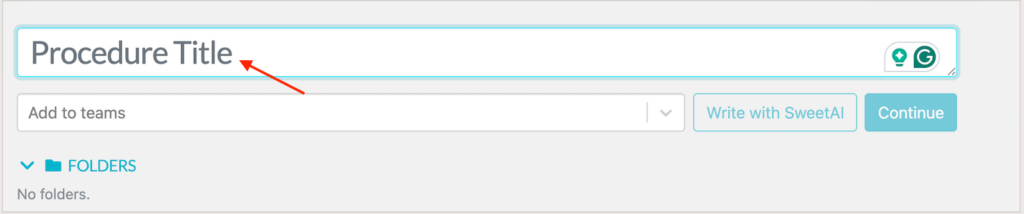
To differentiate it, you have to add a title.
The built-in editor is easy to use. You can add your text and format it according to your goals.
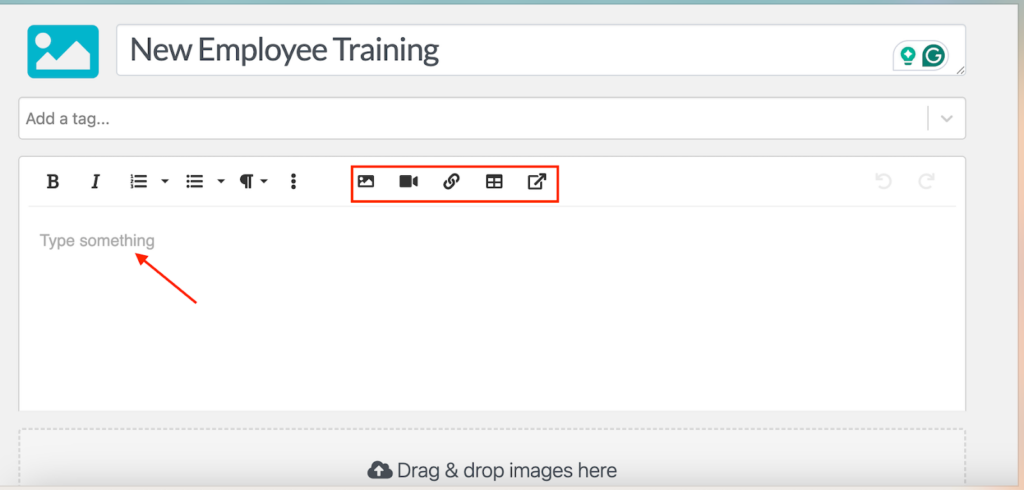
You can define responsibilities and organize instructions in a logical flow. This ensures your SOPs are easy to follow, even for new employees who are seeing the process for the first time.
Create Instant SOPs With SweetProcess AI
If you want to speed things up, SweetProcess AI helps you generate SOPs instantly based on simple prompts.
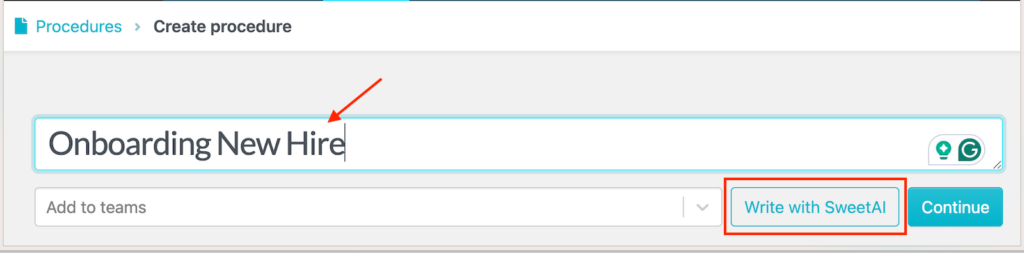
Using AI to write your procedure is useful for documenting repetitive or well-known processes that still require a formal structure.
Once you have the first draft, review and edit the SOP to match your business needs.
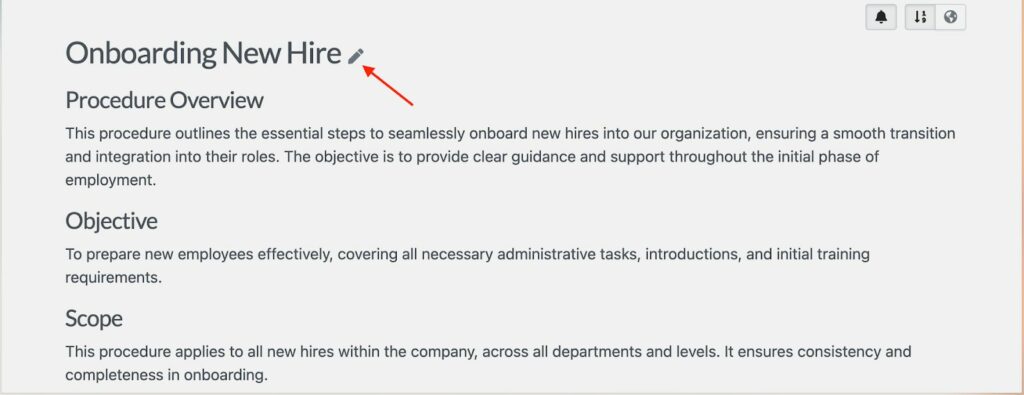
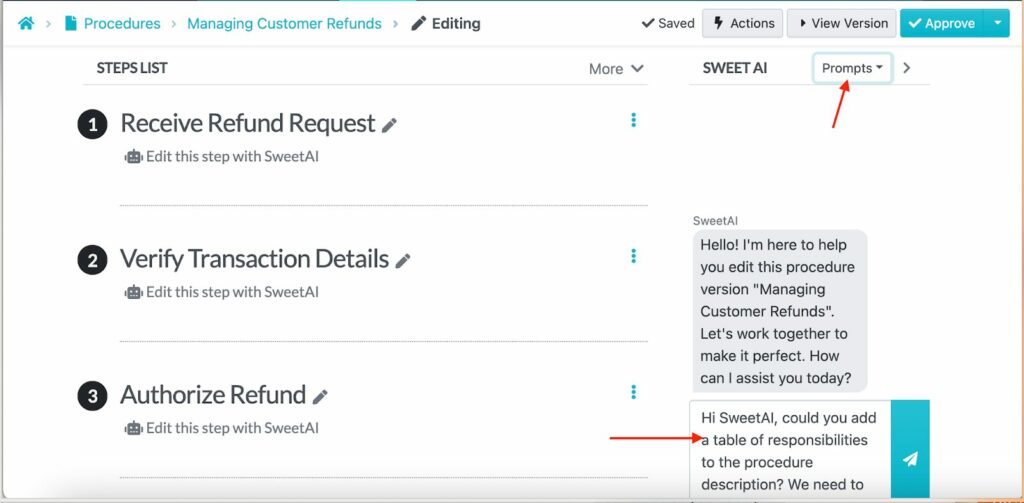
You don’t have to refine the document manually. SweetProcess allows you to edit your procedures using AI. This feature reduces documentation time while still giving you full control over accuracy and detail.
Export Existing SOPs to SweetProcess
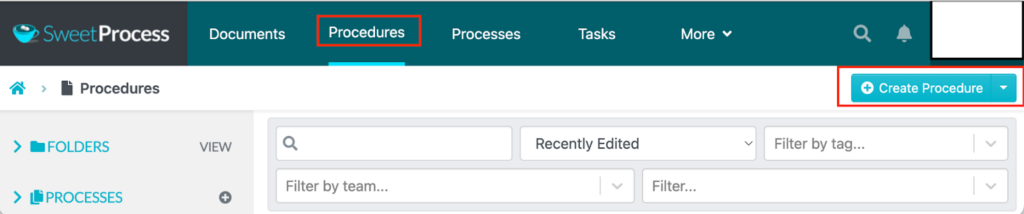
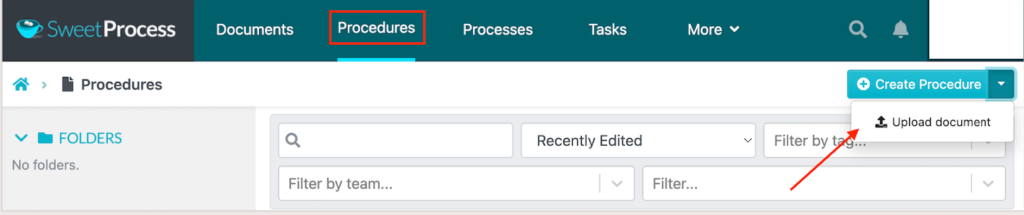
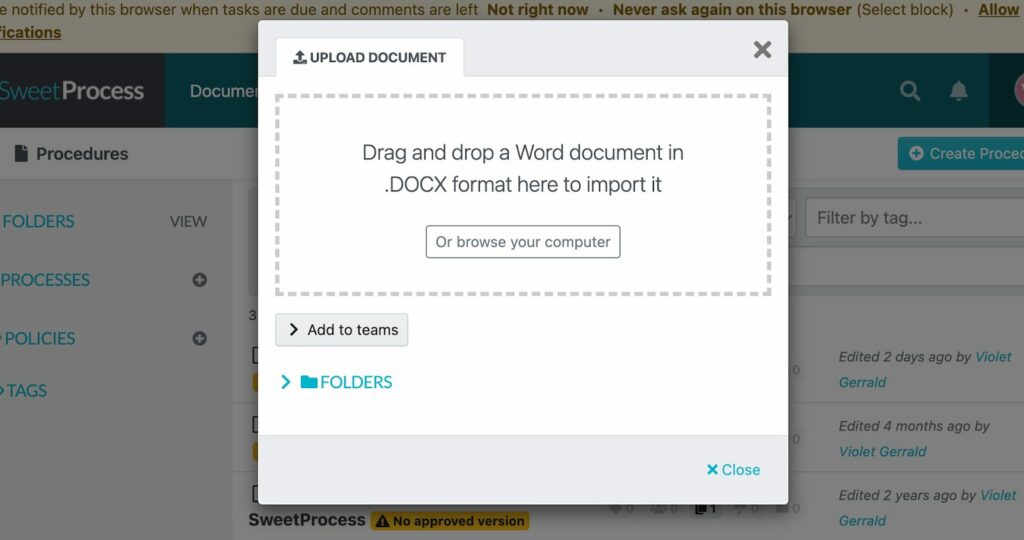
If you already have SOPs in Word documents, PDFs, or other formats, SweetProcess allows you to import and centralize existing SOPs instead of starting from scratch. Under the “Create Procedure” tab, tap the drop-down menu to upload your procedure document.
Choose the document, edit it, or connect it with other procedures.
This feature makes it easier to clean up outdated documentation and bring everything into one consistent system.
Format SOPs
Clear formatting improves readability and comprehension. SweetProcess provides built-in formatting options that let you structure SOPs with headings, styled text, and organized sections.
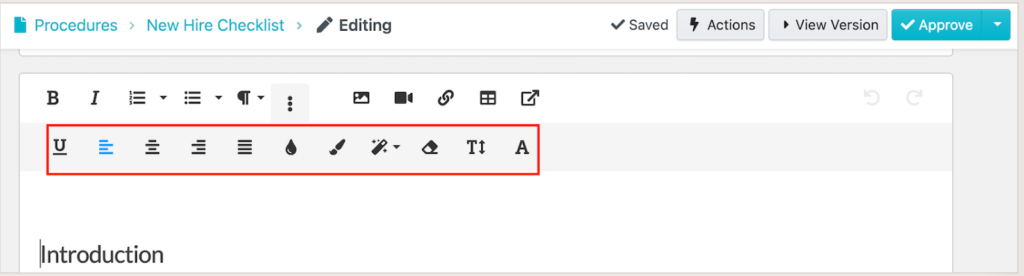
These tools help highlight key instructions or important notes, making SOPs easier to scan and follow during day-to-day work.
Add and Edit Multimedia
Not all processes are best explained with text. With SweetProcess, you can enhance SOPs with visuals and multimedia elements such as images, videos, tables, and forms.

This feature is especially helpful for onboarding and training. Visual guidance reduces confusion and speeds up learning.
Link to Other SOPs, Processes, and Policies
You can link related SOPs to policies and procedures to give your team the full context. For instance, if the SOP is related to hiring new employees, you can link it to a policy that your new hires need to read before they begin work.
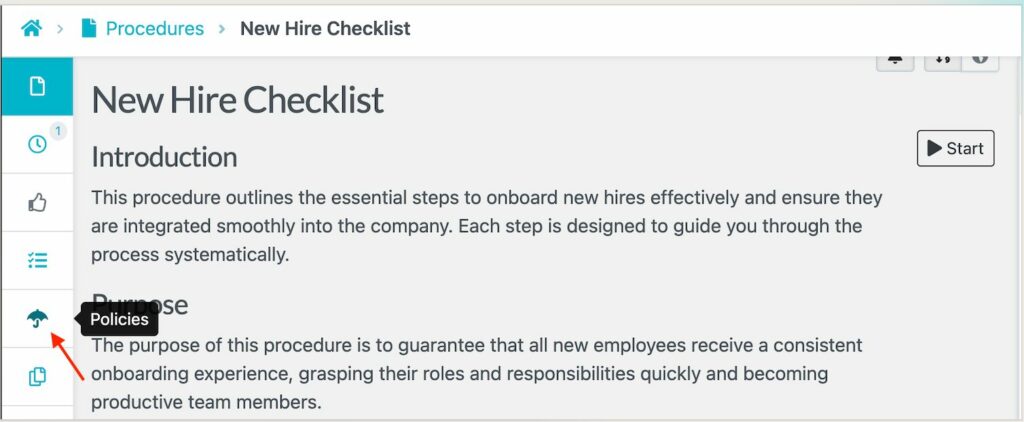
You can also link the procedure to processes that align with their roles and responsibilities.
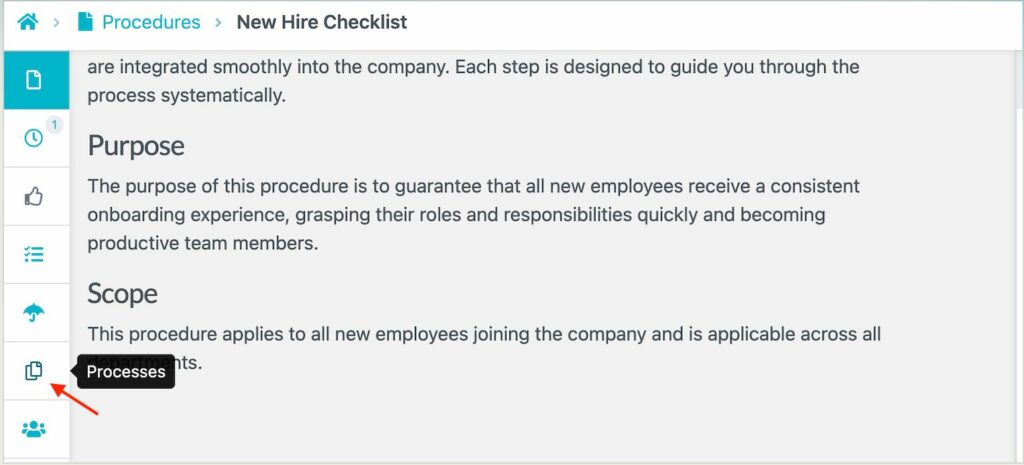
This way, you create a connected knowledge base that helps teams move between procedures without searching through multiple tools or documents.
Assign SOPs As Tasks and Collaborate With Team Members
In addition to being reference documents, your SOPs can also be assigned as tasks. This feature comes in handy during onboarding and recurring training.
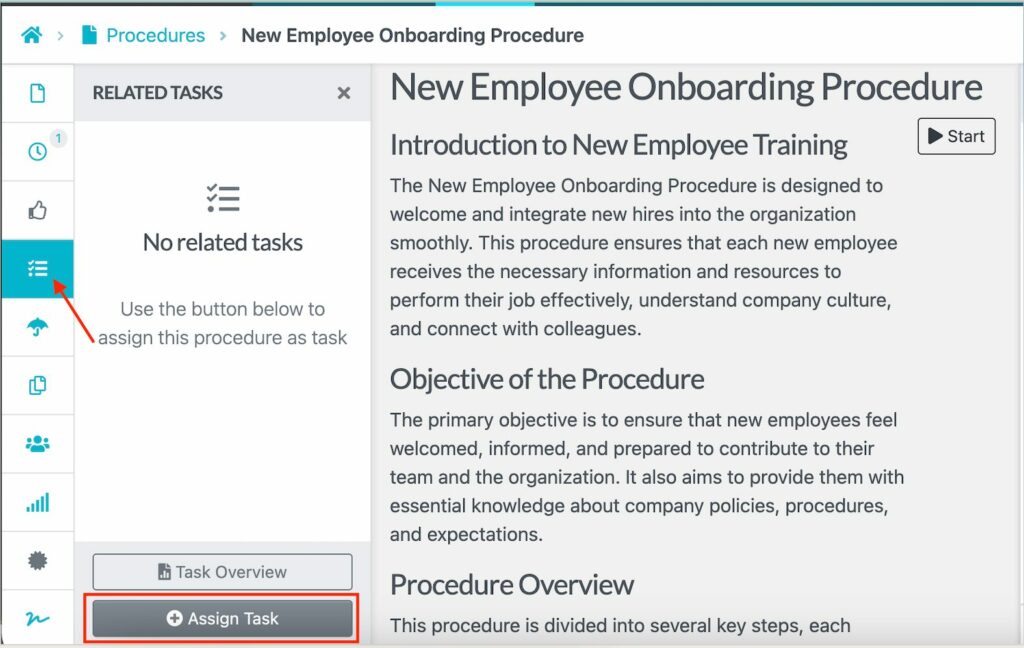
You can add specific team members and add due dates to help you track progress.
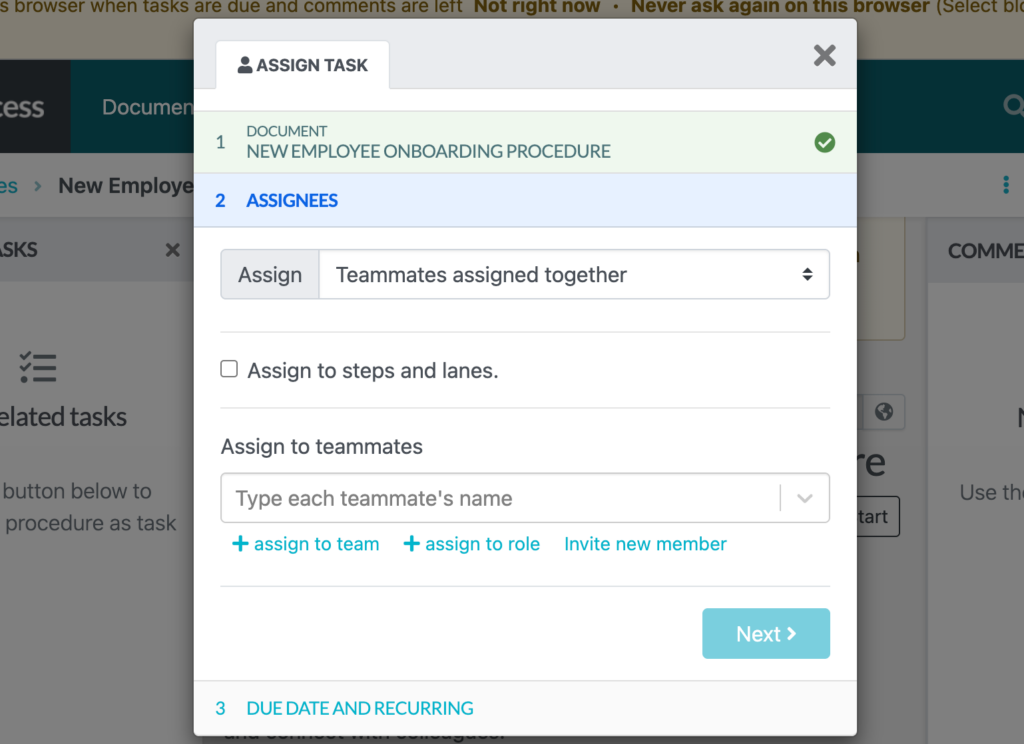
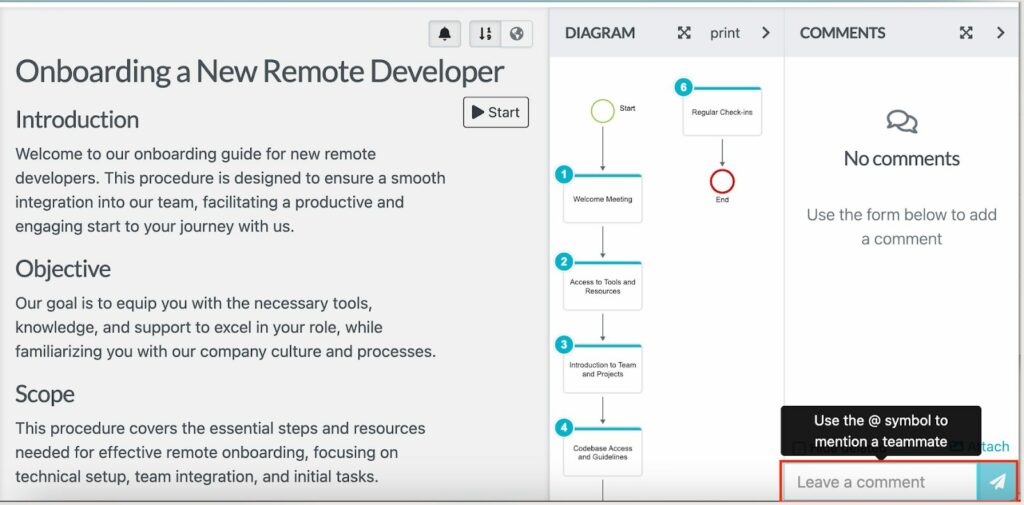
Once employees receive the task, they can comment or ask for clarification by tagging the manager or supervisor on the same page, which boosts collaboration.
View Document Versions To Track Compliance and Training
As you collaborate on the same document, it’s easy to lose track of who made updates. However, SweetProcess centralizes all steps by providing a built-in version control so you can track changes over time.
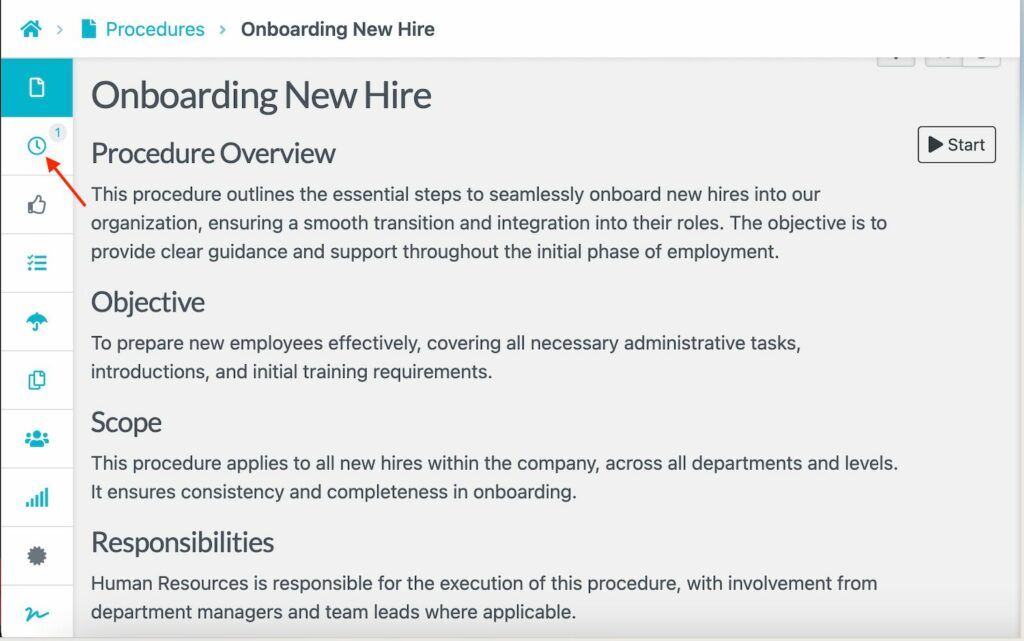
Version tracking is critical for compliance and training. It provides clear proof that employees are following the latest approved procedures.
Manage Documented SOPs in One Place
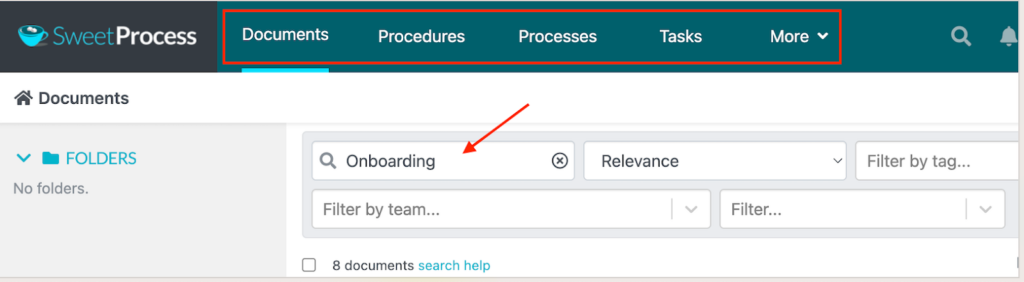
Instead of juggling multiple folders and shared drives, SweetProcess gives you a centralized hub for all SOPs, processes, and policies.
Everything is searchable, organized, and accessible, so your team always knows where to find the most up-to-date instructions.
These features have been instrumental for multiple companies during SOP creation. One of them is Awesome Dynamic. This Amazon consulting agency faced growing pains as its team expanded. While they had documented procedures, those SOPs lived across Google Docs, which created confusion. Files were difficult to locate and often outdated before anyone realized it.
As the company hired more consultants, onboarding became increasingly inefficient. New team members required repeated training, and experienced staff spent valuable time searching for the right document rather than focusing on client work. According to senior Amazon consultant Timothy Dworianyn, the lack of a standardized system was limiting their ability to grow.
That changed when the team moved their SOPs and training materials into SweetProcess. Here are some of the improvements:
- All SOPs are now stored in a single, searchable system.
- Onboarding and training time dropped by 50%, allowing new hires to become productive faster.
- The team got faster access to information, thanks to tags and keyword-based search.
- Updates became simpler, since changes were reflected instantly across the team.
Another SweetProcess success story comes from Consortium Private Wealth, a financial advisory firm that spent years battling fragmented and hard-to-use documentation. Their procedures lived in long, text-heavy Word documents that were difficult to navigate and overwhelming for new hires. As a result, onboarding was slow, and employees struggled to follow processes consistently.
Additionally, critical operational details were held by a few senior team members. When those employees were unavailable, workflows stalled, and questions piled up, creating unnecessary risk for both operations and compliance. The shift to SweetProcess marked a turning point. With SweetProcess, the firm was able to:
- Build a centralized knowledge base, ensuring daily operations continued smoothly even when key team members were absent.
- Create interactive SOPs using images and videos to make procedures easier to understand and follow.
- Implement version control, allowing them to track updates and maintain clarity on the most current procedures.
- Strengthen compliance efforts by keeping SOPs accurate and accessible at all times.
Today, Consortium Private Wealth relies on SweetProcess to preserve institutional knowledge and support employee onboarding.
Components of an Effective SOP
For your SOP to be effective, you need to structure it properly. If you miss key components, it becomes harder to use. Here are the essential components that every SOP should include:
Title
Your SOP title is the first thing people see when searching your documentation library. Therefore, it needs to be specific and searchable. A good title tells you exactly what the SOP covers without opening it.
For instance, instead of having a vague title like “Operations Procedure,” you should provide more context by writing, “How To Manage Customer Refunds on Stripe.”

When you have multiple procedures, it’s important to add key identifiers to differentiate them.
Purpose
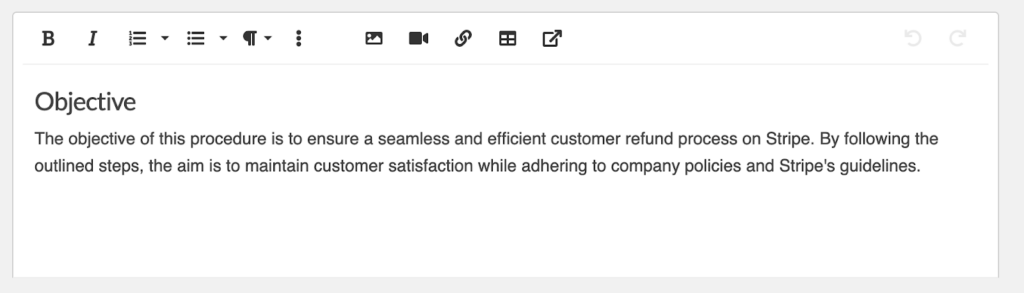
The purpose section explains why the SOP exists and what problem it is designed to solve. This section can be two to four sentences long to help employees understand the context before diving into details.
A well-written purpose statement helps employees understand the importance of following the SOP correctly and consistently. A purpose statement for a customer refund SOP would look like this:
Scope
While the purpose tells you why the SOP exists, the scope tells you exactly what it covers. Defining the boundaries clarifies when the SOP should be used and under what conditions. Failing to include this section confuses your employees.
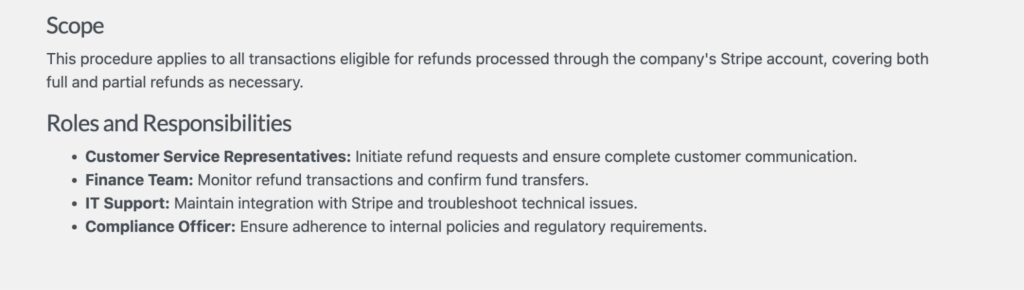
Here are some of the key things to keep in mind:
- Be specific about what situations, products, customers, or scenarios this SOP applies to.
- Explicitly state what this SOP does not cover.
- Geographic or departmental limits, if relevant.
Roles & Responsibilities
This section removes ambiguity around ownership and accountability. It outlines which roles are involved in the process and what each person is responsible for. It’s especially critical for procedures that span multiple people or departments. You can add:
- Primary Roles: Team members performing the main steps of this procedure.
- Supporting Roles: Employees who provide information, resources, or assistance.
- Approval Roles: Managers and supervisors who need to approve or sign off on decisions or exceptions.
- Review or Oversight Roles: The team members who monitor compliance or quality.
Here is an example of roles and responsibilities in a table format:
| Role | Responsibilities |
| Customer Service Rep | Reviews the refund request for completeness. Verifies order details and eligibility. Processes approved refunds in the system.Sends confirmation to the customer. |
| CS Supervisor | Approves refunds over $500.Handles escalated or complex cases.Reviews weekly refund reports. |
| Warehouse Manager | Confirms product returned to inventory. Verifies product condition. |
| Accounting | Processes actual payment refund. Reconciles refunds with order records.Generates monthly refund reports. |
Clear responsibilities prevent tasks from being missed or duplicated.
Step-by-Step Instructions
This part of the SOP shows exactly how to complete the task from start to finish. The quality of your step-by-step instructions will determine whether your SOP actually works. Your instructions need to be clear, logical, actionable, and simple enough for new hires to understand.
For instance, when creating SOPs on SweetProcess, you’ll see the steps listed below the document.
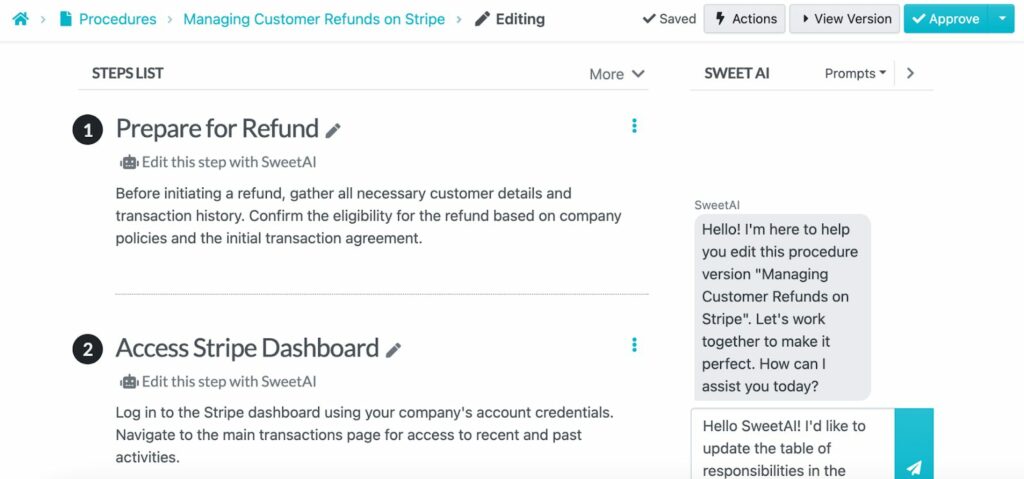
You can edit the steps and add more context to guide your team.
To make your steps clearer, you can also add visual cues to improve how employees understand and follow procedures. Francois Senekal, a service operations manager, notes that people process visual information faster than text alone. He recommends including clearly named images that show components and steps involved in an activity. Using color strategically also improves clarity; for instance, red highlights potential dangers and yellow warns.
References and Related Documents
Your SOPs often rely on supporting documents, such as policies or existing processes. In this section, you can add these resources to help employees find everything much faster. For instance, you can add references such as:
- Refund policy documents.
- Approval forms.
- Related SOPs for escalations or exceptions.
- SOP templates that your team needs.
- External regulations for compliance-related procedures.
- Training courses and videos.
- User guides and documentation for software and tools.
Ensure that you add the latest documents to prevent confusion.
Quality Checks
Your procedures will not be fully utilized if you fail to make quality checks. This process involves verifying that the steps have been implemented correctly. Quality checks are also important for catching errors, just in case a team member enters incorrect data.
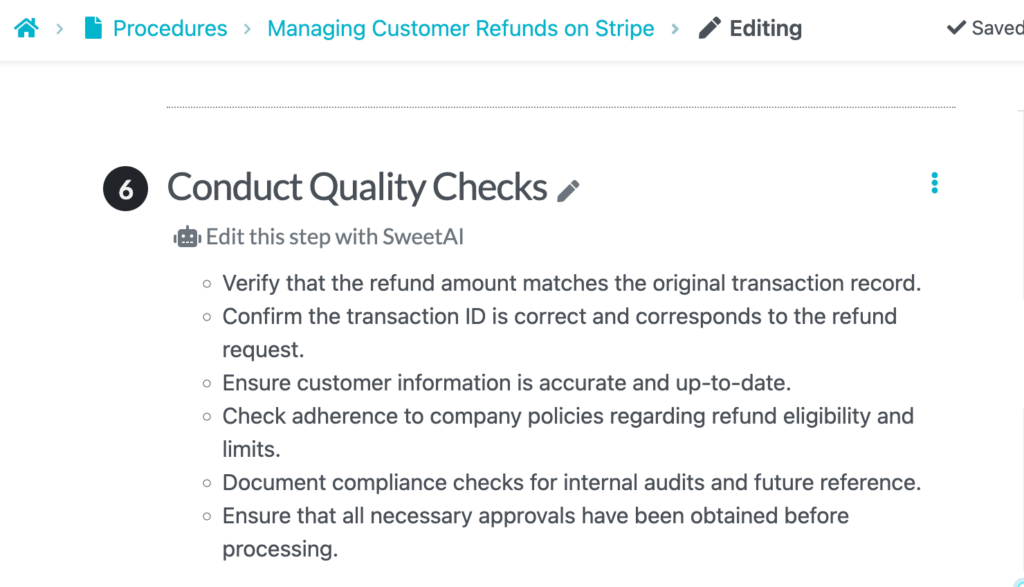
Quality checks support accountability and keep the team on the correct path.
Quality checks are also easier to enforce when SOPs include the right supporting tools. Angelina Barcheva, a Quality Manager, emphasizes the importance of attaching pre-filled, editable forms directly to SOPs, especially for critical operations. According to her, checkboxes and structured fields reduce errors and make quality verification faster and more consistent.
Approval Sign-Off
Every company SOP needs formal approval before it becomes the official procedure. The approval sign-off section documents who authorized this SOP and when, creating an accountability trail.
This section is essential for managing your compliance requirements. You have the evidence of which employee reviewed the SOP and which manager gave the approval sign-off. Here’s this feature on SweetProcess.
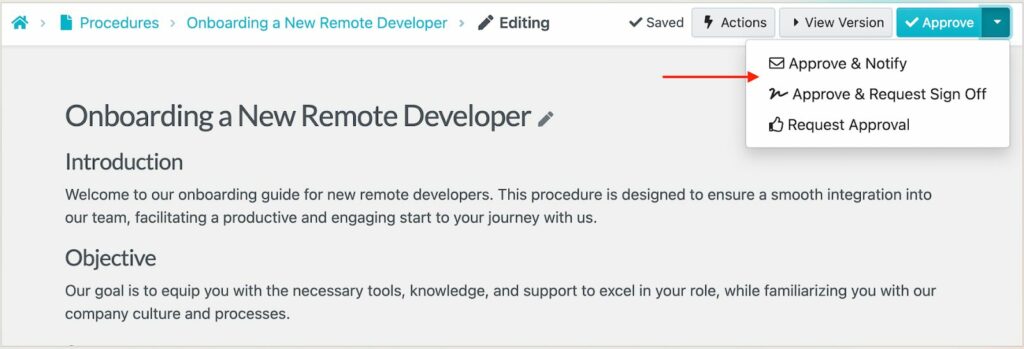
Some of the team members responsible for this process include:
- Compliance or legal team for regulated procedures.
- Quality assurance team for procedures affecting product or service quality.
- Subject matter experts who validated technical accuracy.
Revision History
Processes change over time due to new tools, regulations, or business needs. Your revision history tracks those changes so employees always know they’re working with the most current version. In addition, it provides transparency and creates an audit trail for compliance.
From your SOP software, you can see when each edit was made and the key changes.
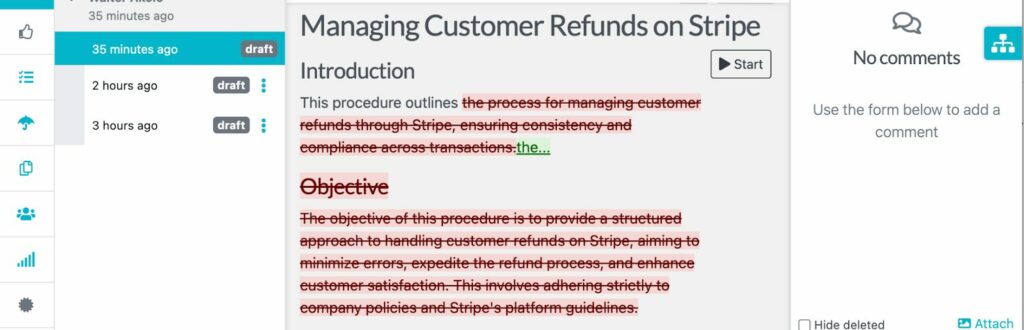
For instance, you can add the key details in the following order:
- Version 1.1: Updated refund timeline (February 2026).
- Version 1.2: Added manager approval threshold (March 2026).
Revision history builds trust and prevents outdated procedures from being followed.
Create and Manage Your SOPs in One Place
The difference between a business that scales smoothly and one that struggles with every new hire comes down to process documentation. SOPs transform the tribal knowledge into repeatable systems anyone can follow. However, you need a tool to help you create and manage them without switching between multiple folders in your Google Drive or on your device.
SweetProcess fits right in by providing a centralized system where you can draft SOPs, assign them as tasks, link them to policies, and share them for approval on the same dashboard. Thanks to built-in version control, your team will always access the latest SOP during training and onboarding. All changes are logged in to create an audit trail and help you meet your compliance requirements.