Last Updated on October 2, 2026 by Owen McGab Enaohwo
TL;DR: The right Process Street alternative depends on the job you need to replace. Start with SweetProcess, Trainual, or Scribe for documentation and training. Compare Pipefy, CheckFlow, Kissflow, Manifestly, and Flowmingo for recurring workflows and checklists. Asana is the project management option. Process Street publishes no price on its pricing page, checked Oct 2, 2026. We checked every alternative’s pricing at the vendor, explain how we chose the list, and say who should skip each tool.
Start your free 14-day trial of SweetProcess.
No credit card needed. Cancel anytime.
Click Here To Try it for Free.
Business tools like Process Street can help you automate workflows easily. However, it may not be a good fit for all types of organizations. If you want to switch from Process Street, there are multiple alternatives that can work for you. The best Process Street alternative depends on whether you need to document procedures and processes or run checklists.
We’ll break down the nine Process Street alternatives and competitors, their features, pros and cons, and pricing to help you determine which to implement in your operations.
Key Takeaways
- Process Street publishes no price for its Startup, Pro, or Enterprise plans. Pro offers a 14-day free trial with no credit card required. Contact the sales team for a quote. Checked on Oct 2, 2026.
- The nine alternatives serve different jobs: SweetProcess, Trainual, and Scribe focus on documentation and training; Pipefy, CheckFlow, Kissflow, Manifestly, and Flowmingo focus on recurring workflows; Asana focuses on projects.
- Trainual and Kissflow don’t publish subscription prices, and Pipefy doesn’t publish prices for its paid plans. Pipefy also offers a free Starter plan.
- If you want to switch from Process Street to any of these alternatives, you can export workflows and workflow runs as PDFs and workflow run data as CSV on all plans, then rebuild your workflows. Want to switch to SweetProcess? Start your free 14-day trial here!
Process Street Alternatives at a Glance
Tool | Built for | Price (As of Oct 2, 2026) | Free plan or trial | Not right for you if |
|---|---|---|---|---|
SweetProcess | Process documentation | $99 a month or $990 a year for up to 10 users; Small Team $495 a year for up to five | No free plan; 14-day trial | You primarily need complex, form-driven workflow automation |
Process Street | Workflow execution and document management | Not published; contact sales | 14-day Pro trial; no credit card | You need to calculate the price before a sales conversation |
Pipefy | Business process automation | Free Starter plan; Business and Enterprise billed per user. You have to contact the sales team | Free Starter plan | You need a documentation-first knowledge base |
CheckFlow | Running checklists and workflows | $10 per user per month, or $9 per user per month if billed annually | 14-day trial | You need a broader documentation and training system |
Trainual | Documenting and employee training | No published subscription price; $1,000 one-time implementation fee | Book a demo | You need a price before a demo |
Kissflow | Low-code workflow automation | No published price. Contact team | Book a consultation | You want to try it yourself before speaking to the team |
Asana | Project management | Starter plan starts at $10.99 per user per month billed annually, or $13.49 billed monthly | Free Personal plan for two users | Your main requirement is a procedure and policy repository |
Flowmingo | Workflow process design | Basic plan starts at $49 a month for five users | 30-day trial on all plans | You need a documentation-first platform |
Manifestly | Running recurring checklists | Business plan starts at $10 per user per month, or $100 per user per year with annual billing | 14-day trial | You mostly document procedures and policies rather than run checklists |
Scribe | Screen-capture documentation | Basic free; Pro Team from $13 per seat per month billed annually (five-seat minimum) | Free Basic plan | You need full process, policy, and procedure management with assigned tasks and sign-offs |
Table of Contents
How Much Does Process Street Cost?
As of Oct 2, 2026, Process Street does not publish a price on its website. To use this software, you have to choose between the Startup, Pro, and Enterprise options. The Pro plan includes a free 14-day trial with no credit card required. If you need a published subscription price before contacting sales, compare the dated prices in the table above.
The Startup plan is limited to five users and 10 guests, and this number is customized once you upgrade to the higher tiers.
You’ll need to contact the sales team for a quote for all pricing tiers. This means you can’t model what Process Street will cost before a sales call and compare it to another tool.
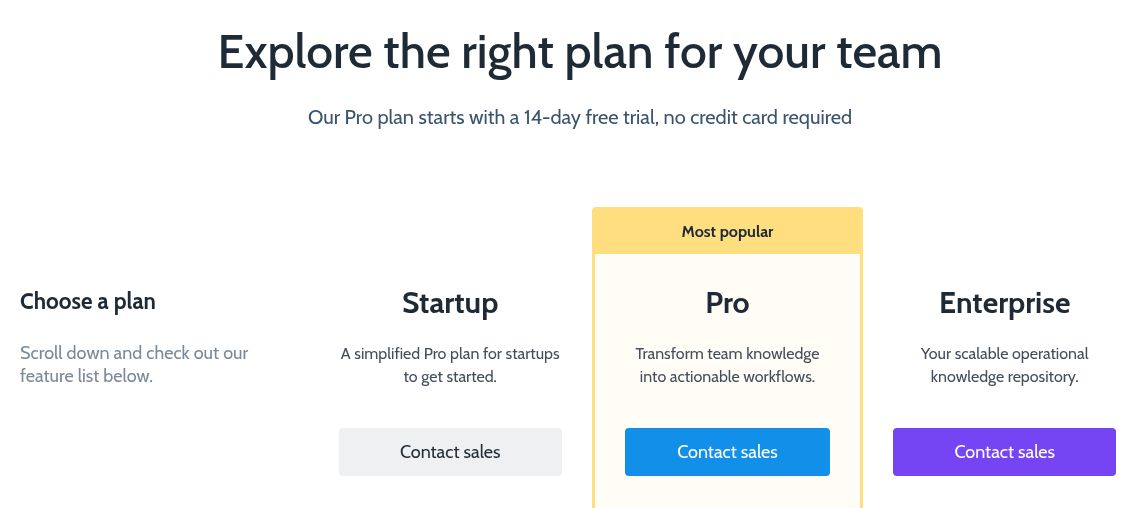
Process Street’s pricing page shows Contact sales for Startup, Pro, and Enterprise. Checked on Oct 2, 2026.
Drawbacks of Process Street
Process Street offers an extensive feature set including workflows, tasks, forms, pages, data sets, conditional logic, approvals, scheduled workflows, integrations, and other automation capabilities. These capabilities make it useful if your team wants to turn operational knowledge into repeatable workflows. It also offers a mobile app and native integrations with Slack and Microsoft Teams apps. Process Street lists conditional logic and task approvals on every plan.
However, it has several drawbacks that may affect your operations and redirect you to a competitor:
- No published pricing: Process Street’s current pricing page does not publish specific costs for the Startup, Pro, or Enterprise plans.
- Limited Startup plan: The limits to five users, 10 guests, and the number of automation apps mean that you have to upgrade to the premium tiers to access more features.
- Trial plan: Process Street advertises a 14-day Pro trial with no credit card required. Its Startup and Enterprise columns do not advertise separate trials.
- Broad operational workflow: If you only need a platform to store your procedures and policies, you may not need every workflow and automation capability on Process Street.
According to users, Process Street has a learning curve, especially if you want to use advanced features like conditional logic and utilize automations.
How We Chose The 9 Process Street Alternatives
Here’s how we evaluated the Process Street competitors:
The Primary Work
Software like CheckFlow, Kissflow, Manifestly, and Pipefy are a good fit for recurring workflows and checklists; therefore, they are a good alternative if that’s what you need in your organization. Asana comes in handy if you require a platform to help you manage projects, while Trainual, Scribe, and standard operating procedure software like SweetProcess help with documenting company knowledge and training teams.
Pricing
When budgeting for software, you need to know the actual price. We’ve indicated which tools publicly list a price for all or some plans, which ones offer a free trial or free plan, and which require you to contact the team for a custom quote.
We included tools that run or document repeatable work and were still offered at their own websites when checked on Oct 2, 2026. We checked every price at the vendor’s own site and state plainly where no subscription price is published. SweetProcess is our own product, so we list it first; this is a comparison by fit, not a scored ranking. We replaced ProcessMaker with Manifestly after ProcessMaker and Decisions moved to the unified Decisions brand and processmaker.com began redirecting to decisions.com.
Which Process Street Job Are You Replacing?
Process Street runs work and documents work; therefore, the right alternative depends on which job you are replacing.
- Tools that run work: These platforms run checklists and workflows with conditional logic, forms, approvals, and automations. For this, your options include Pipefy, CheckFlow, Kissflow, Manifestly, and Flowmingo. Asana is the project management option. Pick from this group if your team’s primary work involves assigning steps, collecting data, and pushing work through on a schedule.
- Tools that document work: These options hold procedures, policies, and training in one searchable place, and keep them current. SweetProcess, Trainual, and Scribe sit here. These are your go-to options if the real issue with your team is finding information on how to execute tasks.
This distinction can save you from moving from one product to another without addressing the actual gap.
Ready to test out process documentation software? Start with SweetProcess by signing up for a 14-day free trial!
9 Best Process Street Alternatives for Managing Business Processes
These nine tools provide different approaches to process management. We’ll examine how each of them differs from Process Street, its advantages and disadvantages, current pricing, and when it may not be the right fit.
SweetProcess: Best Process Street Alternative for Process Management
SweetProcess is web-based business process management software that enables you to document, manage, and execute your company’s policies, procedures, and processes, all in one place. It takes away the burden of manually managing repetitive tasks so you can stay focused on your business.
Whether you manage a team or are hiring your first employee, SweetProcess gives you the systemization you need to scale and grow your business. Compared to Process Street, SweetProcess has pricing plans that all include the full feature set.
With SweetProcess, you can:
- Document step-by-step procedures and processes.
- Turn your procedures into actionable tasks for your team members.
- Create process maps to visually explore every step.
- Combine multiple procedures to make an overarching workflow.
- Create a centralized knowledge base (both public and private).
- Import videos, images, and files into your documents.
- Collaborate in real-time with your team.
- Connect to 1,000+ apps through Zapier, or build integrations with the public API.
- Export Procedures and Policies as PDF or Word documents, and Processes as PDFs, when account permissions allow.
- Enjoy account security with two-factor authentication.
- Access support via email and phone calls.
What Makes SweetProcess the Best Alternative to Process Street?
Here are some features that make SweetProcess the best alternative to Process Street:
Document Your Business Processes Quickly and Easily
SweetProcess helps you document your business processes step by step. SweetAI can create a first draft of a Procedure from a title, but it does not know your business. Someone who does the work must review and correct that draft before it is approved or shared.
With the help of SweetProcess, Next7 IT, a managed services provider, streamlined its operations through effective documentation. This not only closed the knowledge gap among the team but also helped reduce errors in operations. This can be you too.
Let’s create a procedure together:
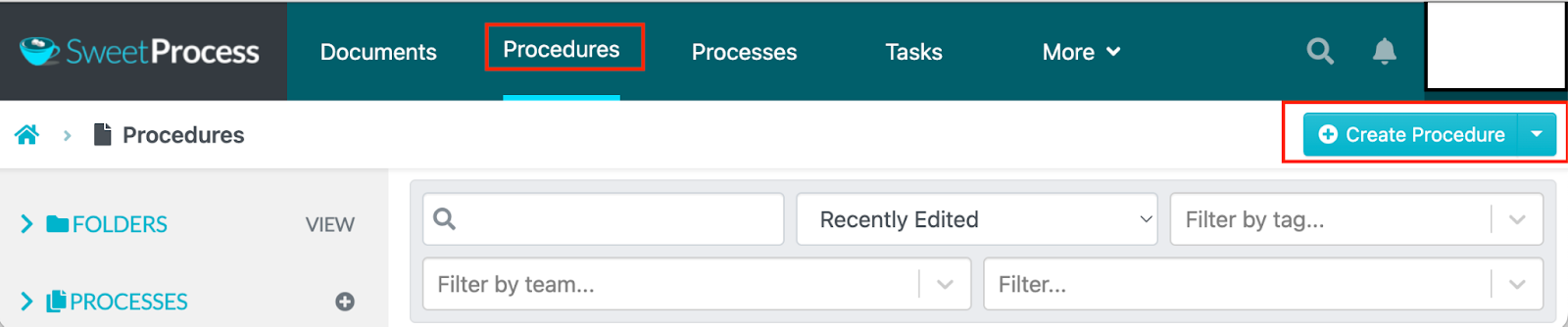
After you log in to your account, click “Procedures” and “Create Procedure.”
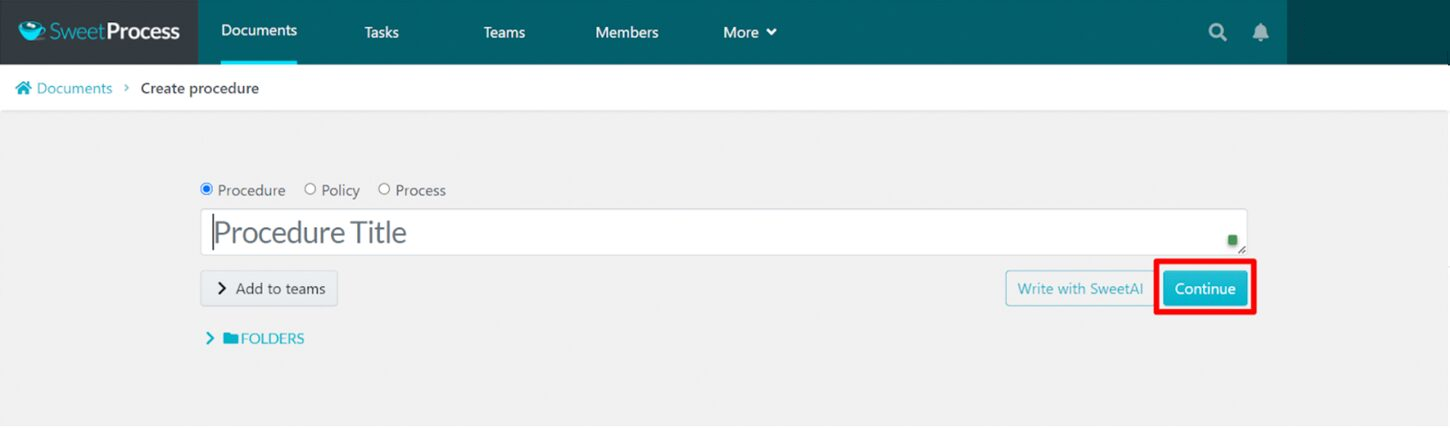
Add your procedure’s title and click “Continue.”
Document your procedure step-by-step. You can easily insert links, images, and videos.
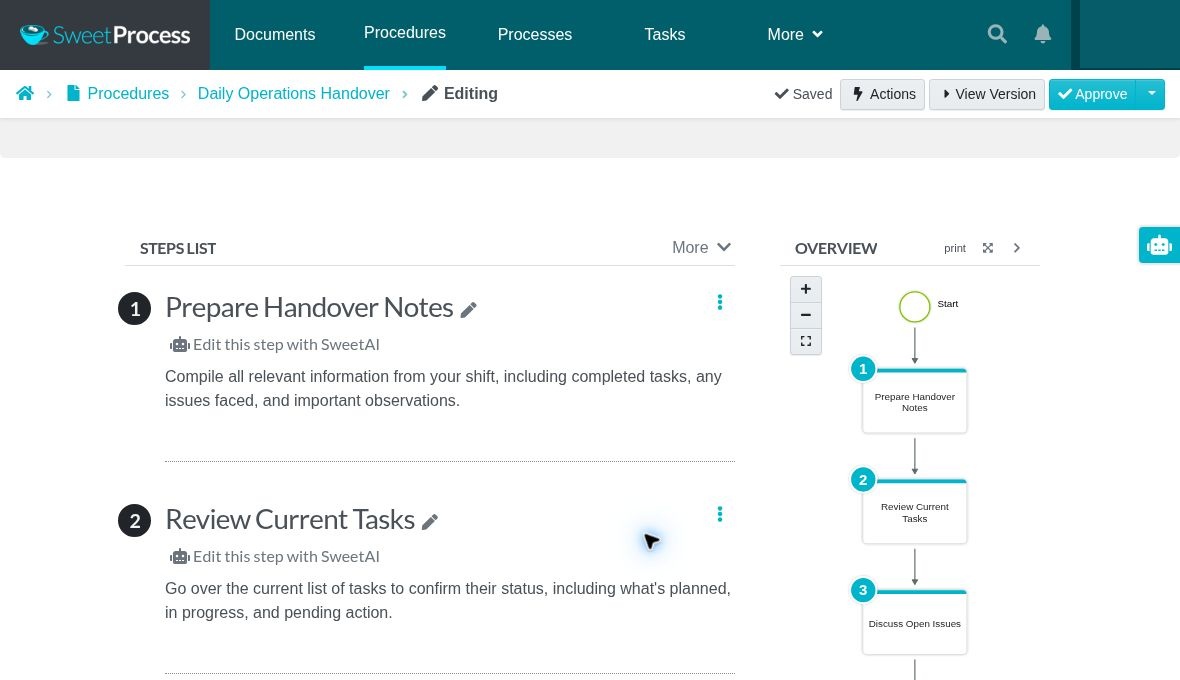
Example Procedure: Daily Operations Handover, with detailed steps and the flowchart SweetProcess generates.
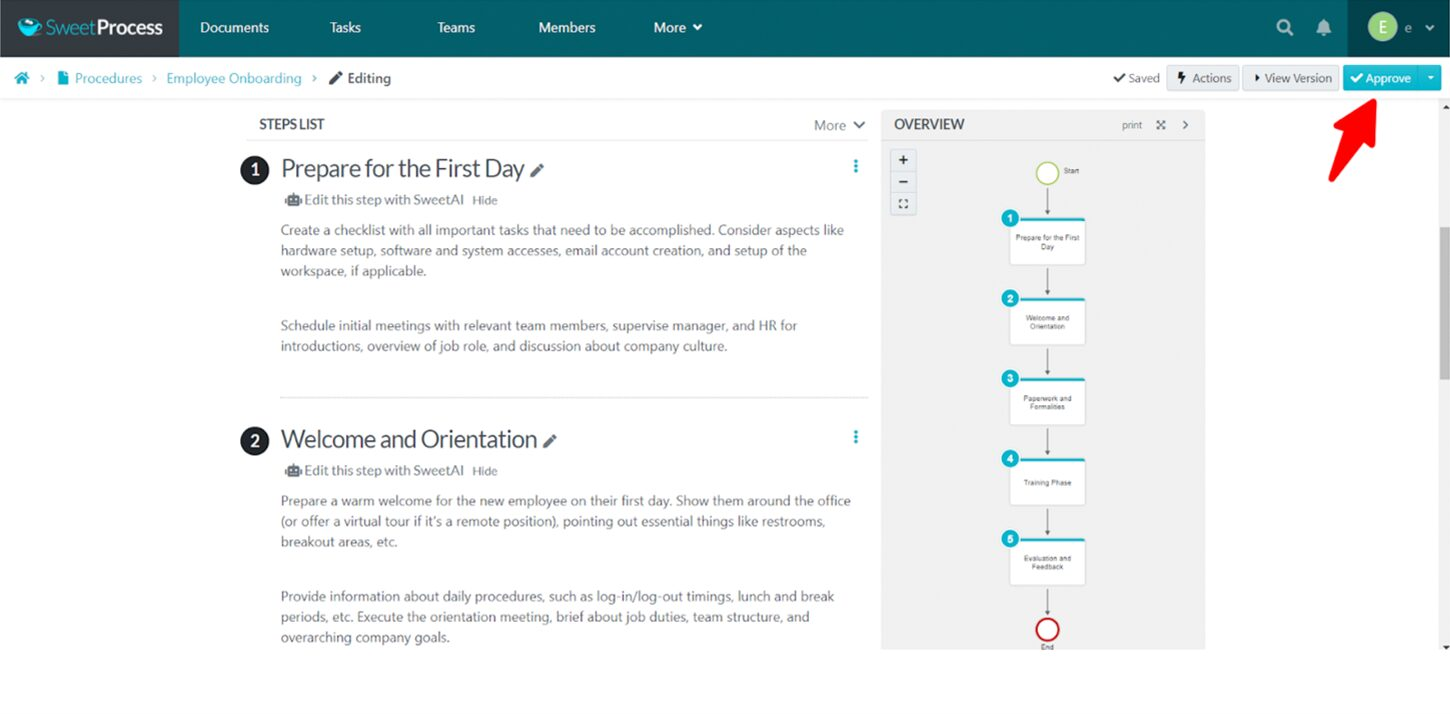
Once you’re done, click on “Approve.”
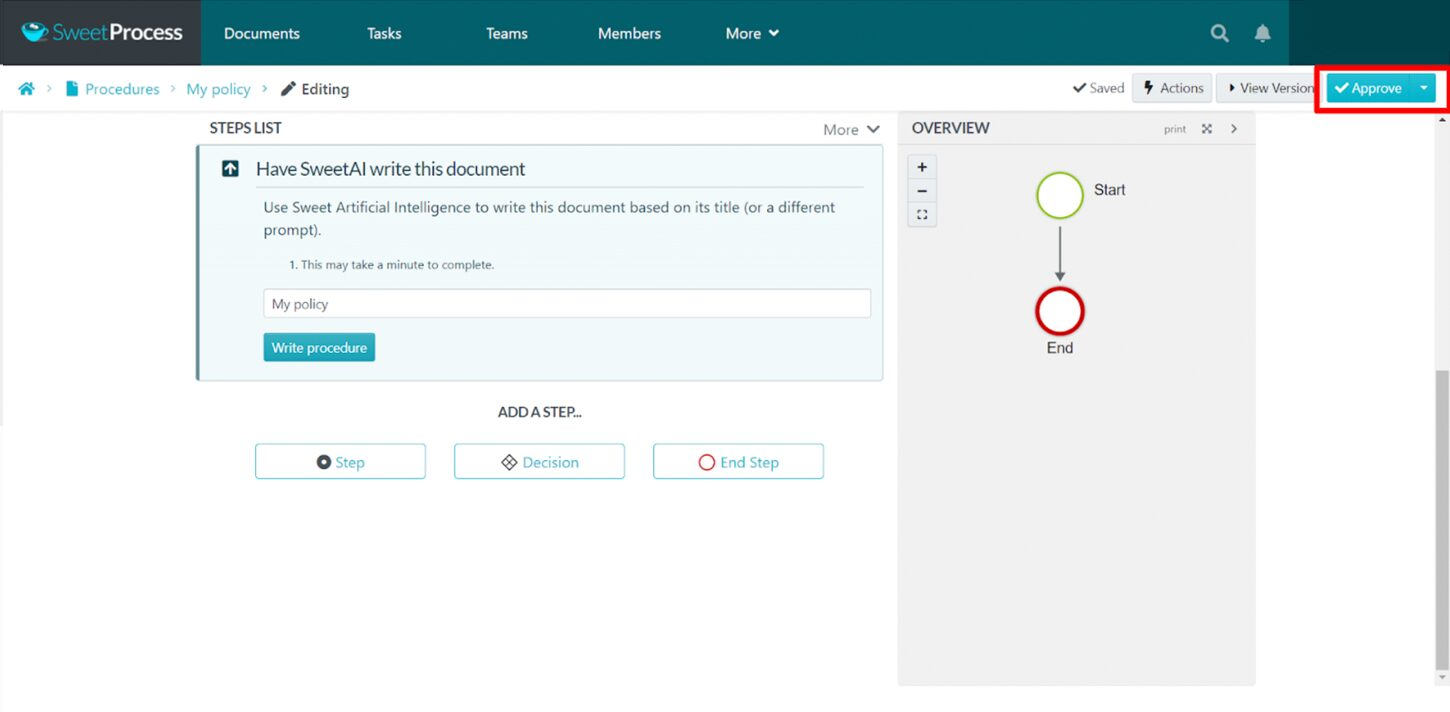
SweetProcess gives you multiple approval options. You can approve and notify team members, approve and request sign-off, or request approval.
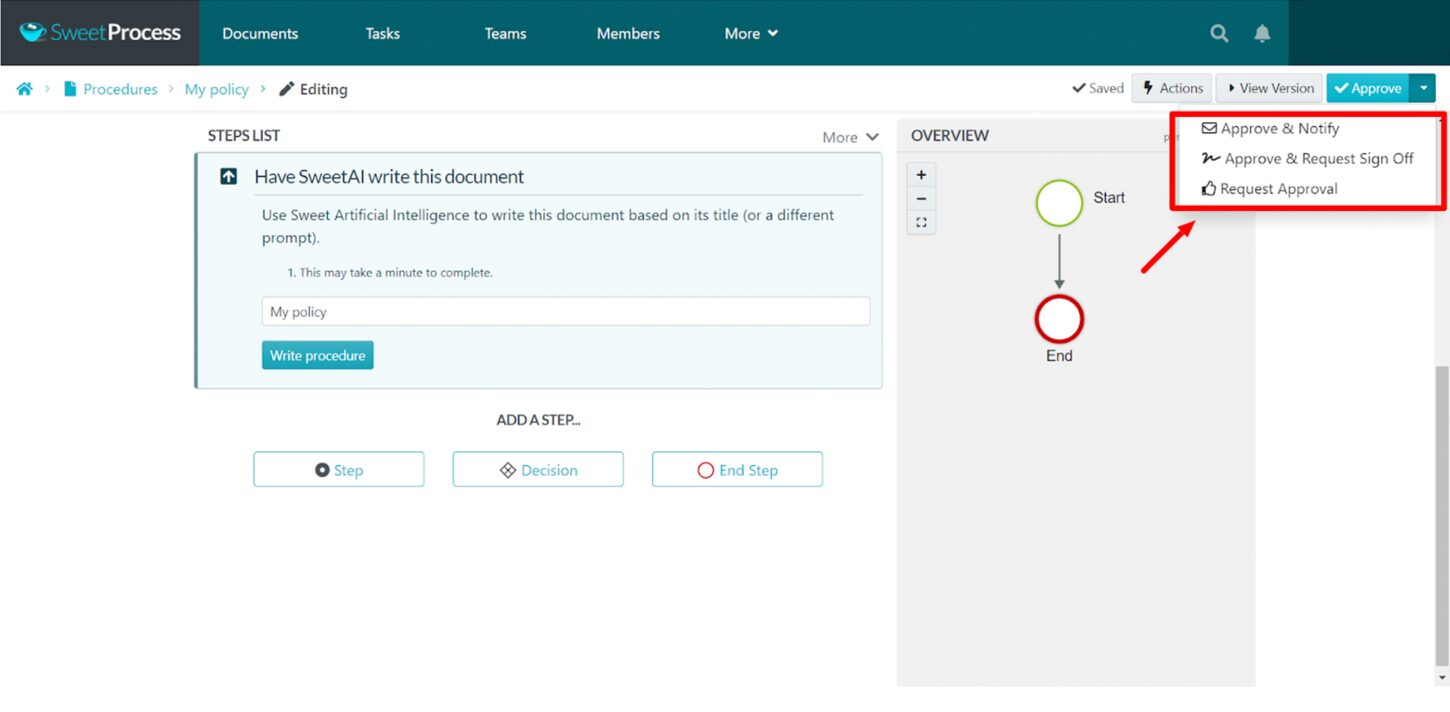
Once you approve, your procedure is ready. You’re done!
Document Your Procedures With SweetAI
After you select “Create Procedure” and add a title, click “Write with SweetAI.”
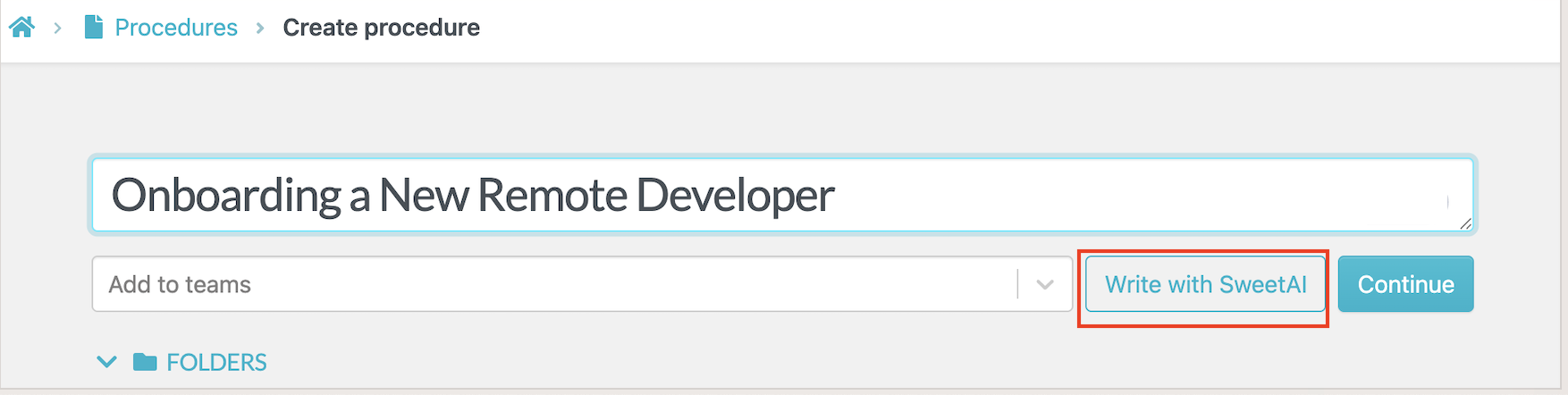
If you need ideas for which Procedures to document, enter your process or industry under “Suggest procedures.” Treat SweetAI’s suggestions as a starting point: someone who does the work must check which Procedures your business needs and review any draft before it is approved or shared.
Then click “Write with SweetAI.”
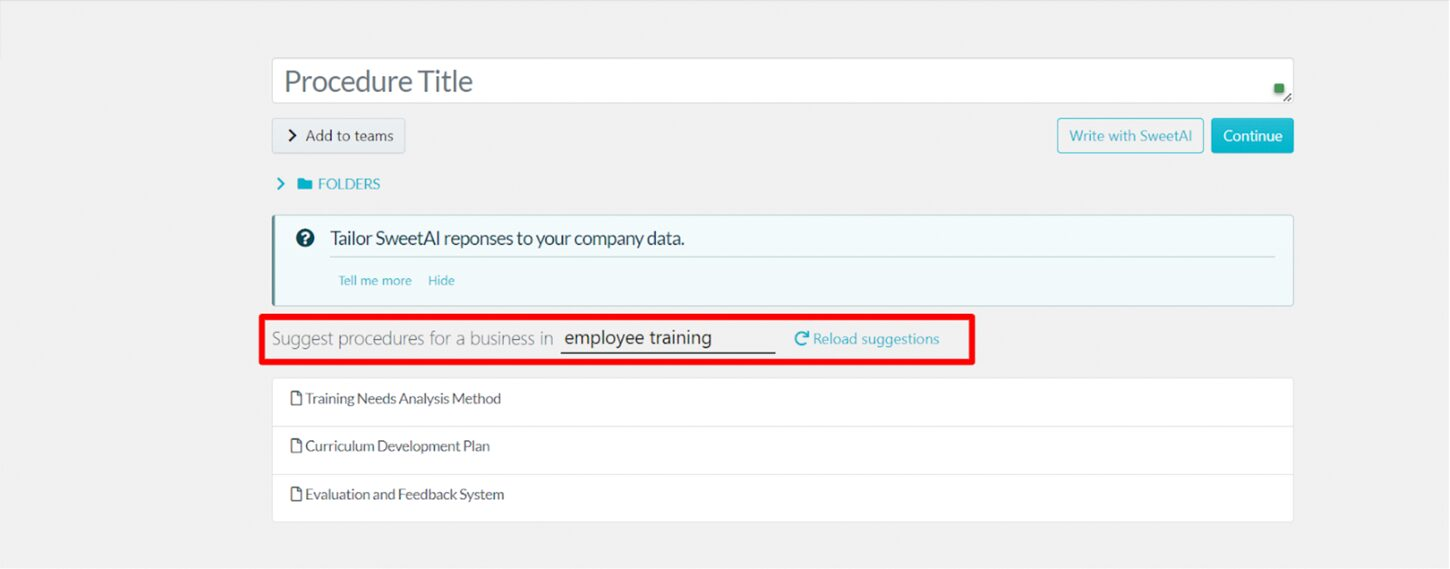
SweetAI creates a draft Procedure, but it does not know your business. Have someone who does the work review every step and correct missing or inaccurate details. Click “Approve” only after that review is complete.
Add a Procedure to a Process
Now that your procedures are ready, let’s add them to your process.
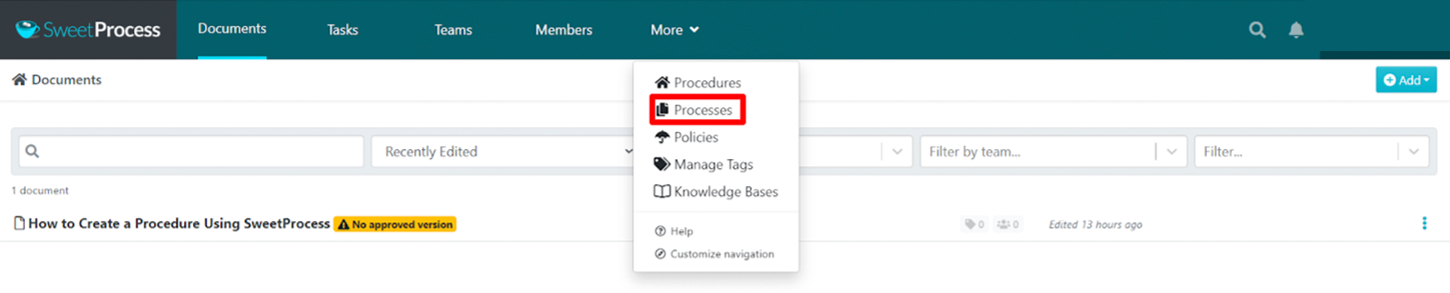
Step 1: Log in to the dashboard. Click “More” and select “Processes” from the drop-down menu.
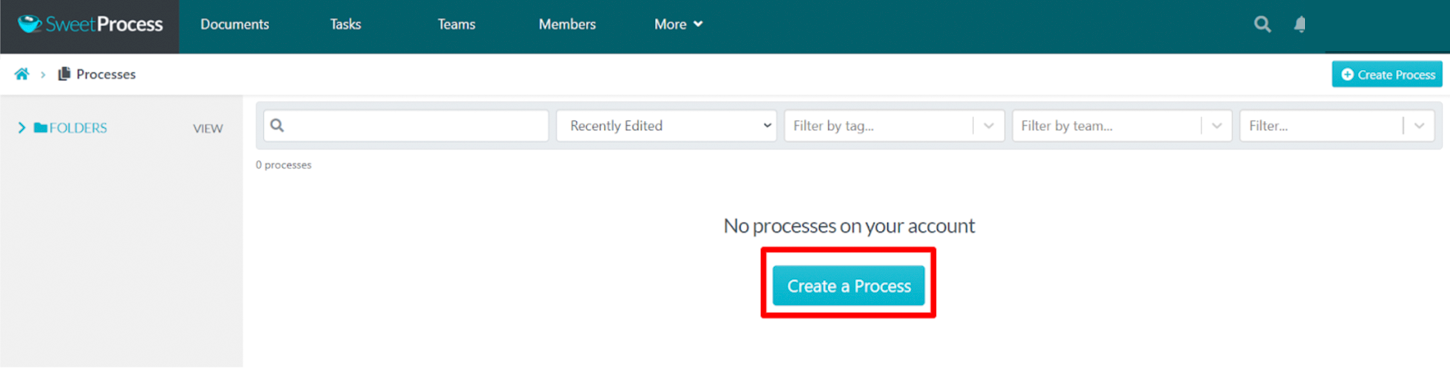
Step 2: Click on “Create a Process.”
Step 3: Add the process title, then click “Continue.”
You can add your process to a folder or specific teams in your organization.
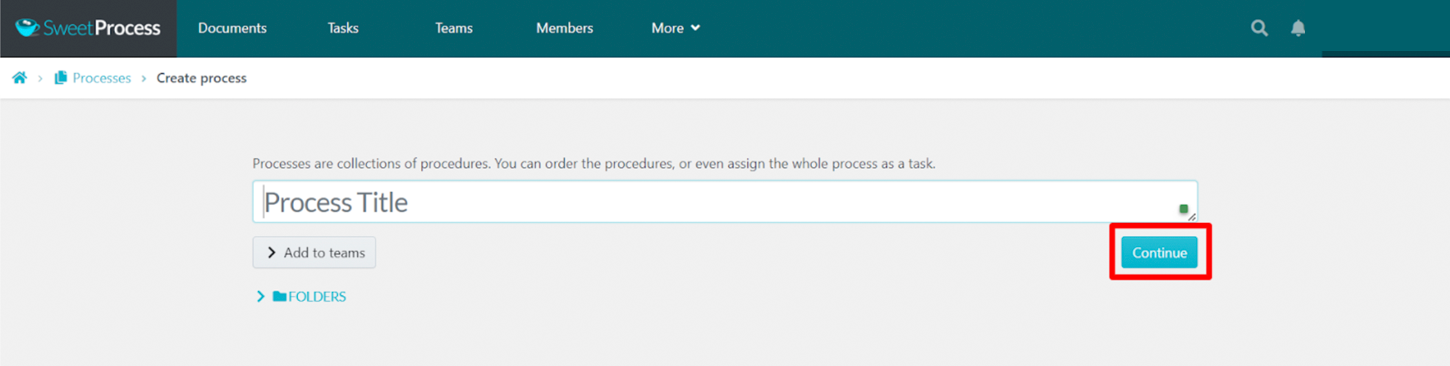
Step 4: Create your process. Add your procedures to the process. Add videos, images, and links as needed. Click on “Approve” when you’re done.
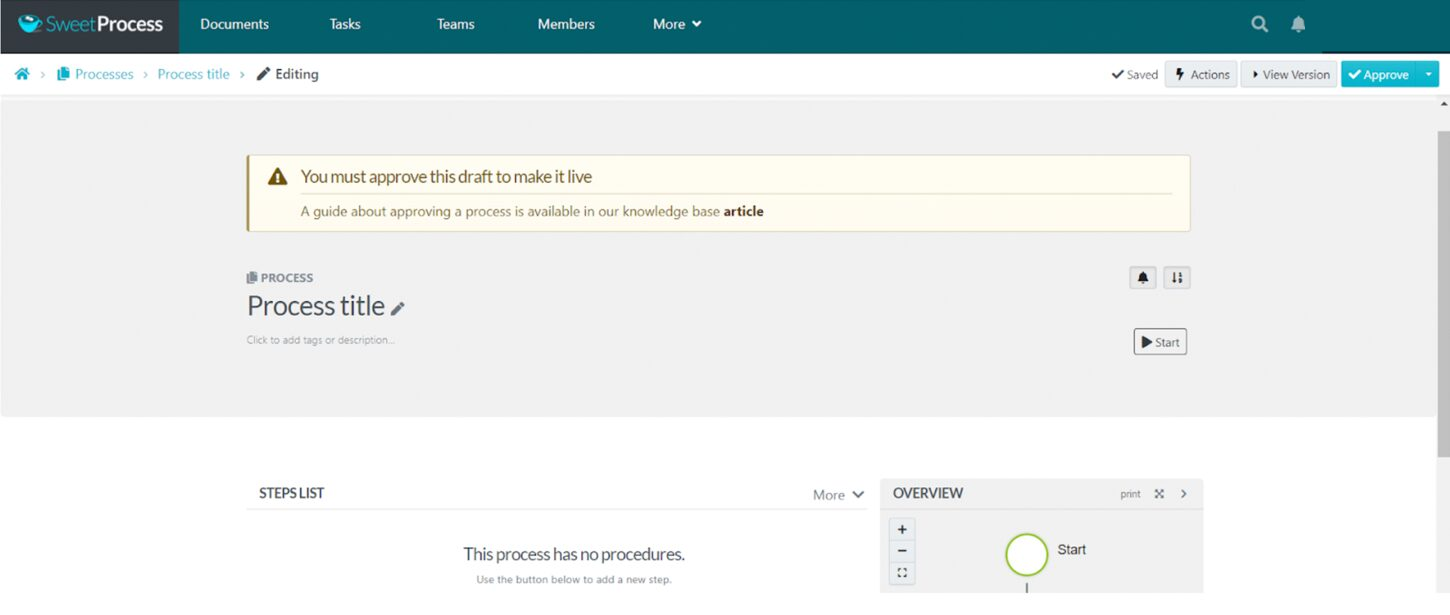
Step 5: Click on “Approve” and choose from the drop-down menu. You can approve and notify interested parties, approve and request sign-off, or request approval.
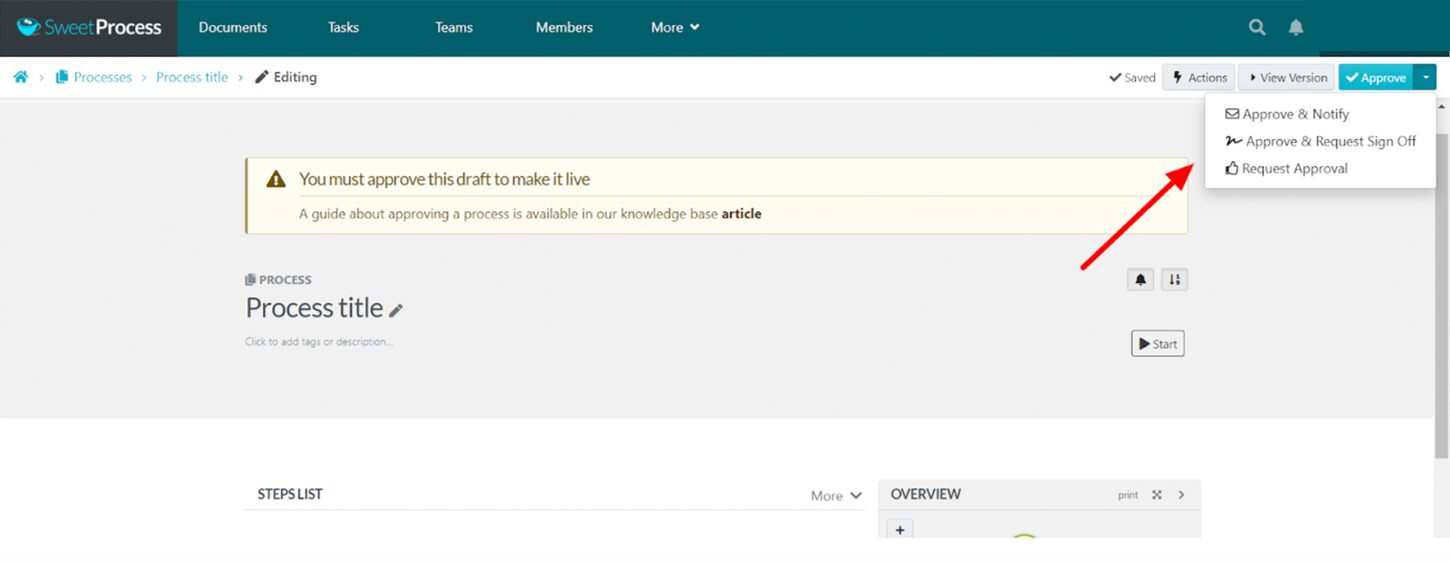
Once you approve, your process is ready.
View the Version History of an Existing Process
You can create processes in SweetProcess and also view the history of each process version. This allows for easy corrections and a vivid overview of your process’s evolution.
To check out the version history of your process, follow these steps:
Step 1: Go to Processes on your dashboard and select an existing process.
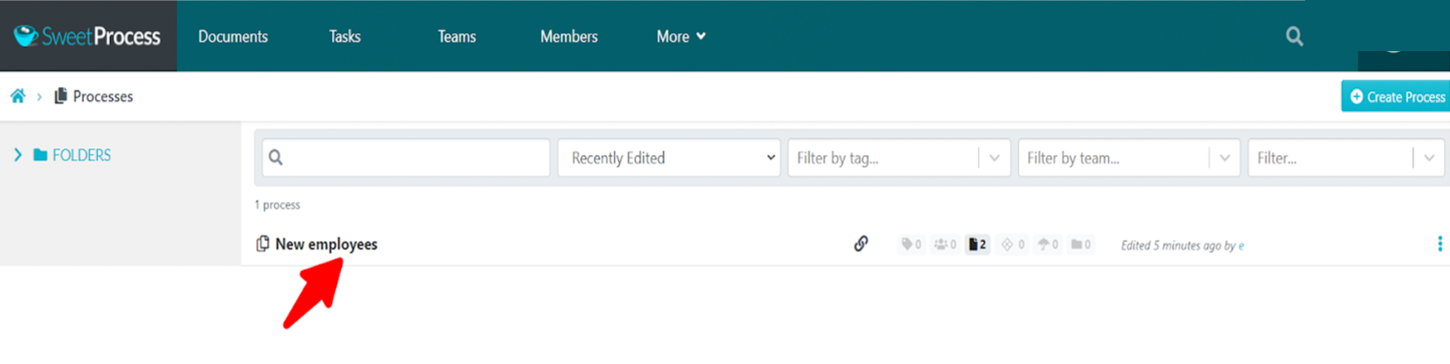
Step 2: Click on the clock icon on the left side of the page.
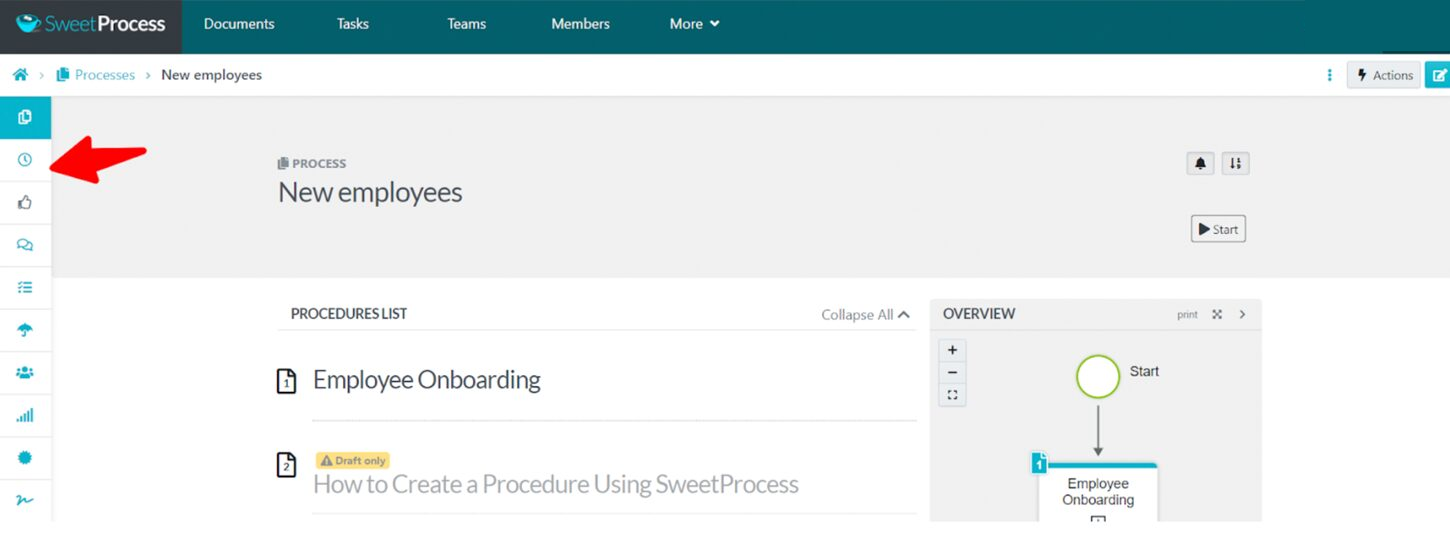
Step 3: View all the different versions of your document.
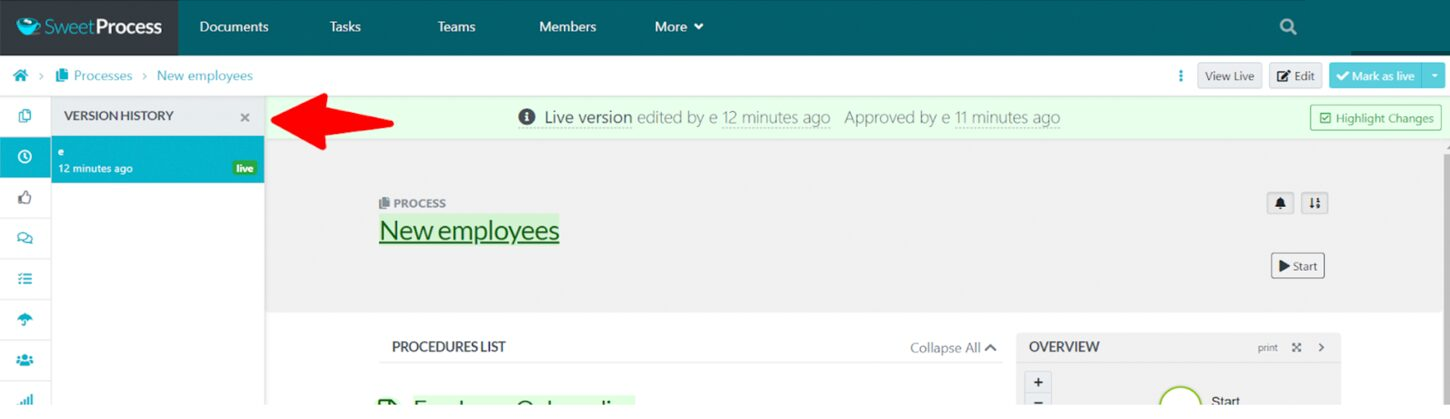
You can click on each version to view or restore your process to that version.
Manage Your Processes Seamlessly
SweetProcess lets you manage a Process through version history, team access, comments, task assignments, and sign-offs.
Managing processes with SweetProcess helped MiPA, a virtual personal assistant service provider, scale up. Emma Mills, MiPA’s founder, described one benefit: “Number one is the ability to amend a process, improve on it. You can get that signed off.”
SweetProcess has many features to ensure that your processes are properly created, managed, and executed.
Some of these features include:
- View and restore version history
- Leave comments
- Assign processes to specific teams
- Review processes
- View past activities on the process document
- Share your documents using a QR code
- Export processes
- Categorize processes in folders
- Request sign-offs and so much more
Assign Tasks and Collaborate With Team Members
What’s the use of creating processes if your team cannot work together to execute them properly? SweetProcess makes it very easy for your team to work together to implement your process.
One of the ways it does that is by allowing you to assign tasks. You can assign the entire process as a task to specific team members or assign just a step in the process.
This is how you do it:
Step 1: Open your process document and click on “Actions.”
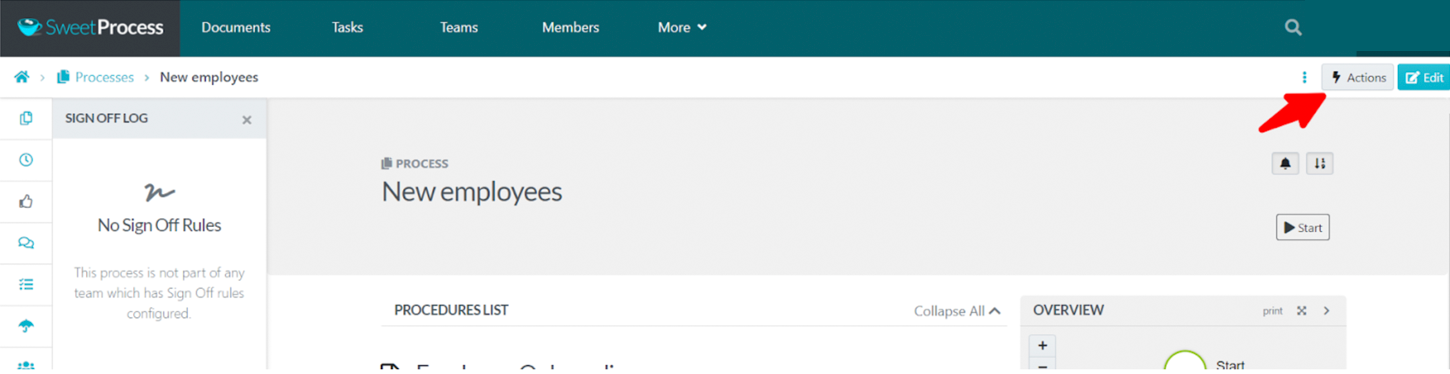
Step 2: Select “Assign as Task” from the drop-down menu.
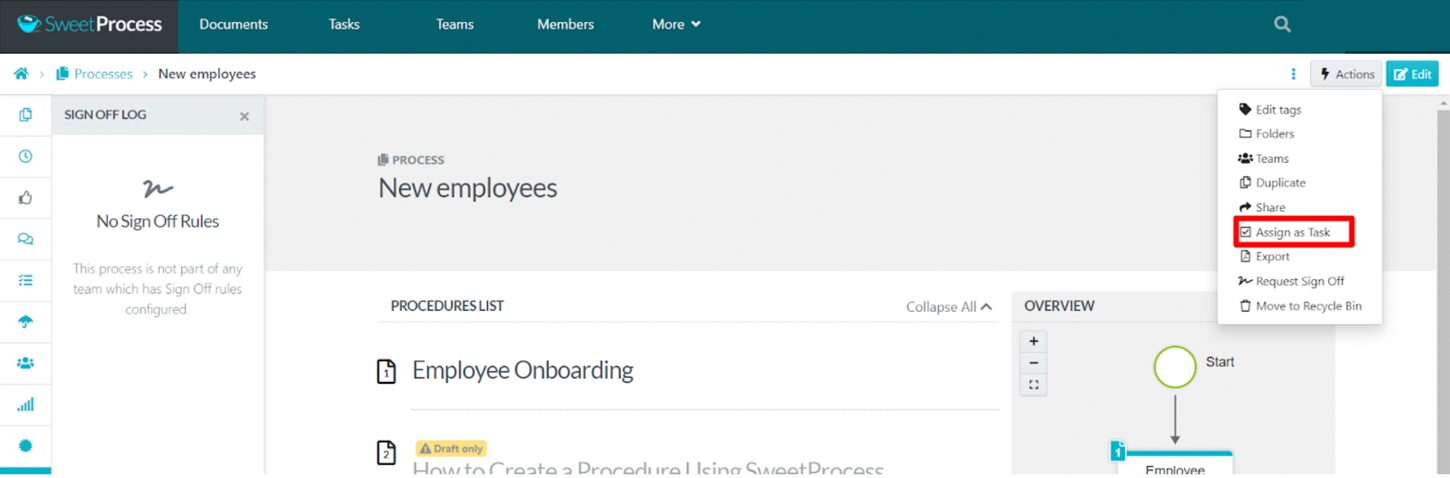
Step 3: Add the team you want to assign the task to. Include individual names and roles for the task. You can also specify which steps are to be assigned, add a due date and time for the task, and indicate if it is recurring.
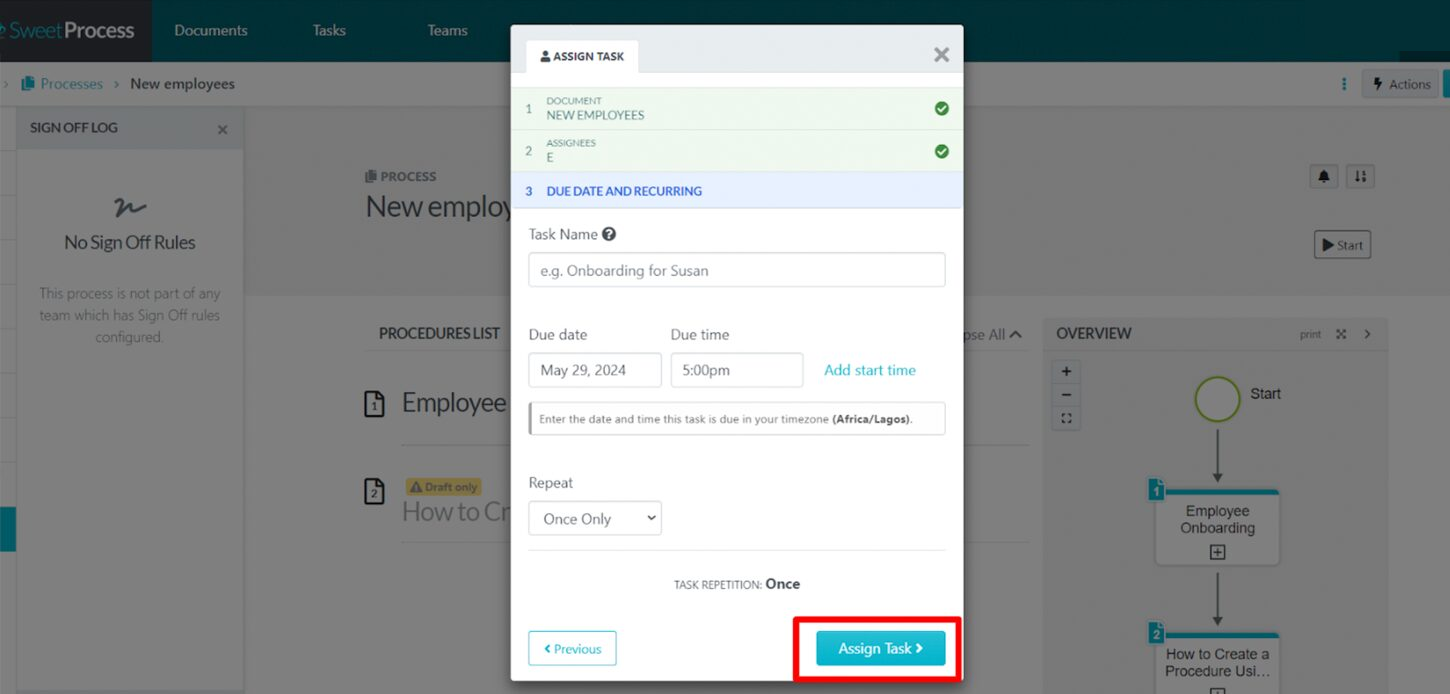
You have successfully assigned your process as a task.
Record Your Procedures
The SweetProcess Chrome extension records a procedure in your browser as you click through it. It captures screenshots of the steps and produces a Procedure you can edit.
Install the extension, click the SweetProcess icon, and choose “Capture Procedure.” Complete the task, then click “Stop” to review the captured steps. This example records edits to a sample welcome checklist and contains 10 captured steps.
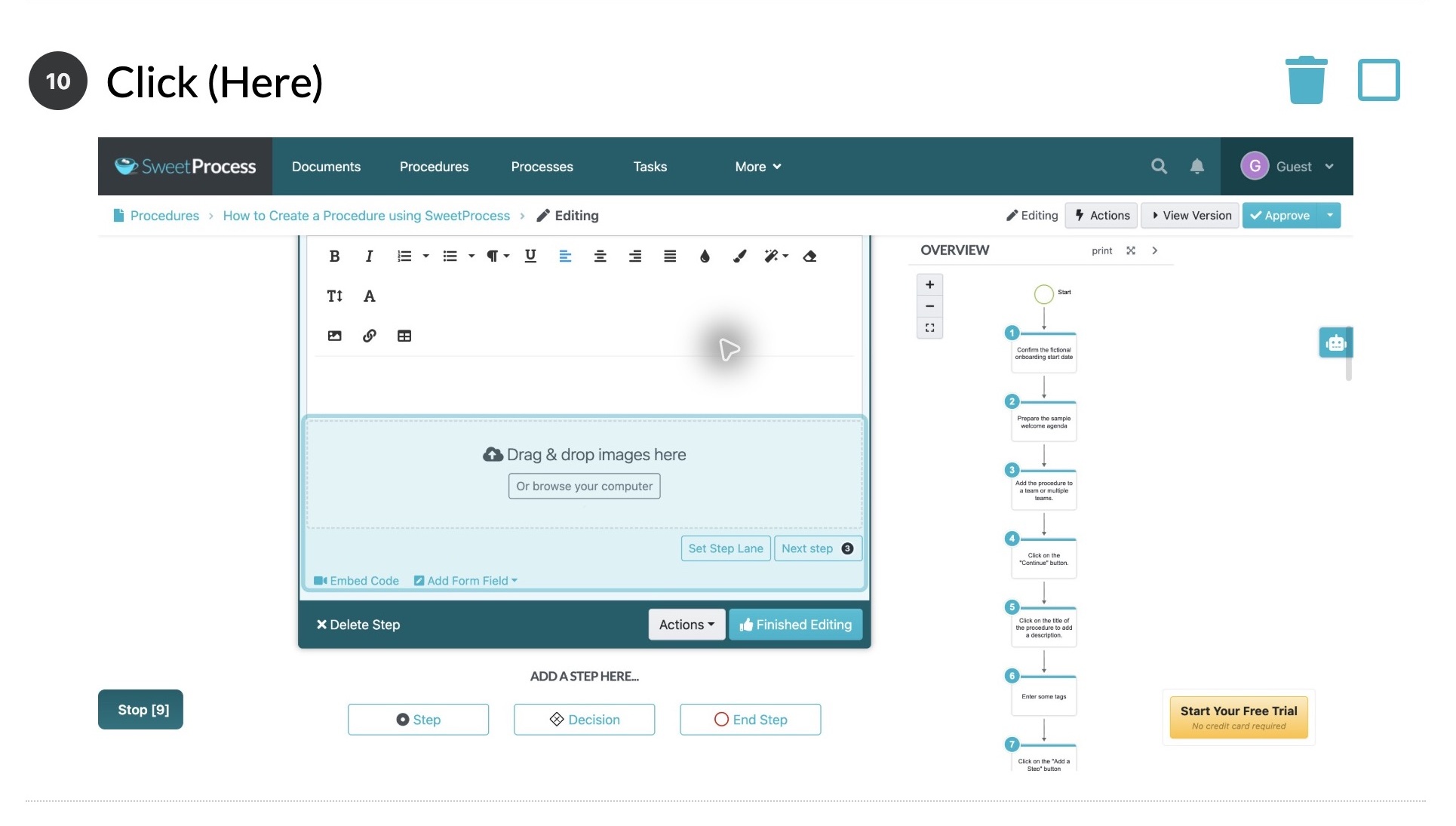
Step 10 of a sample welcome-checklist Procedure captured with the SweetProcess Chrome extension.
Choose “Add to my account” to save the capture as a Procedure. Review its wording, rename generic steps, and check the screenshots before approving it for your team.
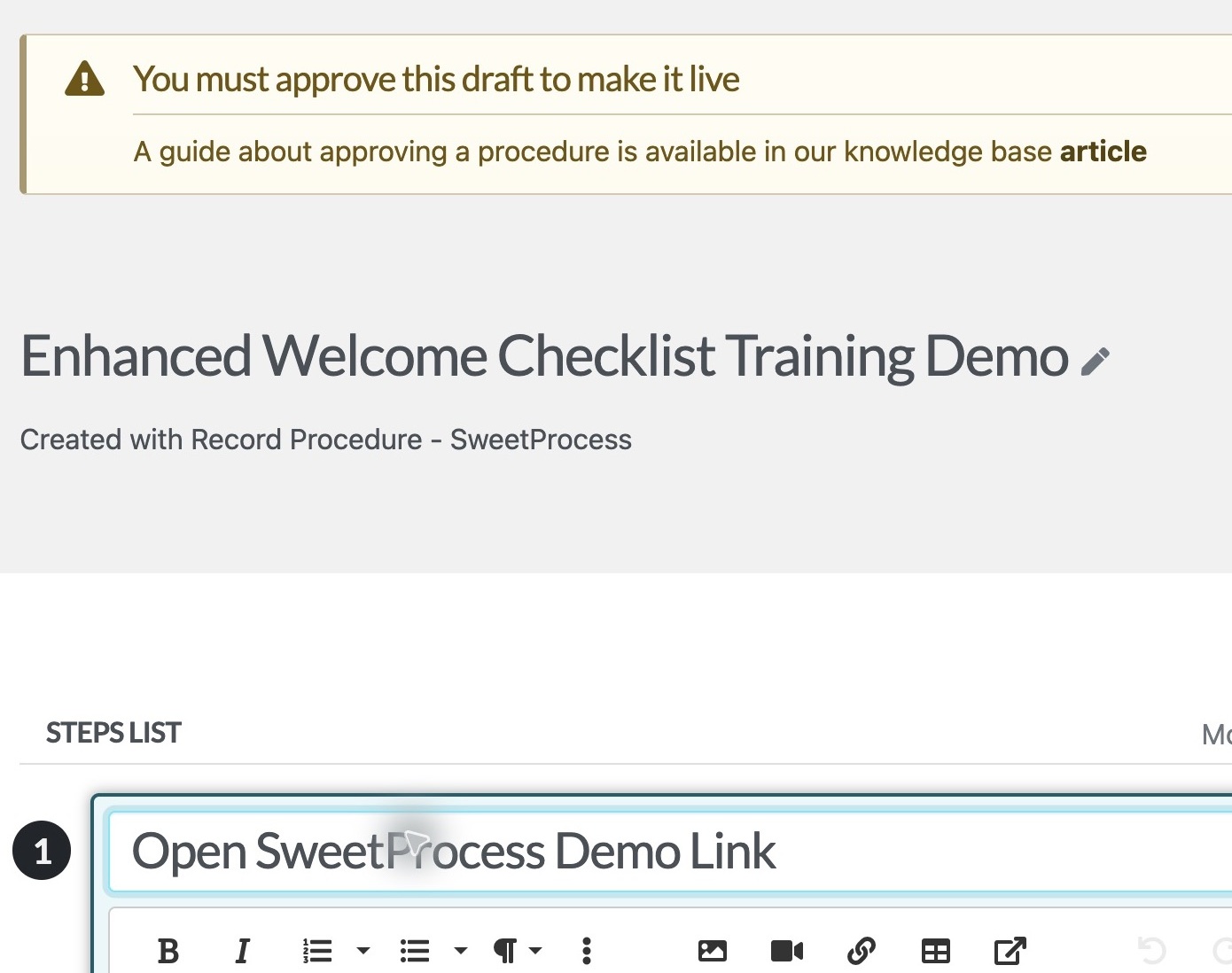
The saved recording opened as an editable SweetProcess Procedure draft.
Creating Automatic Flowcharts
SweetProcess automatically generates a flowchart as you document a Procedure or Process. It can show a linear sequence or branches at decision steps.
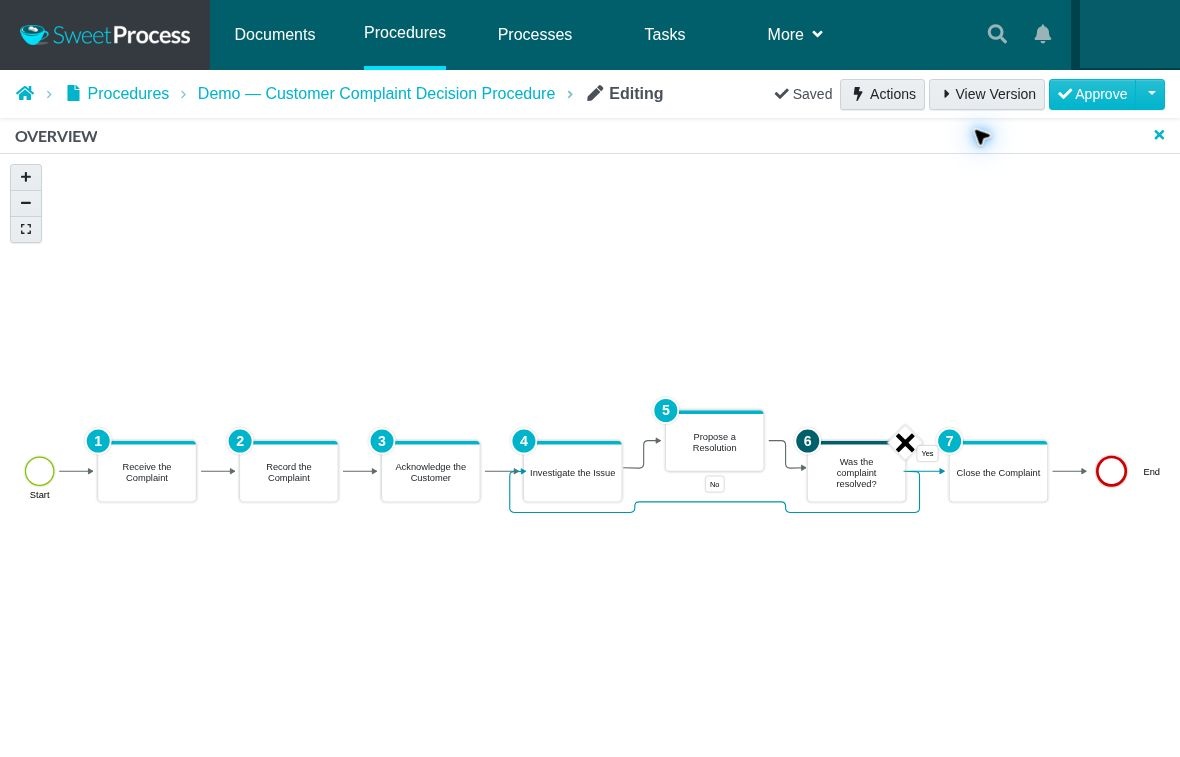
Example Procedure: A customer-complaint decision branch returns unresolved complaints to investigation.
SweetProcess Pricing
Pricing checked Oct 2, 2026. With SweetProcess pricing plans, all users can access every feature after starting the free trial. After the trial ends, SweetProcess costs $99 per month for up to 10 users and $5 for each additional user. If you prefer annual payments, you’ll be charged $990 per year and $50 per year for each additional user. The annual base price works out to $82.50 a month, saving about 16.7 percent, or $198, compared with 12 monthly payments.
For smaller teams of up to five users, SweetProcess is billed annually at $495 per year, plus $50 per year for each additional user. There are no premium tiers or locked features based on specific plans. We also offer a 30-day money-back guarantee that includes a free one-hour consultation call.
Not right for you if: Your main requirement is complex, form-driven workflow automation rather than documenting, maintaining, and assigning procedures, policies, and processes.
Pipefy: Best Process Street Alternative for Business Process Automation

Image source: Pipefy
Overview of Pipefy
Pipefy is an AI-driven business process automation tool. It allows you to construct low-code business apps to automate workflows with minimal coding knowledge. With its enterprise-grade dashboard, businesses can implement workflows across devices while scaling.
How Is Pipefy Different From Process Street?
- Pipefy organizes work around processes and cards, with visual boards, forms, and automation, while Process Street uses workflows, tasks, forms, data sets, approvals, and automation.
- Pipefy offers a free plan.
Pros of Pipefy
- It uses Kanban boards to visualize processes.
- It enables collaboration among team members.
- It enables real-time process monitoring and reporting.
- It has a mobile application for easy access even on the go.
- It has a free plan for small teams.
Cons of Pipefy
- Critical advanced features require a paid plan.
- Integration and API allowances vary by plan, so check the limits for the connections your workflow needs.
- Paid-plan pricing requires a sales quote, so you cannot calculate the subscription cost from the pricing page alone.
Pipefy Pricing
As of Oct 2, 2026, Pipefy has three plans. The Starter plan is free and supports up to 10 users. The Business and Enterprise plans offer advanced features; however, you need to contact the sales team for a quote.
Not right for you if: You primarily need a searchable home for detailed procedures, policies, and process documentation.
CheckFlow: Best Process Street Alternative for Checklist Creation and Management
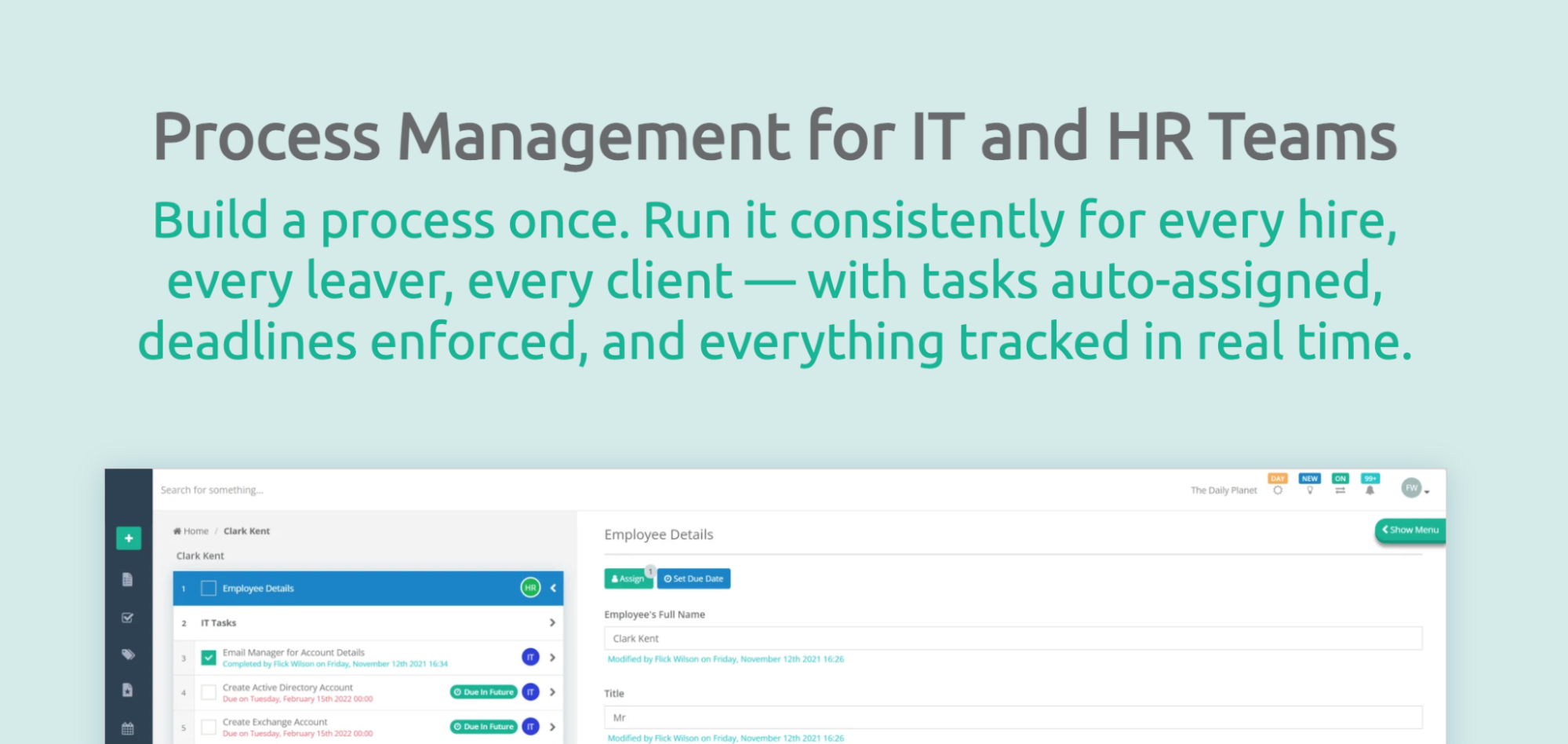
Image source: CheckFlow
Overview of CheckFlow
If you love Process Street’s checklist creation and management, CheckFlow is a great alternative. CheckFlow enables the creation and management of workflows and processes using checklists.
With this tool, you can process documents, videos, photographs, email templates, and other items. You can also share checklists and create new contact lines with your clients. Thanks to its automation features, you can control your workflows and reduce your workload.
How Is CheckFlow Different From Process Street?
- CheckFlow has a risk-free, cancel-anytime policy for all its plans.
- Guest users are free and unlimited on CheckFlow.
- CheckFlow publishes its prices so you can decide quickly.
- Process Street provides three pricing plans, while CheckFlow has two.
Pros of CheckFlow
- It offers a free 14-day trial.
- It uses conditional logic to create dynamic checklists.
- It provides workflow features that allow you to build complex processes easily.
- It enables real-time collaboration.
- It allows third-party integrations via Zapier.
- It has an analytics dashboard that gives you control of your data.
Cons of CheckFlow
- Single sign-on, a dedicated database, and unlimited file storage require Enterprise, which has a five-user minimum.
CheckFlow Pricing
To use CheckFlow, you can choose between Business and Enterprise plans as of Oct 2, 2026. The Business plan is $10 per user per month if billed monthly, or $9 per user per month if billed annually. If you opt for Enterprise, it costs $18 per user per month if billed monthly, or $16.20 per user per month if billed annually, with a minimum of five users.
Not right for you if: You need a documentation-first platform for managing procedures, policies, and a broader organizational knowledge base.
Trainual: Best Process Street Alternative for Standard Operating Procedures
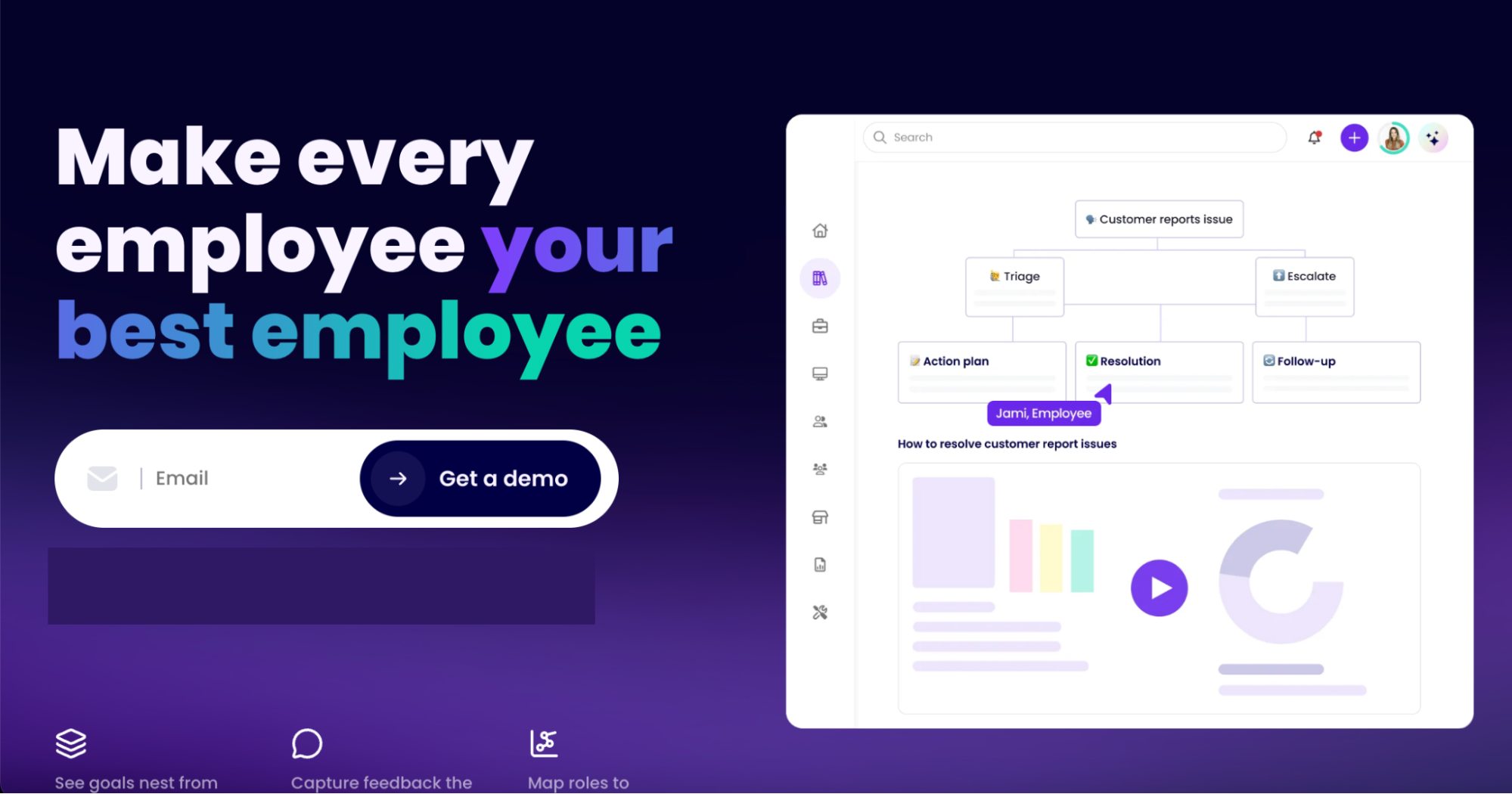
Image source: Trainual
Overview of Trainual
Trainual is an employee onboarding, SOP, and training software. It provides essential features that simplify employee training and onboarding. Thanks to the streamlined training process, you no longer need to use traditional methods.
It is a tool for training new and existing employees, bringing them up to speed on vital information they need to execute tasks effectively. From creating visually engaging training materials to training the employees to organizing the training process, Trainual has you covered.
How Is Trainual Different From Process Street?
- Trainual has a built-in team directory that lets you manage your team members. You can view details like roles, profiles, reporting structures, and key responsibilities.
- Although Process Street offers SOP templates, Trainual templates go beyond processes. They cover essential information like job descriptions and business roles.
Pros of Trainual
- It has a centralized knowledge base that stores all your processes and important company information in one place.
- It allows you to easily onboard new employees as your company grows.
- It simplifies employee training by giving you tools to create and manage training materials easily.
Cons of Trainual
- You don’t get the actual costs from the word go; you have to contact the team for a quote.
- Every plan requires implementation support, with a one-time fee of $1,000.
Trainual Pricing
As of Oct 2, 2026, Trainual doesn’t publicly list its pricing. There are four tiers: Core, Pro, Premium, and Enterprise, and you need to contact the team for a quote. Its pricing page also states a one-time implementation fee of $1,000.
Not right for you if: You need a price before a demo, or your requirement is limited to documenting and assigning procedures; therefore, you do not need a broader employee training and operations platform.
Kissflow: Best Process Street Alternative for Workflow Management

Image source: Kissflow
Overview of Kissflow
Kissflow is low-code workflow management software that anyone can use. With Kissflow, you can build complex business processes and perform a deep dive into them, gaining insights into your company’s process metrics and reports.
This software makes building advanced workflows easy because it requires little to no coding experience. However, you might need some technical prowess to navigate its advanced features easily.
How Is Kissflow Different From Process Street?
- Process Street builds workflows in a checklist style, while Kissflow builds them with a graphical editor.
- Kissflow uses a low-code approach to build business applications and workflows.
Pros of Kissflow
- It has a mobile app for easy access. Employees can create and manage workflows on the go.
- Its impressive analytics feature allows you to generate reports in any format, from simple charts to detailed spreadsheet reports and pivot tables for large data sets.
- It visually represents your workflows on a Kanban board.
- It has an intuitive drag-and-drop builder that allows you to design and automate forms easily.
Cons of Kissflow
- Kissflow is pitched at large organizations, which can be more than a small team wants
- Its current pricing page directs you to a consultation rather than advertising a self-serve free plan or trial.
- You have to contact the team to get a quote for your team
Kissflow Pricing
As of Oct 2, 2026, Kissflow does not list its actual prices on the website. You have to set up a consultation. Its pricing page describes fixed annual agreements, with no surcharges for AI or API usage.
Not right for you if: You want to try it yourself first before speaking to a team member.
Asana: Best Process Street Alternative for Project Management
Image source: Asana
Overview of Asana
Asana helps teams organize and manage their work efficiently. This tool works well for cross-functional teams, helping them communicate and track project progress in real time.
It has a user-friendly interface for easy navigation and suits teams of all sizes, from startups to large enterprises across many industries.
How Is Asana Different From Process Street?
- Asana offers a free Personal plan, while Process Street’s pricing page lists a 14-day Pro trial.
- While Asana is organized around projects and tasks, Process Street is built around repeatable workflows and also offers a Docs product.
- Asana has a mobile and desktop app, while Process Street runs in the browser, with iOS, Android, Slack, and Microsoft Teams apps.
Pros of Asana
- It has an AI tool that creates optimized workflows to match specific goals.
- It has robust task management capabilities.
- It provides ready-made templates for standard workflows.
- It offers a free Personal plan for one or two people.
Cons of Asana
- Advanced capabilities require a paid plan.
- The Personal plan covers only two people; therefore, you have to upgrade if you have a bigger team.
Asana Pricing
Pricing checked Oct 2, 2026. Asana offers a free Personal plan for teams of up to two people. The paid Starter plan starts at $10.99 per user per month billed annually, or $13.49 per user per month billed monthly. The Advanced option costs $24.99 per user per month if billed annually, or $30.49 per user per month when billed monthly. Enterprise and Enterprise+ are custom.
Not right for you if: You need a platform to write and maintain procedures. Asana is primarily built to plan and track projects.
Flowmingo: The Best Process Street Alternative for Workflow Process Design

Image source: Flowmingo
Overview of Flowmingo
Flowmingo is a web-based business process management tool for creating workflows without programming or coding.
With features like drag-and-drop process modeling, task status tracking, dashboards, collaboration, and so much more, designing and implementing workflows becomes easier.
How Is Flowmingo Different From Process Street?
- Process Street gives you a 14-day free trial, while Flowmingo offers 30 days.
- Flowmingo’s plans are organized by the number of users and available storage.
Pros of Flowmingo
- It offers a 30-day free trial.
- It provides a clear overview of your tasks and projects, all in one place.
- It allows you to send real-time notification alerts to team members.
- Unlimited processes on every listed plan.
Cons of Flowmingo
Storage is limited to 2 GB, 5 GB, and 10 GB across the three plans.
The listed plans include up to 50 users; check with the vendor if your team is larger.
Flowmingo Pricing
As of Oct 2, 2026, Flowmingo has three pricing plans: Basic, Professional, and Premier. The Basic plan costs $49 a month for five users and 2 GB of storage. Professional goes for $69 a month for 25 users and 5 GB, while Premier costs $129 a month for 50 users and 10 GB.
Not right for you if: You need a documentation-first system for detailed procedures, policies, training content, and long-term knowledge management instead of a workflow design tool.
Manifestly: Best Process Street Alternative for Recurring Checklists
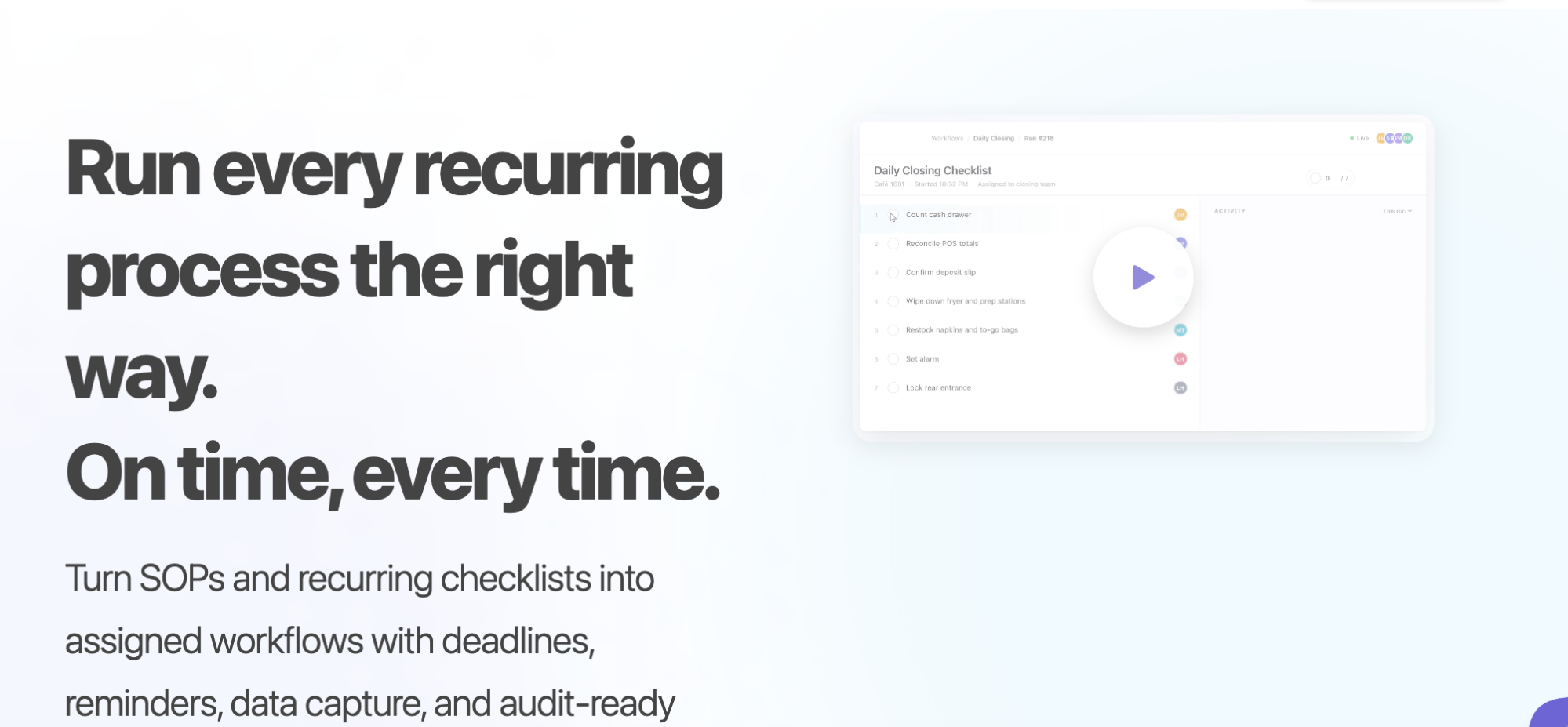
Image source: Manifestly
Overview of Manifestly
Manifestly is checklist and SOP software for recurring work, task assignments, scheduling, data collection, and audit history.
It’s a useful option when your processes are repeatable and checklist-driven, and you want to assign work and monitor completion.
How Is Manifestly Different From Process Street?
- Manifestly publishes a per-user price. Process Street does not.
- Manifestly focuses on recurring checklists and SOPs, with conditional logic, scheduling, data collection, and automation. Process Street also runs workflows and offers a separate Docs product.
Pros of Manifestly
- You can view the actual monthly or annual pricing on the website
- Unlimited workflows and runs on the Business plan.
- Integration with Slack, Microsoft Teams, Zapier, and an API.
- Free 14-day trial to test the software
Cons of Manifestly
The product is centered on recurring checklists rather than a broader documentation platform.
Workflow versioning, to track changes to SOPs, is listed on the Enterprise plan only.
Manifestly Pricing
Pricing checked Oct 2, 2026. The Business plan costs $10 per user per month billed monthly, or $100 per user per year ($8.33 per user per month billed annually). This plan includes a free 14-day trial. The Enterprise plan is annual-only, starting at $2,000 a year including 10 users.
Not right for you if: Your work is more of a library of written procedures than checklists that run on a schedule. Manifestly is built to run recurring checklists.
Scribe: Best Process Street Alternative for Process Documentation

Image source: Scribe
Overview of Scribe
Scribe is a process documentation tool that captures your processes and generates guides, SOPs, employee onboarding materials, and other documents your company needs.
It is no-code software that is easily customizable, allowing you to add images and videos, edit your screenshots, and so much more. It also has a Chrome extension that makes it easier to document, process, and share screenshots with team members.
How Is Scribe Different From Process Street?
- Scribe offers a free plan for small teams.
- Scribe is built around process capture and visual documentation. Process Street is designed for workflows, with separate documentation capabilities through its Docs product.
Pros of Scribe
- Its AI features help turn captured steps into written process documentation.
- It offers pre-built document templates.
- It has free and easy-to-use Chrome extensions.
- It allows you to easily create engaging step-by-step guides.
- Scribe has a free plan.
Cons of Scribe
- Users have pointed out that the software sometimes duplicates steps or makes it hard to adjust screenshots.
- It is primarily a visual documentation and capture product rather than a complete workflow execution platform.
Scribe Pricing
Pricing checked Oct 2, 2026. Scribe’s Basic plan is free with quick customization features. The Pro Personal plan costs $25 per seat per month billed annually, or $35 per seat per month billed monthly, starting at one seat. Pro Team costs $13 per seat per month billed annually, or $17 per seat per month billed monthly, with a five-seat minimum. To use the Enterprise plan, you have to get a custom quote.
Not right for you if: You need to manage procedures, policies, assignments, approvals, and broader operational documentation in one process management system instead of creating visual software guides.
If you want to test out how SweetProcess stacks up against these tools, sign up for a free trial today. It’s free for the first 14 days!
How to Move Your Content Out of Process Street
Process Street’s help center, checked Oct 2, 2026, says all plans can export workflows and workflow runs as PDFs, and workflow run data as CSV. These exports give you records to retain while you plan a move.
A PDF preserves written steps, not a working copy of conditional logic, automations, or integrations. Rebuild and test those behaviors in the replacement tool rather than assuming an export recreates them.
If you are importing a procedure into SweetProcess, prepare a Word document in DOCX format with built-in heading styles, then choose “Upload document” from the “Create Procedure” menu.

After the upload finishes, open the imported Procedure, review the steps, and make any necessary changes.
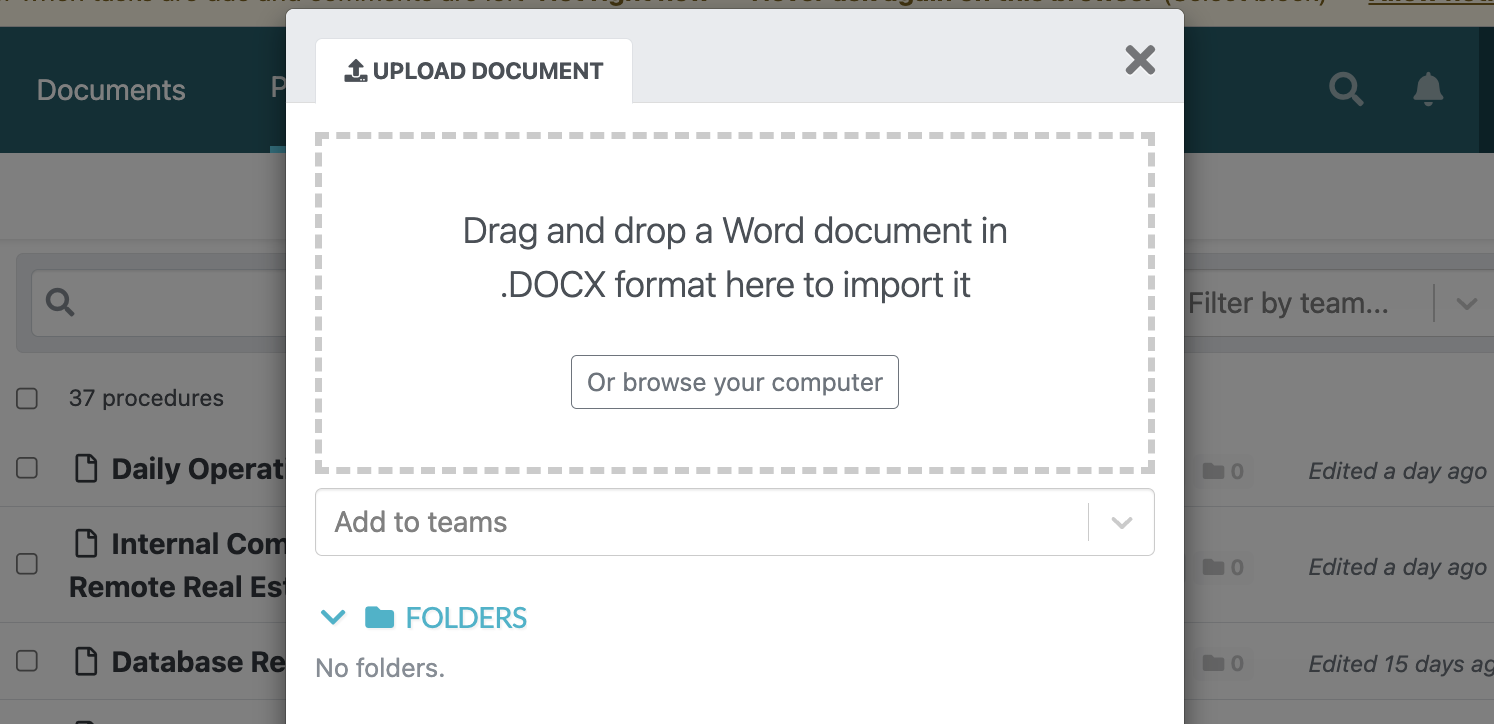
SweetAI can also draft a Procedure from a title, but it does not know your business. Someone who does the work must review and correct it before approval or sharing. The document-import route is not a direct import of a working Process Street workflow.
Alternatively, you can use the SweetProcess Chrome extension to record a browser-based procedure as you click through it. Review the recorded Procedure, add missing steps, and test it with your team before sharing it.
Which Process Street Alternative Should You Choose to Manage Your Business Processes?
Choose the Process Street alternative based on the work you need the software to handle. If you need to run workflows, shortlist Pipefy, CheckFlow, Kissflow, Manifestly, and Flowmingo. These products offer different features that will help you manage checklists, process automation, conditional logic, assignments, forms, and recurring work.
If your actual requirement is project management, Asana is the best fit, and if you prefer to capture visual guides on your screen, Scribe is a good alternative.
However, if you need to document how work is done, start by looking at SweetProcess. It centralizes all procedures, processes, policies, assignments, approvals, version history, and knowledge bases on one platform. It has a Chrome extension to capture processes and offers a transparent price for every plan.
Ready to see how SweetProcess handles your documentation? Start the 14-day SweetProcess trial. No credit card is required.
FAQs
Is Process Street free?
Process Street does not currently list a free plan. It offers a 14-day Pro trial with no credit card required.
How much does Process Street cost?
As of Oct 2, 2026, Process Street does not publish prices for its Startup, Pro, or Enterprise plans. You have to contact the sales team for a quote.
Which Process Street alternatives have a free plan?
Pipefy Starter plan is free but limited to five processes, 10 users, and 50 cards a month. Asana’s Personal plan is free for one or two people, while Scribe’s Basic is free and works with any web app. SweetProcess has no free plan; it offers a 14-day trial with no credit card required.
What is the difference between Process Street and SweetProcess?
SweetProcess is documentation-first software for creating, maintaining, and assigning procedures, policies, and processes. Process Street runs workflows with conditional logic and also offers document management through Docs. While Process Street does not publish its prices, SweetProcess users can pay $99 per month for up to 10 users.
Can I export my workflows from Process Street?
Yes. As of Oct 2, 2026, Process Street allows you to print or export workflows and workflow runs as PDF, and export workflow run data as CSV, on all plans. However, you have to edit and rebuild the exports on your new platform.