Last Updated on October 27, 2026 by Owen McGab Enaohwo
As a business leader, you understand that an empowered team is productive—but how do you ensure your employees are equipped to succeed from day one?
The answer lies in effective training, and that means leveraging cutting-edge training manual software. Gone are the days of relying on outdated handbooks and fragmented training processes. Today’s tools centralize everything your employees need to learn, adapt, and thrive—all in one platform.
The demand for clear, scalable training solutions continues to soar.
CEOs and founders are looking for tools that simplify onboarding, minimize costly errors, and keep employees engaged. Studies back this up: Businesses with structured training programs see 218% higher income per employee, and 94% of workers say they’d stay longer at organizations that invest in their development. The right training manual software is no longer a luxury; it’s a critical driver of long-term success.
Whether you’re a business owner striving to scale or a founder shaping a growing team, this guide is your blueprint.
We’ve curated 11 best training manual software and tools to help you turn employee development into a competitive advantage.
What You’ll Learn In This Guide:
What is a Training Manual Software?
11 Best Training Manual Software and Tools
1. SweetProcess: Best for Documenting and Managing SOPs
2. Confluence: Best for Documenting and Managing SOPs
3. ClickHelp: Best for Technical Documentation
4. Tango: Best for Software Training
5. Scribe: Best for Step-By-Step Training Manual Creation
6. Bit.ai: Best for AI-Powered Collaborative Documentation
7. Document360: Best for Knowledge Base Management
8. Whale: Best for Checklist Management
9. ProProfs Knowledge Base: Best for AI-Powered Knowledge Base Management
10. Trainual: Best for Employee Onboarding
11. Process Street: Best for Process Management
7 Core Features to Consider Before Choosing a Training Manual Software
Types of Training Documentation
How Businesses Use SweetProcess to Create Training Manuals
Which Tool Should You Choose to Create Training Manuals?
What is a Training Manual Software?

Training manual software, also known as a training manual generator or documentation tool, lets you create, customize, organize, and manage training resources all in one place. Rather than managing scattered documents or endless email chains, this software organizes everything employees need in a single place, improving knowledge retention and minimizing confusion.
By keeping information clear and accessible, it aligns teams, boosts productivity, and ensures consistency across the organization.
More than just documentation, training manual software establishes a standard operating procedure (SOP) that promotes clarity in roles and responsibilities, helping employees connect their tasks to broader company goals. The best part? Employees can return to the training documentation anytime they have questions. Employees can revisit training materials anytime they need guidance, fostering a culture of continuous learning and reducing the likelihood of errors. With ease of access and valuable benefits, training manual software is invaluable for maintaining a well-informed and efficient workforce.
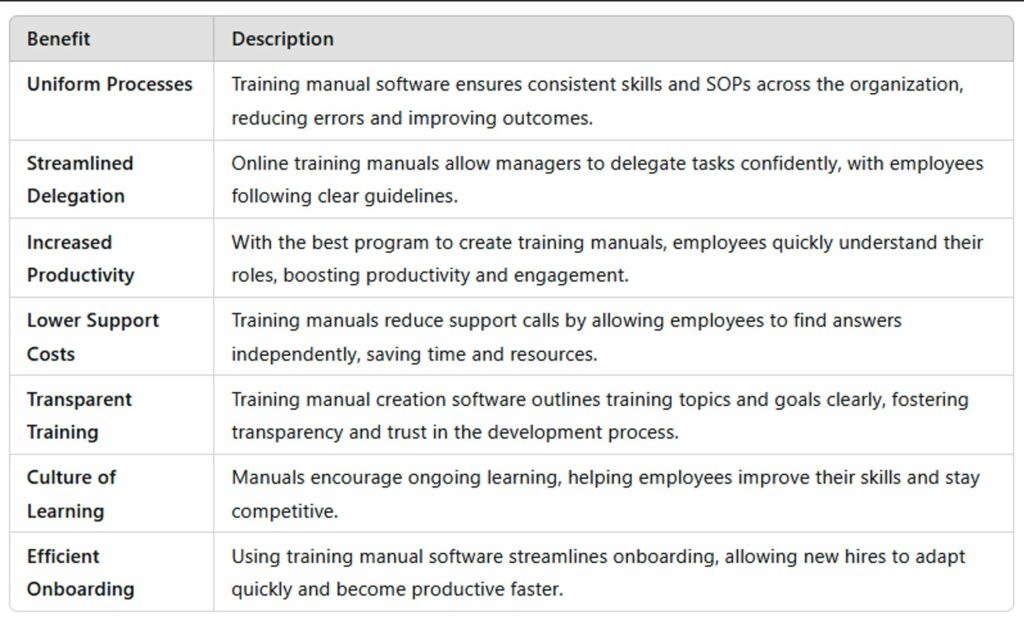
Training manual software comes with a range of valuable benefits for your organization, as stated below:
Ready to take control of your team’s training? Start exploring the benefits of training manual software today with a 14-day free trial of SweetProcess—no credit card required!
11 Best Training Manual Software and Tools
1. SweetProcess: Best for Documenting and Managing SOPs
SweetProcess is an effective training manual creation software that helps you document and manage your organization’s standard operating procedures, processes, people, and tasks—all in one place.
Its user-friendly interface simplifies creating, organizing, and sharing procedures, making it an invaluable asset for businesses looking to improve training and onboarding.
Designed for teams of all sizes, it ensures that complex information is accessible and easy to follow so every employee can confidently perform their roles. The following features distinguish SweetProcess training manual software from the rest in the market:
- Intuitive and easy to use
- Document procedures, processes, and policies
- Organize and find documents easily
- Assign and track tasks
- Import existing procedures and policies
- Create process maps and flowcharts
- Export documents in various formats
- Create a knowledge base for employees and clients
- Version history support
How to Use SweetProcess as a Training Manual Software

Creating training manuals using SweetProcess involves creating a centralized knowledge base for your employees first for onboarding and training new hires. SweetProcess makes the process simple and effective. Here’s how you can make the most of SweetProcess:
Create a Procedure for Employees Using SweetProcess
To create a procedure in SweetProcess, follow the below steps:
- Visit sweetprocess.com and sign up for a 14-day free trial with no credit card.
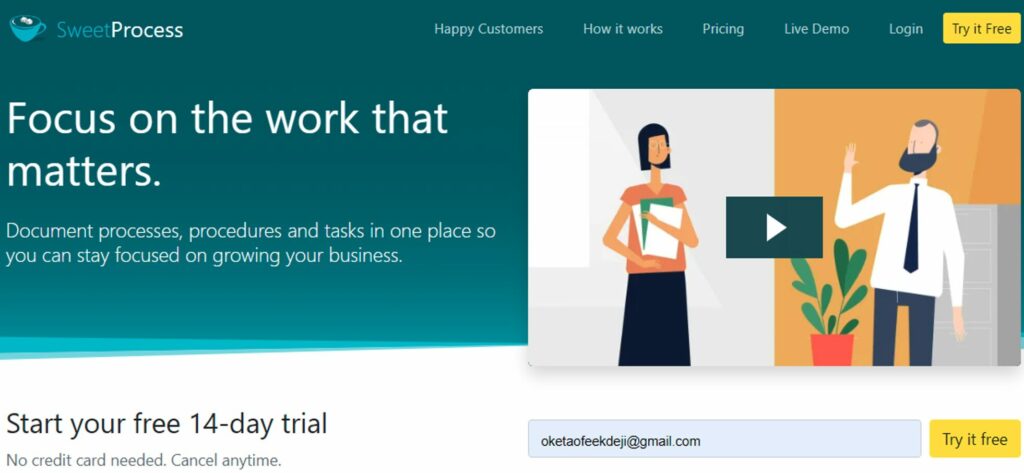
- Next, log in to your SweetProcess account and click on the “Procedures” tab on the main menu.

- Select “Create Procedure” on the next tab and add a procedure title.
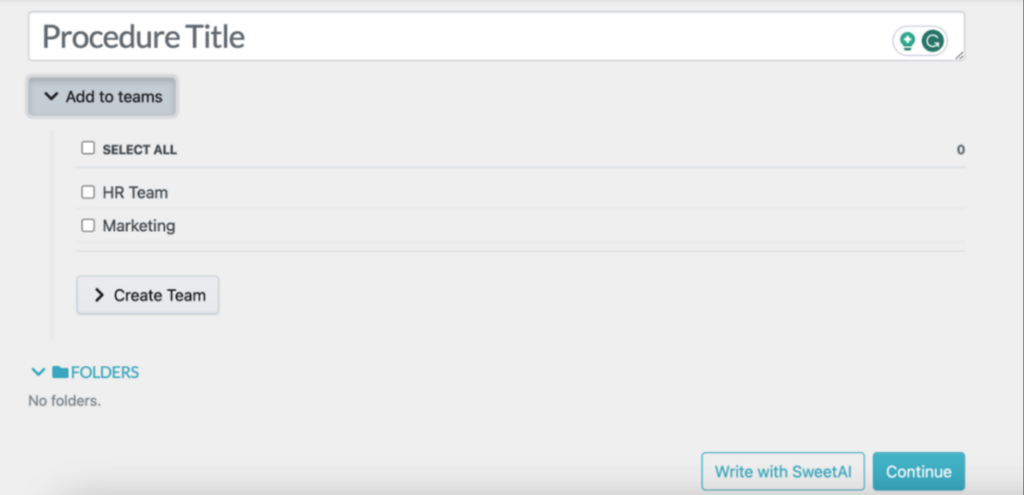
- Assign the procedure to specific teams by selecting an existing team or creating a new one.
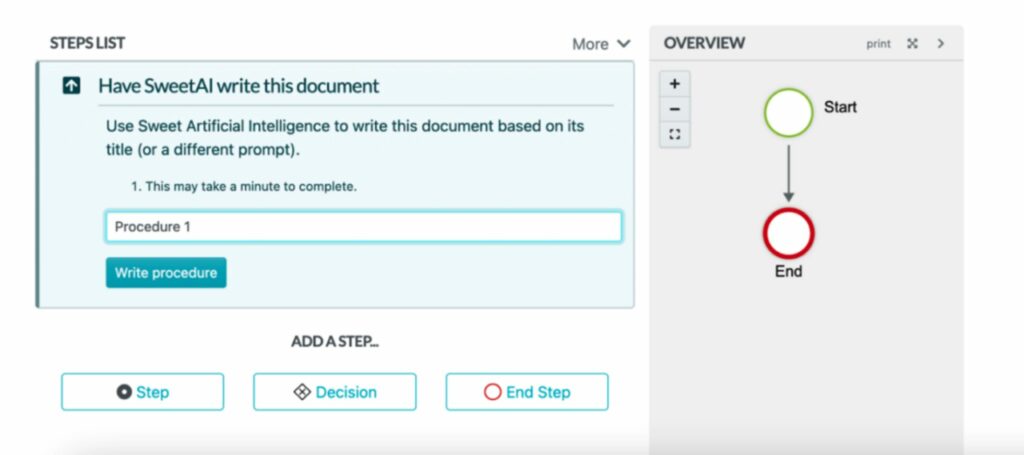
- Choose to write the procedure manually or use SweetAI for assistance.
- Add relevant details to complete your procedure.
How to Create a Process for Employees Using SweetProcess
To use SweetProcess for process management, here’s how to get started:
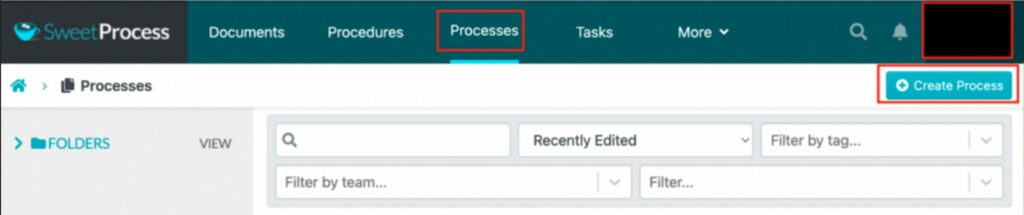
- Go to the “Processes” tab in the main menu and click on “Create Process” to begin setting up your process.
- On the next tab, add the title.
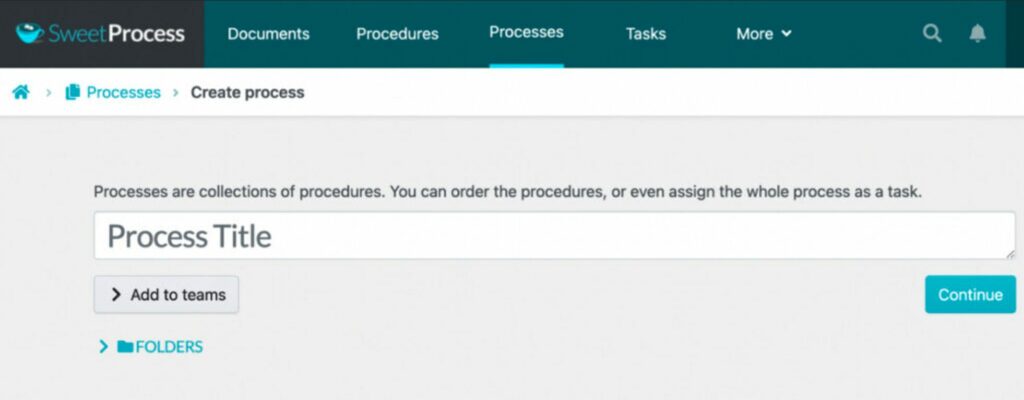
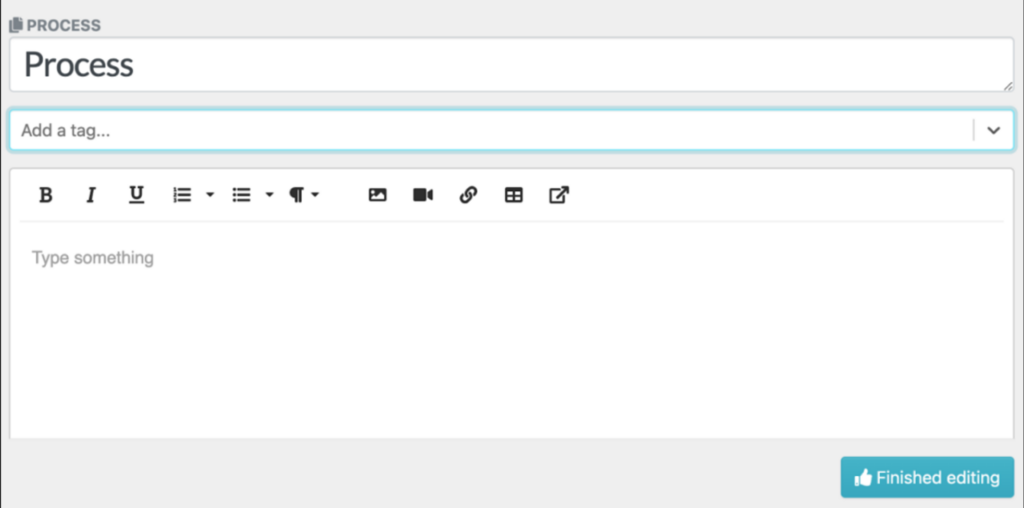
Next, include all the necessary details about the process to support training. You can add images, tags, and videos to make the process clear and thorough.
How to Build a Knowledge Base for Employees Using SweetProcess

SweetProcess lets you create a centralized knowledge base by turning your existing procedures and policies into a beautiful knowledge base to train new hires and current employees efficiently. Here’s how:
- Log in to your existing SweetProcess account.
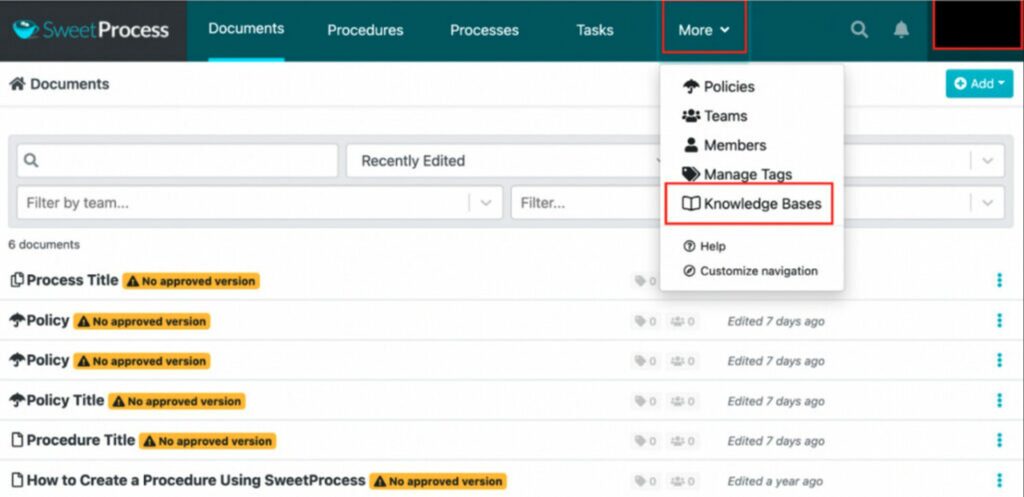
- Select the “More” button on the main menu.
- Click on “Knowledge Bases” on the drop-down menu.
- Add a title for your knowledge base.
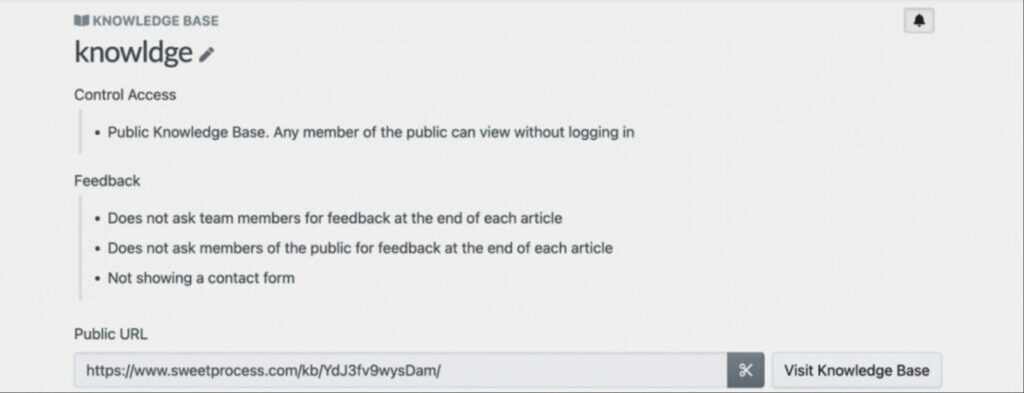
- On the next tab, include a public URL for easy access, name categories, and set access permissions.
How to Embed Images, Tables, and Videos Into Your Training Manual With SweetProcess
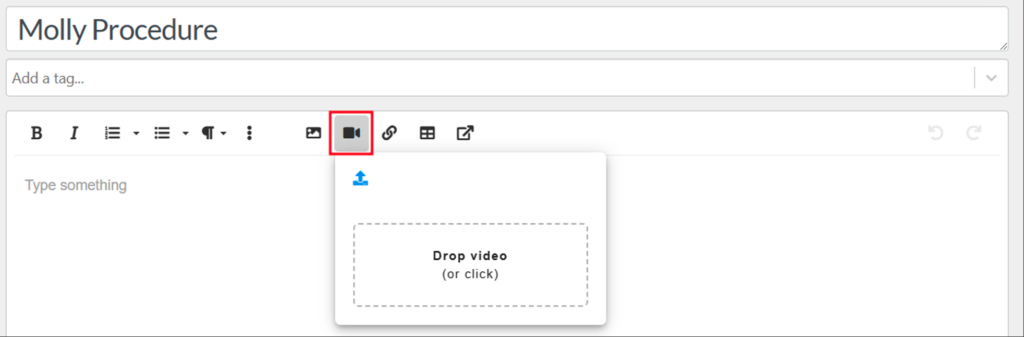
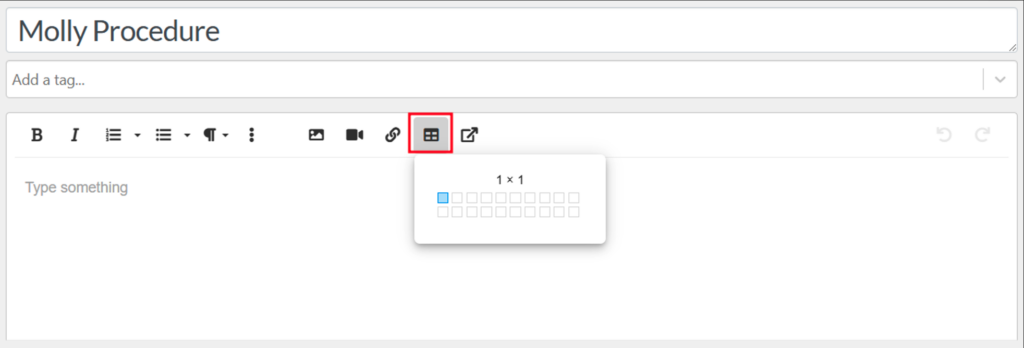
SweetProcess online training documentation software offers one of the best software for creating training manuals today. It enriches your training manual with interactive elements and visuals like images, tables, and videos. Here are simple steps to follow when creating a procedure to add images and videos after adding the procedure title:
- To embed an image, click on the gallery icon to upload an image.
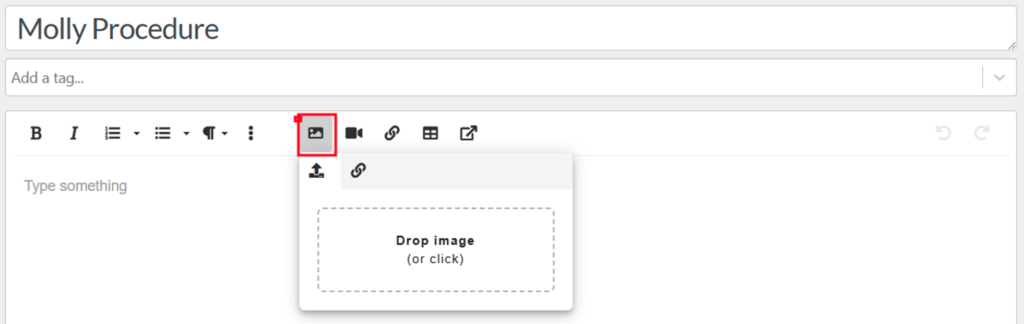
- To add a video, click the video icon to drop or upload.
- Also, to add a table, click on the table icon and select the number of rows and columns you need for your table.
How to Assign Training Tasks to Employees on SweetProcess
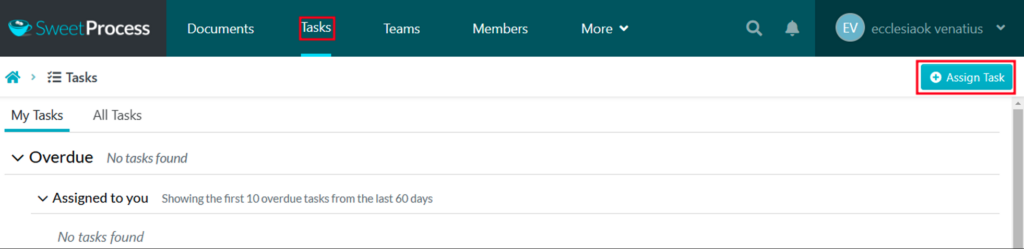
To use SweetProcess to assign training tasks to new hires or current employees, follow these steps:
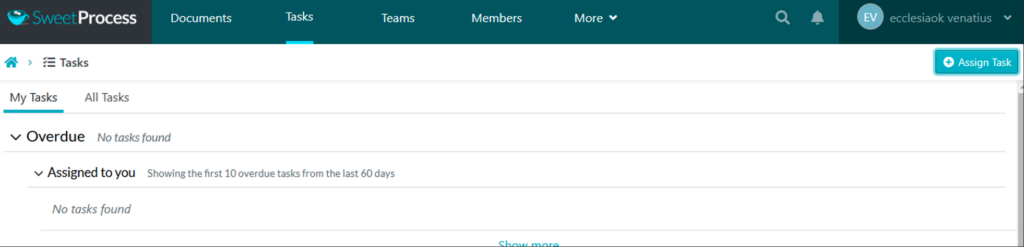
- Select the “Tasks” button on the main menu and tap “Assign Task.”
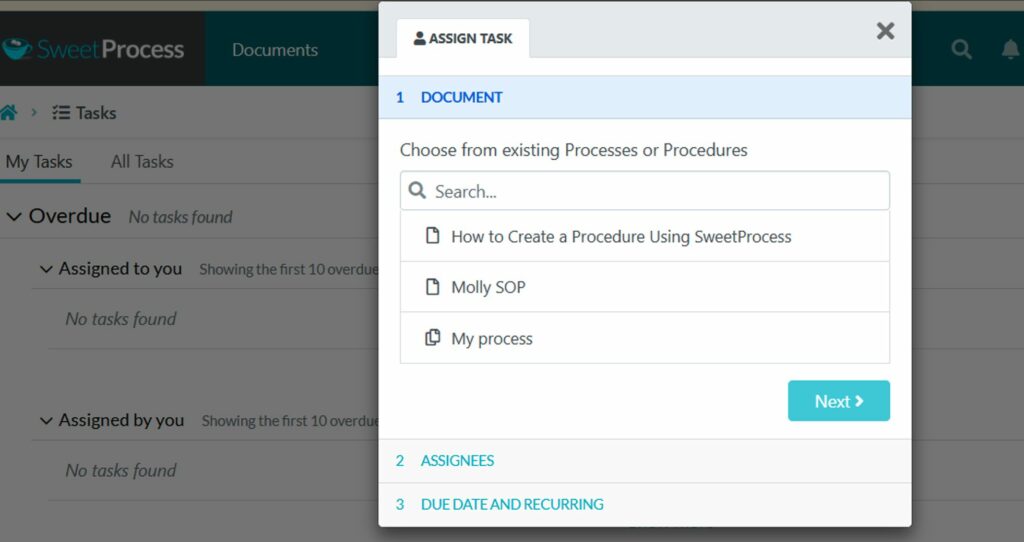
You can also choose the team members you want to assign training tasks to. SweetProcess enables you to specify the task name, the team member’s name, the due date, and the time required for completion.
How to Monitor the Progress of Employees’ Training Using SweetProcess

After assigning training tasks, it’s important to track employees’ progress and identify what is pending. To do this, simply navigate to the “My Tasks” tab. This section will show you tasks that are approaching their due dates and those that are overdue.
How to Collect Feedback From Employees on SweetProcess
After adding training manuals for employees, it is necessary to gather feedback to refine and improve the training. Here’s how you can achieve that with SweetProcess:
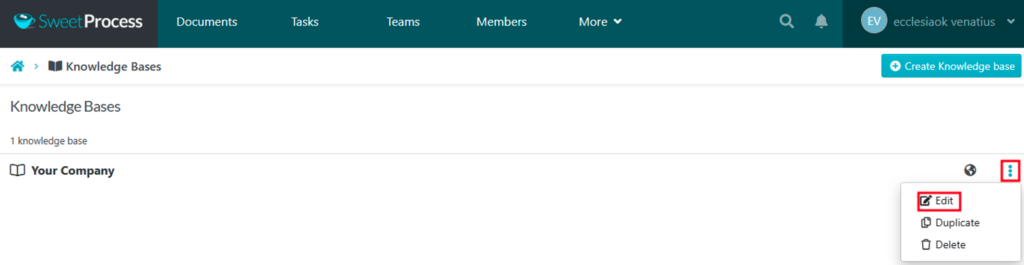
- Open the “Knowledge Base” tab.
- Click on the three dots to access the drop-down menu.
- Select the “Edit”button.
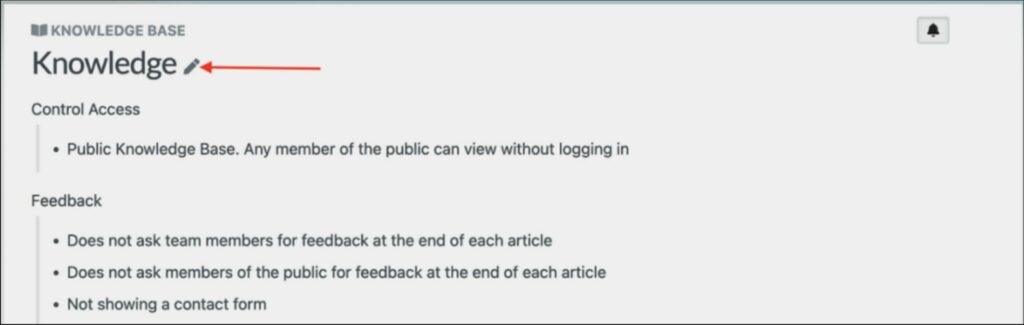
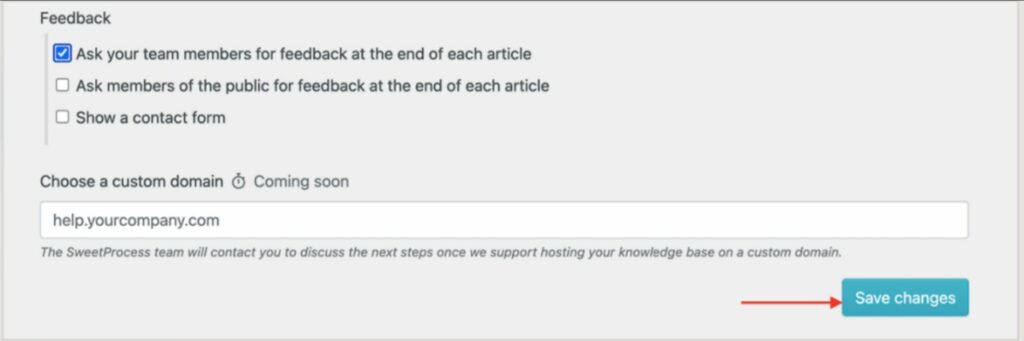
Check the box for “Ask your team members for feedback at the end of each article.”

Select the “Save changes” button to save the knowledge base settings.
Case Study 1: How Aizer Group Enhanced Policy Management With SweetProcess
Aizer Group, an Australian leader in commercial property and facility management, brings together various trades under one roof, from electrical and plumbing to carpentry and roofing. With a team of about 110, including over 20 remote workers, each division has a dedicated leader to ensure consistent quality across services like maintenance and insurance rectification. As the company grew, however, it faced challenges in documenting and standardizing processes, particularly for training offshore teams.
Aizer Group implemented SweetProcess to streamline operations, transforming complex workflows into clear, step-by-step guides. This centralized documentation became invaluable for training remote staff, drastically reducing errors and training time. The platform also sped up onboarding, saving team leaders significant time and enabling them to focus on more strategic priorities. The result? Improved productivity and operational efficiency across the company.
Case Study 2: How SweetProcess Enhanced Efficiency and Customer Satisfaction at TechQuarters
London-based TechQuarters, an IT company with a team of over 43, specializes in helping businesses optimize their IT through Microsoft Cloud solutions. They offer personalized training and hands-on support and collaborate with clients to meet specific needs.
As TechQuarters expanded, they faced challenges in maintaining consistency and efficiency. Manual documentation in spreadsheets and Word files hindered clear workflows. To address these issues, they turned to SweetProcess to digitize and standardize operations into a central knowledge base.
With SweetProcess, employees now have instant access to clear, updated workflows on any device, simplifying adherence to best practices. The system improved onboarding, training, and offboarding processes, minimizing errors and reducing dependency on experts. Version control has also enhanced document tracking, supporting TechQuarters’ goal to double in size by increasing operational efficiency and ensuring they continue delivering high-quality customer support. SweetProcess has become essential to their growth, redefining process management and training documentation.
SweetProcess Pricing
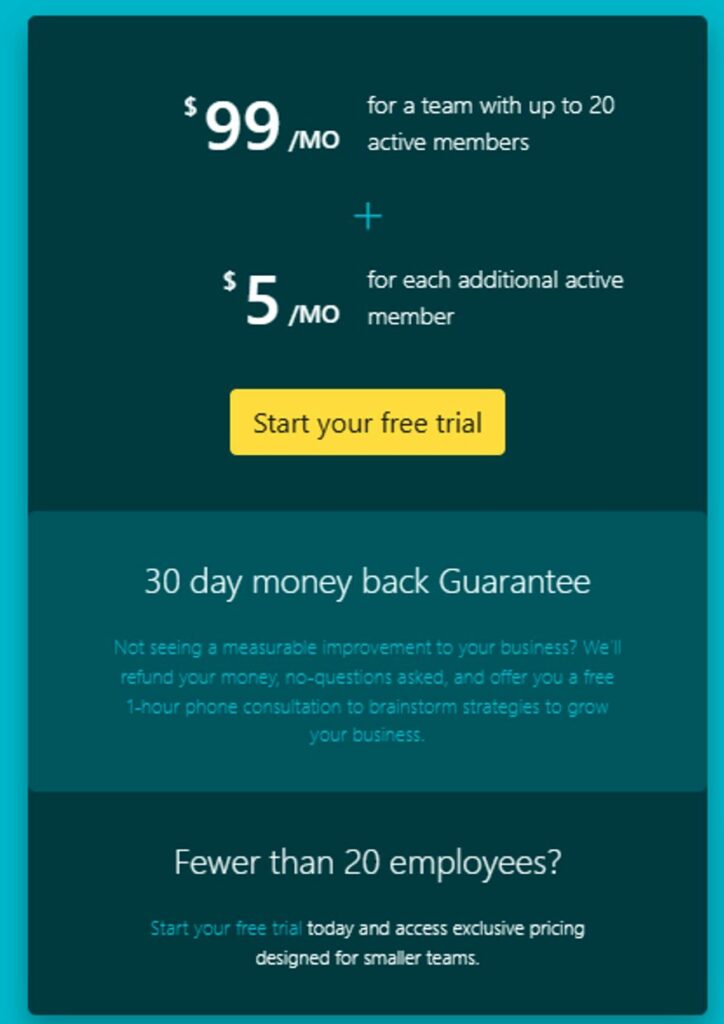
SweetProcess costs $99 per month or $990 per year for up to 10 users. Each additional user costs $5 per month or $50 per year. All plans include all features. For smaller teams, the annual-only Small Team plan costs $495 per year for up to five users, plus $50 per year for each additional user.
2. Confluence: Best for Documenting and Managing SOPs
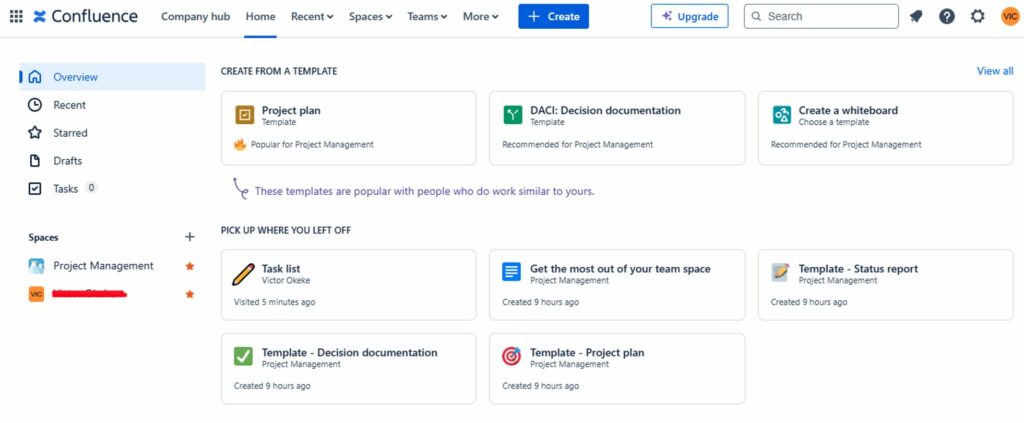
Overview of Confluence
Confluence by Atlassian is a powerful SOP software that focuses on process documentation. It is ideal for IT teams already familiar with products like Jira and Trello.
Features of Confluence
- Seamless AI assistant
- Search capabilities
- Add-ons
- Integrates with Jira, Trello, Slack, and Google Workspace
Pros of Confluence
- Enhanced collaboration
- Simplified workflows
- Streamline cross-functional projects
- Make your workflow more efficient
Cons of Confluence
- Can’t handle large wiki content
- Paid plug-in dependency
- Steep learning curve
Confluence Pricing
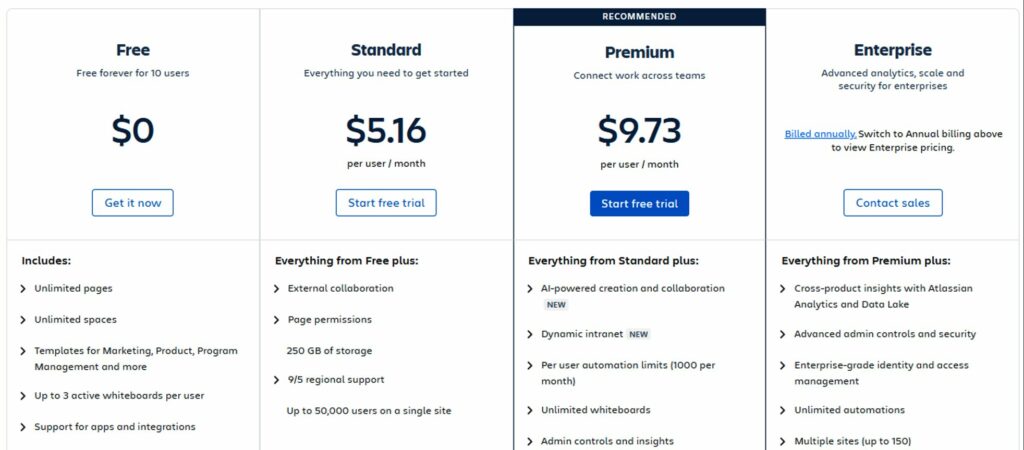
Confluence offers a tiered pricing model ranging from $5.16 to $9.73 per user per month, depending on the team size. One key consideration is that charges apply to all users with access, whether they actively use the platform or not. Confluence also provides a Data Center option for larger organizations, with pricing estimated at approximately $28,000 per year for 500 users.
3. ClickHelp: Best for Technical Documentation
Overview of ClickHelp
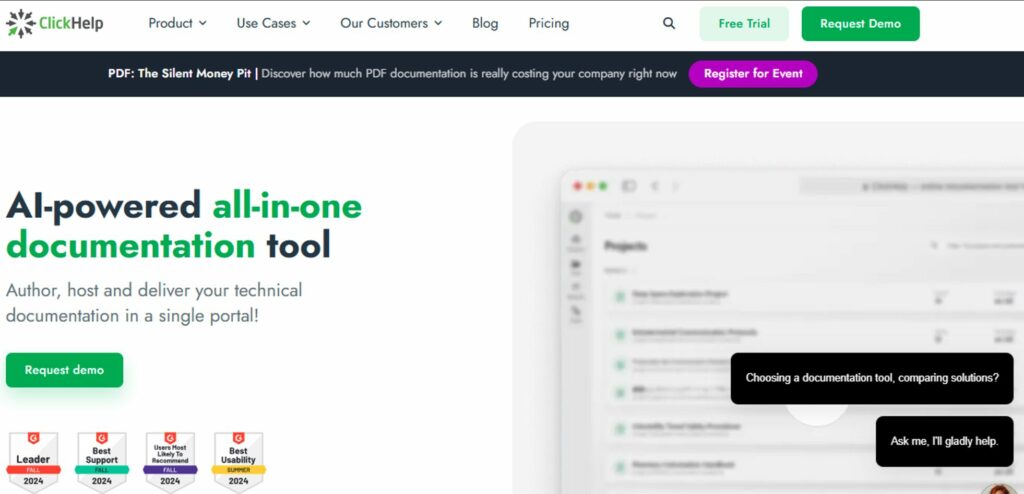
ClickHelp is an online training manual software for creating detailed, customizable online documentation. It is ideal for technical training and complex topics, and its robust publishing options make it perfect for training developers or IT teams.
Features of ClickHelp
- Craft content-rich manuals
- Real-time visualization
- Store all your training documentation in a single, accessible location
Pros of ClickHelp
- Centralized documentation system
- Instant search and advanced search functionality
- Integration with a wide range of tools and services in the market
- Provides readability scores and enhances content clarity
Cons of ClickHelp
- Difficulty in navigation
- Limited customization
- Limited template options compared to other tools on the market
ClickHelp Pricing
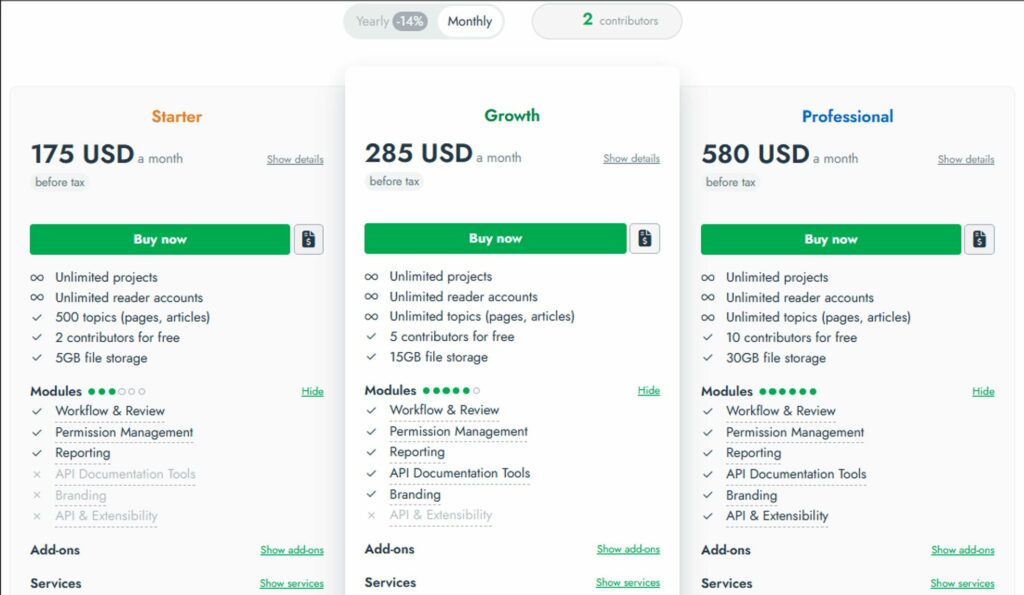
ClickHelp offers three pricing tiers, ranging from $175 to $580, allowing businesses to choose the best option for their needs and budget. A free trial is also available, making it easier to explore the platform’s features before committing.
4. Tango: Best for Software Training
Overview of Tango
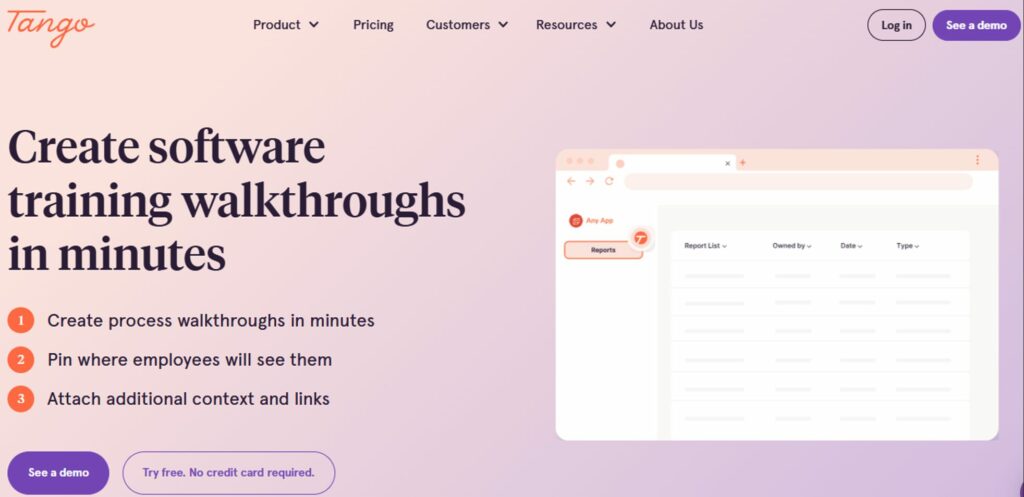
Tango’s online training manual software enables IT, operations, and L&D teams to deliver training materials and interactive process walkthroughs for new hires, employee onboarding, and more.
Features of Tango
- Using the create function, you can make guides by doing the process once
- The training guide functionality walks employees through the process step-by-step
- Analyze and measure usage, process adoption, and friction points
Pros of Tango
- Auto-generate step-by-step software and how-to guides with screenshots
- Create cross-app workflows
- More granular process adoption analytics
Cons of Tango
- Not a complete process documentation tool
- Available on Chrome only
- Inefficient process capturing
Tango Pricing
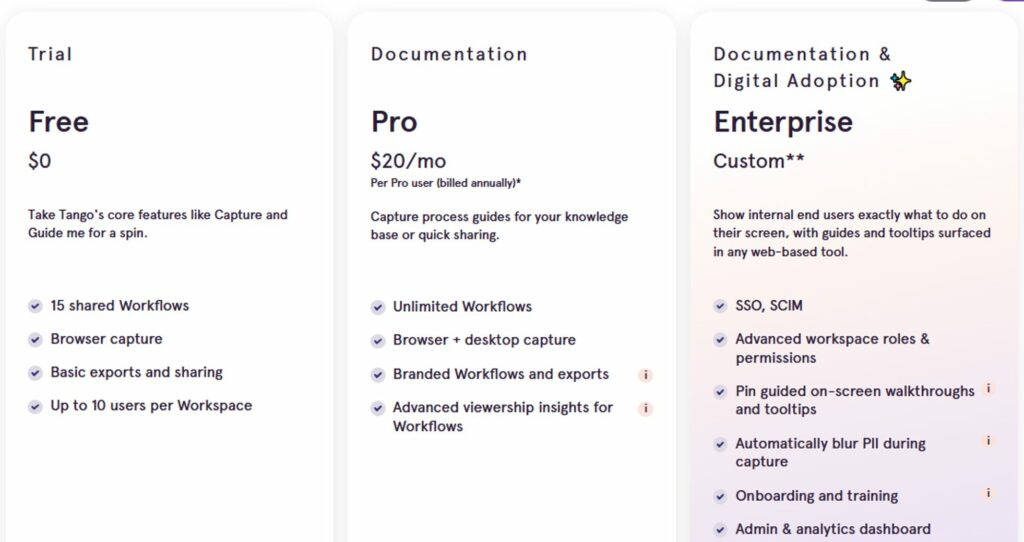
Tango offers three pricing tiers: Free, Pro, and Enterprise. The Free version offers core features like Capture and Guide Me for a spin for up to 10 users per Workspace.
The Pro version, starting at $20 per user per month, includes unlimited workflows, browser and desktop capture, and viewership insights. For larger teams or businesses requiring advanced features, the Enterprise version offers a custom pricing plan with enhanced security, real-time guidance, and dedicated onboarding and training support.
5. Scribe: Best for Step-By-Step Training Manual Creation
Overview of Scribe
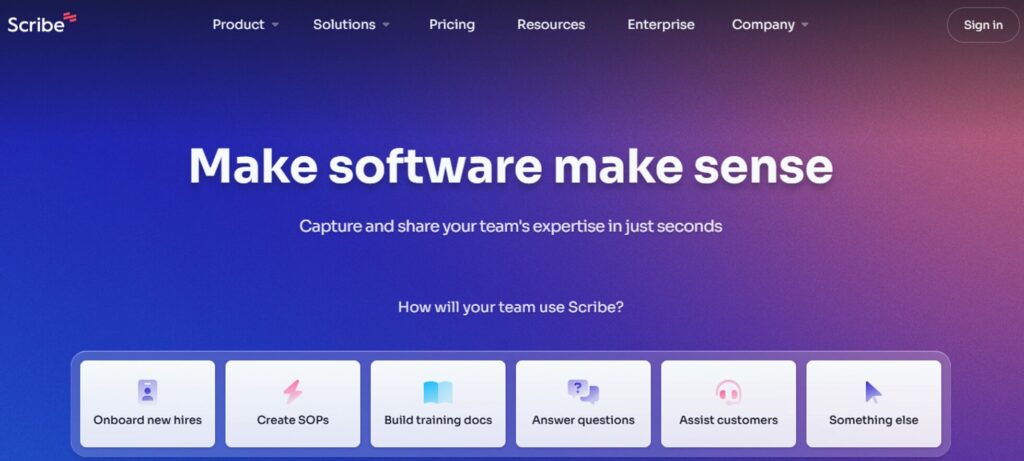
Scribe is process documentation software that lets you create functional and visually appealing training manuals with unlimited guides. Scribe generates step-by-step instructions and annotated screenshots and leverages AI to create a comprehensive training manual for your team.
Features of Scribe
- Built-in editor to annotate, add text, and customize training manuals
- Share training manuals as a PDF or directly with a URL link
- Embed guides into knowledge bases, wikis, learning management system, and more
- Easily create how-to guides with step-by-step instructions and annotated screenshots
Pros of Scribe
- 15-times faster documentation of processes
- Integrates with hundreds of tools, seamlessly fitting into your technology stack
- Compatible across Windows, Mac, and web browsers
- Protect private data with Smart Blur and add brand colors and logos (available on Pro and Pro Teams plans)
Cons of Scribe
- Limited pricing flexibility for small teams
- May be costly for small businesses
Scribe Pricing
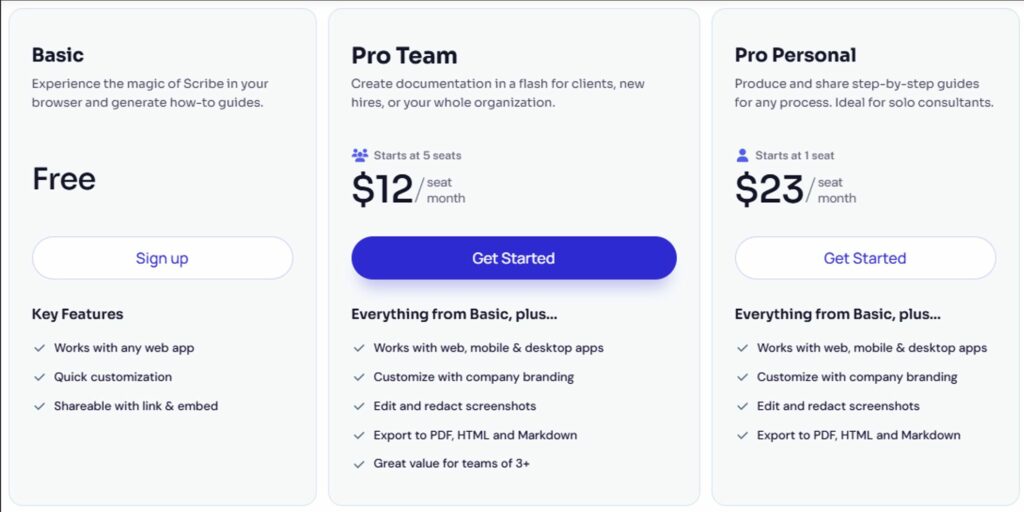
Scribe offers a free basic version with a web extension and the ability to share documents with your team. For more advanced features, the Pro Team version starts at $12 per seat per month, with a minimum of five seats. The Pro Personal version is available starting at $23 per seat per month, catering to individual users or smaller teams.
6. Bit.ai: Best for AI-Powered Collaborative Documentation
Overview of Bit.ai
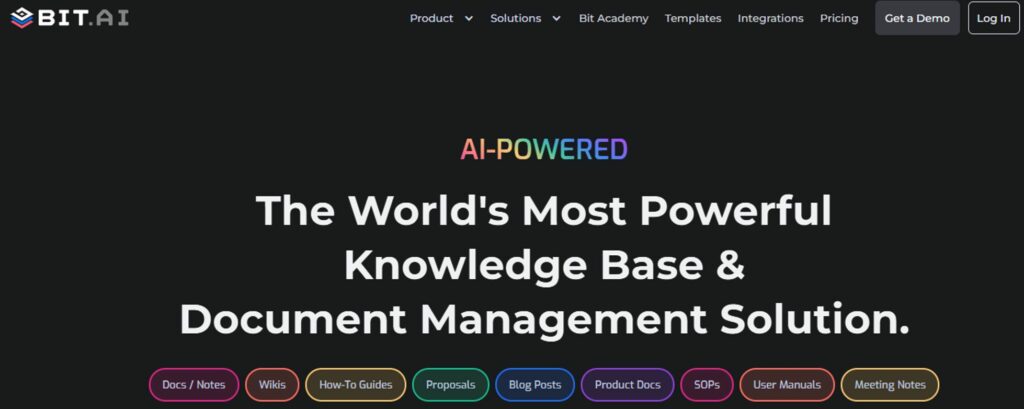
Bit.ai is an advanced AI-powered platform designed for creating professional documents and wikis that are adaptable to diverse business needs. It offers streamlined document creation, enhanced collaboration, and practical knowledge management.
Features of Bit.ai
- AI-powered docs and wikis
- Integrate content in docs via 100+ integrations
- Enrich your docs and wikis with any type of digital content
- Organize work across scalable workspaces
Pros of Bit.ai
- Makes creating and managing training content easy
- Has the collaboration features you need to work and communicate with your team
- It automatically turns the web link into live visual content when you add a shareable link on a blank line.
Cons of Bit.ai
- Fewer font options and limited formatting options
- Some users report PDF issues
- Limited access to the free plan
Bit.ai Pricing
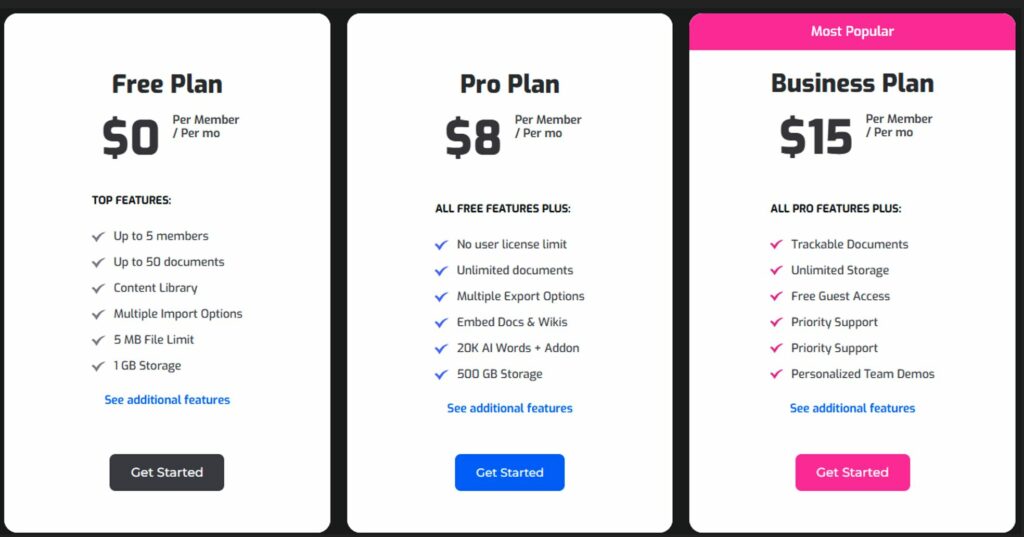
Bit.ai’s free plan starts at $0 per member per month for up to 5 members and 50 documents. The Pro Plan costs $8 per member per month and includes unlimited documents. The Business Plan, priced at $15 per member per month (Most Popular), includes all Pro features plus trackable documents, unlimited storage, free guest access, and priority support.
7. Document360: Best for Knowledge Base Management
Overview of Document360
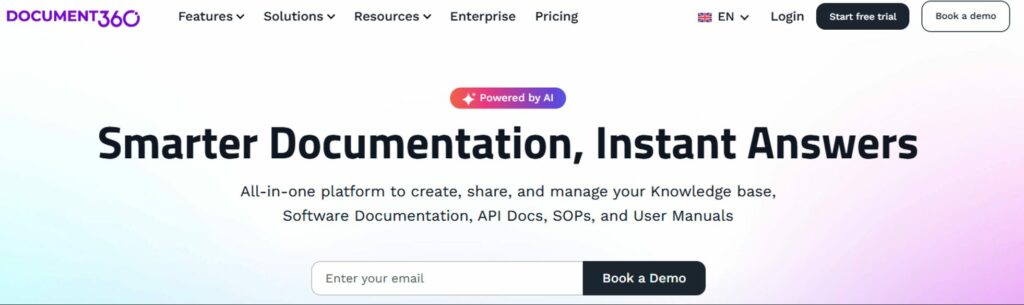
Document360 is an all-in-one AI-powered enterprise training manual software that helps organizations create, share, and manage their knowledge base, SOPs, and user manuals. It is also a great tool for software documentation and API docs.
Features of Document360
- Instantly locate answers with AI-driven search functionality
- Improve teamwork through in-line commenting features
- Track multiple article versions with a comparison viewer
- Easily manage articles with bulk actions like hiding, deleting, or moving in just a few clicks
Pros of Document360
- Always ready to capture consumer feedback
- Keeps track of all article versions simultaneously
- Simplifies customization for users without a developer background
Cons of Document360
- The lack of a training manual template library for new content makes the creation time-consuming.
- Some features are available only via add-ins and not by default; this can increase the overall cost.
Document360 Pricing
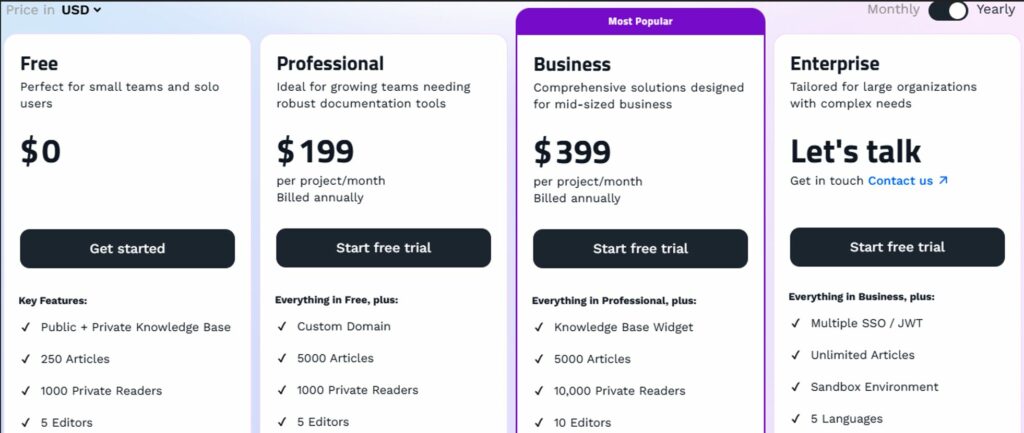
Document360’s free plan starts from $0 and includes a public and private knowledge base. The Pro plan is $199 per project/month (billed annually) and adds a custom domain and API documentation. The Business plan is $399 per project/month (billed annually) and includes advanced features like AI search, while the Enterprise plan offers custom pricing with unlimited articles and a complete AI suite.
8. Whale: Best for Checklist Management
Overview of Whale
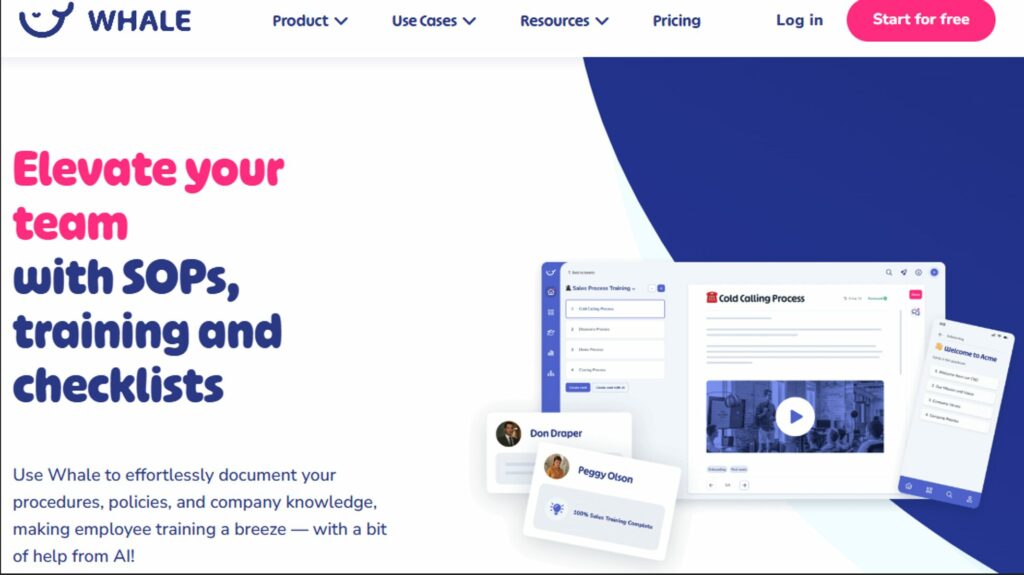
Whale is a business process management tool like most training manual creation software in the market. It centralizes all your training manuals, processes, SOPs, and playbooks, making onboarding and training faster and easier.
Features of Whale
- Unlimited documentation
- Video screen recorder
- AI writing assistant
- Training flows
Pros of Whale
- Easy to use and roll-out
- Very rich functionality
- Helpful templates for creating SOPs
Cons of Whale
- Basic content editor
- Limited customization
- Lack of autosave of documents
Whale Pricing
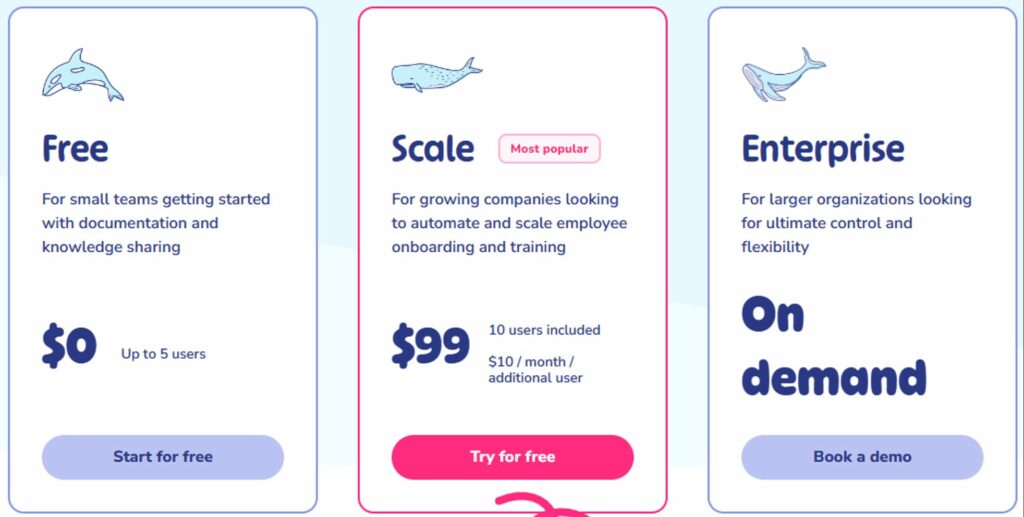
Whale offers three pricing plans: Free, Scale, and Enterprise. The free plan is ideal for small teams, starting with documentation and knowledge sharing. The Scale plan is designed for growing companies looking to automate and scale employee onboarding and training. The Enterprise plan offers ultimate control and flexibility for larger organizations. A free trial lets you explore the features and find the best plan for your needs.
Here’s how Whale compares with Trainual as a training manual software
9. ProProfs Knowledge Base: Best for AI-Powered Knowledge Base Management
Overview of ProProfs Knowledge Base
ProProfs is an AI-powered knowledge base software that simplifies creating and organizing online documentation, user manuals, and knowledge bases for startups and established businesses.
Features of ProProfs Knowledge Base
- SEO-friendly knowledge base for improved searchability
- Extensive customization, including fonts, logos, and more
- Library of ready-to-use templates
- Supports 90+ languages for all your clients across the globe
Pros of ProProfs Knowledge Base
- A free plan that gives you access to everything
- Easy import for existing docs and PDFs
- Integrate with ProProfs Chat, HelpDesk, and Survey Software
- Revision history
Cons of ProProfs Knowledge Base
- The 15-day free trial period may not be enough to try out all the capabilities
- May require a steep learning curve
- More integration is needed
ProProfs Knowledge Base Pricing
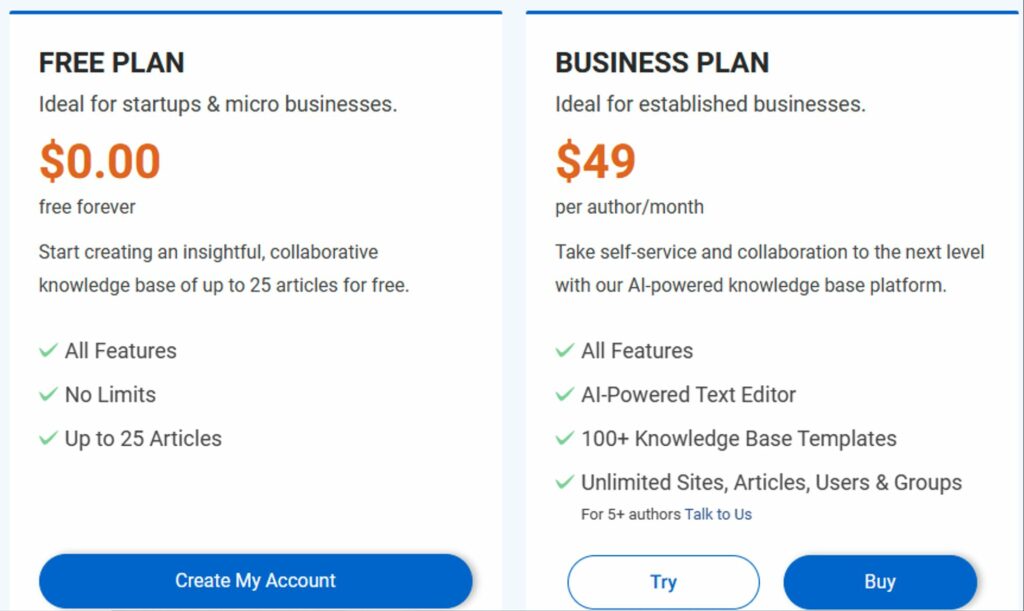
ProProfs offers a straightforward price for everything. The 15-day free trial includes up to 25 pages, ideal for startups and micro businesses. The business plan is designed for established businesses that need 25+ pages and multiple users. Both plans include an unlimited knowledge base, views, users, and groups. If you need more than 25 pages, check out the Business plan and schedule a demo to answer all your questions.
10. Trainual: Best for Employee Onboarding
Overview of Trainual
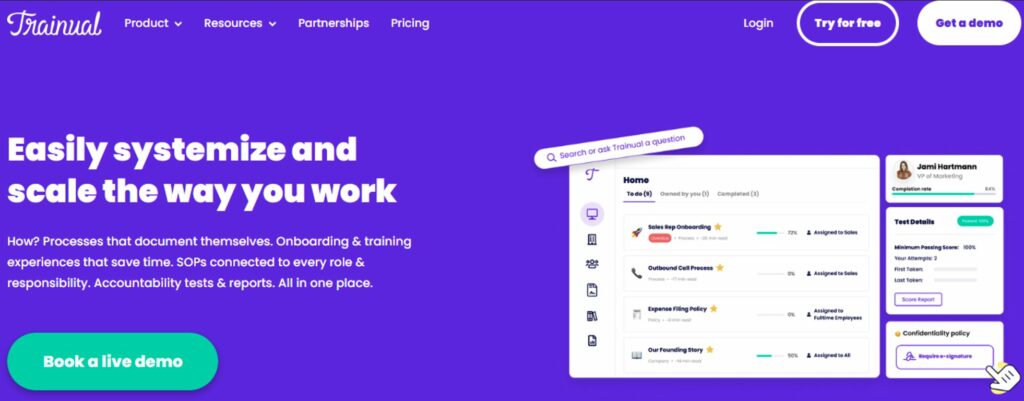
Trainual is one of the best tools out there for creating training manuals. It offers a platform to store all your company’s policies, processes, and SOPs for every role and responsibility in one place.
Features of Trainual
- Easy integrations with tons of work apps you already use
- Searchable and trackable employee handbook
- Track training completion
- Browser extension and mobile app
Pros of Trainual
- Generate performance reports post-training sessions
- Enrich your employee training manuals with GIFs
- Access a vast collection of royalty-free images from Pixabay
- Customize with your company’s colors and logo
Cons of Trainual
- Customer support is hit or miss
- Lack of categories and sub-categories for content
Trainual Pricing
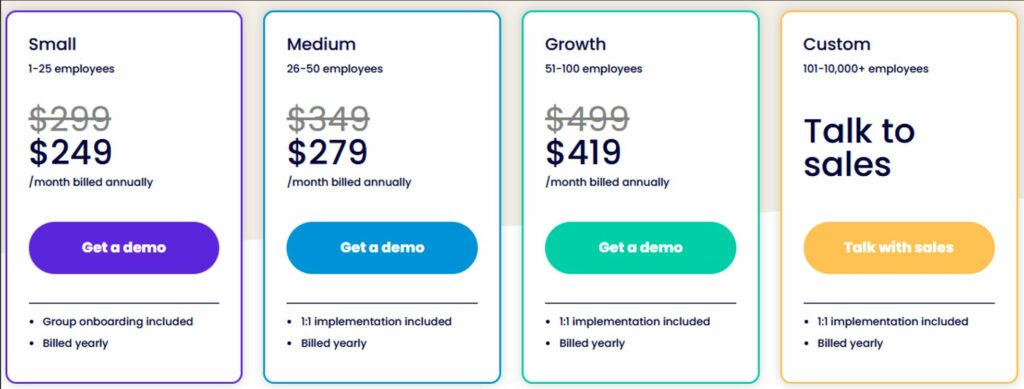
Trainual offers Core, Pro, Premium, and Enterprise plans. Subscription prices are not publicly listed; contact Trainual for a quote. A one-time implementation fee of $1,000 applies.
11. Process Street: Best for Process Management
Overview of Process Street
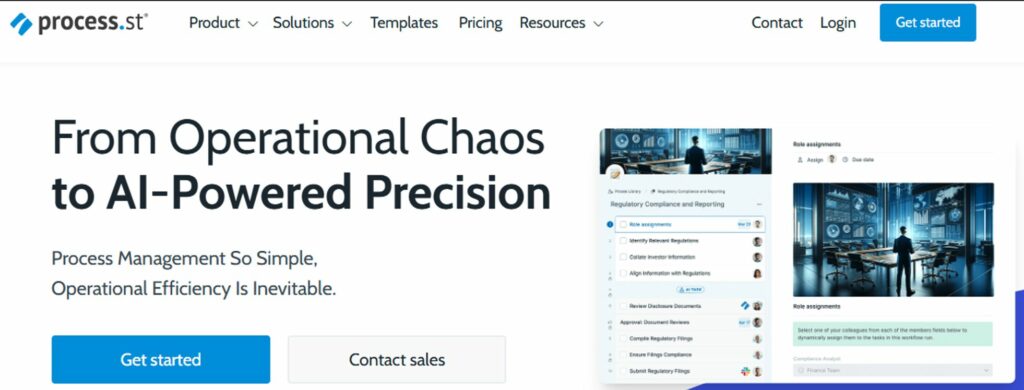
Process Street is an easy-to-use, no-code process management platform that helps businesses streamline operations. It allows teams to create checklists, set up workflows, and design step-by-step guides.
Features of Process Street
- Conditional logic
- Checklist templates for task and business processes
- Collaborative workflow
- Reporting and tracking
Pros of Process Street
- Needs better guest management
- The setup process is not very intuitive
Cons of Process Street
- Subscription prices require a sales quote.
- Steep learning curve
Process Street Pricing
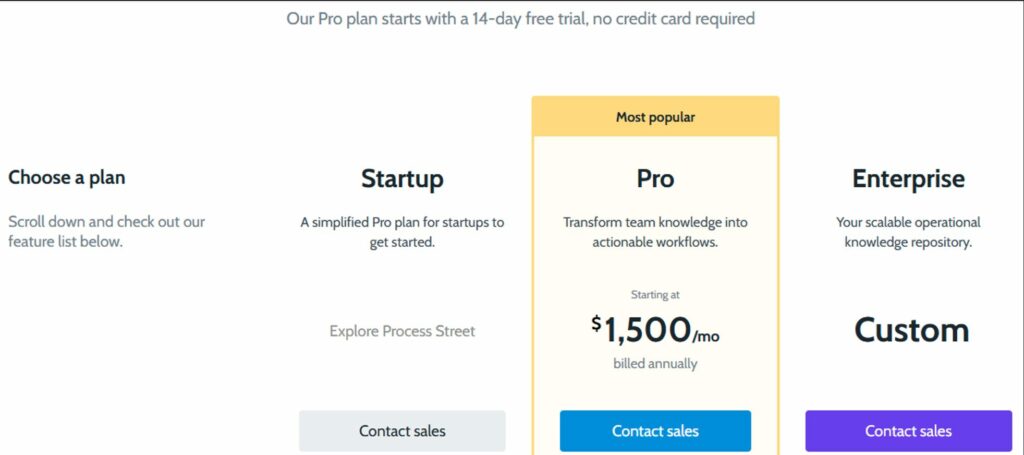
Process Street offers Startup, Pro, and Enterprise plans. Prices are available from its sales team. The Pro plan has a 14-day free trial with no credit card required; continued use after the trial requires a paid subscription.
SweetProcess offers a 14-day free trial, with no credit card required. Try it out today to see it in action!
7 Core Features to Consider Before Choosing a Training Manual Software
When choosing the best software for creating training manuals for your business, it’s important to consider the following:
Integration With Popular Tools
The best employee training manual software should work with the tools your team already uses. Look for software that connects easily with productivity and communication apps like HRMS, Slack, Google Workspace, Microsoft Teams, and other comparable software already in place.
This makes it simple for your team to access training resources without disrupting their workflows, and it can help bring all your tools into one cohesive system.
Easy and Quick Adoption
A good training tool should be easy to use right from the start. Look for a platform with a simple, intuitive design that your team can learn without hours of training. This is especially helpful for small businesses where time and resources are often limited, and new software needs to show value quickly.
Advanced Search Functionality

Nothing frustrates employees more than not being able to find the information they need. A solid search function lets users locate specific sections or terms in a few clicks. It’s an often-overlooked feature, but it can make all the difference when employees are on tight timelines or need to troubleshoot on the fly.
Pre-Made Template Options
Pre-built templates can save time and provide structure for consistent, high-quality manuals. Many online training documentation tools offer templates designed for different needs—like onboarding, SOPs, or compliance training—that can be customized for your business. This is a major plus if you’re looking to hit the ground running with minimal setup.
Content Authoring Tools
Content authoring tools are the heart of training manual software. Look for features like drag-and-drop editors, image and video embedding, and text formatting options. Many platforms now also support browser screen recorder integration, allowing you to capture workflows directly within your browser and embed them seamlessly. These tools help you create engaging and clear content tailored to your team without requiring technical skills.
Mobile Accessibility

Compatibility with mobile devices is key. With more teams working remotely, mobile accessibility has become a standard. A mobile-friendly online training manual software lets employees access resources on the go, whether they’re working in the field or commuting. Ensure the software is optimized for mobile devices to support your team wherever they are.
Analytics and Reporting

A robust training manual software should offer analytics to help you understand your training material’s effectiveness. Look for tools that show who has viewed or completed certain sections, where users spend the most time, and which areas might need improvement. Analytics help you fine-tune content, ensuring it’s relevant and impactful for your team. Ensure your business gets the best.
Sign up for SweetProcess today and experience a platform that embodies all the must-have features for effective employee training.
Types of Training Documentation
Employee Handbook
An employee handbook serves as a comprehensive guide outlining essential company policies, standard operating procedures (SOPs), and expectations for new hires. It summarizes the company’s core values, history, and mission, clearly understanding employees’ roles and responsibilities. Beyond just policies, it may include HR forms, program details, and procedures for specific situations, such as reimbursement processes.
Using a well-structured employee handbook template ensures these elements are consistently organized. This makes it an effective tool that answers common questions and sets the tone for workplace culture and how employees interact.
Vendor Training Manual
Vendor training manuals guide external partners, suppliers, or contractors to ensure they align with your business standards and processes. It teaches employees how to work efficiently with vendors who provide essential services.
This documentation can include information on product requirements, quality control, safety protocols, or even customer service standards. By providing a clear reference, you can help vendors deliver consistent results that meet your company’s expectations.
Project Manual
Project manuals outline the steps, responsibilities, and timelines for specific projects. They’re essential for keeping teams aligned and on track, particularly for complex or long-term projects. A project manual typically includes project goals, milestones, required resources, and special instructions or protocols. This kind of documentation supports smooth handoffs and effective collaboration and helps prevent misunderstandings or delays.
Task Documentation
Task documentation breaks down specific tasks within a job role, giving employees step-by-step instructions they can follow independently. It’s an excellent tool for routine tasks, technical procedures, or anything that requires precision. Task documentation reduces the risk of errors, empowers employees to work more independently, and can be a lifesaver when someone new steps in to cover the work.
How Businesses Use SweetProcess to Create Training Manuals
CFO Services Group Transformed Knowledge Sharing With SweetProcess
Training new hires was once a cumbersome process for CFO Services Group, an accounting firm serving small businesses and nonprofits across the U.S. Founder Manny relied on direct, hands-on training.
Still, as the team grew, this approach became less feasible, and documentation was limited to scattered Word files. New employees often had to ask multiple questions to avoid mistakes, and capturing unique client details in a standard format was increasingly challenging. Manny recognized the need for a streamlined system to guide employees effectively while ensuring accuracy and client-specific flexibility.
When Manny discovered SweetProcess, he saw the opportunity to overhaul the training process.
Now, new hires are onboarded in just two weeks, using SweetProcess’s clear, step-by-step checklists and video tutorials to learn independently.
SweetProcess transformed the training manuals from basic, inconsistent files into a comprehensive, easily accessible knowledge base. Employees have targeted access to only what they need, making it easier to stay focused, and nothing falls through the cracks. As Manny said,
“When I looked at SweetProcess, it literally did everything that I wanted. I was like, this is amazing. This is exactly what I need to just make this process so much easier.”
MonteVista Homes Streamlined Business Processes With SweetProcess
MonteVista Homes, a second-generation, family-owned homebuilding company in Oregon, faced challenges in managing its complex construction processes across multiple projects. The company worked with 75 to 100 trade partners, each with their team of workers.
The lack of standardized operational procedures led to inconsistencies in knowledge and performance. Initially, the team attempted to document processes with loose-leaf standard operating procedures (SOPs), but the results were disorganized and ineffective.
Manuals were scattered across desks and challenging to update, leading to confusion and inefficiency. Due to the absence of clear, accessible guidelines, onboarding new employees was a time-consuming process, requiring weeks of hands-on training.
After adopting SweetProcess, MonteVista Homes transformed its operations. They created detailed, easy-to-update SOPs and consolidated all training materials into a centralized, accessible online training software.
The transition from paper to digital eliminated the risk of losing documents and streamlined onboarding, reducing training time from days to just hours. As Luke Pickerill, president of MonteVista Homes, explained,
“Now, with SweetProcess, what we have been able to do is develop these tracks which SweetProcess calls processes, and so we can group these procedures and these training videos into these groupings so a new employee can come on board, they can learn about the company, they can learn about the job tasks and functions that are specific to their roles.”
The new system enhanced collaboration among departments, improved employee efficiency, and supported MonteVista Homes’ growth as they worked toward doubling their size.
Start Streamlining Your Processes Today
If you’re ready to simplify and organize your business processes, sign up for a free trial of SweetProcess. Document, manage, and optimize your training manuals and SOPs easily—just like MonteVista Homes and CFO Services Group did!
Which Tool Should You Choose to Create Training Manuals?
When choosing the right software for your training manuals, focus on each tool’s unique features to ensure it fits your company’s needs.
SweetProcess stands out for its ability to efficiently document and manage SOPs, offering a simple, intuitive platform for organizations to create, organize, and share processes. It’s especially beneficial for HR professionals and training managers, as it consolidates information, making it easy for employees to access up-to-date training resources in one place.
On the other hand, if you’re part of a collaborative team, Confluence is a great choice, enabling seamless real-time updates on training materials. For those needing more detailed technical documentation, ClickHelp offers extensive customization options. Tango is perfect for creating interactive walkthroughs for software training, while Scribe focuses on producing visually engaging step-by-step guides.
Ultimately, the best training manual software for your organization will depend on its needs. If you’re looking to simplify your training processes and improve efficiency, SweetProcess is your best solution.
Sign up today for a 14-day free trial and explore how this easy-to-use tool can help you effortlessly document and manage your training manuals!