Last Updated on December 30, 2025 by Owen McGab Enaohwo

Construction site accidents bring nothing but bad news. From serious injuries to long delays to fatalities, the consequences come with a hefty price tag. But even the most skilled workers can make mistakes that lead to these disasters if your company has no clear, well-documented, and repeatable procedures in place.
Hence, the importance of construction standard operating procedures (SOPs). Construction SOPs help to turn best practices into documented steps that guide construction teams through every task. This helps to ensure productivity, consistency, safety, compliance, and quality across projects.
In the meantime, check out these construction SOP templates you can upload to your SweetProcess account and start using immediately.
The good thing is that you have access to every single feature for free when you click here to try SweetProcess for 14 days—no credit card required.
Table of Contents
Why Are SOPs Important in Construction Projects?
How To Create a Construction SOP: A Step-by-Step Guide
Create and Manage Your Construction SOPs With SweetProcess
Manage Your Construction SOPs and Policies in One Place
What Is a Construction SOP?

A standard operating procedure (SOP) is a written document that outlines detailed instructions for carrying out specific tasks. This easy-to-understand document helps to ensure consistency in operations by offering a structured approach to executing a specific activity.
A construction SOP is, therefore, a detailed document that outlines how specific construction tasks should be carried out in order to ensure quality and consistency in operations, safety of personnel, and regulatory compliance on site.
SOPs can be created for effective operations in all sorts of tasks in the construction industry, from operating heavy machinery and handling hazardous materials to running quality checks.
Construction SOPs help ensure that everyone—workers, supervisors, project managers, etc.—understands what to do and how to do it to meet established standards.
Construction SOPs also ensure that every phase of the project is completed according to the same standards, regardless of who is in charge. Finally, they serve as documented proof that operations are in compliance with the local regulations, including building codes and occupational safety laws.
When they are well written and executed, construction SOPs don’t just make job sites safer; they increase efficiency, help improve communication across teams, help companies reduce mistakes, and keep them compliant.
Why Are SOPs Important in Construction Projects?
A typical construction project usually involves complex operations, multiple teams, and significant safety risks. This can lead to delays, accidents, or expensive reworks from small mistakes, especially when there is no structured system to guide daily operations and individual tasks.
This is where SOPs become crucial. The frameworks they provide help keep everyone on the same page and ensure that every phase of the project is executed efficiently, safely, and to the required quality standards.
Here are a few key reasons why SOPs are important in construction projects:
1. Ensure Safety Management and Risk Reduction
Safety is paramount in any construction project, and regulatory bodies don’t take it lightly. That’s because it’s an industry that involves a lot of heavy equipment, moving parts, and other hazards that can easily injure workers. Project managers must therefore ensure that the work environment and workers remain compliant with safety regulations.
Construction SOPs make this easy to accomplish. They clearly define the safety measures and protocols workers must follow, from site access procedures and handling of machinery, to proper use of protective equipment and everything in between. This way, workplace accidents are reduced, hazards are minimized, and everyone returns home safely at the end of every workday. More so, occupational safety laws are complied with, and risks are proactively managed across job sites.
According to a Joeris General Contractors whitepaper, “SOPs provide you, your department, and peers with consistency of purpose and process. … The resulting effects are improved efficiency, greater accountability, and increased safety.”
2. Aid Task Standardization for Consistency and Quality Control
In an industry that requires precise execution, construction SOPs are no luxury but a necessity. They help standardize how construction tasks are performed so that the quality of work does not depend on who’s doing the work.
This level of consistency ultimately helps to maintain uniform results across projects. This further leads to both client satisfaction and effective management of resources.
“Standard operating procedures (SOPs) help to define a contractor and their business. It builds consistency, teamwork, and a common vision for how you approach your projects.” Brad Humphrey
3. Enable Faster Training and Onboarding
Construction SOPs help to shorten the learning curve of new hires. When clear construction SOPs are in place, new workers can be trained more quickly and effectively. They are no longer required to rely solely on verbal instructions or shadowing experienced workers, but can also follow documented steps to learn tasks correctly from start to finish. This helps to improve performance and also minimize the possibility of mistakes from a lack of consistent instructions.
The company saves all that time it would’ve spent training new hires, and new hires can get up to speed almost instantly. Win-win for everyone involved.
4. Preserve and Document Institutional Knowledge

Valuable knowledge can easily be lost in the construction industry, which is characterized by multiple contractors and frequent staff turnover. SOPs help prevent this by capturing institutional knowledge and making it the standard procedure to follow within the organization, regardless of personnel changes.
This institutional knowledge—including best practices, proven workflows, lessons learned, and more—is preserved, ensuring continuity and consistency within the organization. This strengthens the company’s performance and operational efficiency for the long term.
5. Guarantee Regulatory Compliance
Construction companies must adhere to a variety of local and international standards. They range from safety and environmental regulations to client requirements. Well-documented SOPs help to guarantee that companies are compliant with these regulations and follow client specs to the letter.
In fact, construction SOPs serve as evidence of such compliance and due diligence and, consequently, help avoid legal liabilities, fines, or project delays arising from noncompliance.
6. Improve Communication and Coordination

Other than these core benefits above, construction SOPs also enhance communication among project stakeholders, especially on large projects with multiple subcontractors from different disciplines. When everyone is on the same page and follows the same documented procedures and processes, workflows become smoother, collaboration improves, and misunderstandings are reduced to the barest minimum.
Types of Construction SOPs
When it comes to construction companies, there can’t be a one-size-fits-all SOP for every area of operation. This is because construction projects involve many moving parts that work together. And every aspect of these projects requires a structured approach, from workplace safety to client delivery.
This is why your construction company must create SOPs specifically for each area of operation. Each tailored SOP will focus on ensuring work is done safely and efficiently in a particular area.
Here are the most common types of SOPs used in construction companies:
1. Safety Procedures
Safety is one of the most important aspects of a construction company. This makes safety SOPs one of the most critical documents in any construction company. They set the rules and define the step-by-step processes workers must follow to minimize accidents and health risks on construction sites.
Safety SOPs usually cover areas like:
- The proper use of personal protective equipment (PPE)
- Safe use, storage, and operation of tools and heavy equipment
- Identification and mitigation of site hazards
- Emergency response and first aid protocols
When safety SOPs are well implemented, a safety-first culture is created and promoted, downtime from accidents is reduced, and compliance with workplace safety regulations, such as OSHA, is ensured.
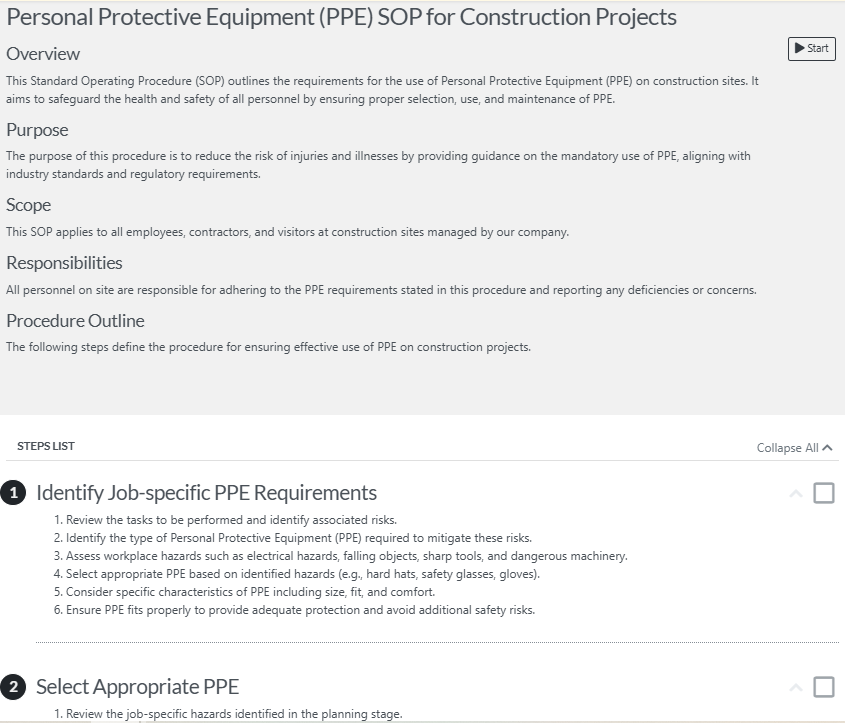
Here’s an example of a personal protective equipment (PPE) SOP:
2. Quality Control Procedures
Quality control is important in construction because it ensures safety, structural integrity, and client satisfaction, while also reducing costs and delays.
A well-implemented quality control SOP outlines how to successfully monitor, inspect, and verify materials, workmanship, and finished products. This ultimately ensures that projects meet design specifications and industry standards. This way, costly re-work and legal issues are avoided.
Construction quality control SOPs often include:
- Inspection and testing plans (ITPs) for checking work at specific stages
- Material inspection checklists to confirm the quality of materials before use
- Workmanship checks for specific tasks
- Verification methods to measure and verify quality
- Final quality checks before client handover
By using SOPs like these, construction companies can consistently deliver high-quality projects, prevent rework, and maintain a reputation of excellence for the company.
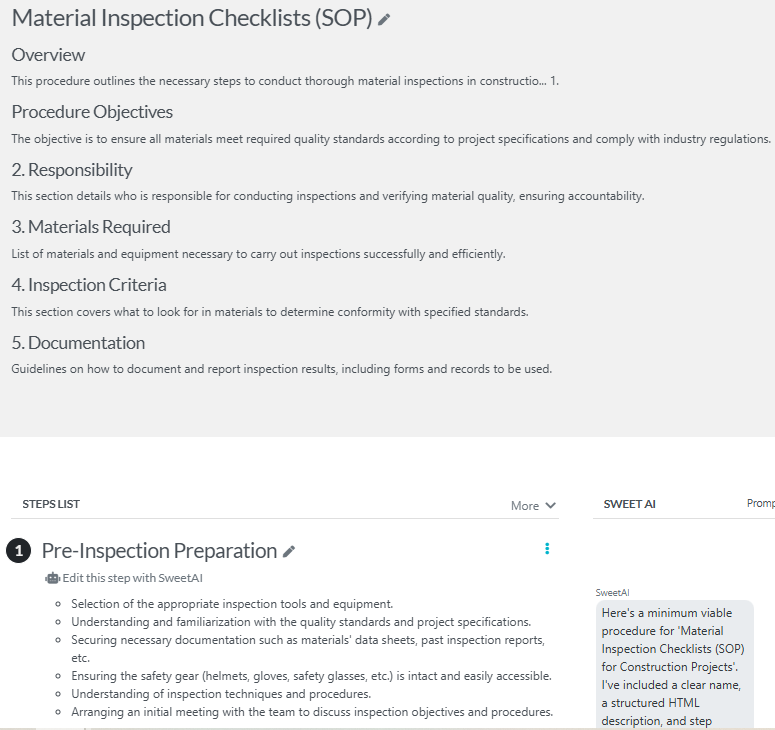
Here’s an example of a material inspection checklist SOP below:
3. Equipment Maintenance SOPs
Construction is an industry that relies heavily on equipment and machinery—think cranes, generators, and more. This is why equipment maintenance is important in construction, especially for safety, extending equipment lifespan, and reducing costs over the long term.
Equipment maintenance SOPs help you achieve these, and more. Most importantly, it reduces project delays that usually come with unexpected mechanical failures.
Your equipment maintenance SOPs should include:
- Daily, weekly, and monthly maintenance routines, including how each piece of equipment is correctly operated, cleaned, and serviced
- Instructions for safe storage and handling of equipment
- Procedures for reporting and documenting equipment faults or breakdowns
- Checklists for pre-use inspections
Equipment maintenance SOPs will help improve efficiency and productivity, keep your company compliant with relevant regulations, and also increase the resale value of your equipment.
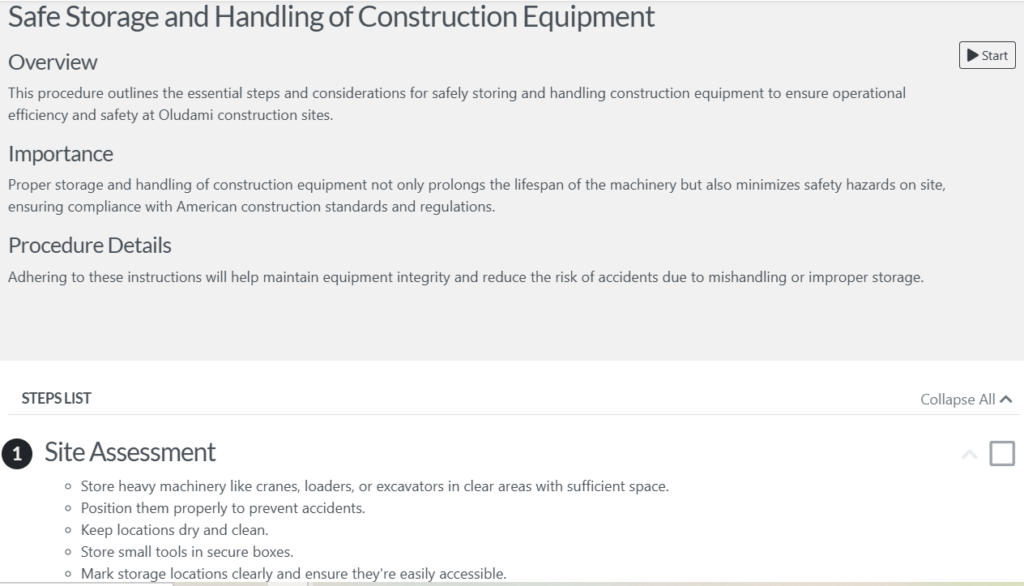
Here’s an example of a safe storage and handling of construction equipment SOP below:
4. Site Management SOPs
Site management is crucial in construction to ensure that projects are completed on time, within budget, and meet high-quality standards.
And with site management SOPs, you can more easily manage the day-to-day operations of running a construction site. They’ll help to maintain an efficient workflow, especially through order and accountability.
Key aspects include:
- Access control, which defines who can enter the site and the conditions they must meet
- Daily check-ins and general attendance for workers, supervisors, and the contractor
- Procedures for housekeeping and waste disposal
- Guidelines for specific tasks like electrical and plumbing installations
- Site security, public safety, and traffic management
Overall, site management SOPs help to maintain a professional, safe, and organized work environment. They also ensure smooth collaboration between construction departments.
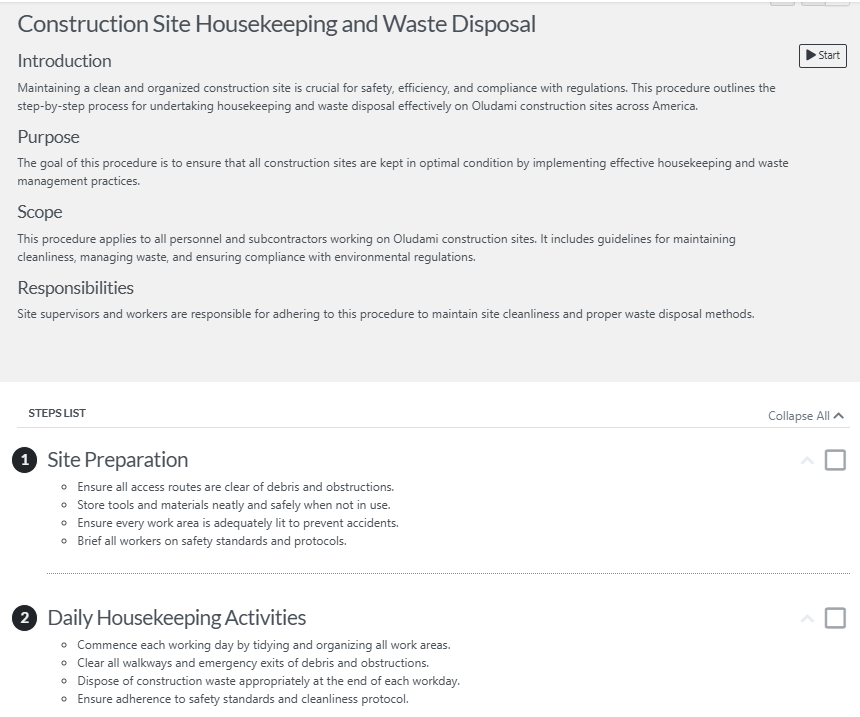
Here’s what a housekeeping and waste disposal SOP looks like:
5. Client Handover SOPs
Once a construction project is completed, it becomes necessary to transfer ownership to the client formally. You, however, want to ensure that the project meets client specifications and also ensure the client is able to manage and maintain the new asset.
Client handover SOPs outline the process for transferring the project from the construction management team to the project owner. It includes documentation, physical items, and training, and key components of this procedure are:
- Site walkthrough and final inspection to approve and identify any issues
- Snag list resolution to identify, document, and correct minor defects in the project before handover
- Detailed handover checklist to verify that all items on the construction contract are completed and delivered
- Training sessions for the client’s facility operators and maintenance staff
- Formal handover and sign-off processes
Client handover SOPs ensure transparency in transitioning, client satisfaction, and smooth closure.
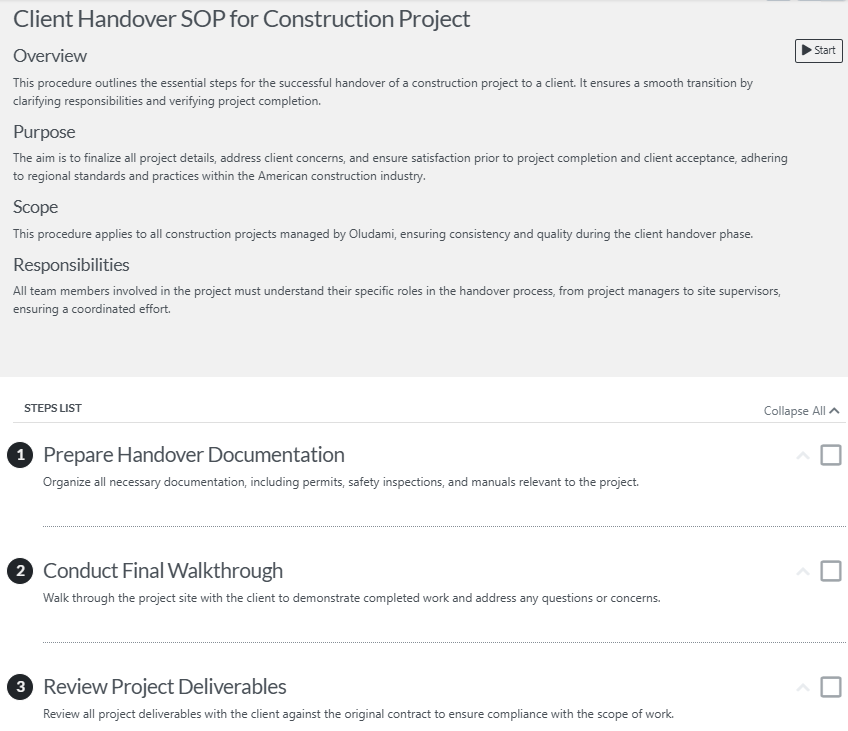
Here’s an example of a typical client handover SOP below:
How To Create a Construction SOP: A Step-by-Step Guide

Even though it seems like a big task, creating a construction SOP is actually a straightforward process. Below is a step-by-step guide for creating a construction SOP:
Step 1: Identify the Process
The first question to ask is: Which task or process needs an SOP? Determine that, and then you can begin to plan its creation. In answering this question, you should consider activities that are often repeated and affect quality and compliance. A construction SOP should also cover activities that have safety implications.
Clearly identifying and defining the process helps to ensure that your SOP document has a well-defined scope and purpose.
Step 2: Set Objectives and Compliance Requirements
Next: What do you want the SOP to achieve?
Do you want to improve safety? Comply with regulatory standards? Ensure consistent results? Decide on what you seek to achieve with the SOP, as this will guide you in its creation.
This is also where you identify laws and industry regulations that are relevant and apply to the process. When you align your SOP objectives with compliance requirements, you ensure that your SOP meets both legal and organizational standards.
Step 3: Gather Expert Input
Who are the people who perform the task daily and have therefore become experts at it? You should consult with them and get their input on your SOP.
Consulting site supervisors, engineers, technicians, safety officers, and other experts who have firsthand experience with the task ensures that the SOP reflects real-world conditions rather than assumptions. This also promotes cooperation from contributing employees who will eventually use the SOP.
Step 4: Write Step-by-step Instructions With Visuals

The next step is to start documenting the process, one step after the other. Avoid using jargon or too many technical terms. Instead, use clear, concise, and action-evoking language that specifies what needs to be done, how it should be done, and by whom.
Also include visual aids to make your SOP easier to follow, especially where complex procedures are involved. Visual aids such as diagrams, checklists, photos, and even videos make your SOP easier to follow and minimize errors.
Step 5: Include Safety and Quality Guidelines
Every construction process has potential risks, so you want to integrate safety guidelines and quality checkpoints into your detailed SOP.
This ensures that workers don’t miss any critical elements and that projects meet the required safety and quality standards. It also reinforces a culture of safety and accountability across projects.
Step 6: Review, Approve, and Train Employees

Once you have your draft SOP ready, review it with project managers and safety and compliance teams for approval before implementation. You can then conduct training sessions for the relevant teams to familiarize everyone with the documented procedures. This way, everyone understands the steps and their responsibilities.
Step 7: Assess, Review, and Update Regularly
Creating construction SOPs doesn’t end with distributing them to the necessary workers; you have to stay on top of the frequent changes in the construction industry. Then update your SOPs regularly to reflect these changes in methods, technologies, and regulations.
Also, encourage feedback from on-field teams who’ll identify areas for improvement as they apply the SOPs to the real world. Use this feedback to update your construction SOPs so that they remain relevant at all times.
Create and Manage Your Construction SOPs With SweetProcess

Now that you know the steps to follow to create a construction SOP, it’s time to not just give you a powerful SOP creation tool, but show you how to use it to create and manage your construction SOPs seamlessly.
If you haven’t guessed by now, this powerful tool is SweetProcess.

SweetProcess is a smart tool for creating and managing documents for effective business operations.
SweetProcess makes the challenging management of construction operations easier. Construction companies can use it to easily create, document, and manage their procedures, policies, processes, tasks, and other documents.
Let’s discuss a few key features of SweetProcess that support SOP creation for construction projects.
Manually and Automatically Create Procedures in Sweetprocess
The great thing about SweetProcess is that it gives you the freedom to choose how you want to create your SOP. You can decide to take the easy route and automatically create your SOP using SweetAI, SweetProcess’s resident AI tool. You can also choose to create your SOP manually, especially if you already have one in existence.
When you log into your SweetProcess to create a new procedure, you’ll first see SweetAI’s suggestion tab. You can simply type in your industry and get related procedure titles generated by SweetAI.
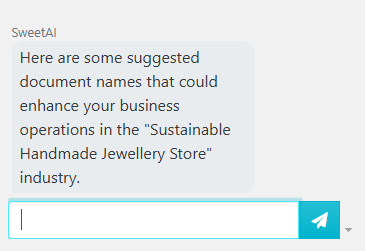
Or you can ignore it and instead scroll back up to enter your procedure title in the title bar.
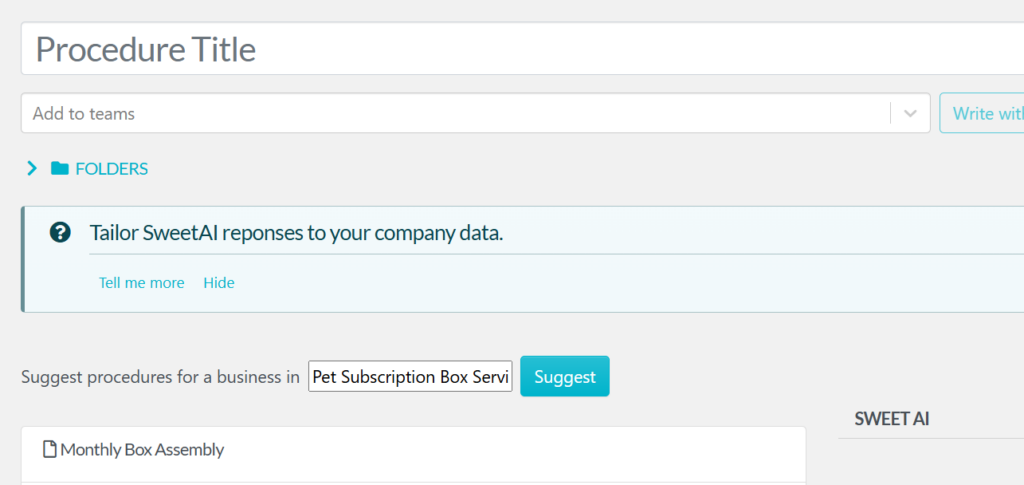
You can either click on “Continue” to open the editor and create your procedure manually, or click on “Write with SweetAI” to get your procedure automatically generated by AI.
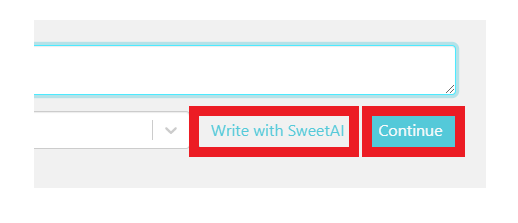
If you decide to generate your SOP automatically with SweetAI, here’s an example of what you’ll get:
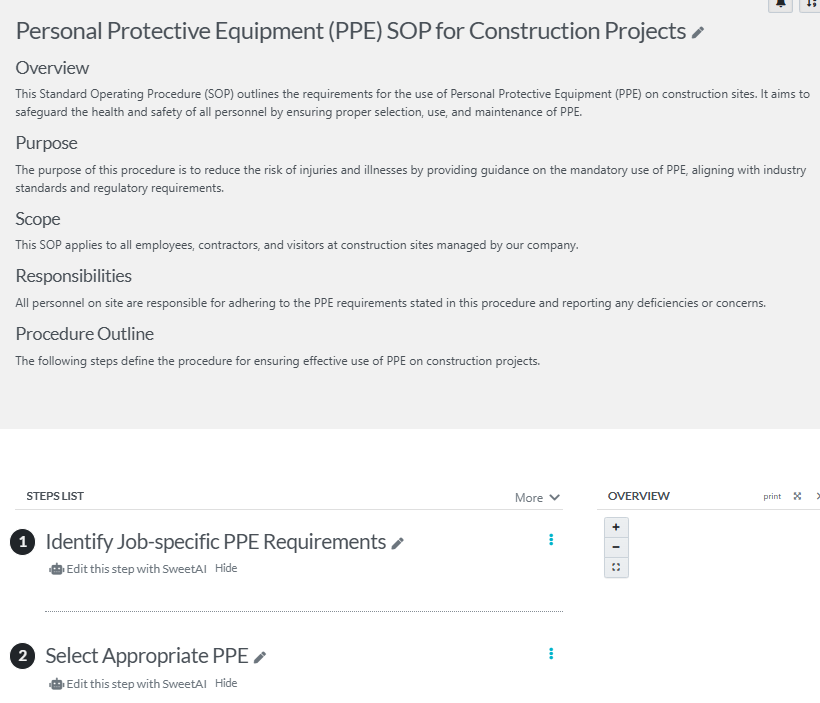
You can then edit your AI-generated procedure however you like.
If you choose to create your procedure manually and click on “Continue” instead, you’ll be taken to a page where you can draft your procedure.
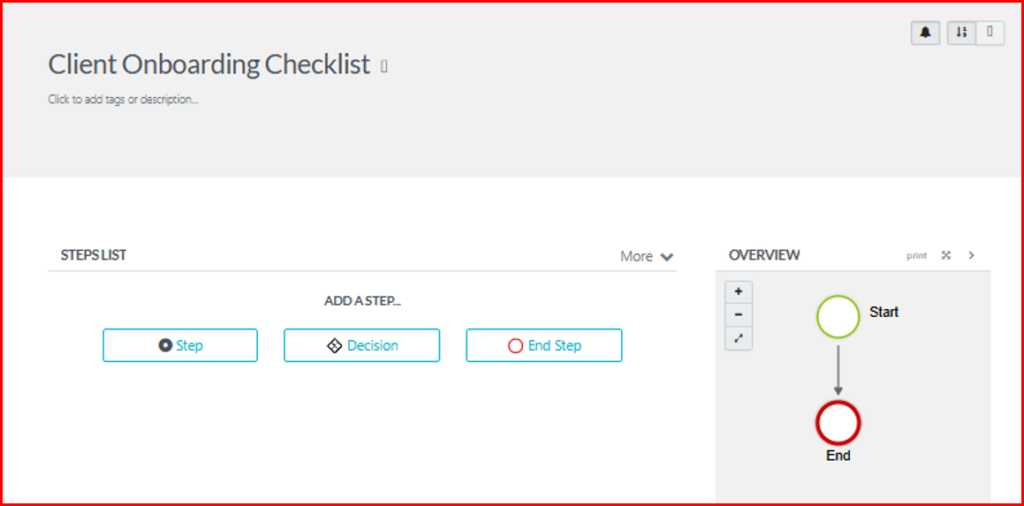
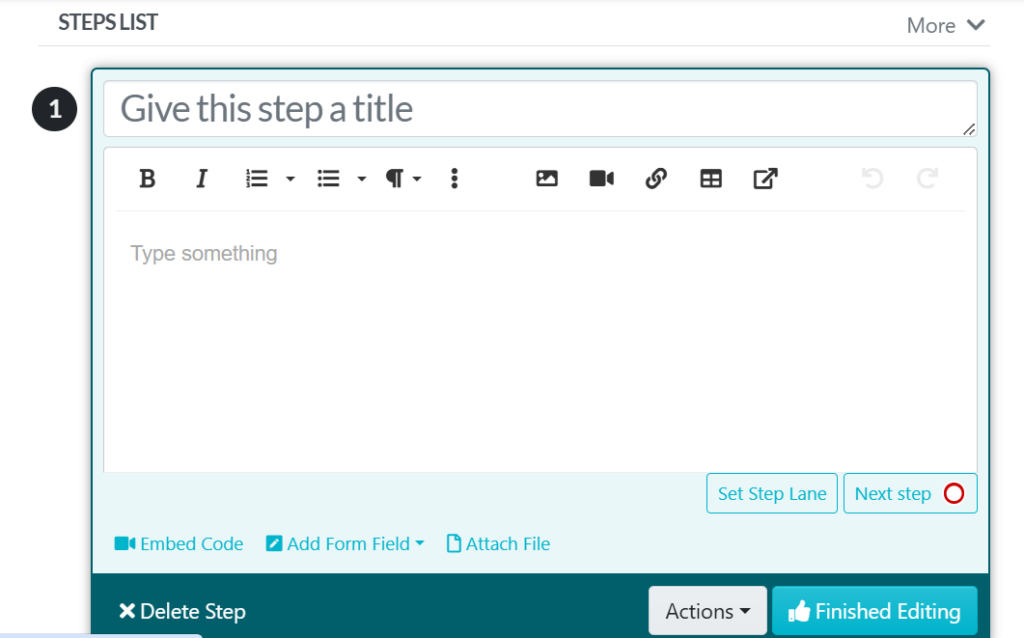
First, click “Step” to add the first step to your SOP. A box will open where you can give your step a title and enter other details. You can also attach images, videos, tables, links, etc., to aid a better understanding of the SOP.
Click on “Finished Editing” when you’re done, and get the draft approved to make your construction SOP go live.
How Aizer Group Streamlined Operations and Empowered Teams Through Process Clarity
Aizer Group, one of Australia’s leading construction and building service companies, faced a challenge common in the industry: managing multiple teams across different sites while maintaining consistent quality and performance.
Some of their employees worked remotely or across various locations, which made it difficult to keep everyone aligned on the same procedures.
By implementing SweetProcess, Aizer Group built a centralized process documentation system that clearly outlined every task, from project coordination to client service standards.
The results were significant:
- Teams were able to work independently and confidently, knowing exactly how each task should be performed.
- Onboarding new staff became faster and easier since procedures were already documented in one accessible place.
- The company reduced operational confusion and improved accountability across departments.
SweetProcess helped Aizer Group turn what used to be scattered tribal knowledge into an organized, searchable system of clear, repeatable processes. This allows the company to scale efficiently while maintaining high-quality standards.
You can read the full Aizer Group case study here.
Review and Customize Construction SOPs in Sweetprocess
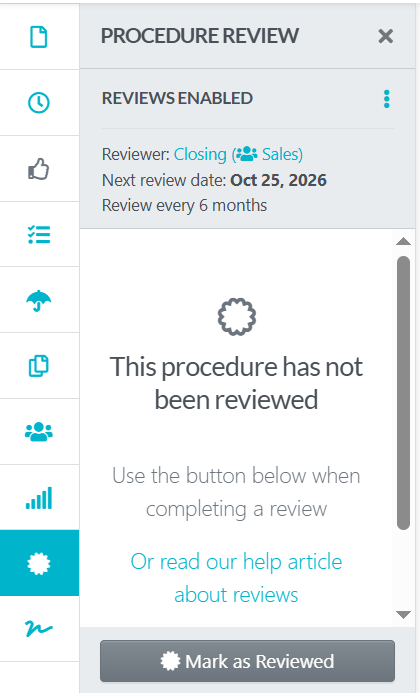
You can also schedule periodic reviews for your construction SOPs to make sure the content never gets stale, old, or out-of-date.
SweetProcess makes it easy to schedule a reminder to review. Employees who manage the procedure will automatically be reminded to verify that its content is up-to-date, and if not, changes can be made immediately.
This way, you can trust the content of the procedure, as you will be able to see exactly when it was last reviewed and verified, and who did.
Setting it up is easy. When inside your procedure, you’ll see the “Review” button among the management tools on the left panel.
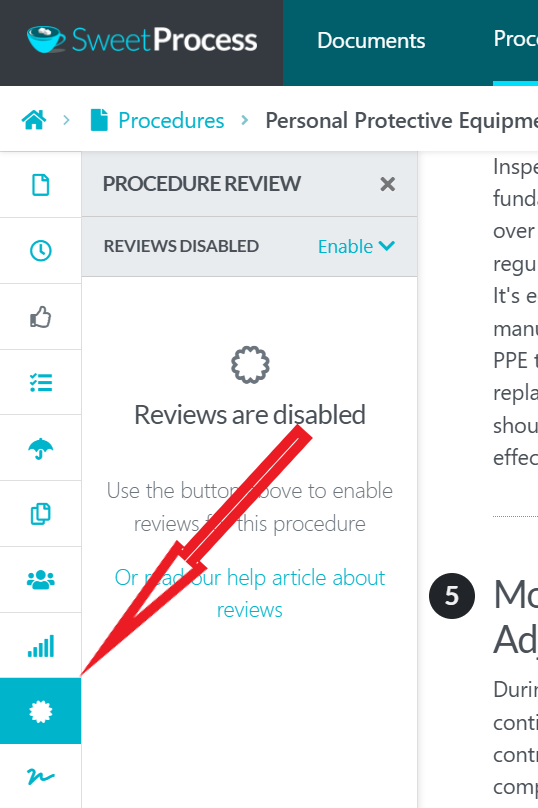
Click on it and enable reviews from the tab that pops up. Also set up who reviews, next review date, and review intervals.
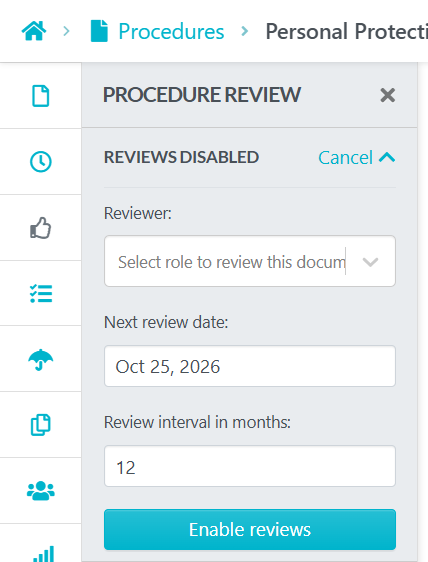
Click on the “Enable reviews” button, and reviews will be enabled.
You can also customize your SOPs in various ways.
By clicking on the three dots in front of a step, you can move the step within the SOP up and down, duplicate a step, and convert a step to either an ending or a decision.
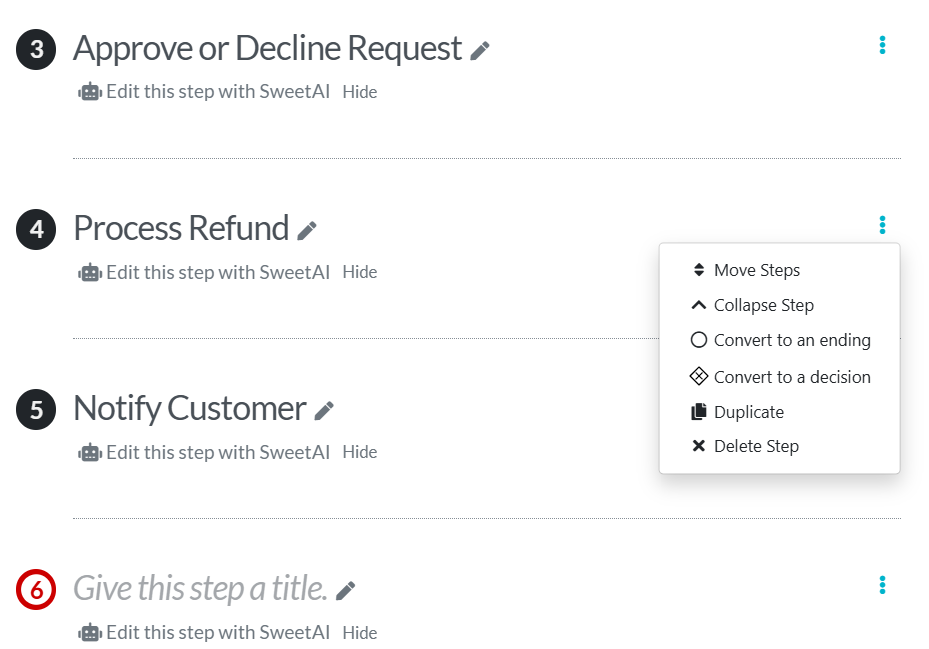
Any step you convert to an ending becomes the end of that SOP, and other steps after it become inaccessible. They only become accessible again when you convert that step back to a normal step.
If you “Convert to a Decision” instead, an editor box will open where you can enter details of your decision. See below.
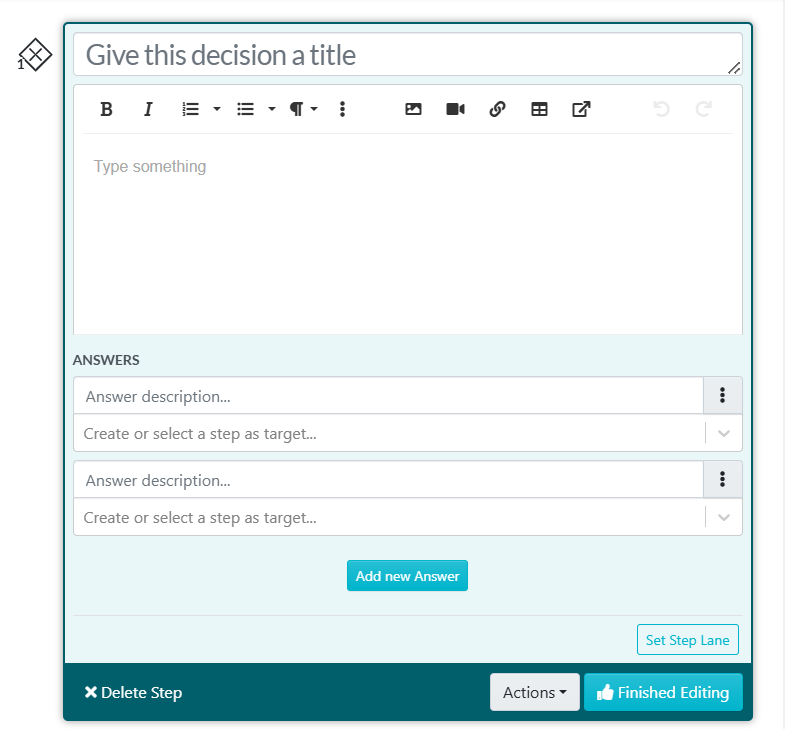
A “Decision” is used to add conditional logic to a procedure. This is also known as “branching” or “yes/no.”
Here’s how it works: When a user reaches the decision point of the SOP, they get to choose from the options you created and go down a specific path/branch based on the option they choose.
Enter the options in the “Answer description” field (see image above) and then select or create the step that the option leads to.
Click on “Finished Editing” when you’re done creating the decision.
One great way to obtain a fully customized SOP from SweetAI is to provide it with sufficient information about your company and opt to share your data under your “Account Overview” settings.
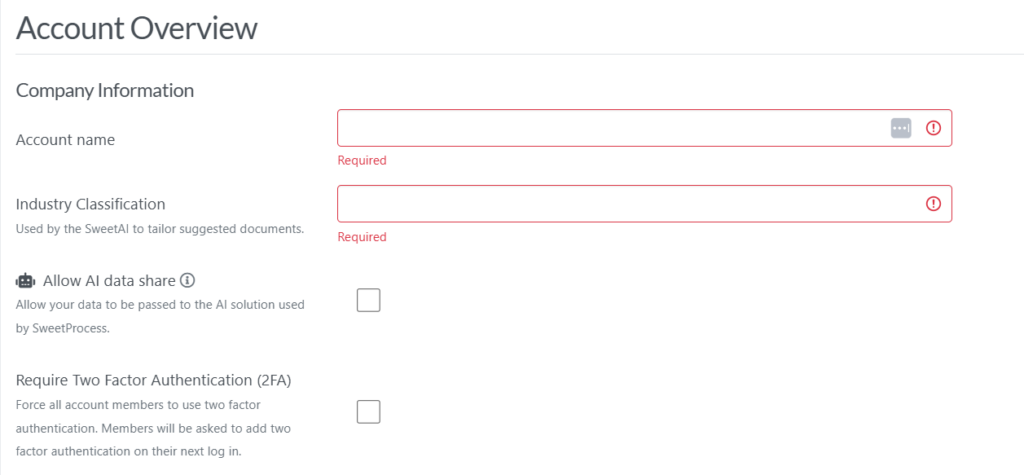
Once you set this up, even your automatically-generated construction SOPs will be far more customized than what you’d normally get when you use AI to create your SOPs.
Other than these, you can add your branding—logo, color, fonts, etc.—to your construction SOPs to make it consistent with your other company assets.
MonteVista Homes: Streamlining Workflow To Deliver the American Dream
MonteVista Homes, a homebuilding company in the US, uses SweetProcess to streamline its operational workflows.
The company standardized its processes with SweetProcess, ensuring projects stay on schedule and meet consistent quality expectations. This helped Montevista to continue delivering high-quality homes efficiently.
You can read the full story here.
Create and Manage Policies in SweetProcess To Ensure Compliance
Compliance is a big deal in construction; your project must meet regulatory requirements, like OSHA and local building laws.
To keep your construction company compliant, you can create and manage relevant policies inside SweetProcess.
To create your policies, head to the Policies tab of your SweetProcess and click on “Create Policy” in the upper-right corner of the screen.
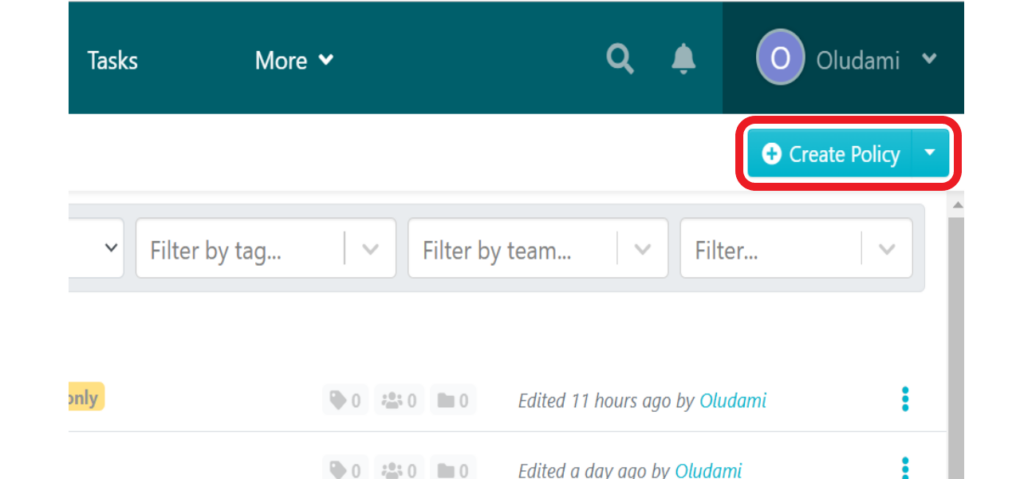
On the next page, enter your policy title and then either click on “Continue” to create your policy manually or click on “Write with SweetAI” to automatically generate your policy.

If you click “Continue”, you’ll be taken to where you can edit the policy to add content.
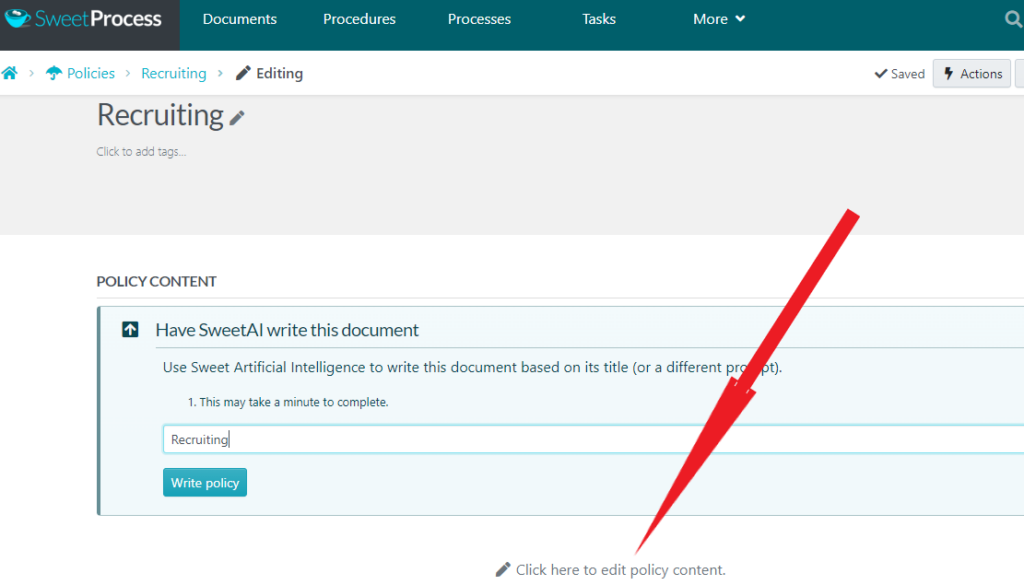
Note, however, that on the policy page, you’ll still get a prompt encouraging you to have SweetAI write your policy. You can ignore the prompt and click “Click here to edit policy content.”
To create your policy automatically, click the “Write with SweetAI” button instead of “Continue” after entering your title at the beginning. You’ll get a fully written policy instantly.
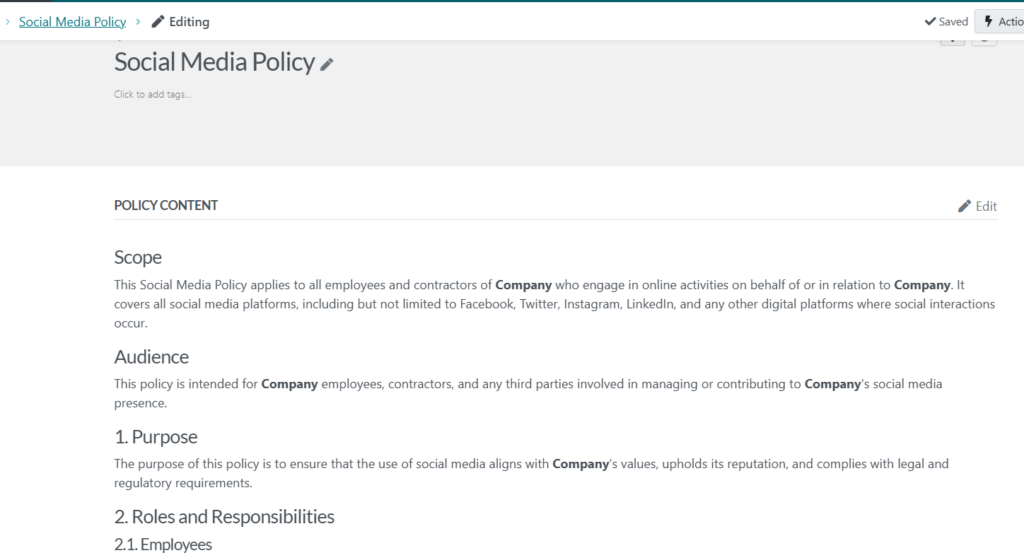
Next, you can click on the “Edit” link at the top-right corner of your new policy to adjust the content to perfectly suit your business.
You can format the text however you like—font style, font color, background color, etc.—to keep it on brand. You can also add images, insert/embed videos, insert links, and even link to other policies and procedures of your company.
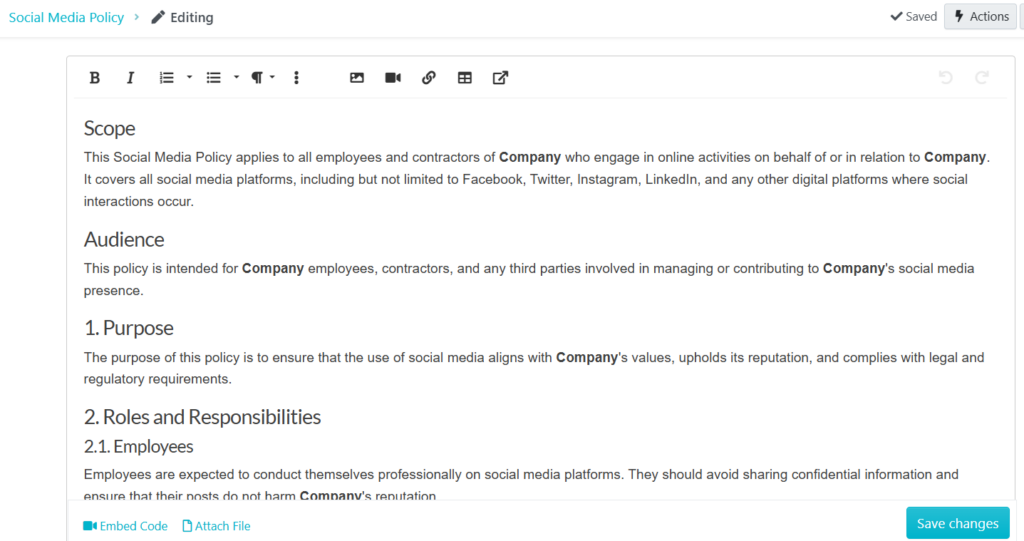
You can also attach files.
Once you’ve edited your policy to your satisfaction, click “Save changes” at the bottom right.
Assign Tasks and Collaborate in SweetProcess
SweetProcess is more than just an SOP creation or management tool; you can distribute your construction SOPs and also collaborate with teams on them.
To collaborate with others on your SOPs, click on the “More” navigation button inside SweetProcess and then select “Teams.”
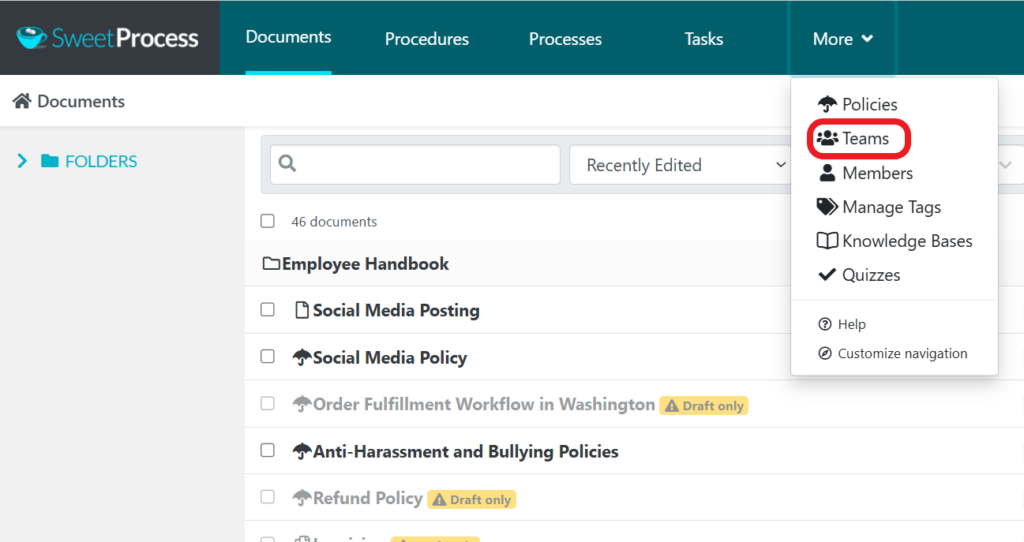
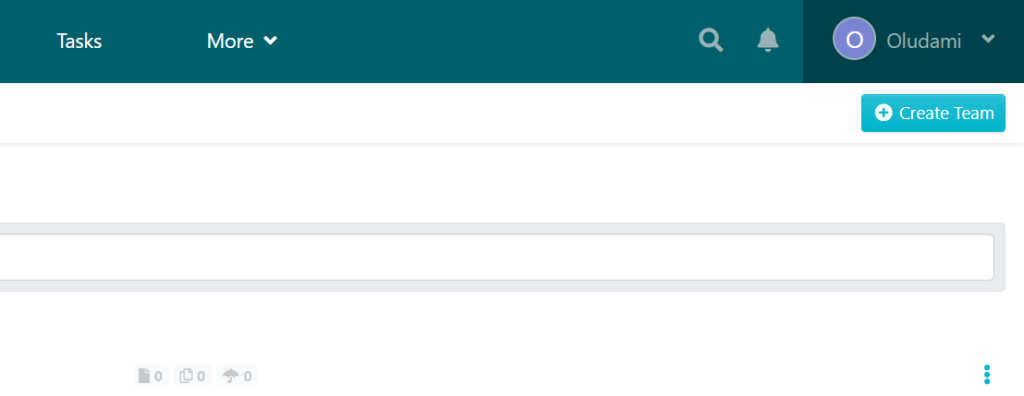
On the next page, click “Create Team” at the top-right corner of your screen.
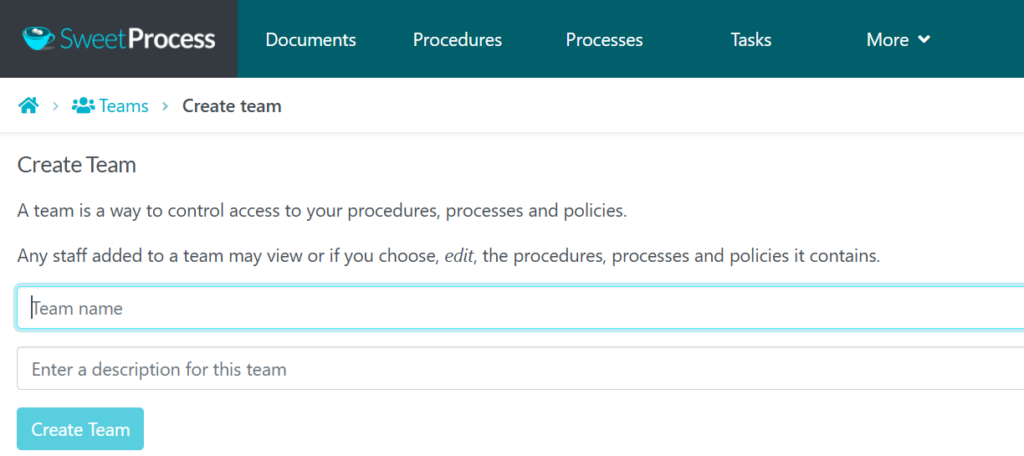
Enter a name and description for your team and click on “Create Team.”
You’ll be taken to the team’s page.

Use the “+Role” and “+Member” buttons to add roles and add team members respectively.
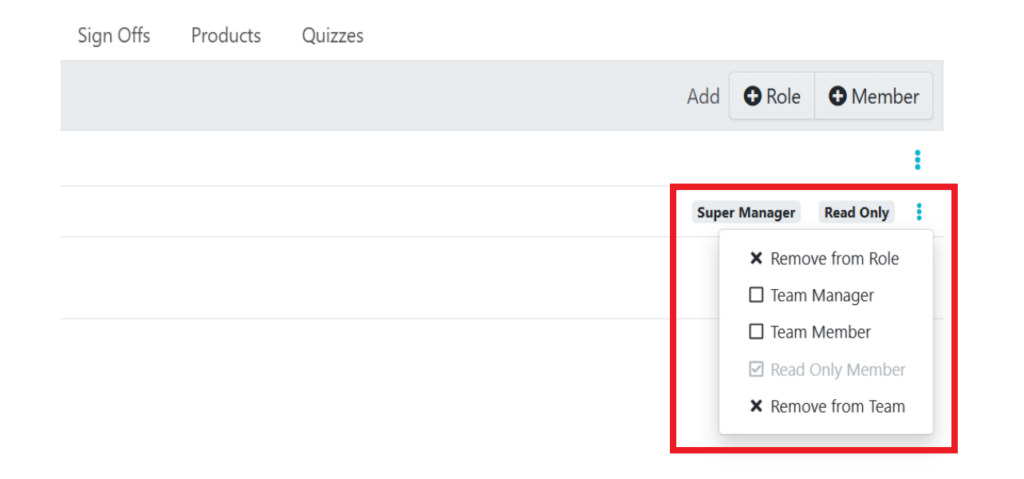
Use the three dots beside each member’s name to select the type of member each they are: team manager, ordinary team member, or read-only member. You can also use this to remove a member from the team.
You can use the tabs in the menu on your team section to add and manage members, assign procedures, processes, or policies to the team, add a folder to the team, add sign-off rules to the team, and add products and quizzes to the team.
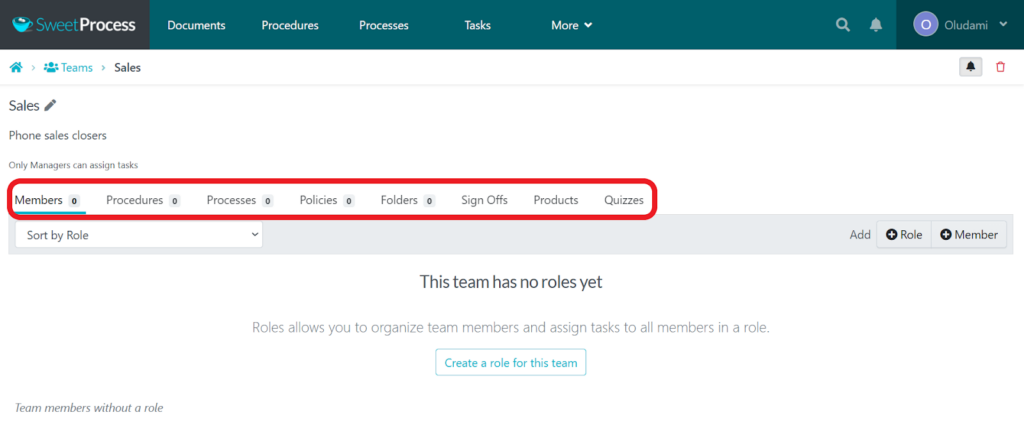
Now you can collaborate seamlessly with your team members. They’ll automatically have access to whatever you add to this team page and get notified for every activity on the page.
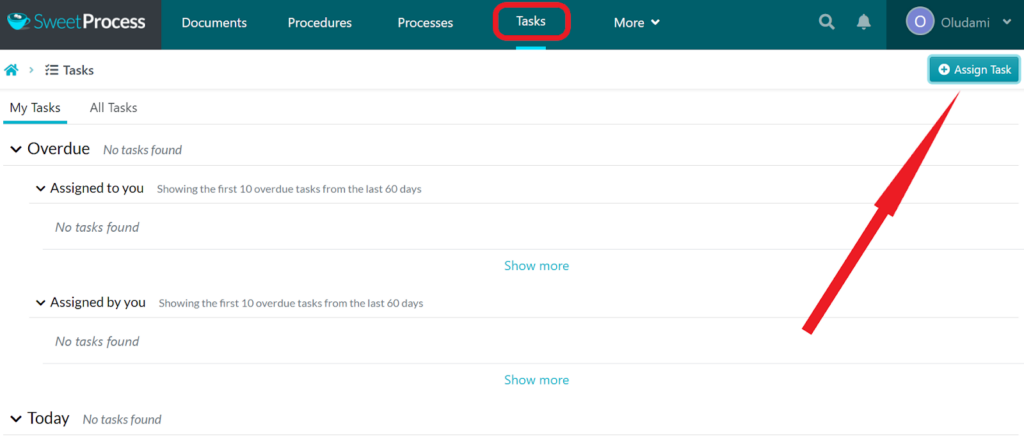
To assign a task to your team, click on “Tasks” from the navigation. Then, at the top-right corner of your screen, click on “Assign Task.”
A box will pop up on your screen to set up and assign tasks. You’ll be asked to choose the procedure you want to turn into a task.
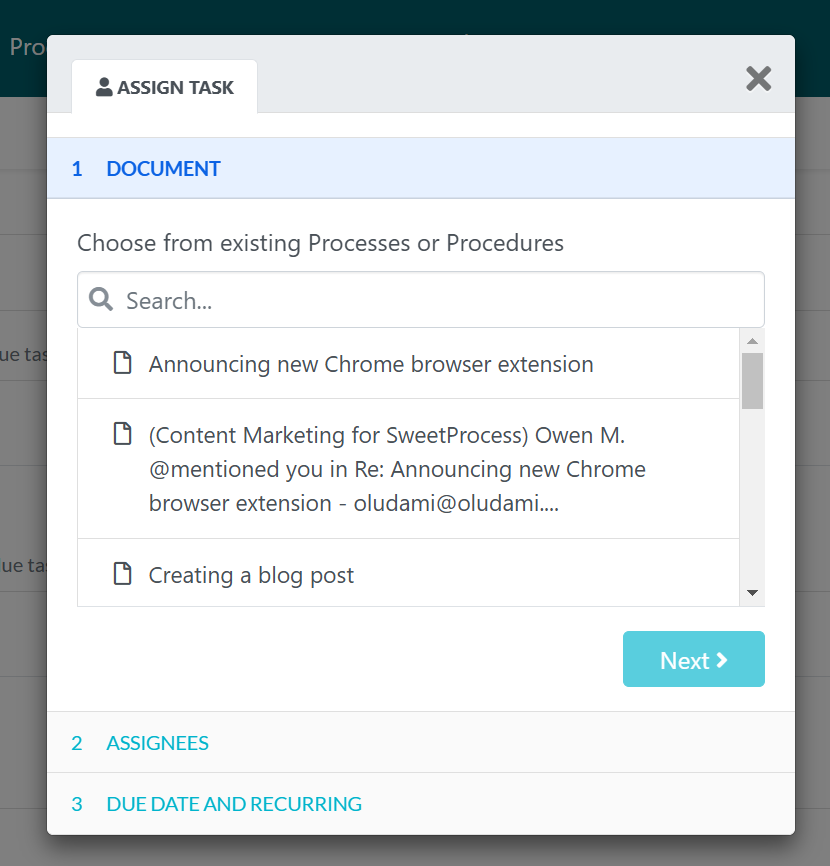
Then you’ll be able to assign the task to teams and team members. You can assign teammates together or assign each teammate separately. You can even assign individual steps in a procedure or process.
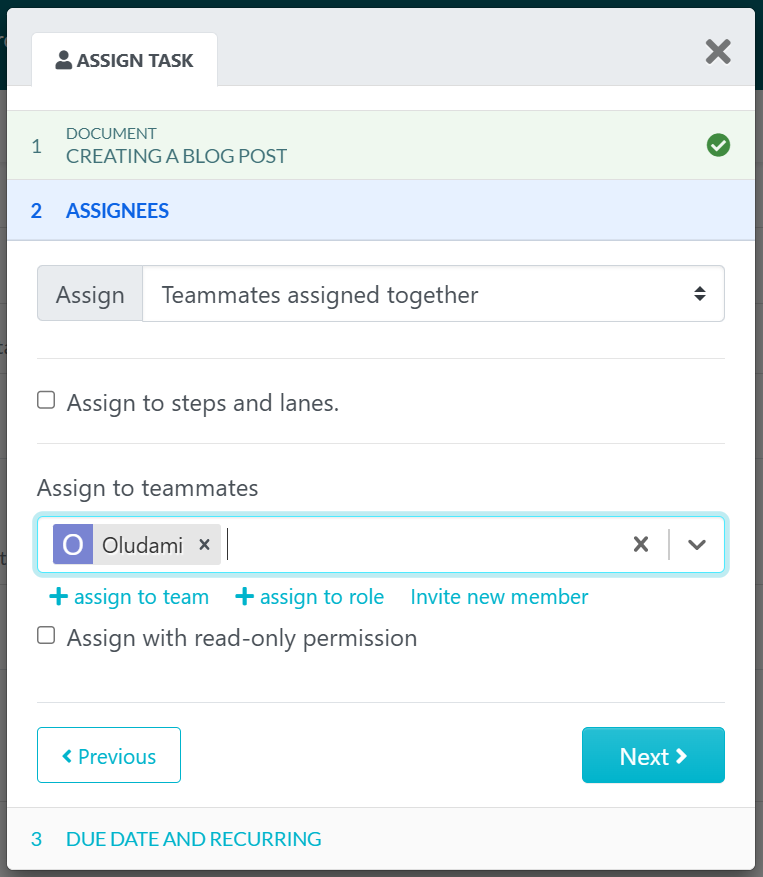
You can assign to a team or to a role, and you can invite a new member to assign to someone not already in your SweetProcess.
When you’re done assigning the task, click the “Next” button.
Next, you’ll name your task, set a due date and due time, and even add a start time if you wish. You can also set a task repetition schedule at this stage.
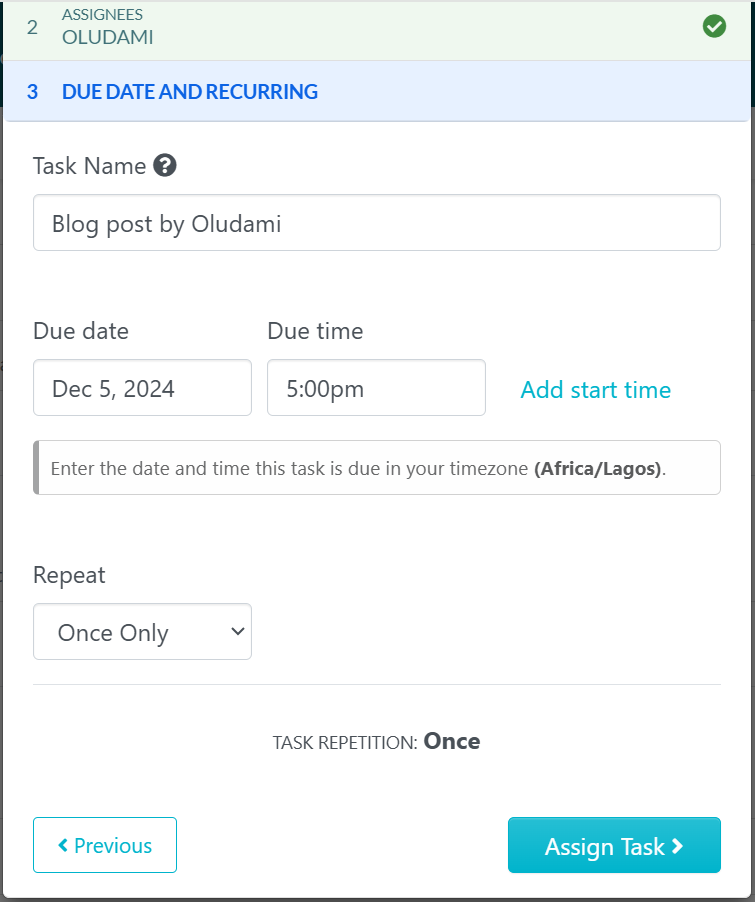
Once you set up your task, click on the “Assign Task” button. Your task will be ready and can be found listed on the tasks page. To complete the task, the assignee must check off the procedure steps in sequential order.
Another way to assign your construction SOP as tasks in SweetProcess is to open the procedure and click on “Actions” in the top-right corner of your screen. You’ll then see a drop-down list of the different actions you can take on that document, including assigning it as a task.
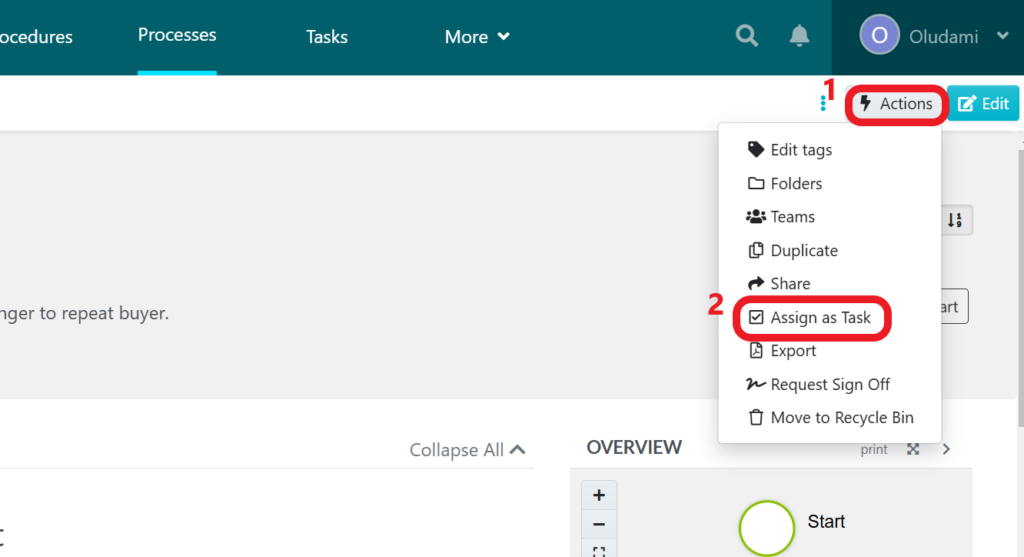
Click on “Assign as Task” from this list, and the same task pop-up as seen earlier will appear, but this time the first step is automatically done—the task to assign is already chosen.
Tameer Inc.: Building an Accessible Knowledge Base for Field and Office Teams
For Tameer Inc., a mechanical construction firm, one of the biggest hurdles was ensuring that important procedural knowledge wasn’t lost between departments or job sites.
With SweetProcess, the company created a comprehensive, easily accessible knowledge base that employees could reference at any time. This reduced confusion and overreliance on the CEO, improved training, and empowered staff to take ownership of their tasks.
You can find the full case study and interview here.
Document, Manage, and Access Construction SOP on Mobile
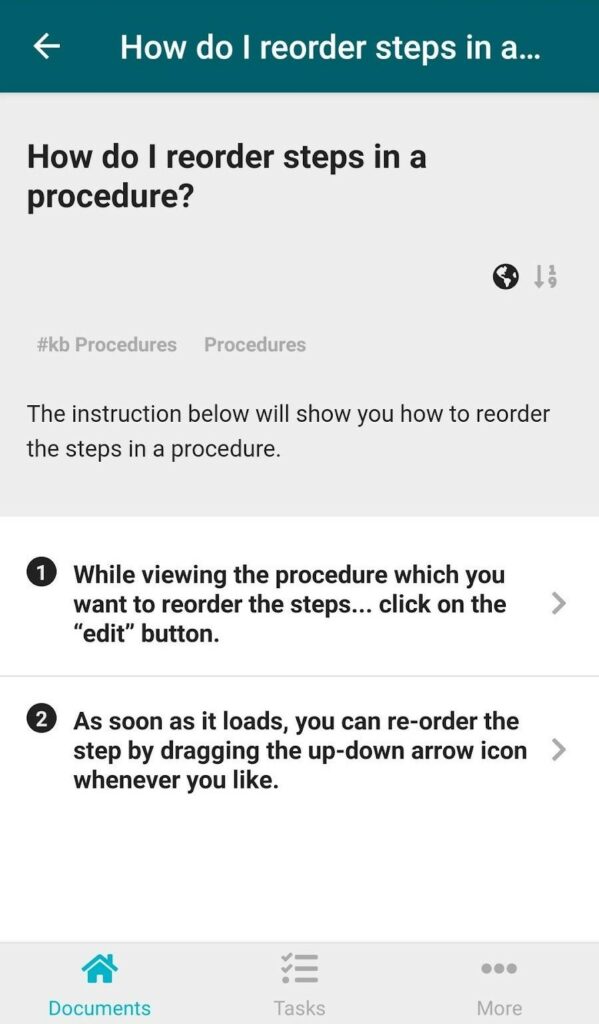
Construction doesn’t happen behind a desk. So it’s impractical for workers to always go consult the computer when they need clarity on steps to take to achieve a particular objective.
SweetProcess understands this, and that is why it has a mobile-friendly and dynamic interface that automatically adjusts to whichever gadget you use it on.
More importantly, though, SweetProcess has a mobile app you can install on your mobile gadgets and have unlimited access to your SOPs on the go, from wherever.
Workers will be able to follow SOPs step by step, confirm completed tasks, add signatures to acknowledge tasks, collaborate with teammates on SOPs, and so on, right on site. This will help to improve accuracy in following SOP steps and achieve set objectives.
Manage Construction Procedures, Processes, and Policies in One Place
One great thing about SweetProcess is that every type of document has its own tab and section. This segmentation makes it easy to find and manage each type of document in one place.
For example, all SOPs will be housed in the “Procedures” section; just click on the “Procedures” tab to find them.
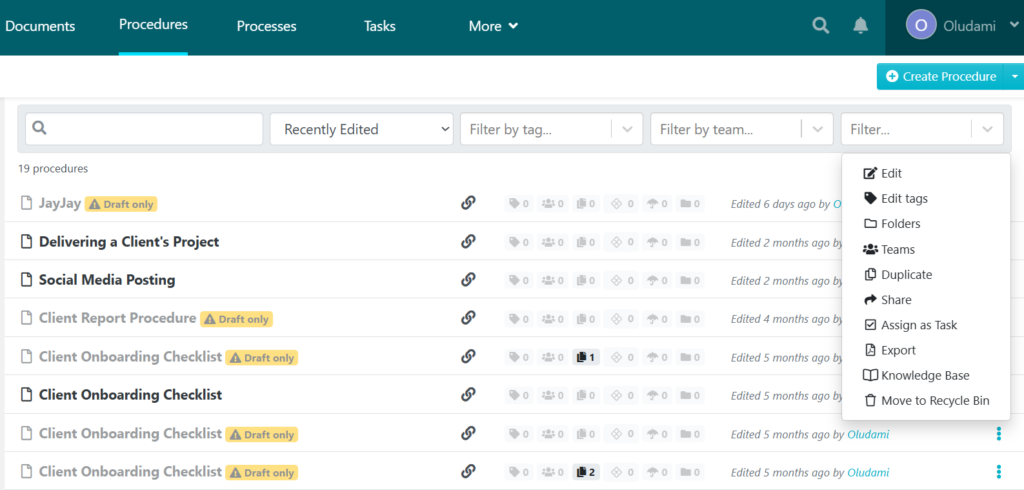
From this page, you can manage your SOPs even without opening them individually. You simply click on the three vertical dots in front of the procedure you want to manage and a suite of management options will pop up.
However, you can also easily manage all types of documents, including your construction SOPs and policies, in one single place—the Documents tab.
When you click on the documents menu from the navigation bar, you’re taken to a page with a list of all your procedures, processes, policies, knowledge bases, etc. You can manage each of these documents even from this page.
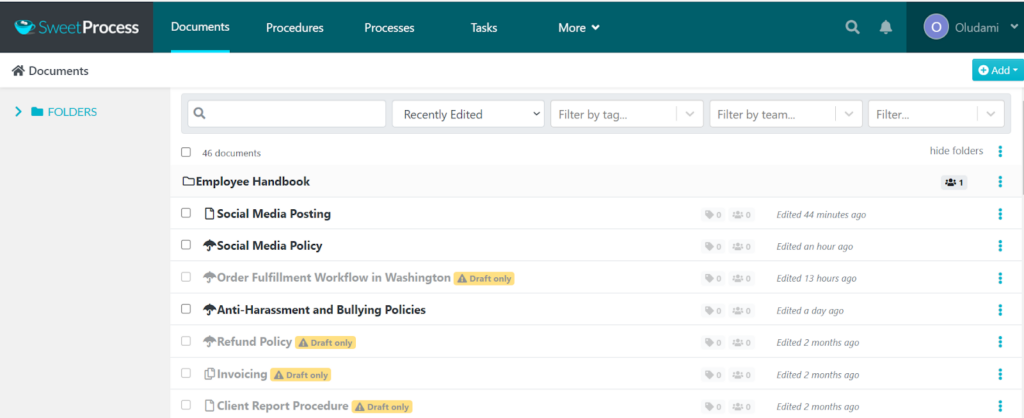
To manage any document from this page, all you have to do is click on the three dots in front of the document, and you’ll get an array of management options.
Manage Your Construction SOPs and Policies in One Place

Having well-documented SOPs is now a necessity in the construction industry – not a luxury. It ensures that everyone knows what to do, how to do it, and when to do it. Construction SOPs help companies to minimize safety risks and maintain high-quality standards, while projects run smoothly from start to finish.
Managing multiple SOPs can, however, quickly become overwhelming when done manually. And that’s where SweetProcess comes in.
With SweetProcess, you can create, document, organize, manage, and distribute your construction company’s SOPs all in one easy-to-use platform. That’s not all; you can assign tasks, collaborate with teams, and keep procedures updated and compliant in real time.
With SweetProcess, you no longer have to deal with scattered documents and inconsistent processes. You’ll enjoy consistency, accountability, and efficiency in running your company operations.
Ready to streamline your construction operations and simplify your workflows? Then click here to start your free trial of SweetProcess todayand begin to build, manage, and implement your construction SOPs with confidence.